

Linux & Edge AI
AI Pyramid
Hardware Control
Applications & Factory Features
LLM-8850 Card
Large Language Models
LLM630 Compute Kit
Module LLM
CoreMP135
CardputerZero ADB Debugging
1. Enable ADB Debugging
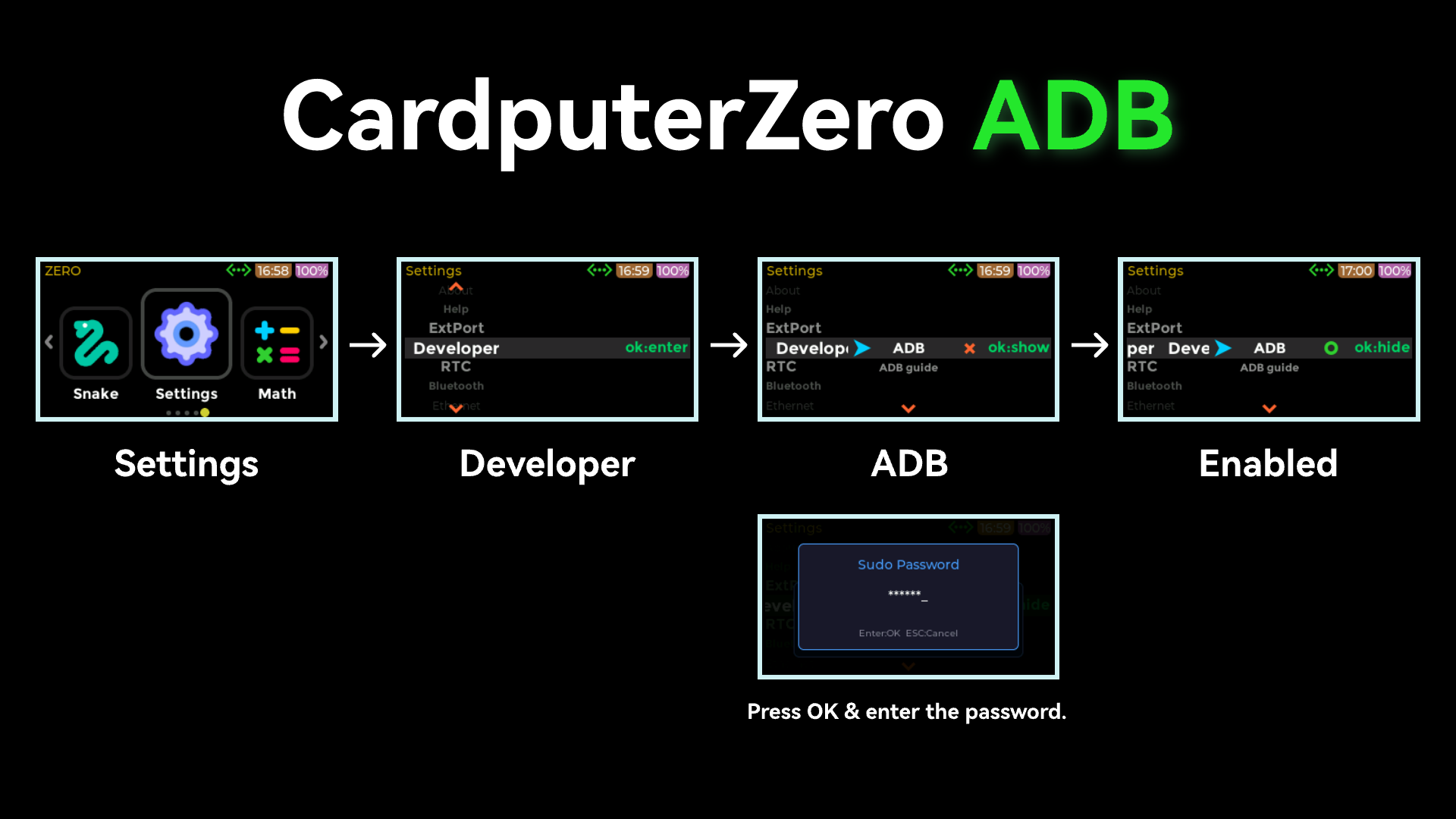
Move the USB-SW switch on the left side of CardputerZero to the left. In APP Launcher, navigate to Settings -> Developer -> ADB, and enable ADB.
2. Install ADB
CardputerZero can be debugged using the ADB debugging tool. This tutorial explains how to use ADB to access the CardputerZero terminal and transfer files. Before proceeding, download ADB Platform-Tools for your operating system.
3. Connect and Debug
Connect the USB Type-C port on the right side of CardputerZero to the PC.
Navigate to the directory containing the ADB tool and use the
pushcommand to transfer files. If "no permissions" is displayed, run the following command.
adb.exe kill-server- Transfer the file.
# adb.exe push local remote
adb.exe push data.json /opt- Access the device terminal.
adb.exe shellsh-5.1# ls /opt/
bin containerd data etc lib lost+foundPage Tools