StickC
SKU:K016-C
Description
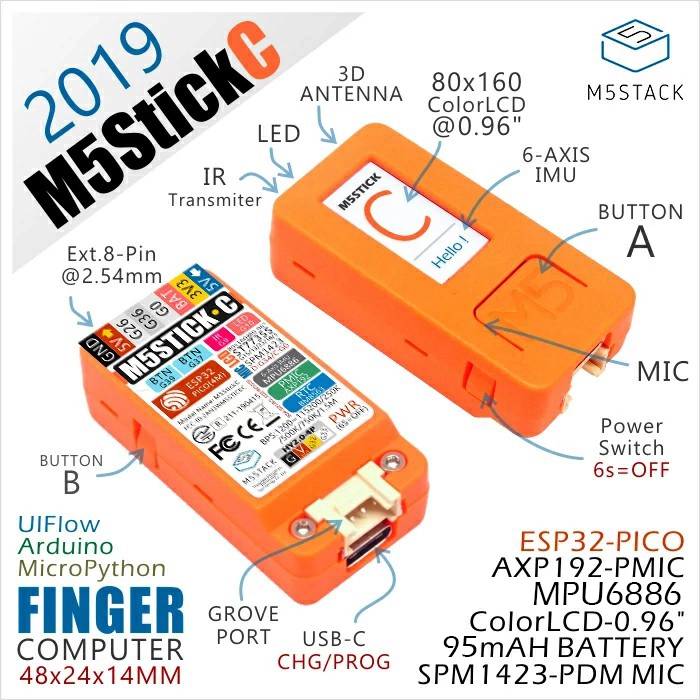
StickC is a compact and delicate development board. As an upgraded version of Stick, it features more expansion interfaces and buttons. It not only offers outstanding performance but also boasts low-power consumption. Whether for programming learning or project development, StickC can provide reliable hardware support.
What can it do? This tiny yet exquisite development tool can fully unleash endless creative potential. StickC helps you quickly build IoT product prototypes and greatly simplifies the entire development process. Even beginners who are new to programming can use it to create interesting applications and apply them to real life.
StickC is one of the core devices in the M5Stack product line, which is built upon a continuously evolving hardware and software ecosystem. It comes with numerous compatible expansion modules, abundant open-source code, and an active forum community, all of which offer users comprehensive and high-quality support throughout the development process.
Tutorial
This tutorial introduces how to control the StickC device through the UIFlow graphical programming platform.
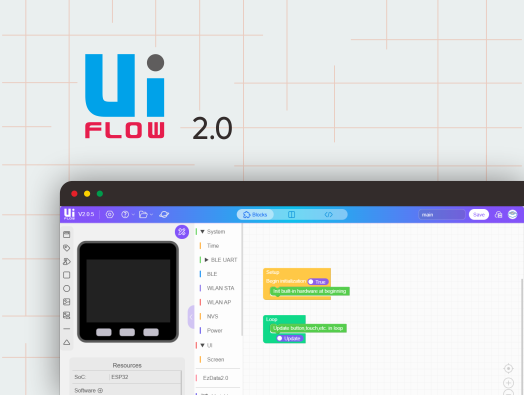
This tutorial introduces how to control the StickC device through the UiFlow2 graphical programming platform.
This tutorial introduces how to program and control the StickC device with the Arduino IDE.
Features
- ESP32-based development
- Built-in 3-axis accelerometer & 3-axis gyroscope
- Built-in Red LED
- Integrated IR transmitter
- Built-in RTC
- Integrated microphone
- User buttons, LCD (0.96"), Power / Reset button
- 95 mAh lithium battery
- Expansion interface
- Wearable & mountable
- Development Platform
- UiFlow1
- UiFlow2
- Arduino IDE
- ESP-IDF
- PlatformIO
Includes
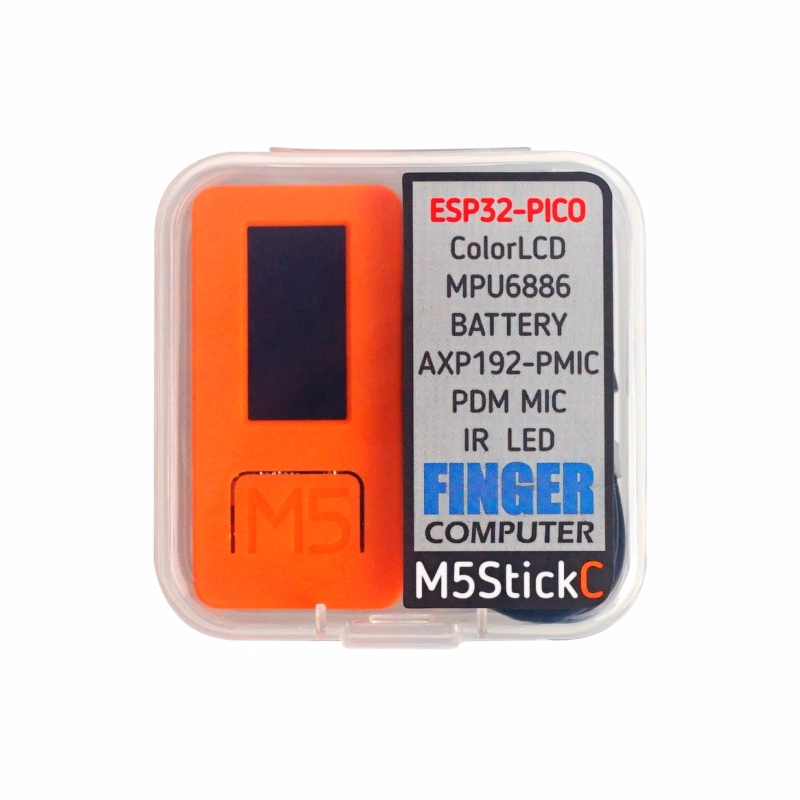
- 1 x StickC
- 1 x USB Type-C Cable (20cm)
Applications
- Wearable devices
- IoT controller
- STEM education
- DIY projects
- Smart-home devices
Specifications
| Main Controller Resources | Parameter |
|---|
| SoC | ESP32-PICO-D4 @ Xtensa® 32-bit LX6 dual-core processor, clock frequency up to 240MHz |
| Flash | 4MB |
| Wi-Fi | 2.4 GHz Wi-Fi |
| DMIPS | 600 |
| SRAM | 520KB |
| Input Voltage | 5V@500mA |
| Interface | USB Type-C x 1, GROVE (I2C+I/O+UART) x 1 |
| LCD Screen | 0.96 inch, 80 x 160 Colorful TFT LCD, ST7735SV |
| Microphone | SPM1423 |
| Button | Custom Button x 2 |
| LED | Red LED x 1 |
| RTC | BM8563 |
| PMU | AXP192 |
| IR | Infrared Transmission |
| MEMS | MPU6886 |
| Antenna | 2.4G 3D Antenna |
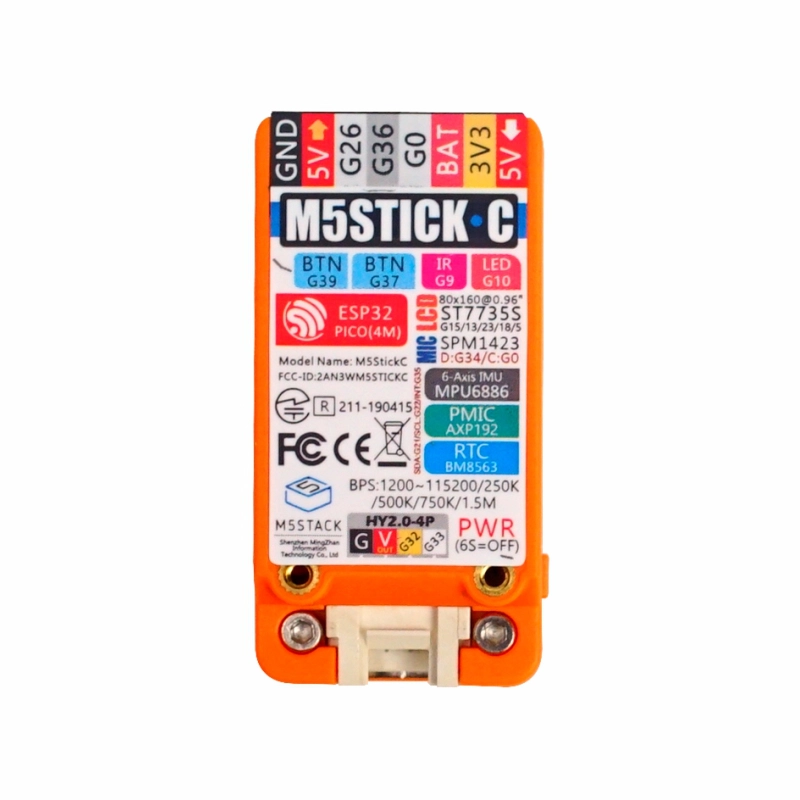
| PIN Interface | G0, G26, G36 |
| Battery | 95mAh@3.7V, inside vb |
| Operating Temperature | 0 ~ 60°C |
| Shell Material | Plastic (PC) |
| Product Size | 48.2 x 25.5 x 13.7mm |
| Product Weight | 15.1g |
| Package Size | 55.0 x 55.0 x 20.0mm |
| Gross Weight | 33.0g |
Learn
Power On/Off
- Power on: Press the reset button for at least 2 s
- Power off: Press the reset button for at least 6 s
Note:
- Supported baud rates: 1200 ~ 115200, 250 K, 500 K, 750 K, 1500 K
- The input range of VBUS_VIN and VBUS_USB is limited to 4.8 – 5.5 V. When VBUS is powered, the built-in battery is charged through the AXP192 PMU.
Schematics
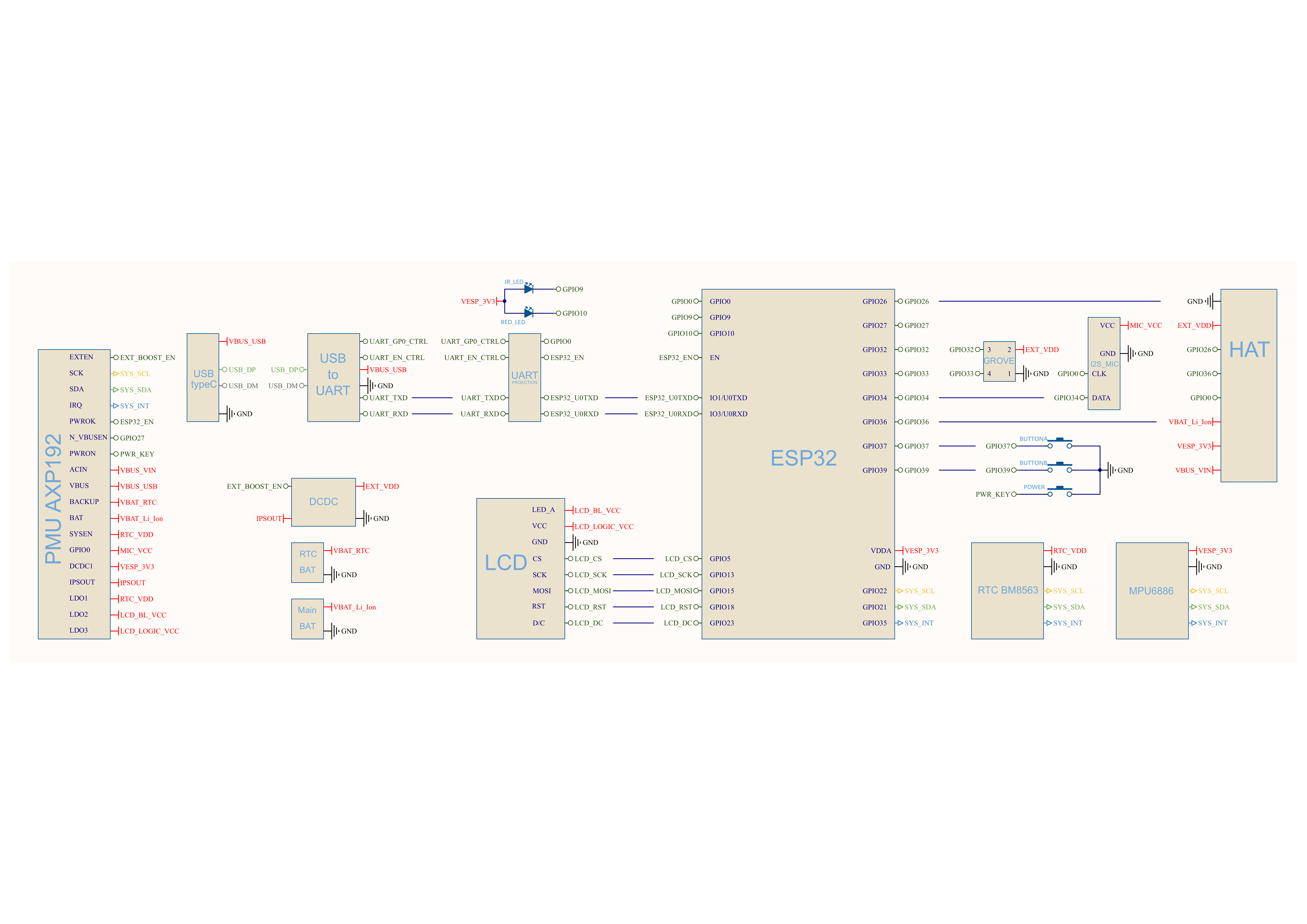
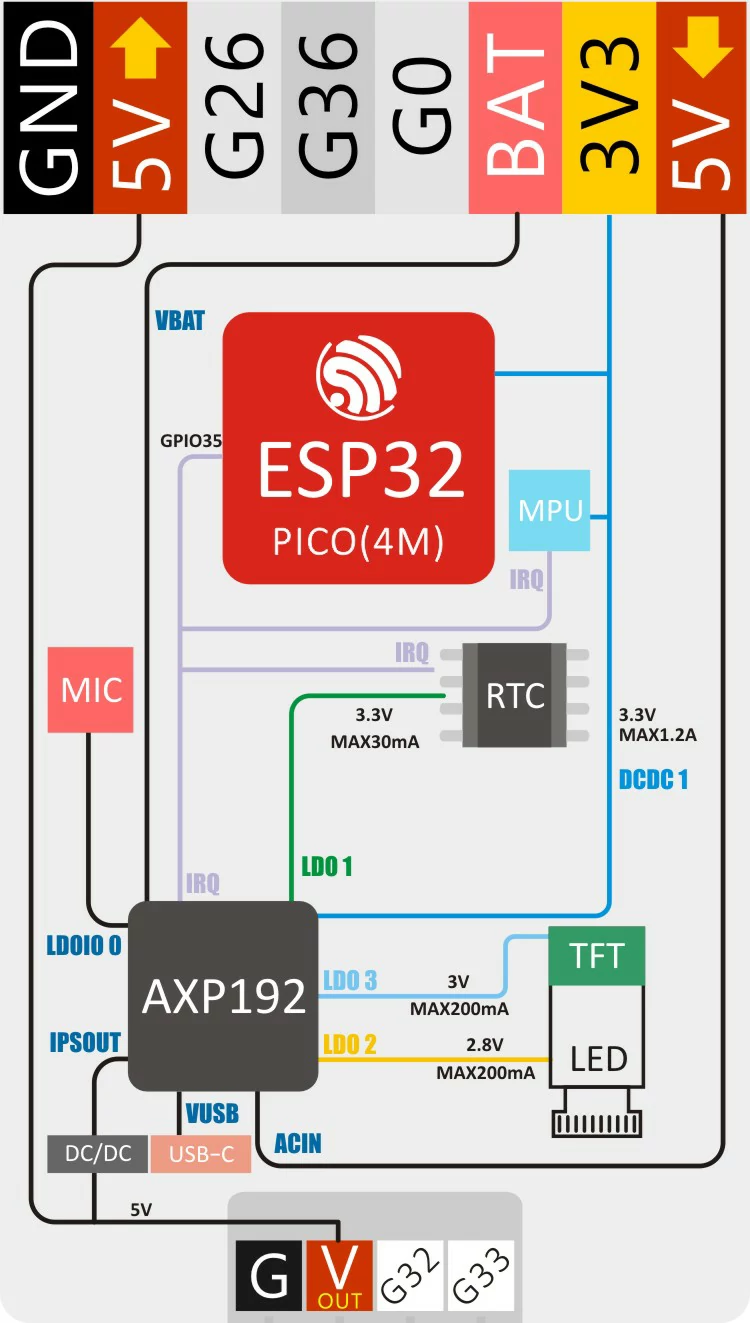
Power Architecture Block Diagram
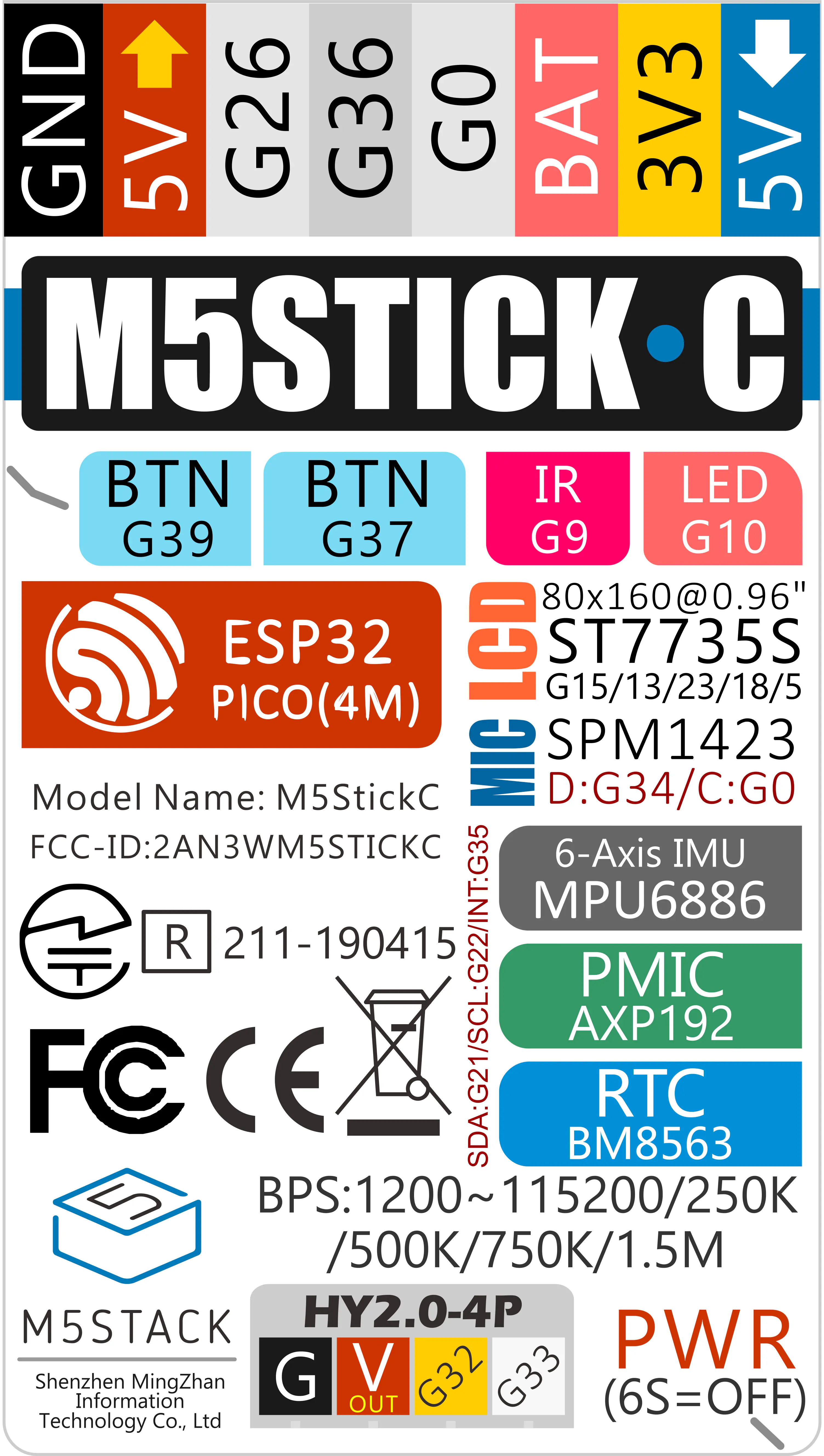
PinMap
| ESP32-PICO-D4 | G10 | G9 | G37 | G39 |
|---|
| Red LED | LED Pin | | | |
| IR Transmitter | | IR Pin | | |
| Button A | | | Button | |
| Button B | | | | Button |
Color TFT Screen
Driver IC: ST7735S
Resolution: 80 x 160
| ESP32-PICO-D4 | G15 | G13 | G23 | G18 | G5 |
|---|
| TFT Screen | TFT_MOSI | TFT_CLK | TFT_DC | TFT_RST | TFT_CS |
Microphone (SPM1423)
| ESP32-PICO-D4 | G0 | G34 |
|---|
| Microphone | CLK | DATA |
6-axis IMU (SH200Q/MPU6886) & AXP192 & RTC (BM8563)
| ESP32-PICO-D4 | G21 | G22 | G35 |
|---|
| AXP192 | SDA | SCL | IRQ |
| MPU6886 | SDA | SCL | IRQ |
| BM8563 | SDA | SCL | IRQ |
PMU (AXP192)
| Microphone | RTC | TFT backlight | TFT IC | ESP32/3.3 V MPU6886/SH200Q | 5 V GROVE |
|---|
| LDOio0 | LDO1 | LDO2 | LDO3 | DC-DC1 | IPSOUT |
HY2.0-4P
| HY2.0-4P | Black | Red | Yellow | White |
|---|
| PORT.CUSTOM | GND | 5V | G32 | G33 |
Charging Current Measurements
| Charging Current | Current after Full (OFF) | Full Charge (ON) |
|---|
| 0.488 A | 0.066 A | 0.181 A |
Structure
Datasheets
Softwares
Arduino
UiFlow1
UiFlow2
USB Driver
Baud Rate Limitation
When downloading firmware, it is recommended to use the following UART baud rates. Using other speeds may cause download failure: 1500000 bps / 750000 bps / 500000 bps / 250000 bps / 115200 bps
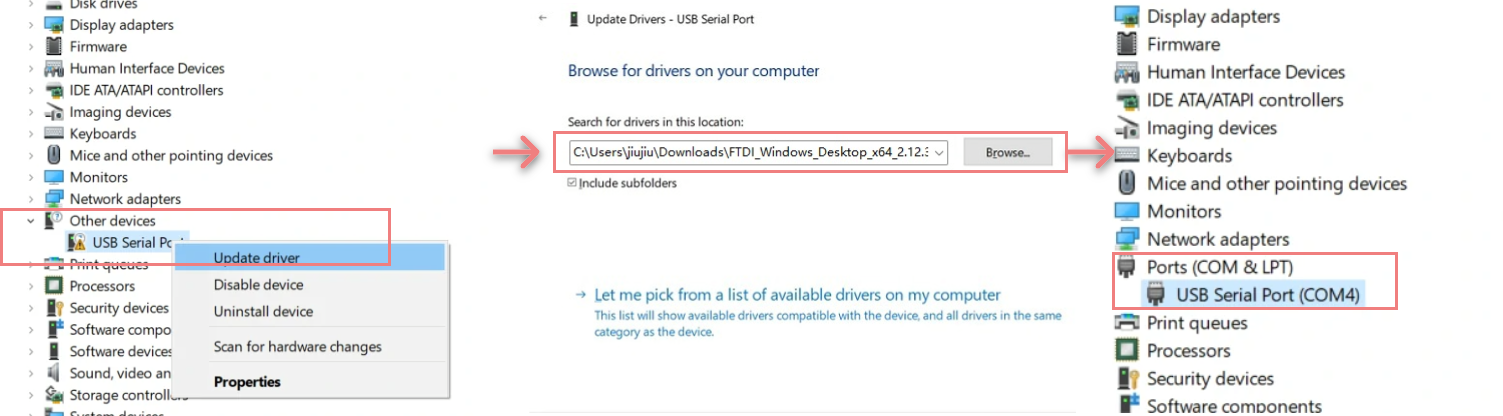
- Select and download the driver file matching your operating system from the list below, then extract it. You can also visit the FTDI Chip official website to get additional FTDI driver versions.
- Connect the device to your PC, open Device Manager, and install the FTDI driver (the screenshot below uses Windows 10 as an example). (Note: On some systems, you may need to install the driver twice for it to take effect. The unrecognized device is usually named
M5Stack or USB Serial.)
Easyloader
| Easyloader | Download | Note |
|---|
| StickC Firmware Easyloader | download | / |
Video
Product Comparison
To compare information on the Stick series products, you can visit the Product Selection Table, check the target products, and get the comparison results. The selection table covers key information such as core parameters and functional features, and supports comparison of multiple products simultaneously.
Version Change
| Release Date | Product Changes |
|---|
| 2020.3 | Battery capacity changed from 80mAh to 95mAh |
| 2019.10 | Upgraded bottom case and added copper nuts |
| 2019.8 | SH200Q changed to MPU6886 |
| 2019.3 | First release |