

製品ガイド
AI・音声
AI 音声アシスタント
Volcengine
カメラ・ビジョン
カメラ機能
M5Camera
PoECAM
Unit CamS3 / CamS3-5MP
通信・IoT
産業制御・計測
Air Quality
PowerHub
StamPLC
VAMeter
T-Lite
Module13.2 PPS
Unit RollerCAN
表示・インタラクション
Paper
PaperColor
StopWatch
Tab5 Keyboard
Chain DualKey
ロボット・メイカー
Atom Printer
Bala
Bala2
BalaC Plus
Faces Kit Gameboy
RoverC & JoyC
StampFly & Atom Joystick
ファームウェア・デバイス保守
vlw Font Creator
vlw Font Creator は、オンラインで vlw フォントを生成するツールです。ピクセルサイズと収録文字の範囲をカスタマイズした vlw フォントファイルを生成でき、開発者が表示フォントのスタイルを拡張したり、フォントのメモリ使用量を削減したりするのに役立ちます。
1. vlw フォントの作成
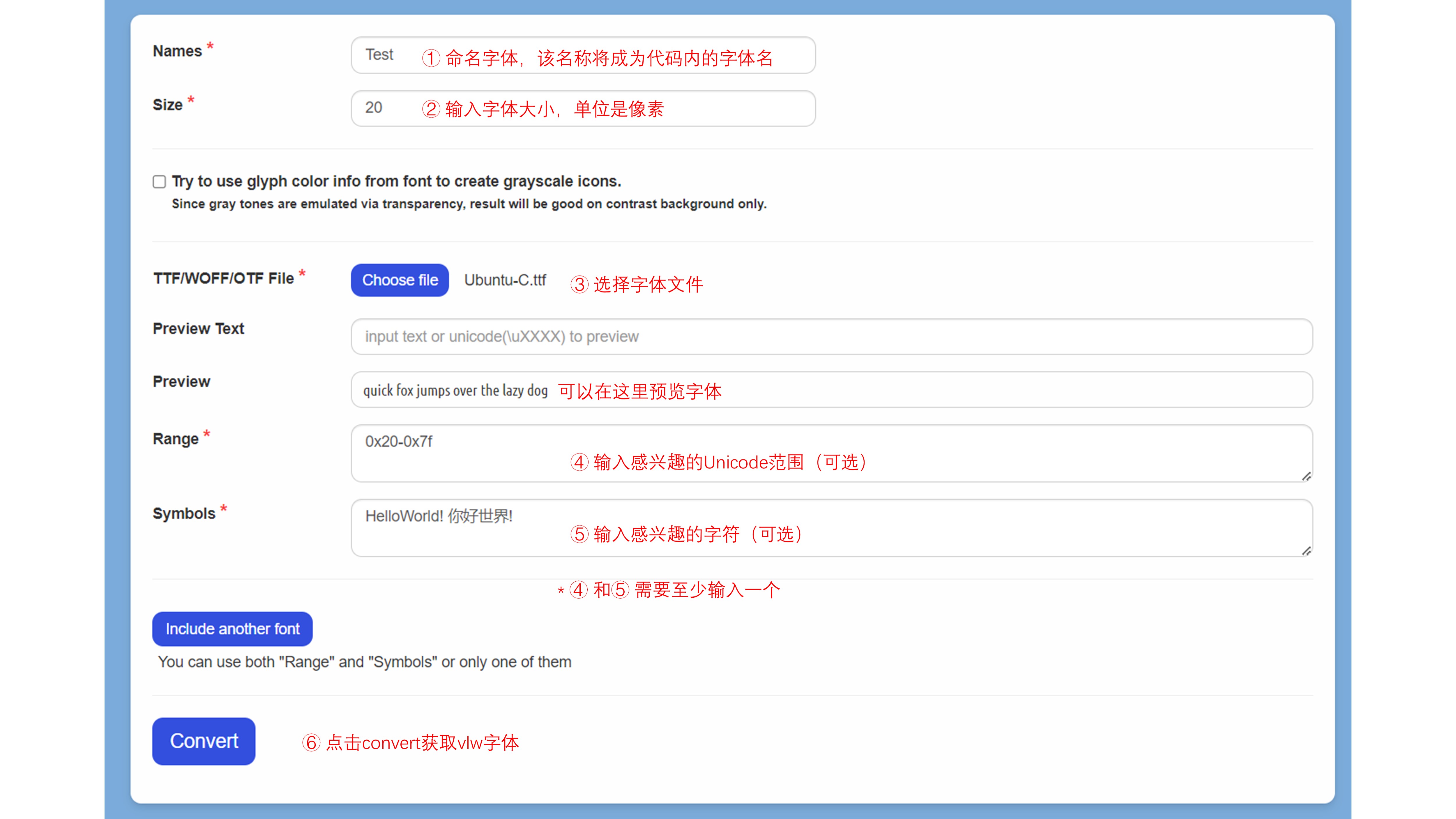
https://vlw-font-creator.m5stack.com/ にアクセスし、以下の図の手順に従って vlw フォントを作成してください。
2. vlw フォントの使用
以下のサンプルプログラムを参考に、vlw フォントファイルをプロジェクトに組み込んでください。
チップ内蔵メモリに vlw フォントファイルを保存する場合
microSD に vlw フォントファイルを保存する場合
cpp
1 2 3 4 5 6 7 8 9 10 11 12 13 14 15 16 17 18 19 20 21 22 23 24 25 26 27 28 29 30 31 32 33 34 35 36 37 38 39 40 41 42 43 44 45 46
#include <Arduino.h>
#include <SPI.h>
#include <SD.h>
#include <M5Unified.h>
#include <M5GFX.h>

#define SD_SPI_CS_PIN   4
#define SD_SPI_SCK_PIN  18
#define SD_SPI_MISO_PIN 19
#define SD_SPI_MOSI_PIN 23

void setup() {
  M5.begin();

  M5.Display.setTextFont(&fonts::Orbitron_Light_24);
  M5.Display.setTextSize(1);

  // SD Card Initialization
  SPI.begin(SD_SPI_SCK_PIN, SD_SPI_MISO_PIN, SD_SPI_MOSI_PIN, SD_SPI_CS_PIN);
  if (!SD.begin(SD_SPI_CS_PIN, SPI, 25000000)) {
    // Print a message if SD card initialization failed or if the SD card does not exist.
    M5.Display.print("\n SD card not detected\n");
    while (1)
      ;
  } else {
    M5.Display.print("\n SD card detected\n");
  }
  delay(1000);
  delay(1000);

  M5.Display.print("\n SD card read test...\n");
  if (SD.open("/Test.vlw", FILE_READ, false)) {
    M5.Display.print(" vlw detected\n");
  } else {
    M5.Display.print(" vlw not detected\n");
  }

  if (M5.Display.loadFont(SD, "/Test.vlw")) {
    M5.Display.print("\n↑↓←→☺\n");// Display some characters to test the font
  } else {
    M5.Display.print(" vlw not loaded\n");
  }
}

void loop() {
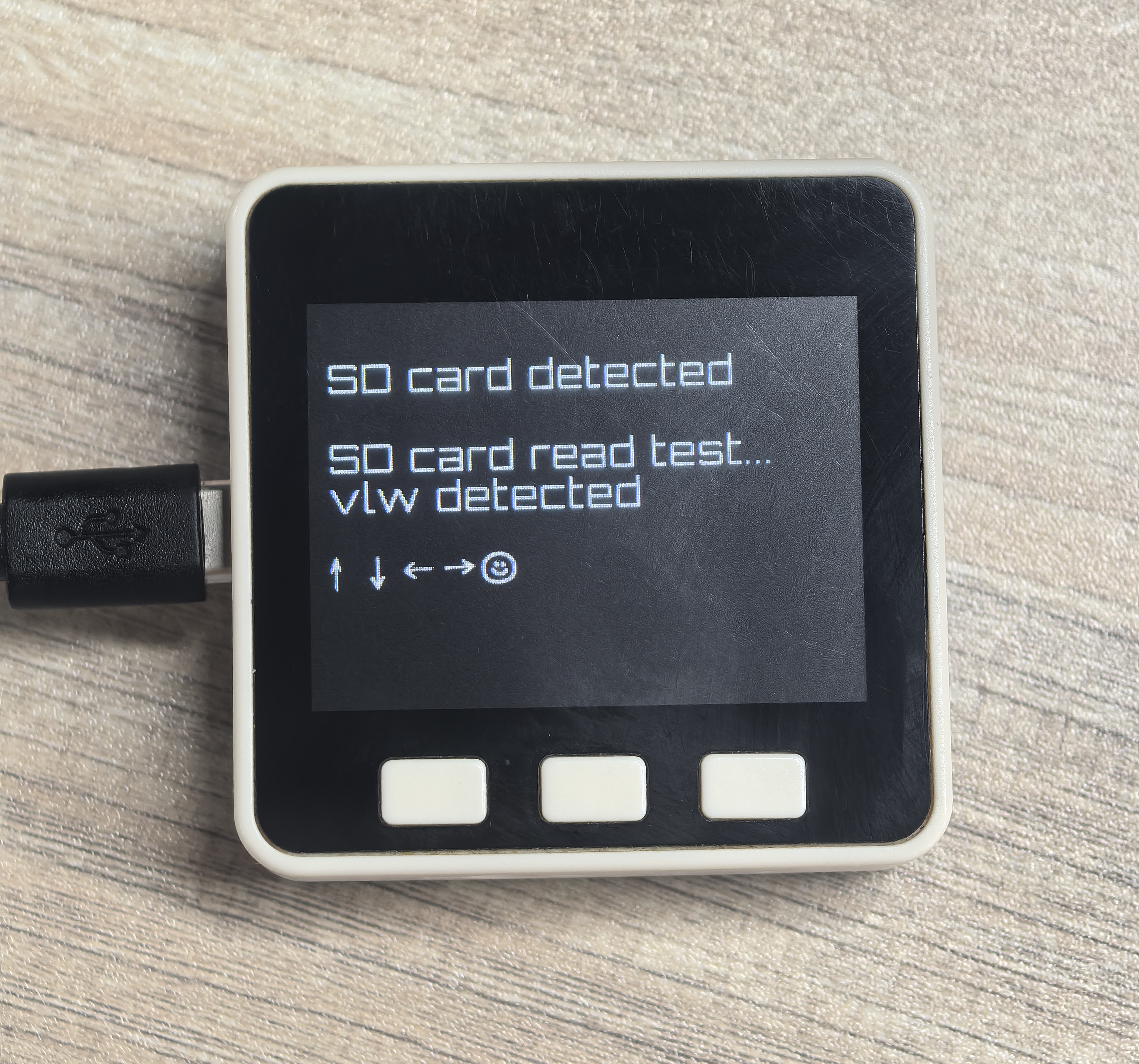
}実行結果は以下の通りです:
Page Tools