StackFlow AI Platform
设备开发 & 快速上手
模型介绍
Qwen3
DeepSeek-R1
AI Pyramid 应用案例
Module LLM 应用案例
CV 视觉应用
VLM 多模态
LLM 大语言模型
语音助手
AI Pyramid EC Proxy 硬件控制
1. 简介
AI Pyramid 默认镜像中内置 EC Proxy 嵌入式控制器通信系统,用于实现主系统与嵌入式控制器(EC)之间的通信与管理。EC Proxy 为底层硬件提供统一的抽象层,封装具体硬件实现细节,对上层系统暴露标准化控制接口。AI Pyramid 上的 RGB 灯、散热风扇、电源管理、按键等外设功能 可通过 EC Proxy 进行控制。 AI Pyramid 开机后将自动启用 EC Proxy 服务,用户可通过 ec_cli 命令行工具对硬件资源进行操作,无需直接与底层硬件交互。
┌─────────────────┐     Modbus RTU      ┌──────────────────┐      ZMQ RPC/PUB     ┌─────────────┐
│   Hardware EC   │ ◄─────────────────► │   EC Proxy       │ ◄──────────────────► │   Client    │
│   (STM32/MCU)   │   /dev/ttyS3        │   Server         │   IPC/TCP Sockets    │   (CLI/App) │
└─────────────────┘ 115200-921600bps └──────────────────┘ └─────────────┘2. 硬件控制
输入 ec_cli device 可查看,硬件控制相关的指令。
root@m5stack-AI-Pyramid:~# ec_cli device
usage: ec_cli [options] ...
options:
  -r, --rgb                             Get or set RGB LED display mode
      --poweron_time                    Get or set the scheduled power-on time
      --poweroff_time                   Get or set the scheduled power-off time
      --rgb_size                        Get or set the number of RGB LEDs in the array
      --rgb_get_color                   Get the color value of a specific RGB LED
      --rgb_set_color                   Set color for a specific RGB LED, example: cli --rgb_set_color -d '{"rgb_index":0,"rgb_color":255}'
  -f, --fan                             Get or set the fan PWM duty cycle
  -F, --fanspeed                        Get the current fan rotation speed in RPM
      --pd_power_info                   Get the USB PD power delivery information
  -B, --board                           Get the board power consumption information
      --ip_eth0                         Get or set the IP address for Ethernet interface eth0
      --ip_eth1                         Get or set the IP address for Ethernet interface eth1
      --ip_wlan                         Get or set the IP address for wireless LAN interface
  -l, --lcd                             Get or set the LCD display mode
      --lcd_ram                         Set the LCD RAM buffer data directly
  -c, --vddcpu                          Get or set the CPU core voltage (VDD)
      --modbus_speed                    Get or set the Modbus communication baud rate
  -p, --ext_power                       Control the external power supply output
  -b, --board_power                     Control the main board power switch
      --pcie0                           Set the PCIe slot 0 switch on/off state
      --pcie1                           Set the PCIe slot 1 switch on/off state
      --gl3510_reset                    Reset the GL3510 USB hub controller
      --usbds1_big                      Set the high-power mode for USB downstream port 1
      --usbds2_big                      Set the high-power mode for USB downstream port 2
      --usbds1                          Set the switch on/off state for USB downstream port 1
      --usbds2                          Set the switch on/off state for USB downstream port 2
      --usbds3                          Set the switch on/off state for USB downstream port 3
      --hdmi_loop_en                    Switch HDMI OUT port input source between IN and AX8850
      --grove_uart                      Set the switch on/off state for Grove UART interface
      --grove_iic                       Set the switch on/off state for Grove I2C interface
      --flash_switch                    Save switch configuration to flash memory (stores coil registers 4-14)
      --flash_value                     Save value configuration to flash memory (stores holding registers 1, 2, 11, 12, 14, 16-21)
      --poweroff                        Trigger the system power-off sequence
      --lcd_brightness                  Get or set the LCD backlight brightness level
  -P, --lcd_putc                        Output a character or string to the LCD display
      --i2c_set_reg                     Write a value to an I2C device register
      --i2c_get_reg                     Read a value from an I2C device register
      --ec_button_head_event            Get or set the event handler for EC head button press
      --soc_button_head_event           Get or set the event handler for SoC head button press
      --ec_button_lcd_event             Get or set the event handler for EC LCD button press
      --fun_auto                        Get or set the automatic control mode for the proxy service
      --ec_modbus_set_bit               Set a specific bit in the EC Modbus coil register
      --ec_modbus_get_bit               Get a specific bit value from the EC Modbus coil register
      --ec_modbus_input_bits            Read the EC Modbus discrete input bits status
      --ec_modbus_input_registers       Read the EC Modbus input registers values
      --ec_modbus_set_hold_registers    Write values to the EC Modbus holding registers
      --ec_modbus_get_hold_registers    Read values from the EC Modbus holding registers
      --pcie0_exists                    Check if a PCIe device is present in slot 0
      --pcie1_exists                    Check if a PCIe device is present in slot 1
      --V3_3_good                       Check if the 3.3V power rail is within normal operating range
      --V1_8_good                       Check if the 1.8V power rail is within normal operating range
      --head_button                     Get the current state of the head button (pressed/released)
      --lcd_button                      Get the current state of the LCD button (pressed/released)
      --version                         Get the EC firmware version information
  -d, --data                            call param (string [=])
  -D, --DataRaw                         call param raw (string [=])
-?, --help print this messageRGB LED 控制
配置 RGB LED 工作模式
ec_cli device --rgb -d 4| RGB LED Mode | 描述 |
|---|---|
| 0 | 通过 rgb_set_color 指令控制 |
| 1 | 彩色渐变 |
| 2 | 呼吸灯效 |
| 3 | 流水灯效 |
| 4 | 分散灯效 |
| 5 | 聚合灯效 |
通过 rgb_set_color 指令配置单个 RGB LED 颜色,该指令仅在模式 0 有效,注意:当前接口不支持范围设置灯光颜色。传入的 rgb_color 为十进制的 RGB888 编码。(eg: 0x00FF00 == 65280)
ec_cli device --rgb_set_color -d '{"rgb_index":0,"rgb_color": 65280}'风扇控制
配置风扇 PWM 占空比为 80%
ec_cli device --fan -d 80{
"created": 1769747093,
"data": "ok",
"object": "",
"request_id": "",
"work_id": "fun_set_pwm"
}读取风扇转速 RPM
ec_cli device --fanspeed{
"created": 1769753372,
"data": 9060,
"object": "",
"request_id": "",
"work_id": "get_input_registers"
}网络信息
ec_cli device --ip_eth0
ec_cli device --ip_eth1
ec_cli device --ip_wlanPD 电源信息
ec_cli device --pd_power_info{
"created": 1769753175,
"data": { "voltage": "20 V", "current": "1.25 A" },
"object": "",
"request_id": "",
"work_id": "pd_info"
}电源管理
查看当前设备功耗信息
ec_cli device --board{
"created": 1769756427,
"data": {
"pcie0_mv": 3352,
"pcie0_ma": 0,
"pcie1_mv": 3328,
"pcie1_ma": 0,
"usb1_mv": 5040,
"usb1_ma": 0,
"usb2_mv": 5040,
"usb2_ma": 0,
"INVDD_mv": 20112,
"INVDD_ma": 292,
"EXTVDD_mv": 20112,
"EXTVDD_ma": 28
},
"object": "",
"request_id": "",
"work_id": "board_get_power_info"
}USB 接口供电
打开 USB 接口输出供电,设备内部的 USB 3.0 #4 接口为常开状态。
ec_cli device --usbds1 -d 1
ec_cli device --usbds2 -d 1
ec_cli device --usbds3 -d 1关闭 USB 接口输出供电
ec_cli device --usbds1 -d 0
ec_cli device --usbds2 -d 0
ec_cli device --usbds3 -d 0设置 USB 接口供电增强。接口默认输出能力可达 400mA,启用增强后可达 800mA。当前仅 USB #1 / #2 接口支持供电增强。
ec_cli device --usbds1_big -d 1
ec_cli device --usbds2_big -d 1OLED
配置 OLED 显示模式
ec_cli device --lcd -d 4| RGB LED Mode | 描述 |
|---|---|
| 0 | M5Stack 字符 |
| 1 | 接口电压显示,每 3s 刷新数据 |
| 2 | IP 显示,每 3s 刷新数据 |
| 3 | ARM 映射 |
| 4 | 字符显示模式,通过 lcd_putc 指令控制 |
通过 lcd_putc 指令打印字符到 OLED 屏上,该指令仅在模式 4 有效。
ec_cli device --lcd_putc -d "Hello World!"可通过写入空白字符进行清屏
ec_cli device --lcd_putc -d " "3. 状态监控
输入 ec_cli echo 可查看,硬件控制相关的指令。当前版本仅支持读取顶部按键状态。
root@m5stack-AI-Pyramid:~# ec_cli echo
usage: ec_cli [options] ...
options:
  -b, --button    button event
-?, --help print this messageec_cli echo --button按下顶部按键
{ "created":1769747540,"data":{"code":0,"vale":204},"object":"","request_id":"","work_id":"buttons_thread" }
{ "created":1769747540,"data":{"code":1,"vale":204},"object":"","request_id":"","work_id":"buttons_thread" }
{ "created":1769747540,"data":{"code":0,"vale":204},"object":"","request_id":"","work_id":"buttons_thread" }
{ "created":1769747540,"data":{"code":1,"vale":204},"object":"","request_id":"","work_id":"buttons_thread" }4. Core-Config
除了使用命令行,也可以使用 Core-Config 打开 GUI 界面进行配置。
core-config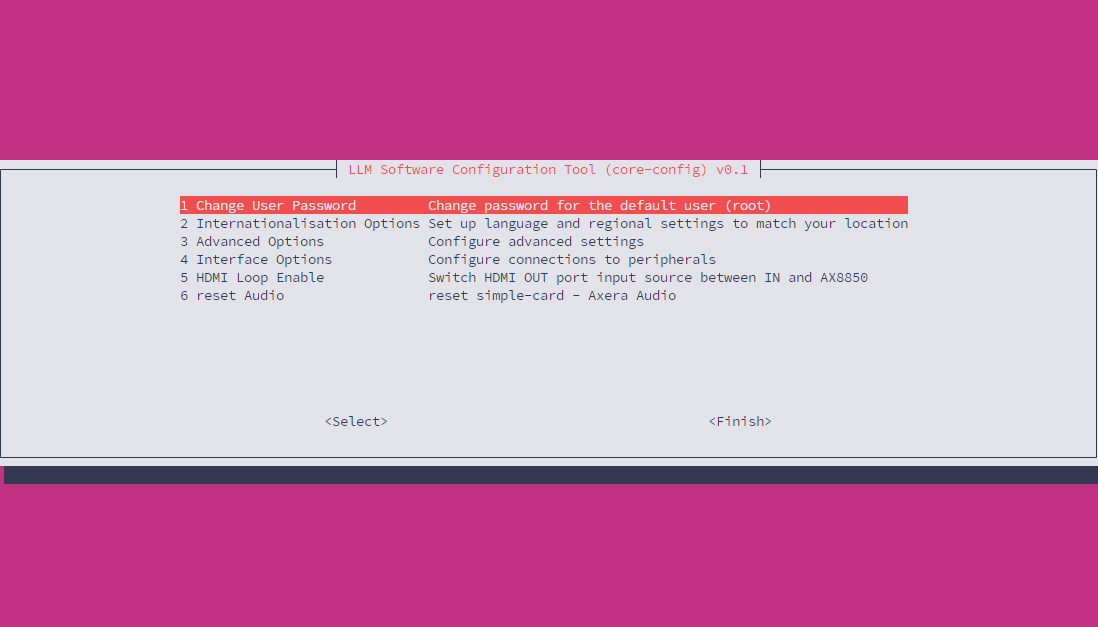
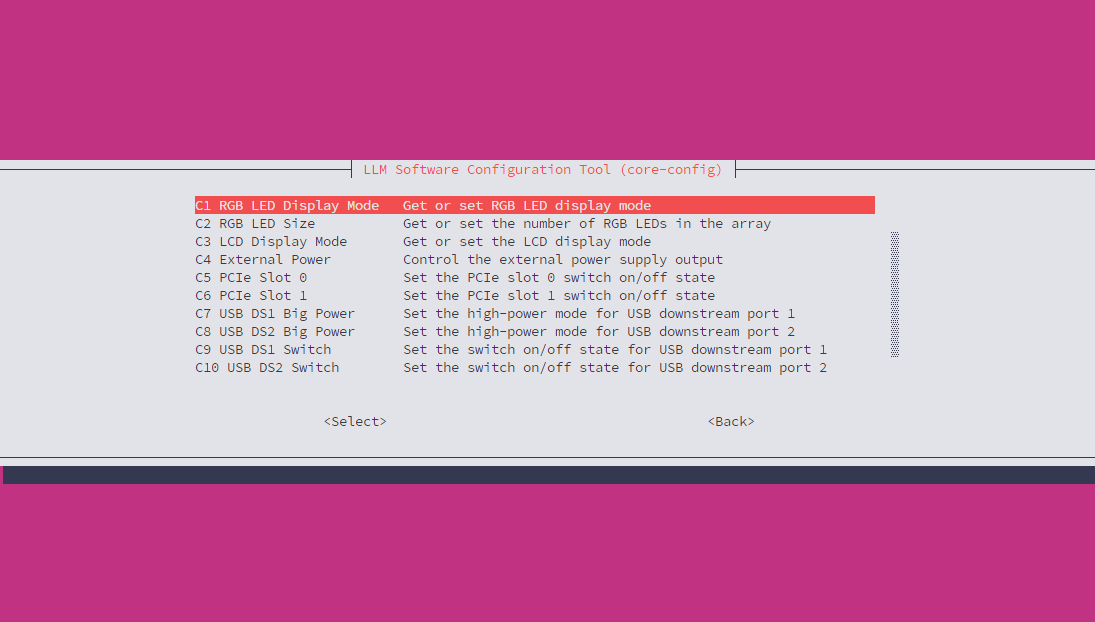
Interface Option 中包含了一些常用的硬件控制选项,如 USB 接口供电,风扇转速等。配置内容与 ec_cli 命令行工具功能一致。
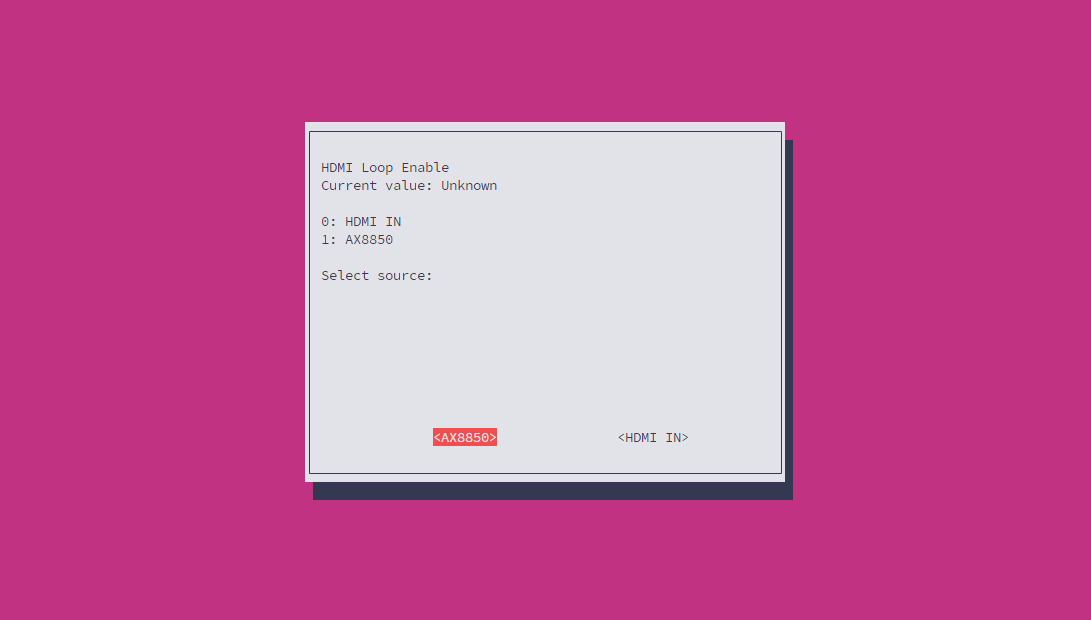
配置显示输出
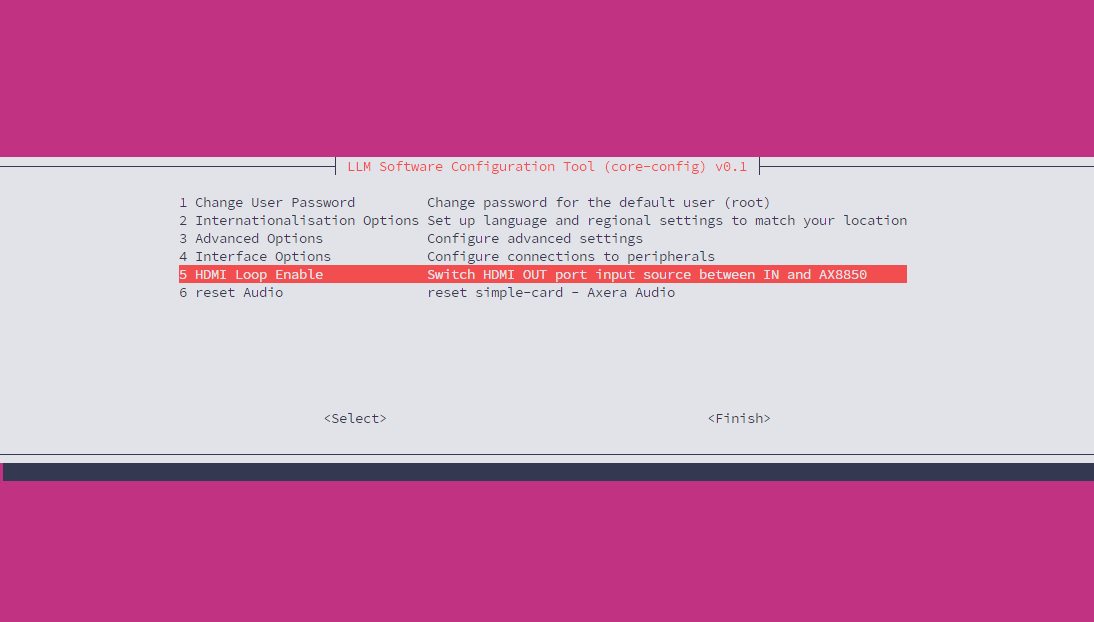
该配置适用于 AI Pyramid-Pro,可配置 Display 输出接口的信号源来自 Display Input 接口,或是直接使用 AX8850 内部默认输出
Reset Audio