

Home Assistant
Home Assistant
主控与整机
摄像头
扩展模块
灯光控制
Dial ESPHome 集成
Dial v1.1 的 ESPHome 集成包含显示、触摸、旋钮、NFC、蜂鸣器和 RTC 组件。

1. 设备简介
| 项目 | 信息 |
|---|---|
| 产品名称 | Dial v1.1 |
| SKU | K130-V11 |
| 主要功能 | 圆形显示、触摸、旋钮、NFC、蜂鸣器和 RTC |
| 通信接口 | I2C、SPI、GPIO |
| ESPHome 组件 | mipi_spi、ft5x06、rotary_encoder、binary_sensor.gpio、rc522、rtttl、pcf8563、monochromatic |
| ESPHome 版本要求 | / |
2. 组件说明
显示屏与触摸屏
圆形 GC9A01A 显示屏使用 MIPI SPI Display Platform,触摸输入使用 FT5x06 Touchscreen Platform。显示示例只输出固定文字:
i2c:
  - id: internal_i2c
    sda: GPIO11
    scl: GPIO12
    frequency: 400kHz

spi:
  id: spi_bus
  mosi_pin: GPIO5
  clk_pin: GPIO6

font:
  - file: "gfonts://Roboto"
    id: my_font
    size: 32

display:
  - platform: mipi_spi
    id: round_display
    model: GC9A01A
    cs_pin: GPIO7
    reset_pin: GPIO8
    dc_pin: GPIO4
    invert_colors: true
    data_rate: 40MHz
    update_interval: 1s
    auto_clear_enabled: true
    lambda: |-
      it.print(120, 120, id(my_font), TextAlign::CENTER, "Hello");

touchscreen:
  - platform: ft5x06
    id: touch
    i2c_id: internal_i2c
address: 0x38背光
显示背光使用 Monochromatic Light Platform,通过 GPIO9 控制:
output:
  - platform: ledc
    pin: GPIO9
    id: backlight_output
    frequency: 1000Hz

light:
  - platform: monochromatic
    name: "Backlight"
    output: backlight_output
    id: display_backlight
default_transition_length: 0s旋钮编码器与按键
旋钮使用 Rotary Encoder Sensor Platform,屏下按键使用 GPIO Binary Sensor Platform:
sensor:
  - platform: rotary_encoder
    id: encoder
    name: "Rotary Encoder"
    pin_a:
      number: GPIO40
      mode: INPUT_PULLUP
    pin_b:
      number: GPIO41
      mode: INPUT_PULLUP
    resolution: 4
    min_value: -32768
    max_value: 32767
    publish_initial_value: true

binary_sensor:
  - platform: gpio
    name: Button
    id: front_button
    pin:
      number: GPIO42
      inverted: true
      mode:
        input: true
pullup: trueNFC 读卡器
内置 WS1850S 使用 RC522 I2C 组件检测 NFC/RFID 标签;基础事件只打印标签 UID:
rc522_i2c:
  - id: nfc_reader
    i2c_id: internal_i2c
    address: 0x28
    update_interval: 500ms
    on_tag:
      - lambda: |-
ESP_LOGD("rfid", "Card detected: %s", x.c_str());蜂鸣器
板载蜂鸣器使用 RTTTL 组件,通过 GPIO3 输出声音。示例按钮只播放一次短提示音:
output:
  - platform: ledc
    pin: GPIO3
    id: buzzer
    frequency: 4000Hz

rtttl:
  output: buzzer
  id: rtttl_player
  gain: 0.6

button:
  - platform: template
    name: "The buzzer beeps once"
    id: buzzer_button
    icon: mdi:bell-ring
    on_press:
      - rtttl.play:
          id: rtttl_player
rtttl: "beep:d=4,o=5,b=180:16e,16e"RTC
板载 RTC 使用 PCF8563 Time Platform。设备启动时读取 RTC,避免显示时间在初始化阶段为空:
time:
  - platform: pcf8563
    id: rtctime
    i2c_id: internal_i2c
    address: 0x51
update_interval: never3. 参考案例
完整示例请参考 dial-example.yaml。该案例包含主控、网络、API、显示、触摸、旋钮、NFC、蜂鸣器、RTC 和背光配置。
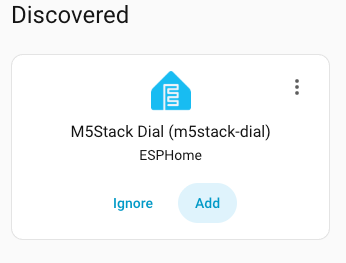
添加设备时的 Home Assistant 界面:
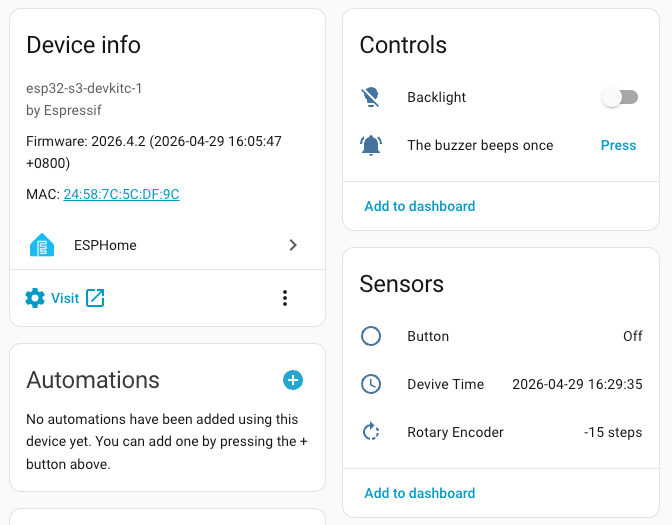
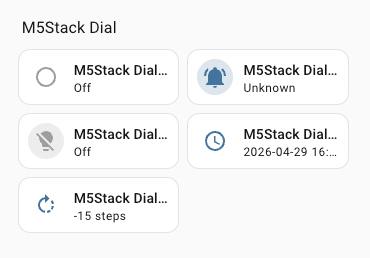
设备添加完成后,可查看旋钮、按键、NFC、蜂鸣器、背光和 RTC 等实体,并将其添加到 Dashboard:
4. 相关链接
Page Tools