

Home Assistant
Home Assistant
Controller & Devices
Cameras
Components
Lighting
Interfaces and Expansion
Applications
Media Playback
Dashboard
Unit Encoder ESPHome Component
The Unit Encoder provides encoder values, button status, and RGB LED control over the I2C bus.
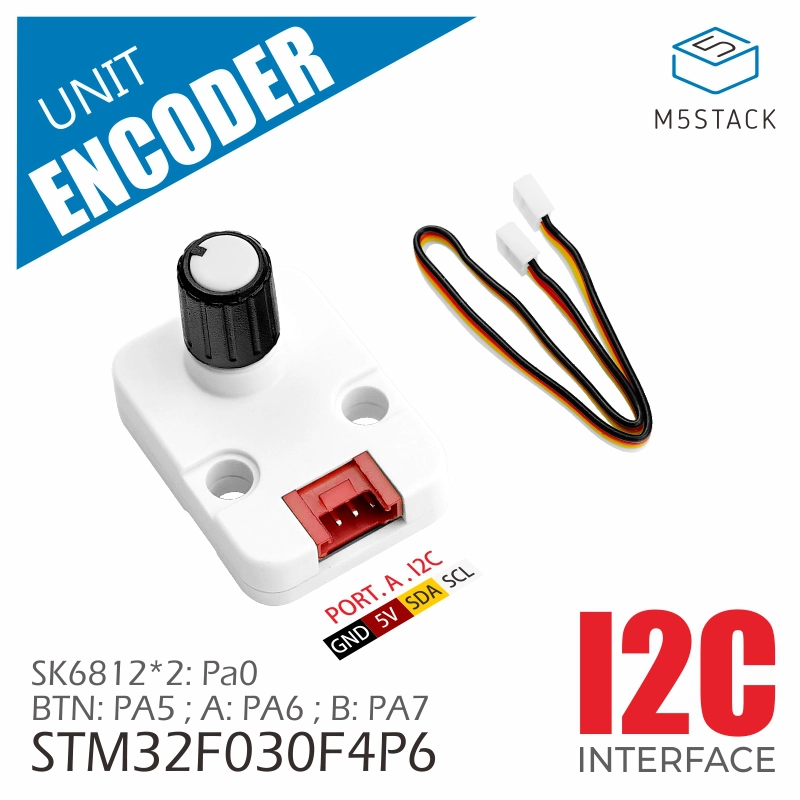
1. Component Overview
| Item | Information |
|---|---|
| Product name | Unit Encoder |
| SKU | U135 |
| Main functions | Encoder value, button status, and RGB LED control |
| Communication interface | I2C |
| Default I2C address | 0x40 |
| ESPHome component | m5unit_encoder (external component) |
| ESPHome version requirement | 2026.4.5 or later |
2. Component Details
Include the External Component
Add the External Components configuration to your YAML file to load the Unit Encoder component.
external_components:
  - source: github://m5stack/esphome-yaml/components
    components: [m5unit_encoder]
refresh: 0sSensor: Encoder Value
Add a Sensor to read the encoder count. Its id can be referenced by the button and LED output components.
sensor:
- platform: m5unit_encoder
id: unit_encoder_1
name: "Encoder Value"The default unit is steps, the default update interval is 100ms, and the default I2C address is 0x40.
Key parameters:
| Parameter | Description |
|---|---|
| id | Component ID referenced by other Unit Encoder components. |
| ame | Entity name displayed in Home Assistant. |
Binary Sensor: Encoder Button
Add a Binary Sensor to read the encoder button state. m5unit_encoder_id must reference the ID defined in the Sensor component.
binary_sensor:
- platform: m5unit_encoder
m5unit_encoder_id: unit_encoder_1
name: "Encoder Button"Output: RGB LED Channels
Add an Output for each red, green, and blue LED channel, then reference these outputs from a Light component.
output:
- platform: m5unit_encoder
m5unit_encoder_id: unit_encoder_1
led_index: 0
channel: red
id: led0_red
- platform: m5unit_encoder
m5unit_encoder_id: unit_encoder_1
led_index: 0
channel: green
id: led0_green
- platform: m5unit_encoder
m5unit_encoder_id: unit_encoder_1
led_index: 0
channel: blue
id: led0_blueKey parameters:
| Parameter | Description |
|---|---|
| m5unit_encoder_id | ID of the associated Sensor component. |
| led_index | LED index: 0 or 1. |
| channel | Color channel: |
| red, green, or blue. | |
| id | Output ID referenced by the Light component. |
Light: RGB LED
Add a Light to combine the three color channels into an RGB light entity.
light:
- platform: rgb
name: "Encoder LED 0"
red: led0_red
green: led0_green
blue: led0_blueKey parameters:
| Parameter | Description |
|---|---|
| ame | Light entity name displayed in Home Assistant. |
| ed | Output ID for the red channel. |
| green | Output ID for the green channel. |
| blue | Output ID for the blue channel. |
3. Reference Example
external_components:
  - source: github://m5stack/esphome-yaml/components
    components: [m5unit_encoder]
    refresh: 0s
i2c:
sda: GPIOXX
scl: GPIOXX
scan: true
sensor:
  - platform: m5unit_encoder
    id: unit_encoder_1
    name: "Encoder Value"
binary_sensor:
  - platform: m5unit_encoder
    m5unit_encoder_id: unit_encoder_1
    name: "Encoder Button"
output:
  - platform: m5unit_encoder
    m5unit_encoder_id: unit_encoder_1
    led_index: 0
    channel: red
    id: led0_red
  - platform: m5unit_encoder
    m5unit_encoder_id: unit_encoder_1
    led_index: 0
    channel: green
    id: led0_green
  - platform: m5unit_encoder
    m5unit_encoder_id: unit_encoder_1
    led_index: 0
    channel: blue
    id: led0_blue
- platform: m5unit_encoder
m5unit_encoder_id: unit_encoder_1
led_index: 1
channel: red
id: led1_red
- platform: m5unit_encoder
m5unit_encoder_id: unit_encoder_1
led_index: 1
channel: green
id: led1_green
- platform: m5unit_encoder
m5unit_encoder_id: unit_encoder_1
led_index: 1
channel: blue
id: led1_blue
light:
  - platform: rgb
    name: "Encoder LED 0"
    red: led0_red
    green: led0_green
    blue: led0_blue
- platform: rgb
name: "Encoder LED 1"
red: led1_red
green: led1_green
blue: led1_blue