

Home Assistant
Home Assistant
コントローラーとデバイス
カメラ
コンポーネント
照明
インターフェース拡張
アプリケーション
ダッシュボード
Unit Encoder ESPHomeコンポーネント
Unit Encoderは、I2Cバスを介してエンコーダ値、ボタン状態、RGB LED 制御を提供します。
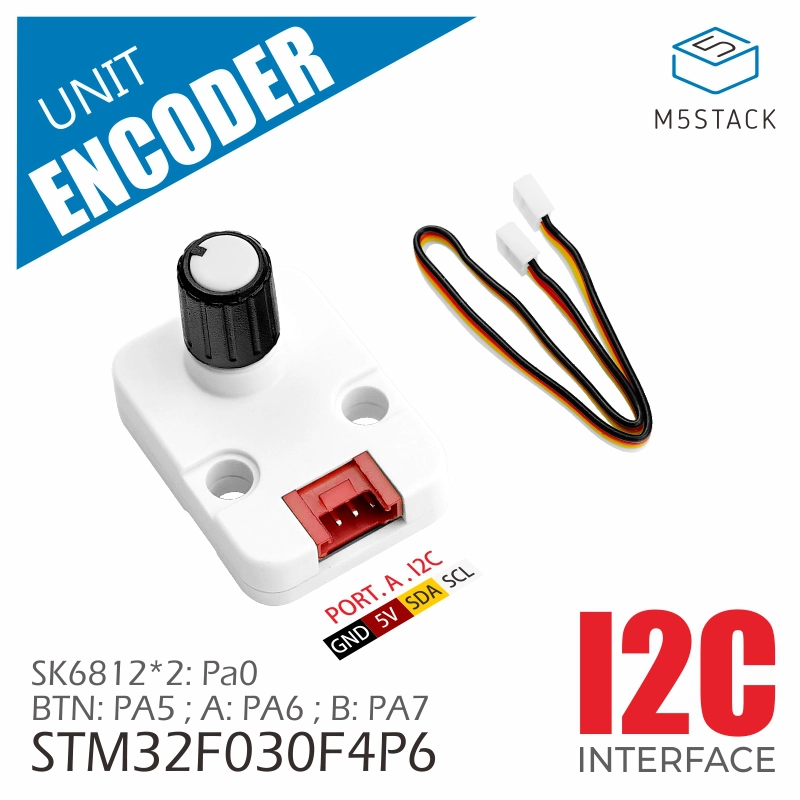
1. コンポーネント概要
| 項目 | 情報 |
|---|---|
| 製品名 | Unit Encoder |
| SKU | U135 |
| 主な機能 | エンコーダ値、ボタン状態、RGB LED 制御 |
| 通信インターフェース | I2C |
| デフォルトI2Cアドレス | 0x40 |
| ESPHomeコンポーネント | m5unit_encoder(外部コンポーネント) |
| ESPHomeバージョン要件 | 2026.4.5 以降 |
2. コンポーネントの説明
外部コンポーネントの導入
YAMLファイルにExternal Componentsの設定を追加して、Unit Encoderコンポーネントを読み込みます。
external_components:
  - source: github://m5stack/esphome-yaml/components
    components: [m5unit_encoder]
refresh: 0sSensor: エンコーダ値
Sensorを追加してエンコーダのカウント値を読み取ります。このidは、ボタンおよびLEDのOutputコンポーネントから参照できます。
sensor:
- platform: m5unit_encoder
id: unit_encoder_1
name: "Encoder Value"デフォルト単位はsteps、デフォルトの更新間隔は100ms、デフォルトのI2Cアドレスは0x40です。
主なパラメータ:
| パラメータ | 説明 |
|---|---|
| id | 他のUnit Encoderコンポーネントから参照するコンポーネントID。 |
| ame | Home Assistantに表示するエンティティ名。 |
Binary Sensor: エンコーダボタン
Binary Sensorを追加してエンコーダボタンの状態を読み取ります。m5unit_encoder_idには、Sensorコンポーネントで定義したIDを指定してください。
binary_sensor:
- platform: m5unit_encoder
m5unit_encoder_id: unit_encoder_1
name: "Encoder Button"Output: RGB LED 出力
Outputを追加し、赤・緑・青のLEDチャンネルを個別の出力に割り当てます。これらの出力をLightコンポーネントから参照します。
output:
- platform: m5unit_encoder
m5unit_encoder_id: unit_encoder_1
led_index: 0
channel: red
id: led0_red
- platform: m5unit_encoder
m5unit_encoder_id: unit_encoder_1
led_index: 0
channel: green
id: led0_green
- platform: m5unit_encoder
m5unit_encoder_id: unit_encoder_1
led_index: 0
channel: blue
id: led0_blue主なパラメータ:
| パラメータ | 説明 |
|---|---|
| m5unit_encoder_id | 関連付けるSensorコンポーネントのID。 |
| led_index | LEDインデックス。0または1。 |
| channel | カラーチャンネル。 |
| ed、green、blueのいずれか。 | |
| id | Lightコンポーネントから参照する出力 ID。 |
Light: RGB LED
Lightを追加し、3つのカラーチャンネルを1つのRGBライトエンティティにまとめます。
light:
- platform: rgb
name: "Encoder LED 0"
red: led0_red
green: led0_green
blue: led0_blue主なパラメータ:
| パラメータ | 説明 |
|---|---|
| ame | Home Assistantに表示するライトエンティティ名。 |
| ed | 赤チャンネルのOutput ID。 |
| green | 緑チャンネルのOutput ID。 |
| blue | 青チャンネルのOutput ID。 |
3. 使用例
yaml
1 2 3 4 5 6 7 8 9 10 11 12 13 14 15 16 17 18 19 20 21 22 23 24 25 26 27 28 29 30 31 32 33 34 35 36 37 38 39 40 41 42 43 44 45 46 47 48 49 50 51 52 53 54 55 56 57 58 59 60 61 62 63
external_components:
  - source: github://m5stack/esphome-yaml/components
    components: [m5unit_encoder]
    refresh: 0s
i2c:
sda: GPIOXX
scl: GPIOXX
scan: true
sensor:
  - platform: m5unit_encoder
    id: unit_encoder_1
    name: "Encoder Value"
binary_sensor:
  - platform: m5unit_encoder
    m5unit_encoder_id: unit_encoder_1
    name: "Encoder Button"
output:
  - platform: m5unit_encoder
    m5unit_encoder_id: unit_encoder_1
    led_index: 0
    channel: red
    id: led0_red
  - platform: m5unit_encoder
    m5unit_encoder_id: unit_encoder_1
    led_index: 0
    channel: green
    id: led0_green
  - platform: m5unit_encoder
    m5unit_encoder_id: unit_encoder_1
    led_index: 0
    channel: blue
    id: led0_blue
- platform: m5unit_encoder
m5unit_encoder_id: unit_encoder_1
led_index: 1
channel: red
id: led1_red
- platform: m5unit_encoder
m5unit_encoder_id: unit_encoder_1
led_index: 1
channel: green
id: led1_green
- platform: m5unit_encoder
m5unit_encoder_id: unit_encoder_1
led_index: 1
channel: blue
id: led1_blue
light:
  - platform: rgb
    name: "Encoder LED 0"
    red: led0_red
    green: led0_green
    blue: led0_blue
- platform: rgb
name: "Encoder LED 1"
red: led1_red
green: led1_green
blue: led1_blue4. 関連リンク
Page Tools