StackFlow AI プラットフォーム
デバイスとクイックスタート
モデルの紹介
Qwen3
DeepSeek-R1
AI Pyramid Applications
アプリケーション
CVビジョンアプリケーション
VLMマルチモーダル
大規模言語モデル (LLM)
音声アシスタント
AI Pyramid EC Proxy ハードウェア制御
1. 説明
AI Pyramid のデフォルトイメージには、メインシステムとエンベデッドコントローラ(EC)間の通信および管理を実現するための「EC Proxy」エンベデッドコントローラ通信システムが内蔵されています。EC Proxy は、下位層のハードウェアに対して統一された抽象化レイヤーを提供し、具体的なハードウェアの実装詳細をカプセル化して、上位層のシステムに標準化された制御インターフェースを公開します。AI Pyramid 上のRGB LED、冷却ファン、電源管理、ボタンなどの周辺機器機能は、EC Proxy を通じて制御できます。AI Pyramid の起動後、EC Proxy サービスは自動的に有効になります。ユーザーはec_cliコマンドラインツールを使用してハードウェアリソースを操作でき、下位層のハードウェアと直接やり取りする必要はありません。
┌─────────────────┐     Modbus RTU      ┌──────────────────┐      ZMQ RPC/PUB     ┌─────────────┐
│   Hardware EC   │ ◄─────────────────► │   EC Proxy       │ ◄──────────────────► │   Client    │
│   (STM32/MCU)   │   /dev/ttyS3        │   Server         │   IPC/TCP Sockets    │   (CLI/App) │
└─────────────────┘ 115200-921600bps └──────────────────┘ └─────────────┘2. ハードウェア制御
ec_cli deviceと入力すると、ハードウェア制御に関するコマンドを確認できます。
root@m5stack-AI-Pyramid:~# ec_cli device
usage: ec_cli [options] ...
options:
  -r, --rgb                             Get or set RGB LED display mode
      --poweron_time                    Get or set the scheduled power-on time
      --poweroff_time                   Get or set the scheduled power-off time
      --rgb_size                        Get or set the number of RGB LEDs in the array
      --rgb_get_color                   Get the color value of a specific RGB LED
      --rgb_set_color                   Set color for a specific RGB LED, example: cli --rgb_set_color -d '{"rgb_index":0,"rgb_color":255}'
  -f, --fan                             Get or set the fan PWM duty cycle
  -F, --fanspeed                        Get the current fan rotation speed in RPM
      --pd_power_info                   Get the USB PD power delivery information
  -B, --board                           Get the board power consumption information
      --ip_eth0                         Get or set the IP address for Ethernet interface eth0
      --ip_eth1                         Get or set the IP address for Ethernet interface eth1
      --ip_wlan                         Get or set the IP address for wireless LAN interface
  -l, --lcd                             Get or set the LCD display mode
      --lcd_ram                         Set the LCD RAM buffer data directly
  -c, --vddcpu                          Get or set the CPU core voltage (VDD)
      --modbus_speed                    Get or set the Modbus communication baud rate
  -p, --ext_power                       Control the external power supply output
  -b, --board_power                     Control the main board power switch
      --pcie0                           Set the PCIe slot 0 switch on/off state
      --pcie1                           Set the PCIe slot 1 switch on/off state
      --gl3510_reset                    Reset the GL3510 USB hub controller
      --usbds1_big                      Set the high-power mode for USB downstream port 1
      --usbds2_big                      Set the high-power mode for USB downstream port 2
      --usbds1                          Set the switch on/off state for USB downstream port 1
      --usbds2                          Set the switch on/off state for USB downstream port 2
      --usbds3                          Set the switch on/off state for USB downstream port 3
      --hdmi_loop_en                    Switch HDMI OUT port input source between IN and AX8850
      --grove_uart                      Set the switch on/off state for Grove UART interface
      --grove_iic                       Set the switch on/off state for Grove I2C interface
      --flash_switch                    Save switch configuration to flash memory (stores coil registers 4-14)
      --flash_value                     Save value configuration to flash memory (stores holding registers 1, 2, 11, 12, 14, 16-21)
      --poweroff                        Trigger the system power-off sequence
      --lcd_brightness                  Get or set the LCD backlight brightness level
  -P, --lcd_putc                        Output a character or string to the LCD display
      --i2c_set_reg                     Write a value to an I2C device register
      --i2c_get_reg                     Read a value from an I2C device register
      --ec_button_head_event            Get or set the event handler for EC head button press
      --soc_button_head_event           Get or set the event handler for SoC head button press
      --ec_button_lcd_event             Get or set the event handler for EC LCD button press
      --fun_auto                        Get or set the automatic control mode for the proxy service
      --ec_modbus_set_bit               Set a specific bit in the EC Modbus coil register
      --ec_modbus_get_bit               Get a specific bit value from the EC Modbus coil register
      --ec_modbus_input_bits            Read the EC Modbus discrete input bits status
      --ec_modbus_input_registers       Read the EC Modbus input registers values
      --ec_modbus_set_hold_registers    Write values to the EC Modbus holding registers
      --ec_modbus_get_hold_registers    Read values from the EC Modbus holding registers
      --pcie0_exists                    Check if a PCIe device is present in slot 0
      --pcie1_exists                    Check if a PCIe device is present in slot 1
      --V3_3_good                       Check if the 3.3V power rail is within normal operating range
      --V1_8_good                       Check if the 1.8V power rail is within normal operating range
      --head_button                     Get the current state of the head button (pressed/released)
      --lcd_button                      Get the current state of the LCD button (pressed/released)
      --version                         Get the EC firmware version information
  -d, --data                            call param (string [=])
  -D, --DataRaw                         call param raw (string [=])
-?, --help print this messageRGB LED 制御
RGB LED の動作モードを設定します。
ec_cli device --rgb -d 4| RGB LED Mode | 説明 |
|---|---|
| 0 | rgb_set_color 指令で制御 |
| 1 | カラーグラデーション |
| 2 | 呼吸エフェクト |
| 3 | 流れる水エフェクト |
| 4 | 分散エフェクト |
| 5 | 集合エフェクト |
rgb_set_colorコマンドを使用して個別の RGB LED の色を設定します。このコマンドはモード 0 でのみ有効です。注意:現在のインターフェースは範囲指定による色の設定には対応していません。入力するrgb_colorは 10 進数のRGB888エンコードです。(例:0x00FF00 == 65280)
ec_cli device --rgb_set_color -d '{"rgb_index":0,"rgb_color": 65280}'ファン制御
ファンの PWM デューティ比を 80% に設定します。
ec_cli device --fan -d 80{
"created": 1769747093,
"data": "ok",
"object": "",
"request_id": "",
"work_id": "fun_set_pwm"
}ファンの回転数(RPM)を読み取ります。
ec_cli device --fanspeed{
"created": 1769753372,
"data": 9060,
"object": "",
"request_id": "",
"work_id": "get_input_registers"
}ネットワーク情報
ec_cli device --ip_eth0
ec_cli device --ip_eth1
ec_cli device --ip_wlanPD 電源情報
ec_cli device --pd_power_info{
"created": 1769753175,
"data": { "voltage": "20 V", "current": "1.25 A" },
"object": "",
"request_id": "",
"work_id": "pd_info"
}電源管理
現在のデバイスの消費電力情報を確認します。
ec_cli device --board{
"created": 1769756427,
"data": {
"pcie0_mv": 3352,
"pcie0_ma": 0,
"pcie1_mv": 3328,
"pcie1_ma": 0,
"usb1_mv": 5040,
"usb1_ma": 0,
"usb2_mv": 5040,
"usb2_ma": 0,
"INVDD_mv": 20112,
"INVDD_ma": 292,
"EXTVDD_mv": 20112,
"EXTVDD_ma": 28
},
"object": "",
"request_id": "",
"work_id": "board_get_power_info"
}USB インターフェース給電
USB インターフェースの出力給電をオンにします。デバイス内部の USB 3.0 #4 インターフェースは常時オンの状態です。
ec_cli device --usbds1 -d 1
ec_cli device --usbds2 -d 1
ec_cli device --usbds3 -d 1USB インターフェースの出力給電をオフにします。
ec_cli device --usbds1 -d 0
ec_cli device --usbds2 -d 0
ec_cli device --usbds3 -d 0USB インターフェースの給電強化を設定します。インターフェースのデフォルト出力能力は最大 400mA ですが、強化を有効にすると最大 800mA になります。現在、USB #1 / #2 インターフェースのみが給電強化に対応しています。
ec_cli device --usbds1_big -d 1
ec_cli device --usbds2_big -d 1OLED
OLED の表示モードを設定します。
ec_cli device --lcd -d 4| RGB LED Mode | 説明 |
|---|---|
| 0 | M5Stack 文字 |
| 1 | インターフェース電圧表示、3 秒ごとに更新 |
| 2 | IP 表示、3 秒ごとに更新 |
| 3 | ARM マッピング |
| 4 | 文字表示モード、lcd_putc 指令で制御 |
lcd_putcコマンドを使用して OLED 画面に文字を出力します。このコマンドはモード 4 でのみ有効です。
ec_cli device --lcd_putc -d "Hello World!"空白文字を書き込むことで画面をクリアできます。
ec_cli device --lcd_putc -d " "3. ステータス監視
ec_cli echoと入力すると、ハードウェア制御に関するコマンドを確認できます。現在のバージョンでは、本体上部ボタンの状態の読み取りのみをサポートしています。
root@m5stack-AI-Pyramid:~# ec_cli echo
usage: ec_cli [options] ...
options:
  -b, --button    button event
-?, --help print this messageec_cli echo --button本体上部ボタンを押した際:
{ "created":1769747540,"data":{"code":0,"vale":204},"object":"","request_id":"","work_id":"buttons_thread" }
{ "created":1769747540,"data":{"code":1,"vale":204},"object":"","request_id":"","work_id":"buttons_thread" }
{ "created":1769747540,"data":{"code":0,"vale":204},"object":"","request_id":"","work_id":"buttons_thread" }
{ "created":1769747540,"data":{"code":1,"vale":204},"object":"","request_id":"","work_id":"buttons_thread" }4. Core-Config
コマンドライン以外に、Core-Config を使用して GUI 画面を開き設定することも可能です。
core-config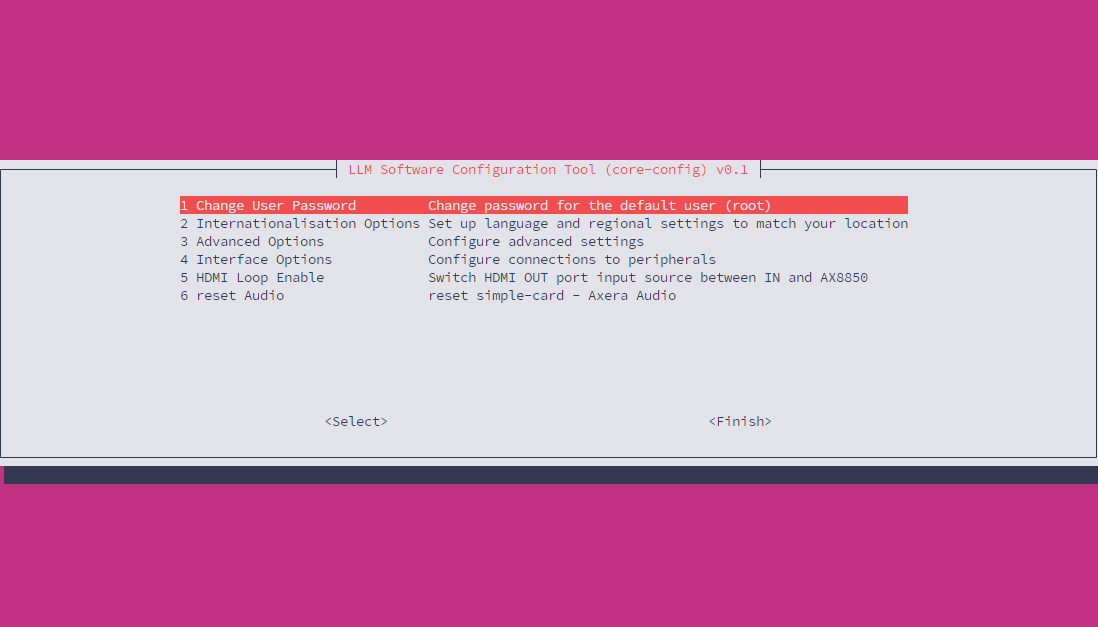
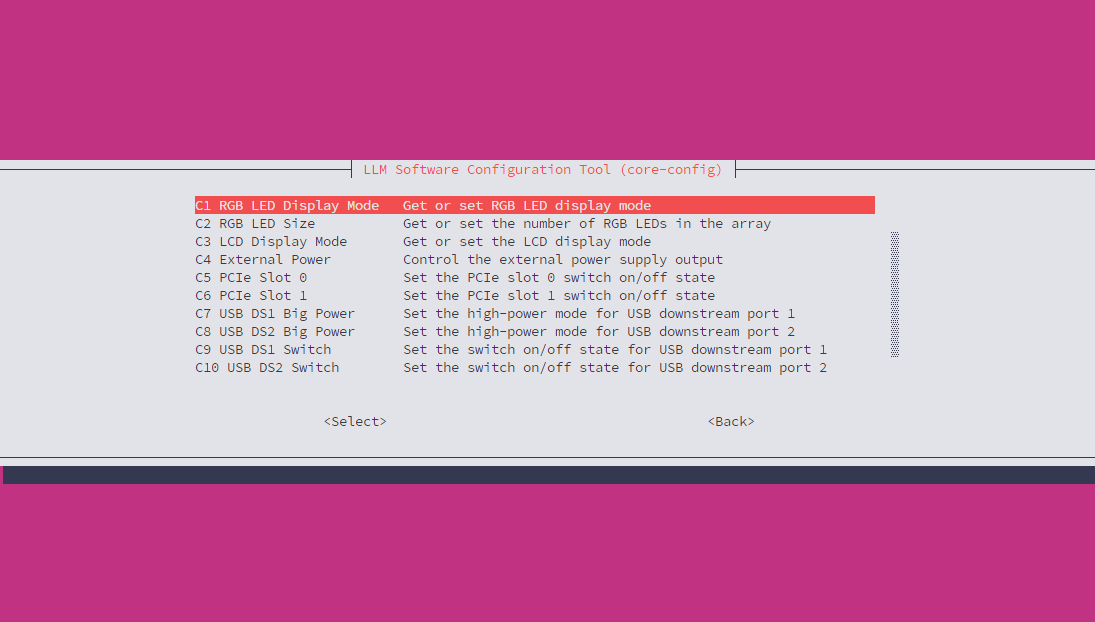
Interface Optionには、USB インターフェースの給電やファンの回転数など、よく使われるハードウェア制御オプションが含まれています。設定内容はec_cliコマンドラインツールと同一です。
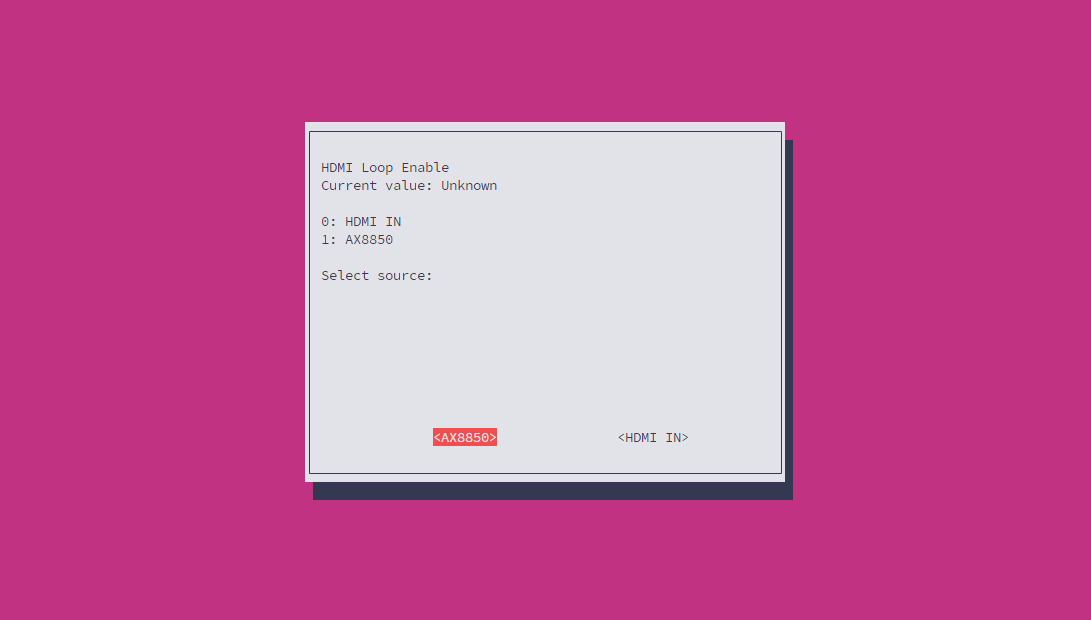
ディスプレイ出力設定
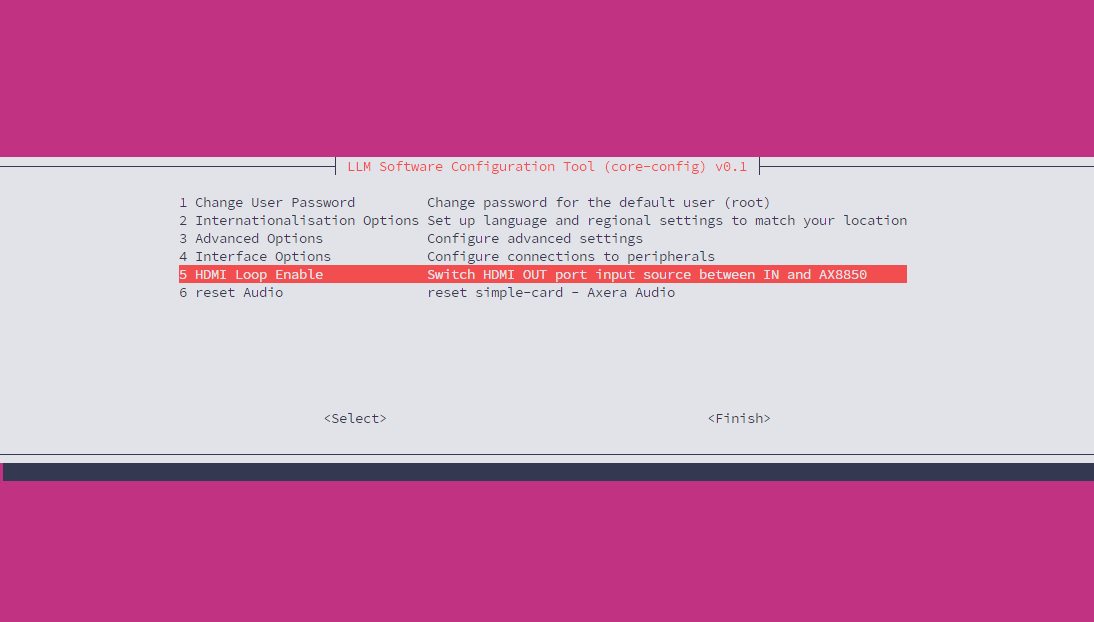
この設定は AI Pyramid-Pro に適用されます。Display 出力インターフェースの信号源を、Display Input インターフェースからにするか、または AX8850 の内部デフォルト出力を直接使用するかを設定できます。
Reset Audio