Home Assistant
Home Assistant
主控与整机
摄像头
扩展模块
灯光控制
StackChan ESPHome 集成
StackChan 的 ESPHome 集成包含电源、显示、音频、摄像头、传感器、舵机和灯光组件。
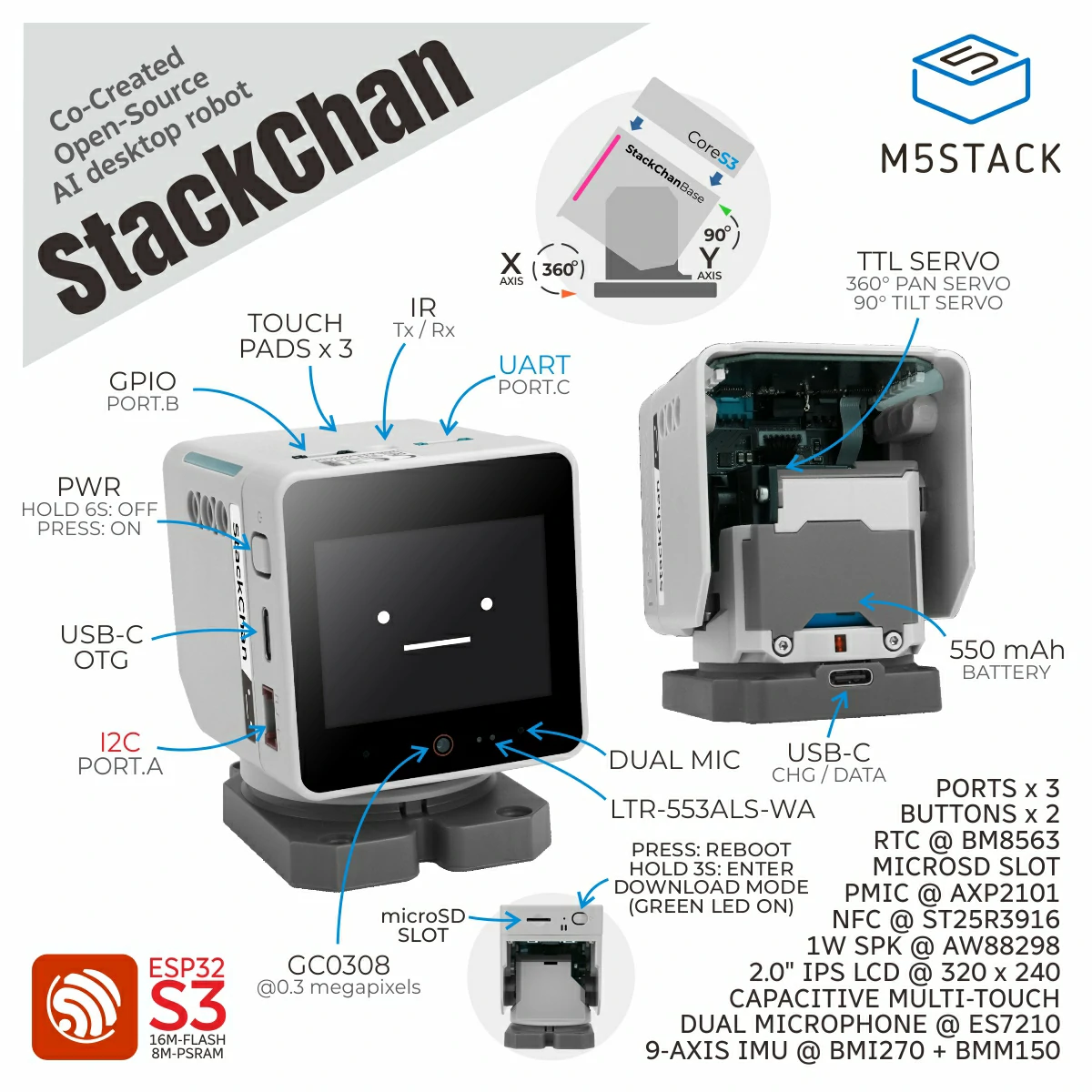
1. 设备简介
| 项目 | 信息 |
|---|---|
| 产品名称 | StackChan |
| SKU | K151 / K151-R |
| 主要功能 | 显示、音频、摄像头、传感器、舵机和灯光控制 |
| 通信接口 | I2C、I2S、UART、SPI、GPIO |
| ESPHome 组件 | axp2101、aw9523b、aw88298、si12t、m5ioe1、ftservo、scs9009(外部组件),以及 es7210、i2s_audio、mipi_spi、ft63x6、esp32_camera、ltr_als_ps、ina226、remote_transmitter、remote_receiver、bm8563 |
| ESPHome 版本要求 | / |
2. 组件说明
外部组件引入
StackChan 的电源、功放、IO 扩展、头部触摸、灯条和舵机使用 M5Stack 外部组件:
external_components:
  - source: github://m5stack/esphome-yaml/components
    components: [axp2101, aw88298, aw9523b, si12t, m5ioe1, ftservo, scs9009]
refresh: 0s电源管理与 IO 扩展
axp2101 驱动 CoreS3 的供电轨和 LCD 背光,aw9523b 控制复位与电源方向,m5ioe1 为舵机和灯条提供扩展 IO:
i2c:
  - id: bsp_bus
    sda: GPIO12
    scl: GPIO11
    frequency: 100kHz

axp2101:
  id: axp2101_pmu
  i2c_id: bsp_bus

aw9523b:
  id: aw9523b_hub
  i2c_id: bsp_bus
  p0_drive_mode: PUSH_PULL

m5ioe1:
  id: m5ioe1_hub
  i2c_id: bsp_bus
  reset: true

output:
  - platform: axp2101
    type: range
    channel: DLDO1
    id: lcd_backlight_output
    min_voltage: 2600
max_voltage: 3300BUS 输出和 USB OTG 需要先启用升压电路:
switch:
  - platform: gpio
    name: "BOOST_EN"
    pin:
      aw9523b_id: aw9523b_hub
      number: 15
    restore_mode: RESTORE_DEFAULT_ON

  - platform: gpio
    name: "USB_OTG_EN"
    pin:
      aw9523b_id: aw9523b_hub
      number: 5
    restore_mode: RESTORE_DEFAULT_OFF

  - platform: gpio
    name: "BUS_OUT_EN"
    pin:
      aw9523b_id: aw9523b_hub
      number: 1
restore_mode: RESTORE_DEFAULT_ONBUS_OUT_EN 和 USB_OTG_EN 只有在 BOOST_EN 开启后才会生效。修改默认状态前应确认外围设备的供电方向。麦克风与扬声器
麦克风使用官方 ES7210 Audio ADC 和 I2S Microphone,扬声器使用 aw88298 外部 Audio DAC 与 I2S Speaker:
i2s_audio:
  id: i2s_audio_bus
  i2s_lrclk_pin: GPIO33
  i2s_bclk_pin: GPIO34
  i2s_mclk_pin:
    number: GPIO0
    ignore_strapping_warning: true

audio_adc:
  - platform: es7210
    id: es7210_adc
    i2c_id: bsp_bus
    bits_per_sample: 16bit
    sample_rate: 16000
    mic_gain: 36

microphone:
  - platform: i2s_audio
    id: i2s_mic
    i2s_din_pin: GPIO14
    adc_type: external
    sample_rate: 16000
    bits_per_sample: 16bit
    i2s_audio_id: i2s_audio_bus

audio_dac:
  - platform: aw88298
    id: aw88298_dac
    i2c_id: bsp_bus
    sample_rate: 48000

speaker:
  - platform: i2s_audio
    id: i2s_speaker
    i2s_audio_id: i2s_audio_bus
    dac_type: external
    i2s_dout_pin: GPIO13
audio_dac: aw88298_dacLCD 与触摸屏
LCD 使用官方 MIPI SPI Display Platform,触摸屏使用 FT63X6 Platform。最小显示配置启用测试画面:
spi:
  - id: spi_bus
    clk_pin: GPIO36
    mosi_pin: GPIO37

display:
  - platform: mipi_spi
    model: M5CORE
    dc_pin: GPIO35
    reset_pin:
      aw9523b_id: aw9523b_hub
      number: 9
    cs_pin:
      number: GPIO3
      ignore_strapping_warning: true
    data_rate: 40MHz
    invert_colors: true
    show_test_card: true

touchscreen:
  - platform: ft63x6
    i2c_id: bsp_bus
    reset_pin:
      aw9523b_id: aw9523b_hub
number: 0摄像头
GC0308 使用官方 ESP32 Camera 组件。setup_priority: -200 用于等待电源和 IO 扩展器初始化完成:
esp32_camera:
  name: "Camera"
  i2c_id: bsp_bus
  setup_priority: -200
  vsync_pin:
    number: GPIO46
    ignore_strapping_warning: true
  href_pin: GPIO38
  external_clock:
    pin: GPIO2
    frequency: 20MHz
  pixel_clock_pin:
    number: GPIO45
    ignore_strapping_warning: true
  data_pins: [GPIO39, GPIO40, GPIO41, GPIO42, GPIO15, GPIO16, GPIO48, GPIO47]
  resolution: 320x240
frame_buffer_location: PSRAMsetup_priority: -200,否则摄像头可能在供电与复位信号稳定前开始初始化。环境光、接近与功率测量
LTR-553ALS-WA 使用官方 LTR-ALS-PS Platform,电压、电流与功率使用官方 INA226 Platform:
sensor:
  - platform: ltr_als_ps
    address: 0x23
    i2c_id: bsp_bus
    type: ALS_PS
    ambient_light:
      name: "Ambient Light"
    ps_counts: "Proximity Counts"

  - platform: ina226
    i2c_id: bsp_bus
    address: 0x41
    shunt_resistance: 0.01 ohm
    max_current: 3.2A
    current:
      name: "INA226 Current"
    power:
      name: "INA226 Power"
    bus_voltage:
name: "INA226 Bus Voltage"舵机
两个 SCS9009 舵机分别使用地址 1 和 2,ftservo Number Platform 提供基础角度控制:
uart:
  tx_pin: GPIO6
  rx_pin: GPIO7
  baud_rate: 1000000

scs9009:

ftservo:
  - platform: scs9009
    address: 1
    id: x_servo
  - platform: scs9009
    address: 2
    id: y_servo

number:
  - platform: ftservo
    ftservo_id: x_servo
    angle:
      name: "Servo X Angle"
      min_value: -164
      max_value: 164
      use_raw_angle: false
      angle_offset: 164
step: 5头部触摸
si12t 外部组件提供三路电容触摸状态。下面以第一路为例:
si12t:
  id: touch_hub
  i2c_id: bsp_bus

text_sensor:
  - platform: si12t
    name: "Touch Sensor 1"
    channel: CH_1
update_interval: 1sRGB 灯条
12 颗 RGB LED 使用 m5ioe1 Light Platform。M5IOE1 Pin 14 必须保持开启,BUS 侧还需要 BOOST_EN 与 BUS_OUT_EN 提供 5V:
switch:
  - platform: gpio
    name: "M5IOE1 Pin 14"
    pin:
      m5ioe1_id: m5ioe1_hub
      number: 13
      mode:
        output: true
        pullup: true
    restore_mode: RESTORE_DEFAULT_ON

light:
  - platform: m5ioe1
    name: "StackChan Light Bar"
num_led: 12红外收发
板载红外发射和接收使用 ESPHome 官方 Remote Transmitter 与 Remote Receiver 组件:
remote_transmitter:
  pin: GPIO5
  carrier_duty_percent: 50%
  non_blocking: true

remote_receiver:
pin: GPIO10RTC
板载 RTC 使用官方 BM8563 Platform。启动时先读取 RTC,Home Assistant 完成时间同步后再写回 RTC:
time:
  - platform: bm8563
    i2c_id: bsp_bus
    update_interval: never
  - platform: homeassistant
    on_time_sync:
      then:
- bm8563.write_time:3. 参考案例
完整配置可通过 packages 引入:
packages:
  remote_package_files:
    url: https://github.com/m5stack/esphome-yaml
    files: [examples/kit/stackchan-bsp.factory.yaml]
    ref: main
refresh: 0s完整源码请参考 stackchan-bsp.factory.yaml。
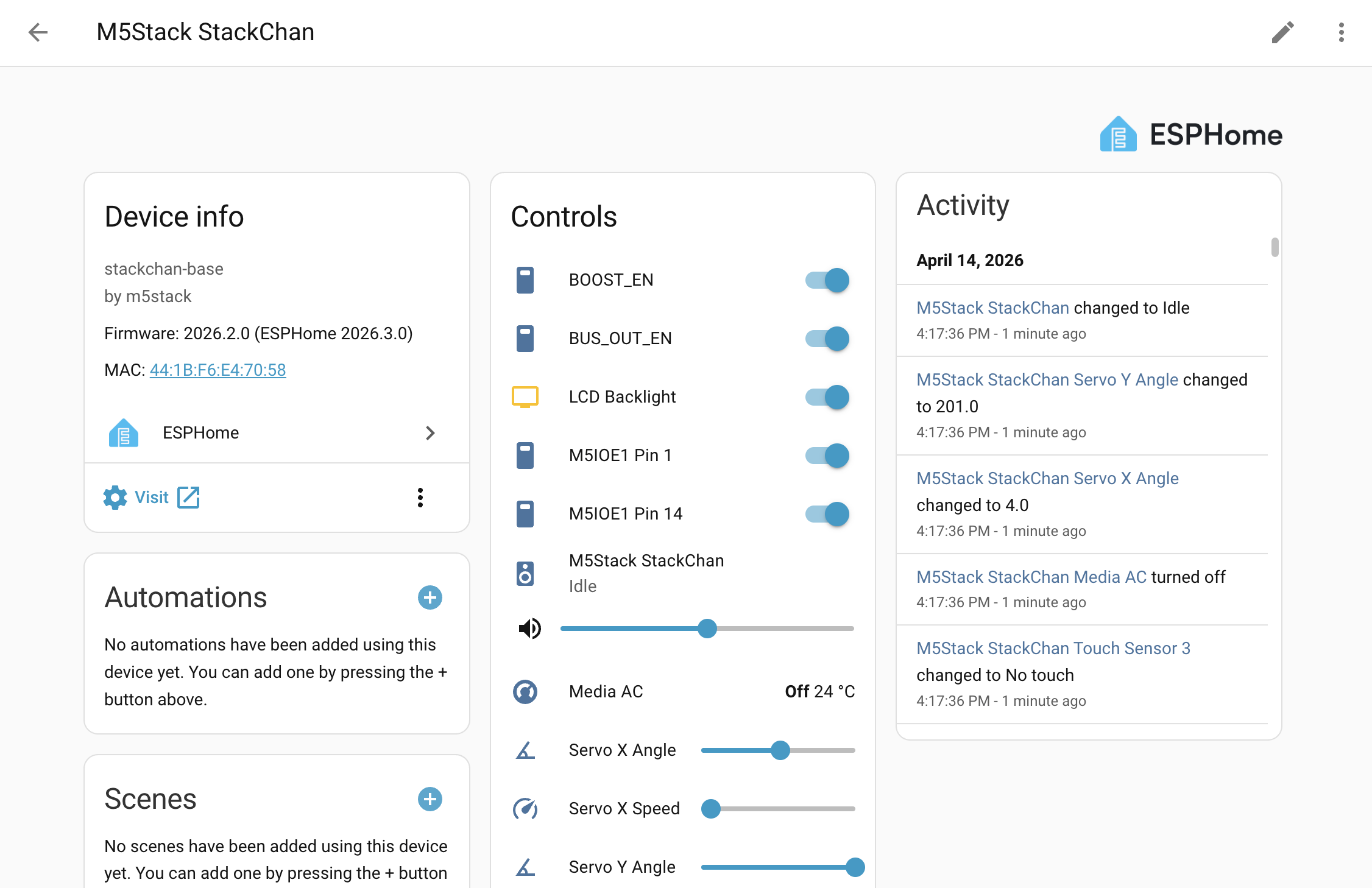
设备接入 Home Assistant 后,可查看 StackChan 的基础实体:
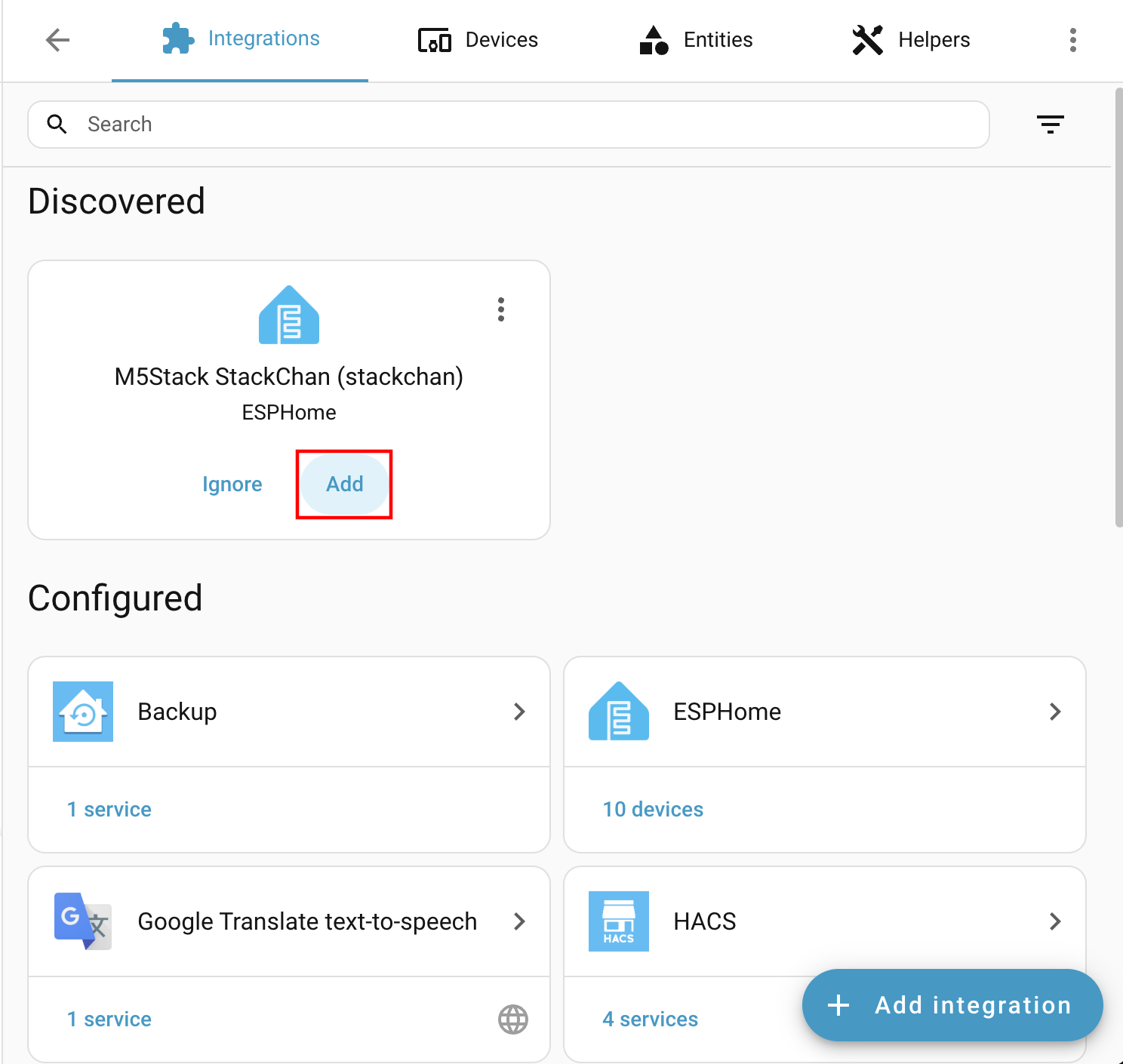
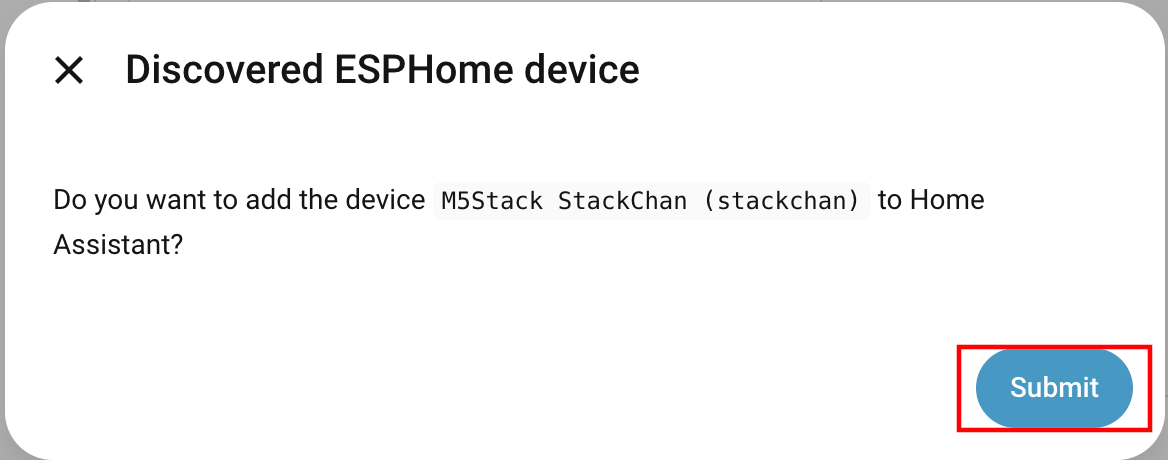
ESPHome 集成中的设备实体: