

UiFlow Tutorial
UiFlow1 Quick Start
2. Firmware & Program
UiFlow1 Development Guide
Project Management
Use LTE network
UiFlow1 Blockly
Event
UI
Unit
Module
Hat
UiFlow2 Quick Start
2. Firmware & Program
UiFlow2 Development Guide
UI Editor
UiFlow2 Video Column
Touch
Example
Display touch coordinates and touch status on the screen.
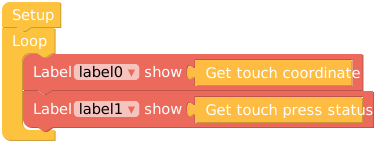
from m5stack import *
from m5stack_ui import *
from uiflow import *
from m5stack import touch

screen = M5Screen()
screen.clean_screen()
screen.set_screen_bg_color(0xFFFFFF)

label0 = M5Label('label0', x=123, y=59, color=0x000, font=FONT_MONT_14, parent=None)
label1 = M5Label('label1', x=121, y=93, color=0x000, font=FONT_MONT_14, parent=None)

while True:
  label0.set_text(str(touch.read()))
  label1.set_text(str(touch.status()))
wait_ms(2)API

str(touch.read())- Get the touch point coordinates on the screen for x and y axes (x: 0-320; y: 0-240).

str(touch.read()[0])- Get the x-axis coordinate of the touch point on the screen (returns 0-320).

str(touch.read()[1])- Get the y-axis coordinate of the touch point on the screen (returns 0-240).

str(touch.status())- Returns true or false; returns true if the screen is being touched, and false if it is not.
Page Tools