

UiFlow Tutorial
UiFlow1 Quick Start
2. Firmware & Program 1.0
UiFlow1 Development Guide
Project Management
Use LTE network
UiFlow1 Blockly
Event
UI
Unit
Module
Hat
UiFlow2 Quick Start
2. Firmware & Program 2.0
UiFlow2 Development Guide
UI Editor
UiFlow2 Video Column
Hat Yun
Example
Sets the light color to red and retrieves sensor data for temperature, humidity, and atmospheric pressure.
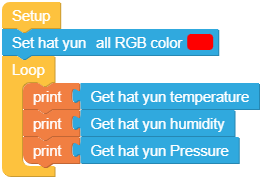
from m5stack import *
from m5ui import *
from uiflow import *
import hat

setScreenColor(0x111111)

hat_yun_0 = hat.get(hat.YUN)

hat_yun_0.SetRGBAll(0xff0000)
while True:
  print(hat_yun_0.temperature)
  print(hat_yun_0.humidity)
  print(hat_yun_0.pressure)
wait_ms(2)API

print((str('brightness:') + str((hat_yun_0.getLight()))))- Retrieves the brightness level of the Yun device.

print((str('humidity:') + str((hat_yun_0.humidity))))- Retrieves the humidity level from the Yun device.

print((str('pressure:') + str((hat_yun_0.pressure))))- Retrieves the atmospheric pressure from the Yun device.

print((str('temperature:') + str((hat_yun_0.temperature))))- Retrieves the temperature from the Yun device.

hat_yun_0.SetRGB(1, 0xff0000)- Sets the color of a specific LED on the Yun device.

hat_yun_0.SetRGBAll(0xff0000)- Sets the color of all LEDs on the Yun device.
Page Tools