

UiFlow Tutorial
UiFlow1 Quick Start
2. Firmware & Program
UiFlow1 Development Guide
Project Management
Use LTE network
UiFlow1 Blockly
Event
UI
Unit
Module
Hat
UiFlow2 Quick Start
2. Firmware & Program
UiFlow2 Development Guide
UI Editor
UiFlow2 Video Column
Unit 4Relay
Example
Set the relay status of the specified channel
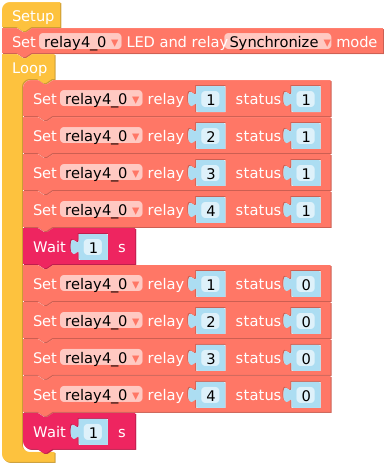
from m5stack import *
from m5ui import *
from uiflow import *
import time
import unit

setScreenColor(0x222222)
relay4_0 = unit.get(unit.RELAY4, unit.PORTA)

relay4_0.set_mode(1)
while True:
  relay4_0.set_relay_status(1, 1)
  relay4_0.set_relay_status(2, 1)
  relay4_0.set_relay_status(3, 1)
  relay4_0.set_relay_status(4, 1)
  wait(1)
  relay4_0.set_relay_status(1, 0)
  relay4_0.set_relay_status(2, 0)
  relay4_0.set_relay_status(3, 0)
  relay4_0.set_relay_status(4, 0)
  wait(1)
wait_ms(2)API

relay4_0.set_mode(1)- Set the Relay LED Sync mode.
- 1:LED follows the Relay state
- 0:LED does not follow Relay state

relay4_0.set_relay_status(ch, status)- Set the Relay Status:
- ch:
- 1-4
- status:
- 1:on
- 0:off
- ch:

relay4_0.set_led_status(ch, status)- Set the LED Status:
- ch:
- 1-4
- status:
- 1:on
- 0:off
- ch:

relay4_0.get_mode()- Read Relay LED Sync mode status.
- 1:LED follows the Relay state
- 0:LED does not follow Relay state

relay4_0.get_relay_status(ch)- Read Relay status:
- ch:
- 1-4
- ch:
- status:
- 1:on
- 0:off

relay4_0.get_led_status(ch)- Read LED status:
- ch:
- 1-4
- ch:
- status:
- 1:on
- 0:off
Page Tools