

UiFlow Tutorial
UiFlow1 Quick Start
2. Firmware & Program
UiFlow1 Development Guide
Project Management
Use LTE network
UiFlow1 Blockly
Event
UI
Unit
Module
Hat
UiFlow2 Quick Start
2. Firmware & Program
UiFlow2 Development Guide
UI Editor
UiFlow2 Video Column
BLE
Initialise the device to BLE Peripheral or Central to enable data transfer. Note: Only models with PSRAM (e.g. M5Fire, M5Core2) are supported.
BLE Peripheral
Example
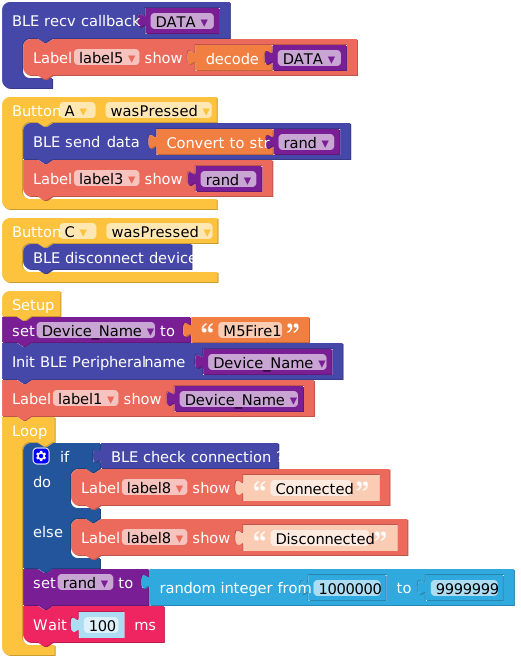
from m5stack import *
from m5ui import *
from uiflow import *
from ble.ble_peripheral import BLEPeripheral
import time
setScreenColor(0x222222)

DATA = None
Device_Name = None
rand = None

periph = BLEPeripheral()

label0 = M5TextBox(12, 41, "DEVICE NAME:", lcd.FONT_Ubuntu, 0xFFFFFF, rotate=0)
label1 = M5TextBox(137, 41, "label1", lcd.FONT_Ubuntu, 0xFFFFFF, rotate=0)
title0 = M5Title(title="M5FIRE-PERIPHERAL", x=85, fgcolor=0xFFFFFF, bgcolor=0xa40000)
label2 = M5TextBox(12, 80, "SEND DATA:", lcd.FONT_Ubuntu, 0xFFFFFF, rotate=0)
label3 = M5TextBox(119, 80, "label3", lcd.FONT_Ubuntu, 0xFFFFFF, rotate=0)
label4 = M5TextBox(12, 120, "RECV DATA:", lcd.FONT_Ubuntu, 0xFFFFFF, rotate=0)
label5 = M5TextBox(119, 120, "label5", lcd.FONT_Ubuntu, 0xFFFFFF, rotate=0)
label6 = M5TextBox(46, 219, "SEND", lcd.FONT_Ubuntu, 0xFFFFFF, rotate=0)
label9 = M5TextBox(200, 219, "DISCONNECT", lcd.FONT_Ubuntu, 0xFFFFFF, rotate=0)
label7 = M5TextBox(12, 160, "STATUS:", lcd.FONT_Ubuntu, 0xFFFFFF, rotate=0)
label8 = M5TextBox(86, 160, "label8", lcd.FONT_Ubuntu, 0xFFFFFF, rotate=0)

import random

def on_recv(Data):
  global DATA, Device_Name, rand
  DATA = Data
  label5.setText(str(DATA.decode()))

  pass

def buttonA_wasPressed():
  global DATA, Device_Name, rand
  periph.write_to(str(rand))
  label3.setText(str(rand))
  pass
btnA.wasPressed(buttonA_wasPressed)

def buttonC_wasPressed():
  global DATA, Device_Name, rand
  periph.disconnect()
  pass
btnC.wasPressed(buttonC_wasPressed)


Device_Name = 'M5Fire1'
periph.init(Device_Name)
periph.read_callback(on_recv)
label1.setText(str(Device_Name))
while True:
  if periph.is_connected():
    label8.setText('Connected')
  else:
    label8.setText('Disconnected')
  rand = random.randint(1000000, 9999999)
  wait_ms(100)
  wait_ms(2)
API

from ble.ble_peripheral import BLEPeripheral
periph = BLEPeripheral()
periph.init(Device_Name)- Initialise the BLE peripheral and set the name

periph.is_connected()- Check if it is connected

periph.disconnect()- Control device disconnected

periph.write_to(data)- Send data
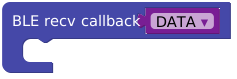
def on_recv(Data):
  print(str(DATA.decode()))

periph.read_callback(on_recv)- Data Receiving Callbacks
BLE Central
Example
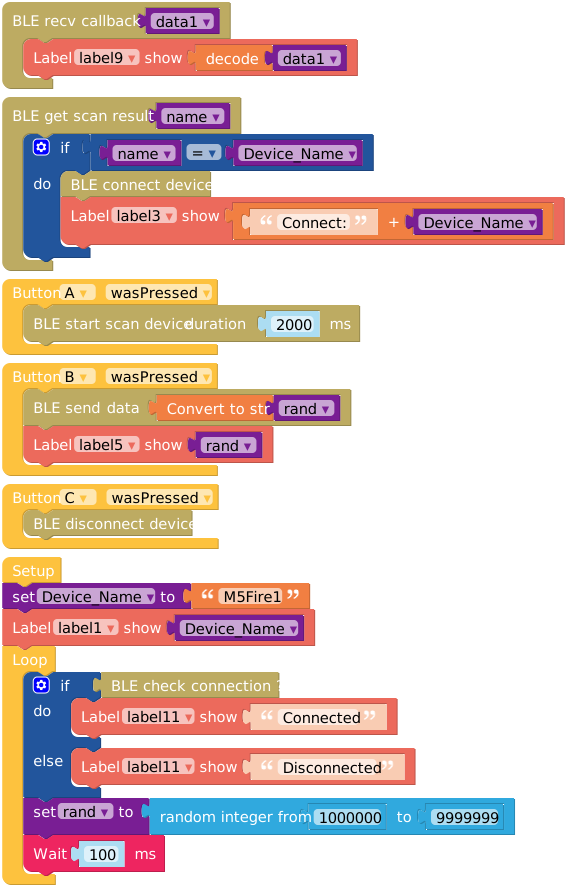
from m5stack import *
from m5ui import *
from uiflow import *
from ble.ble_central import BLECentral
import time

setScreenColor(0x222222)

data1 = None
name = None
Device_Name = None
rand = None

central = BLECentral()

label0 = M5TextBox(12, 40, "REMOTE DEV NAME:", lcd.FONT_Ubuntu, 0xFFFFFF, rotate=0)
label1 = M5TextBox(185, 40, "label1", lcd.FONT_Ubuntu, 0xFFFFFF, rotate=0)
title0 = M5Title(title="M5FIRE-CENTRAL", x=95, fgcolor=0xFFFFFF, bgcolor=0xa40000)
label2 = M5TextBox(12, 72, "STATUS:", lcd.FONT_Ubuntu, 0xFFFFFF, rotate=0)
label3 = M5TextBox(89, 72, "label3", lcd.FONT_Ubuntu, 0xFFFFFF, rotate=0)
label4 = M5TextBox(12, 106, "SEND DATA:", lcd.FONT_Ubuntu, 0xFFFFFF, rotate=0)
label7 = M5TextBox(46, 213, "SCAN", lcd.FONT_Ubuntu, 0xFFFFFF, rotate=0)
label5 = M5TextBox(120, 106, "label5", lcd.FONT_Ubuntu, 0xFFFFFF, rotate=0)
label8 = M5TextBox(12, 140, "RECV DATA:", lcd.FONT_Ubuntu, 0xFFFFFF, rotate=0)
label6 = M5TextBox(139, 213, "SEND", lcd.FONT_Ubuntu, 0xFFFFFF, rotate=0)
label9 = M5TextBox(120, 140, "label9", lcd.FONT_Ubuntu, 0xFFFFFF, rotate=0)
label10 = M5TextBox(12, 174, "CON STATUS:", lcd.FONT_Ubuntu, 0xFFFFFF, rotate=0)
label11 = M5TextBox(132, 174, "label11", lcd.FONT_Ubuntu, 0xFFFFFF, rotate=0)
label12 = M5TextBox(200, 213, "DISCONNECT", lcd.FONT_Ubuntu, 0xFFFFFF, rotate=0)

import random

def on_recv(Data):
  global data1, name, Device_Name, rand
  data1 = Data
  label9.setText(str(data1.decode()))

  pass

central.on_notify(on_recv)

def on_scan(x, y, dev_name):
  global data1, name, Device_Name, rand
  name = dev_name
  if name == Device_Name:
    central.connect()
    label3.setText(str((str('Connect: ') + str(Device_Name))))

  pass

def buttonA_wasPressed():
  global data1, name, Device_Name, rand
  central.scan(2000, on_scan)
  pass
btnA.wasPressed(buttonA_wasPressed)

def buttonB_wasPressed():
  global data1, name, Device_Name, rand
  central.write_to(str(rand))
  label5.setText(str(rand))
  pass
btnB.wasPressed(buttonB_wasPressed)

def buttonC_wasPressed():
  global data1, name, Device_Name, rand
  central.disconnect()
  pass
btnC.wasPressed(buttonC_wasPressed)


Device_Name = 'M5Fire1'
label1.setText(str(Device_Name))
while True:
  if central.is_connected():
    label11.setText('Connected')
  else:
    label11.setText('Disconnected')
  rand = random.randint(1000000, 9999999)
  wait_ms(100)
wait_ms(2)API

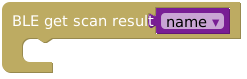


from ble.ble_central import BLECentral
central = BLECentral()

def on_scan(x, y, dev_name):
  global data1, name, Device_Name, rand
  name = dev_name
  if name == Device_Name:
    central.connect()

central.scan(2000, on_scan)- Scan the BLE peripheral broadcast, and configure the scanning time, when finished, it will enter the scanning callback. You can judge the information in the callback to connect.

central.disconnect()- Control device disconnected

central.is_connected()- Check if it is connected
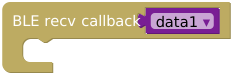
def on_recv(Data):
  data1 = Data
  print(str(data1.decode()))

central.on_notify(on_recv)- Data Receiving Callbacks

central.write_to(data)- Send data
Page Tools