

UiFlow Tutorial
UiFlow1 Quick Start
2. Firmware & Program
UiFlow1 Development Guide
Project Management
Use LTE network
UiFlow1 Blockly
Event
UI
Unit
Module
Hat
UiFlow2 Quick Start
2. Firmware & Program
UiFlow2 Development Guide
UI Editor
UiFlow2 Video Column
M5Burner Common Issues and Solutions
Compatibility Issues
Issue Description
When using M5Burner to flash firmware on Intel-based Mac devices, if the error message Error: spawn Unknown system error -86 appears as shown below, you can refer to the following solution.
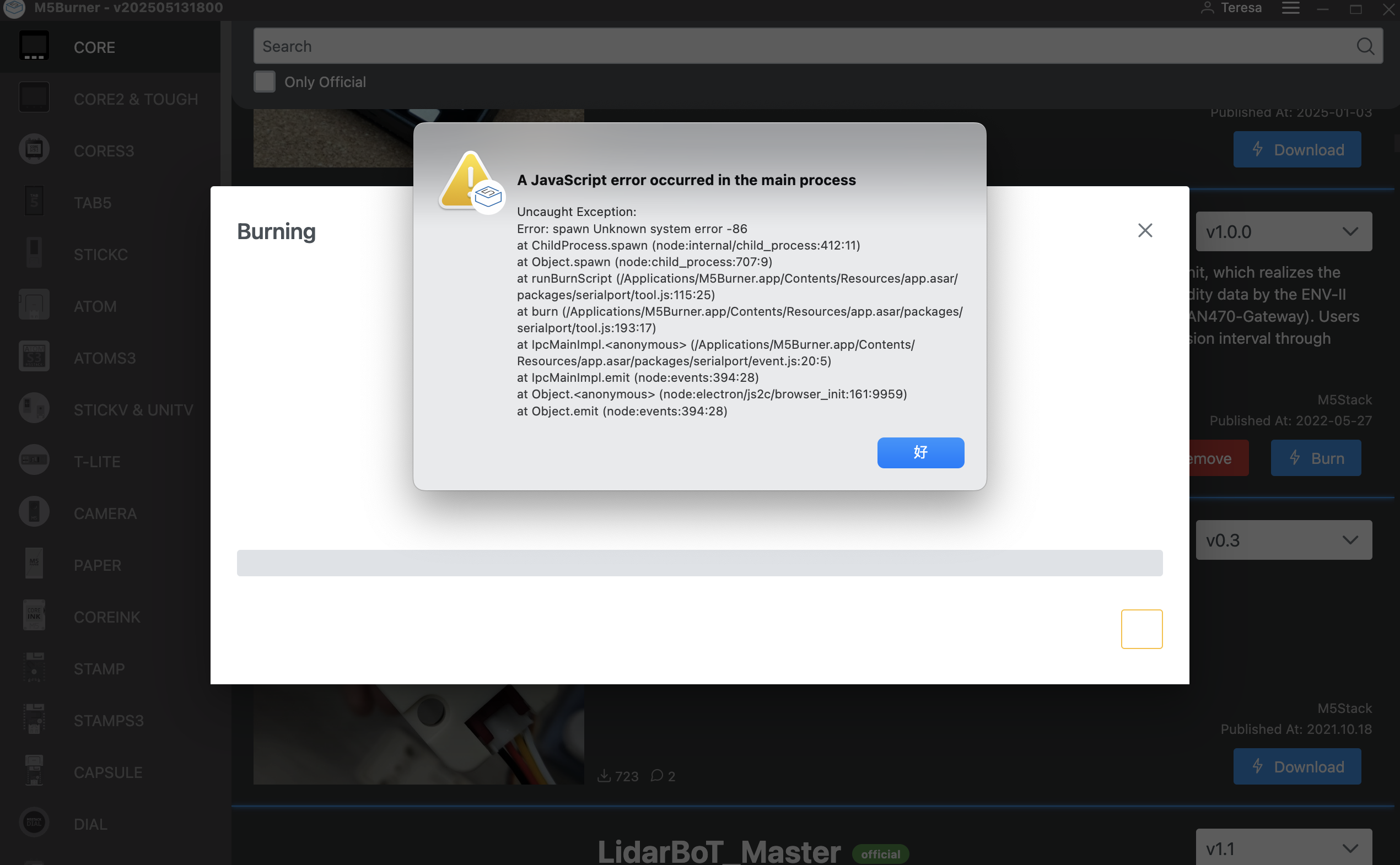
Troubleshooting Steps
Download the esptool-v5.0.1 tool and extract it to obtain the
esptoolexecutable.On the Mac device, open
Finder, click theGotab at the top, locateApplications, and click to open it.
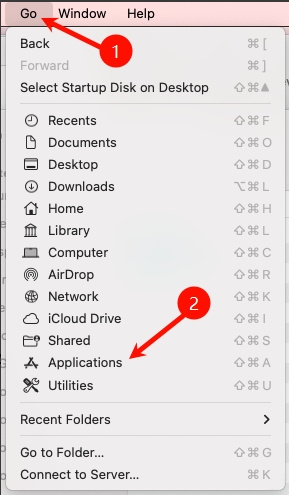
- In the
Applicationsdirectory, findm5burner.app, right-click it, and selectShow Package Contents.
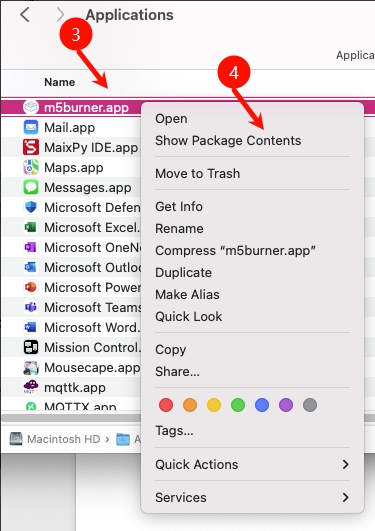
- Navigate to the
Contents/Resources/packages/tooldirectory, and replace the existing esptool with the esptool downloaded in Step 1.
Startup Issues
Issue Description
When launching M5Burner, issues such as no response / white screen / failure to start / no firmware information displayed may occur.

Troubleshooting Steps
Try switching networks, disabling proxy settings, and turning off the system firewall.
Login Issues
Issue Description
A login failure prompt appears when logging into M5Burner.

Troubleshooting Steps
- Check whether the email address and password are entered correctly. If you have confirmed that the input is correct, you can check the verification email. If you did not receive the verification email, you can contact Taobao customer service or send an email to the M5Stack official mailbox at support@m5stack.com for assistance.
- Make sure that any network proxies, firewalls, and ad-blocking software are disabled.
Flashing Issues
Invalid Chip Displayed When Flashing Firmware
Issue Description
The message Invalid Chip is displayed when flashing firmware.

Troubleshooting Steps
First, obtain the MAC address of the device, then provide this address to Taobao customer service or send it to the official M5Stack support email at support@m5stack.com, along with an explanation of the issue. For details on how to obtain the MAC address, please refer to this guide.
Get mac failed Displayed When Flashing Firmware
Issue Description
A Get mac failed error message appears when flashing UiFlow2 firmware.

Troubleshooting Steps
This message usually appears when flashing UiFlow2 firmware and is mainly caused by the device not entering download mode. Please follow the instructions in the device documentation to put the device into download mode to resolve the issue.