

UiFlow Tutorial
UiFlow1 Quick Start
2. Firmware & Program
UiFlow1 Development Guide
Project Management
Use LTE network
UiFlow1 Blockly
Event
UI
Unit
Module
Hat
UiFlow2 Quick Start
2. Firmware & Program
UiFlow2 Development Guide
UI Editor
UiFlow2 Video Column
Module GPS
Example
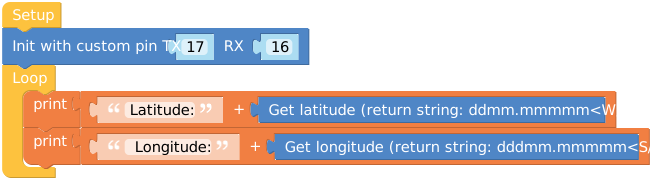
Serial print the device's longitude and latitude
from m5stack import *
from m5ui import *
from uiflow import *
import module

screen = M5Screen()
screen.clean_screen()
screen.set_screen_bg_color(0xFFFFFF)

gps = module.get(module.GPS, (17, 16))

while True:
  print((str('Latitude: ') + str((gps.latitude))))
  print((str(' Longitude: ') + str((gps.longitude))))
wait_ms(2)API

gps.altitude- Get altitude in meters, returns a string

gps.course- Get course information, returns a string. The course refers to the direction relative to the Earth's North Pole

gps.gps_date- Get date information, returns a string

gps.latitude- Get latitude information, returns a string. The format is degrees and minutes (ddmm.mmmmm) and includes the east/west (W/E) designation

gps.latitude_decimal- Get latitude in decimal format, returns a float

gps.longitude- Get longitude information, returns a string. The format is degrees and minutes (dddmm.mmmmm) and includes the north/south (S/N) designation

gps.longitude_decimal- Get longitude in decimal format, returns a float

gps.pos_quality- Get positioning quality, returns a string. Typically used to indicate the quality or accuracy of the GPS signal

gps.satellite_num- Get the number of satellites connected, returns a string

gps.speed_knot- Get speed, returns a string. The speed can be in:
- Knot: A unit of speed commonly used in maritime and aviation.
- Kph: Kilometers per hour, commonly used in land transportation.

gps.gps_time- Get current time, returns a string

module.get(module.GPS, (17, 16))- Initialize with custom pins, TX pin is 17 and RX pin is 16. This is used to set custom serial communication pins
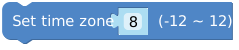
gps.set_time_zone(8)- Set the time zone, the range is -12 to 12. In this example, the time zone is set to 8

gps.uart_port_id(1)- Set the core UART ID number. This is used to specify the UART interface to be used
- 1: Set the core UART ID number to 1.
- 2: Set the core UART ID number to 2.
Page Tools