

UiFlow Tutorial
UiFlow1 Quick Start
2. Firmware & Program
UiFlow1 Development Guide
Project Management
Use LTE network
UiFlow1 Blockly
Event
UI
Unit
Module
Hat
UiFlow2 Quick Start
2. Firmware & Program
UiFlow2 Development Guide
UI Editor
UiFlow2 Video Column
Unit 8Angle
Example
Obtain the device button status of the specified channel button and set the indicator color
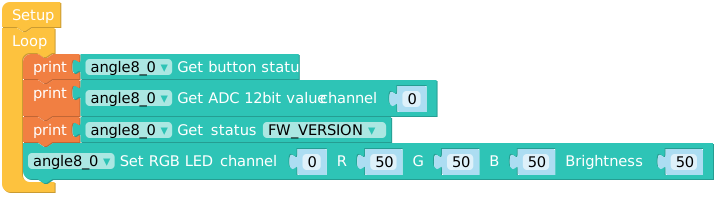
from m5stack import *
from m5ui import *
from uiflow import *
import unit

setScreenColor(0x222222)
angle8_0 = unit.get(unit.ANGLE8, unit.PORTA)

while True:
  print(angle8_0.get_button_status())
  print(angle8_0.get_adc12_raw(0))
  print(angle8_0.read_status(0xFE))
  angle8_0.set_LED_RGB24(0, 50, 50, 50, 50)
wait_ms(2)API

print(angle8_0.get_adc12_raw(0))- Gets a value of 12 as ADC from a channel (0-7)

print(angle8_0.get_adc8_raw(0))- Gets an 8-bit ADC value from a channel

print(angle8_0.get_button_status())- ets an 8-bit ADC value from a channel

angle8_0.init_i2c_address(0x43)- Initializes the I2C communication address of the device (default 0x43)

print(angle8_0.read_status(0xFE))- Get the firmware version

angle8_0.set_i2c_address(0x43)- Set the I2C address

angle8_0.set_LED_RGB24(0, 50, 50, 50, 50)- Set the RGB value and brightness for a channel (0-7)

angle8_0.set_LED_RGB24_From(0, 8, 50, 50, 50, 50)- Set RGB values and brightness for multiple channels (0-7) in batches
Page Tools