
























Arduino入門
2. デバイス&サンプル
3. M5Unified
4. M5GFX
5. 拡張モジュール&サンプル
Unit
Base
Cap
IoT
アクセサリー
Atom DTU NBIoT2 v1.1 Arduino 使用チュートリアル
1. 準備作業
環境設定: Arduino IDE クイックスタートチュートリアル を参照して IDE のインストールを完了し、使用する開発ボードに応じて対応するボードマネージャーと必要なライブラリをインストールしてください。
使用ライブラリ:
注意
GitHub から最新バージョンをダウンロードしてください、ライブラリアドレス: TinyGSM - M5Stack GitHub、Arduino Library からダウンロードしないでください。(疑問がある場合、このチュートリアル を参照してください)
- 使用ハードウェア:
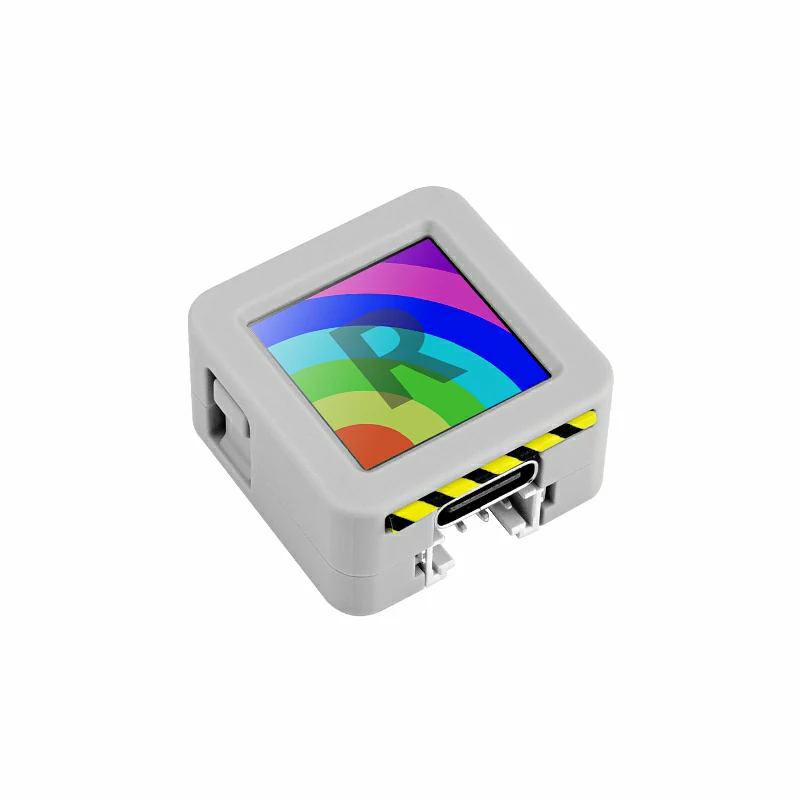
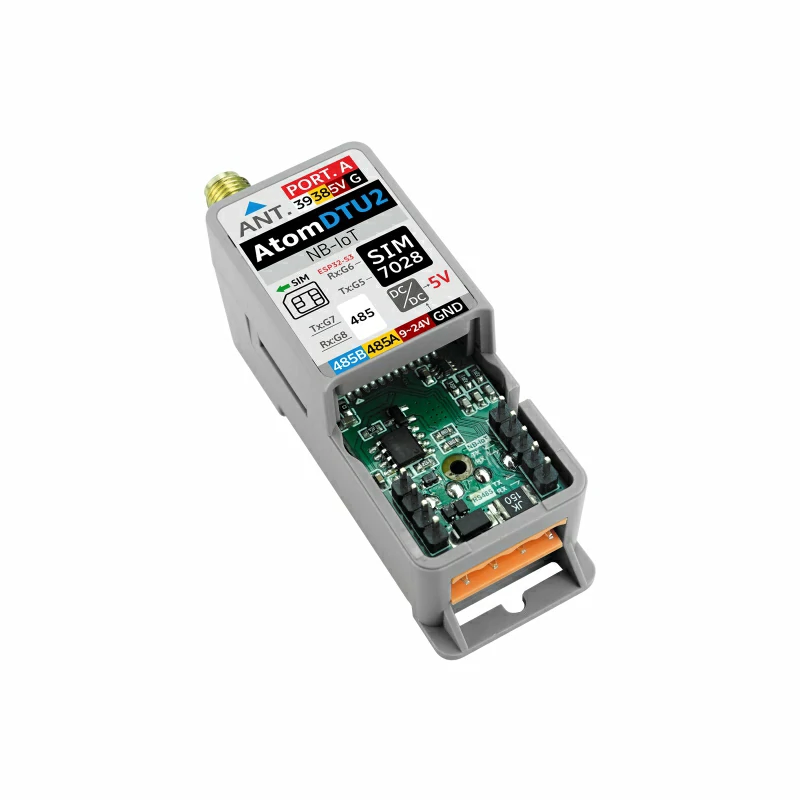
2. 注意事項
SIM カード互換性
このモジュールは Micro SIM 仕様の IoT カード が必要です、カードが Cat-M1 または NB-IoT ネットワークをサポートすることを確認し、以下のオペレーターの認証を受けたカードを優先的に使用することを推奨します:Deutsche Telekom、Vodafone、Telefonica、中国電信、中国移動、中国聯通。
注意
電源が入っている状態で IoT カードを挿入または取り外さないでください、または同じ SIM カードを異なるデバイスで使用しないでください、そうしないと自動カードロックがトリガーされ接続に失敗する可能性があります、ロック後にオペレーターに連絡して解除してください。
ピン互換性
各ホストのピン構成が異なるため、使用前に製品ドキュメントの ピン互換表 を参照し、実際のピン接続に応じてサンプルプログラムを修正してください。
3. サンプルプログラム
- このチュートリアルで使用するメインコントロールデバイスは AtomS3 で、Atom DTU NBIoT v1.1 とペアリングします。このモジュールはシリアルポートで通信します、実際の回路接続に応じてプログラムのピン定義を修正してください、デバイス接続後の対応するシリアル IO は
G5 (TX)、G6 (RX)、RS485 IO はG7 (TX)、G8 (RX)です(以下で定義されていますがルーチンでは実際には使用されていません)。
説明
以下のルーチンはデフォルトで SIM カードの CAT モードを使用します、NB-IoT モードに切り替える必要がある場合、
TinyGSM ライブラリの TinyGsmClientSIM7028.h の 32 行目の MODE_NB_IOT マクロ定義のコメントを外してください;デバッグが必要な場合、同様に TINY_GSM_DEBUG と以下のコードの DUMP_AT_COMMANDS マクロ定義のコメントを外してください。3.1 MQTT
cpp
1 2 3 4 5 6 7 8 9 10 11 12 13 14 15 16 17 18 19 20 21 22 23 24 25 26 27 28 29 30 31 32 33 34 35 36 37 38 39 40 41 42 43 44 45 46 47 48 49 50 51 52 53 54 55 56 57 58 59 60 61 62 63 64 65 66 67 68 69 70 71 72 73 74 75 76 77 78 79 80 81 82 83 84 85 86 87 88 89 90 91 92 93 94 95 96 97 98 99 100 101 102 103 104 105 106 107 108 109 110 111 112 113 114 115 116 117 118 119 120 121 122 123 124 125 126 127 128 129 130 131 132 133 134 135 136 137 138 139 140 141 142 143 144 145 146 147 148 149 150 151 152 153 154 155 156 157 158 159 160 161 162 163 164 165 166 167 168 169 170 171 172 173 174 175 176 177 178 179 180 181 182 183 184 185 186 187 188 189 190 191 192 193 194 195 196 197 198 199 200 201 202 203 204 205 206 207 208 209 210 211 212 213 214 215 216 217 218 219 220 221 222 223 224 225 226 227 228 229 230 231
#include "M5Unified.h"
#define TINY_GSM_MODEM_SIM7028  // Specify to use SIM7028 module; TinyGsm library adapts instruction set based on this macro, must be placed here
#include "PubSubClient.h"
#include "TinyGsmClient.h"
#include "StreamDebugger.h"
#include "M5IOE1.h"

#define SerialMon        Serial             // MCU -> PC for log output
#define MONITOR_BAUDRATE 115200
#define SerialAT         Serial1            // MCU <-> SIM7028 module communication
#define SIM7028_BAUDRATE 115200
#define SIM7028_RESET    -1
#define MCU_TX           5
#define MCU_RX           6
#define RS485_TX         7
#define RS485_RX         8
#define IO_SCL           39
#define IO_SDA           38
#define MQTT_BROKER      "mqtt.m5stack.com" // MQTT broker address
#define MQTT_PORT        1883               // MQTT service port
#define mqtt_devid       "XXXXXXXX"         // MQTT client ID
#define mqtt_pubid       "XXXXXXXX"         // MQTT username
#define mqtt_password    "XXXXXXXX"         // MQTT authentication key
#define UPLOAD_INTERVAL  10000              // Data upload interval, 10s

// M5IOE1 device instance
M5IOE1 ioe1;

// M5IOE1 I2C address (default 0x6F)
#define I2C_ADDR M5IOE1_DEFAULT_ADDR

// Pin definitions for M5IOE1 GPIOs
#define SIM_PWR_EN M5IOE1_PIN_9
#define SIM_RST M5IOE1_PIN_11
#define VIN_ADC M5IOE1_PIN_2

// If you need to see log detail, you can open the following macro definition
// #define DUMP_AT_COMMANDS
// If you need to debug, you can open the following macro definition in TinyGsmClientSIM7028.h line 13
// #define TINY_GSM_DEBUG Serial
#ifdef DUMP_AT_COMMANDS
StreamDebugger debugger(SerialAT, SerialMon);
TinyGsm modem(debugger);
#else
TinyGsm modem(SerialAT);
#endif

TinyGsmClient tcpClient(modem); // Create TCP client based on TinyGsm (MQTT relies on TCP connection)
PubSubClient mqttClient(MQTT_BROKER, MQTT_PORT, tcpClient); // Create MQTT client instance (specify broker, port and TCP client)

void mqttCallback(char *topic, byte *payload, unsigned int len); // Callback function for receiving MQTT messages
bool mqttConnect(void); // Function to establish MQTT connection
void nbConnect(void);   // Function to initialize SIM7028 and connect to NB-IoT network

const char* topicSub = "Atom DTU NBIoT v1.1 Receive"; // MQTT topic for receiving messages (replace with your actual subscribe topic)
const char* topicPub = "Atom DTU NBIoT v1.1 Send";    // MQTT topic for sending messages (replace with your actual publish topic)
int         num               = 0; // Counter for published messages
uint32_t lastReconnectAttempt = 0; // Timestamp for last MQTT reconnection attempt (avoid frequent retries)
bool lastMqttState = false; // Track MQTT connection status
const char apn[] = "cmnbiot";

void log(String info)
{
    SerialMon.println(info);
}

void SIM7028_EN()
{
    if (ioe1.begin(&Wire, I2C_ADDR, IO_SDA, IO_SCL, M5IOE1_I2C_FREQ_100K, M5IOE1_INT_MODE_POLLING) == M5IOE1_OK){
        ioe1.pinMode(SIM_PWR_EN, OUTPUT);
        ioe1.digitalWrite(SIM_PWR_EN, HIGH); // Enable SIM power
        delay(100);
        ioe1.pinMode(SIM_RST, OUTPUT);
        ioe1.digitalWrite(SIM_RST, LOW); // SIM reset
        delay(100);
        ioe1.digitalWrite(SIM_RST, HIGH);
        log("SIM power enabled");
    }
    else{
        log("Failed to enable SIM power");
    }
}

void setup()
{
    M5.begin();
    SerialMon.begin(115200);
    SerialMon.println(">>SIM7028 MQTT TEST");
    SerialAT.begin(SIM7028_BAUDRATE, SERIAL_8N1, MCU_RX, MCU_TX);
    M5.Display.setFont(&fonts::FreeMonoBold9pt7b);
    M5.Display.setTextDatum(middle_center);
    M5.Display.drawString("NBIoT MQTT", M5.Display.width() / 2, 10);
    M5.Display.drawString("Init...", M5.Display.width() / 2, 60);
    delay(500);
    SIM7028_EN();
    nbConnect(); // Initialize SIM7028 module and connect to network
    mqttClient.setServer(MQTT_BROKER, MQTT_PORT);  // Set MQTT broker address and port
    mqttClient.setKeepAlive(120);                  // MQTT keep-alive interval (120 seconds)
    mqttClient.setSocketTimeout(15000);            // TCP connection timeout (15 seconds)
    mqttClient.setCallback(mqttCallback);          // Register MQTT message receive callback
}

void loop()
{
    static unsigned long timer = 0;
    M5.update();

    // Check for MQTT connection status change (connected <-> disconnected)
    if (mqttClient.connected() != lastMqttState) {
        if (mqttClient.connected()) {
            log("=== MQTT CONNECTED ===");
            M5.Display.fillRect(0, 20, 128, 20, TFT_BLACK);
            M5.Display.setTextColor(TFT_GREEN);
            M5.Display.drawString("CONNECTED", M5.Display.width() / 2, 30);
        } else {
            log("=== MQTT DISCONNECTED ===");
            M5.Display.fillRect(0, 20, 128, 20, TFT_BLACK);
            M5.Display.setTextColor(TFT_RED);
            M5.Display.drawString("DISCONNECTED", M5.Display.width() / 2, 30);
        }
        lastMqttState = mqttClient.connected();
    }

    // MQTT reconnection logic (retry every 3 seconds if disconnected)
    if (!mqttClient.connected()) {
        log(">> MQTT NOT CONNECTED");
        log("MQTT state code: " + String(mqttClient.state()));
        M5.Display.fillRect(0, 20, 128, 20, TFT_BLACK);
        M5.Display.setTextColor(TFT_RED);
        M5.Display.drawString("DISCONNECTED", M5.Display.width() / 2, 30);
        uint32_t t = millis();
        if (t - lastReconnectAttempt > 3000L) {
            lastReconnectAttempt = t;
            if (mqttConnect()) {
                lastReconnectAttempt = 0;
            }
        }
        delay(100);
    }

    // Periodic data publishing (triggered when timer expires)
    if (millis() >= timer) {
        timer = millis() + UPLOAD_INTERVAL;
        if (mqttClient.connected()) {
            char jsonBuf[256];
            snprintf(jsonBuf, sizeof(jsonBuf), "SIM7028 MQTT #%d", num);
            log(">> [MQTT SEND] Topic: " + String(topicPub));
            log("Info: " + String(jsonBuf));
            mqttClient.publish(topicPub, jsonBuf);
            M5.Display.fillRect(0, 40, 128, 40, TFT_BLACK);
            M5.Display.setTextColor(TFT_WHITE);
            M5.Display.drawString("Send:", M5.Display.width() / 2, 50);
            M5.Display.drawString("#" + String(num++), M5.Display.width() / 2, 70);
        }
    }

    mqttClient.loop();// Process MQTT incoming messages, maintain connection and handle keep-alive
    delay(10);
}

void mqttCallback(char *topic, byte *payload, unsigned int len)
{
    String payloadStr;
    for (unsigned int i = 0; i < len; i++) {
        payloadStr += (char)payload[i];
    }
    log(">> [MQTT RECEIVE] Topic: " + String(topic) + "\nInfo: " + payloadStr);
    M5.Display.fillRect(0, 90, 128, 38, TFT_BLACK);
    M5.Display.setTextColor(TFT_WHITE);
    M5.Display.drawString("Rece:", M5.Display.width() / 2, 90);
    M5.Display.drawString(String(payloadStr), M5.Display.width() / 2, 110);
}

bool mqttConnect(void)
{
    log(">> Connecting to MQTT broker: " + String(MQTT_BROKER));
    bool status = mqttClient.connect(mqtt_devid, mqtt_pubid, mqtt_password);
    if (!status) {
        log("!! MQTT Connection FAILED, code: " + String(mqttClient.state()));
        return false;
    }
    log(">> MQTT CONNECTED, subscribing: " + String(topicSub));
    mqttClient.subscribe(topicSub);
    return true;
}

void nbConnect(void)
{
    unsigned long start = millis();
    log("Initializing modem...");
    while (!modem.init()) {
        log("waiting...." + String((millis() - start) / 1000) + "s");
    };

    start = millis();
    log("Waiting for network...");
    while (!modem.waitForNetwork()) {
        log("waiting...." + String((millis() - start) / 1000) + "s");
    }
    log("success");

    log("Waiting for GPRS connect...");
    if (!modem.gprsConnect(apn)) {
        log("waiting...." + String((millis() - start) / 1000) + "s");
    }
    log("success");

    // Get CCID for IoT SIM card
    SerialAT.println("AT+CICCID");
    delay(100);  // Short delay for response
    String resp = "";
    while (SerialAT.available()) {
        resp += (char)SerialAT.read();
    }
    int pos = resp.indexOf("+CICCID:");
    if (pos != -1) {
        String ccid = resp.substring(pos + 9, resp.indexOf("\r", pos));
        ccid.trim();
        Serial.println("CCID: " + ccid);
    } else {
        Serial.println("CCID: Not found");
    }

    // Acquire signal strength
    int csq = modem.getSignalQuality();
    Serial.println("Signal quality: " + String(csq));
    // Example Query the IP address of a device
    String ip = modem.getLocalIP();
    log("Device IP address: " + ip);
    log("success");
}3.2 HTTP
cpp
1 2 3 4 5 6 7 8 9 10 11 12 13 14 15 16 17 18 19 20 21 22 23 24 25 26 27 28 29 30 31 32 33 34 35 36 37 38 39 40 41 42 43 44 45 46 47 48 49 50 51 52 53 54 55 56 57 58 59 60 61 62 63 64 65 66 67 68 69 70 71 72 73 74 75 76 77 78 79 80 81 82 83 84 85 86 87 88 89 90 91 92 93 94 95 96 97 98 99 100 101 102 103 104 105 106 107 108 109 110 111 112 113 114 115 116 117 118 119 120 121 122 123 124 125 126 127 128 129 130 131 132 133 134 135 136 137 138 139 140 141 142 143 144 145 146 147 148 149 150 151 152 153 154 155 156 157 158 159 160 161 162 163 164 165 166 167 168 169 170 171 172 173 174 175 176 177 178 179 180
#include "M5Unified.h"
#define TINY_GSM_MODEM_SIM7028  // Specify to use SIM7028 module; TinyGsm library adapts instruction set based on this macro, must be placed here
#include "ArduinoHttpClient.h"
#include "TinyGsmClient.h"
#include "StreamDebugger.h"
#include "M5IOE1.h"

#define SerialMon        Serial             // MCU -> PC for log output
#define MONITOR_BAUDRATE 115200
#define SerialAT         Serial1            // MCU <-> SIM7028 module communication
#define SIM7028_BAUDRATE 115200
#define SIM7028_RESET    -1
#define MCU_TX           5
#define MCU_RX           6
#define RS485_TX         7
#define RS485_RX         8
#define IO_SCL           39
#define IO_SDA           38

// M5IOE1 device instance
M5IOE1 ioe1;

// M5IOE1 I2C address (default 0x6F)
#define I2C_ADDR M5IOE1_DEFAULT_ADDR

// Pin definitions for M5IOE1 GPIOs
#define SIM_PWR_EN M5IOE1_PIN_9
#define SIM_RST M5IOE1_PIN_11
#define VIN_ADC M5IOE1_PIN_2

// If you need to see log detail, you can open the following macro definition
// #define DUMP_AT_COMMANDS
// If you need to debug, you can open the following macro definition in TinyGsmClientSIM7028.h line 13
// #define TINY_GSM_DEBUG Serial
#ifdef DUMP_AT_COMMANDS
StreamDebugger debugger(SerialAT, SerialMon);
TinyGsm modem(debugger);
#else
TinyGsm modem(SerialAT);
#endif

// Server details
const char server[]   = "httpbin.org";
const char resource[] = ""; // API endpoint path
const int port        = 80;    // HTTP port
TinyGsmClient client(modem); // Create TCP client based on TinyGsm (HTTP relies on TCP connection)
HttpClient http(client, server, port); // Create HTTP client instance (specify TCP client, server and port)

void modemConnect(void);// Initialize ML307 module and establish network connection
const char apn[] = "cmnbiot";

void log(String info)
{
    SerialMon.println(info);
}

void SIM7028_EN()
{
    if (ioe1.begin(&Wire, I2C_ADDR, IO_SDA, IO_SCL, M5IOE1_I2C_FREQ_100K, M5IOE1_INT_MODE_POLLING) == M5IOE1_OK){
        ioe1.pinMode(SIM_PWR_EN, OUTPUT);
        ioe1.digitalWrite(SIM_PWR_EN, HIGH); // Enable SIM power
        delay(100);
        ioe1.pinMode(SIM_RST, OUTPUT);
        ioe1.digitalWrite(SIM_RST, LOW); // SIM reset
        delay(100);
        ioe1.digitalWrite(SIM_RST, HIGH);
        log("SIM power enabled");
    }
    else{
        log("Failed to enable SIM power");
    }
}

void setup()
{
    M5.begin();
    SerialMon.begin(115200);
    SerialMon.println(">>SIM7028 HTTP TEST");
    SerialAT.begin(SIM7028_BAUDRATE, SERIAL_8N1, MCU_RX, MCU_TX);
    M5.Display.setFont(&fonts::FreeMonoBold9pt7b);
    M5.Display.setTextDatum(middle_center);
    M5.Display.drawString("NBIoT HTTP", M5.Display.width() / 2, 10);
    M5.Display.drawString("Init...", M5.Display.width() / 2, 60);
    delay(500);
    SIM7028_EN();
    modemConnect();
}

void loop()
{
    // --- GET request ---
    M5.Display.fillRect(0, 30, 128, 98, TFT_BLACK);
    M5.Display.drawString("GET", M5.Display.width() / 2, 40);
    Serial.println("making GET request");

    http.get("/get");
    // read the status code and body of the response
    int statusCode  = http.responseStatusCode();
    String response = http.responseBody();

    Serial.print("Status code: ");
    Serial.println(statusCode);
    Serial.print("Response: ");
    Serial.println(response);
    Serial.println("Wait five seconds");

    M5.Display.drawString("STATUS:", M5.Display.width() / 2, 70);
    M5.Display.drawString(String(statusCode), M5.Display.width() / 2, 100);

    delay(5000);

    // --- POST request ---
    M5.Display.fillRect(0, 30, 128, 98, TFT_BLACK);
    M5.Display.drawString("POST", M5.Display.width() / 2, 40);
    Serial.println("making POST request");

    String contentType = "application/x-www-form-urlencoded";
    String postData    = "name=Alice&age=12";

    http.post("/post", contentType, postData);

    // read the status code and body of the response
    statusCode = http.responseStatusCode();
    response   = http.responseBody();

    Serial.print("Status code: ");
    Serial.println(statusCode);
    Serial.print("Response: ");
    Serial.println(response);
    Serial.println("Wait five seconds");

    M5.Display.drawString("STATUS:", M5.Display.width() / 2, 70);
    M5.Display.drawString(String(statusCode), M5.Display.width() / 2, 100);

    delay(5000);
}

void modemConnect(void)
{
    unsigned long start = millis();
    log("Initializing modem...");
    while (!modem.init()) {
        log("waiting...." + String((millis() - start) / 1000) + "s");
    };

    start = millis();
    log("Waiting for network...");
    while (!modem.waitForNetwork()) {
        log("waiting...." + String((millis() - start) / 1000) + "s");
    }
    log("success");

    log("Waiting for GPRS connect...");
    if (!modem.gprsConnect(apn)) {
        log("waiting...." + String((millis() - start) / 1000) + "s");
    }
    log("success");
    // Get CCID for SIM card
    SerialAT.println("AT+CICCID");
    delay(100);  // Short delay for response
    String resp = "";
    while (SerialAT.available()) {
        resp += (char)SerialAT.read();
    }
    int pos = resp.indexOf("+CICCID:");
    if (pos != -1) {
        String ccid = resp.substring(pos + 9, resp.indexOf("\r", pos));
        ccid.trim();
        Serial.println("CCID: " + ccid);
    } else {
        Serial.println("CCID: Not found");
    }
    // Acquire signal strength
    int csq = modem.getSignalQuality();
    log("Signal quality: " + String(csq));
    // Example Query the IP address of a device
    String ip = modem.getLocalIP();
    log("Device IP address: " + ip);
    log("success");
}4. コンパイルとアップロード
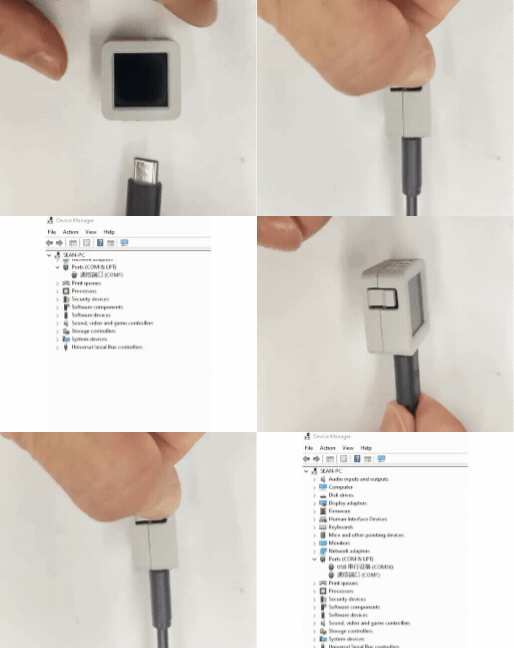
- 1. AtomS3R のリセットボタンを長押し(約 2 秒)して内部の緑色 LED が点灯するまで押し続け、その後離すとデバイスがダウンロードモードに入り、書き込み待ちになります。
説明
異なるデバイスはプログラム前にダウンロードモードに入る必要があります、このステップは異なるメインコントロールデバイスによって異なる場合があります。詳細は Arduino IDE クイックスタートチュートリアル ページの下部のデバイスプログラムダウンロードチュートリアルリストを参照して具体的な操作方法を確認してください。
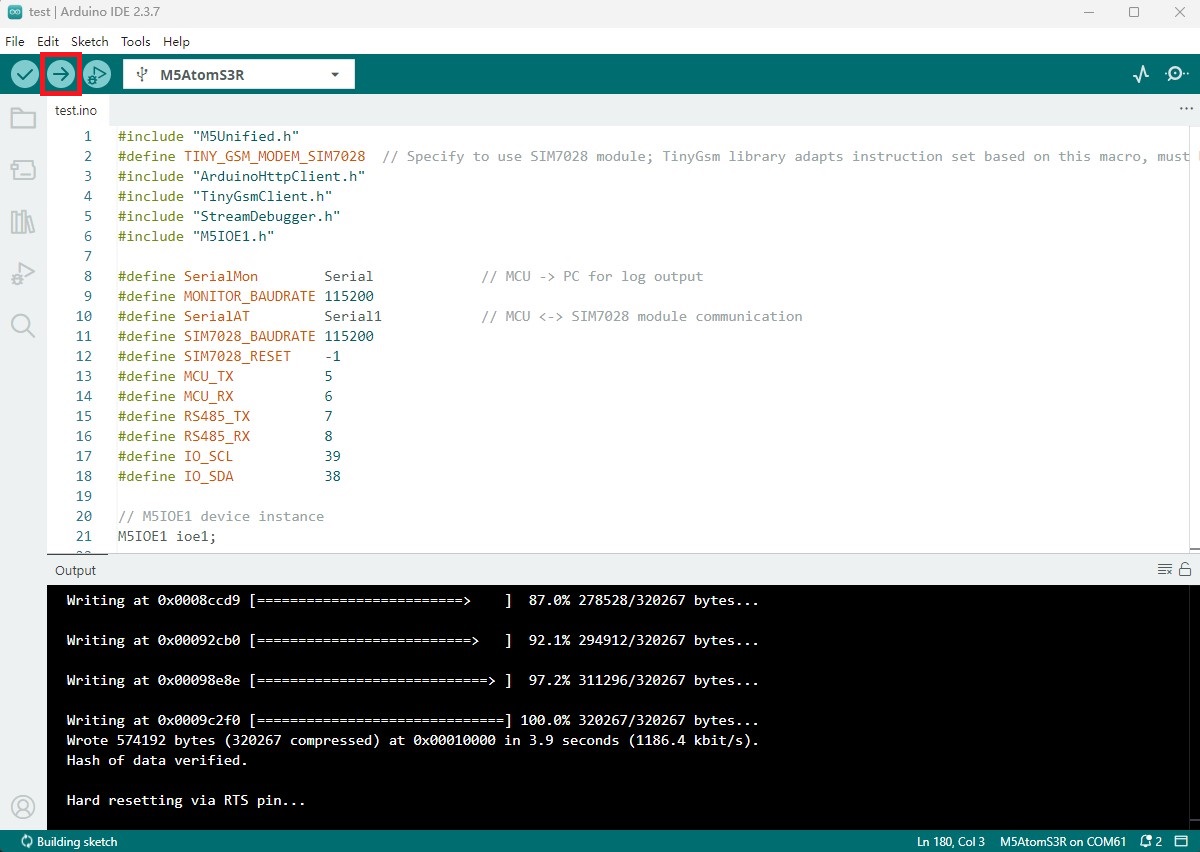
- 2. デバイスポートを選択し、Arduino IDE の左上隅のコンパイルとアップロードボタンをクリックし、プログラムのコンパイルとデバイスへのアップロードが完了するのを待ちます。
5. 通信効果
- MQTT 通信
デバイス電源オン後、シリアルモニターは通信モジュールと MQTT サーバー関連情報を出力し、接続成功後 10 秒ごとにサーバーにメッセージをパブリッシュし、サブスクライブしたトピックにメッセージがある場合、受信したメッセージ内容を印刷します。
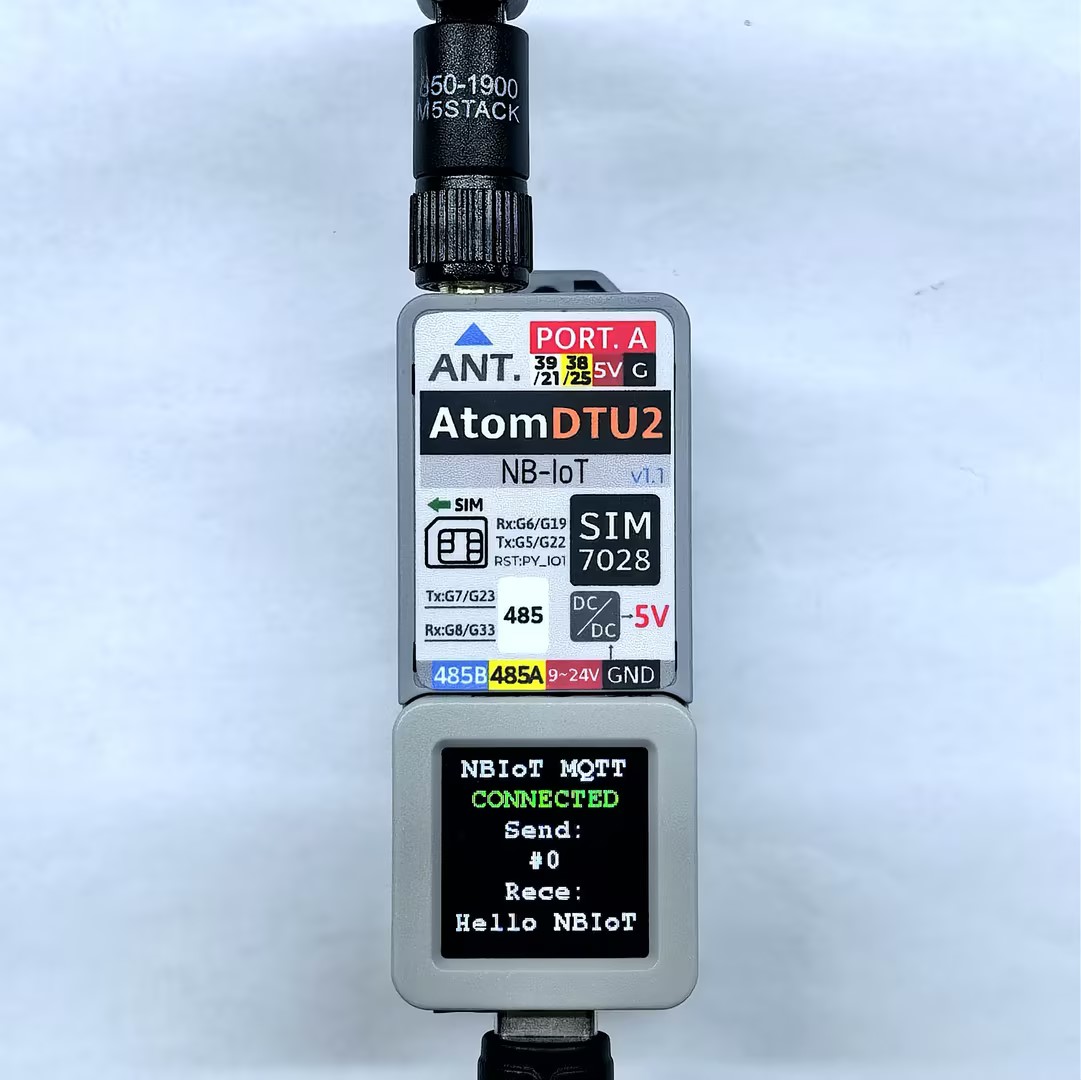
シリアルモニターのフィードバックは以下の通り:
>>SIM7028 MQTT TEST
Initializing modem...
Waiting for network...
success
Waiting for GPRS connect...
success
CCID: 898607B01022C0006068
Signal quality: 18
Device IP address: 100.50.14.152

OK
success
>> MQTT NOT CONNECTED
MQTT state code: -1
>> Connecting to MQTT broker: mqtt.m5stack.com
>> MQTT CONNECTED, subscribing: Atom DTU NBIoT v1.1 Receive
>> [MQTT SEND] Topic: Atom DTU NBIoT v1.1 Send
Info: SIM7028 MQTT! #0
=== MQTT CONNECTED ===
>> [MQTT RECEIVE] Topic: Atom DTU NBIoT v1.1 Receive
Info: Hello NBIoT- HTTP 通信
デバイス電源オン後、シリアルモニターは通信モジュール関連情報を出力し、接続成功後指定サーバーに GET と POST リクエストをループで送信し、メインコントロール画面はリクエストステータスを表示し、シリアルで詳細を確認できます。
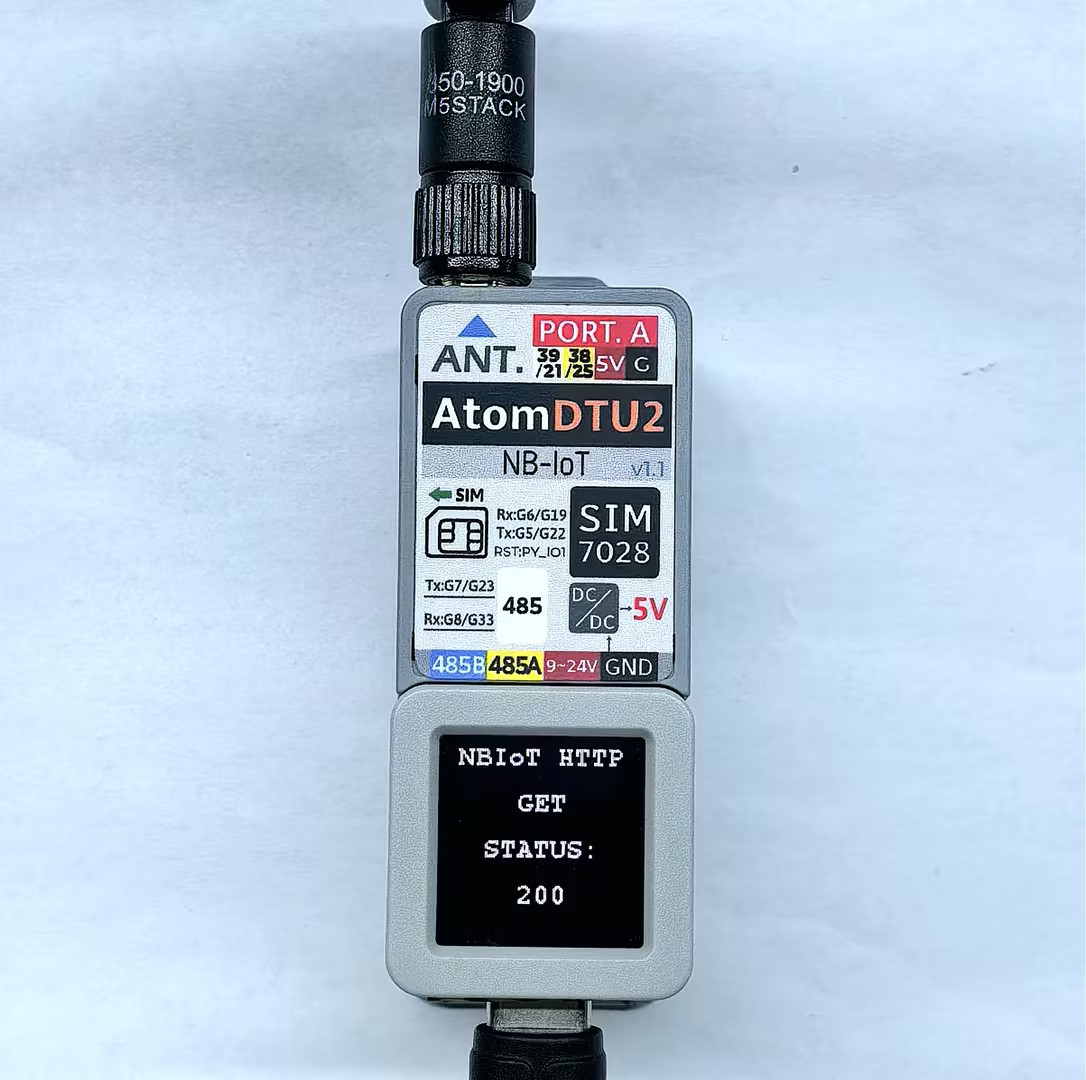
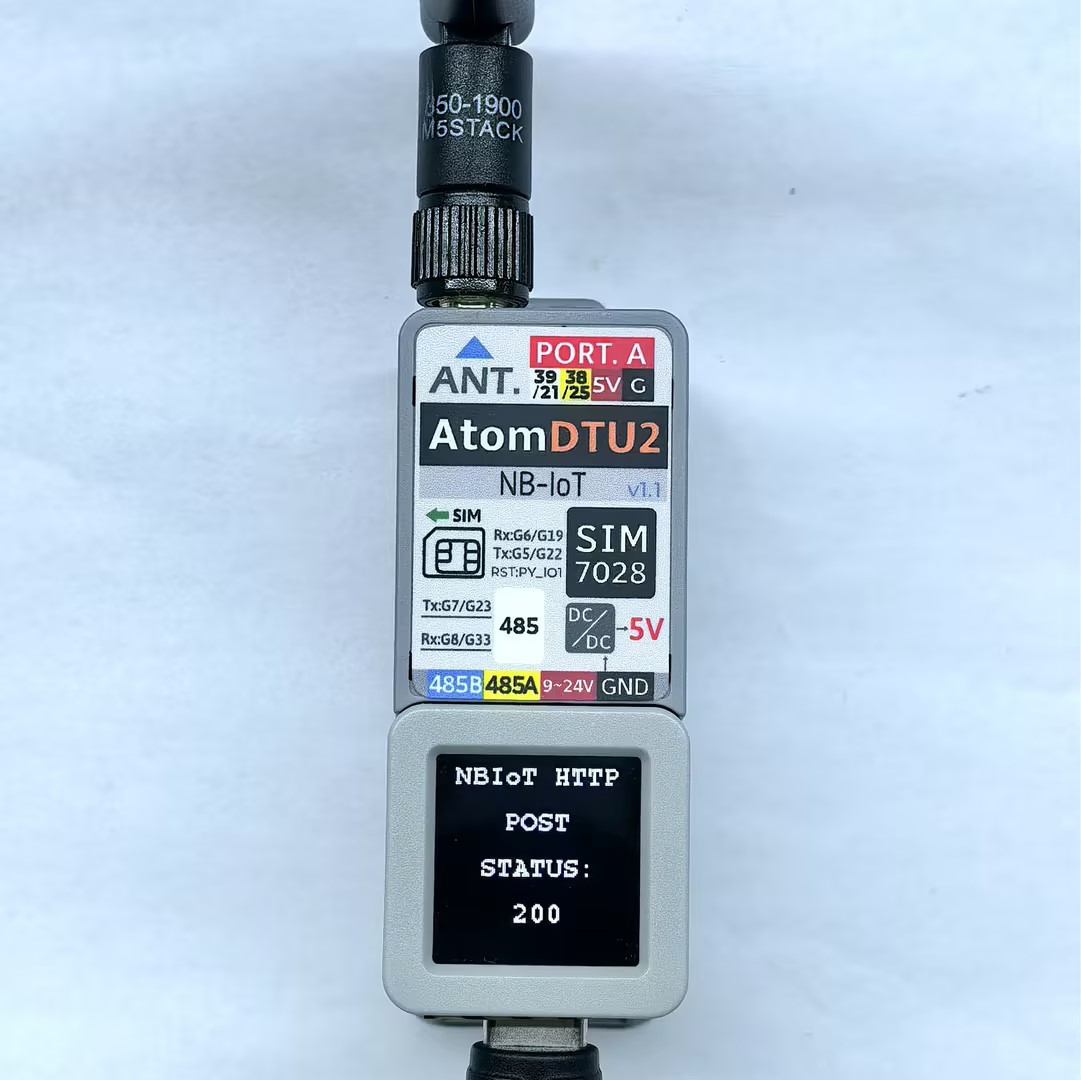
シリアルモニターのフィードバックは以下の通り:
>>SIM7028 HTTP TEST
[M5IOE1] Initializing M5IOE1 with 100KHz (device default)
[M5IOE1] Device UID: 0xDF0E, FW Version: 41
[M5IOE1] Current I2C speed matches user request (100K)
[M5IOE1] I2C config set and verified: sleep=0, speed=100K, wake=falling, pull=on
[M5IOE1] M5IOE1 initialized at address 0x6F (I2C: 100000 Hz)
[M5IOE1] Interrupt mode -> POLLING (pause if I2C sleep on; resume when off)
[M5IOE1] Pin 1 interrupt detached and verified
[M5IOE1] Pin 8 mode set and verified: 0x03
[M5IOE1] Pin 10 mode set and verified: 0x03
SIM power enabled
Initializing modem...
Waiting for network...
success
Waiting for GPRS connect...
success
CCID: 898607B01022C0006068
Signal quality: 16
Device IP address: 100.65.16.242

OK
success
making GET request
Status code: 200
Response: {
  "args": {},
  "headers": {
    "Host": "httpbin.org",
    "User-Agent": "Arduino/2.2.0",
    "X-Amzn-Trace-Id": "Root=1-6961fd12-1549e2280f15840b34db2c4e"
  },
  "origin": "111.55.204.81",
  "url": "http://httpbin.org/get"
}

Wait five seconds
making POST request
Status code: 200
Response: {
  "args": {},
  "data": "",
  "files": {},
  "form": {
    "age": "12",
    "name": "Alice"
  },
  "headers": {
    "Content-Length": "17",
    "Content-Type": "application/x-www-form-urlencoded",
    "Host": "httpbin.org",
    "User-Agent": "Arduino/2.2.0",
    "X-Amzn-Trace-Id": "Root=1-6961fd1a-4d5c07665fbd6ae37525cd8d"
  },
  "json": null,
  "origin": "111.55.204.81",
  "url": "http://httpbin.org/post"
}

Wait five seconds