Arduino Quick Start
2. Devices & Examples
3. M5Unified
4. M5GFX
5. Extensions
Unit
Module
Atomic
Tab5
IoT
Accessories
NanoH2 Zigbee Arduino
NanoH2 Zigbee Arduino–related example programs.
Preparation
Compilation Requirements
- M5Stack Board Manager version >= 3.2.5
- Development board option = M5NanoH2
Zigbee Thermostat (Coordinator)
This example demonstrates how to configure a Zigbee Coordinator and use it as a thermostat to achieve the following functions:
- Run as a Zigbee Coordinator
- Receive temperature sensor data
- Configure the reporting interval of the temperature sensor
- Print temperature and configuration information via serial
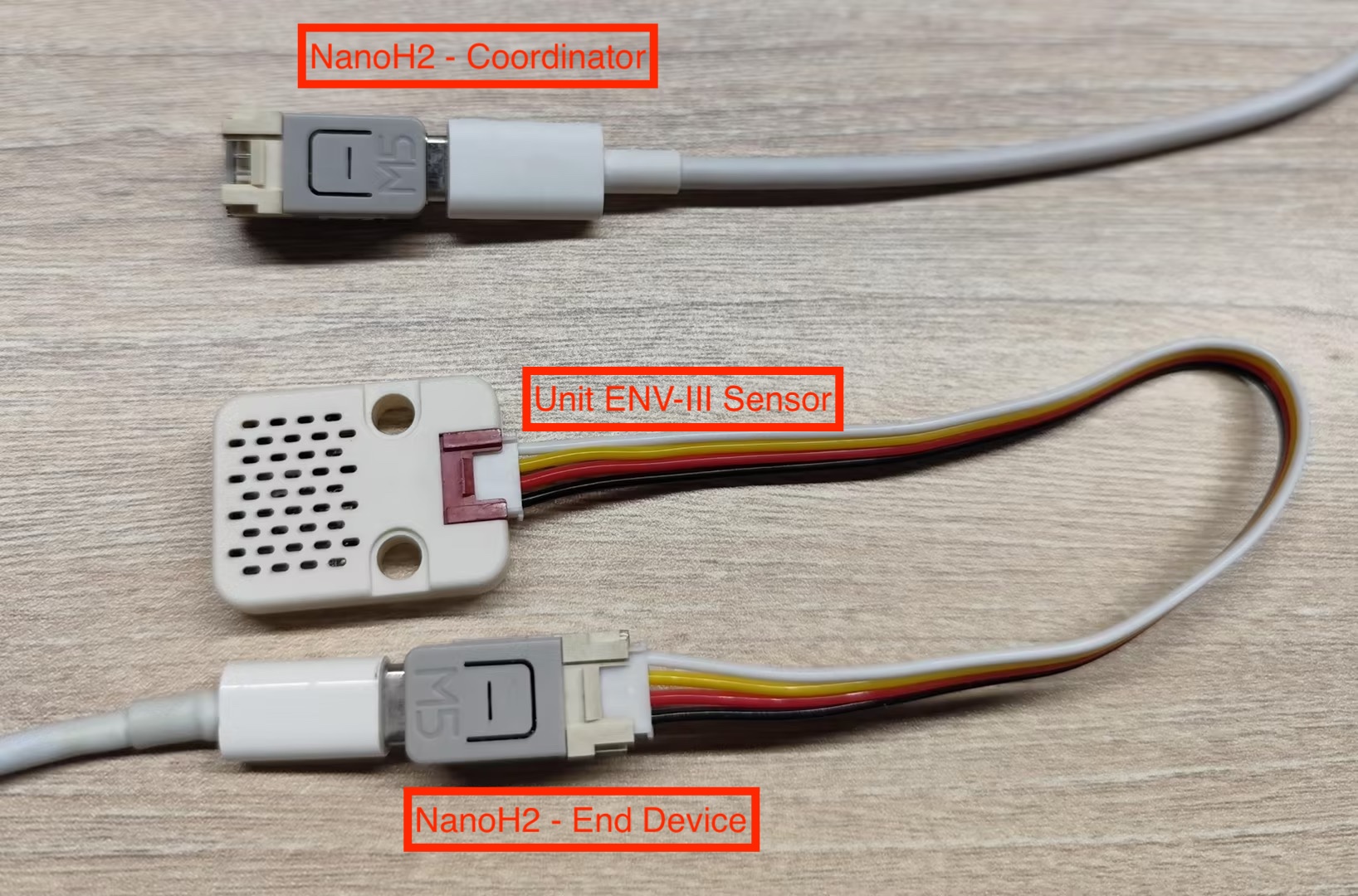
Hardware Requirements
- One NanoH2 as the Zigbee Coordinator (running the thermostat example)
- One NanoH2 as the Zigbee End Device (running the temperature sensor example)
- One Unit ENV-III (for ambient temperature measurement)
Configuration Instructions
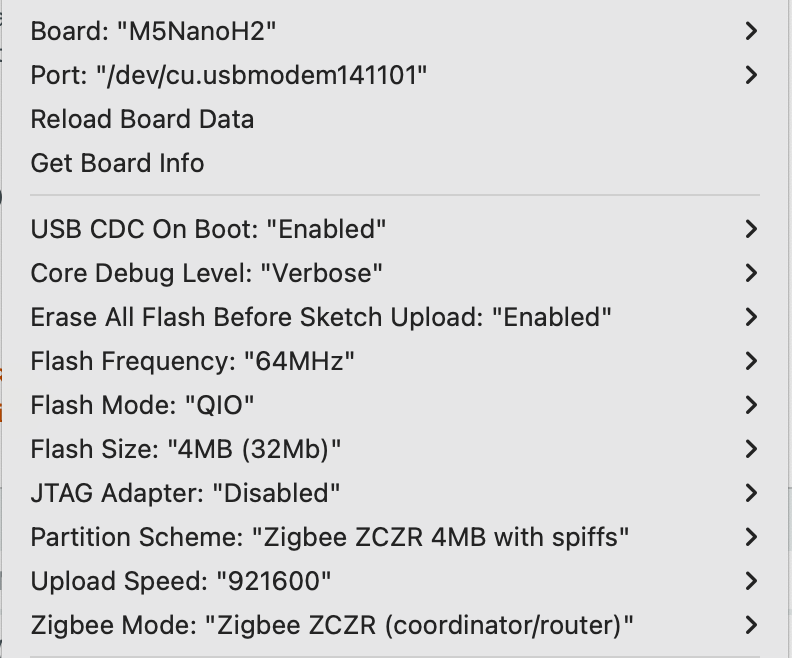
Arduino IDE Tools menu configuration:
- Select the correct development board:
Tools -> Board: M5NanoH2 - Enable USB CDC on Boot:
Tools -> USB CDC On Boot: Enabled - Enable erase before upload:
Tools -> Erase All Flash Before Sketch Upload: Enabled(disabling this may cause connection failures) - Select flash size:
Tools -> Flash Size: 4MB - Select Zigbee partition scheme:
Tools -> Partition Scheme: Zigbee ZCZR 4MB with spiffs - Select coordinator mode:
Tools -> Zigbee mode: Zigbee ZCZR (coordinator/router) - Select the correct serial port:
Tools -> Port
Example Program
#ifndef ZIGBEE_MODE_ZCZR
#error "Zigbee coordinator mode is not selected in Tools->Zigbee mode"
#endif

#include "Zigbee.h"

// Define endpoint number
#define THERMOSTAT_ENDPOINT_NUMBER 5

// Create Zigbee thermostat object (for receiving temperature data)
ZigbeeThermostat zbThermostat = ZigbeeThermostat(THERMOSTAT_ENDPOINT_NUMBER);

// Temperature data variables
float sensor_temp = 0.0;
float sensor_max_temp = 120.0;
float sensor_min_temp = -40.0;
float sensor_tolerance = 1.0;

// Temperature receive callback function
void receiveSensorTemp(float temperature) {
    Serial.printf("Temperature received: %.2f°C\n", temperature);
    sensor_temp = temperature;
}

// Sensor configuration receive callback function
void receiveSensorConfig(float min_temp, float max_temp, float tolerance) {
    Serial.printf("Sensor config: min=%.2f°C, max=%.2f°C, tolerance=%.2f°C\n",
                   min_temp, max_temp, tolerance);
    sensor_min_temp = min_temp;
    sensor_max_temp = max_temp;
    sensor_tolerance = tolerance;
}

void setup() {
    Serial.begin(115200);
    delay(1000);
    Serial.println("=== NanoH2 Zigbee Coordinator ===");

    // Set callback functions
    zbThermostat.onTempReceive(receiveSensorTemp);
    zbThermostat.onConfigReceive(receiveSensorConfig);

    // Configure device information
    zbThermostat.setManufacturerAndModel("Espressif", "ZigbeeThermostat");

    // Add endpoint
    Zigbee.addEndpoint(&zbThermostat);

    // Open network for 180 seconds
    Zigbee.setRebootOpenNetwork(180);

    // Start Coordinator
    Serial.println("Starting Zigbee Coordinator...");
    if (!Zigbee.begin(ZIGBEE_COORDINATOR)) {
        Serial.println("Zigbee failed to start!");
        Serial.println("Rebooting...");
        ESP.restart();
    }

    Serial.println("Zigbee Coordinator started");
    Serial.println("Network is open for 180 seconds");
    Serial.println("Waiting for temperature sensor to bind...");

    // Wait for End Device binding
    while (!zbThermostat.bound()) {
        Serial.print(".");
        delay(500);
    }

    Serial.println("\nTemperature sensor bound successfully!");

    // Configure reporting interval only once
    zbThermostat.setTemperatureReporting(0, 10, 2);
    Serial.println("Temperature reporting configured");

    // Get sensor configuration
    zbThermostat.getSensorSettings();
}

void loop() {
    // Periodically print temperature data
    static uint32_t last_print = 0;
    if (millis() - last_print > 10000) {
        last_print = millis();

        int temp_percent = (int)((sensor_temp - sensor_min_temp) /
                                 (sensor_max_temp - sensor_min_temp) * 100);
        Serial.printf("Current temperature: %.2f°C (%d%%)\n",
                      sensor_temp, temp_percent);
    }

    delay(100);
}Usage Steps
- Flash the thermostat code to the Coordinator device
- Flash the temperature sensor code to the End Device
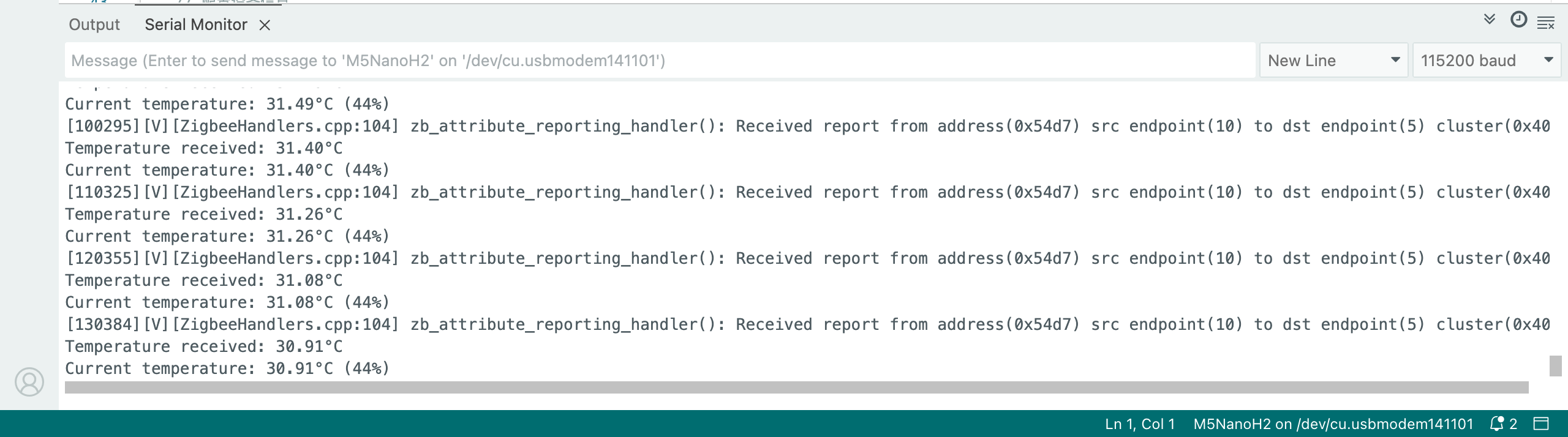
- After the Coordinator starts, it will automatically create a network and wait for devices to join, printing the current temperature every 10 seconds
- Check the temperature data in the Serial Monitor, observe automatic reporting when temperature changes, and verify that configuration information is received correctly
Zigbee Temperature Sensor
This example demonstrates how to configure a Zigbee End Device and use it as a Home Automation (HA) temperature sensor to achieve the following functions:
- Run as a Zigbee End Device
- Read temperature data
- Periodically report temperature to the Coordinator
- Support on-demand temperature reporting
Configuration Instructions
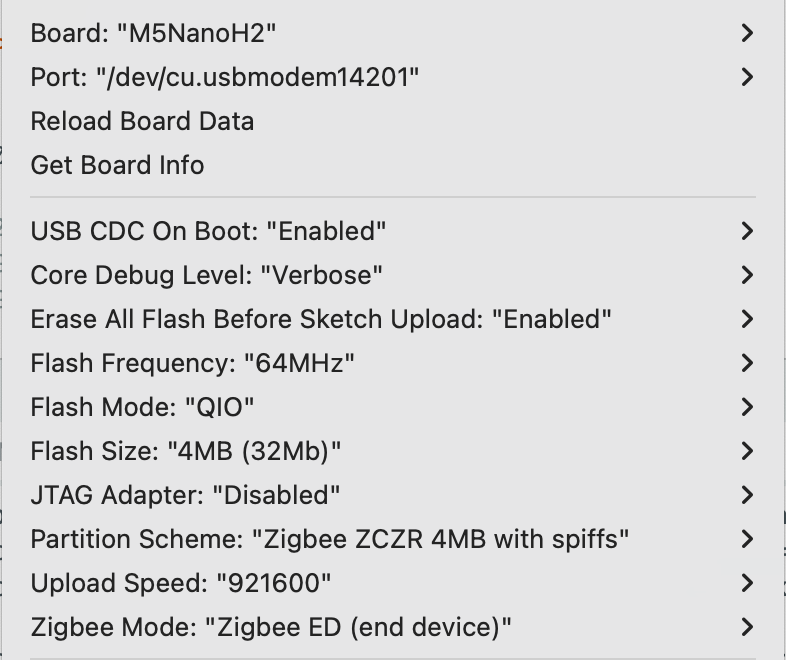
Arduino IDE Tools menu configuration:
- Select the correct development board:
Tools -> Board: M5NanoH2 - Enable USB CDC on Boot:
Tools -> USB CDC On Boot: Enabled - Enable erase before upload:
Tools -> Erase All Flash Before Sketch Upload: Enabled(disabling this may cause connection failures) - Select flash size:
Tools -> Flash Size: 4MB - Select Zigbee partition scheme:
Tools -> Partition Scheme: Zigbee ZCZR 4MB with spiffs - Select End Device mode:
Tools -> Zigbee mode: Zigbee ED (end device) - Select the correct serial port:
Tools -> Port
Example Program
#ifndef ZIGBEE_MODE_ED
#error "Zigbee end device mode is not selected in Tools->Zigbee mode"
#endif

#include "Zigbee.h"
#include <Wire.h>

// Define endpoint number
#define TEMP_SENSOR_ENDPOINT_NUMBER 10

// Define SHT30 I2C address
#define SHT30_I2C_ADDR 0x44

// I2C pins on NanoH2 Grove interface
#define I2C_SDA 2   // G2 = GPIO2 (Yellow wire)
#define I2C_SCL 1   // G1 = GPIO1 (White wire)

// Create Zigbee temperature sensor object
ZigbeeTempSensor zbTempSensor = ZigbeeTempSensor(TEMP_SENSOR_ENDPOINT_NUMBER);

// Temperature data variable
float temperature = 0.0;

// Task synchronization flag
volatile bool temp_updated = false;

/************************ SHT30 temperature read function (temperature only) *****************************/
bool readSHT30Temperature(float &temp) {
    // Send measurement command (high repeatability)
    Wire.beginTransmission(SHT30_I2C_ADDR);
    Wire.write(0x2C);
    Wire.write(0x06);

    if (Wire.endTransmission() != 0) {
        Serial.println("SHT30 communication failed!");
        return false;
    }

    // Wait for measurement completion
    delay(20);

    // Request 6 bytes of data
    Wire.requestFrom(SHT30_I2C_ADDR, 6);

    if (Wire.available() < 6) {
        Serial.println("SHT30 data not available!");
        return false;
    }

    // Read temperature data (first 3 bytes)
    uint8_t tempData[3];
    for (int i = 0; i < 3; i++) {
        tempData[i] = Wire.read();
    }

    // Skip humidity data (last 3 bytes)
    for (int i = 0; i < 3; i++) {
        Wire.read();
    }

    // Calculate temperature
    uint16_t rawTemp = (tempData[0] << 8) | tempData[1];
    temp = -45.0 + 175.0 * ((float)rawTemp / 65535.0);

    // Sanity check
    if (temp < -40.0 || temp > 125.0) {
        Serial.printf("Invalid temperature: %.2f°C\n", temp);
        return false;
    }

    return true;
}

/************************ Temperature read task *****************************/
static void temp_sensor_value_update(void *arg) {
    for (;;) {
        if (readSHT30Temperature(temperature)) {
            Serial.printf("Temperature: %.2f°C\n", temperature);
            zbTempSensor.setTemperature(temperature);
            temp_updated = true;
        } else {
            Serial.println("Failed to read SHT30");
        }
        delay(10000);
    }
}

void setup() {
    Serial.begin(115200);
    delay(1000);
    Serial.println("=== NanoH2 End Device + Unit ENV III (Temperature Only) ===");

    // Initialize I2C
    Wire.begin(I2C_SDA, I2C_SCL, 100000);
    Serial.printf("I2C initialized (SDA=GPIO%d, SCL=GPIO%d, 100kHz)\n",
                  I2C_SDA, I2C_SCL);

    delay(100);

    // Test SHT30 connection
    Serial.println("Scanning I2C bus...");
    Wire.beginTransmission(SHT30_I2C_ADDR);
    uint8_t error = Wire.endTransmission();

    if (error == 0) {
        Serial.println("SHT30 detected at address 0x44");
    } else {
        Serial.printf("SHT30 not found! Error code: %d\n", error);
        Serial.println("\n   Expected wiring:");
        Serial.println("   - Black (GND) → GND");
        Serial.println("   - Red (5V) → 5V");
        Serial.println("   - Yellow (SDA) → G2 (GPIO2)");
        Serial.println("   - White (SCL) → G1 (GPIO1)");
        while (1) delay(1000);
    }

    // Configure Zigbee temperature sensor
    zbTempSensor.setManufacturerAndModel("Espressif", "TempSensor");
    zbTempSensor.setMinMaxValue(-40, 120);
    zbTempSensor.setTolerance(1);

    // Add endpoint
    Zigbee.addEndpoint(&zbTempSensor);

    // Start Zigbee End Device
    Serial.println("Starting Zigbee End Device...");
    if (!Zigbee.begin()) {
        Serial.println("Zigbee failed to start!");
        delay(5000);
        ESP.restart();
    }

    Serial.println("Zigbee End Device started");
    Serial.println("Connecting to network...");

    while (!Zigbee.connected()) {
        Serial.print(".");
        delay(1000);
    }

    Serial.println("\nConnected to Zigbee network!");

    xTaskCreate(temp_sensor_value_update, "temp_sensor_update", 4096, NULL, 10, NULL);

    zbTempSensor.setReporting(1, 0, 1);
    Serial.println("Temperature reporting configured");
}

void loop() {
    if (temp_updated) {
        temp_updated = false;
        zbTempSensor.reportTemperature();
        Serial.println("Temperature reported to Coordinator");
    }
    delay(100);
}Usage Steps
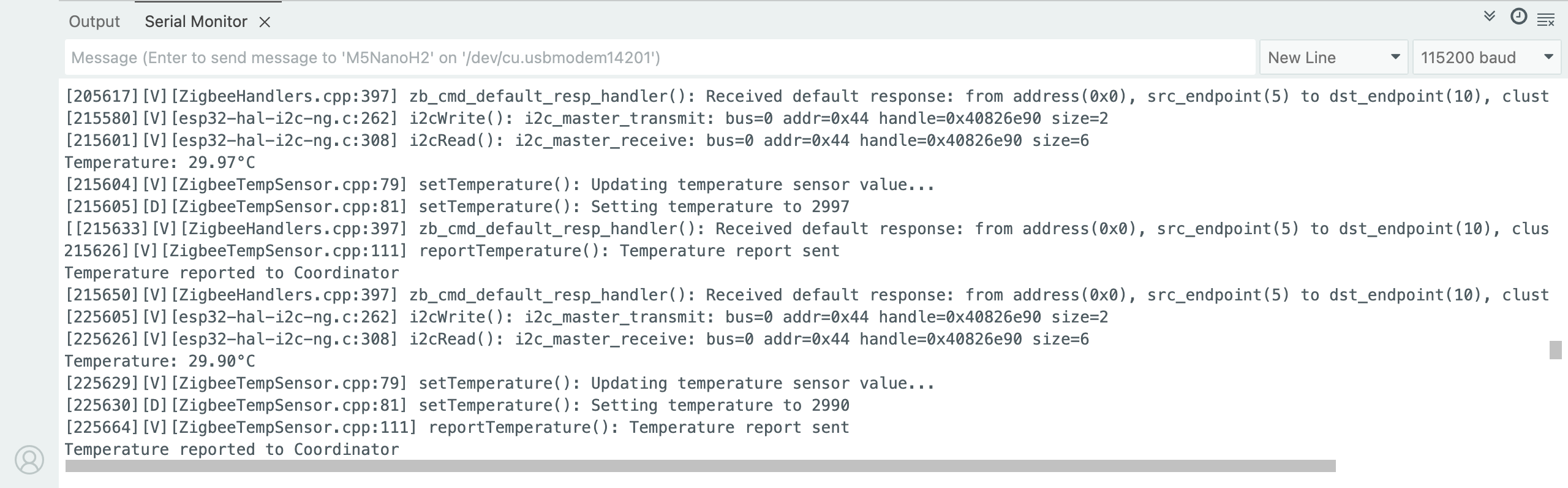
- Ensure the Coordinator is running and has created a network, then flash the temperature sensor code to the End Device
- After startup, the device will automatically search for and join the network, read temperature data every 10 seconds, and automatically report when the temperature change exceeds 0.01°C
Zigbee Network Scan
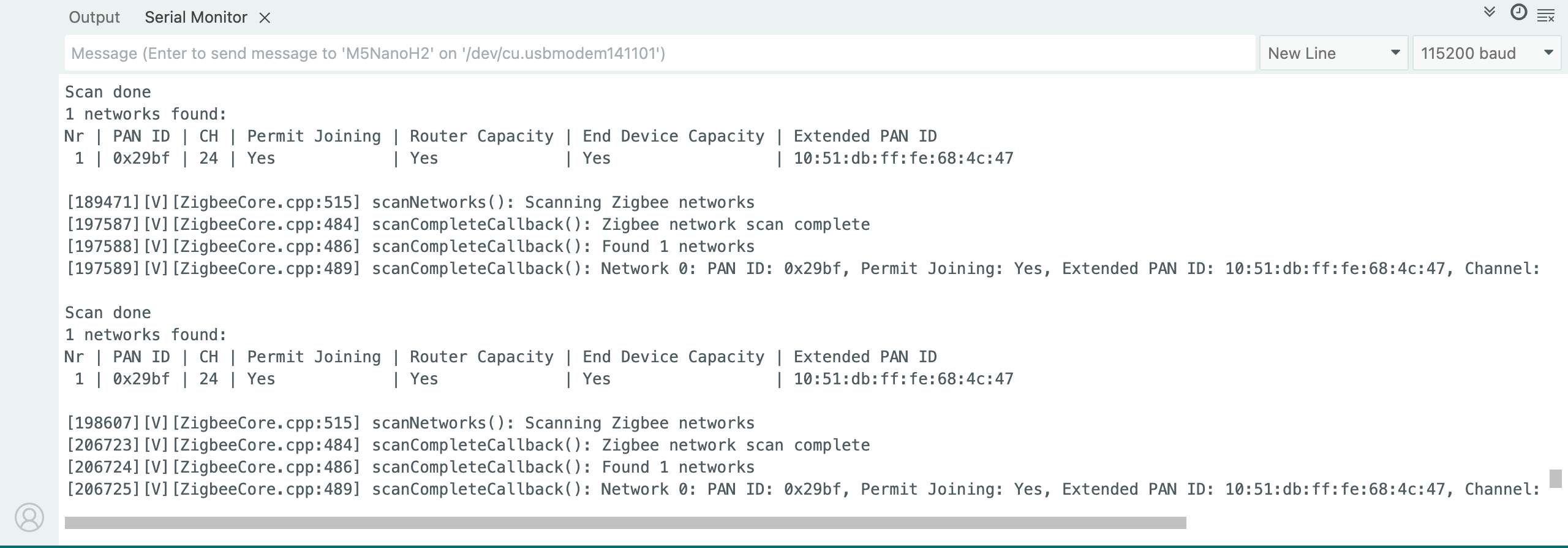
This example demonstrates scanning nearby Zigbee networks and printing network information via serial.
- Ensure there are active Zigbee networks nearby, then flash the scanning code to the device
- After startup, the device will automatically begin scanning, display results after each scan, and then start the next scan
Example Program
#if !defined(ZIGBEE_MODE_ED) && !defined(ZIGBEE_MODE_ZCZR)
#error "Zigbee device mode is not selected in Tools->Zigbee mode"
#endif

#include "Zigbee.h"

#ifdef ZIGBEE_MODE_ZCZR
zigbee_role_t role = ZIGBEE_ROUTER;
#else
zigbee_role_t role = ZIGBEE_END_DEVICE;
#endif

void printScannedNetworks(uint16_t networksFound) {
    if (networksFound == 0) {
        Serial.println("No networks found");
    } else {
        zigbee_scan_result_t *scan_result = Zigbee.getScanResult();
        Serial.println("\nScan done");
        Serial.print(networksFound);
        Serial.println(" networks found:");
        Serial.println("Nr | PAN ID | CH | Permit Joining | Router Capacity | End Device Capacity | Extended PAN ID");
        for (int i = 0; i < networksFound; ++i) {
        Serial.printf("%2d", i + 1);
        Serial.print(" | ");
        Serial.printf("0x%04hx", scan_result[i].short_pan_id);
        Serial.print(" | ");
        Serial.printf("%2d", scan_result[i].logic_channel);
        Serial.print(" | ");
        Serial.printf("%-14.14s", scan_result[i].permit_joining ? "Yes" : "No");
        Serial.print(" | ");
        Serial.printf("%-15.15s", scan_result[i].router_capacity ? "Yes" : "No");
        Serial.print(" | ");
        Serial.printf("%-19.19s", scan_result[i].end_device_capacity ? "Yes" : "No");
        Serial.print(" | ");
        Serial.printf(
            "%02x:%02x:%02x:%02x:%02x:%02x:%02x:%02x",
            scan_result[i].extended_pan_id[7], scan_result[i].extended_pan_id[6],
            scan_result[i].extended_pan_id[5], scan_result[i].extended_pan_id[4],
            scan_result[i].extended_pan_id[3], scan_result[i].extended_pan_id[2],
            scan_result[i].extended_pan_id[1], scan_result[i].extended_pan_id[0]
        );
        Serial.println();
        delay(10);
        }
        Serial.println("");
        Zigbee.scanDelete();
    }
}

void setup() {
    Serial.begin(115200);

    if (!Zigbee.begin(role)) {
        Serial.println("Zigbee failed to start!");
        ESP.restart();
    }

    Serial.println("Setup done, starting Zigbee network scan...");
    Zigbee.scanNetworks();
}

void loop() {
    int16_t ZigbeeScanStatus = Zigbee.scanComplete();
    if (ZigbeeScanStatus < 0) {
        if (ZigbeeScanStatus == ZB_SCAN_FAILED) {
        Serial.println("Zigbee scan has failed. Starting again.");
        delay(1000);
        Zigbee.scanNetworks();
        }
        delay(100);
    } else {
        printScannedNetworks(ZigbeeScanStatus);
        delay(1000);
        Zigbee.scanNetworks();
    }
}Usage Steps
- Ensure there are active Zigbee networks nearby and flash the scanning code to the device
- After startup, the device will automatically begin scanning, display the results after each scan, and then start the next scan
Zigbee Switch (Coordinator)
This example demonstrates how to configure a Zigbee Coordinator, detect ButtonA presses to control the blue LED on an End Device, and achieve the following functions:
- Run as a Zigbee Coordinator
- Detect whether ButtonA is pressed
- Send commands to control the blue LED on the End Device
- Print command information via serial
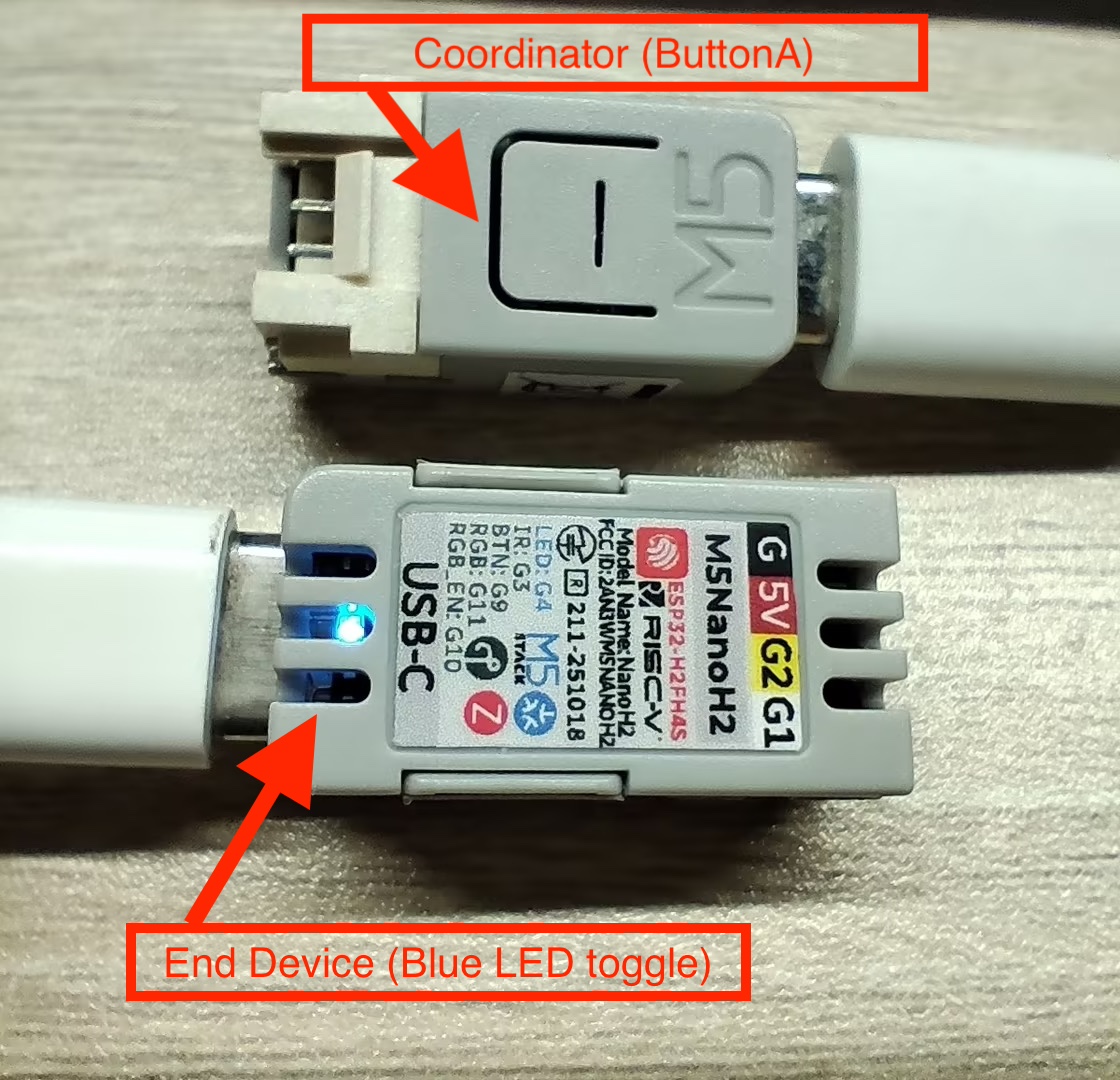
Hardware Requirements
- One NanoH2 as the Zigbee Coordinator (Switch)
- One NanoH2 as the Zigbee End Device (Blue LED toggle)
Configuration Instructions
Arduino IDE Tools menu configuration:
- Select the correct development board:
Tools -> Board: M5NanoH2 - Enable USB CDC on Boot:
Tools -> USB CDC On Boot: Enabled - Enable erase before upload:
Tools -> Erase All Flash Before Sketch Upload: Enabled - Select flash size:
Tools -> Flash Size: 4MB - Select Zigbee partition scheme:
Tools -> Partition Scheme: Zigbee ZCZR 4MB with spiffs - Select coordinator mode:
Tools -> Zigbee mode: Zigbee ZCZR (coordinator/router) - Select the correct serial port:
Tools -> Port
Example Program
#ifndef ZIGBEE_MODE_ZCZR
#error "Zigbee coordinator mode is not selected in Tools->Zigbee mode"
#endif

#include "Zigbee.h"

#define SWITCH_ENDPOINT_NUMBER 5

// ButtonA Pin (GPIO9)
#define BUTTON_A_PIN 9

ZigbeeSwitch zbSwitch = ZigbeeSwitch(SWITCH_ENDPOINT_NUMBER);

bool led_state = false;

unsigned long last_button_press = 0;
const unsigned long debounce_delay = 200;

void setup() {
    Serial.begin(115200);
    delay(1000);
    Serial.println("=== NanoH2 Zigbee Coordinator (ButtonA Controller) ===");

    pinMode(BUTTON_A_PIN, INPUT_PULLUP);
    Serial.println("ButtonA (G9/GPIO9) initialized");

    zbSwitch.setManufacturerAndModel("Espressif", "ZigbeeSwitch");

    Zigbee.addEndpoint(&zbSwitch);

    Zigbee.setRebootOpenNetwork(180);

    Serial.println("Starting Zigbee Coordinator...");
    if (!Zigbee.begin(ZIGBEE_COORDINATOR)) {
        Serial.println("Zigbee failed to start!");
        ESP.restart();
    }

    Serial.println("Zigbee Coordinator started");
    Serial.println("Waiting for LED device to bind...");

    while (!zbSwitch.bound()) {
        Serial.print(".");
        delay(500);
    }

    Serial.println("\nLED device bound successfully!");
    Serial.println("\nPress ButtonA to toggle LED");
}

void loop() {
    if (digitalRead(BUTTON_A_PIN) == LOW) {
        unsigned long current_time = millis();
        if (current_time - last_button_press > debounce_delay) {
            last_button_press = current_time;
            led_state = !led_state;
            if (led_state) {
                Serial.println("Sending ON command...");
                zbSwitch.lightOn();
            } else {
                Serial.println("Sending OFF command...");
                zbSwitch.lightOff();
            }
            while (digitalRead(BUTTON_A_PIN) == LOW) {
                delay(10);
            }
        }
    }
    delay(10);
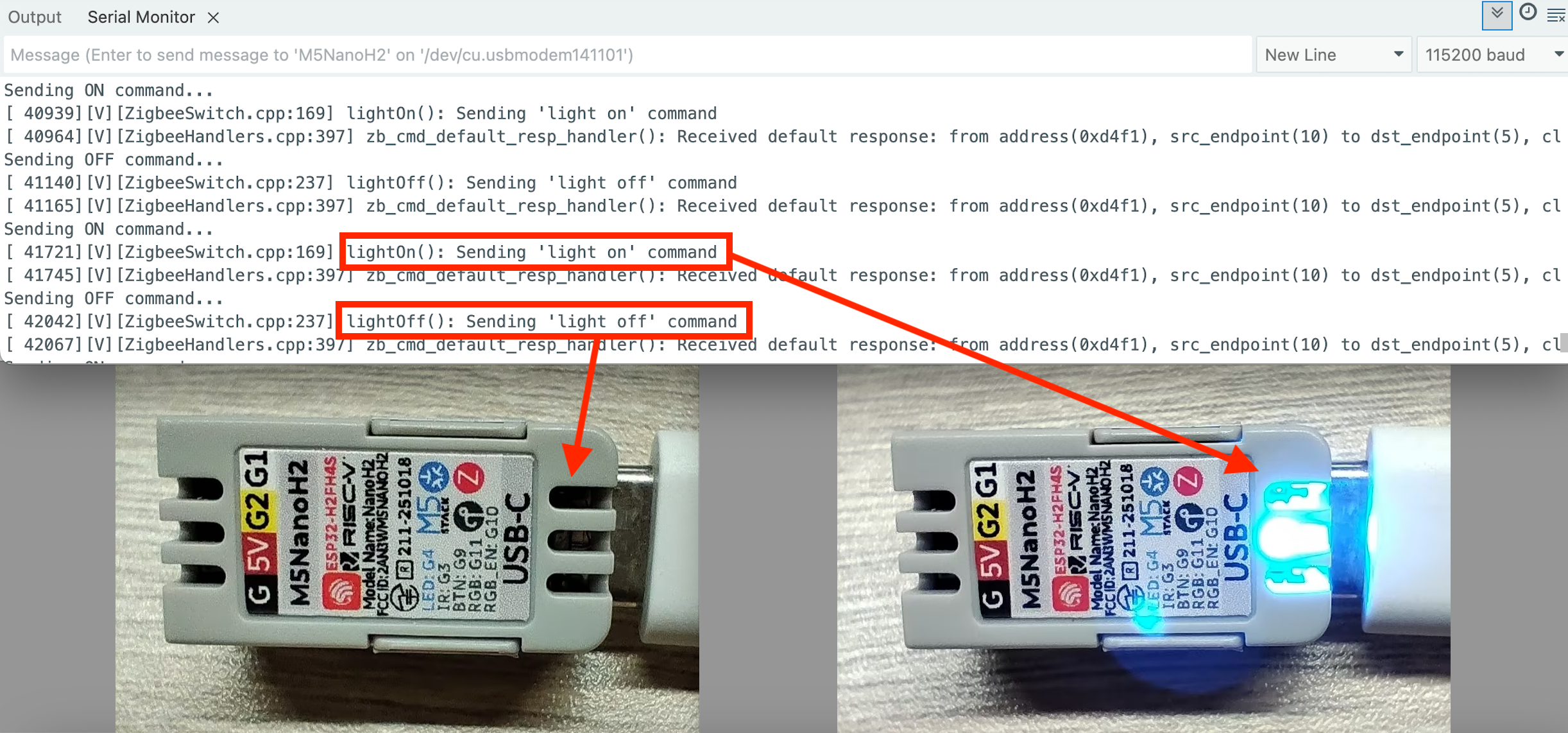
}
Zigbee Command-Controlled Blue LED
This example demonstrates how to configure a Zigbee End Device to receive commands and control the blue LED, achieving the following functions:
- Run as a Zigbee End Device
- Receive commands from the Coordinator
- Print received data via serial
- Turn the blue LED on the NanoH2 on/off
Configuration Instructions
Arduino IDE Tools menu configuration:
- Select the correct development board:
Tools -> Board: M5NanoH2 - Enable USB CDC on Boot:
Tools -> USB CDC On Boot: Enabled - Enable erase before upload:
Tools -> Erase All Flash Before Sketch Upload: Enabled - Select flash size:
Tools -> Flash Size: 4MB - Select Zigbee partition scheme:
Tools -> Partition Scheme: Zigbee ZCZR 4MB with spiffs - Select End Device mode:
Tools -> Zigbee mode: Zigbee ED (end device) - Select the correct serial port:
Tools -> Port
Example Program
#ifndef ZIGBEE_MODE_ED
#error "Zigbee end device mode is not selected in Tools->Zigbee mode"
#endif

#include "Zigbee.h"

#define LIGHT_ENDPOINT_NUMBER 10

// Blue LED Pin (GPIO4)
#define BLUE_LED_PIN 4

ZigbeeLight zbLight = ZigbeeLight(LIGHT_ENDPOINT_NUMBER);

// LED toggle
void setLED(bool state) {
    digitalWrite(BLUE_LED_PIN, state ? HIGH : LOW);
}

void setup() {
    Serial.begin(115200);
    delay(1000);
    Serial.println("=== NanoH2 Zigbee End Device (LED) ===");

    pinMode(BLUE_LED_PIN, OUTPUT);
    digitalWrite(BLUE_LED_PIN, HIGH);
    Serial.println("Blue LED (G4/GPIO4) initialized");

    zbLight.setManufacturerAndModel("Espressif", "ZigbeeLight");
    zbLight.onLightChange(setLED);
    Zigbee.addEndpoint(&zbLight);

    Serial.println("Starting Zigbee End Device...");
    if (!Zigbee.begin()) {
        Serial.println("Zigbee failed to start!");
        delay(5000);
        ESP.restart();
    }

    Serial.println("Zigbee End Device started");
    Serial.println("Searching for Zigbee network...");

    while (!Zigbee.connected()) {
        Serial.print(".");
        delay(1000);
    }

    Serial.println("\nConnected to Zigbee network!");
    Serial.println("Waiting for commands from Coordinator...");
}

void loop() {
    delay(100);
}