

Arduino Quick Start
2. Devices & Examples
3. M5Unified
4. M5GFX
5. Extensions
Unit
Module
Atomic
Tab5
IoT
Accessories
CoreS3 RTC Real-Time Clock
CoreS3 RTC clock related APIs and example programs.
Example Program
Compilation Requirements
- M5Stack Board Manager version >= 3.2.2
- Board selection = M5CoreS3
- M5Unified library version >= 0.2.11
cpp
1 2 3 4 5 6 7 8 9 10 11 12 13 14 15 16 17 18 19 20 21 22 23 24 25 26 27 28 29 30 31 32 33 34 35 36 37 38 39 40 41 42 43 44 45 46 47 48 49 50 51 52 53 54 55 56 57 58 59 60 61 62 63 64 65 66 67 68 69 70 71 72 73 74 75 76 77 78 79 80 81 82 83 84 85 86 87 88 89 90 91 92 93 94 95 96 97 98 99 100 101 102 103 104 105 106 107 108 109 110 111 112 113 114 115 116 117 118 119 120 121 122 123 124 125 126 127
#if defined(ARDUINO)

#define WIFI_SSID     "***********"
#define WIFI_PASSWORD "***********"
#define NTP_TIMEZONE  "UTC-8"
#define NTP_SERVER1   "0.pool.ntp.org"
#define NTP_SERVER2   "1.pool.ntp.org"
#define NTP_SERVER3   "2.pool.ntp.org"

#include <WiFi.h>

// Different versions of the framework have different SNTP header file names and
// availability.
#if __has_include(<esp_sntp.h>)
#include <esp_sntp.h>
#define SNTP_ENABLED 1
#elif __has_include(<sntp.h>)
#include <sntp.h>
#define SNTP_ENABLED 1
#endif

#endif

#ifndef SNTP_ENABLED
#define SNTP_ENABLED 0
#endif

#include <M5Unified.h>

void setup(void) {
    M5.begin();
    M5.Display.setFont(&fonts::FreeMonoBold12pt7b);

    if (!M5.Rtc.isEnabled()) {
        Serial.println("RTC not found.");
        for (;;) {
            vTaskDelay(500);
        }
    }

    Serial.println("RTC found.");

    // It is recommended to set UTC for the RTC and ESP32 internal clocks.
    /* /// setup RTC ( direct setting )
      //                      YYYY  MM  DD      hh  mm  ss
      M5.Rtc.setDateTime( { { 2021, 12, 31 }, { 12, 34, 56 } } );

    //*/

    /// setup RTC ( NTP auto setting )

    M5.Display.println("WiFi Connecting...");

    WiFi.begin(WIFI_SSID, WIFI_PASSWORD);
    while (WiFi.status() != WL_CONNECTED) {
        Serial.print('.');
        delay(500);
    }
    M5.Display.println("WiFi Connected.");
    Serial.println("\r\n WiFi Connected.");

    configTzTime(NTP_TIMEZONE, NTP_SERVER1, NTP_SERVER2, NTP_SERVER3);

#if SNTP_ENABLED
    while (sntp_get_sync_status() != SNTP_SYNC_STATUS_COMPLETED) {
        Serial.print('.');
        delay(1000);
    }
    Serial.println("\r\n NTP Connected.");
    M5.Display.println("NTP Connected");
#else
    delay(1600);
    struct tm timeInfo;
    while (!getLocalTime(&timeInfo, 1000)) {
        Serial.print('.');
    };
#endif

    time_t t = time(nullptr) + 1;  // Advance one second.
    while (t > time(nullptr))
        ;  /// Synchronization in seconds
    M5.Rtc.setDateTime(gmtime(&t));
    M5.Display.clear();
}

void loop(void) {
    static constexpr const char* const wd[7] = {"Sun", "Mon", "Tue", "Wed",
                                                "Thr", "Fri", "Sat"};

    delay(500);

    auto dt = M5.Rtc.getDateTime();
    Serial.printf("RTC   UTC  :%04d/%02d/%02d (%s)  %02d:%02d:%02d\r\n",
                  dt.date.year, dt.date.month, dt.date.date,
                  wd[dt.date.weekDay], dt.time.hours, dt.time.minutes,
                  dt.time.seconds);
    M5.Display.setCursor(0, 0);
    M5.Display.printf("RTC   UTC  :%04d/%02d/%02d (%s)  %02d:%02d:%02d\n",
                          dt.date.year, dt.date.month, dt.date.date,
                          wd[dt.date.weekDay], dt.time.hours, dt.time.minutes,
                          dt.time.seconds);

    /// ESP32 internal timer
    auto t = time(nullptr);
    {
        auto tm = gmtime(&t);  // for UTC.
        Serial.printf("ESP32 UTC  :%04d/%02d/%02d (%s)  %02d:%02d:%02d\r\n",
                      tm->tm_year + 1900, tm->tm_mon + 1, tm->tm_mday,
                      wd[tm->tm_wday], tm->tm_hour, tm->tm_min, tm->tm_sec);
        M5.Display.printf("ESP32 UTC  :%04d/%02d/%02d (%s)  %02d:%02d:%02d\n",
                              tm->tm_year + 1900, tm->tm_mon + 1, tm->tm_mday,
                              wd[tm->tm_wday], tm->tm_hour, tm->tm_min,
                              tm->tm_sec);
    }

    {
        auto tm = localtime(&t);  // for local timezone.
        Serial.printf("ESP32 %s:%04d/%02d/%02d (%s)  %02d:%02d:%02d\r\n",
                      NTP_TIMEZONE, tm->tm_year + 1900, tm->tm_mon + 1,
                      tm->tm_mday, wd[tm->tm_wday], tm->tm_hour, tm->tm_min,
                      tm->tm_sec);
        M5.Display.printf("ESP32 %s:%04d/%02d/%02d (%s)  %02d:%02d:%02d\n",
                              NTP_TIMEZONE, tm->tm_year + 1900, tm->tm_mon + 1,
                              tm->tm_mday, wd[tm->tm_wday], tm->tm_hour,
                              tm->tm_min, tm->tm_sec);
    }
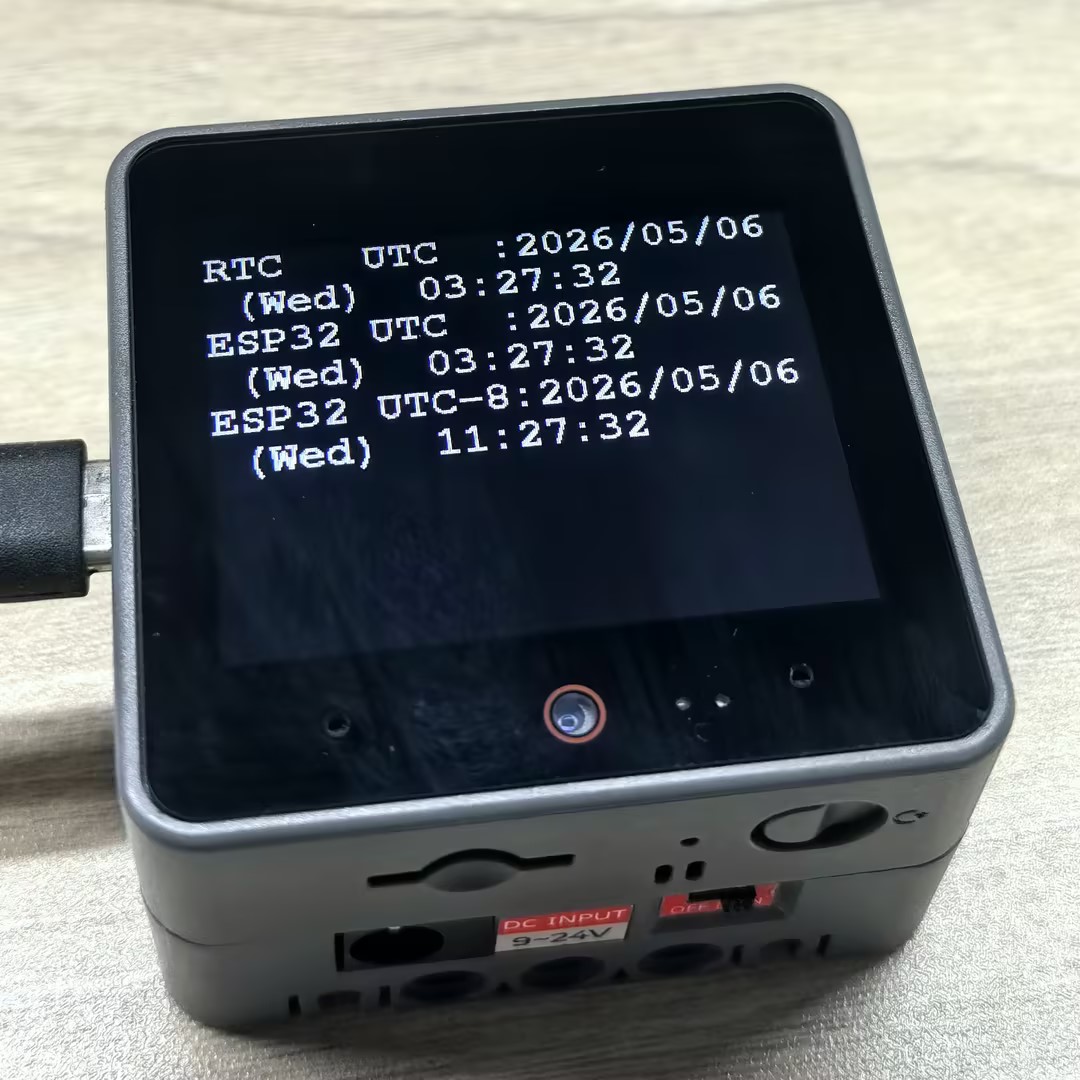
}After successful upload, the CoreS3 screen will display the current RTC time and the ESP32 internal clock time information. The RTC time is set through NTP synchronization, while the ESP32 internal clock is obtained through the system time function. They should be synchronized.
API
The CoreS3 RTC clock section uses the RTC8563_Class from the M5Unified library. For more related APIs, please refer to the documentation below:
Page Tools