Arduino Quick Start
2. Devices & Examples
3. M5Unified
4. M5GFX
5. Extensions
Unit
Module
Atomic
Tab5
IoT
Accessories
StamPLC PoE Arduino Tutorial
1. Preparation
Environment setup: Refer to the Arduino IDE Getting Started Guide to complete IDE installation, and install the corresponding board package and required libraries according to your development board.
Required libraries:
Required hardware:
2. Example
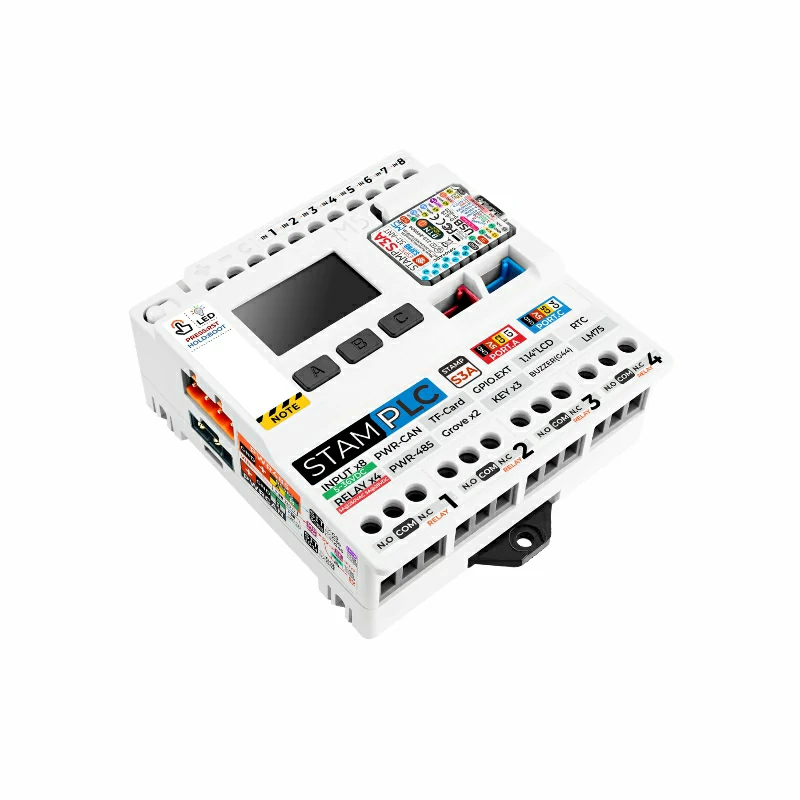
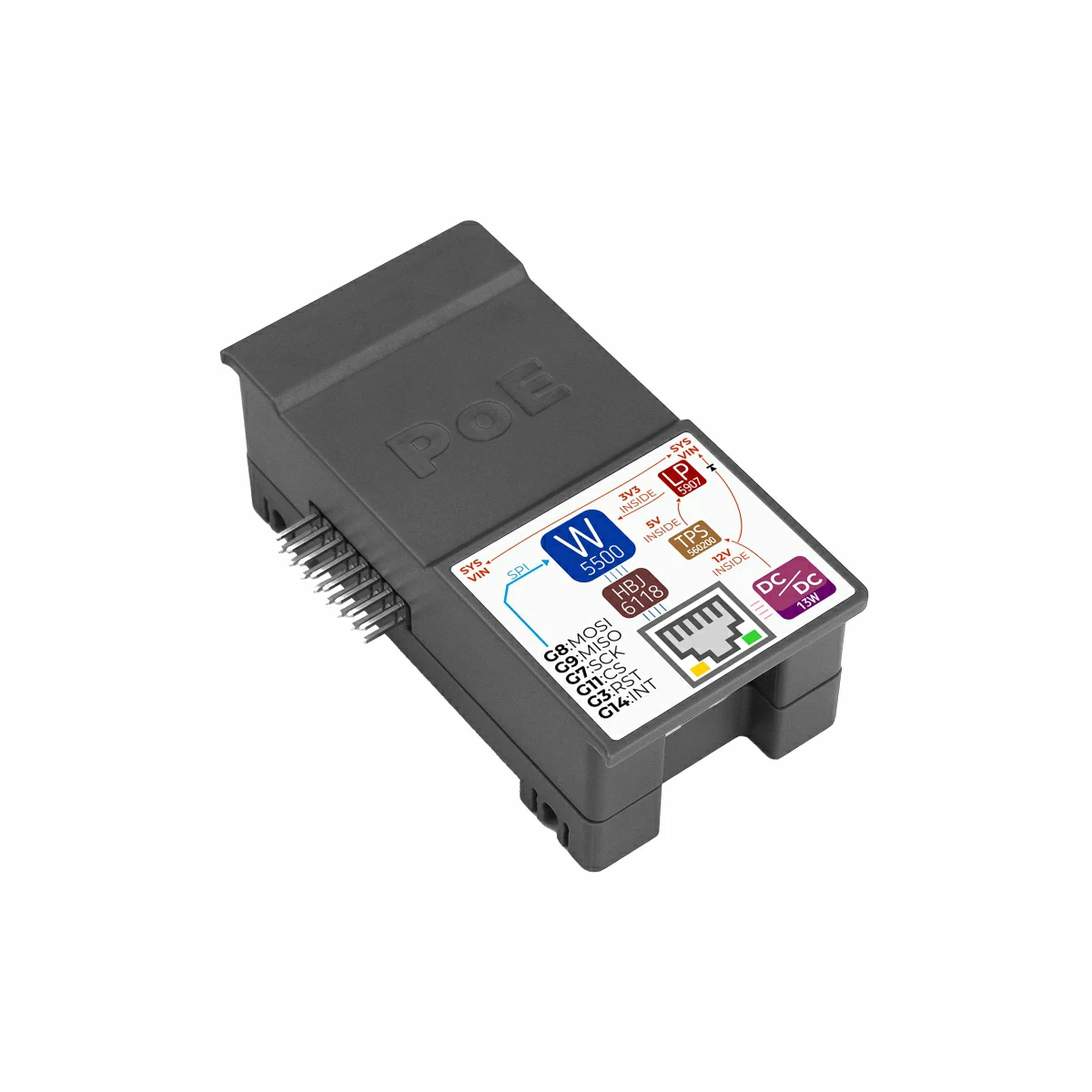
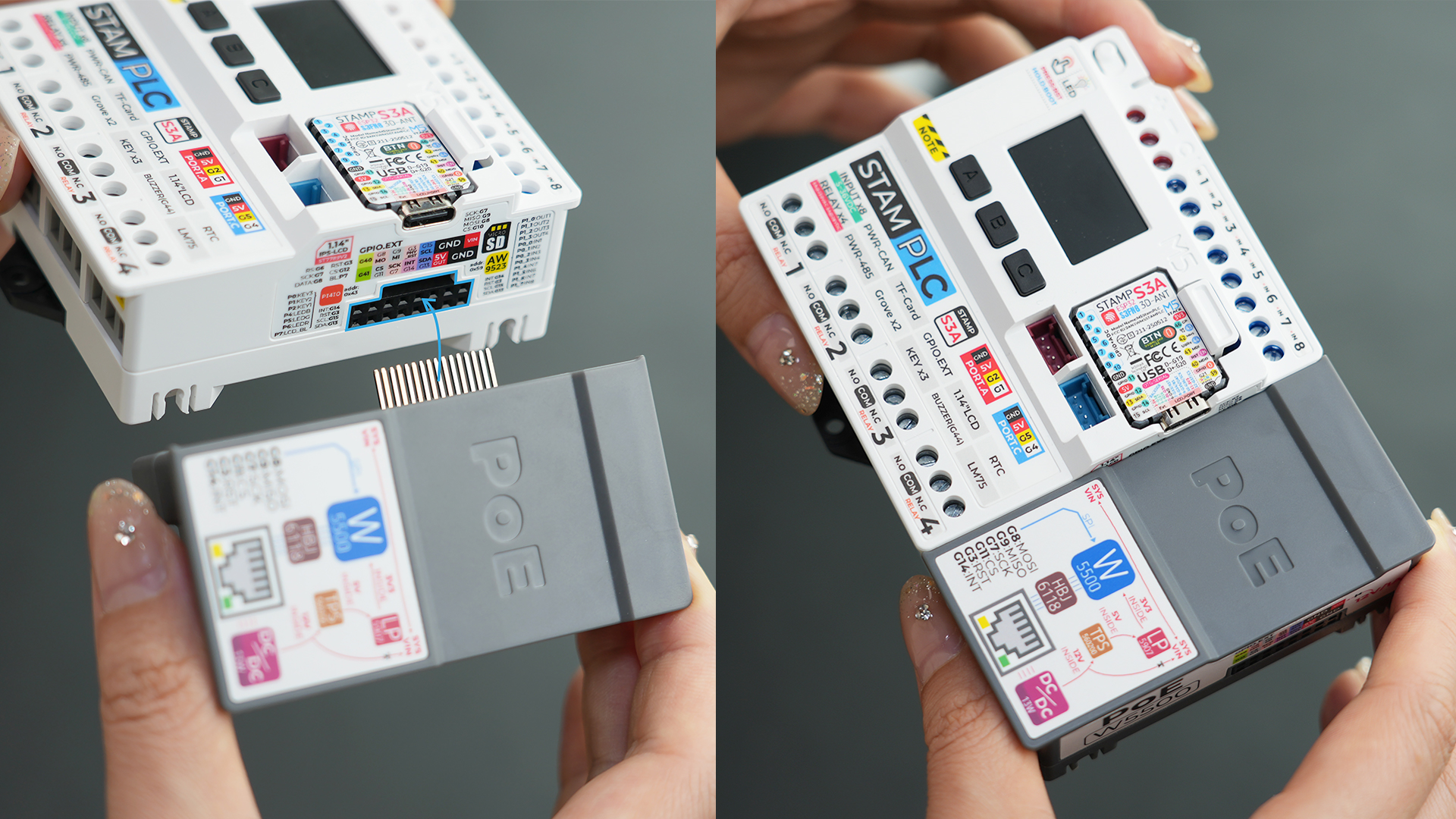
- The main controller used in this tutorial is StamPLC, paired with StamPLC PoE. StamPLC PoE communicates with the host via SPI. Modify the pin definitions in the program according to your actual circuit connections. After connection, the corresponding SPI IOs are
G7 (SCK),G8 (MISO),G9 (MOSI),G11 (CS). The physical wiring and assembly are shown below:
2.1 Web Server
#include "M5StamPLC.h"
#include "SPI.h"
#include "M5_Ethernet.h"

#define SCK  7
#define MISO 9
#define MOSI 8
#define CS   11

byte mac[] = {0xDE, 0xAD, 0xBE, 0xEF, 0xFE, 0x99};// Custom MAC address
// IPAddress ip(192, 168, 1, 177);                   // Static IP (Custom)

EthernetServer server(80);// Initialize the Web Server on port 80 (standard HTTP port)

void setup() {
    M5StamPLC.begin();
    Serial.begin(115200);

    M5StamPLC.Display.setTextDatum(middle_center);
    M5StamPLC.Display.setFont(&fonts::FreeMonoBold12pt7b);

    SPI.begin(SCK, MISO, MOSI, -1);
    Ethernet.init(CS);

    M5StamPLC.Display.drawString("Init...", M5StamPLC.Display.width() / 2, M5StamPLC.Display.height() / 2);
    Serial.println("Initializing...");
    delay(500);

    // To use a static IP, use Ethernet.begin(mac, ip)
    // Attempt to obtain an IP address via DHCP
    while (Ethernet.begin(mac) != 1) {
        Serial.println("Error getting IP address via DHCP, trying again...");
        delay(1000);
    }

    // Check for Ethernet hardware presence
    if (Ethernet.hardwareStatus() == EthernetNoHardware) {
        Serial.println(
            "Ethernet shield was not found. Sorry, can't run without "
            "hardware. :(");
        while (true) {
            delay(1);  // Do nothing if hardware is missing
        }
    }
    if (Ethernet.linkStatus() == LinkOFF) {
        Serial.println("Ethernet cable is not connected.");
    }

    // Start web server
    server.begin();
    Serial.print("Server is at ");
    Serial.println(Ethernet.localIP());
    M5StamPLC.Display.clear();
    M5StamPLC.Display.drawString(Ethernet.localIP().toString().c_str(),
                              M5StamPLC.Display.width() / 2, M5StamPLC.Display.height() / 2);
    delay(1000);
}

long lastTime;

void loop() {
    // Listen for incoming client connections
    EthernetClient client = server.available();
    if (client) {
        Serial.println("new client");

        boolean currentLineIsBlank = true; // HTTP requests terminate with a blank line

        while (client.connected()) {
            if (client.available()) {
                char c = client.read();
                Serial.write(c); // Echo request to Serial Monitor for debugging
                // If you've gotten to the end of the line (received a newline
                // character) and the line is blank, the http request has ended,
                // so you can send a reply
                if (c == '\n' && currentLineIsBlank) {
                    // Send a standard http response header
                    client.println("HTTP/1.1 200 OK");
                    client.println("Content-Type: text/html");
                    client.println(
                        "Connection: close");  // Connection will be closed
                                               // after completion of the
                                               // response
                    client.println("Refresh: 5");  // Refresh the page
                                                   // automatically every 5 sec
                    client.println();
                    client.println("<!DOCTYPE HTML>");
                    client.println("<html>");
                    client.print("<h2>Hello M5Stack User!</h2>");
                    client.println("</html>");
                    break;
                }
                if (c == '\n') {
                    // Starting a new line
                    currentLineIsBlank = true;
                } else if (c != '\r') {
                    // You've gotten a character on the current line
                    currentLineIsBlank = false;
                }
            }
        }
        // Give the web browser time to receive the data
        delay(1);
        // Close the connection:
        client.stop();
        Serial.println("client disconnected");
    }
}After power-on, StamPLC will automatically initialize the StamPLC PoE module and create a web server. The server IP address will be displayed on the screen. Enter this IP address in your browser to see the message Hello M5 User! on the page, and the page will refresh automatically every 5 seconds.
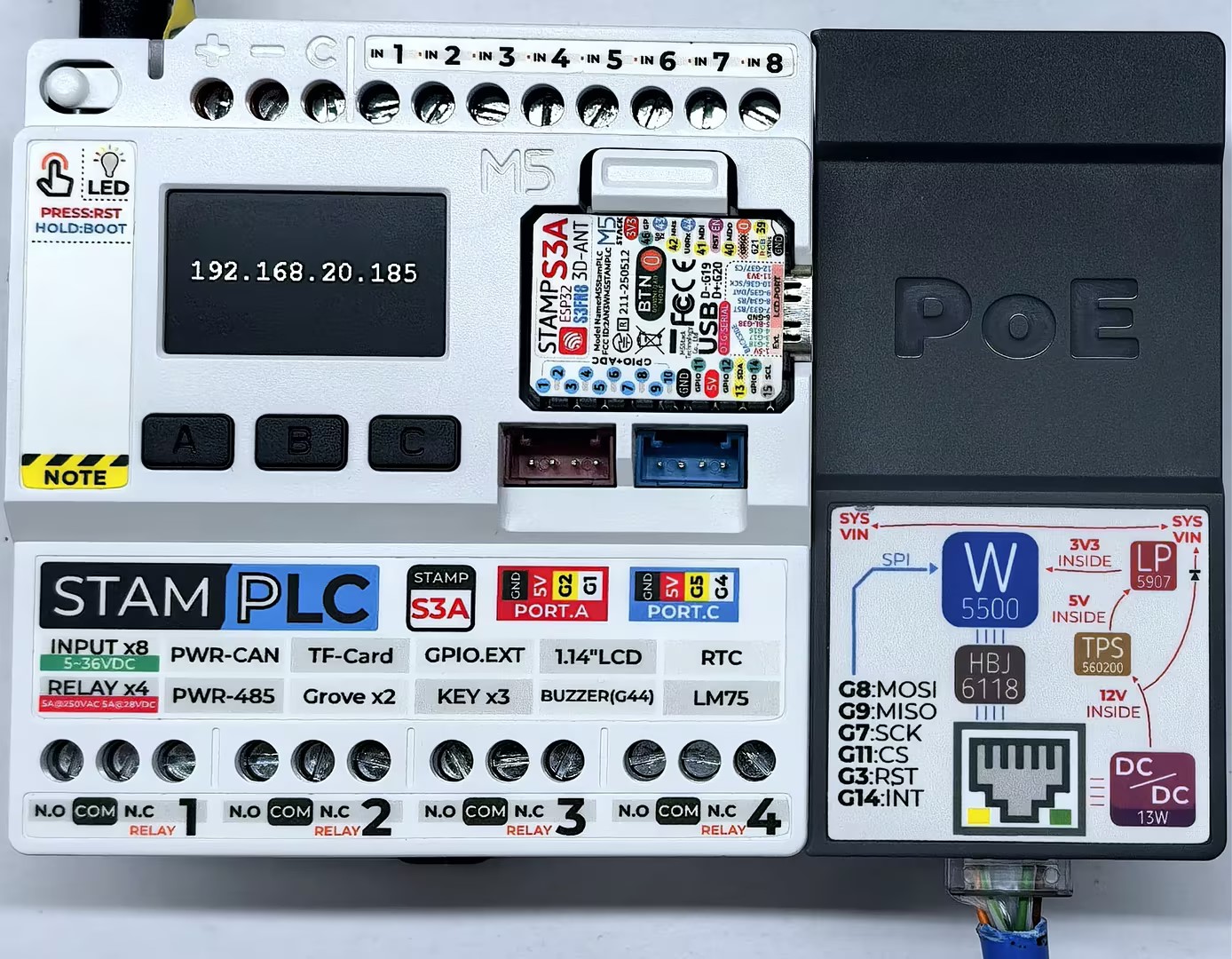
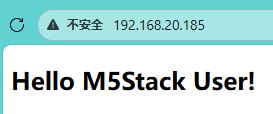
Serial monitor feedback is as follows:
Initializing...
Server is at 192.168.20.185
new client
GET / HTTP/1.1
Host: 192.168.20.185
Connection: keep-alive
Upgrade-Insecure-Requests: 1
User-Agent: Mozilla/5.0 (Windows NT 10.0; Win64; x64) AppleWebKit/537.36 (KHTML, like Gecko) Chrome/143.0.0.0 Safari/537.36 Edg/143.0.0.0
Accept: text/html,application/xhtml+xml,application/xml;q=0.9,image/avif,image/webp,image/apng,*/*;q=0.8,application/signed-exchange;v=b3;q=0.7
Accept-Encoding: gzip, deflate
Accept-Language: zh-CN,zh;q=0.9,en;q=0.8,en-GB;q=0.7,en-US;q=0.6,ja;q=0.5,ko;q=0.4

client disconnected2.2 MQTT
#include "M5StamPLC.h"
#include "SPI.h"
#include "M5_Ethernet.h"
#include "PubSubClient.h"

#define SCK  7
#define MISO 9
#define MOSI 8
#define CS   11

#define PUB_INTERVAL 3000 // Publishing interval  unit: ms
#define PUB_TOPIC "StamPLC_PoE_Send"
#define SUB_TOPIC "StamPLC_PoE_Receive"

byte mac[] = {0xDE, 0xAD, 0xBE, 0xEF, 0xFE, 0x99};// Custom MAC address
// IPAddress ip(192, 168, 1, 177);                   // Static IP (Custom)

const char* mqtt_server = "mqtt.m5stack.com";// MQTT broker address
EthernetClient ethClient;
PubSubClient client(ethClient);

// Handle incoming MQTT messages
void callback(char* topic, byte* payload, unsigned int length) {
    Serial.print("Message arrived [");
    Serial.print(topic);
    Serial.print("] ");

    String payloadStr;
    for (int i = 0; i < length; i++) {
        payloadStr += (char)payload[i];
    }
    Serial.print(payloadStr);
    M5StamPLC.Display.fillRect(0, 0, 240, 68, TFT_BLACK);
    M5StamPLC.Display.drawString("Rece: " + payloadStr, M5StamPLC.Display.width() / 2, 40);

}

// Connect or reconnect to the MQTT broker
void reconnect() {
    // Loop until we're reconnected
    while (!client.connected()) {
        Serial.print("Attempting MQTT connection...\n");
        // Attempt to connect
        if (client.connect("arduinoClient")) {
            Serial.println("Connected");
            M5StamPLC.Display.clear();
            M5StamPLC.Display.drawString("Connected!", M5StamPLC.Display.width() / 2, M5StamPLC.Display.height() / 2);

            // Once connected, publish an announcement...
            client.publish(PUB_TOPIC, "Client connected");
            // ... and resubscribe
            client.subscribe(SUB_TOPIC);
        } else {
            M5StamPLC.Display.clear();
            M5StamPLC.Display.drawString("Failed!", M5StamPLC.Display.width() / 2, 60);
            Serial.print("Failed, rc=");
            Serial.print(client.state());
            Serial.println(" try again in 5s");
            // Wait 5 seconds before retrying
            delay(5000);
        }
    }
}

void setup() {
    M5StamPLC.begin();
    Serial.begin(115200);

    M5StamPLC.Display.setTextColor(GREEN);
    M5StamPLC.Display.setTextDatum(middle_center);
    M5StamPLC.Display.setFont(&fonts::FreeMonoBold12pt7b);

    SPI.begin(SCK, MISO, MOSI, -1);
    Ethernet.init(CS);

    M5StamPLC.Display.drawString("Init...", M5StamPLC.Display.width() / 2, M5StamPLC.Display.height() / 2);
    Serial.println("Initializing...");

    // To use a static IP, use Ethernet.begin(mac, ip)
    // Attempt to obtain an IP address via DHCP
    while (Ethernet.begin(mac) != 1) {
        Serial.println("Error getting IP address via DHCP, trying again...");
        delay(1000);
    }

    // Check for Ethernet hardware presence
    if (Ethernet.hardwareStatus() == EthernetNoHardware) {
        Serial.println(
            "Ethernet shield was not found. Sorry, can't run without :(");
        while (true) {
            delay(1);  // Do nothing if hardware is missing
        }
    }
    if (Ethernet.linkStatus() == LinkOFF) {
        Serial.println("Ethernet cable is not connected.");
    }

    Serial.print("IP Address: ");
    Serial.println(Ethernet.localIP());

    M5StamPLC.Display.clear();
    M5StamPLC.Display.drawString(Ethernet.localIP().toString().c_str(),
                              M5StamPLC.Display.width() / 2, M5StamPLC.Display.height() / 2);
    // --- MQTT Setup ---
    client.setServer(mqtt_server, 1883);
    client.setCallback(callback);// Register incoming message handler
    delay(1000);
}

long lastTime;

void loop() {
    if (!client.connected()) {
        reconnect();
        delay(500);
        M5StamPLC.Display.clear();
        M5StamPLC.Display.drawString("Rece: NULL", M5StamPLC.Display.width() / 2, 40);
    } else {
        client.loop();// Essential to process incoming messages and maintain the heartbeat
        if (millis() - lastTime > PUB_INTERVAL) {
            lastTime = millis();
            M5StamPLC.Display.fillRect(0, 68, 240, 67, TFT_BLACK);
            M5StamPLC.Display.drawString("Send: " + String(lastTime) + " ms", M5StamPLC.Display.width() / 2, 100);
            String data = "Hello world: " + String(lastTime);
            client.publish(PUB_TOPIC, data.c_str());
            Serial.println("Send Message [" PUB_TOPIC "] " + data);
        }
    }
}After power-on, StamPLC will automatically configure the StamPLC PoE module and connect to the MQTT broker. Once connected, it publishes a message to the broker every 3 seconds. The screen shows send/receive information, and the serial monitor provides more details.
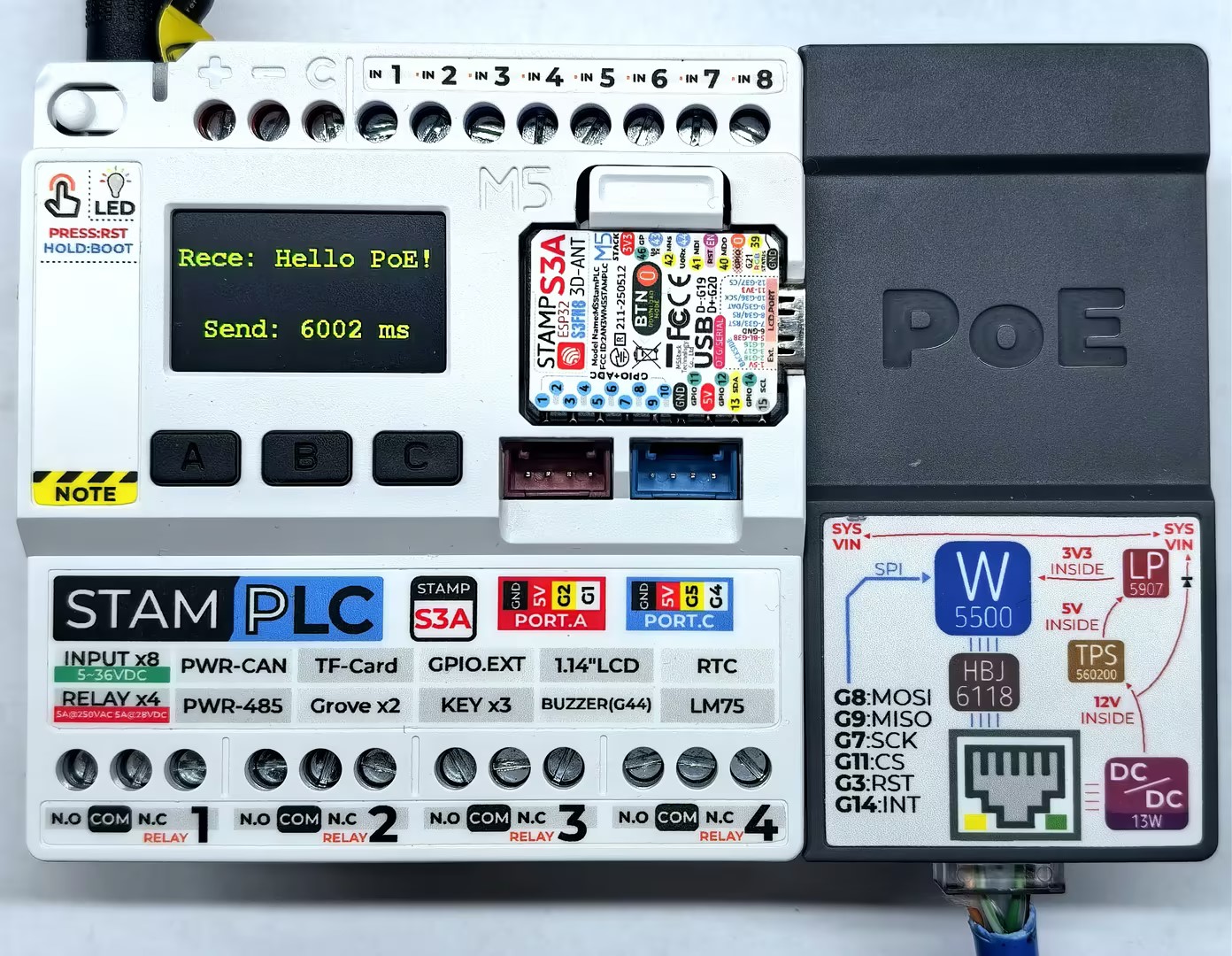
Serial monitor feedback is as follows:
Initializing...
IP Address: 192.168.20.185
Attempting MQTT connection...
Connected
Send Message [StamPLC_PoE_Send] Hello world: 3001
Send Message [StamPLC_PoE_Send] Hello world: 6002
Message arrived [StamPLC_PoE_Receive] Hello PoE!
...2.3 HTTP
#include "M5StamPLC.h"
#include "SPI.h"
#include "M5_Ethernet.h"
#include "ArduinoHttpClient.h"

#define SCK  7
#define MISO 9
#define MOSI 8
#define CS   11

byte mac[] = {0xDE, 0xAD, 0xBE, 0xEF, 0xFE, 0x99};// Custom MAC address
// IPAddress ip(192, 168, 1, 177);                   // Static IP (Custom)

const char* http_server = "httpbin.org";// Target HTTP server
EthernetClient ethClient;
HttpClient client = HttpClient(ethClient, http_server);

void setup() {
    M5StamPLC.begin();
    Serial.begin(115200);

    M5StamPLC.Display.setTextColor(GREEN);
    M5StamPLC.Display.setTextDatum(middle_center);
    M5StamPLC.Display.setFont(&fonts::FreeMonoBold12pt7b);

    SPI.begin(SCK, MISO, MOSI, -1);
    Ethernet.init(CS);

    M5StamPLC.Display.drawString("Init...", M5StamPLC.Display.width() / 2, 60);
    Serial.println("Initializing...");

    // To use a static IP, use Ethernet.begin(mac, ip)
    // Attempt to obtain an IP address via DHCP
    while (Ethernet.begin(mac) != 1) {
        Serial.println("Error getting IP address via DHCP, trying again...");
        delay(1000);
    }

    // Check for Ethernet hardware presence
    if (Ethernet.hardwareStatus() == EthernetNoHardware) {
        Serial.println(
            "Ethernet shield was not found. Sorry, can't run without hardware. :(");
        while (true) {
            delay(1);  // Do nothing if hardware is missing
        }
    }
    if (Ethernet.linkStatus() == LinkOFF) {
        Serial.println("Ethernet cable is not connected.");
    }

    Serial.print("IP Address: ");
    Serial.println(Ethernet.localIP());

    M5StamPLC.Display.clear();
    M5StamPLC.Display.drawString(Ethernet.localIP().toString().c_str(),
                              M5StamPLC.Display.width() / 2, M5StamPLC.Display.height() / 2);
    delay(1000);
}

void loop() {
    // --- GET request ---
    M5StamPLC.Display.clear();
    M5StamPLC.Display.drawString("GET", M5StamPLC.Display.width() / 2, 20);
    Serial.println("making GET request");

    client.get("/get");
    // read the status code and body of the response
    int statusCode  = client.responseStatusCode();
    String response = client.responseBody();

    Serial.print("Status code: ");
    Serial.println(statusCode);
    Serial.print("Response: ");
    Serial.println(response);
    Serial.println("Wait five seconds");

    M5StamPLC.Display.drawString("STATUS:", M5StamPLC.Display.width() / 2, 60);
    M5StamPLC.Display.drawString(String(statusCode), M5StamPLC.Display.width() / 2, 100);

    delay(5000);

    // --- POST request ---
    M5StamPLC.Display.clear();
    M5StamPLC.Display.drawString("POST", M5StamPLC.Display.width() / 2, 20);
    Serial.println("making POST request");

    String contentType = "application/x-www-form-urlencoded";
    String postData    = "name=Alice&age=12";

    client.post("/post", contentType, postData);

    // read the status code and body of the response
    statusCode = client.responseStatusCode();
    response   = client.responseBody();

    Serial.print("Status code: ");
    Serial.println(statusCode);
    Serial.print("Response: ");
    Serial.println(response);
    Serial.println("Wait five seconds");

    M5StamPLC.Display.drawString("STATUS:", M5StamPLC.Display.width() / 2, 60);
    M5StamPLC.Display.drawString(String(statusCode), M5StamPLC.Display.width() / 2, 100);

    delay(5000);
}After power-on, StamPLC will automatically configure the StamPLC PoE module and connect to the HTTP server, then continuously send GET and POST requests in a loop. The main screen displays the request status, and the serial monitor provides more details.
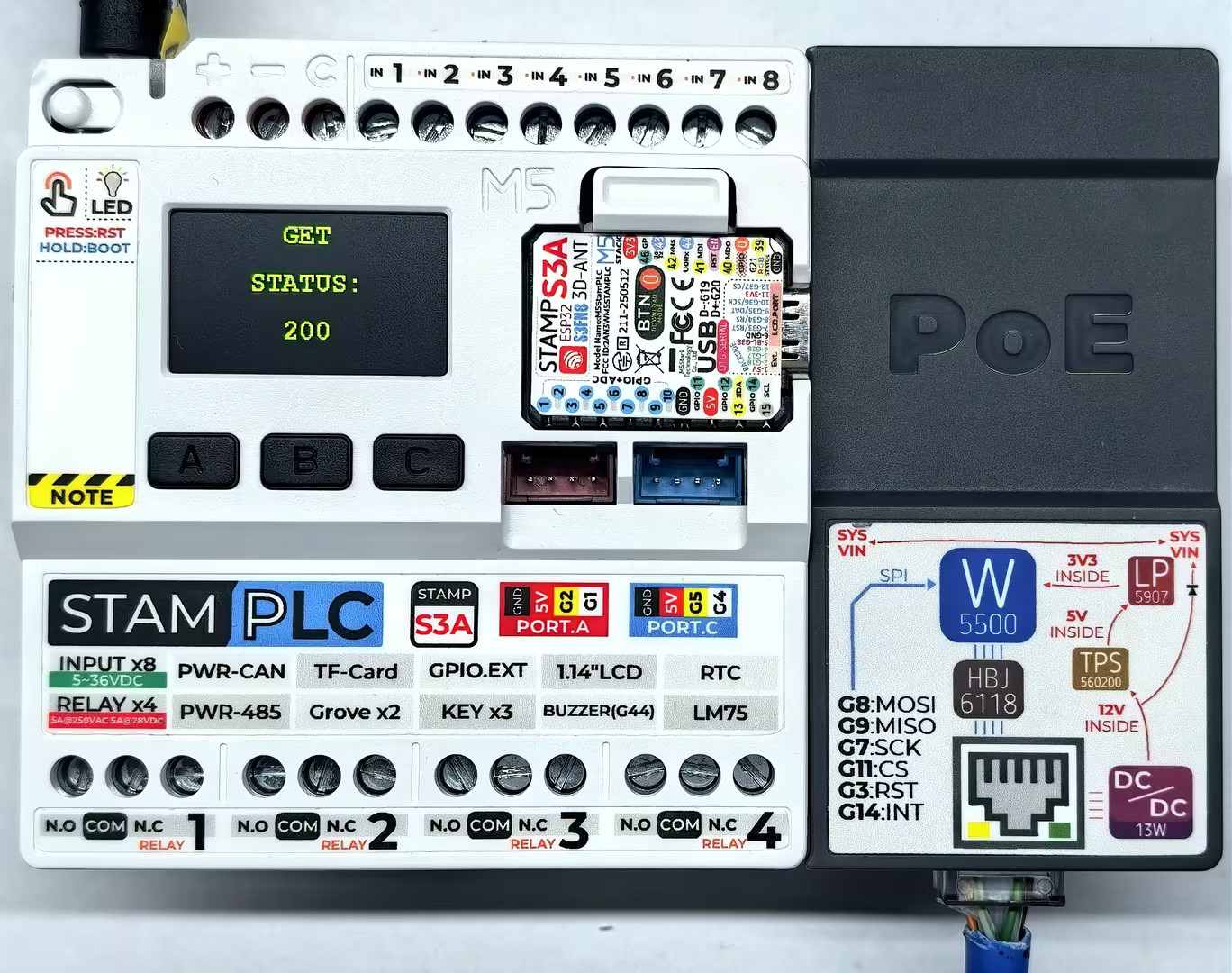
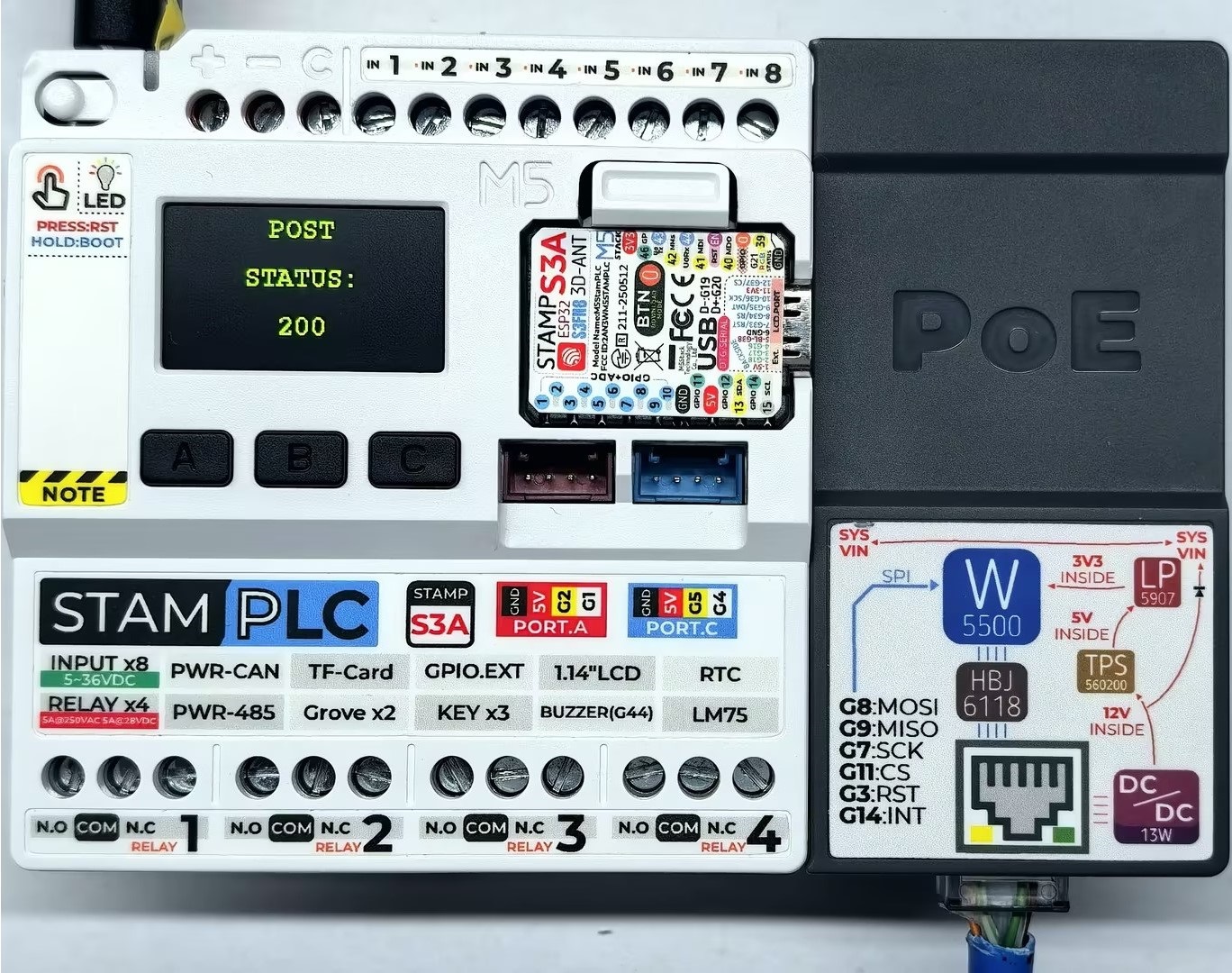
Serial monitor feedback is as follows:
Initializing...
IP Address: 192.168.20.185
making GET request
Status code: 200
Response: {
  "args": {},
  "headers": {
    "Host": "httpbin.org",
    "User-Agent": "Arduino/2.2.0",
    "X-Amzn-Trace-Id": "Root=1-69524204-7d767e3110e3bd6d1e28f6a8"
  },
  "origin": "113.88.164.214",
  "url": "http://httpbin.org/get"
}

Wait five seconds
making POST request
Status code: 200
Response: {
  "args": {},
  "data": "",
  "files": {},
  "form": {
    "age": "12",
    "name": "Alice"
  },
  "headers": {
    "Content-Length": "17",
    "Content-Type": "application/x-www-form-urlencoded",
    "Host": "httpbin.org",
    "User-Agent": "Arduino/2.2.0",
    "X-Amzn-Trace-Id": "Root=1-6952420a-588b0f181a6d7b311e694e06"
  },
  "json": null,
  "origin": "113.88.164.214",
  "url": "http://httpbin.org/post"
}2.4 NTP
NTP is a protocol used to synchronize device clocks over computer networks, providing high-precision and reliable time synchronization. The example below uses the public free NTP server cn.pool.ntp.org.
#include "M5StamPLC.h"
#include "SPI.h"
#include "M5_Ethernet.h"

#define SCK  7
#define MISO 9
#define MOSI 8
#define CS   11

byte mac[] = {0xDE, 0xAD, 0xBE, 0xEF, 0xFE, 0x99};// Custom MAC address
// IPAddress ip(192, 168, 1, 177);                   // Static IP (Custom)

const char* ntpServerName = "cn.pool.ntp.org";     // NTP Server address
const uint16_t localPort = 8888;                   // Local port to listen for UDP packets
const int timeZone = 8;                            // Time zone offset (Beijing is UTC+8)
const int NTP_PACKET_SIZE = 48;                    // NTP packet size

byte packetBuffer[NTP_PACKET_SIZE];                // Buffer for incoming and outgoing packets
EthernetUDP Udp;

void sendNTPpacket(const char* address);
void printFormattedTime(uint32_t rawTime);

void setup() {
    M5StamPLC.begin();
    Serial.begin(115200);

    M5StamPLC.Display.setTextColor(GREEN);
    M5StamPLC.Display.setTextDatum(middle_center);
    M5StamPLC.Display.setFont(&fonts::FreeMonoBold12pt7b);

    SPI.begin(SCK, MISO, MOSI, -1);
    Ethernet.init(CS);

    M5StamPLC.Display.drawString("Init...", M5StamPLC.Display.width() / 2, M5StamPLC.Display.height() / 2);
    Serial.println("Initializing...");

    // To use a static IP, use Ethernet.begin(mac, ip)
    // Attempt to obtain an IP address via DHCP
    while (Ethernet.begin(mac) != 1) {
        Serial.println("Error getting IP address via DHCP, trying again...");
        delay(1000);
    }

    // Check for Ethernet hardware presence
    if (Ethernet.hardwareStatus() == EthernetNoHardware) {
        Serial.println(
            "Ethernet shield was not found. Sorry, can't run without hardware. :(");
        while (true) {
            delay(1);  // Do nothing if hardware is missing
        }
    }
    if (Ethernet.linkStatus() == LinkOFF) {
        Serial.println("Ethernet cable is not connected.");
    }

    Serial.print("IP Address: ");
    Serial.println(Ethernet.localIP());

    M5StamPLC.Display.clear();
    M5StamPLC.Display.drawString(Ethernet.localIP().toString().c_str(),
                              M5StamPLC.Display.width() / 2, M5StamPLC.Display.height() / 2);
    M5StamPLC.Display.setTextDatum(top_left);

    Udp.begin(localPort); // Start listening for UDP packets
    delay(1000);
}

void loop() {
    Serial.println("Sending NTP packet...");
    sendNTPpacket(ntpServerName);

    delay(1000); // Wait for packet to return

    if (Udp.parsePacket()) { // Check if a response is received
        Serial.println("Packet received");
        Udp.read(packetBuffer, NTP_PACKET_SIZE);

        // --- Parse NTP Timestamp ---
        // NTP timestamp is located at bytes 40-43, representing seconds since Jan 1, 1900
        uint32_t highWord = word(packetBuffer[40], packetBuffer[41]);
        uint32_t lowWord = word(packetBuffer[42], packetBuffer[43]);
        uint32_t secsSince1900 = highWord << 16 | lowWord; // Combine into a 32-bit unsigned integer

        // --- Convert to Unix Epoch Time ---
        // Unix epoch starts in 1970; NTP starts in 1900.
        // The 70-year difference (including leap years) is 2,208,988,800 seconds.
        const uint32_t seventyYears = 2208988800UL;
        uint32_t epoch = secsSince1900 - seventyYears;

        uint32_t bjTime = epoch + (timeZone * 3600); // Adjust for Beijing time zone
        printFormattedTime(bjTime);
    } else {
        Serial.println("No packet received yet.");
    }

    delay(4000); // Sync every 5 seconds, 4+1
}

// Send an NTP request to the given address
void sendNTPpacket(const char* address) {
    memset(packetBuffer, 0, NTP_PACKET_SIZE);
    // Set the NTP request header
    // 0b00011011 represents: LI=00=0 (no warning), VN=011=3 (Version 3), Mode=011=3 (Client mode)
    packetBuffer[0] = 0b00011011;

    Udp.beginPacket(address, 123); // NTP requests are on port 123
    Udp.write(packetBuffer, NTP_PACKET_SIZE);
    Udp.endPacket();
}

// Format and display the time
void printFormattedTime(uint32_t rawTime) {
    int hours = (rawTime % 86400L) / 3600; // 86400 seconds = 1 day
    int minutes = (rawTime % 3600) / 60;
    int seconds = rawTime % 60;

    String timeStr = "Time: " + String(hours) + ":" +
                     (minutes < 10 ? "0" : "") + String(minutes) + ":" +
                     (seconds < 10 ? "0" : "") + String(seconds);

    Serial.println(timeStr);

    M5StamPLC.Display.clear();
    M5StamPLC.Display.drawString("Beijing", 10, 30);
    M5StamPLC.Display.drawString(timeStr, 10, 60);
}After power-on, StamPLC automatically configures the StamPLC PoE module to connect to the NTP server and synchronizes the time every 5 seconds.
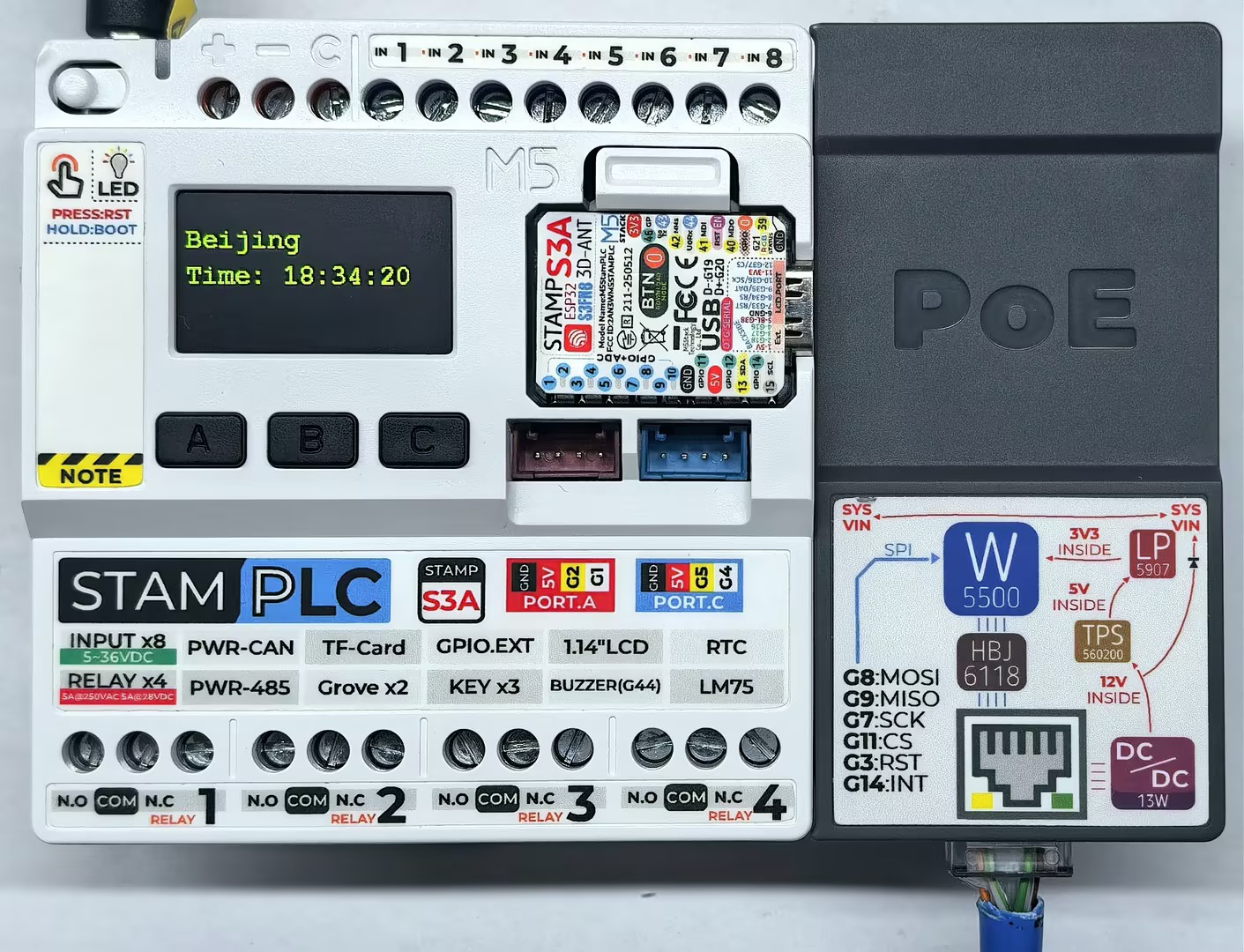
Serial monitor feedback is as follows:
Initializing...
IP Address: 192.168.20.185
Sending NTP packet...
No packet received yet.
Sending NTP packet...
Packet received
Time: 18:34:20
Sending NTP packet...
Packet received
Time: 18:34:253. Compile & Upload
- Press and hold the Boot button on StamPLC, then release it when the red LED turns on. The device will enter download mode and wait for programming. The red light turns off after the button is released, confirming that the device is in download mode.
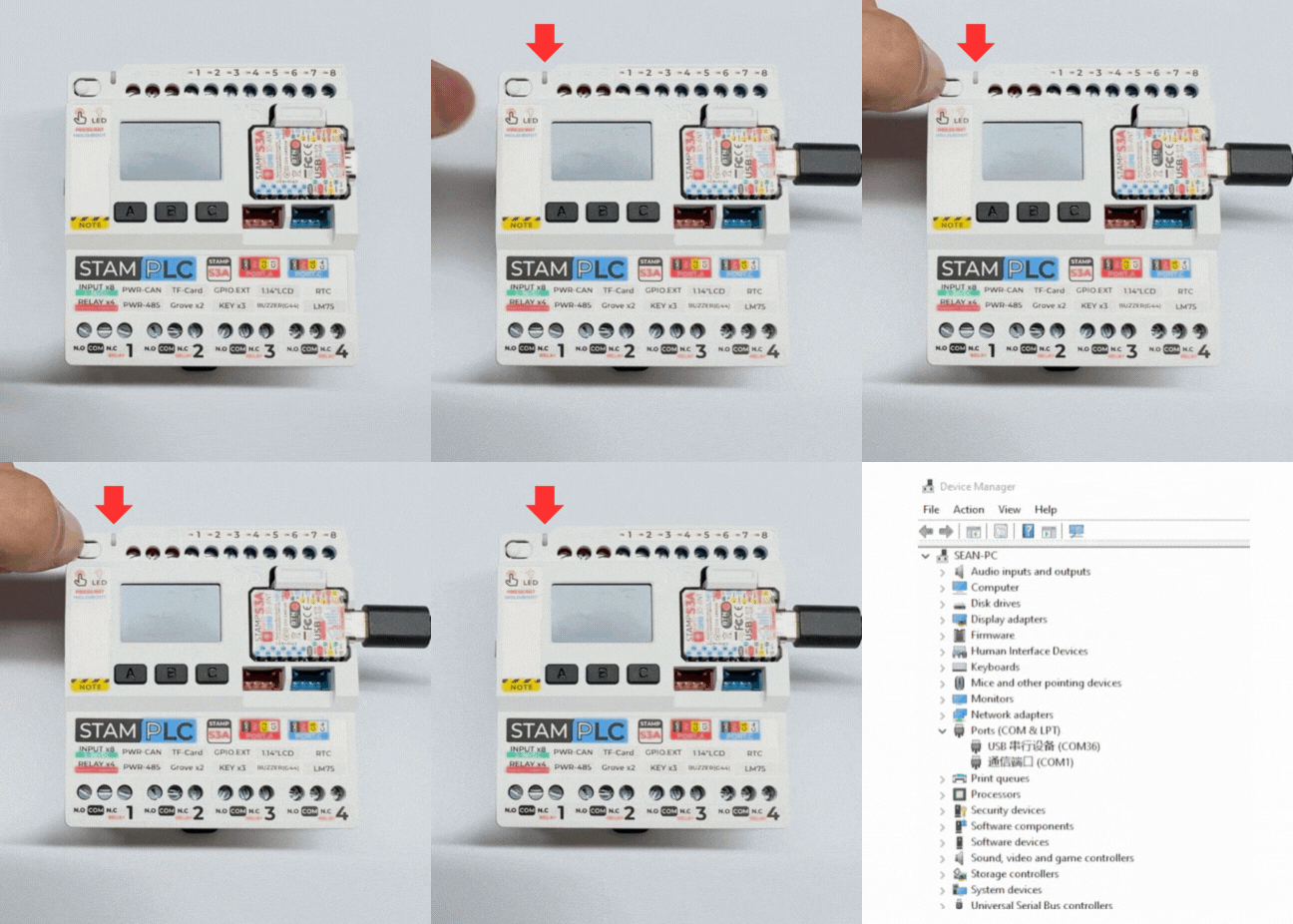
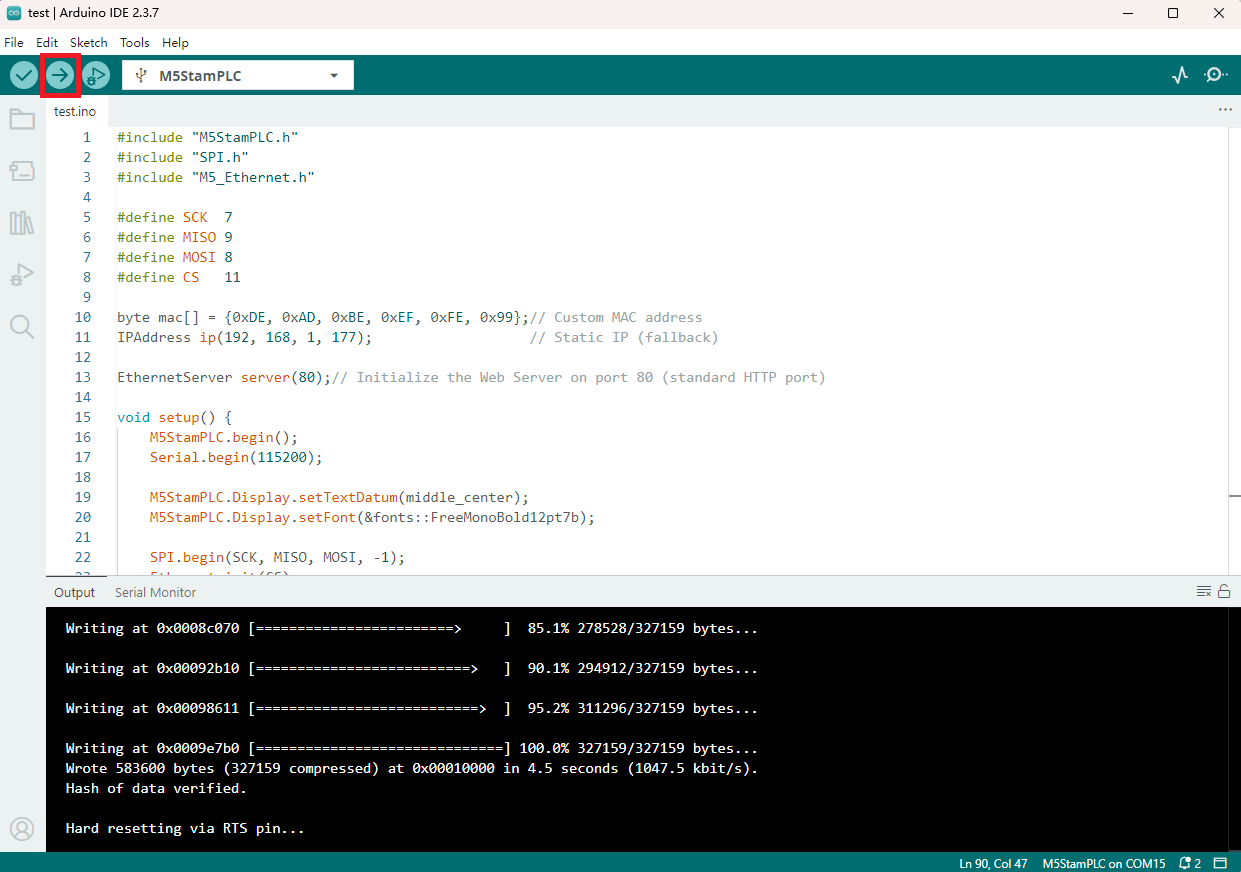
- Select the device port, paste one of the example programs above, and click the compile and upload button in the upper left corner of Arduino IDE. Wait for the program to complete compilation and upload to the device.