

Arduino Quick Start
2. Devices & Examples
3. M5Unified
4. M5GFX
5. Extensions
Unit
Module
Atomic
Tab5
IoT
Accessories
Stamp C6LoRa Arduino Program Compilation & Upload
1. Preparation
- Arduino IDE Installation: Refer to the Arduino IDE Installation Tutorial and complete the IDE installation.
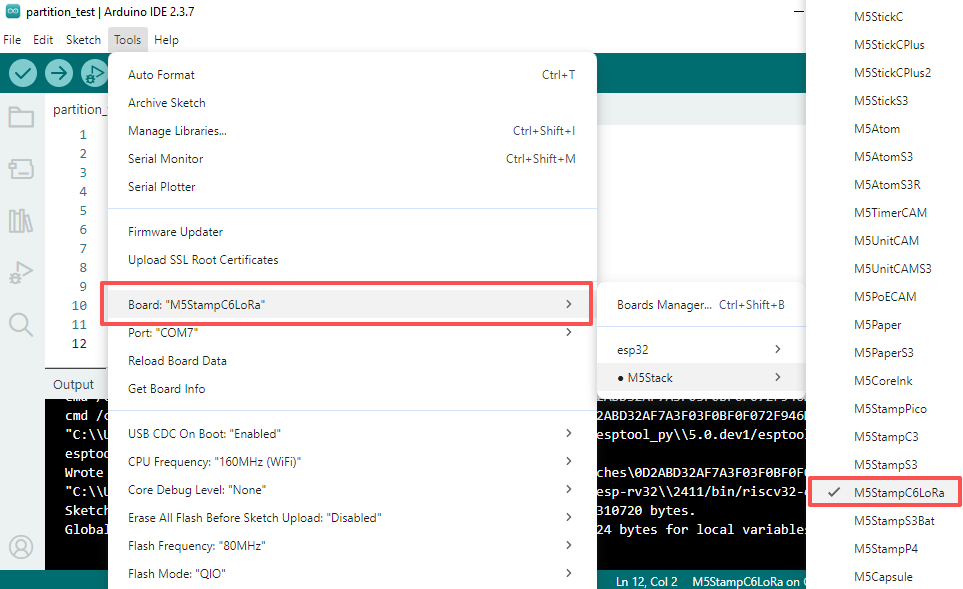
- Board Manager Installation: Refer to the Basic Environment Setup Tutorial, complete the M5Stack Board Manager installation, and select the development board
M5StampC6LoRa.
- Board Manager Installation: Refer to the Basic Environment Setup Tutorial, complete the M5Stack Board Manager installation, and select the development board
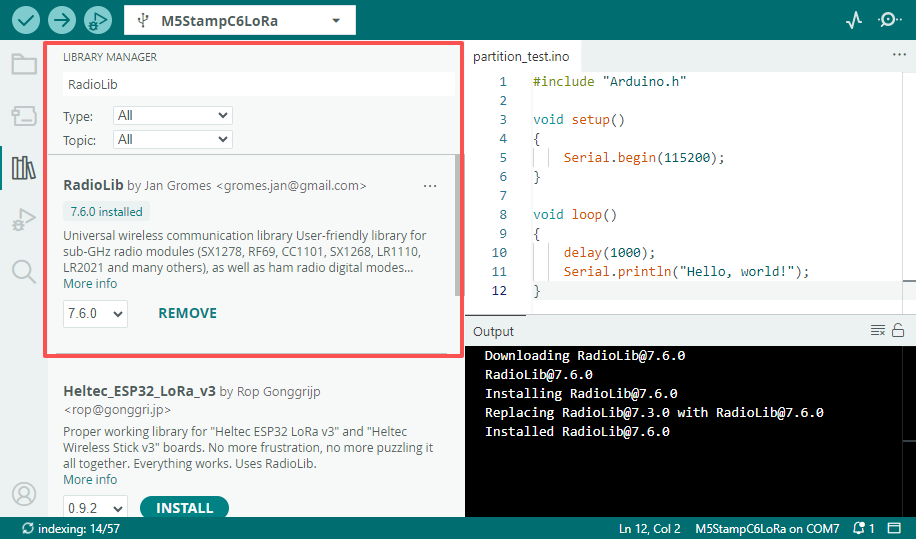
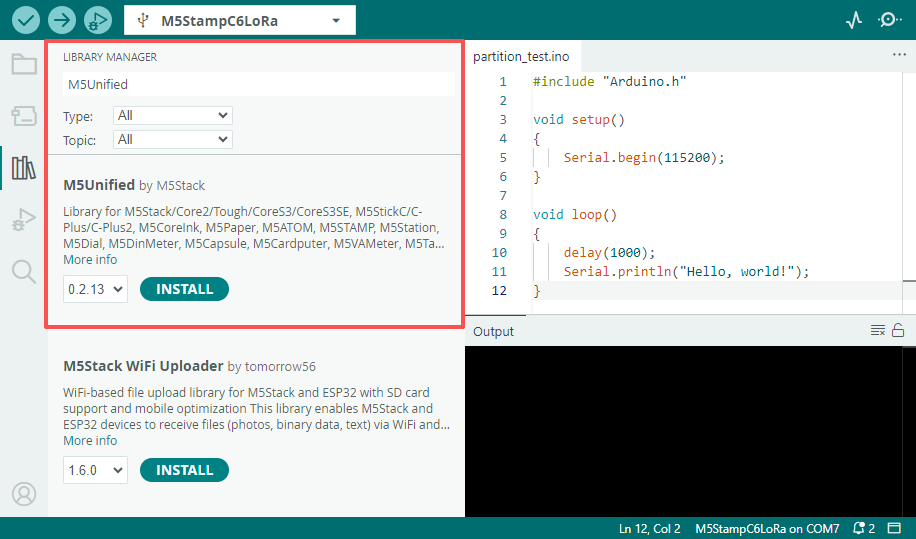
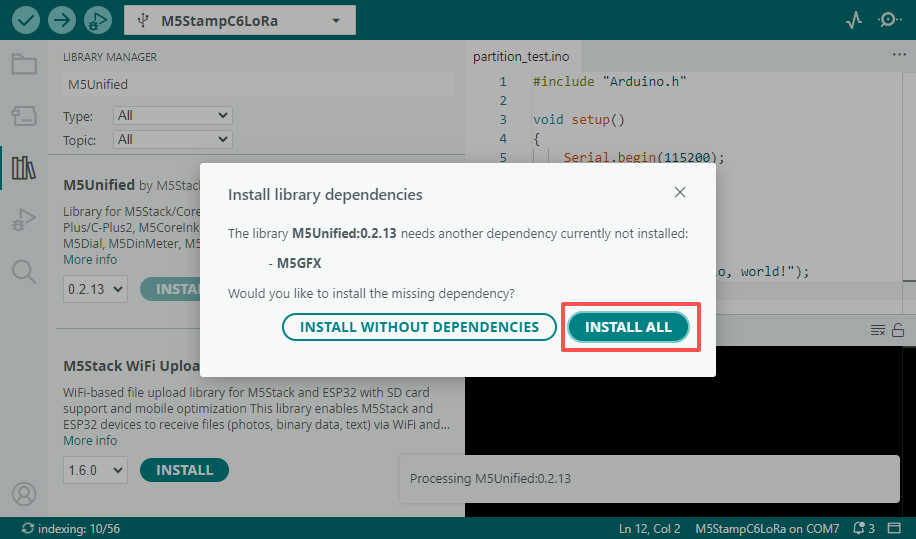
- Dependency Library Installation: Refer to the Library Management Installation Tutorial, install the latest versions of the
M5Unified,M5GFX, andRadioLibdriver libraries, and install all dependency libraries as prompted.
- Dependency Library Installation: Refer to the Library Management Installation Tutorial, install the latest versions of the
2. Burning Method
Stamp C6LoRa supports downloading programs via UART or USB interfaces. Before downloading, the Boot pin (GPIO9) must be held low, then the module must be reset to enter download mode.
- Downloading via UART requires a USB-TTL adapter board. The wiring diagram below uses the ESP32 Downloader adapter board as an example to connect to the Stamp C6LoRa UART program download interface.
- The ESP32 Downloader includes an automatic download circuit, which will automatically control the module to enter download mode when the burning program runs.
- To download via USB, the Boot pin must be held low, and the module must be reset via the RST pin (low level -> high level) to enter download mode.
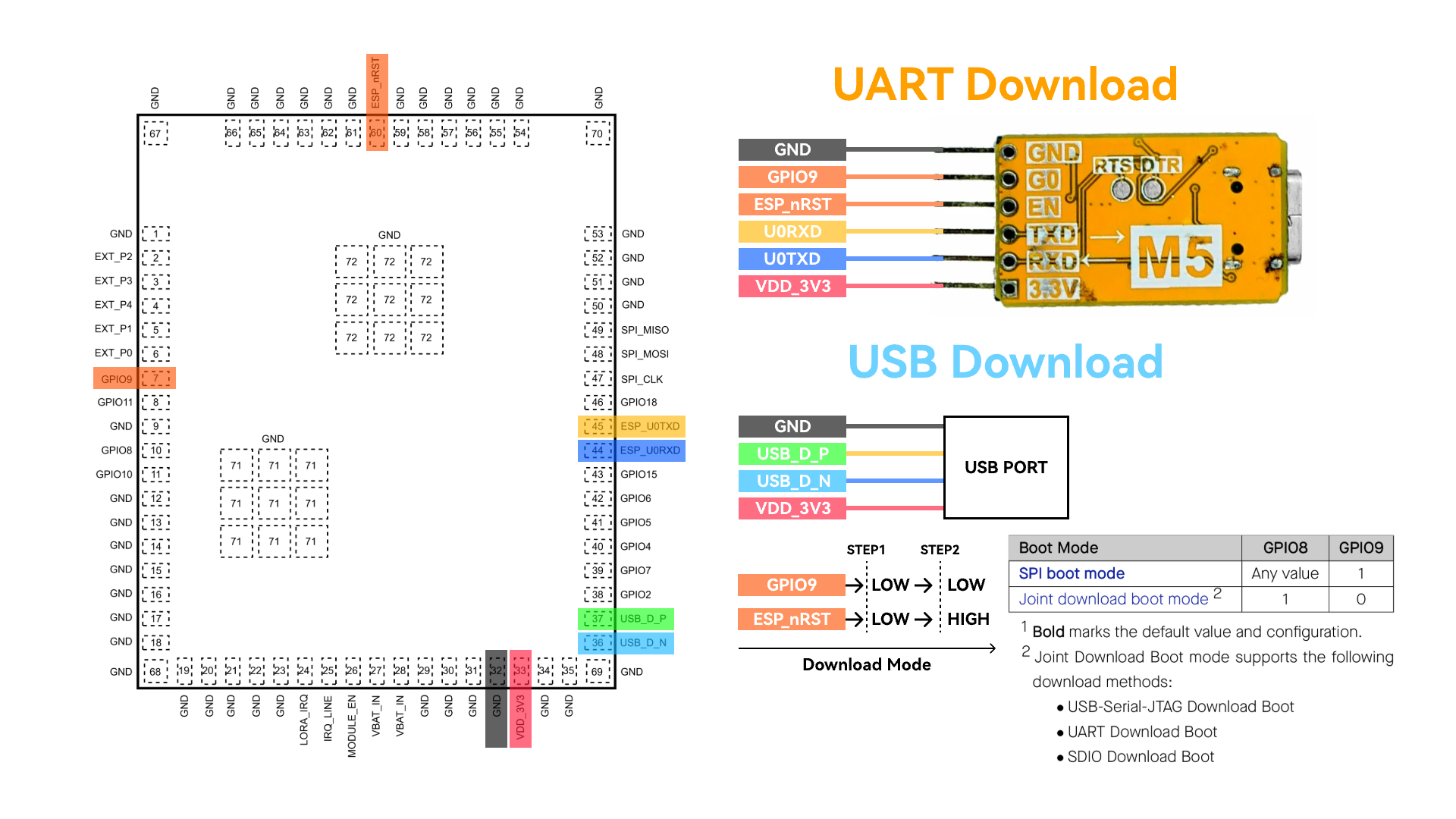
Entering download mode, you can select the port of the corresponding device in the Arduino IDE for burning.
3. Program Compilation & Burning
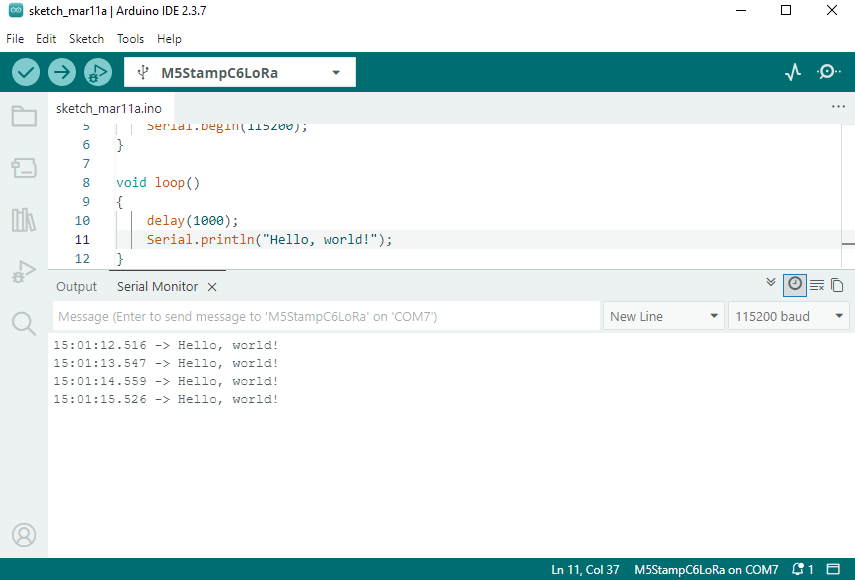
Paste the code below into the Arduino IDE workspace and click the upload button to automatically compile and burn the program.
Tools -> USB CDC On Boot option is Enabled by default, and the module's default logs will be output to the USB interface. To switch the log output to UART0, set this option to Disabled.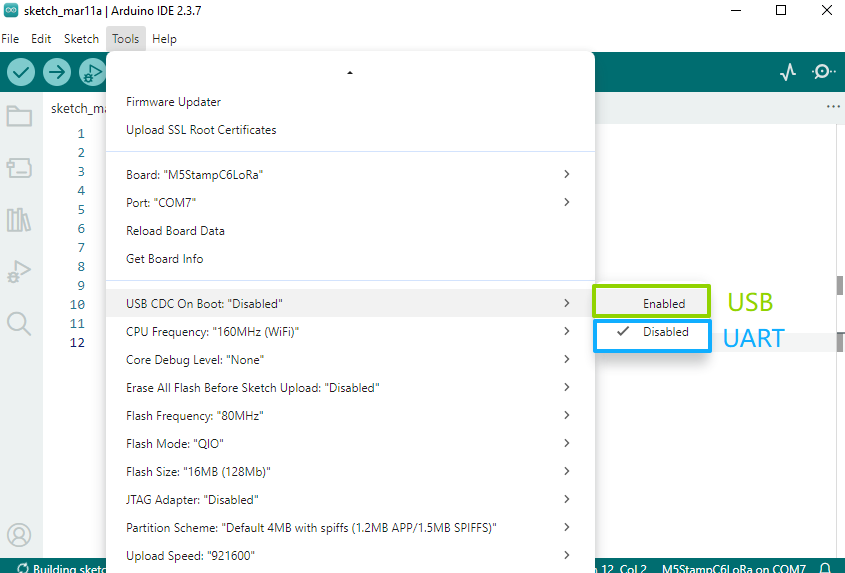
Hello World
#include "Arduino.h"

void setup()
{
    Serial.begin(115200);
}

void loop()
{
    delay(1000);
    Serial.println("Hello, world!");
}
LoRa Ping Pong
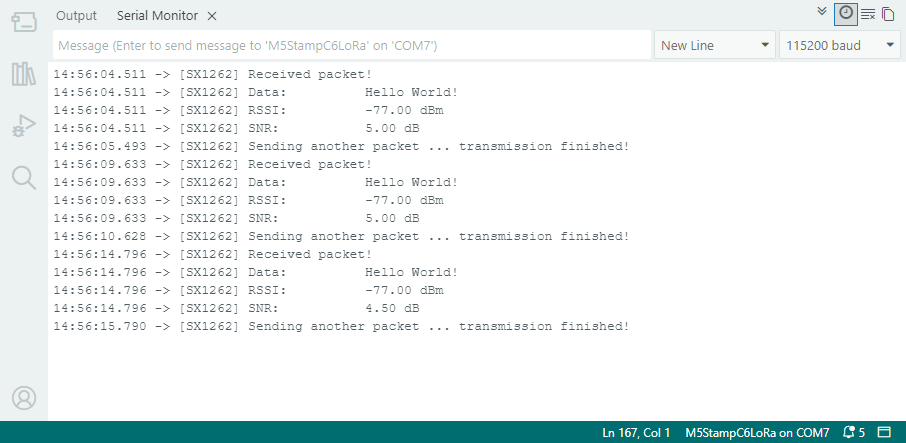
The following is the LoRa Ping Pong test program. It requires two sets of Stamp C6LoRa modules. After the modules are powered on sequentially at an interval, they will automatically perform mutual transmission and reception tests:
- In the example program, LORA_IRQ uses GPIO7 as the interrupt signal reception pin. During testing, please connect the LORA_IRQ pin of the module to GPIO7.
- Connect the LoRa antenna before use to avoid damaging the RF circuit.
#include <Arduino.h>
#include <SPI.h>
#include <RadioLib.h>
#include <M5Unified.h>
#include "utility/PI4IOE5V6408_Class.hpp"

// Stamp C6LoRa board mapping
#define I2C_SDA_PIN 10
#define I2C_SCL_PIN 8

// SX1262 base pins on Stamp C6LoRa
#define SX1262_MOSI_PIN 21
#define SX1262_MISO_PIN 22
#define SX1262_SCK_PIN  20
#define SX1262_CS_PIN   23
#define SX1262_IRQ_PIN  7
#define SX1262_BUSY_PIN 19

// PI4IOE5V6408 -> SX1262 control lines
#define SX_LNA_EN_PIN 5
#define SX_ANT_SW_PIN 6
#define SX_NRST_PIN   7

// SX1262: CS, IRQ(DIO1), NRST, BUSY
SX1262 radio = new Module(SX1262_CS_PIN, SX1262_IRQ_PIN, RADIOLIB_NC, SX1262_BUSY_PIN);

m5::I2C_Class i2c_bus_0;
// Stamp C6LoRa uses PI4IOE5V6408 at 0x43 to control SX1262 power path
m5::PI4IOE5V6408_Class ioe(0x43, 400000, &i2c_bus_0);

// save transmission state between loops
int transmissionState = RADIOLIB_ERR_NONE;

// flag to indicate transmission/reception state
bool transmitFlag = false;

// flag to indicate that a packet was sent/received
volatile bool operationDone = false;

void setFlag(void)
{
    operationDone = true;
}

static bool initIoExpanderAndRfPath()
{
    if (!i2c_bus_0.begin(I2C_NUM_0, I2C_SDA_PIN, I2C_SCL_PIN)) {
        Serial.println("[I2C] begin failed");
        return false;
    }

    if (!ioe.begin()) {
        Serial.println("[IOE] PI4IOE5V6408 begin failed");
        return false;
    }

    ioe.setHighImpedance(SX_NRST_PIN, false);
    ioe.setHighImpedance(SX_ANT_SW_PIN, false);
    ioe.setHighImpedance(SX_LNA_EN_PIN, false);
    ioe.setDirection(SX_NRST_PIN, true);
    ioe.setDirection(SX_ANT_SW_PIN, true);
    ioe.setDirection(SX_LNA_EN_PIN, true);
    delay(100);

    // SX1262 reset and RF path enable sequence.
    ioe.digitalWrite(SX_NRST_PIN, false);
    delay(100);
    ioe.digitalWrite(SX_NRST_PIN, true);
    ioe.digitalWrite(SX_ANT_SW_PIN, true);
    ioe.digitalWrite(SX_LNA_EN_PIN, true);
    delay(10);

    return true;
}

void setup()
{
    Serial.begin(115200);
    delay(300);
    Serial.println("\n[Stamp C6LoRa] RadioLib ping-pong start");

    SPI.begin(SX1262_SCK_PIN, SX1262_MISO_PIN, SX1262_MOSI_PIN, SX1262_CS_PIN);

    if (!initIoExpanderAndRfPath()) {
        while (true) {
            delay(1000);
        }
    }

    Serial.print("[SX1262] Initializing... ");
    int state = radio.begin(868.0, 125.0, 12, 5, 0x34, 22, 20, 3.0, true);
    if (state != RADIOLIB_ERR_NONE) {
        Serial.print("failed, code: ");
        Serial.println(state);
        while (true) {
            delay(1000);
        }
    }
    Serial.println("ok");

    // One callback handles both TX done and RX done on SX1262 DIO1.
    radio.setDio1Action(setFlag);

    // Send first PING packet.
    Serial.print("[SX1262] Sending first packet... ");
    transmissionState = radio.startTransmit("PING");
    if (transmissionState == RADIOLIB_ERR_NONE) {
        Serial.println("ok");
        transmitFlag = true;
    }
}

void loop()
{
    // check if the previous operation finished
    if (operationDone) {
        // reset flag
        operationDone = false;

        if (transmitFlag) {
            // the previous operation was transmission, listen for response
            // print the result
            if (transmissionState == RADIOLIB_ERR_NONE) {
                // packet was successfully sent
                Serial.println(F("transmission finished!"));

            } else {
                Serial.print(F("failed, code "));
                Serial.println(transmissionState);
            }

            // listen for response
            radio.startReceive();
            transmitFlag = false;

        } else {
            // the previous operation was reception
            // print data and send another packet
            String str;
            int state = radio.readData(str);

            if (state == RADIOLIB_ERR_NONE) {
                // packet was successfully received
                Serial.println(F("[SX1262] Received packet!"));

                // print data of the packet
                Serial.print(F("[SX1262] Data:\t\t"));
                Serial.println(str);

                // print RSSI (Received Signal Strength Indicator)
                Serial.print(F("[SX1262] RSSI:\t\t"));
                Serial.print(radio.getRSSI());
                Serial.println(F(" dBm"));

                // print SNR (Signal-to-Noise Ratio)
                Serial.print(F("[SX1262] SNR:\t\t"));
                Serial.print(radio.getSNR());
                Serial.println(F(" dB"));
            }

            // wait a second before transmitting again
            delay(1000);

            // send another one
            Serial.print(F("[SX1262] Sending another packet ... "));
            transmissionState = radio.startTransmit("Hello World!");
            transmitFlag      = true;
        }
    }
}
4. API
Stamp C6LoRa uses the RadioLib library as the LoRa driver. For more related APIs, please refer to the documents below: