Arduino 上手教程
2. 设备开发 & 案例程序
3. M5Unified
4. M5GFX
5. 拓展模块
Unit
Base
IoT
Unit CamS3-5MP Web CAM
该案例程序使用 Unit CamS3-5MP 实现 HTTP Web CAM 实现局域网内的图像预览。
案例程序
编译要求
编译版本要求
Unit CamS3-5MP 存在两种内置固件版本,使用前请参考 Unit CamS3-5MP 快速上手,读取版本信息,并根据实际使用的版本,配置相应的编译环境。
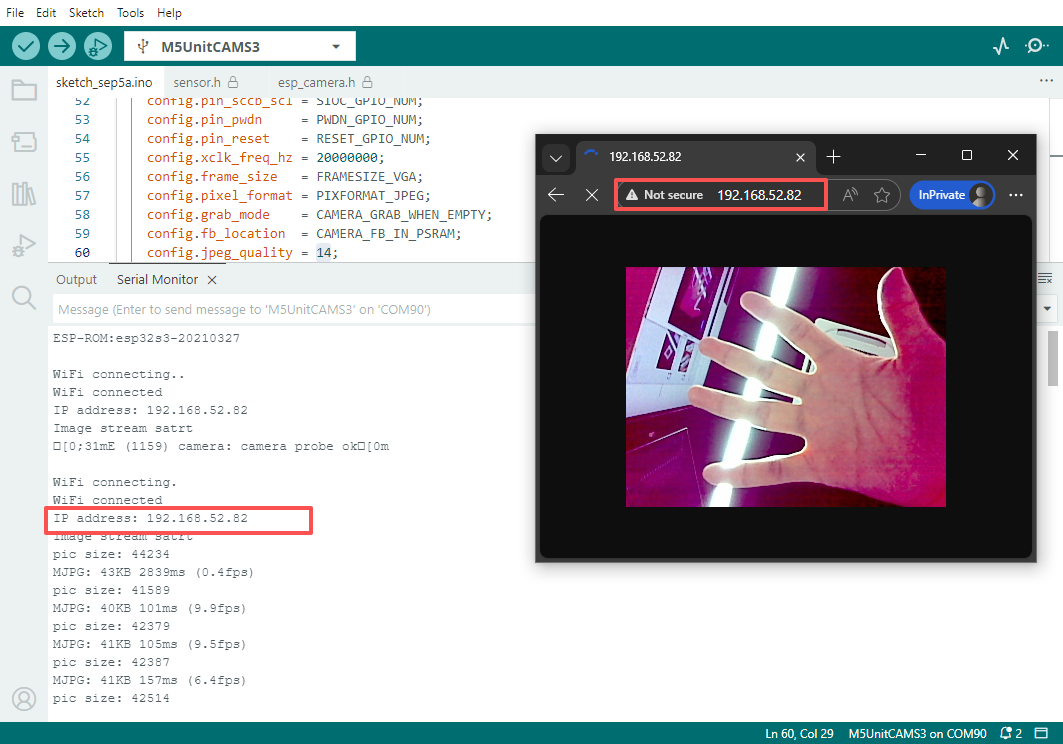
烧录需配置 Wi-Fi 信息,完成固件烧录后,通过串口助手查看设备 IP 并进行访问。
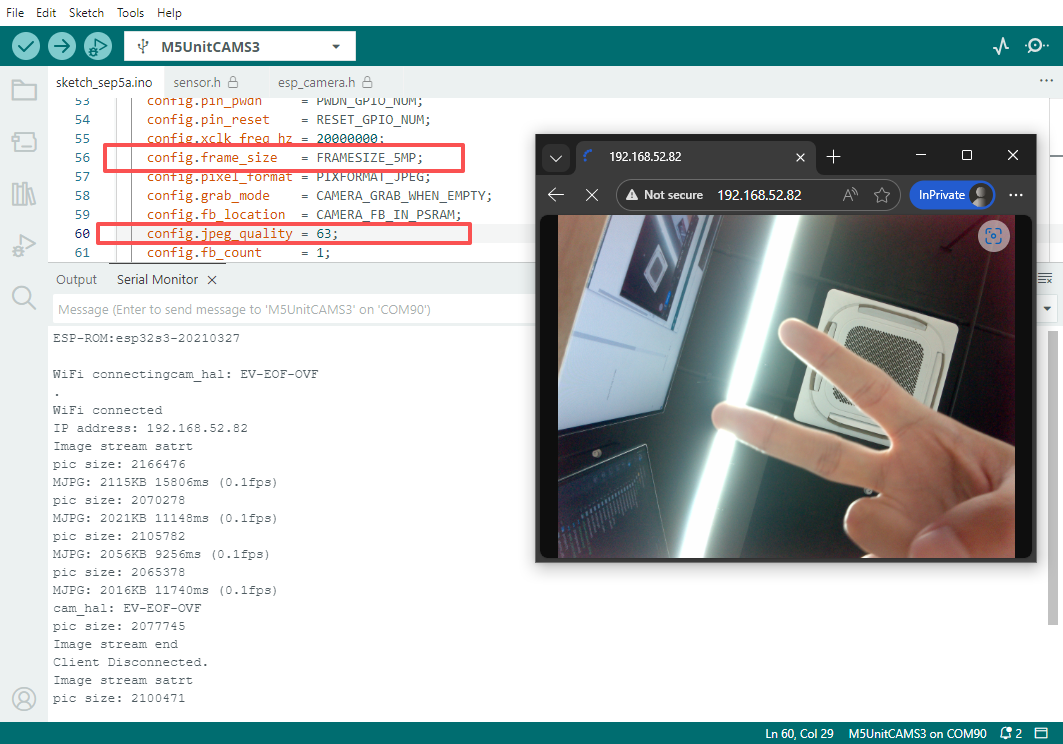
当前 demo 默认使用像素为 FRAMESIZE_VGA(640x480) 修改其他分辨率,请参考下方配置。大分辨率的由于图像数据大小,传输将变得缓慢。
cpp
1 2 3 4 5 6 7 8 9 10 11 12 13 14 15 16 17 18 19 20 21 22 23 24 25 26 27 28 29 30 31 32 33 34 35 36 37 38 39 40 41 42 43 44 45 46 47 48 49 50 51 52 53 54 55 56 57 58 59 60 61 62 63 64 65 66 67 68 69 70 71 72 73 74 75 76 77 78 79 80 81 82 83 84 85 86 87 88 89 90 91 92 93 94 95 96 97 98 99 100 101 102 103 104 105 106 107 108 109 110 111 112 113 114 115 116 117 118 119 120 121 122 123 124 125 126 127 128 129 130 131 132 133 134 135 136 137 138 139 140 141 142 143 144 145 146 147 148 149 150 151 152 153 154 155 156 157 158 159 160 161 162 163 164 165
#include <WiFi.h>
#include "esp_camera.h"

const char* ssid     = "ssid";
const char* password = "password";

WiFiServer server(80);

static void jpegStream(WiFiClient* client);

#define PWDN_GPIO_NUM  -1
#define RESET_GPIO_NUM 21
#define XCLK_GPIO_NUM  11
#define SIOD_GPIO_NUM  17
#define SIOC_GPIO_NUM  41

#define Y9_GPIO_NUM    13
#define Y8_GPIO_NUM    4
#define Y7_GPIO_NUM    10
#define Y6_GPIO_NUM    5
#define Y5_GPIO_NUM    7
#define Y4_GPIO_NUM    16
#define Y3_GPIO_NUM    15
#define Y2_GPIO_NUM    6
#define VSYNC_GPIO_NUM 42
#define HREF_GPIO_NUM  18
#define PCLK_GPIO_NUM  12
#define LED_GPIO_NUM   14

void setup()
{
    Serial.begin(115200);
    Serial.setDebugOutput(true);
    Serial.println();

    camera_config_t config;
    config.ledc_channel = LEDC_CHANNEL_0;
    config.ledc_timer   = LEDC_TIMER_0;
    config.pin_d0       = Y2_GPIO_NUM;
    config.pin_d1       = Y3_GPIO_NUM;
    config.pin_d2       = Y4_GPIO_NUM;
    config.pin_d3       = Y5_GPIO_NUM;
    config.pin_d4       = Y6_GPIO_NUM;
    config.pin_d5       = Y7_GPIO_NUM;
    config.pin_d6       = Y8_GPIO_NUM;
    config.pin_d7       = Y9_GPIO_NUM;
    config.pin_xclk     = XCLK_GPIO_NUM;
    config.pin_pclk     = PCLK_GPIO_NUM;
    config.pin_vsync    = VSYNC_GPIO_NUM;
    config.pin_href     = HREF_GPIO_NUM;
    config.pin_sccb_sda = SIOD_GPIO_NUM;
    config.pin_sccb_scl = SIOC_GPIO_NUM;
    config.pin_pwdn     = PWDN_GPIO_NUM;
    config.pin_reset    = RESET_GPIO_NUM;
    config.xclk_freq_hz = 20000000;
    config.frame_size   = FRAMESIZE_VGA;
    config.pixel_format = PIXFORMAT_JPEG;
    config.grab_mode    = CAMERA_GRAB_WHEN_EMPTY;
    config.fb_location  = CAMERA_FB_IN_PSRAM;
    config.jpeg_quality = 14;
    config.fb_count     = 1;

    // camera init
    esp_err_t err = esp_camera_init(&config);
    if (err != ESP_OK) {
        Serial.printf("Camera init failed with error 0x%x", err);
        return;
    }

    sensor_t* s = esp_camera_sensor_get();
    // initial sensors are flipped vertically and colors are a bit saturated
    if (s->id.PID == OV3660_PID) {
        s->set_vflip(s, 1);        // flip it back
        s->set_brightness(s, 1);   // up the brightness just a bit
        s->set_saturation(s, -2);  // lower the saturation
    }

    WiFi.begin(ssid, password);
    WiFi.setSleep(false);

    Serial.print("WiFi connecting");
    while (WiFi.status() != WL_CONNECTED) {
        delay(500);
        Serial.print(".");
    }
    Serial.println("");
    Serial.println("WiFi connected");

    Serial.print("IP address: ");
    Serial.println(WiFi.localIP());
    server.begin();
}

void loop()
{
    WiFiClient client = server.available();  // listen for incoming clients
    if (client) {                            // if you get a client,
        while (client.connected()) {         // loop while the client's connected
            if (client.available()) {        // if there's bytes to read from the
                jpegStream(&client);
            }
        }
        // close the connection:
        client.stop();
        Serial.println("Client Disconnected.");
    }
}

#define PART_BOUNDARY "123456789000000000000987654321"
static const char* _STREAM_CONTENT_TYPE = "multipart/x-mixed-replace;boundary=" PART_BOUNDARY;
static const char* _STREAM_BOUNDARY     = "--" PART_BOUNDARY "\r\n";
static const char* _STREAM_PART         = "Content-Type: image/jpeg\r\nContent-Length: %u\r\n\r\n";

static void jpegStream(WiFiClient* client)
{
    Serial.println("Image stream satrt");
    client->println("HTTP/1.1 200 OK");
    client->printf("Content-Type: %s\r\n", _STREAM_CONTENT_TYPE);
    client->println("Content-Disposition: inline; filename=capture.jpg");
    client->println("Access-Control-Allow-Origin: *");
    client->println();
    static int64_t last_frame = 0;
    if (!last_frame) {
        last_frame = esp_timer_get_time();
    }
    camera_fb_t* fb;

    for (;;) {
        fb = esp_camera_fb_get();
        if (!fb) {
            delay(10);
            continue;
        }

        Serial.printf("pic size: %d\n", fb->len);
        client->print(_STREAM_BOUNDARY);
        client->printf(_STREAM_PART, fb->len);
        int32_t to_sends    = fb->len;
        int32_t now_sends   = 0;
        uint8_t* out_buf    = fb->buf;
        uint32_t packet_len = 8 * 1024;
        while (to_sends > 0) {
            now_sends = to_sends > packet_len ? packet_len : to_sends;
            if (client->write(out_buf, now_sends) == 0) {
                goto client_exit;
            }
            out_buf += now_sends;
            to_sends -= now_sends;
        }

        int64_t fr_end     = esp_timer_get_time();
        int64_t frame_time = fr_end - last_frame;
        last_frame         = fr_end;
        frame_time /= 1000;
        Serial.printf("MJPG: %luKB %lums (%.1ffps)\r\n", (long unsigned int)(fb->len / 1024),
                      (long unsigned int)frame_time, 1000.0 / (long unsigned int)frame_time);
        esp_camera_fb_return(fb);
    }
client_exit:
    if (fb) {
        esp_camera_fb_return(fb);
    }
    client->stop();
    Serial.printf("Image stream end\r\n");
}
像素切换
使用 5MP 像素时候,请将摄像头初始化配置进行修改。
config.frame_size   = FRAMESIZE_5MP;
config.jpeg_quality = 63;