

Arduino Quick Start
2. Devices & Examples
3. M5Unified
4. M5GFX
5. Extensions
Unit
Module
Atomic
Tab5
IoT
Accessories
Stamp-P4 Wi‑Fi
Wi‑Fi examples for Stamp‑P4.
Note
Wi‑Fi requires the Stamp-AddOn C6 For P4 module. Make sure the module is connected before running the examples.
Installation illustration
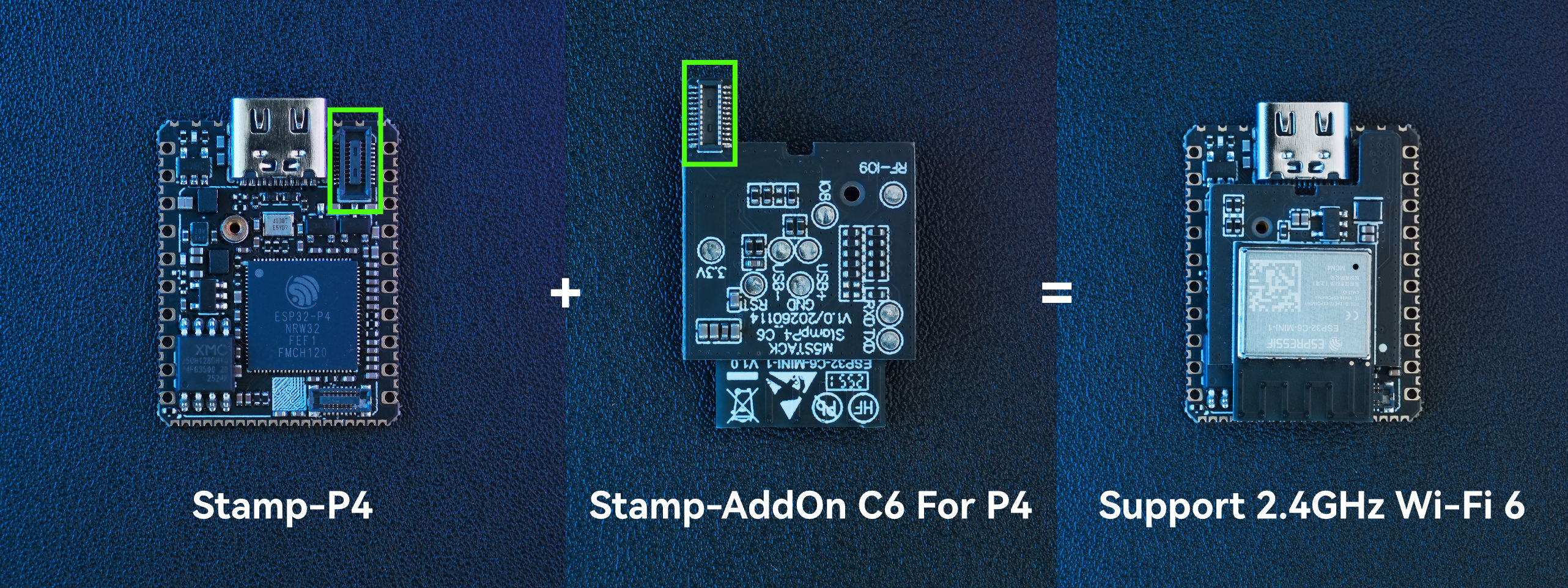
Compilation requirements
- M5Stack Board Manager version >= 3.3.7
- Development board option = M5StampP4
- M5Unified library version >= 0.2.13
Note
1. Please define the pin numbers of each pin of the SDIO interface according to the actual connection.
2. When applying in practice, please replace
ssid in the following code with the actual Wi-Fi name and password with the actual Wi-Fi password.Wi‑Fi STA / AP
cpp
1 2 3 4 5 6 7 8 9 10 11 12 13 14 15 16 17 18 19 20 21 22 23 24 25 26 27 28 29 30 31 32 33 34 35 36 37 38 39 40 41 42 43 44 45 46 47 48 49 50 51 52 53 54 55
#include <M5Unified.h>
#include <WiFi.h>

#define SDIO_CLK GPIO_NUM_43
#define SDIO_CMD GPIO_NUM_44
#define SDIO_D0  GPIO_NUM_45
#define SDIO_D1  GPIO_NUM_46
#define SDIO_D2  GPIO_NUM_47
#define SDIO_D3  GPIO_NUM_48
#define SDIO_RST GPIO_NUM_42

const char *ssid     = "ssid";
const char *password = "password";

void setup()
{
    M5.begin();
    Serial.begin(115200);

    WiFi.setPins(SDIO_CLK, SDIO_CMD, SDIO_D0, SDIO_D1, SDIO_D2, SDIO_D3, SDIO_RST);

    // If you select the M5StampP4 board in Arduino IDE, you could use the default pins defined.
    // WiFi.setPins(BOARD_SDIO_ESP_HOSTED_CLK, BOARD_SDIO_ESP_HOSTED_CMD, BOARD_SDIO_ESP_HOSTED_D0,
    //              BOARD_SDIO_ESP_HOSTED_D1, BOARD_SDIO_ESP_HOSTED_D2, BOARD_SDIO_ESP_HOSTED_D3,
    //              BOARD_SDIO_ESP_HOSTED_RESET);

    // STA MODE
    WiFi.mode(WIFI_STA);
    Serial.println("WiFi mode set to STA");
    WiFi.begin(ssid, password);
    Serial.print("Connecting to ");
    // Wait for connection
    while (WiFi.status() != WL_CONNECTED) {
        delay(500);
        Serial.print(".");
    }
    Serial.println("");
    Serial.print("Connected to ");
    Serial.println(ssid);
    Serial.print("IP address: ");
    Serial.println(WiFi.localIP());

    // AP MODE
    // WiFi.mode(WIFI_MODE_AP);
    // Serial.println("WiFi mode set to AP");
    // WiFi.softAP(ssid, password);
    // Serial.println("AP started");
    // Serial.print("IP address: ");
    // Serial.println(WiFi.softAPIP());

}

void loop()
{
}Example serial output:
WiFi mode set to STA
Connecting to ........
Connected to M5Stack
IP address: 192.168.52.169Wi‑Fi Scan
cpp
1 2 3 4 5 6 7 8 9 10 11 12 13 14 15 16 17 18 19 20 21 22 23 24 25 26 27 28 29 30 31 32 33 34 35 36 37 38 39 40 41 42 43 44 45 46 47 48 49 50 51 52 53 54 55 56 57 58 59 60 61 62 63 64 65 66 67 68 69 70 71 72 73 74 75 76 77 78 79 80 81 82 83 84 85 86 87 88 89 90
#include <M5Unified.h>
#include <WiFi.h>

#define SDIO_CLK GPIO_NUM_43
#define SDIO_CMD GPIO_NUM_44
#define SDIO_D0  GPIO_NUM_45
#define SDIO_D1  GPIO_NUM_46
#define SDIO_D2  GPIO_NUM_47
#define SDIO_D3  GPIO_NUM_48
#define SDIO_RST GPIO_NUM_42

void setup()
{
    M5.begin();
    Serial.begin(115200);

    WiFi.setPins(SDIO_CLK, SDIO_CMD, SDIO_D0, SDIO_D1, SDIO_D2, SDIO_D3, SDIO_RST);

    // If you select the M5StampP4 board in Arduino IDE, you could use the default pins defined.
    // WiFi.setPins(BOARD_SDIO_ESP_HOSTED_CLK, BOARD_SDIO_ESP_HOSTED_CMD, BOARD_SDIO_ESP_HOSTED_D0,
    //              BOARD_SDIO_ESP_HOSTED_D1, BOARD_SDIO_ESP_HOSTED_D2, BOARD_SDIO_ESP_HOSTED_D3,
    //              BOARD_SDIO_ESP_HOSTED_RESET);
}

void loop()
{
    Serial.setCursor(0, 0);
    Serial.println("Scan start");

    // WiFi.scanNetworks will return the number of networks found.
    int n = WiFi.scanNetworks();
    Serial.println("Scan done");
    if (n == 0) {
        Serial.println("no networks found");
    } else {
        Serial.print(n);
        Serial.println(" networks found");
        Serial.println("Nr | SSID                             | RSSI | CH | Encryption");
        for (int i = 0; i < n; ++i) {
            // Print SSID and RSSI for each network found
            Serial.printf("%2d", i + 1);
            Serial.print(" | ");
            Serial.printf("%-32.32s", WiFi.SSID(i).c_str());
            Serial.print(" | ");
            Serial.printf("%4ld", WiFi.RSSI(i));
            Serial.print(" | ");
            Serial.printf("%2ld", WiFi.channel(i));
            Serial.print(" | ");
            switch (WiFi.encryptionType(i)) {
                case WIFI_AUTH_OPEN:
                    Serial.print("open");
                    break;
                case WIFI_AUTH_WEP:
                    Serial.print("WEP");
                    break;
                case WIFI_AUTH_WPA_PSK:
                    Serial.print("WPA");
                    break;
                case WIFI_AUTH_WPA2_PSK:
                    Serial.print("WPA2");
                    break;
                case WIFI_AUTH_WPA_WPA2_PSK:
                    Serial.print("WPA+WPA2");
                    break;
                case WIFI_AUTH_WPA2_ENTERPRISE:
                    Serial.print("WPA2-EAP");
                    break;
                case WIFI_AUTH_WPA3_PSK:
                    Serial.print("WPA3");
                    break;
                case WIFI_AUTH_WPA2_WPA3_PSK:
                    Serial.print("WPA2+WPA3");
                    break;
                case WIFI_AUTH_WAPI_PSK:
                    Serial.print("WAPI");
                    break;
                default:
                    Serial.print("unknown");
            }
            Serial.println();
            delay(10);
        }
    }
    Serial.println("");
    // Delete the scan result to free memory for code below.
    WiFi.scanDelete();

    // Wait a bit before scanning again.
    delay(5000);
}Example serial output:
Scan start
Scan done
20 networks found
Nr | SSID                             | RSSI | CH | Encryption
 1 | ocean                            |  -47 | 11 | WPA+WPA2
 2 | DIANJIXZ                         |  -49 |  2 | WPA+WPA2
 3 | DeepSpace9                       |  -52 | 10 | WPA2+WPA3
 4 | GL-AXT1800-06a                   |  -59 |  6 | WPA2
 5 | CMCC-NFUU                        |  -62 |  1 | open
 6 | CamStack_S3                      |  -63 |  1 | open
 7 | M5Stack                          |  -68 |  1 | WPA+WPA2
 8 | M5Stack-Guest                    |  -69 |  1 | WPA+WPA2
 9 | M5Stack                          |  -69 |  1 | WPA+WPA2
10 | M5Stack-Guest                    |  -69 |  1 | WPA+WPA2
11 | M5Stack-Production               |  -70 |  1 | WPA2
12 | TP-Link_8AF4                     |  -76 | 10 | WPA2+WPA3
13 | M5Stack-Guest                    |  -78 |  1 | WPA+WPA2
14 | UPS2000H-BT2430157250            |  -78 | 11 | WPA2
15 | M5Stack                          |  -79 |  1 | WPA+WPA2
16 | Xiaomi_32BD                      |  -84 | 10 | WPA+WPA2
17 | M5Stack                          |  -85 |  1 | WPA+WPA2
18 | M5Stack-Guest                    |  -85 |  1 | WPA+WPA2
19 | esp-dou                          |  -85 |  1 | WPA2
20 | hzwna | -89 | 13 | openPage Tools