Arduino 上手教程
2. 设备开发 & 案例程序
3. M5Unified
4. M5GFX
5. 扩展模块
Unit
Module
Atomic
Tab5
IoT
Unit NFC Arduino 使用教程
1.准备工作
1.环境配置:参考Arduino IDE上手教程完成 IDE 安装,并根据实际使用的开发板安装对应的板管理与驱动库。
2.使用到的驱动库:
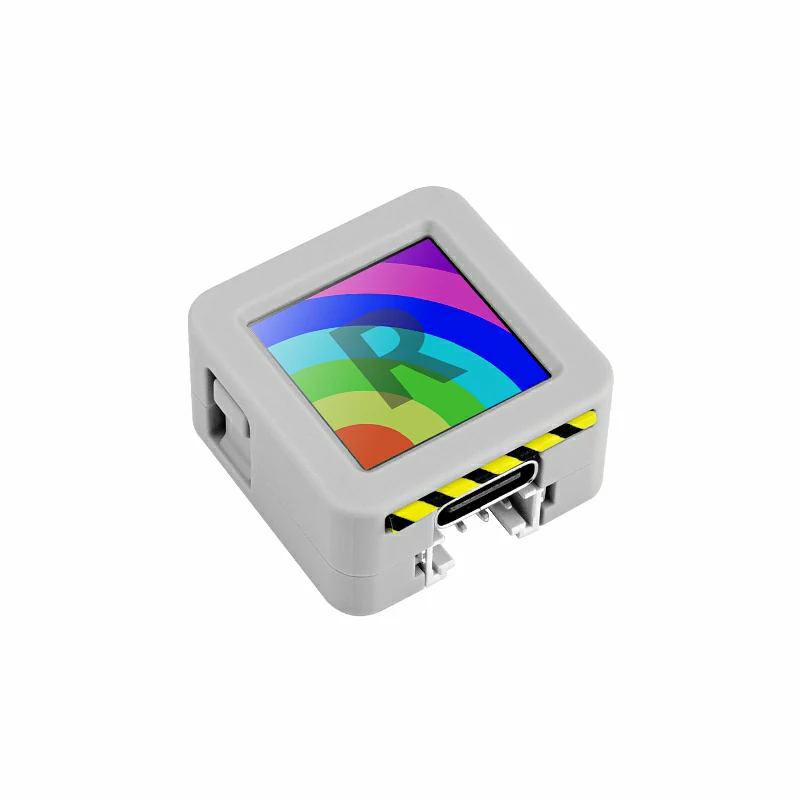
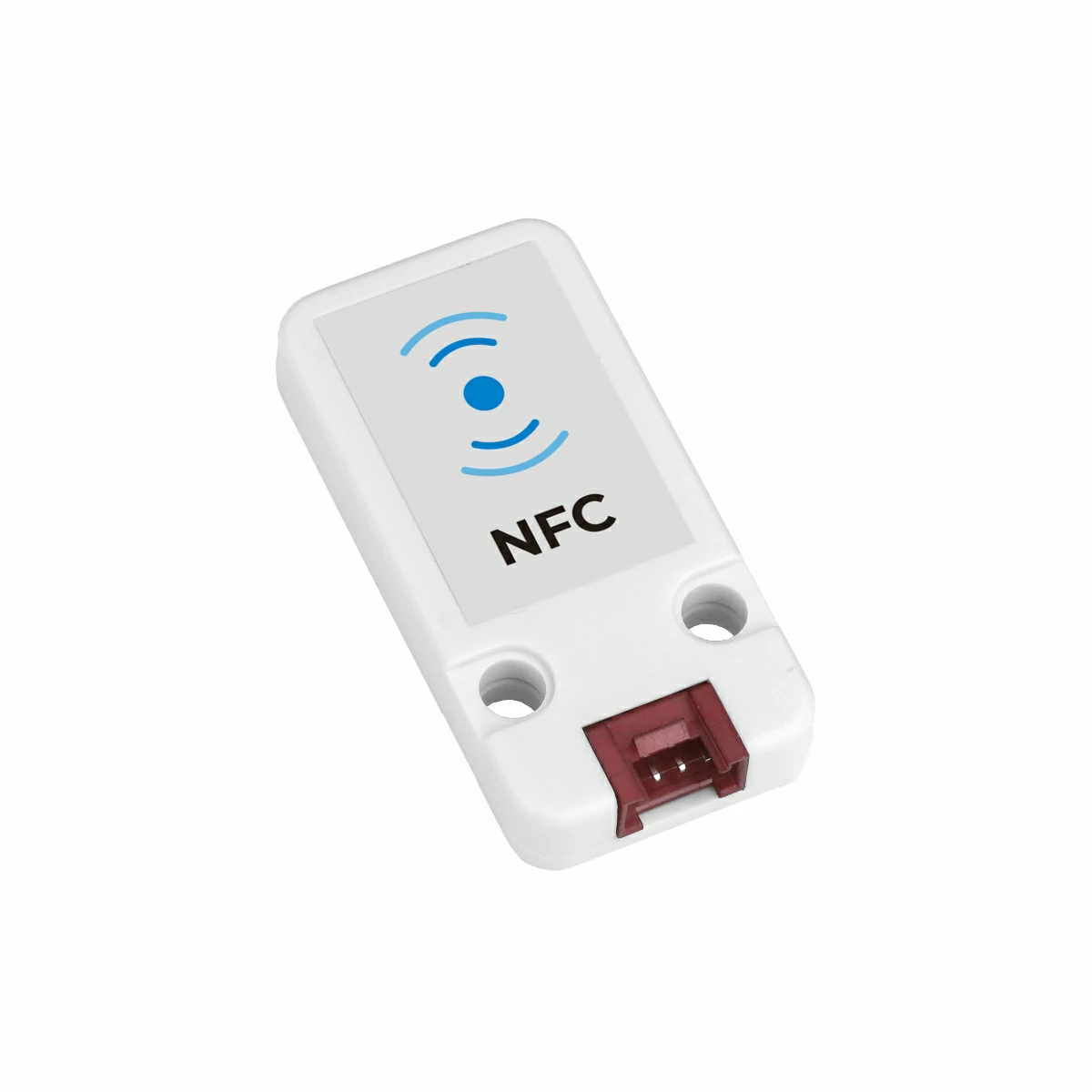
3.使用到的硬件产品:
2.注意事项
3.案例程序
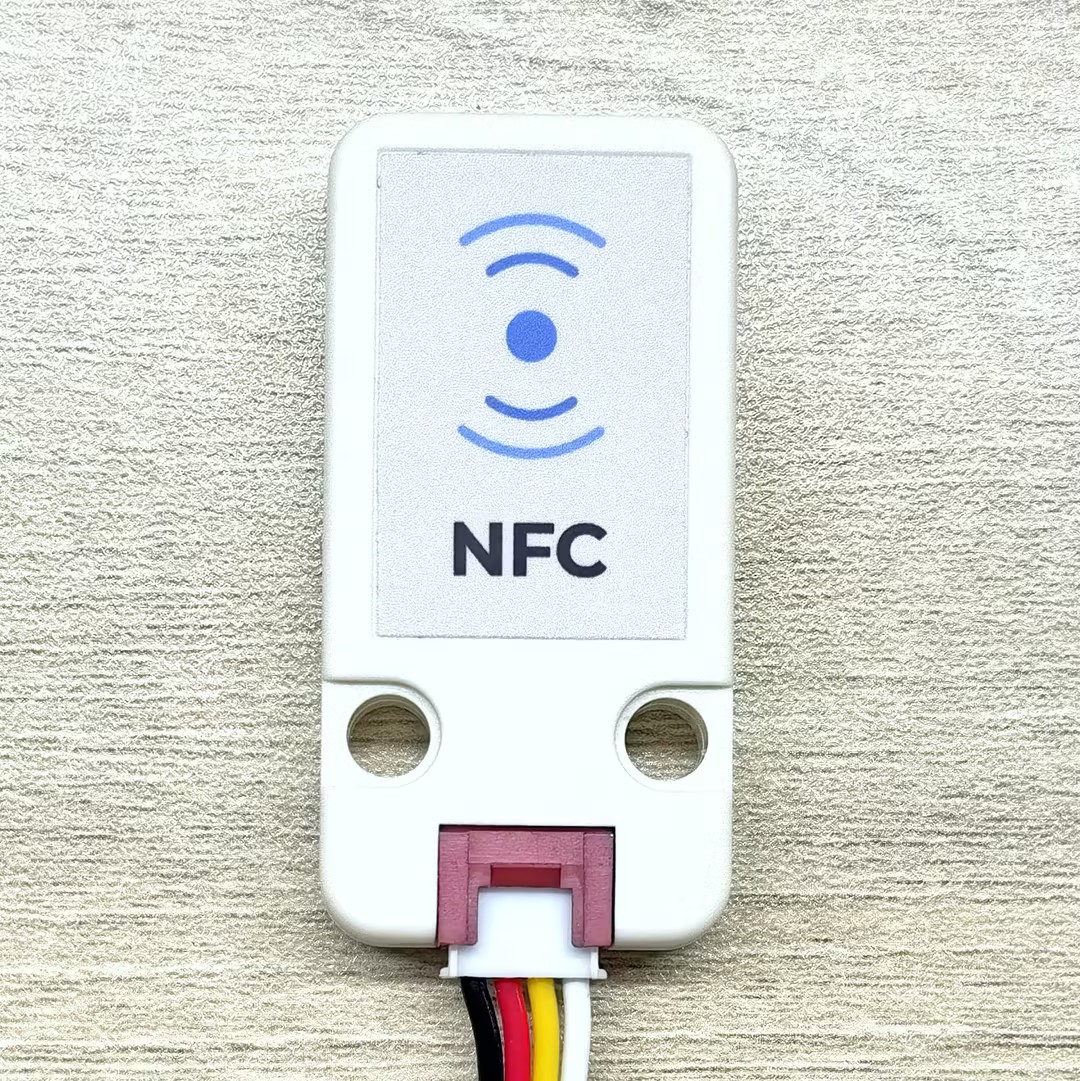
请放置 NFC 标签卡片到下方图片所示的 Unit NFC 感应面进行测试,以获得最佳的读写效果。
3.1 基础说明
核心对象
// NFC protocol layer instances
m5::nfc::NFCLayerA nfc_a{unit};             // NFC-A protocol layer (reader mode)
m5::nfc::EmulationLayerA emu_a{unit};       // NFC-A emulation layer (tag emulation mode)

// Card object
PICC picc{}; // Represents a detected cardMIFARE Classic 密钥
constexpr Key keyA = DEFAULT_KEY;
constexpr Key keyB = DEFAULT_KEY;
// DEFAULT_KEY is 0xFFFFFFFFFFFF (Default value)读卡器基本工作流程
典型的 NFC 读卡器操作流程包括以下步骤:
- 初始化:
M5.begin()和Wire.begin() - 检测:使用
nfc_a.detect()或nfc_a.detect(piccs)查找卡片 - 识别:使用
nfc_a.identify()确定卡片类型和内存布局 - 激活:使用
nfc_a.reactivate()获取完整通讯参数 - 认证:对于 MIFARE Classic 卡片需要使用
mifareClassicAuthenticateA/B()进行认证 - 操作:执行读、写或特殊操作
- 停用:使用
nfc_a.deactivate()释放卡片
卡片对象常用方法
| 方法 | 返回值 | 说明 |
|---|---|---|
picc.isMifareClassic() | bool | 检查是否为 Classic1K/4K |
picc.isMifareUltralight() | bool | 检查是否为 Ultralight 系列 |
picc.isMifareDESFire() | bool | 检查是否为 DESFire 系列 |
picc.isUserBlock(block) | bool | 检查块是否为用户可用块 |
picc.uidAsString() | string | 获取 UID 的十六进制字符串 |
picc.typeAsString() | string | 获取卡片类型名称 |
picc.userAreaSize() | uint16_t | 获取用户可用区域大小 |
picc.totalSize() | uint16_t | 获取卡片总容量 |
标签模拟基本概念
标签模拟(Tag Emulation)使设备充当一张 NFC 卡片,允许其他 NFC 读卡器检测和通信,这在需要模拟各种 NFC 卡片类型(如MIFARE Ultralight、NTAG等)的应用中非常常见。
标签模拟的主要步骤:
- 创建 PICC 对象:代表要模拟的虚拟卡片
- 定义卡片类型和 UID:选择模拟的具体卡片类型和其唯一标识
- 准备内存数据:设置卡片内存中的数据(可包含NDEF消息等)
- 嵌入 UID:将 UID 正确写入内存的指定位置
- 启动模拟:调用
emu_a.begin()开始模拟 - 更新状态:在主循环中调用
emu_a.update()处理读卡器的查询
标签信息定义
constexpr Type type{Type::MIFARE_Ultralight};  // Select tag type to emulate (e.g., MIFARE_Ultralight or NTAG_213)
constexpr uint8_t uid[] = {0x04, 0x34, 0x56, 0x78, 0x9A, 0xBC, 0xDE};  // 7-byte UID
uint8_t picc_memory[64]{}; // Emulated tag memory buffer (size depends on card type)标签模拟 API
模拟操作
| 方法 | 功能 |
|---|---|
picc.emulate(type, uid, uid_len) | 配置要模拟的卡片类型和 UID |
emu_a.begin(picc, memory, mem_size) | 用指定的卡片信息和内存数据启动模拟 |
emu_a.emulatePICC() | 获取当前模拟的 PICC 对象 |
emu_a.update() | 更新模拟状态(需在主循环中调用) |
emu_a.state() | 获取当前仿真状态 |
状态值
模拟器有以下几种状态:
None(无)、Off(关闭)、Idle(空闲)、Ready(就绪)、Active(活跃)、Halt(停止)
辅助函数
| 函数 | 功能 |
|---|---|
embed_uid(memory, uid) | 将 7 字节 UID 嵌入到 Ultralight/NTAG 的内存布局中 |
bcc8(data, len, init) | 计算 BCC(块校验字符)用于 UID 验证 |
3.2 快速扫描识别
本示例演示如何快速扫描并识别NFC卡片。该程序持续检测读卡器范围内的卡片,对于每张检测到的卡片执行两步识别流程:首先通过detect()进行初步分类,然后使用identify()进行精确识别。识别成功后会输出卡片的 UID、类型、ATQA 和 SAK 等信息。这是实现 NFC 应用的基础步骤。
#include <M5Unified.h>
#include <M5UnitUnified.h>
#include <M5UnitUnifiedNFC.h>
#include <M5Utility.h>
#include <Wire.h>
#include <vector>

using namespace m5::nfc::a; // Use NFC-A protocol namespace (ISO 14443-3A)

namespace {
auto& lcd = M5.Display;
m5::unit::UnitUnified Units; // Unit unified manager instance
m5::unit::UnitNFC unit{};  // NFC Unit instance (I2C interface)
m5::nfc::NFCLayerA nfc_a{unit}; // NFC-A protocol layer instance for ISO 14443-3A cards
}  // namespace

void setup()
{
    M5.begin();
    // The screen shall be in landscape mode
    if (lcd.height() > lcd.width()) {
        lcd.setRotation(1);
    }

    auto board = M5.getBoard();
    bool unit_ready{};// Unit initialization status flag

    auto pin_num_sda = M5.getPin(m5::pin_name_t::port_a_sda);
    auto pin_num_scl = M5.getPin(m5::pin_name_t::port_a_scl);
    M5_LOGI("getPin: SDA:%u SCL:%u", pin_num_sda, pin_num_scl);
    Wire.end(); // Close existing I2C connection first
    Wire.begin(pin_num_sda, pin_num_scl, 400 * 1000U);
    // Add NFC Unit to manager and initialize
    unit_ready = Units.add(unit, Wire) && Units.begin();
    if (!unit_ready) {
        // Initialization failed: turn screen red and enter infinite loop
        M5_LOGE("Failed to begin");
        lcd.fillScreen(TFT_RED);
        while (true) {
            m5::utility::delay(10000);
        }
    }
    M5_LOGI("M5UnitUnified initialized");
    M5_LOGI("%s", Units.debugInfo().c_str());

    lcd.setFont(&fonts::FreeMono9pt7b);
    lcd.fillScreen(0);
}

void loop()
{
    M5.update();
    Units.update();// Update all registered Units

    // Create PICC (card) list, try to detect nearby cards
    std::vector<PICC> piccs;
    if (nfc_a.detect(piccs)) { // Cards detected
        lcd.fillScreen(0);
        lcd.setCursor(0, 0);
        uint16_t idx{}; // Counter for successfully identified cards
        for (auto&& u : piccs) {
            // detect only performs a provisional classification based on sak, so further identification is required
            if (nfc_a.identify(u)) {// Perform precise identification of the card
                // Print card info: UID, type, ATQA, SAK, user area size, total size
                M5.Log.printf("PICC:%s %s %04X/%02X %u/%u\n", u.uidAsString().c_str(), u.typeAsString().c_str(), u.atqa,
                              u.sak, u.userAreaSize(), u.totalSize());
                lcd.printf("[%u]:PICC:\n<%s>\n%s\n", idx, u.uidAsString().c_str(), u.typeAsString().c_str());
                ++idx;
            } else {
                M5_LOGW("Failed to identify %s %s %04X/%02X %u/%u", u.uidAsString().c_str(), u.typeAsString().c_str(),
                        u.atqa, u.sak, u.userAreaSize(), u.totalSize());
            }
        }
        if (idx) {
            lcd.printf("==> %u PICC\n", idx);
            M5.Log.printf("==> %u PICC\n", idx);
        }
        nfc_a.deactivate();// Deactivate communication with all cards
    }
}将上述代码上传到主控设备后,打开串口监视器,放置一张或多张标签卡片在 Unit NFC 感应面附近,即可看到识别结果。
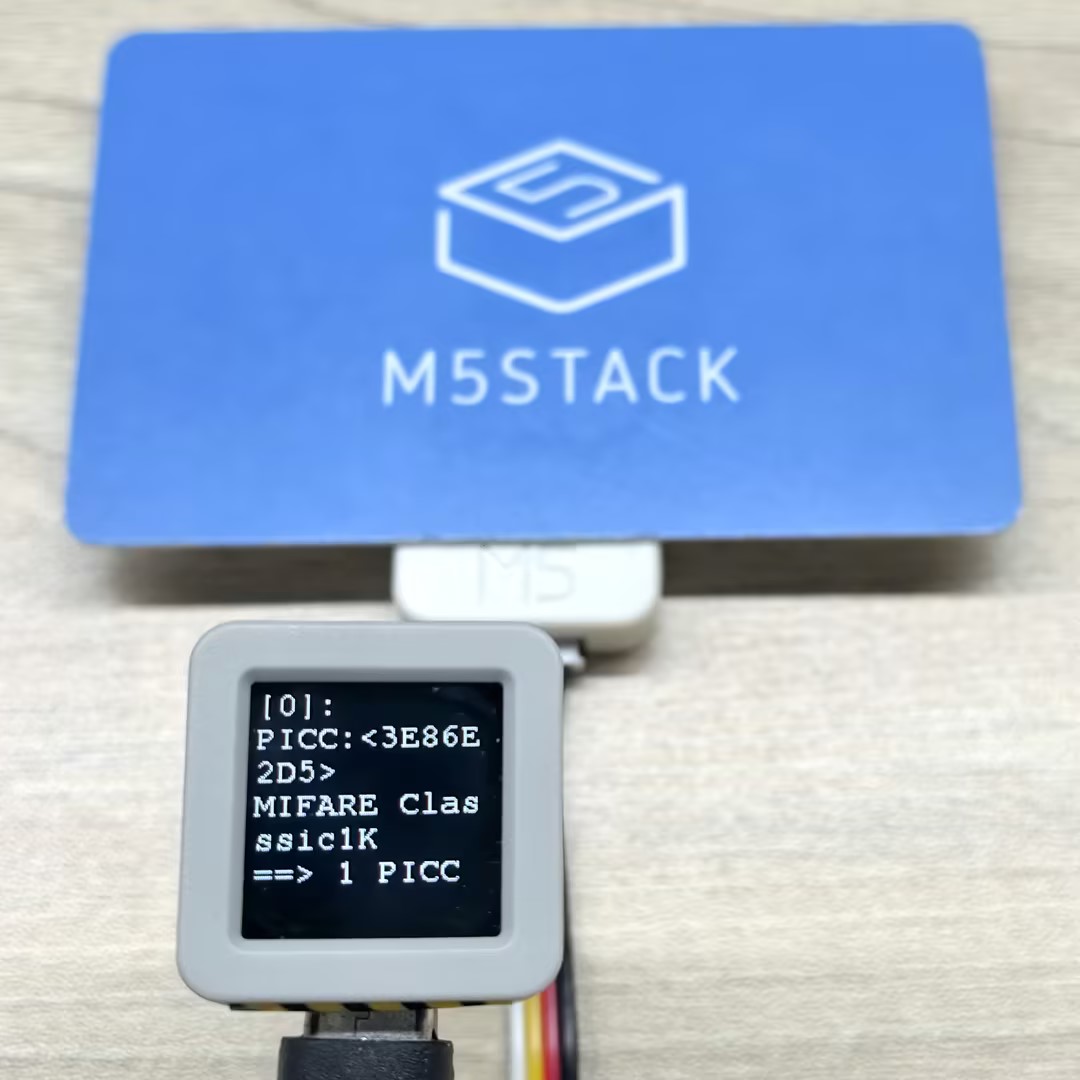
串口监视器输出示例:
PICC:3E86E2D5 MIFARE Classsic1K 0004/08 752/1024
==> 1 PICC
PICC:047D9D82752291 MIFARE Ultralight EV1 11 0044/00 48/80
PICC:04327CD2B97880 MIFARE Plus 2K X/EV SL0 0044/20 1520/2048
==> 2 PICC3.3 完整数据读取
本过程需要点击 BtnA 时将卡片靠近读卡器,程序检测到卡片后会自动执行读取并将数据打印至屏幕和串口,读取过程中程序会进行完整的卡片识别和激活。
#include <M5Unified.h>
#include <M5UnitUnified.h>
#include <M5UnitUnifiedNFC.h>
#include <M5Utility.h>
#include <Wire.h>
#include <vector>

using namespace m5::nfc::a; // NFC-A protocol layer
using namespace m5::nfc::a::mifare; // MIFARE card common operations
using namespace m5::nfc::a::mifare::classic; // MIFARE Classic card specific operations

namespace {
auto& lcd = M5.Display;
m5::unit::UnitUnified Units; // Unit unified manager instance
m5::unit::UnitNFC unit{};  // NFC Unit instance (I2C interface)
m5::nfc::NFCLayerA nfc_a{unit}; // NFC-A protocol layer instance for ISO 14443-3A cards

// KeyA that can authenticate all blocks
// If it's a different key value, change it
constexpr Key keyA = DEFAULT_KEY;  // Default as 0xFFFFFFFFFFFF
}  // namespace

void setup()
{
    M5.begin();

    // The screen shall be in landscape mode
    if (lcd.height() > lcd.width()) {
        lcd.setRotation(1);
    }

    auto board = M5.getBoard();
    bool unit_ready{};// Unit initialization status flag

    auto pin_num_sda = M5.getPin(m5::pin_name_t::port_a_sda);
    auto pin_num_scl = M5.getPin(m5::pin_name_t::port_a_scl);
    M5_LOGI("getPin: SDA:%u SCL:%u", pin_num_sda, pin_num_scl);
    Wire.end();// Close existing I2C connection first
    Wire.begin(pin_num_sda, pin_num_scl, 400 * 1000U);
    // Add NFC Unit to manager and initialize
    unit_ready = Units.add(unit, Wire) && Units.begin();
    if (!unit_ready) {
        M5_LOGE("Failed to begin");
        lcd.fillScreen(TFT_RED);
        while (true) {
            m5::utility::delay(10000);
        }
    }

    M5_LOGI("M5UnitUnified initialized");
    M5_LOGI("%s", Units.debugInfo().c_str());

    lcd.setFont(&fonts::FreeMono9pt7b);
    lcd.fillScreen(0);
    lcd.setCursor(0, 0);
    lcd.printf("Please put the PICC\nand click\nBtnA");
    M5.Log.printf("Please put the PICC and click BtnA\n");
}

void loop()
{
    M5.update();
    Units.update();// Update all registered Units

    if (M5.BtnA.wasClicked()) {
        lcd.fillScreen(0);
        lcd.setCursor(0, 0);
        PICC picc{}; // Create card object
        if (nfc_a.detect(picc)) { // Detect a single card
            // Identify card type and reactivate (get full communication parameters)
            if (nfc_a.identify(picc) && nfc_a.reactivate(picc)) {
                lcd.printf("%s\n%s", picc.uidAsString().c_str(), picc.typeAsString().c_str());
                // Print detailed info: UID, type, user area size, total size
                M5.Log.printf("==== Dump %s %s %u/%u ====\n", picc.uidAsString().c_str(), picc.typeAsString().c_str(),
                              picc.userAreaSize(), picc.totalSize());
                // Dump all card data (needs key for MIFARE Classic, key parameter ignored for other types)
                nfc_a.dump(keyA);  // Need key if MIFARE classic, Ignore key if not MIFARE classic
                nfc_a.deactivate();
            } else {
                lcd.printf("Failed to identify");
                M5_LOGE("Failed to identify/activate %s", picc.uidAsString().c_str());
            }
        } else {
            lcd.printf("PICC NOT exists");
            M5.Log.printf("PICC NOT exists\n");
        }
    }
}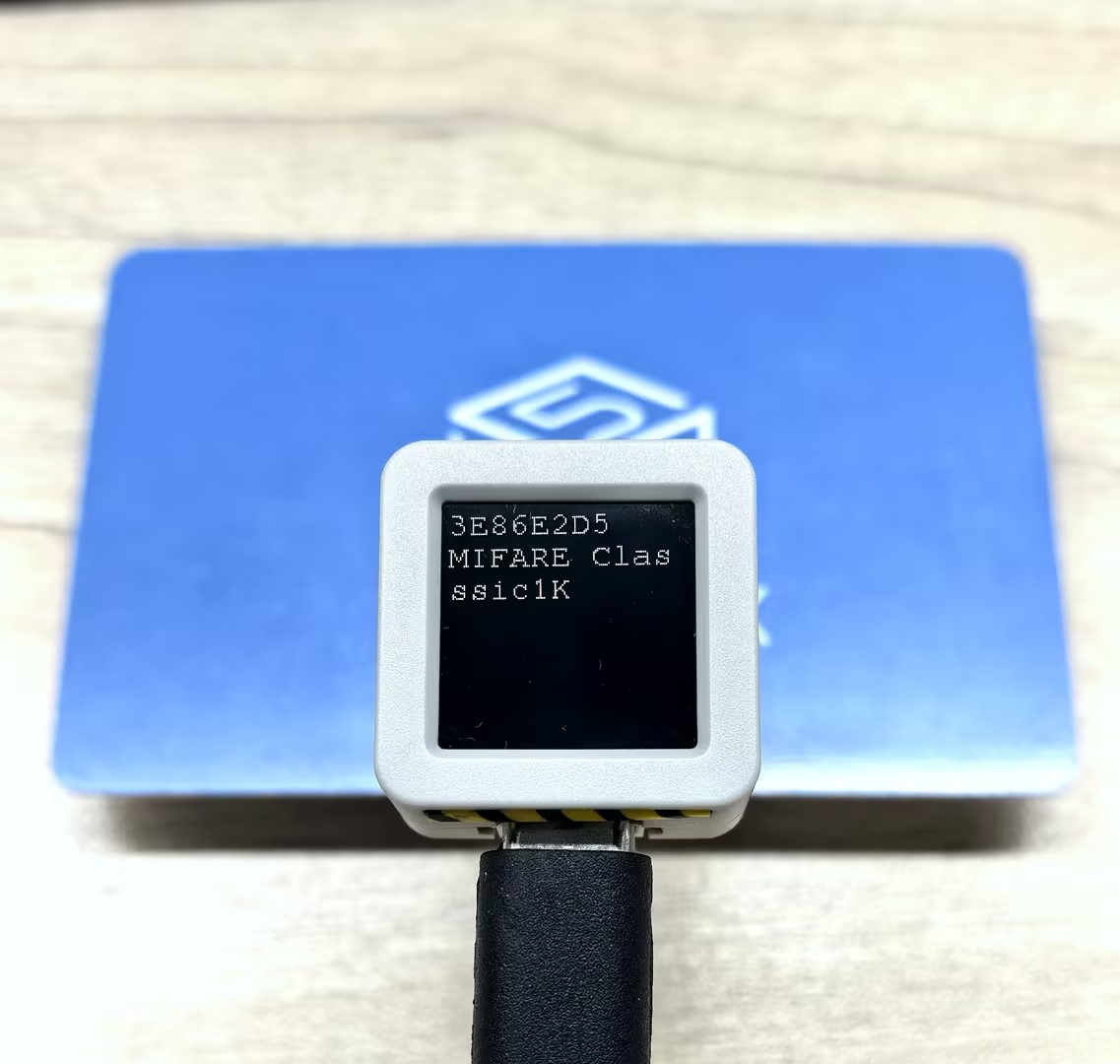
串口监视器输出示例:
==== Dump 3E86E2D5 MIFARE Classsic1K 752/1024 ====
Sec[Blk]:00 01 02 03 04 05 06 07 08 09 0A 0B 0C 0D 0E 0F [Access]
-----------------------------------------------------------------
00)[000]:3E 86 E2 D5 8F 08 04 00 62 63 64 65 66 67 68 69 [0 0 0]
   [001]:00 00 00 00 00 00 00 00 00 00 00 00 00 00 00 00 [0 0 0]
   [002]:00 00 00 00 00 00 00 00 00 00 00 00 00 00 00 00 [0 0 0]
   [003]:00 00 00 00 00 00 FF 07 80 69 FF FF FF FF FF FF [0 0 1]
01)[004]:00 00 00 00 00 00 00 00 00 00 00 00 00 00 00 00 [0 0 0]
   [005]:00 00 00 00 00 00 00 00 00 00 00 00 00 00 00 00 [0 0 0]
   [006]:00 00 00 00 00 00 00 00 00 00 00 00 00 00 00 00 [0 0 0]
   [007]:00 00 00 00 00 00 FF 07 80 69 FF FF FF FF FF FF [0 0 1]
02)[008]:00 00 00 00 00 00 00 00 00 00 00 00 00 00 00 00 [0 0 0]
   [009]:00 00 00 00 00 00 00 00 00 00 00 00 00 00 00 00 [0 0 0]
   [010]:00 00 00 00 00 00 00 00 00 00 00 00 00 00 00 00 [0 0 0]
   [011]:00 00 00 00 00 00 FF 07 80 69 FF FF FF FF FF FF [0 0 1]
03)[012]:00 00 00 00 00 00 00 00 00 00 00 00 00 00 00 00 [0 0 0]
   [013]:00 00 00 00 00 00 00 00 00 00 00 00 00 00 00 00 [0 0 0]
   [014]:00 00 00 00 00 00 00 00 00 00 00 00 00 00 00 00 [0 0 0]
   [015]:00 00 00 00 00 00 FF 07 80 69 FF FF FF FF FF FF [0 0 1]
04)[016]:00 00 00 00 00 00 00 00 00 00 00 00 00 00 00 00 [0 0 0]
   [017]:00 00 00 00 00 00 00 00 00 00 00 00 00 00 00 00 [0 0 0]
   [018]:00 00 00 00 00 00 00 00 00 00 00 00 00 00 00 00 [0 0 0]
   [019]:00 00 00 00 00 00 FF 07 80 69 FF FF FF FF FF FF [0 0 1]
05)[020]:00 00 00 00 00 00 00 00 00 00 00 00 00 00 00 00 [0 0 0]
   [021]:00 00 00 00 00 00 00 00 00 00 00 00 00 00 00 00 [0 0 0]
   [022]:00 00 00 00 00 00 00 00 00 00 00 00 00 00 00 00 [0 0 0]
   [023]:00 00 00 00 00 00 FF 07 80 69 FF FF FF FF FF FF [0 0 1]
06)[024]:00 00 00 00 00 00 00 00 00 00 00 00 00 00 00 00 [0 0 0]
   [025]:00 00 00 00 00 00 00 00 00 00 00 00 00 00 00 00 [0 0 0]
   [026]:00 00 00 00 00 00 00 00 00 00 00 00 00 00 00 00 [0 0 0]
   [027]:00 00 00 00 00 00 FF 07 80 69 FF FF FF FF FF FF [0 0 1]
07)[028]:00 00 00 00 00 00 00 00 00 00 00 00 00 00 00 00 [0 0 0]
   [029]:00 00 00 00 00 00 00 00 00 00 00 00 00 00 00 00 [0 0 0]
   [030]:00 00 00 00 00 00 00 00 00 00 00 00 00 00 00 00 [0 0 0]
   [031]:00 00 00 00 00 00 FF 07 80 69 FF FF FF FF FF FF [0 0 1]
08)[032]:00 00 00 00 00 00 00 00 00 00 00 00 00 00 00 00 [0 0 0]
   [033]:00 00 00 00 00 00 00 00 00 00 00 00 00 00 00 00 [0 0 0]
   [034]:00 00 00 00 00 00 00 00 00 00 00 00 00 00 00 00 [0 0 0]
   [035]:00 00 00 00 00 00 FF 07 80 69 FF FF FF FF FF FF [0 0 1]
09)[036]:00 00 00 00 00 00 00 00 00 00 00 00 00 00 00 00 [0 0 0]
   [037]:00 00 00 00 00 00 00 00 00 00 00 00 00 00 00 00 [0 0 0]
   [038]:00 00 00 00 00 00 00 00 00 00 00 00 00 00 00 00 [0 0 0]
   [039]:00 00 00 00 00 00 FF 07 80 69 FF FF FF FF FF FF [0 0 1]
10)[040]:00 00 00 00 00 00 00 00 00 00 00 00 00 00 00 00 [0 0 0]
   [041]:00 00 00 00 00 00 00 00 00 00 00 00 00 00 00 00 [0 0 0]
   [042]:00 00 00 00 00 00 00 00 00 00 00 00 00 00 00 00 [0 0 0]
   [043]:00 00 00 00 00 00 FF 07 80 69 FF FF FF FF FF FF [0 0 1]
11)[044]:00 00 00 00 00 00 00 00 00 00 00 00 00 00 00 00 [0 0 0]
   [045]:00 00 00 00 00 00 00 00 00 00 00 00 00 00 00 00 [0 0 0]
   [046]:00 00 00 00 00 00 00 00 00 00 00 00 00 00 00 00 [0 0 0]
   [047]:00 00 00 00 00 00 FF 07 80 69 FF FF FF FF FF FF [0 0 1]
12)[048]:00 00 00 00 00 00 00 00 00 00 00 00 00 00 00 00 [0 0 0]
   [049]:00 00 00 00 00 00 00 00 00 00 00 00 00 00 00 00 [0 0 0]
   [050]:00 00 00 00 00 00 00 00 00 00 00 00 00 00 00 00 [0 0 0]
   [051]:00 00 00 00 00 00 FF 07 80 69 FF FF FF FF FF FF [0 0 1]
13)[052]:00 00 00 00 00 00 00 00 00 00 00 00 00 00 00 00 [0 0 0]
   [053]:00 00 00 00 00 00 00 00 00 00 00 00 00 00 00 00 [0 0 0]
   [054]:00 00 00 00 00 00 00 00 00 00 00 00 00 00 00 00 [0 0 0]
   [055]:00 00 00 00 00 00 FF 07 80 69 FF FF FF FF FF FF [0 0 1]
14)[056]:00 00 00 00 00 00 00 00 00 00 00 00 00 00 00 00 [0 0 0]
   [057]:00 00 00 00 00 00 00 00 00 00 00 00 00 00 00 00 [0 0 0]
   [058]:00 00 00 00 00 00 00 00 00 00 00 00 00 00 00 00 [0 0 0]
   [059]:00 00 00 00 00 00 FF 07 80 69 FF FF FF FF FF FF [0 0 1]
15)[060]:00 00 00 00 00 00 00 00 00 00 00 00 00 00 00 00 [0 0 0]
   [061]:00 00 00 00 00 00 00 00 00 00 00 00 00 00 00 00 [0 0 0]
   [062]:00 00 00 00 00 00 00 00 00 00 00 00 00 00 00 00 [0 0 0]
[063]:00 00 00 00 00 00 FF 07 80 69 FF FF FF FF FF FF [0 0 1]3.4 标签模拟
本示例展示 NFC 标签模拟功能,其他支持 NFC 的读卡器(如手机)靠近标签时就能识别并读取该标签。程序支持两种常见标签卡片类型的模拟:MIFARE Ultralight 和 NTAG 213,每种都配置了对应的 UID 和内存数据(包含 NDEF 消息)。
关键要点:
- 模拟过程中必须在主循环中不断调用
update()更新状态 - 状态变化(Off→Idle→Ready→Active→Halt)通过屏幕指示器实时显示
- 卡片数据可包含 NDEF 消息,支持 URI、文本、图片等多种内容类型
#include <M5Unified.h>
#include <M5UnitUnified.h>
#include <M5UnitUnifiedNFC.h>
#include <M5Utility.h>
#include <Wire.h>
#include <vector>

using namespace m5::nfc; // NFC common namespace
using namespace m5::nfc::a; // NFC-A protocol layer
using namespace m5::nfc::a::mifare; // MIFARE card common operations
using namespace m5::nfc::a::mifare::classic; // MIFARE Classic card specific operation

namespace {
auto& lcd = M5.Display;
m5::unit::UnitUnified Units; // Unit unified manager instance
m5::unit::UnitNFC unit{};  // NFC Unit instance (I2C interface)
m5::nfc::EmulationLayerA emu_a{unit}; // Create NFC-A emulation layer instance to emulate the device as an NFC tag

PICC picc{}; // Card object to emulate

// ===== Select the tag type to emulate =====
#define EMU_MIFARE_ULTRALIGHT // MIFARE Ultralight tag
// #define EMU_NTAG213  // NTAG213 tag

// ===== MIFARE Ultralight emulation data =====
#if defined(EMU_MIFARE_ULTRALIGHT)
constexpr Type type{Type::MIFARE_Ultralight};
constexpr uint8_t uid[] = {0x04, 0x34, 0x56, 0x78, 0x9A, 0xBC, 0xDE};// 7-byte UID (Ultralight/NTAG series uses 7-byte UID)
// Emulated tag memory data (contains NDEF message: URL https://m5stack.com/ and text "Hello M5Stack")
uint8_t picc_memory[]   = {
    0x00, 0x00, 0x00, 0x00,  // Page 0: UID bytes (to be filled by embed_uid)
    0x00, 0x00, 0x00, 0x00,  // Page 1: UID bytes (continued)
    0x00, 0xA3, 0x00, 0x00,  // Page 2: Internal data, lock bits
    0xE1, 0x10, 0x06, 0x00,  // Page 3: CC (Capability Container) - NDEF format identifier
    0x03, 0x25, 0x91, 0x01,  // Page 4: NDEF TLV start
    0x0D, 0x55, 0x04, 0x6D,  // Page 5: URI record (https://)
    0x35, 0x73, 0x74, 0x61,  // Page 6: "5sta"
    0x63, 0x6B, 0x2E, 0x63,  // Page 7: "ck.c"
    0x6F, 0x6D, 0x2F, 0x51,  // Page 8: "om/" + text record start
    0x01, 0x10, 0x54, 0x02,  // Page 9: Text record header
    0x65, 0x6E, 0x48, 0x65,  // Page 10: "enHe" (language code "en" + "He")
    0x6C, 0x6C, 0x6F, 0x20,  // Page 11: "llo "
    0x4D, 0x35, 0x53, 0x74,  // Page 12: "M5St"
    0x61, 0x63, 0x6B, 0xFE,  // Page 13: "ack" + NDEF terminator 0xFE
    0x44, 0x45, 0x46, 0x00,  // Page 14: Padding data
    0x44, 0x45, 0x46, 0x00,  // Page 15: Padding data
};
// ===== NTAG213 emulation data =====
#elif defined(EMU_NTAG213)
constexpr Type type{Type::NTAG_213};
constexpr uint8_t uid[] = {0x99, 0x88, 0x77, 0x66, 0x55, 0x44, 0x33};// 7-byte UID
// Emulated tag memory data (contains multilingual NDEF message: URL + Chinese/English/Japanese text)
uint8_t picc_memory[]   = {
    0x00, 0x00, 0x00, 0x00,  // Page 0: UID bytes
    0x00, 0x00, 0x00, 0x00,  // Page 1: UID bytes (continued)
    0x00, 0x48, 0x00, 0x00,  // Page 2: Internal data, lock bits
    0xE1, 0x10, 0x12, 0x00,  // Page 3: CC (Capability Container)
    0x01, 0x03, 0xA0, 0x0C,  // Page 4: NDEF capability data
    0x34, 0x03, 0x58, 0x91,  // Page 5: NDEF TLV + message start
    0x01, 0x0D, 0x55, 0x04,  // Page 6: URI record header (https://)
    0x6D, 0x35, 0x73, 0x74,  // Page 7: "m5st"
    0x61, 0x63, 0x6B, 0x2E,  // Page 8: "ack."
    0x63, 0x6F, 0x6D, 0x2F,  // Page 9: "com/"
    0x11, 0x01, 0x11, 0x54,  // Page 10: Chinese text record header
    0x02, 0x7A, 0x68, 0xE4,  // Page 11: Language code "zh" + UTF-8 Chinese start
    0xBD, 0xA0, 0xE5, 0xA5,  // Page 12: UTF-8 encoding of "你好"
    0xBD, 0x20, 0x4D, 0x35,  // Page 13: " M5"
    0x53, 0x74, 0x61, 0x63,  // Page 14: "Stac"
    0x6B, 0x11, 0x01, 0x10,  // Page 15: "k" + English text record header
    0x54, 0x02, 0x65, 0x6E,  // Page 16: Language code "en"
    0x48, 0x65, 0x6C, 0x6C,  // Page 17: "Hell"
    0x6F, 0x20, 0x4D, 0x35,  // Page 18: "o M5"
    0x53, 0x74, 0x61, 0x63,  // Page 19: "Stac"
    0x6B, 0x51, 0x01, 0x1A,  // Page 20: "k" + Japanese text record header
    0x54, 0x02, 0x6A, 0x61,  // Page 21: Language code "ja"
    0xE3, 0x81, 0x93, 0xE3,  // Page 22: "こ" UTF-8
    0x82, 0x93, 0xE3, 0x81,  // Page 23: "ん" + start of "に"
    0xAB, 0xE3, 0x81, 0xA1,  // Page 24: "に" + "ち"
    0xE3, 0x81, 0xAF, 0x20,  // Page 25: "は "
    0x4D, 0x35, 0x53, 0x74,  // Page 26: "M5St"
    0x61, 0x63, 0x6B, 0xFE,  // Page 27: "ack" + NDEF terminator
    0x00, 0x00, 0x00, 0x00,  // Pages 28-39: Free user data area
    0x00, 0x00, 0x00, 0x00,  //
    0x00, 0x00, 0x00, 0x00,  //
    0x00, 0x00, 0x00, 0x00,  //
    0x00, 0x00, 0x00, 0x00,  //
    0x00, 0x00, 0x00, 0x00,  //
    0x00, 0x00, 0x00, 0x00,  //
    0x00, 0x00, 0x00, 0x00,  //
    0x00, 0x00, 0x00, 0x00,  //
    0x00, 0x00, 0x00, 0x00,  //
    0x00, 0x00, 0x00, 0x00,  //
    0x00, 0x00, 0x00, 0x00,  //
    0x00, 0x00, 0x00, 0xBD,  // Page 40: NTAG213 configuration page
    0x02, 0x00, 0x00, 0xFF,  // Page 41: Configuration page (continued)
    0x00, 0x00, 0x00, 0x00,  // Page 42: Password protection
    0x00, 0x00, 0x00, 0x00,  // Page 43: Password acknowledgment
    0x00, 0x00, 0x00, 0x00,  // Page 44: Reserved area
};
#else
#error "Choose the target to emulate"
#endif

/**
 * @brief Calculate BCC (Block Check Character) - XOR operation on byte sequence
 * @param p    Pointer to input data
 * @param len  Data length
 * @param init Initial value (default: 0)
 * @return     BCC check value
 */
uint8_t bcc8(const uint8_t* p, const uint8_t len, const uint8_t init = 0)
{
    uint8_t v = init;
    for (uint_fast8_t i = 0; i < len; ++i) {
        v ^= p[i];
    }
    return v;
}

/**
 * @brief Correctly embed 7-byte UID into Ultralight/NTAG memory layout
 *
 * UID storage format in Ultralight/NTAG memory:
 *   Page 0: [UID0, UID1, UID2, BCC0]  BCC0 = CT ^ UID0 ^ UID1 ^ UID2
 *   Page 1: [UID3, UID4, UID5, UID6]
 *   Page 2 prefix: [BCC1]  BCC1 = UID3 ^ UID4 ^ UID5 ^ UID6
 *
 * @param mem  Target memory buffer (at least 9 bytes)
 * @param uid  7-byte UID data
 */
void embed_uid(uint8_t mem[9], const uint8_t uid[7])
{
    memcpy(mem, uid, 3);
    mem[3] = bcc8(uid, 3, 0x88 /* CT */);
    memcpy(mem + 4, uid + 3, 4);
    mem[8] = bcc8(uid + 3, 4);
}

// Color table corresponding to emulation states
constexpr uint16_t color_table[] = {
    //  None,      Off,     Idle,     Ready,   Active,      Halt };
    TFT_BLACK, TFT_RED, TFT_BLUE, TFT_YELLOW, TFT_GREEN, TFT_MAGENTA};
// Character identifiers for emulation states
//                                 None,  Off,  Idle, Ready, Active, Halt
constexpr const char* state_table[] = {"-", "O", "I", "R", "A", "H"};
}  // namespace

void setup()
{
    M5.begin();
    Serial.begin(115200);

    // The screen shall be in landscape mode
    if (lcd.height() > lcd.width()) {
        lcd.setRotation(1);
    }

    // Emulation mode settings
    auto cfg      = unit.config();
    cfg.emulation = true;
    cfg.mode      = NFC::A;
    unit.config(cfg);

    auto board = M5.getBoard();
    bool unit_ready{};
    auto pin_num_sda = M5.getPin(m5::pin_name_t::port_a_sda);
    auto pin_num_scl = M5.getPin(m5::pin_name_t::port_a_scl);
    M5_LOGI("getPin: SDA:%u SCL:%u", pin_num_sda, pin_num_scl);
    Wire.end();// Close existing I2C connection first
    Wire.begin(pin_num_sda, pin_num_scl, 400 * 1000U);
    // Add NFC Unit to manager and initialize
    unit_ready = Units.add(unit, Wire) && Units.begin();
    if (!unit_ready) {
        M5_LOGE("Failed to begin");
        lcd.fillScreen(TFT_RED);
        while (true) {
            m5::utility::delay(10000);
        }
    }

    M5_LOGI("M5UnitUnified initialized");
    M5_LOGI("%s", Units.debugInfo().c_str());

    lcd.setFont(&fonts::FreeMono9pt7b);
    lcd.startWrite();
    lcd.fillScreen(TFT_RED);
    // Initialize emulation
    if (picc.emulate(type, uid, sizeof(uid))) {// Set card type and UID to emulate
        embed_uid(picc_memory, uid);// Embed UID into emulation memory
        // Start emulation layer with card object and memory data
        if (emu_a.begin(picc, picc_memory, sizeof(picc_memory))) {
            lcd.fillScreen(TFT_DARKGREEN);
            lcd.setTextColor(TFT_WHITE, TFT_DARKGREEN);
            lcd.setCursor(0, 16);
            // Get and display the emulated PICC info
            const auto& e_picc = emu_a.emulatePICC();
            Serial.printf("Emulation:%s %s ATQA:%04X SAK:%u\n", e_picc.typeAsString().c_str(),
                          e_picc.uidAsString().c_str(), e_picc.atqa, e_picc.sak);
            lcd.printf("%s\n%s\nATQA:%04X\nSAK:%u ", e_picc.typeAsString().c_str(), e_picc.uidAsString().c_str(),
                       e_picc.atqa, e_picc.sak);
        }
    }
    lcd.fillRect(0, 0, 32, 16, color_table[0]);
    lcd.drawString(state_table[0], 0, 0);
    lcd.endWrite();
}

void loop()
{
    M5.update();
    Units.update();  // Update all registered Units
    emu_a.update();  // Update emulation layer state (MUST be called in loop)

    // Monitor emulation state changes and update screen indicator
    static EmulationLayerA::State latest{}; // Record previous state
    auto state = emu_a.state(); // Get current emulation state
    if (latest != state) {
        latest = state;
        lcd.startWrite();
        // Update top-left color block and text based on state
        lcd.fillRect(0, 0, 32, 16, color_table[m5::stl::to_underlying(state)]);
        lcd.drawString(state_table[m5::stl::to_underlying(state)], 0, 0);
        Serial.println(state_table[m5::stl::to_underlying(state)]);
        lcd.endWrite();
    }
}将上述代码上传到主控设备后,Unit NFC 会模拟成一个 NFC 标签,此时若使用手机或其他 NFC 读卡器靠近 Unit NFC,能够识别到一个 NFC 标签,并读取到其中存储的 NDEF 消息内容(URL + Text),串口监视器会输出模拟标签的类型、UID、ATQA 和 SAK 等信息,同时主控屏幕左上角会有状态指示(Idle/Ready/Active 等)。
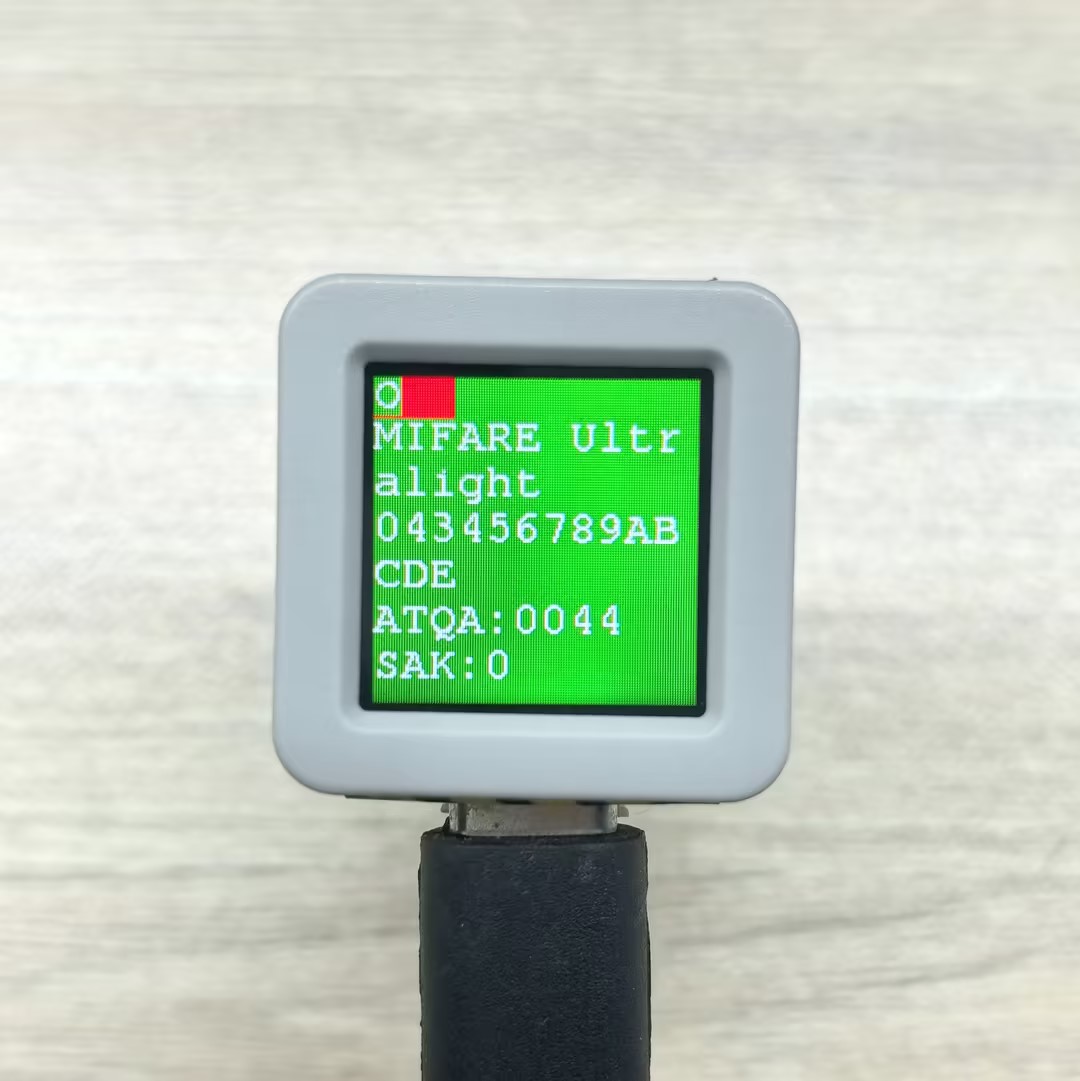
手机读取到的标签信息示例:

串口监视器输出示例:
- MIFARE Ultralight
Emulation:MIFARE Ultralight 043456789ABCDE ATQA:0044 SAK:0
O
I
R
A
H
R
A
H
R
A
O- NTAG 213
Emulation:NTAG 213 99887766554433 ATQA:0044 SAK:0
O
I
R
A
H
R
A
H
R
A
O3.5 直接读写标签
本示例演示如何直接对 NFC 标签进行读写操作,包含跨块连续读写和单块读写两种方式。
#include <M5Unified.h>
#include <M5UnitUnified.h>
#include <M5UnitUnifiedNFC.h>
#include <M5Utility.h>
#include <Wire.h>

using namespace m5::nfc; // NFC common namespace
using namespace m5::nfc::a; // NFC-A protocol layer
using namespace m5::nfc::a::mifare; // MIFARE card operations

namespace {
auto& lcd = M5.Display;
m5::unit::UnitUnified Units;// Unit unified manager instance
m5::unit::UnitNFC unit{};  // NFC Unit instance (I2C interface)
m5::nfc::NFCLayerA nfc_a{unit};// NFC-A protocol layer instance

// Classic default KeyA (0xFFFFFFFFFFFF)
// If your card uses a different key, change it here
constexpr classic::Key keyA = classic::DEFAULT_KEY;

// Test message strings (selected based on card capacity)
constexpr char long_msg[]  = "This is a sample message buffer used for testing NFC page writes and data integrity verification purposes.";// For large-capacity cards (user area >= 120 bytes)
constexpr char short_msg[] = "0123456789ABCDEFGHIJ";// For small-capacity cards (user area < 120 bytes)

/**
 * @brief Cross-block continuous read/write test (triggered by click)
 *
 * Write test message to card starting from specified block, read back and verify data integrity,
 * then clear by writing all zeros.
 * Uses high-level read()/write() API which handles cross-block/cross-sector operations automatically.
 *
 * Flow: Write -> Dump -> Read back & Verify -> Clear -> Dump
 *
 * @param sblock  Starting block number to write
 * @param msg     Test message string to write
 * @return true if all operations (write, verify, clear) succeeded
 */
bool read_write(const uint8_t sblock, const char* msg)
{
    auto len = strlen(msg);
    uint8_t buf[(strlen(msg) + 15) / 16 * 16]{};  // Round up to 16-byte alignment (Classic block size)
    uint16_t rx_len = sizeof(buf);

    // Write test message to card
    M5.Log.printf("================================ WRITE block:%u len:%zu\n", sblock, sizeof(buf));
    if (!nfc_a.write(sblock, (const uint8_t*)msg, len, keyA)) {
        M5_LOGE("Failed to write block %u", sblock);
        return false;
    }
    lcd.fillScreen(TFT_ORANGE);

    // Dump written data for visual confirmation
    nfc_a.mifareClassicAuthenticateA(classic::get_sector_trailer_block(sblock), keyA);// Authenticate sector before dump
    nfc_a.dump(sblock);

    // Read back and verify data integrity
    if (!nfc_a.read(buf, rx_len, sblock, keyA)) {
        M5_LOGE("Failed to read");
        return false;
    }
    lcd.fillScreen(TFT_BLUE);

    bool verify_ok = (memcmp(buf, msg, len) == 0);// Compare read data with original message
    M5.Log.printf("================================ VERIFY:%s\n", verify_ok ? "OK" : "NG");
    if (!verify_ok) {
        M5_LOGE("VERIFY NG!!");
        m5::utility::log::dump(buf, rx_len, false);// Dump read data for debugging
    }

    // Clear by writing all zeros
    memset(buf, 0, sizeof(buf));
    lcd.fillScreen(TFT_MAGENTA);
    if (!nfc_a.write(sblock, buf, sizeof(buf), keyA)) {
        M5_LOGE("Failed to clear");
        return false;
    }
    M5.Log.printf("================================ CLEAR\n");

    // Dump cleared data for visual confirmation
    nfc_a.mifareClassicAuthenticateA(classic::get_sector_trailer_block(sblock), keyA);
    nfc_a.dump(sblock);

    return true;
}

/**
 * @brief Single block read/write test
 *
 * Write a fixed test string to a single 16-byte block using low-level read16()/write16() API,
 * read back and verify, then clear.
 * Unlike read_write(), this operates on exactly one block without cross-sector handling.
 *
 * Flow: Authenticate -> Dump before -> Write -> Dump after -> Read & Verify -> Clear -> Dump
 *
 * @param block  Block number to read/write (must NOT be a sector trailer block)
 */
void read_write_single_block(const uint8_t block)
{
    constexpr char msg[] = "M5Unit-RFID";// Fixed test message (fits within 16-byte block)

    // Authenticate with KeyA before any read/write operation
    if (!nfc_a.mifareClassicAuthenticateA(block, keyA)) {
        M5_LOGE("Failed to AuthA");
        return;
    }

    // Dump block content before write
    M5.Log.printf("Before[%u] ----\n", block);
    nfc_a.dump(block);

    // Write test message to the block
    M5.Log.printf("Write\n");
    if (!nfc_a.write16(block, (const uint8_t*)msg, sizeof(msg))) {
        M5_LOGE("Failed to write");
        return;
    }

    // Dump block content after write
    M5.Log.printf("After[%u] ----\n", block);
    nfc_a.dump(block);

    // Read back and verify data integrity
    uint8_t rbuf[16]{};
    if (!nfc_a.read16(rbuf, block)) {
        M5_LOGE("Failed to read");
        return;
    }
    bool verify = (std::memcmp(rbuf, (const uint8_t*)msg, sizeof(msg)) == 0);// Compare read data with original
    M5.Log.printf("Verify %s\n", verify ? "OK" : "NG");

    // Clear block by writing minimal zero data (library pads to 16 bytes)
    M5.Log.printf("Clear\n");
    uint8_t c[1]{};
    if (!nfc_a.write16(block, c, sizeof(c))) {
        M5_LOGE("Failed to write");
        return;
    }

    // Dump block content after clear
    nfc_a.dump(block);
}

}  // namespace

void setup()
{
    M5.begin();

    // The screen shall be in landscape mode
    if (lcd.height() > lcd.width()) {
        lcd.setRotation(1);
    }

    auto pin_num_sda = M5.getPin(m5::pin_name_t::port_a_sda);
    auto pin_num_scl = M5.getPin(m5::pin_name_t::port_a_scl);
    M5_LOGI("getPin: SDA:%u SCL:%u", pin_num_sda, pin_num_scl);

    Wire.end();// Close existing I2C connection first
    Wire.begin(pin_num_sda, pin_num_scl, 400 * 1000U);

    // Add NFC Unit to manager and initialize
    bool unit_ready = Units.add(unit, Wire) && Units.begin();
    M5_LOGI("NFC Unit initialized: %s", unit_ready ? "OK" : "NG");

    lcd.setFont(&fonts::FreeMono9pt7b);
    lcd.setCursor(0, 0);
    lcd.printf("Put Classic card & click/hold BtnA");
    M5.Log.printf("Put Classic card & click/hold BtnA\n");
}

void loop()
{
    M5.update();
    Units.update();

    bool clicked = M5.BtnA.wasClicked();  // For cross-block read/write test
    bool held    = M5.BtnA.wasHold();     // For single block read/write test

    if (clicked || held) {
        PICC picc;
        if (nfc_a.detect(picc)) {
            lcd.fillScreen(TFT_DARKGREEN);

            if (nfc_a.identify(picc) && nfc_a.reactivate(picc)) {
                // Print card information: UID, type, user area size, total size
                M5.Log.printf("PICC:%s %s %u/%u\n",
                              picc.uidAsString().c_str(),
                              picc.typeAsString().c_str(),
                              picc.userAreaSize(),
                              picc.totalSize());

                // Only process MIFARE Classic cards, skip all other types
                if (!picc.isMifareClassic()) {
                    M5.Log.printf("Not a MIFARE Classic card, skipped\n");
                } else if (clicked) {
                    // Cross-block continuous read/write test
                    M5.Speaker.tone(2000, 30);
                    // Select message based on card capacity
                    const char* msg = (picc.userAreaSize() >= 120) ? long_msg : short_msg;
                    bool ret = read_write(picc.firstUserBlock(), msg);// Start from first user block
                    lcd.fillScreen(ret ? TFT_BLACK : TFT_RED);// Black = success, Red = failure

                } else if (held) {
                    // Single block read/write test
                    M5.Speaker.tone(4000, 30);
                    // Use second-to-last block (avoid sector trailer which contains keys and access bits)
                    read_write_single_block(picc.blocks - 2);
                }

                nfc_a.deactivate();// Release card communication
            } else {
                M5_LOGE("Failed to identify/activate");
            }
        } else {
            M5.Log.printf("PICC NOT detected\n");
        }

        lcd.setCursor(0, 0);
        lcd.printf("Put Classic card & click/hold BtnA");
        M5.Log.printf("Put Classic card & click/hold BtnA\n");
    }
}串口监视器输出示例:
- 单击 BtnA(跨块读写测试):
PICC:3E86E2D5 MIFARE Classsic1K 752/1024
================================ WRITE block:1 len:112
00)[000]:3E 86 E2 D5 8F 08 04 00 62 63 64 65 66 67 68 69 [0 0 0]
   [001]:54 68 69 73 20 69 73 20 61 20 73 61 6D 70 6C 65 [0 0 0]
   [002]:20 6D 65 73 73 61 67 65 20 62 75 66 66 65 72 20 [0 0 0]
   [003]:00 00 00 00 00 00 FF 07 80 69 FF FF FF FF FF FF [0 0 1]
================================ VERIFY:OK
================================ CLEAR
00)[000]:3E 86 E2 D5 8F 08 04 00 62 63 64 65 66 67 68 69 [0 0 0]
   [001]:00 00 00 00 00 00 00 00 00 00 00 00 00 00 00 00 [0 0 0]
   [002]:00 00 00 00 00 00 00 00 00 00 00 00 00 00 00 00 [0 0 0]
[003]:00 00 00 00 00 00 FF 07 80 69 FF FF FF FF FF FF [0 0 1]- 长按 BtnA(单块读写测试):
PICC:3E86E2D5 MIFARE Classsic1K 752/1024
Before[62] ----
15)[060]:00 00 00 00 00 00 00 00 00 00 00 00 00 00 00 00 [0 0 0]
   [061]:00 00 00 00 00 00 00 00 00 00 00 00 00 00 00 00 [0 0 0]
   [062]:00 00 00 00 00 00 00 00 00 00 00 00 00 00 00 00 [0 0 0]
   [063]:00 00 00 00 00 00 FF 07 80 69 FF FF FF FF FF FF [0 0 1]
Write
After[62] ----
15)[060]:00 00 00 00 00 00 00 00 00 00 00 00 00 00 00 00 [0 0 0]
   [061]:00 00 00 00 00 00 00 00 00 00 00 00 00 00 00 00 [0 0 0]
   [062]:4D 35 55 6E 69 74 2D 52 46 49 44 00 00 00 00 00 [0 0 0]
   [063]:00 00 00 00 00 00 FF 07 80 69 FF FF FF FF FF FF [0 0 1]
Verify OK
Clear
15)[060]:00 00 00 00 00 00 00 00 00 00 00 00 00 00 00 00 [0 0 0]
   [061]:00 00 00 00 00 00 00 00 00 00 00 00 00 00 00 00 [0 0 0]
   [062]:00 00 00 00 00 00 00 00 00 00 00 00 00 00 00 00 [0 0 0]
[063]:00 00 00 00 00 00 FF 07 80 69 FF FF FF FF FF FF [0 0 1]3.6 NDEF 格式读写标签
本示例演示如何使用 Unit NFC 以 NDEF 格式读写 NFC 标签,包含以下功能:
- 以 NDEF 格式写入包含 URL 和文本的多记录消息
- 读取标签中的 NDEF 消息并解析显示内容
- 使用内置 PNG 图片数据写入 NDEF 媒体记录
- 适配不同容量标签的消息内容(根据用户区大小选择文本长度)
#include <M5Unified.h>
#include <M5UnitUnified.h>
#include <M5UnitUnifiedNFC.h>
#include <M5Utility.h>
#include <Wire.h>
#include <algorithm>
#include <vector>

using namespace m5::nfc; // NFC common namespace
using namespace m5::nfc::a; // NFC-A protocol layer
using namespace m5::nfc::a::mifare; // MIFARE card operations
using namespace m5::nfc::ndef; // NDEF (NFC Data Exchange Format)

namespace {
auto& lcd = M5.Display;
m5::unit::UnitUnified Units;// Unit unified manager instance
m5::unit::UnitNFC unit{};  // NFC Unit instance (I2C interface)
m5::nfc::NFCLayerA nfc_a{unit};// NFC-A protocol layer instance

// PNG image binary data (64x64 pixels, used for writing to NDEF record)
constexpr uint8_t poji_64_png[] = {
    0x89, 0x50, 0x4e, 0x47, 0x0d, 0x0a, 0x1a, 0x0a, 0x00, 0x00, 0x00, 0x0d, 0x49, 0x48, 0x44, 0x52, 0x00, 0x00, 0x00,
    0x40, 0x00, 0x00, 0x00, 0x40, 0x01, 0x00, 0x00, 0x00, 0x00, 0x82, 0x12, 0x4c, 0x73, 0x00, 0x00, 0x00, 0x02, 0x62,
    0x4b, 0x47, 0x44, 0x00, 0x01, 0xdd, 0x8a, 0x13, 0xa4, 0x00, 0x00, 0x00, 0x09, 0x70, 0x48, 0x59, 0x73, 0x00, 0x00,
    0x00, 0x48, 0x00, 0x00, 0x00, 0x48, 0x00, 0x46, 0xc9, 0x6b, 0x3e, 0x00, 0x00, 0x00, 0x07, 0x74, 0x49, 0x4d, 0x45,
    0x07, 0xe8, 0x0b, 0x16, 0x08, 0x12, 0x36, 0x8d, 0x3c, 0xbe, 0xef, 0x00, 0x00, 0x00, 0x77, 0x74, 0x45, 0x58, 0x74,
    0x52, 0x61, 0x77, 0x20, 0x70, 0x72, 0x6f, 0x66, 0x69, 0x6c, 0x65, 0x20, 0x74, 0x79, 0x70, 0x65, 0x20, 0x38, 0x62,
    0x69, 0x6d, 0x00, 0x0a, 0x38, 0x62, 0x69, 0x6d, 0x0a, 0x20, 0x20, 0x20, 0x20, 0x20, 0x20, 0x34, 0x30, 0x0a, 0x33,
    0x38, 0x34, 0x32, 0x34, 0x39, 0x34, 0x64, 0x30, 0x34, 0x30, 0x34, 0x30, 0x30, 0x30, 0x30, 0x30, 0x30, 0x30, 0x30,
    0x30, 0x30, 0x30, 0x30, 0x33, 0x38, 0x34, 0x32, 0x34, 0x39, 0x34, 0x64, 0x30, 0x34, 0x32, 0x35, 0x30, 0x30, 0x30,
    0x30, 0x30, 0x30, 0x30, 0x30, 0x30, 0x30, 0x31, 0x30, 0x64, 0x34, 0x31, 0x64, 0x38, 0x63, 0x64, 0x39, 0x38, 0x66,
    0x30, 0x30, 0x62, 0x32, 0x30, 0x34, 0x65, 0x39, 0x38, 0x30, 0x30, 0x39, 0x39, 0x38, 0x0a, 0x65, 0x63, 0x66, 0x38,
    0x34, 0x32, 0x37, 0x65, 0x0a, 0xa6, 0x53, 0xc3, 0x8e, 0x00, 0x00, 0x00, 0x01, 0x6f, 0x72, 0x4e, 0x54, 0x01, 0xcf,
    0xa2, 0x77, 0x9a, 0x00, 0x00, 0x00, 0x6e, 0x49, 0x44, 0x41, 0x54, 0x28, 0xcf, 0x63, 0xf8, 0x0f, 0x05, 0x0c, 0xc3,
    0x98, 0xf1, 0x43, 0x1e, 0xcc, 0xf8, 0xbc, 0xf7, 0xf3, 0xf9, 0xbd, 0xe7, 0x81, 0x8c, 0xef, 0x36, 0xef, 0x81, 0x08,
    0xc8, 0x78, 0xc2, 0x71, 0xfe, 0xb3, 0x80, 0x3a, 0x90, 0xf1, 0x4e, 0x22, 0xfe, 0x97, 0x44, 0x39, 0x90, 0xf1, 0x5e,
    0x28, 0xfe, 0x97, 0xc7, 0x67, 0x20, 0xe3, 0x5c, 0xfc, 0xfc, 0x9f, 0xbf, 0x8a, 0x81, 0x8c, 0xf3, 0xff, 0xef, 0xff,
    0xfe, 0xff, 0x19, 0x99, 0xf1, 0xfe, 0xff, 0xfb, 0xef, 0xff, 0xbf, 0x03, 0x19, 0xcf, 0xff, 0x7f, 0x7f, 0x0f, 0x24,
    0x40, 0x0c, 0xa0, 0x15, 0x20, 0xc6, 0x67, 0x90, 0x95, 0x20, 0x2b, 0x7e, 0x83, 0x18, 0xf7, 0x07, 0x81, 0xdf, 0x69,
    0xcc, 0x00, 0x00, 0x17, 0xc5, 0xed, 0x7a, 0x25, 0x80, 0xdc, 0xb3, 0x00, 0x00, 0x00, 0x50, 0x65, 0x58, 0x49, 0x66,
    0x4d, 0x4d, 0x00, 0x2a, 0x00, 0x00, 0x00, 0x08, 0x00, 0x02, 0x01, 0x12, 0x00, 0x03, 0x00, 0x00, 0x00, 0x01, 0x00,
    0x01, 0x00, 0x00, 0x87, 0x69, 0x00, 0x04, 0x00, 0x00, 0x00, 0x01, 0x00, 0x00, 0x00, 0x26, 0x00, 0x00, 0x00, 0x00,
    0x00, 0x03, 0xa0, 0x01, 0x00, 0x03, 0x00, 0x00, 0x00, 0x01, 0x00, 0x01, 0x00, 0x00, 0xa0, 0x02, 0x00, 0x04, 0x00,
    0x00, 0x00, 0x01, 0x00, 0x00, 0x02, 0x00, 0xa0, 0x03, 0x00, 0x04, 0x00, 0x00, 0x00, 0x01, 0x00, 0x00, 0x02, 0x00,
    0x00, 0x00, 0x00, 0x00, 0x19, 0x25, 0x9b, 0x9b, 0x00, 0x00, 0x00, 0x25, 0x74, 0x45, 0x58, 0x74, 0x64, 0x61, 0x74,
    0x65, 0x3a, 0x63, 0x72, 0x65, 0x61, 0x74, 0x65, 0x00, 0x32, 0x30, 0x32, 0x34, 0x2d, 0x31, 0x31, 0x2d, 0x32, 0x32,
    0x54, 0x30, 0x38, 0x3a, 0x31, 0x35, 0x3a, 0x32, 0x31, 0x2b, 0x30, 0x30, 0x3a, 0x30, 0x30, 0x28, 0xd2, 0x30, 0x68,
    0x00, 0x00, 0x00, 0x25, 0x74, 0x45, 0x58, 0x74, 0x64, 0x61, 0x74, 0x65, 0x3a, 0x6d, 0x6f, 0x64, 0x69, 0x66, 0x79,
    0x00, 0x32, 0x30, 0x32, 0x33, 0x2d, 0x30, 0x34, 0x2d, 0x32, 0x38, 0x54, 0x30, 0x36, 0x3a, 0x35, 0x32, 0x3a, 0x32,
    0x35, 0x2b, 0x30, 0x30, 0x3a, 0x30, 0x30, 0xcf, 0xa4, 0xfa, 0x1c, 0x00, 0x00, 0x00, 0x28, 0x74, 0x45, 0x58, 0x74,
    0x64, 0x61, 0x74, 0x65, 0x3a, 0x74, 0x69, 0x6d, 0x65, 0x73, 0x74, 0x61, 0x6d, 0x70, 0x00, 0x32, 0x30, 0x32, 0x34,
    0x2d, 0x31, 0x31, 0x2d, 0x32, 0x32, 0x54, 0x30, 0x38, 0x3a, 0x31, 0x38, 0x3a, 0x35, 0x34, 0x2b, 0x30, 0x30, 0x3a,
    0x30, 0x30, 0xa3, 0x99, 0x04, 0x05, 0x00, 0x00, 0x00, 0x11, 0x74, 0x45, 0x58, 0x74, 0x65, 0x78, 0x69, 0x66, 0x3a,
    0x43, 0x6f, 0x6c, 0x6f, 0x72, 0x53, 0x70, 0x61, 0x63, 0x65, 0x00, 0x31, 0x0f, 0x9b, 0x02, 0x49, 0x00, 0x00, 0x00,
    0x12, 0x74, 0x45, 0x58, 0x74, 0x65, 0x78, 0x69, 0x66, 0x3a, 0x45, 0x78, 0x69, 0x66, 0x4f, 0x66, 0x66, 0x73, 0x65,
    0x74, 0x00, 0x33, 0x38, 0xad, 0xb8, 0xbe, 0x23, 0x00, 0x00, 0x00, 0x18, 0x74, 0x45, 0x58, 0x74, 0x65, 0x78, 0x69,
    0x66, 0x3a, 0x50, 0x69, 0x78, 0x65, 0x6c, 0x58, 0x44, 0x69, 0x6d, 0x65, 0x6e, 0x73, 0x69, 0x6f, 0x6e, 0x00, 0x35,
    0x31, 0x32, 0xb6, 0x2e, 0xb8, 0xdc, 0x00, 0x00, 0x00, 0x18, 0x74, 0x45, 0x58, 0x74, 0x65, 0x78, 0x69, 0x66, 0x3a,
    0x50, 0x69, 0x78, 0x65, 0x6c, 0x59, 0x44, 0x69, 0x6d, 0x65, 0x6e, 0x73, 0x69, 0x6f, 0x6e, 0x00, 0x35, 0x31, 0x32,
    0x2b, 0x21, 0x59, 0xaa, 0x00, 0x00, 0x00, 0x00, 0x49, 0x45, 0x4e, 0x44, 0xae, 0x42, 0x60, 0x82};

constexpr uint32_t poji_64_png_len = 738;// PNG image data length (bytes)

/**
 * @brief Format DESFire card (delete all applications and files)
 *
 * Note: DESFire Light does NOT support format operation
 */
void format_desfire()
{
    auto& picc = nfc_a.activatedPICC();

    if (picc.isMifareDESFire()) {
        desfire::DESFireFileSystem dfs(nfc_a);
        if (picc.type == Type::MIFARE_DESFire_Light) {
            M5_LOGW("DESFire light can NOT format");
            return;
        } else {
            if (!dfs.formatPICC(desfire::DESFIRE_DEFAULT_KEY)) {
                M5_LOGE("Failed to formatPICC");
                return;
            }
            uint32_t free_size{};
            if (dfs.selectApplication() && dfs.getFreeMemory(free_size)) {
                M5_LOGI("free(picc):%u", free_size);
            }
        }
    }
}

/**
 * @brief Read NDEF data and display
 *
 * Read NDEF message from activated card, parse and display each record on screen/serial.
 * Supports Well-known types (URI, text, etc.) and MIME types (such as PNG images).
 */
void read_ndef()
{
    // Disable non-test NDEF read path; keep only the current debug logging.
    bool valid{};
    if (!nfc_a.ndefIsValidFormat(valid)) {// Check if the data on the card is valid NDEF format
        M5_LOGE("Failed to ndefIsValidFormat");
        lcd.fillScreen(TFT_RED);
        return;
    }
    if (!valid) {
        M5.Log.printf("Data format is NOT NDEF\n");
        return;
    }

    TLV msg;
    // Read NDEF message TLV
    if (!nfc_a.ndefRead(msg)) {
        M5_LOGE("Failed to read");
        lcd.fillScreen(TFT_RED);
        return;
    }

    // If it does not exist, a Null TLV is returned
    if (msg.isMessageTLV()) {
        lcd.setCursor(0, lcd.fontHeight());
        // Iterate through all records in the NDEF message
        for (auto&& r : msg.records()) {
            switch (r.tnf()) {
                case TNF::Wellknown: {// Well-known type records (e.g., URI "U", Text "T")
                    auto s = r.payloadAsString().c_str();
                    M5.Log.printf("SZ:%3u TNF:%u T:%s [%s]\n", r.payloadSize(), r.tnf(), r.type(), s);
                    lcd.printf("T:%s [%s]\n", r.type(), s);
                } break;
                default:
                    // Other type records (e.g., MIME media type)
                    M5.Log.printf("SZ:%3u TNF:%u T:%s\n", r.payloadSize(), r.tnf(), r.type());
                    lcd.printf("T:%s\n", r.type());
                    // If it's a PNG image, draw it directly on screen
                    if (strcmp(r.type(), "image/png") == 0) {
                        lcd.drawPng(r.payload(), r.payloadSize(), lcd.width() >> 1, lcd.height() >> 1);
                    }
                    break;
            }
        }
    } else {
        M5.Log.printf("NDEF Message TLV is NOT exists\n");
    }
}

/**
 * @brief Write NDEF data to tag
 *
 * Build an NDEF message containing URI, multilingual text, and PNG image, and write it to the tag.
 * Automatically adjusts the number of records based on tag capacity.
 */
void write_ndef()
{
    auto& picc = nfc_a.activatedPICC();// Get currently activated card

    /*
      **** MIFARE Ultralight NOTICE ***************************
      Change the Ultralight series to NDEF format
      Note: This change cannot be undone
      *********************************************************
    */
    if (picc.isMifareUltralight()) {
        // Convert Ultralight card format to NDEF format (irreversible operation)
        if (!nfc_a.mifareUltralightChangeFormatToNDEF()) {
            M5_LOGE("Failed to mifareUltralightChangeFormatToNDEF");
            lcd.fillScreen(TFT_RED);
            return;
        }
        M5_LOGI("Changed NDEF format");
    }

    /*
      **** MIFARE DESFire NOTICE ******************************
      If the DESFire card is not in NDEF format, the PICC will be formatted
      This means all existing files and applications will be deleted!
      For DESFire light, the file structure is changed to comply with the NDEF specification,
      and the data is overwritten.
      *********************************************************
    */
    if (picc.isMifareDESFire() && picc.type != Type::MIFARE_DESFire_Light) {
        bool valid{};
        if (!nfc_a.ndefIsValidFormat(valid)) {
            lcd.fillScreen(TFT_RED);
            return;
        }
        M5_LOGI("NDEF format valid?:%u", valid);
        if (!valid) {
            format_desfire();// NDEF format invalid, format DESFire card first
            // Prepare NDEF file structure
            if (!nfc_a.ndefPrepareDesfire(picc.userAreaSize())) {
                M5_LOGE("Failed to prepare NDEF files");
                lcd.fillScreen(TFT_RED);
                return;
            }
            M5_LOGI("Prepare for NDEF OK");
        }
    }

    // Build NDEF message and write
    TLV msg{Tag::Message};
    Record r[5] = {};  // Wellknown as default

    // URI record
    r[0].setURIPayload("m5stack.com/", URIProtocol::HTTPS);
    // Text record with language type
    const char* en_data = "Hello M5Stack";
    r[1].setTextPayload(en_data, "en");
    const char* zh_data = "你好 M5Stack";
    r[2].setTextPayload(zh_data, "zh");
    const char* ja_data = "こんにちは M5Stack";
    r[3].setTextPayload(ja_data, "ja");

    // MIME record
    Record png{TNF::MIMEMedia};// Create MIME type record
    png.setType("image/png");// Set MIME type to PNG
    png.setPayload(poji_64_png, poji_64_png_len);// Set PNG image data as payload
    r[4] = png;

    // Calculate maximum available space (user area size minus 1 byte for terminator TLV)
    uint32_t max_user_size = nfc_a.activatedPICC().userAreaSize() - 1 /* terminator TLV */;
    for (auto&& rr : r) {
        msg.push_back(rr);
        if (msg.required() > max_user_size) {
            msg.pop_back(); // Exceeds capacity, remove the last added record
            break;
        }
    }

    // Write NDEF message to tag
    if (!nfc_a.ndefWrite(msg)) {
        M5_LOGE("Failed to write");
        lcd.fillScreen(TFT_RED);
        return;
    }
    M5.Log.printf("Write NDEF OK!\n");
}

}  // namespace

void setup()
{
    M5.begin();

    // The screen shall be in landscape mode
    if (lcd.height() > lcd.width()) {
        lcd.setRotation(1);
    }

    auto board = M5.getBoard();
    bool unit_ready{};
    auto pin_num_sda = M5.getPin(m5::pin_name_t::port_a_sda);
    auto pin_num_scl = M5.getPin(m5::pin_name_t::port_a_scl);
    M5_LOGI("getPin: SDA:%u SCL:%u", pin_num_sda, pin_num_scl);
    Wire.end();// Close existing I2C connection first
    Wire.begin(pin_num_sda, pin_num_scl, 400 * 1000U);
    // Add NFC Unit to manager and initialize
    unit_ready = Units.add(unit, Wire) && Units.begin();
    M5_LOGI("M5UnitUnified initialized");
    M5_LOGI("%s", Units.debugInfo().c_str());

    lcd.setFont(&fonts::FreeMono9pt7b);
    lcd.setCursor(0, 0);
    lcd.printf("Please put the PICC and click/hold BtnA");
    M5.Log.printf("Please put the PICC and click/hold BtnA\n");
}

void loop()
{
    M5.update();
    Units.update();
    bool clicked = M5.BtnA.wasClicked();  // For read
    bool held    = M5.BtnA.wasHold();     // For write

    if (clicked || held) {
        PICC picc{};
        if (nfc_a.detect(picc)) {
            if (nfc_a.identify(picc) && nfc_a.reactivate(picc)) {
                M5.Log.printf("PICC:%s %s %u/%u\n", picc.uidAsString().c_str(), picc.typeAsString().c_str(),
                              picc.userAreaSize(), picc.totalSize());
                // Check if card supports NDEF
                if (picc.supportsNDEF()) {
                    if (clicked) {
                        lcd.fillScreen(TFT_BLUE);
                        // nfc_a.dump();
                        read_ndef();
                    } else if (held) {
                        lcd.fillScreen(TFT_YELLOW);
                        write_ndef();
                        lcd.fillScreen(0);
                    }
                    M5.Log.printf("Please remove the PICC from the reader\n");
                } else {
                    M5.Log.printf("Not support the NDEF\n");
                }
            } else {
                M5_LOGE("Failed to identify/activate %s", picc.uidAsString().c_str());
            }
            nfc_a.deactivate();
            lcd.setCursor(0, lcd.height() / 2);
            lcd.printf("Please put the PICC and click/hold BtnA");
            M5.Log.printf("Please put the PICC and click/hold BtnA\n");
        } else {
            M5.Log.printf("PICC NOT exists\n");
        }
    }
}串口监视器输出示例:
- 单击 BtnA (读取 NDEF):
PICC:047D9D82752291 MIFARE Ultralight EV1 11 48/80
SZ: 13 TNF:1 T:U [https://m5stack.com/]
SZ: 16 TNF:1 T:T [Hello M5Stack]- 长按 BtnA (写入 NDEF):
PICC:047D9D82752291 MIFARE Ultralight EV1 11 48/80
Write NDEF OK!
Please remove the PICC from the reader3.7 电子钱包
本示例演示如何使用 Unit NFC 实现电子钱包功能,支持两种模式:
不可充值钱包(单击按钮):仅支持扣款操作,可防止非法充值,适用于一次性消费场景。该模式通过特定的权限设置禁止充值,确保消费金额只能减少不能增加。
可充值钱包(长按按钮):既支持扣款也支持充值,适用于需要反复充值的场景。通过合理的权限配置允许两种操作,提供更灵活的应用体验。
NFC 电子钱包的核心原理是利用 MIFARE Classic 卡的值块(Value Block)来存储和管理金额信息。值块采用特殊的内部格式,包括数据备份和防篡改机制。每个值块在卡上占据一个块空间(16字节),其中包含:金额数值(4字节)、金额反码备份(4字节)、金额备份(4字节)、反码备份(4字节),这种冗余设计可防止数据被恶意篡改。
相关API
认证操作
| 方法 | 功能 |
|---|---|
mifareClassicAuthenticateA(block, key) | 使用 KeyA 对块所在扇区认证 |
mifareClassicAuthenticateB(block, key) | 使用 KeyB 对块所在扇区认证 |
mifareClassicWriteAccessCondition(block, mode, keyA, keyB) | 修改块的访问权限 |
值块操作
| 方法 | 功能 |
|---|---|
mifareClassicWriteValueBlock(block, value) | 初始化值块,写入金额 |
mifareClassicDecrementValueBlock(block, amount) | 扣款操作 |
mifareClassicIncrementValueBlock(block, amount) | 充值操作 |
mifareClassicRestoreValueBlock(block) | 从卡恢复值块到缓冲区 |
mifareClassicTransferValueBlock(block) | 将缓冲区数据转移到卡上 |
状态查询
| 方法 | 功能 |
|---|---|
activatedPICC() | 获取当前激活的卡片对象 |
picc.isUserBlock(block) | 检查块是否为用户可用块 |
dump(block) | 打印块的十六进制内容用于调试 |
工作流程对比
| 工作阶段 | 不可充值钱包 | 可充值钱包 |
|---|---|---|
| 1. 认证 | KeyA 认证 | KeyA 认证后设置权限,再用KeyB认证 |
| 2. 初始化 | 设为 READ_WRITE_BLOCK模式 | 设为 READ_WRITE_BLOCK 模式 |
| 3. 设金额 | 写入初始金额 | 写入初始金额 |
| 4. 权限设置 | VALUE_BLOCK_NON_RECHARGEABLE(禁写) | VALUE_BLOCK_RECHARGEABLE(允许读写) |
| 5. 扣款 | 支持 ✓ | 支持 ✓ |
| 6. 充值 | 不支持 ✗(会失败) | 支持 ✓ |
| 7. 数据复用 | 复制值块到相邻块做备份 | 复制值块到相邻块做备份 |
| 8. 恢复 | 恢复为普通块 | 恢复权限位并清空 |
核心差异:两种模式的关键区别在于权限位的设置。不可充值模式通过权限位配置使得 Increment 命令无法执行,而可充值模式允许两种操作。
#include <M5Unified.h>
#include <M5UnitUnified.h>
#include <M5UnitUnifiedNFC.h>
#include <M5Utility.h>
#include <Wire.h>
#include <vector>

using namespace m5::nfc::a;// NFC-A protocol layer
using namespace m5::nfc::a::mifare;// MIFARE card common operations
using namespace m5::nfc::a::mifare::classic;// MIFARE Classic card specific operations

namespace {
auto& lcd = M5.Display;
m5::unit::UnitUnified Units;// Unit unified manager instance
m5::unit::UnitNFC unit{};  // NFC Unit instance (I2C interface)
m5::nfc::NFCLayerA nfc_a{unit};// NFC-A protocol layer instance

// KeyA,B that can authenticate all blocks
// If it's a different key value, change it
constexpr Key keyA = DEFAULT_KEY;  // Default as 0xFFFFFFFFFFFF
constexpr Key keyB = DEFAULT_KEY;  // Default as 0xFFFFFFFFFFFF

/* @brief Non-rechargeable e-wallet demonstration: create and use value block
 *
 * This function demonstrates how to create a non-rechargeable value block on a MIFARE Classic card and perform decrement operations.
 * Main steps include:
 *   1. Authenticate sector
 *   2. Set block access to read/write
 *   3. Initialize value block with initial amount
 *   4. Change access to non-rechargeable mode
 *   5. Demonstrate decrementing the amount
 *   6. Attempt to recharge (should fail)
 *   7. Demonstrate copying value block
 *   8. Finally restore block to normal read/write
 *
 * @param block Block number, must be user block and not sector trailer
 * @param akey  KeyA for authentication
 * @param bkey  KeyB for modifying access conditions
 */
void non_rechargeable_value_block(const uint8_t block, const Key& akey, const Key& bkey)
{
    auto& picc = nfc_a.activatedPICC();// Get the currently activated PICC object
    // Verify that block and block-1 are both user blocks (not config or sector trailer)
    if (!picc.isUserBlock(block) || !picc.isUserBlock(block - 1)) {
        M5_LOGE("block and block - 1 must be user block %u %u", block, block - 1);
        return;
    }
    // Step 1: Authenticate sector with KeyA
    if (!nfc_a.mifareClassicAuthenticateA(block, akey)) {
        M5_LOGE("Failed to AUTH A %u/%u", block, block);
        return;
    }

    // Change read/write block
    if (!nfc_a.mifareClassicWriteAccessCondition(block, READ_WRITE_BLOCK, akey, bkey)) {
        M5_LOGE("Failed to WriteAccessCondition %u", block);
        return;
    }

    // Write initial value
    if (!nfc_a.mifareClassicWriteValueBlock(block, 1234567)) {
        M5_LOGE("Failed to WriteValue %u", block);
        return;
    }

    // After writing the value, change it to the value block (Non rechargeable)
    if (!nfc_a.mifareClassicWriteAccessCondition(block, VALUE_BLOCK_NON_RECHARGEABLE, akey, bkey)) {
        M5_LOGE("Failed to WriteAccessCondition %u", block);
        return;
    }
    M5.Log.printf("==== Initial value\n");
    nfc_a.dump(block);

    // Decrement and transfer value
    if (!nfc_a.mifareClassicDecrementValueBlock(block, 4567u)) {
        M5_LOGE("Failed to decrement %u", block);
        return;
    }
    M5.Log.printf("==== Decrement done\n");
    nfc_a.dump(block);

    // Incremental operations cannot be performed because charging is not possible
    if (nfc_a.mifareClassicIncrementValueBlock(block, 9876543)) {
        M5_LOGE("Oops!?!?");
        return;
    } else {
        // Passing through this block is normal
        M5.Log.printf("Incremental operations cannot be performed because charging is not possible\n");
        // The Increment command failed, causing a HALT, so need reactivate and auth
        if (!nfc_a.reactivate()) {
            M5_LOGE("Failed to reactivate");
            return;
        }
        if (!nfc_a.mifareClassicAuthenticateA(block, akey)) {
            M5_LOGE("Failed to AUTH %u/%u", block, block);
            return;
        }
        M5.Log.printf("==== Can NOT increment\n");
        nfc_a.dump(block);
    }

    // Copy value block
    if (!nfc_a.mifareClassicRestoreValueBlock(block)) {
        M5_LOGE("Failed to restore %u", block);
        return;
    }
    if (!nfc_a.mifareClassicTransferValueBlock(block - 1)) {
        M5_LOGE("Failed to transfer %u", block);
        return;
    }
    M5.Log.printf("==== Copy from %u to %u\n", block, block - 1);
    nfc_a.dump(block);

    // Change read/write block and clear
    if (!nfc_a.mifareClassicWriteAccessCondition(block, READ_WRITE_BLOCK, akey, bkey)) {
        M5_LOGE("Failed to WriteAccessCondition%u", block);
        return;
    }
    uint8_t c[1]{};
    if (!nfc_a.write16(block, c, sizeof(c)) || !nfc_a.write16(block - 1, c, sizeof(c))) {
        M5_LOGE("Failed to Write %u/%u", block, block - 1);
        return;
    }

    M5.Log.printf("==== To be normal block\n");
    nfc_a.dump(block);
}


/**
 * @brief Rechargeable e-wallet demonstration: create, decrement, and recharge value block
 *
 * Rechargeable e-wallet characteristics:
 *   - Set amount on initialization
 *   - Supports both decrement and recharge
 *   - Sector trailer access: KeyB must be read-only
 *   - Supports transfer to adjacent block
 *
 * Workflow:
 *   1. Set sector trailer so KeyB is read-only
 *   2. Authenticate sector with KeyB
 *   3. Set block access to readable/writable
 *   4. Initialize value block with initial amount
 *   5. Change access condition to rechargeable mode
 *   6. Demonstrate decrement operation
 *   7. Demonstrate recharge (increment) operation
 *   8. Demonstrate transfer operation
 *   9. Restore access permissions to default
 *   10. Restore block to normal
 *
 * @param block Block number to operate
 * @param akey  MIFARE Classic KeyA (for authentication)
 * @param bkey  MIFARE Classic KeyB (for authentication)
 */
void rechargeable_value_block(const uint8_t block, const Key& akey, const Key& bkey)
{
    auto& picc = nfc_a.activatedPICC();
    // Verify both blocks are user blocks
    if (!picc.isUserBlock(block) || !picc.isUserBlock(block - 1)) {
        M5_LOGE("block and block - 1 must be user block %u %u", block, block - 1);
        return;
    }

    // Auth A
    uint8_t stb = get_sector_trailer_block(block);
    if (!nfc_a.mifareClassicAuthenticateA(stb, akey)) {
        M5_LOGE("Failed to AUTH A %u/%u", block, stb);
        return;
    }

    // KeyB authentication is required for Increment operations
    // Additionally, KeyB must be read-only
    // Some cards may function even if the sector trailer access bit is 001, but strictly speaking, 110 or similar is
    // preferable
    // Change Sector trailer access bits
    //       RkeyA  WkeyA    RAb       WAb     ***RkeyB***   WkeyB
    // 011 | never | key B | key A|B | key B | ***never*** | key B |
    if (!nfc_a.mifareClassicWriteAccessCondition(stb, 0x03 /*011*/, akey, bkey)) {
        M5_LOGE("Failed to WriteAccessCondition %u", stb);
        return;
    }

    // Auth B
    if (!nfc_a.mifareClassicAuthenticateB(block, bkey)) {
        M5_LOGE("Failed to AUTH B %u/%u", block, stb);
        return;
    }

    // Change read/write block
    if (!nfc_a.mifareClassicWriteAccessCondition(block, READ_WRITE_BLOCK, akey, bkey)) {
        M5_LOGE("Failed to WriteAccessCondition %u", block);
        return;
    }
    // Write initial value
    if (!nfc_a.mifareClassicWriteValueBlock(block, 1234567)) {
        M5_LOGE("Failed to WriteValue %u", block);
        return;
    }

    // After writing the value, change it to the value block (rechargeable)
    if (!nfc_a.mifareClassicWriteAccessCondition(block, VALUE_BLOCK_RECHARGEABLE, akey, bkey)) {
        M5_LOGE("Failed to WriteAccessCondition %u", block);
        return;
    }
    M5.Log.printf("==== Initial value\n");
    nfc_a.dump(block);

    // Decrement and transfer value
    if (!nfc_a.mifareClassicDecrementValueBlock(block, 4567u)) {
        M5_LOGE("Failed to decrement %u", block);
        return;
    }
    M5.Log.printf("==== Decrement done\n");
    nfc_a.dump(block);

    // Increment and transfer value
    if (!nfc_a.mifareClassicIncrementValueBlock(block, 99u)) {
        M5_LOGE("Failed to increment %u", block);
        return;
    }
    M5.Log.printf("==== Increment done\n");
    nfc_a.dump(block);

    // Copy value block
    if (!nfc_a.mifareClassicRestoreValueBlock(block)) {
        M5_LOGE("Failed to restore %u", block);
        return;
    }
    if (!nfc_a.mifareClassicTransferValueBlock(block - 1)) {
        M5_LOGE("Failed to transfer %u", block);
        return;
    }
    M5.Log.printf("==== Copy from %u to %u\n", block, block - 1);
    nfc_a.dump(block);

    // Change read/write block and clear
    if (!nfc_a.mifareClassicWriteAccessCondition(block, READ_WRITE_BLOCK, akey, bkey)) {
        M5_LOGE("Failed to WriteAccessCondition%u", block);
        return;
    }
    // Clear both blocks
    uint8_t c[1]{};
    if (!nfc_a.write16(block, c, sizeof(c)) || !nfc_a.write16(block - 1, c, sizeof(c))) {
        M5_LOGE("Failed to Write %u/%u", block, block - 1);
        return;
    }

    // Restore access bits
    if (!nfc_a.mifareClassicWriteAccessCondition(stb, 0x01 /*001*/, akey, bkey)) {
        M5_LOGE("Failed to WriteAccessCondition %u", stb);
        return;
    }
    // Finally authenticate with KeyA once more
    if (!nfc_a.mifareClassicAuthenticateA(stb, akey)) {
        M5_LOGE("Failed to AUTH A %u/%u", block, stb);
        return;
    }

    M5.Log.printf("==== To be normal block\n");
    nfc_a.dump(block);
}

// Scan all sectors and restore any value blocks to normal read/write blocks
// Also restores sector trailer access bits to default (001)
// Tries multiple key combinations: KeyA/KeyB may have been changed by previous operations
void restore_all_value_blocks(const Key& akey, const Key& bkey)
{
    auto& picc = nfc_a.activatedPICC();
    uint8_t st_block{};
    uint32_t restored{};
    constexpr Key zero_key = {0x00, 0x00, 0x00, 0x00, 0x00, 0x00};

    // Try to authenticate with multiple keys
    // Note: After a failed auth, PICC goes to HALT state. Need reactivate before retry.
    auto try_auth = [&](uint8_t stb) -> bool {
        if (nfc_a.mifareClassicAuthenticateA(stb, akey)) {
            M5_LOGI("Auth KeyA(default) OK for trailer %u", stb);
            return true;
        }
        nfc_a.reactivate();
        if (nfc_a.mifareClassicAuthenticateA(stb, zero_key)) {
            M5_LOGI("Auth KeyA(zero) OK for trailer %u", stb);
            return true;
        }
        nfc_a.reactivate();
        if (nfc_a.mifareClassicAuthenticateB(stb, bkey)) {
            M5_LOGI("Auth KeyB(default) OK for trailer %u", stb);
            return true;
        }
        nfc_a.reactivate();
        if (nfc_a.mifareClassicAuthenticateB(stb, zero_key)) {
            M5_LOGI("Auth KeyB(zero) OK for trailer %u", stb);
            return true;
        }
        nfc_a.reactivate();
        return false;
    };

    // Pass 1: Restore sector trailer access bits first
    // Some access conditions require KeyB for trailer writes
    for (uint_fast16_t stb = 3; stb < picc.blocks; stb = get_sector_trailer_block(stb + 1)) {
        if (!try_auth(stb)) {
            M5_LOGW("Cannot auth sector trailer %u, skip", stb);
            continue;
        }
        // Try with current auth (KeyA)
        if (nfc_a.mifareClassicWriteAccessCondition(stb, 0x01 /*001*/, akey, bkey)) {
            M5_LOGI("Restored trailer %u with KeyA", stb);
            continue;
        }
        M5_LOGW("KeyA write failed for trailer %u, trying KeyB...", stb);
        // KeyA write failed -> need KeyB auth for this trailer
        nfc_a.reactivate();
        if (nfc_a.mifareClassicAuthenticateB(stb, bkey)) {
            if (nfc_a.mifareClassicWriteAccessCondition(stb, 0x01, akey, bkey)) {
                M5_LOGI("Restored trailer %u with KeyB(default)", stb);
                continue;
            }
        }
        nfc_a.reactivate();
        if (nfc_a.mifareClassicAuthenticateB(stb, zero_key)) {
            if (nfc_a.mifareClassicWriteAccessCondition(stb, 0x01, akey, bkey)) {
                M5_LOGI("Restored trailer %u with KeyB(zero)", stb);
                continue;
            }
        }
        M5_LOGE("Cannot restore trailer %u", stb);
        nfc_a.reactivate();
    }

    // Pass 2: Find and restore value blocks
    st_block = 0;
    for (uint_fast16_t block = 0; block < picc.blocks; ++block) {
        uint8_t stb = get_sector_trailer_block(block);
        if (stb != st_block) {
            st_block = stb;
            if (!try_auth(stb)) {
                block = stb;
                continue;
            }
        }
        if (block == stb || !picc.isUserBlock(block)) {
            continue;
        }
        bool vb{};
        if (!nfc_a.mifareClassicIsValueBlock(vb, block)) {
            continue;
        }
        if (!vb) {
            continue;
        }

        M5.Log.printf("Found value block [%u], restoring...\n", block);

        // Change to read/write block
        if (!nfc_a.mifareClassicWriteAccessCondition(block, READ_WRITE_BLOCK, akey, bkey)) {
            M5_LOGE("Failed to change access condition %u", block);
            continue;
        }
        // Clear block data
        uint8_t c[1]{};
        if (!nfc_a.write16(block, c, sizeof(c))) {
            M5_LOGE("Failed to clear %u", block);
            continue;
        }
        ++restored;
    }

    M5.Log.printf("Restored %u value blocks\n", restored);
}

}  // namespace

void setup()
{
    M5.begin();

    // The screen shall be in landscape mode
    if (lcd.height() > lcd.width()) {
        lcd.setRotation(1);
    }

    auto board = M5.getBoard();
    bool unit_ready{};// Unit initialization status flag
    auto pin_num_sda = M5.getPin(m5::pin_name_t::port_a_sda);
    auto pin_num_scl = M5.getPin(m5::pin_name_t::port_a_scl);
    M5_LOGI("getPin: SDA:%u SCL:%u", pin_num_sda, pin_num_scl);
    Wire.end();// Close existing I2C connection first
    Wire.begin(pin_num_sda, pin_num_scl, 400 * 1000U);
    unit_ready = Units.add(unit, Wire) && Units.begin();// Add NFC Unit to manager and initialize
    M5_LOGI("M5UnitUnified initialized");
    M5_LOGI("%s", Units.debugInfo().c_str());

    lcd.setFont(&fonts::FreeMono9pt7b);
    lcd.setCursor(0, 0);
    lcd.printf("Please put the PICC\nand click/\nhold BtnA");
    M5.Log.printf("Please put the PICC and click/hold BtnA\n");
}

void loop()
{
    M5.update();
    Units.update();// Update all registered Units
    bool clicked = M5.BtnA.wasClicked();  // For decrement--non-rechargeable e-wallet operation
    bool held    = M5.BtnA.wasHold();     // For increment--rechargeable e-wallet operation

    if (clicked || held) {
        PICC picc{};// Create card object
        if (nfc_a.detect(picc)) {// Detect a single card
            if (nfc_a.identify(picc) && nfc_a.reactivate(picc)) {// Identify card and reactivate for full parameters
                // Print card info: UID, type, user area size, total size
                M5.Log.printf("PICC:%s %s %u/%u\n", picc.uidAsString().c_str(), picc.typeAsString().c_str(),
                              picc.userAreaSize(), picc.totalSize());
                // Check if card is MIFARE Classic (supports e-wallet)
                if (picc.isMifareClassic()) {
                    if (clicked) {
                        lcd.fillScreen(TFT_BLUE);
                        M5.Log.print("Non rechargeable\n");
                        // Demonstrate non-rechargeable e-wallet: amount can only decrease, cannot recharge
                        non_rechargeable_value_block(picc.blocks - 2, keyA, keyB);
                        // nfc_a.dump(DEFAULT_KEY);
                    } else if (held) {
                        M5.Speaker.tone(4000, 30);
                        lcd.fillScreen(TFT_YELLOW);
                        M5.Log.print("Rechargeable\n");
                        // Demonstrate rechargeable e-wallet: amount can both decrease and recharge
                        rechargeable_value_block(picc.blocks - 2, keyA, keyB);
                        // restore_all_value_blocks(DEFAULT_KEY, DEFAULT_KEY);
                    }
                    M5.Log.printf("Please remove the PICC from the reader\n");
                } else {
                    M5.Log.printf("Not support the value block\n");
                }
                nfc_a.deactivate();
            } else {
                M5_LOGE("Failed to identify/activate %s", picc.uidAsString().c_str());
            }
        } else {
            M5.Log.printf("PICC NOT exists\n");
        }
        lcd.setCursor(0, 0);
        lcd.printf("Please put the PICC and click/hold BtnA");
        M5.Log.printf("Please put the PICC and click/hold BtnA\n");
    }
}运行结果说明
按照代码流程运行后,setup() 初始化设备并显示提示信息。在 loop() 中:
- 单击 BtnA:执行不可充值电子钱包演示
- 长按 BtnA:执行可充值电子钱包演示
每次操作的过程:
- 检测并识别 MIFARE Classic 卡
- 执行对应的电子钱包函数
- 通过
dump()打印块内容以验证数据变化 - 恢复块到正常状态
输出信息说明:
PICC:后为卡片 UID、类型和容量信息[062]:格式表示扇区 15 的块 62 的数据V:1234567表示值块中存储的金额[0 0 1]表示权限位(C1 C2 C3),决定了读写和增值权限
输出示例
执行不可充值钱包:
- 初始化为 1234567,扣款 4567 后变为 1230000
- 尝试充值时失败(预期行为)
- 通过转移命令复制值块到相邻块
- 最后恢复为普通读写块
执行可充值钱包:
- 初始化为 1234567,扣款 4567 后为 1230000
- 充值 99 后变为 1230099(与不可充值的差别)
- 权限位从
[0 0 1]变为[1 1 0]表示支持两种操作
串口监视器输出示例:
- 单击 BtnA (不可充值钱包):
PICC:3E86E2D5 MIFARE Classsic1K 752/1024
Non rechargeable
==== Initial value
15)[060]:00 00 00 00 00 00 00 00 00 00 00 00 00 00 00 00 [0 0 0]
   [061]:00 00 00 00 00 00 00 00 00 00 00 00 00 00 00 00 [0 0 0]
   [062]:87 D6 12 00 78 29 ED FF 87 D6 12 00 3E C1 3E C1 [0 0 1] V:1234567 A: 62
   [063]:00 00 00 00 00 00 FF 03 C0 69 FF FF FF FF FF FF [0 0 1]
==== Decrement done
15)[060]:00 00 00 00 00 00 00 00 00 00 00 00 00 00 00 00 [0 0 0]
   [061]:00 00 00 00 00 00 00 00 00 00 00 00 00 00 00 00 [0 0 0]
   [062]:B0 C4 12 00 4F 3B ED FF B0 C4 12 00 3E C1 3E C1 [0 0 1] V:1230000 A: 62
   [063]:00 00 00 00 00 00 FF 03 C0 69 FF FF FF FF FF FF [0 0 1]
Incremental operations cannot be performed because charging is not possible
==== Can NOT increment
15)[060]:00 00 00 00 00 00 00 00 00 00 00 00 00 00 00 00 [0 0 0]
   [061]:00 00 00 00 00 00 00 00 00 00 00 00 00 00 00 00 [0 0 0]
   [062]:B0 C4 12 00 4F 3B ED FF B0 C4 12 00 3E C1 3E C1 [0 0 1] V:1230000 A: 62
   [063]:00 00 00 00 00 00 FF 03 C0 69 FF FF FF FF FF FF [0 0 1]
==== Copy from 62 to 61
15)[060]:00 00 00 00 00 00 00 00 00 00 00 00 00 00 00 00 [0 0 0]
   [061]:B0 C4 12 00 4F 3B ED FF B0 C4 12 00 3E C1 3E C1 [0 0 0] V:1230000 A: 62
   [062]:B0 C4 12 00 4F 3B ED FF B0 C4 12 00 3E C1 3E C1 [0 0 1] V:1230000 A: 62
   [063]:00 00 00 00 00 00 FF 03 C0 69 FF FF FF FF FF FF [0 0 1]
==== To be normal block
15)[060]:00 00 00 00 00 00 00 00 00 00 00 00 00 00 00 00 [0 0 0]
   [061]:00 00 00 00 00 00 00 00 00 00 00 00 00 00 00 00 [0 0 0]
   [062]:00 00 00 00 00 00 00 00 00 00 00 00 00 00 00 00 [0 0 0]
   [063]:00 00 00 00 00 00 FF 07 80 69 FF FF FF FF FF FF [0 0 1]
Please remove the PICC from the reader- 长按 BtnA(可充值钱包):
PICC:3E86E2D5 MIFARE Classsic1K 752/1024
Rechargeable
==== Initial value
15)[060]:00 00 00 00 00 00 00 00 00 00 00 00 00 00 00 00 [0 0 0]
   [061]:00 00 00 00 00 00 00 00 00 00 00 00 00 00 00 00 [0 0 0]
   [062]:87 D6 12 00 78 29 ED FF 87 D6 12 00 3E C1 3E C1 [1 1 0] V:1234567 A: 62
   [063]:00 00 00 00 00 00 3B 47 8C 69 00 00 00 00 00 00 [0 1 1]
==== Decrement done
15)[060]:00 00 00 00 00 00 00 00 00 00 00 00 00 00 00 00 [0 0 0]
   [061]:00 00 00 00 00 00 00 00 00 00 00 00 00 00 00 00 [0 0 0]
   [062]:B0 C4 12 00 4F 3B ED FF B0 C4 12 00 3E C1 3E C1 [1 1 0] V:1230000 A: 62
   [063]:00 00 00 00 00 00 3B 47 8C 69 00 00 00 00 00 00 [0 1 1]
==== Increment done
15)[060]:00 00 00 00 00 00 00 00 00 00 00 00 00 00 00 00 [0 0 0]
   [061]:00 00 00 00 00 00 00 00 00 00 00 00 00 00 00 00 [0 0 0]
   [062]:13 C5 12 00 EC 3A ED FF 13 C5 12 00 3E C1 3E C1 [1 1 0] V:1230099 A: 62
   [063]:00 00 00 00 00 00 3B 47 8C 69 00 00 00 00 00 00 [0 1 1]
==== Copy from 62 to 61
15)[060]:00 00 00 00 00 00 00 00 00 00 00 00 00 00 00 00 [0 0 0]
   [061]:13 C5 12 00 EC 3A ED FF 13 C5 12 00 3E C1 3E C1 [0 0 0] V:1230099 A: 62
   [062]:13 C5 12 00 EC 3A ED FF 13 C5 12 00 3E C1 3E C1 [1 1 0] V:1230099 A: 62
   [063]:00 00 00 00 00 00 3B 47 8C 69 00 00 00 00 00 00 [0 1 1]
==== To be normal block
15)[060]:00 00 00 00 00 00 00 00 00 00 00 00 00 00 00 00 [0 0 0]
   [061]:00 00 00 00 00 00 00 00 00 00 00 00 00 00 00 00 [0 0 0]
   [062]:00 00 00 00 00 00 00 00 00 00 00 00 00 00 00 00 [0 0 0]
   [063]:00 00 00 00 00 00 FF 07 80 69 FF FF FF FF FF FF [0 0 1]
Please remove the PICC from the reader4.编译上传
- 1. 长按 AtomS3R 复位按键 (大约 2 秒) 直到内部绿色 LED 灯亮起后松开按键。松开后绿色 LED 灯熄灭,表示设备已进入下载模式,等待烧录。
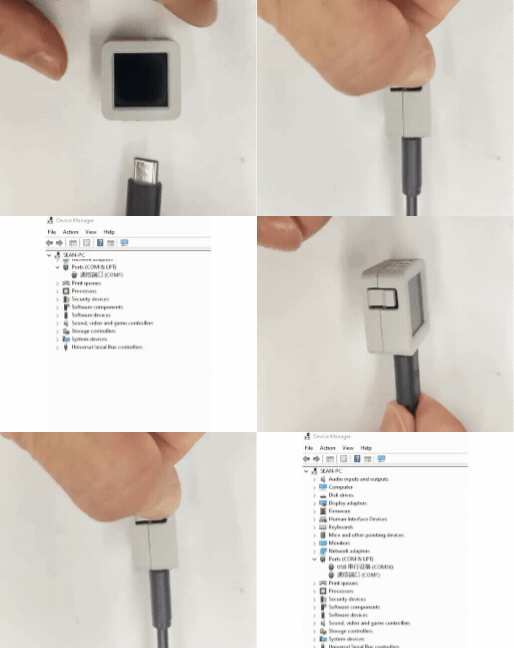
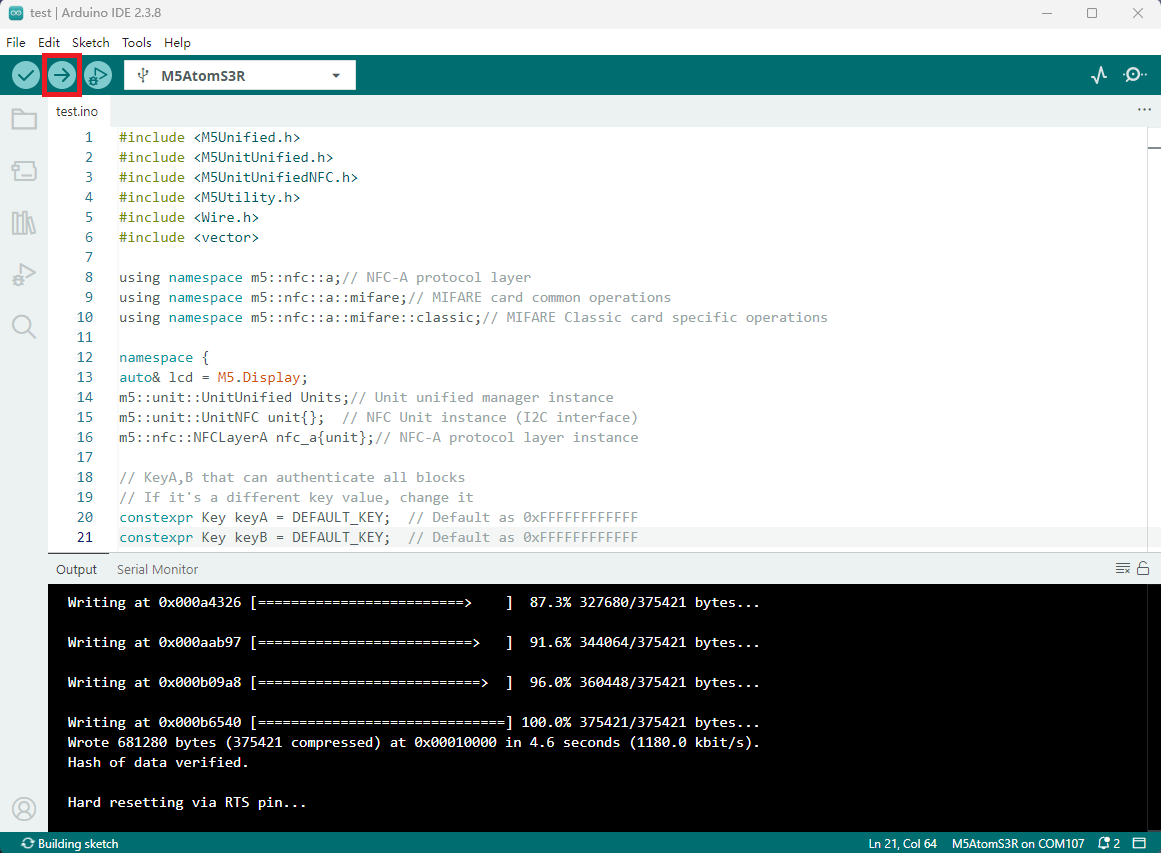
- 2.选中设备端口,点击 Arduino IDE 左上角编译上传按钮,等待程序完成编译并上传至设备。