Arduino Quick Start
2. Devices & Examples
3. M5Unified
4. M5GFX
5. Extensions
Unit
Module
Atomic
Tab5
IoT
Accessories
Module LoRaWAN-EU868 Arduino Tutorial
1. Preparation
1. Environment setup: Refer to Getting Started with Arduino IDE to complete the IDE installation, and install the corresponding board manager and required driver libraries according to your development board.
2. Required libraries:
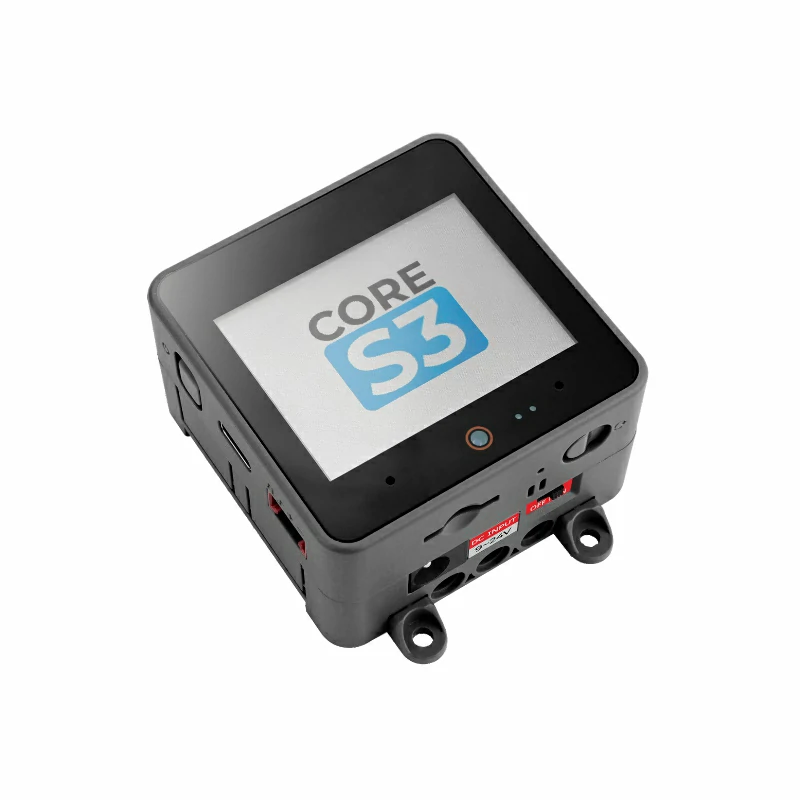
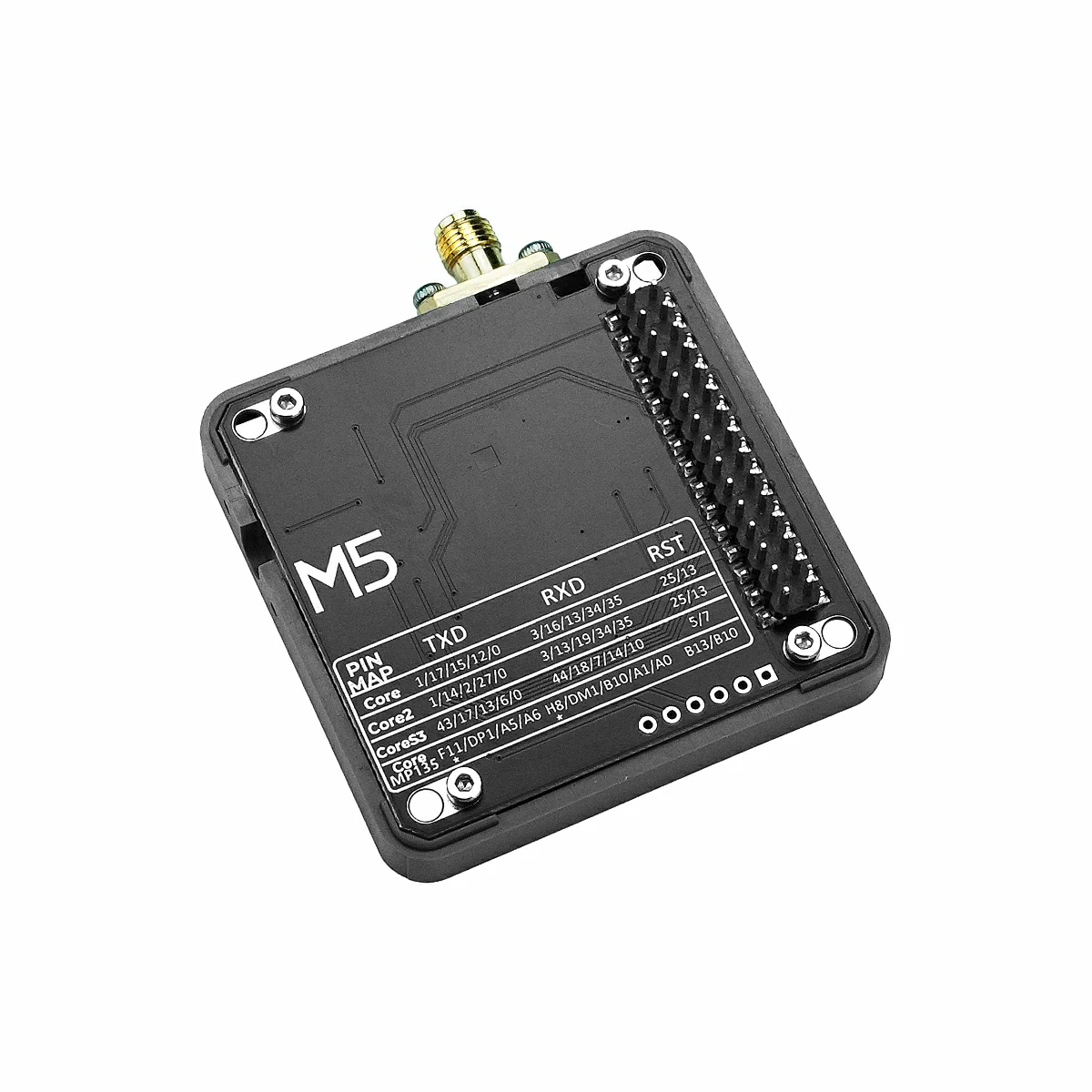
3. Required hardware products:
2. Notes
3. DIP Switch Settings
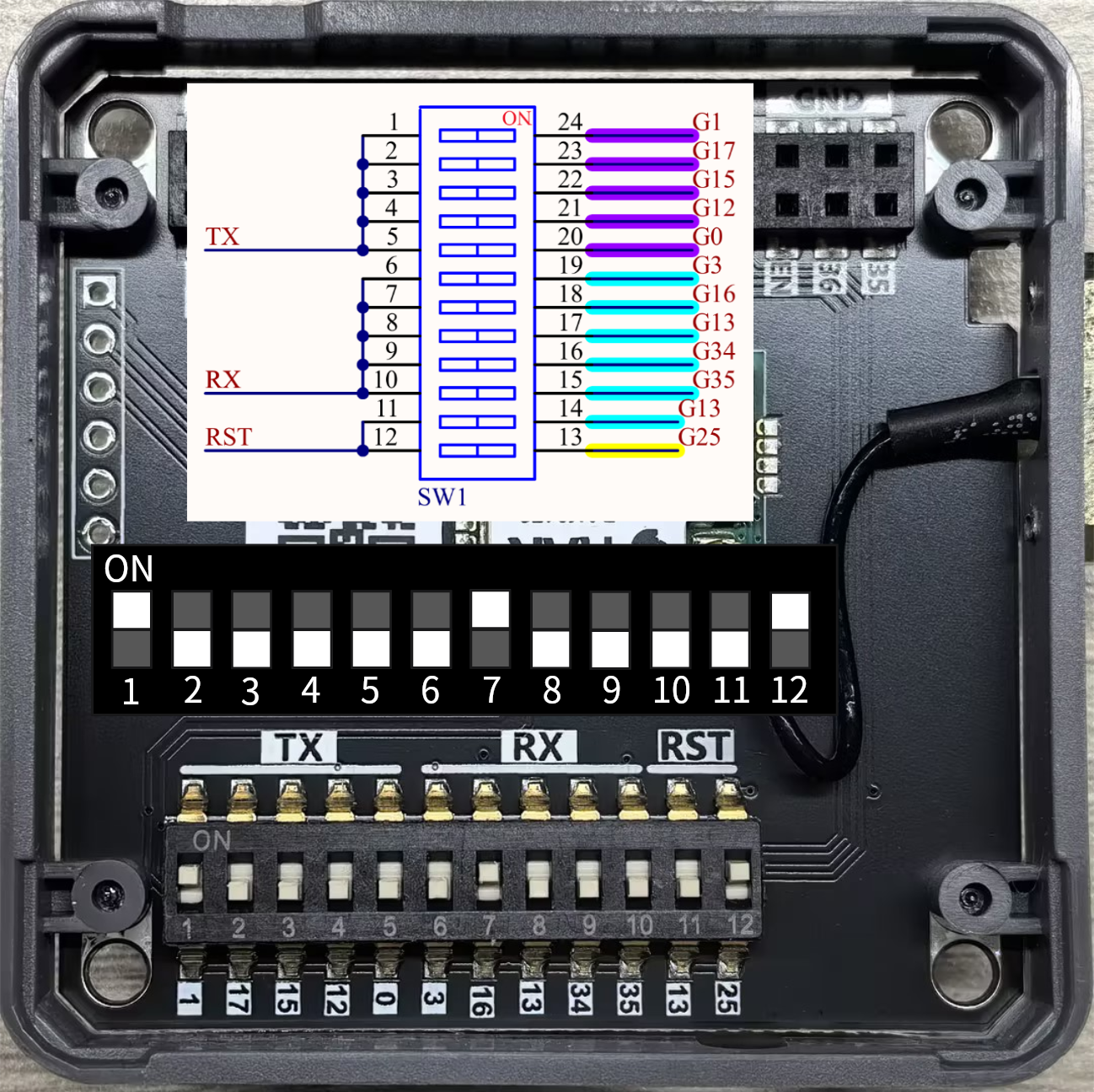
- In this tutorial, the main controller used is CoreS3, combined with Module LoRaWAN-EU868 to implement wireless communication. The communication method is UART communication, using pins
G18 (RX),G43 (TX), andG5 (RST). Before use, please set the DIP switch positions as shown below.
4. LoRa P2P
#include <M5Unified.h>
#include "rak3172_p2p.hpp"

#define LORA_CONFIG_PRLEN 8
#define LORA_CONFIG_PWR   22
#define LORA_FREQ         868E6  // 868E6 equals to 868*10^6, which is the frequency 868M(Hz)
#define LORA_CR           0      // (4/5=0, 4/6=1, 4/7=2, 4/8=3)
#define LORA_SF           7      // (6, 7, 8, 9, 10, 11, 12)
#define LORA_BW           500    // (125, 250, 500)

#define LORA_RX 18
#define LORA_TX 43

RAK3172P2P lora;

void LoRaLoopTask(void* arg) {
    while (1) {
        lora.update();
        vTaskDelay(5);
    }
}

void setup() {
    M5.begin();
    pinMode(LORA_RST, OUTPUT);
    digitalWrite(LORA_RST, LOW);
    delay(100);
    digitalWrite(LORA_RST, HIGH);
    Serial.begin(115200);
    M5.Display.setFont(&fonts::FreeMonoBold9pt7b);
    Serial.println("LoRa Init...");
    M5.Display.setCursor(5,0);
    M5.Display.printf("LoRa Init...\n");
    while (!lora.init(&Serial2, LORA_RX, LORA_TX, RAK3172_BPS_115200)) {
        delay(1000);
    }

    lora.setMode(P2P_RX_MODE, 0);
    if (lora.config(LORA_FREQ, LORA_SF, LORA_BW, LORA_CR, LORA_CONFIG_PRLEN, LORA_CONFIG_PWR)) {
        Serial.println("LoRa config success");
        M5.Display.printf("LoRa config success\n");
    } else {
        Serial.println("LoRa config failed");
        M5.Display.printf("LoRa config failed\n");
    }
    lora.setMode(P2P_TX_RX_MODE);
    xTaskCreate(LoRaLoopTask, "LoRaLoopTask", 1024 * 10, NULL, 2, NULL);
    M5.Display.setCursor(0, 40);
    M5.Display.printf("Touch screen to send \"Hello!\"\n");
}

void loop() {
    M5.update();
    if (M5.Touch.getCount() && M5.Touch.getDetail(0).wasClicked()) {
        M5.Display.fillRect(0, 0, 320, 70, TFT_BLACK);
        if (lora.print("Hello!")) {
        Serial.println("Send Hello! success");
        M5.Display.setCursor(0,0);
        M5.Display.printf("Send Hello! success\n");
        }
        M5.Display.setCursor(0, 40);
        M5.Display.printf("Touch screen to send \"Hello!\"\n");
    }

    if (lora.available()) {
        std::vector<p2p_frame_t> frames = lora.read();
        M5.Display.fillRect(0, 100, 320, 140, TFT_BLACK);
        M5.Display.setCursor(0, 100);
        M5.Display.printf("Received:\n");
        for (int i = 0; i < frames.size(); i++) {
        Serial.print(" RSSI: ");
        Serial.print(frames[i].rssi);
        M5.Display.printf("RSSI: %d\n", frames[i].rssi);
        Serial.print(" SNR: ");
        Serial.print(frames[i].snr);
        M5.Display.printf("SNR: %d\n", frames[i].snr);
        Serial.print(" LEN: ");
        Serial.print(frames[i].len);
        M5.Display.printf("LEN: %d\n", frames[i].len);
        Serial.print(" Payload: ");
        M5.Display.printf("Payload: ");
        for (uint8_t j = 0; j < frames[i].len; j++) {
            Serial.printf("%02X", frames[i].payload[j]);
            M5.Display.printf("%c", frames[i].payload[j]);
        }
        Serial.println();
        M5.Display.println();
        }
        lora.flush();
    }
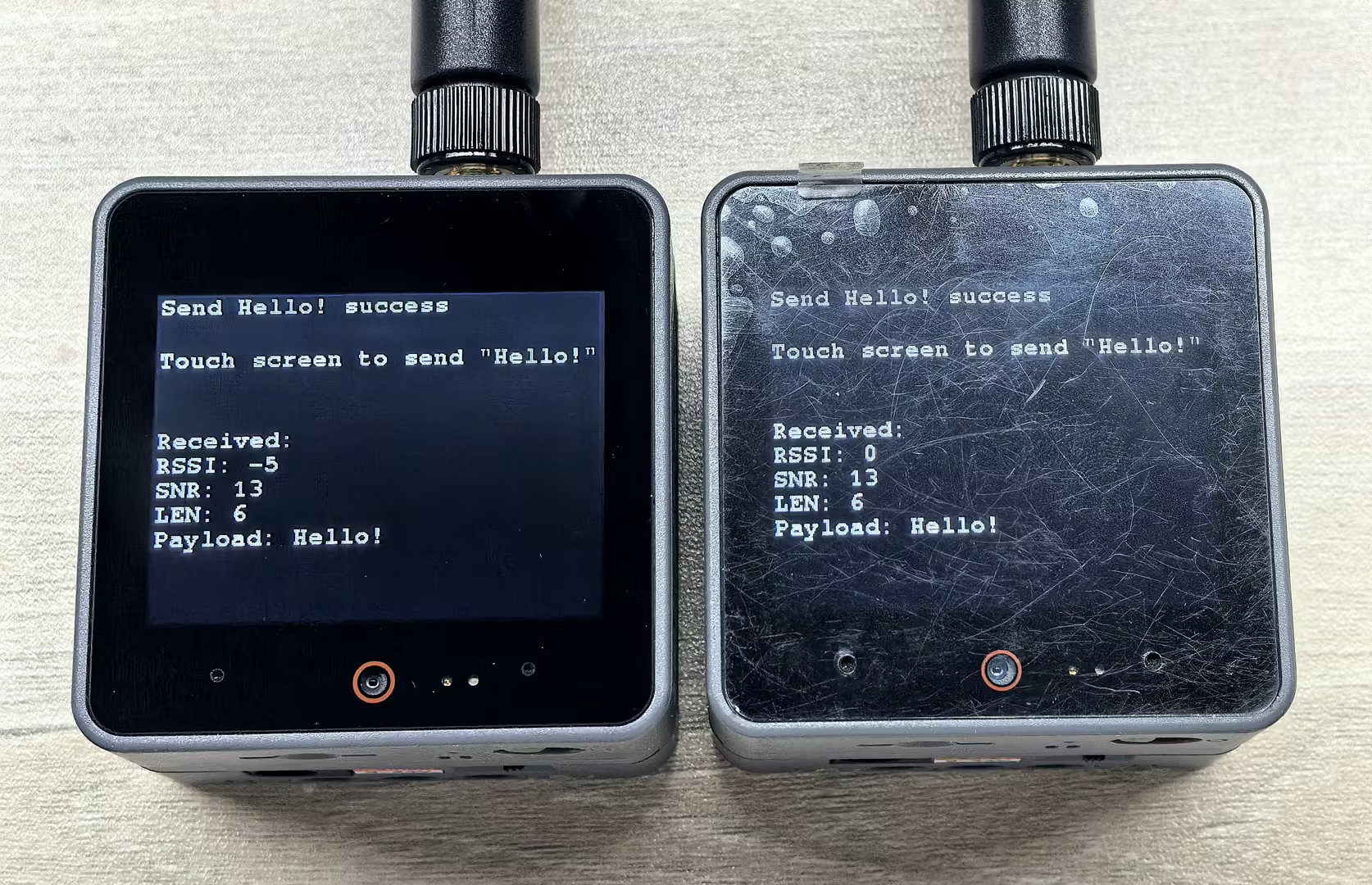
} After flashing the example code, you can check the output logs through the serial monitor. Touch the CoreS3 screen to send data. The device will receive data and display it on the screen.
5. LoRaWAN
In LoRaWAN communication mode, devices need to connect to a LoRaWAN gateway to exchange data. Thanks to the advantages of frequency hopping technology, this connection method can manage more LoRa device nodes simultaneously and provide data security. Before use, please confirm that there is a public LoRaWAN gateway in your area. If there is no public gateway, you can also set up your own gateway to establish the connection.
5.1 Communication Keys
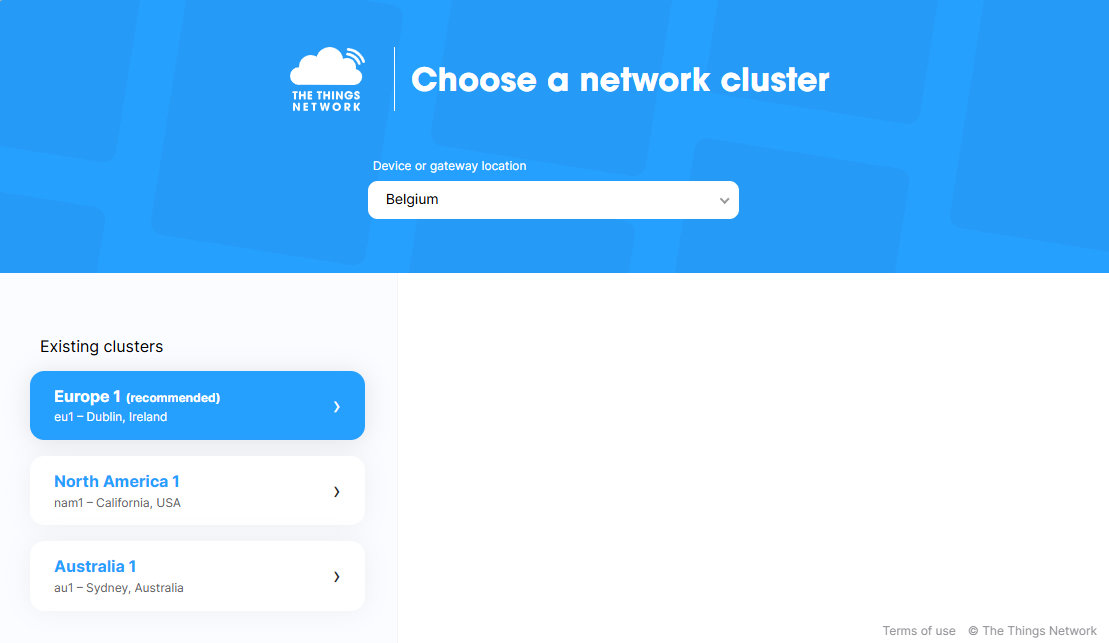
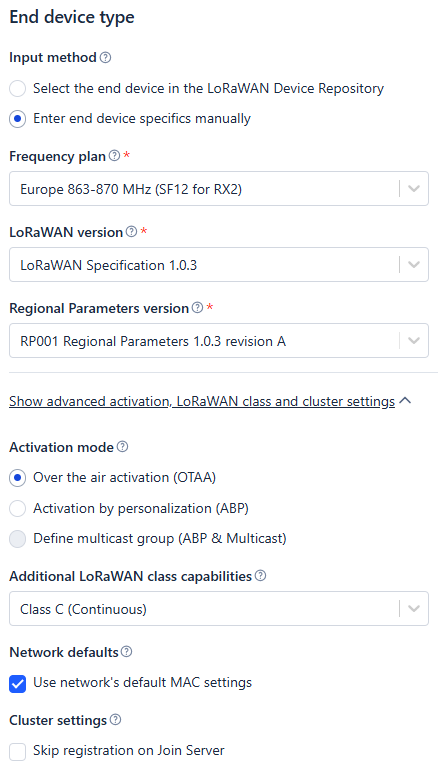
1. Refer to TTN - Device Creation Tutorial to create a node based on the frequency band of your device and obtain the corresponding key information. These keys include DevEUI, AppEUI (JoinEUI), and AppKey. Different network access modes (OTAA / ABP) use different key contents. These keys are
essential informationfor device access to the LoRaWAN network.2. During configuration, you can set corresponding parameters and device types (ClassA ~ C) according to the information below. For information about LoRaWAN introduction and device configuration, refer to TTN - LoRaWAN Docs.
- 3. Enter the device key information obtained from TTN or other LoRaWAN servers into the example code, then compile and flash the example to the device.
5.2 OTAA
#include <M5Unified.h>
#include "rak3172_lorawan.hpp"

#define APPEUI "****************"  // Application EUI (JoinEUI)
#define DEVEUI "****************"  // Device EUI
#define APPKEY "********************************"  // Application Key

#define LORA_RX 18
#define LORA_TX 43
#define LORA_RST 5

RAK3172LoRaWAN lorawan;
bool isJoin = false;

void joinCallback(bool status)
{
    isJoin = status;
    if (status) {
        Serial.println("[LoRaWAN] Join network successful!");
        M5.Display.printf("Join network successful!\nTouch screen to send\n");
        Serial.println("Device EUI: " + String(DEVEUI));
        lorawan.send("Device connected");
    } else {
        Serial.println("[LoRaWAN] Join network failed!");
    }
}

void sendCallback()
{
    Serial.println("[LoRaWAN] Uplink confirmed by server");
}

void errorCallback(char* error)
{
    Serial.print("[LoRaWAN] Error: ");
    Serial.println(error);
}

void LoRaWANLoopTask(void* arg)
{
    while (1) {
        lorawan.update();
        vTaskDelay(5);
    }
}

void setup()
{
    M5.begin();
    pinMode(LORA_RST, OUTPUT);
    digitalWrite(LORA_RST, LOW);
    delay(100);
    digitalWrite(LORA_RST, HIGH);
    Serial.begin(115200);
    M5.Display.setFont(&fonts::FreeMonoBold9pt7b);
    Serial.println("[Init] Initialize LoRaWAN module...");
    M5.Display.setCursor(0,0);
    M5.Display.printf("Initialize LoRaWAN module...\n");
    while (!lorawan.init(&Serial2, LORA_RX, LORA_TX, RAK3172_BPS_115200)) {
        Serial.println("[Init] Failed to initialize module, retrying...");
        delay(1000);
    }
    Serial.println("Device Init OK");
    Serial.println("[Config] Set band to EU868...");
    M5.Display.printf("Device Init OK\nSet band to EU868...\n");
    // get or set the channel mask to close or open the channel (only for US915, AU915, CN470)
    while (!lorawan.setBAND(EU868)) {
        Serial.println(" failed, retrying...");
        delay(1000);
    }
    Serial.println("[Config] Set OTAA parameters...");
    M5.Display.printf("Set OTAA parameters...\n");
    while (!lorawan.setOTAA(DEVEUI, APPEUI, APPKEY)) {
        Serial.println(" failed, retrying...");
        delay(1000);
    }
    Serial.println("[Config] Set device mode to CLASS_C...");
    M5.Display.printf("Set device mode to CLASS_C...\n");
    while (!lorawan.setMode(CLASS_C)) {
        Serial.println(" failed, retrying...");
        delay(1000);
    }
    Serial.println("[Config] Set data rate to DR4...");
    M5.Display.printf("Set data rate to DR4...\n");
    while (!lorawan.setDR(4)) {
        Serial.println(" failed, retrying...");
        delay(1000);
    }
    Serial.println("[Config] Set Link check...");
    M5.Display.printf("Set Link check...\n");
    while (!lorawan.setLinkCheck(ALLWAYS_LINKCHECK)) {
        delay(1000);
    }

    lorawan.onSend(sendCallback);
    lorawan.onJoin(joinCallback);
    lorawan.onError(errorCallback);
    lorawan.flush();
    xTaskCreate(LoRaWANLoopTask, "LoRaWANLoopTask", 1024 * 10, NULL, 5, NULL);

    Serial.println("[Info] Attempting to join the network...");
    if (lorawan.join(true, false, 10, 10)) {
        Serial.println("Start Join...");
    } else {
        Serial.println("Join Fail");
    }
}

void loop()
{
    M5.update();
    if (M5.Touch.getCount() && M5.Touch.getDetail(0).wasClicked()) {
        if (isJoin) {
            String data = "UPlink LoRaWAN Frame: " + String(millis());
            if (lorawan.send(data)) {
                Serial.println("Send Successful");
                M5.Display.printf("Send Successful\n");
            } else {
                Serial.println("Send fail");
            }
        } else {
            Serial.println("LoRaWAN not joined");
        }
    }
    if (lorawan.available()) {
        std::vector<lorawan_frame_t> frames = lorawan.read();
        M5.Display.clear();
        M5.Display.setCursor(0, 0);
        M5.Display.printf("Received:\n");
        for (int i = 0; i < frames.size(); i++) {
            Serial.print("RSSI: ");
            Serial.println(frames[i].rssi);
            M5.Display.printf("RSSI: %d\n", frames[i].rssi);
            Serial.print("SNR: ");
            Serial.println(frames[i].snr);
            M5.Display.printf("SNR: %d\n", frames[i].snr);
            Serial.print("LEN: ");
            Serial.println(frames[i].len);
            M5.Display.printf("LEN: %d\n", frames[i].len);
            Serial.print("PORT: ");
            Serial.println(frames[i].port);
            M5.Display.printf("PORT: %d\n", frames[i].port);
            Serial.print("UNITCAST: ");
            Serial.println(frames[i].unicast);
            M5.Display.printf("UNITCAST: %d\n", frames[i].unicast);
            Serial.print("Payload: ");
            M5.Display.printf("Payload: ");
            for (uint8_t j = 0; j < frames[i].len; j++) {
                Serial.printf("%02X", frames[i].payload[j]);
                M5.Display.printf("%c", frames[i].payload[j]);
            }
            Serial.println();
            M5.Display.println();
        }
        lorawan.flush();
    }
    if (Serial.available()) {             // If the serial port reads data.
        String ch = Serial.readString();  // Copy the data read from the serial port
        lorawan.sendCommand(ch);
    }
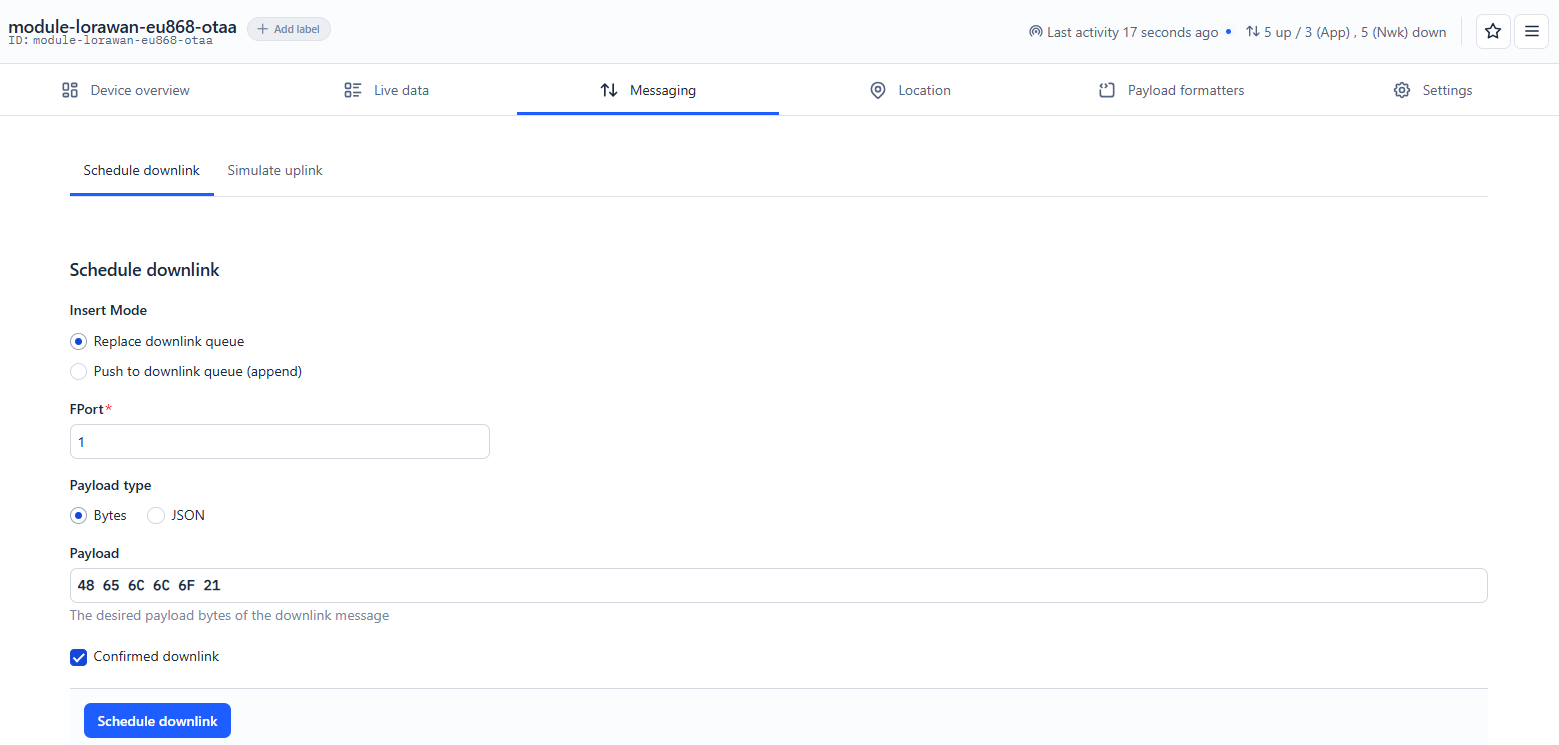
}After successfully flashing the above example, touch the CoreS3 screen to send data. The device will connect to the LoRaWAN network and send data. In the TTN console Messaging, enter 48 65 6C 6C 6F 21 (hexadecimal string, representing the ASCII string "Hello!") in the Playload field, then click the Schedule downlink button. The device will receive the data and display it on the screen.
- Serial monitor output example:
[Init] Initializing LoRaWAN module...
Device Init OK
[Config] Setting band to EU868...
[Config] Setting OTAA parameters...
[Config] Setting device mode to CLASS_C...
[Config] Setting data rate to DR4...
[Config] Setting Link check...
[Info] Attempting to join the network...
Start Join...
[LoRaWAN] Join network successful!
Device EUI: XXXXXXXXXXXXXXXX
Send Successful
RSSI: -57
SNR: 11
LEN: 6
PORT: 1
UNITCAST: 1
Payload: 48656C6C6F21- CoreS3 screen display example:
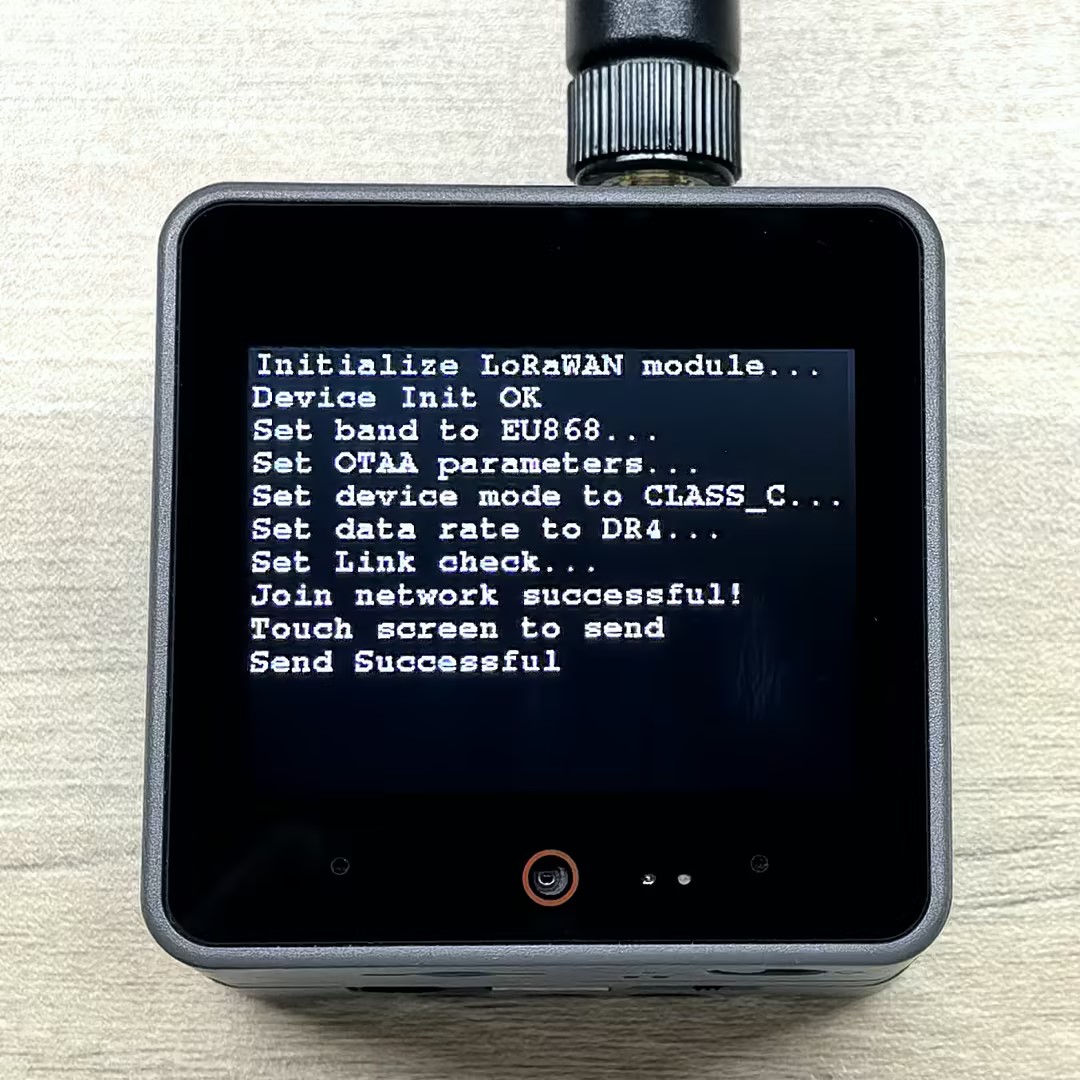
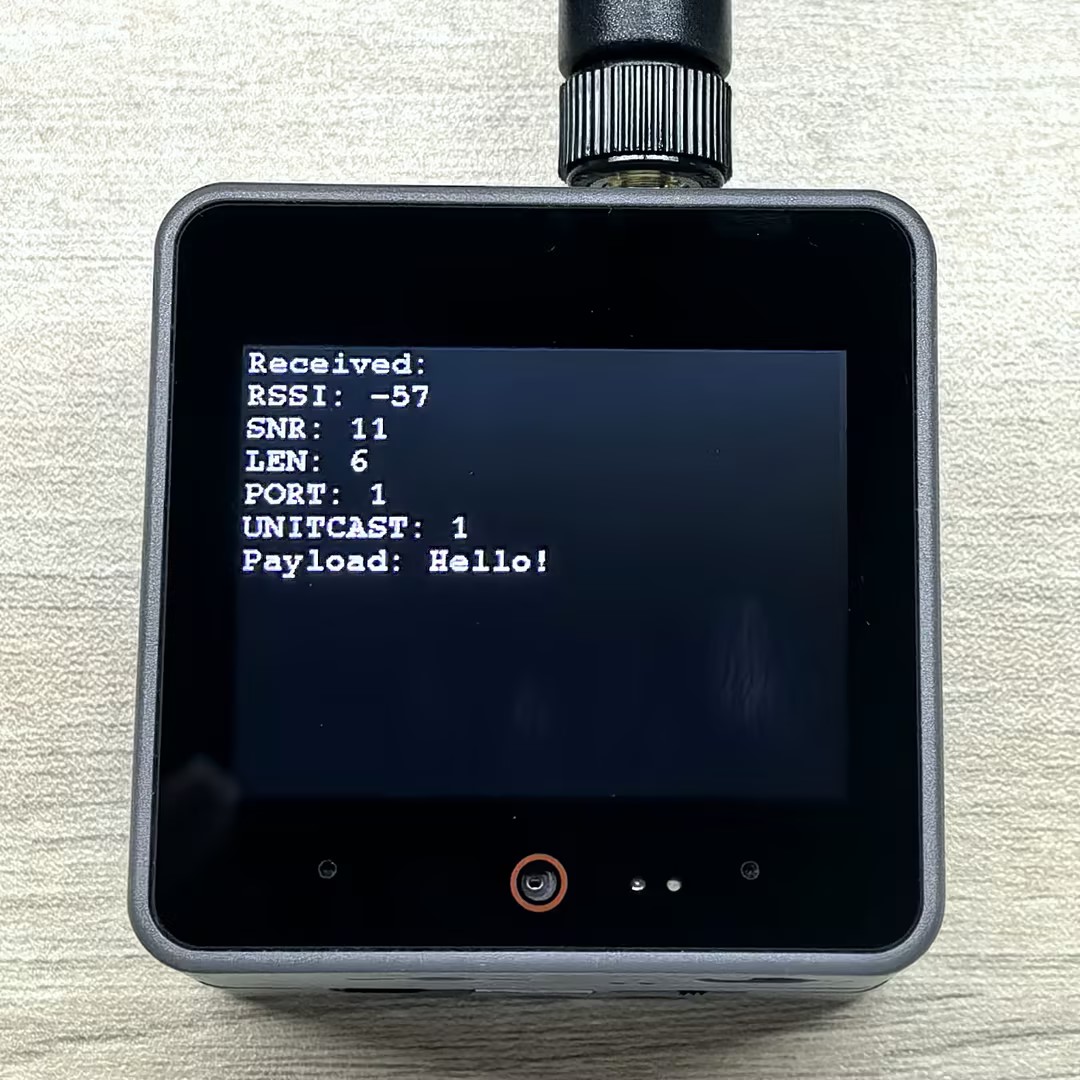
- TTN console log display example:
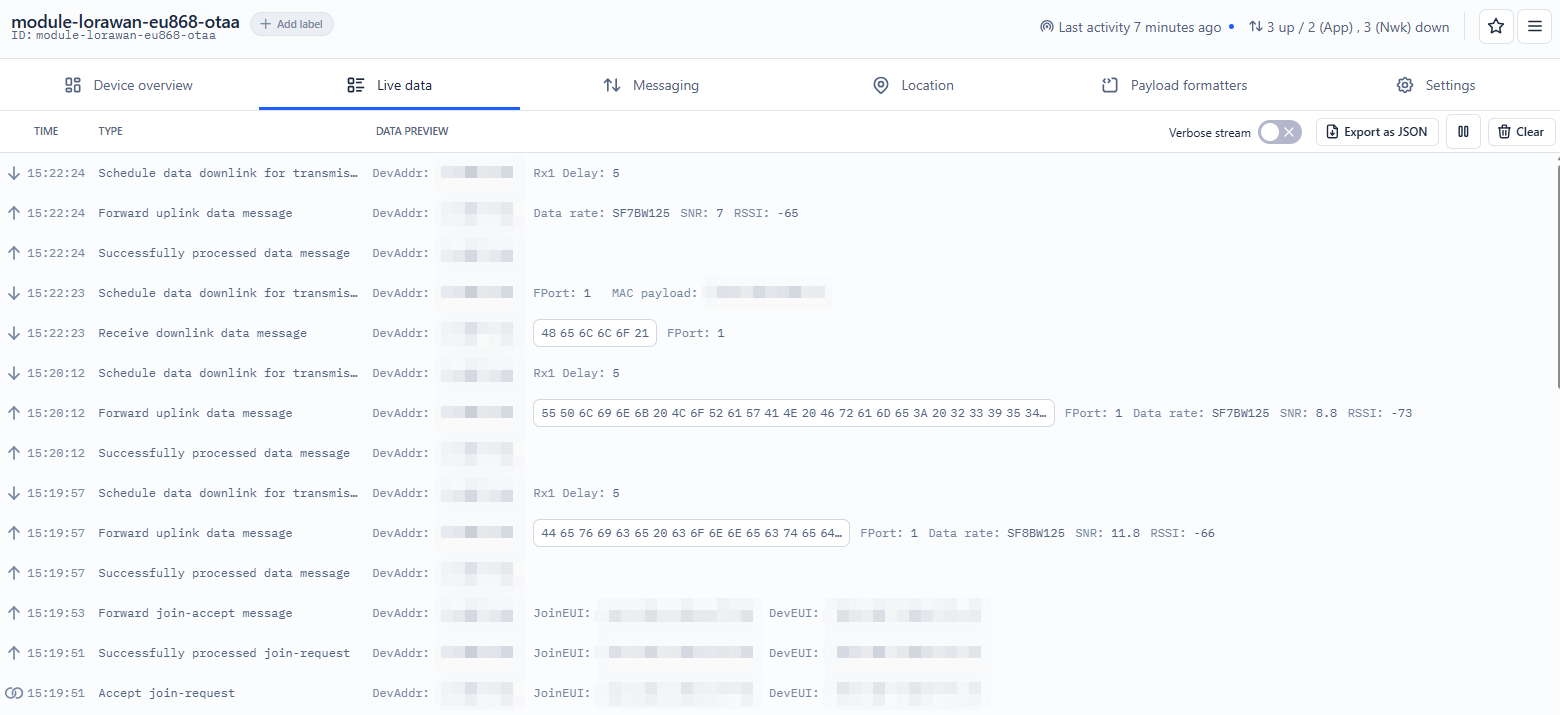
5.3 ABP
Settings of the corresponding device in the TTN Console, find Custom MAC settings in the Network layer, and check the Resets frame counters option (as shown below) to allow TTN to reset frame counters after device restart, avoiding the above problem.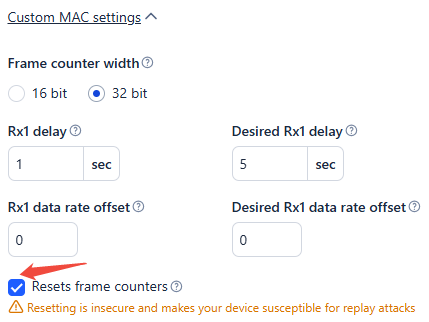
#include <M5Unified.h>
#include "rak3172_lorawan.hpp"

#define DEVADDR "260B8AF9"             // Device Address
#define NWKSKEY "E87AA07838189048FF31AD51BB9843D1"  // Network Session Key
#define APPSKEY "7D887F47B374962E0A83C4BD2E11D2E8"  // Application Session Key

#define LORA_RX 18
#define LORA_TX 43
#define LORA_RST 5

RAK3172LoRaWAN lorawan;

void errorCallback(char* error)
{
    Serial.print("[LoRaWAN] Error: ");
    Serial.println(error);
}

void LoRaWANLoopTask(void* arg)
{
    while (1) {
        lorawan.update();
        vTaskDelay(5);
    }
}

void setup()
{
    M5.begin();
    pinMode(LORA_RST, OUTPUT);
    digitalWrite(LORA_RST, LOW);
    delay(100);
    digitalWrite(LORA_RST, HIGH);
    Serial.begin(115200);
    M5.Display.setFont(&fonts::FreeMonoBold9pt7b);
    Serial.println("[Init] Initialize LoRaWAN module...");
    M5.Display.printf("Initialize LoRaWAN module...\n");
    while (!lorawan.init(&Serial2, LORA_RX, LORA_TX, RAK3172_BPS_115200)) {
        Serial.println("[Init] Failed to initialize module, retrying...");
        delay(1000);
    }
    Serial.println("Device Init OK");
    Serial.println("[Config] Set band to EU868...");
    M5.Display.printf("Device Init OK\nSet band to EU868...\n");
    // get or set the channel mask to close or open the channel (only for US915, AU915, CN470)
    while (!lorawan.setBAND(EU868)) {
        Serial.println(" failed, retrying...");
        delay(1000);
    }
    Serial.println("[Config] Set ABP parameters...");
    M5.Display.printf("Set ABP parameters...\n");
    while (!lorawan.setABP(DEVADDR, NWKSKEY, APPSKEY)) {
        Serial.println(" failed, retrying...");
        delay(1000);
    }
    Serial.println("[Config] Set device mode to CLASS_C...");
    M5.Display.printf("Set device mode to CLASS_C...\n");
    while (!lorawan.setMode(CLASS_C)) {
        Serial.println(" failed, retrying...");
        delay(1000);
    }
    Serial.println("[Config] Set data rate to DR4...");
    M5.Display.printf("Set data rate to DR4...\n");
    while (!lorawan.setDR(4)) {
        Serial.println(" failed, retrying...");
        delay(1000);
    }
    Serial.println("[Config] Set Link check...");
    M5.Display.printf("Set Link check...\n");
    while (!lorawan.setLinkCheck(ALLWAYS_LINKCHECK)) {
        delay(1000);
    }
    delay(2000);
    Serial.println("[Config] Link successful!");
    M5.Display.printf("Link successful!\nTouch screen to send\n");
    lorawan.send("Device connected");

    lorawan.onError(errorCallback);
    lorawan.flush();
    xTaskCreate(LoRaWANLoopTask, "LoRaWANLoopTask", 1024 * 10, NULL, 5, NULL);
}

void loop()
{
    M5.update();
    if (M5.Touch.getCount() && M5.Touch.getDetail(0).wasClicked()) {
        String data = "UPlink LoRaWAN Frame: " + String(millis());
        if (lorawan.send(data)) {
            Serial.println("Send Successful");
            M5.Display.printf("Send Successful\n");
        } else {
            Serial.println("Send fail");
        }
    }

    if (lorawan.available()) {
        std::vector<lorawan_frame_t> frames = lorawan.read();
        M5.Display.clear();
        M5.Display.setCursor(0, 0);
        M5.Display.printf("Received:\n");
        for (int i = 0; i < frames.size(); i++) {
            Serial.print("RSSI: ");
            Serial.println(frames[i].rssi);
            M5.Display.printf("RSSI: %d\n", frames[i].rssi);
            Serial.print("SNR: ");
            Serial.println(frames[i].snr);
            M5.Display.printf("SNR: %d\n", frames[i].snr);
            Serial.print("LEN: ");
            Serial.println(frames[i].len);
            M5.Display.printf("LEN: %d\n", frames[i].len);
            Serial.print("PORT: ");
            Serial.println(frames[i].port);
            M5.Display.printf("PORT: %d\n", frames[i].port);
            Serial.print("UNITCAST: ");
            Serial.println(frames[i].unicast);
            M5.Display.printf("UNITCAST: %d\n", frames[i].unicast);
            Serial.print("Payload: ");
            M5.Display.printf("Payload: ");
            for (uint8_t j = 0; j < frames[i].len; j++) {
                Serial.printf("%02X", frames[i].payload[j]);
                M5.Display.printf("%c", frames[i].payload[j]);
            }
            Serial.println();
            M5.Display.println();
        }
        lorawan.flush();
    }
    if (Serial.available()) {             // If the serial port reads data.
        String ch = Serial.readString();  // Copy the data read from the serial port
        lorawan.sendCommand(ch);
    }
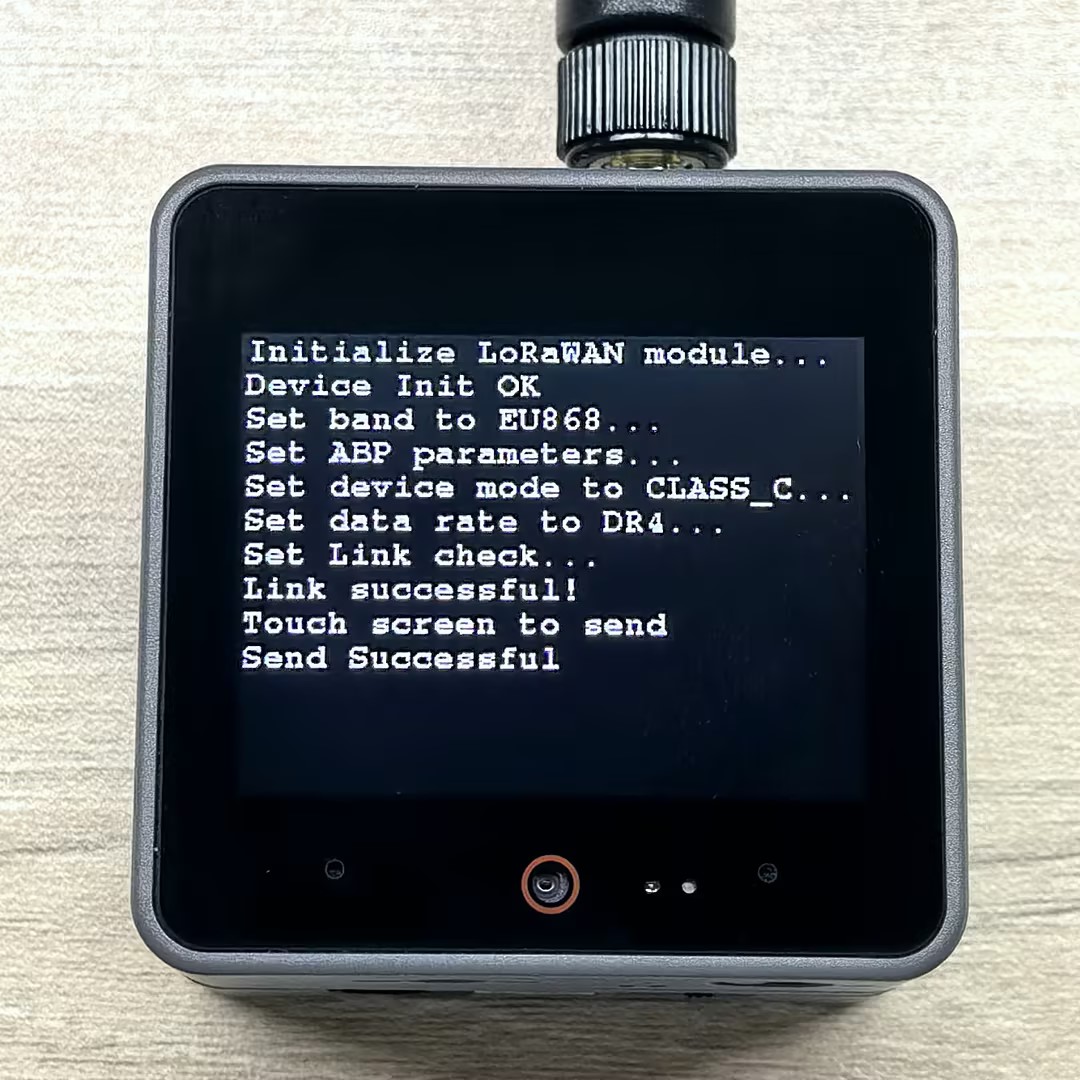
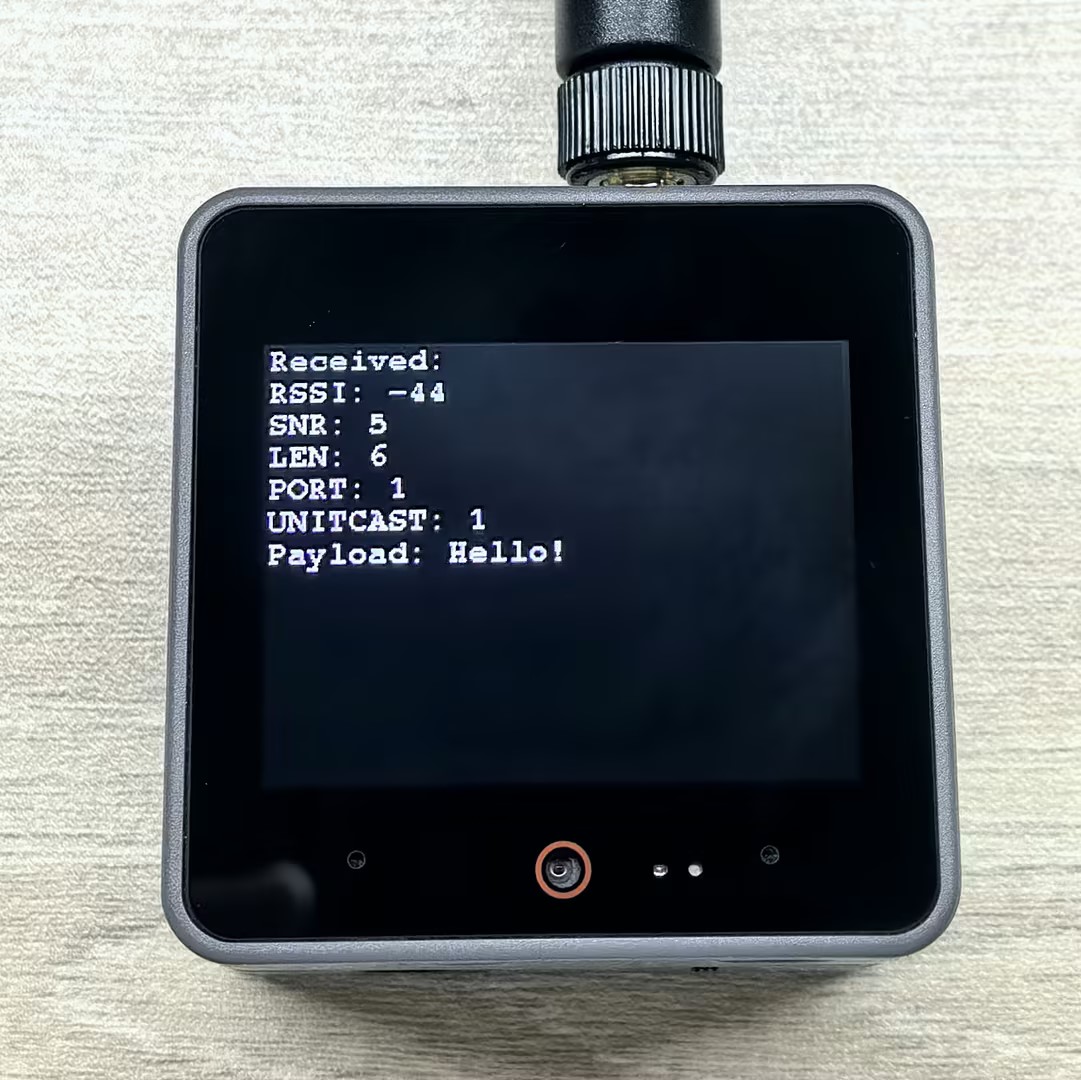
}After successfully flashing the above example, similarly to OTAA, touch the CoreS3 screen to send data. The device will connect to the LoRaWAN network and send data. In the TTN console Messaging, enter 48 65 6C 6C 6F 21 (hexadecimal string, representing the ASCII string "Hello!") in the Playload field, then click the Schedule downlink button. The device will receive the data and display it on the screen.
- Serial monitor output example:
[Init] Initialize LoRaWAN module...
Device Init OK
[Config] Set band to EU868...
[Config] Set ABP parameters...
[Config] Set device mode to CLASS_C...
[Config] Set data rate to DR4...
[Config] Set Link check...
[Config] Link successful!
Send Successful
RSSI: -44
SNR: 5
LEN: 6
PORT: 1
UNITCAST: 1
Payload: 48656C6C6F21- CoreS3 screen display example:
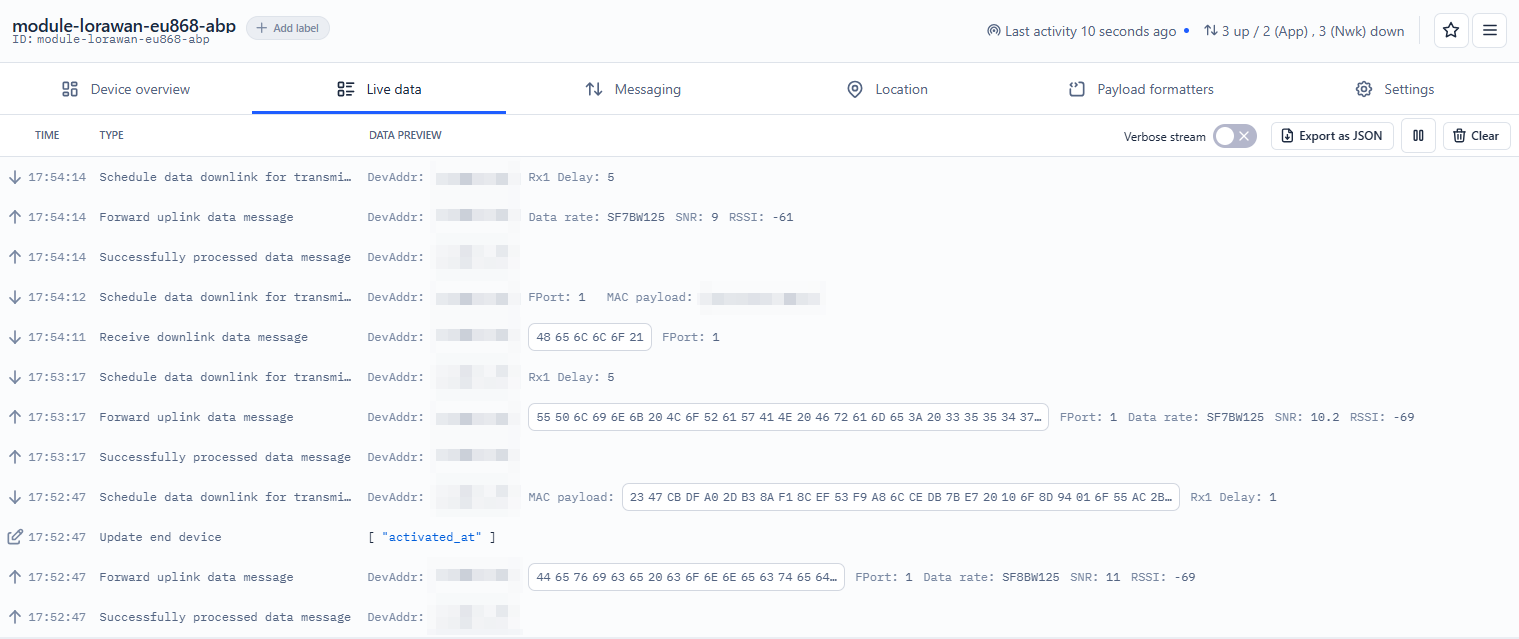
- TTN console log display example: