

Arduino Quick Start
2. Devices & Examples
3. M5Unified
4. M5GFX
5. Extensions
Unit
Module
Atomic
Tab5
IoT
Accessories
StackChan Servo
StackChan servo control example program.
Calibration
cpp
1 2 3 4 5 6 7 8 9 10 11 12 13 14 15 16 17 18 19 20 21 22 23 24 25 26 27 28 29 30 31 32 33 34 35 36 37 38 39 40 41 42 43 44 45 46 47 48 49 50 51 52 53 54 55 56 57 58 59 60 61 62 63 64 65 66 67 68 69 70 71 72 73 74 75 76 77 78 79 80 81 82 83 84 85 86 87 88 89 90 91 92 93 94 95 96 97 98 99 100 101 102 103 104 105
#include <M5StackChan.h>

namespace {

constexpr uint16_t kBackgroundColor          = TFT_BLACK;
constexpr uint16_t kBorderColor              = TFT_WHITE;
constexpr uint16_t kTopButtonColor           = 0x39C7;
constexpr uint16_t kTopButtonPressedColor    = 0x2204;
constexpr uint16_t kBottomButtonColor        = 0x03EF;
constexpr uint16_t kBottomButtonPressedColor = 0x01E8;
constexpr uint16_t kTextColor                = TFT_WHITE;

enum class ButtonZone {
    None,
    SetHome,
    GoHome,
};

ButtonZone pressed_zone = ButtonZone::None;

ButtonZone getButtonZone(const int16_t y, const int16_t height)
{
    return y < (height / 2) ? ButtonZone::SetHome : ButtonZone::GoHome;
}

void drawButton(const int16_t x, const int16_t y, const int16_t w, const int16_t h, const uint16_t color,
                const char* line_1, const char* line_2)
{
    auto& display = M5StackChan.Display();

    display.fillRect(x, y, w, h, color);
    display.drawRect(x, y, w, h, kBorderColor);

    display.setTextDatum(middle_center);
    display.setTextColor(kTextColor, color);
    display.setTextSize(2);
    display.drawString(line_1, x + w / 2, y + h / 2 - 12);
    display.drawString(line_2, x + w / 2, y + h / 2 + 12);
}

void drawUi(ButtonZone active_zone)
{
    auto& display          = M5StackChan.Display();
    const int16_t width    = display.width();
    const int16_t height   = display.height();
    const int16_t gap      = 8;
    const int16_t button_x = 8;
    const int16_t button_w = width - button_x * 2;
    const int16_t half_h   = (height - gap) / 2;

    display.startWrite();
    display.fillScreen(kBackgroundColor);
    display.fillRect(0, half_h, width, gap, kBackgroundColor);

    drawButton(button_x, 8, button_w, half_h - 12,
               active_zone == ButtonZone::SetHome ? kTopButtonPressedColor : kTopButtonColor, "set current postion",
               "as home");

    drawButton(button_x, half_h + gap + 4, button_w, height - (half_h + gap + 12),
               active_zone == ButtonZone::GoHome ? kBottomButtonPressedColor : kBottomButtonColor, "move to", "home");

    display.endWrite();
}

}  // namespace

void setup()
{
    /* Init StackChan */
    M5StackChan.begin();

    /* Setup display */
    M5StackChan.Display().setTextScroll(false);
    drawUi(ButtonZone::None);
}

void loop()
{
    M5StackChan.update();
    auto& display               = M5StackChan.Display();
    const int16_t screen_height = display.height();
    int16_t touch_x             = 0;
    int16_t touch_y             = 0;
    const bool touching         = display.getTouch(&touch_x, &touch_y);

    if (touching) {
        const ButtonZone current_zone = getButtonZone(touch_y, screen_height);
        if (current_zone != pressed_zone) {
            pressed_zone = current_zone;
            drawUi(pressed_zone);
        }
    } else if (pressed_zone != ButtonZone::None) {
        const ButtonZone released_zone = pressed_zone;
        pressed_zone                   = ButtonZone::None;
        drawUi(ButtonZone::None);

        if (released_zone == ButtonZone::SetHome) {
            M5StackChan.Motion.setCurrentPostionAsHome();
        } else if (released_zone == ButtonZone::GoHome) {
            M5StackChan.Motion.goHome();
        }
    }

    delay(20);
}This program displays two buttons on the screen for setting the current servo position as the origin and returning to the origin. You can interact with the device by touching the buttons on the screen. When you press and release the "set current position as home" button, the current servo position will be set as the origin. When you press and release the "move to home" button, the servo will return to the origin position.
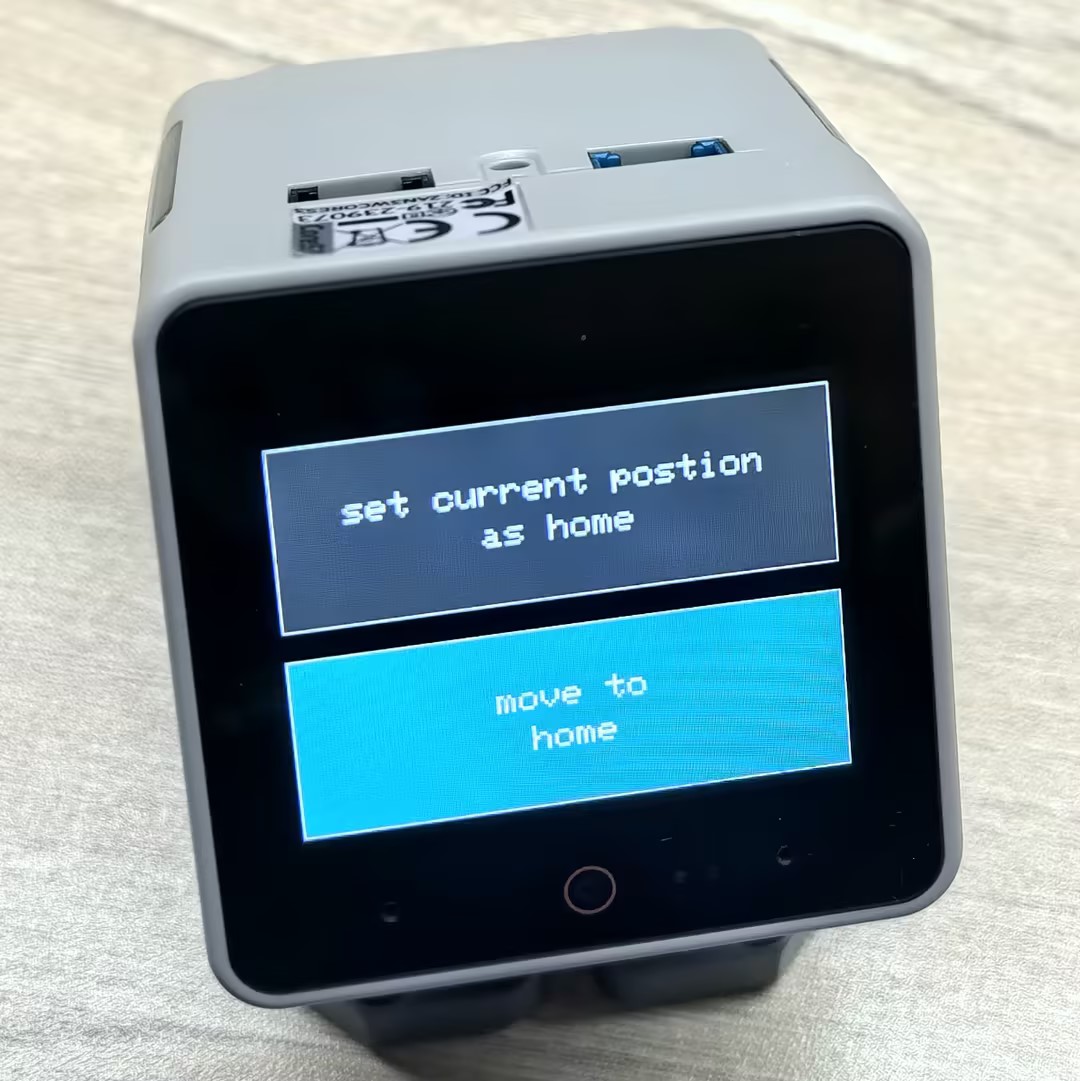
Servo Control
Note
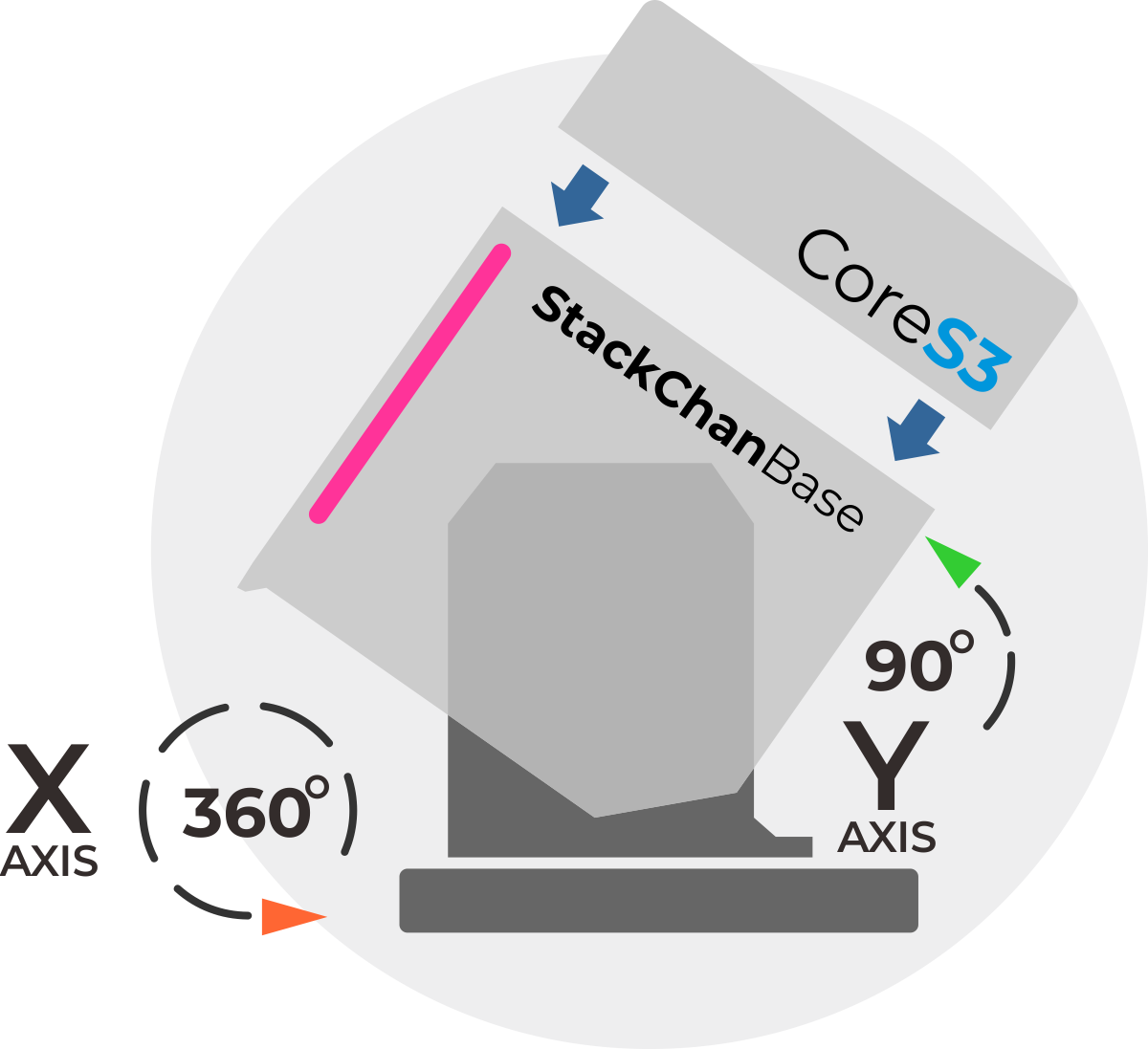
The operating angle of StackChan's Y-axis servo (vertical direction) is recommended to be controlled within 5 ~ 85°. Operating at extreme angles may easily cause the servo to stall and become damaged.
cpp
1 2 3 4 5 6 7 8 9 10 11 12 13 14 15 16 17 18 19 20 21 22 23 24 25 26 27 28 29 30 31 32 33 34 35 36 37 38 39 40 41 42 43 44 45 46 47 48 49 50 51 52 53 54 55 56 57 58 59 60 61 62 63 64 65 66 67 68 69 70 71 72 73 74 75 76 77 78 79 80 81 82 83 84 85 86
#include <M5StackChan.h>

int state = 1;
const int MAX_STATE = 8;

void setup()
{
    /* Init StackChan */
    M5StackChan.begin();
    M5StackChan.Motion.goHome();

    /* Setup display */
    M5StackChan.Display().setTextSize(2);
    M5StackChan.Display().setTextScroll(true);
    M5StackChan.Display().setTextColor(TFT_ORANGE);
    M5StackChan.Display().printf("> Touch the top to start\n");
    M5StackChan.Display().setTextColor(TFT_GREEN);

    // Set to false if high-frequency updates are needed
    // M5StackChan.Motion.setAutoAngleSyncEnabled(false);
}

void loop()
{
    M5StackChan.update();
    if (M5StackChan.TouchSensor.wasPressed()) {
        switch(state){
            /* Angle unit: 10 = 1 degrees, Speed range: 0~1000 */
            /* Range X: -1280 ~ 1280 (-128° ~ 128°), Range Y: 0 ~ 900 (0° ~ 90°) */
            case 1:
                /* Move X servo to 0°, Y servo to 45° */
                M5StackChan.Motion.move(0, 450);
                M5StackChan.Display().printf("> Turn Y to 45\n");
                break;
            case 2:
                /* Move X servo to 90° */
                M5StackChan.Motion.moveX(900, 500);
                M5StackChan.Display().printf("> Turn Left\n");
                break;
            case 3:
                /* Move X servo to -90° */
                M5StackChan.Motion.moveX(-900, 500);
                M5StackChan.Display().printf("> Turn Right\n");
                break;
            case 4:
                /* Move Y servo to 90° */
                M5StackChan.Motion.moveY(900, 300);
                M5StackChan.Display().printf("> Look Up\n");
                break;
            case 5:
                /* Move Y servo to 0° */
                M5StackChan.Motion.moveY(0, 300);
                M5StackChan.Display().printf("> Look Down\n");
                break;
            /* Only X axis supports continuous 360° rotation. Y axis does not. */
            /* Velocity range: -1000 ~ 1000 (Negative: CW, Positive: CCW) */
            case 6:
                /* Rotate clockwise */
                M5StackChan.Motion.rotateX(-800);
                M5StackChan.Display().printf("> Rotate clockwise\n");
                delay(2000);
                M5StackChan.Motion.stop();
                break;
            case 7:
                /* Rotate counter-clockwise */
                M5StackChan.Motion.rotateX(800);
                M5StackChan.Display().printf("> Rotate counter-clockwise\n");
                delay(2000);
                M5StackChan.Motion.stop();
                break;
            default:
                M5StackChan.Motion.goHome();
                M5StackChan.Display().printf("> Go home\n");
                break;
        }

        state++;
        if (state > MAX_STATE) {
            state = 1;
            M5StackChan.Display().setTextColor(TFT_ORANGE);
            M5StackChan.Display().printf("> Touch the top to start\n");
            M5StackChan.Display().setTextColor(TFT_GREEN);
        }
    }
    delay(10);
}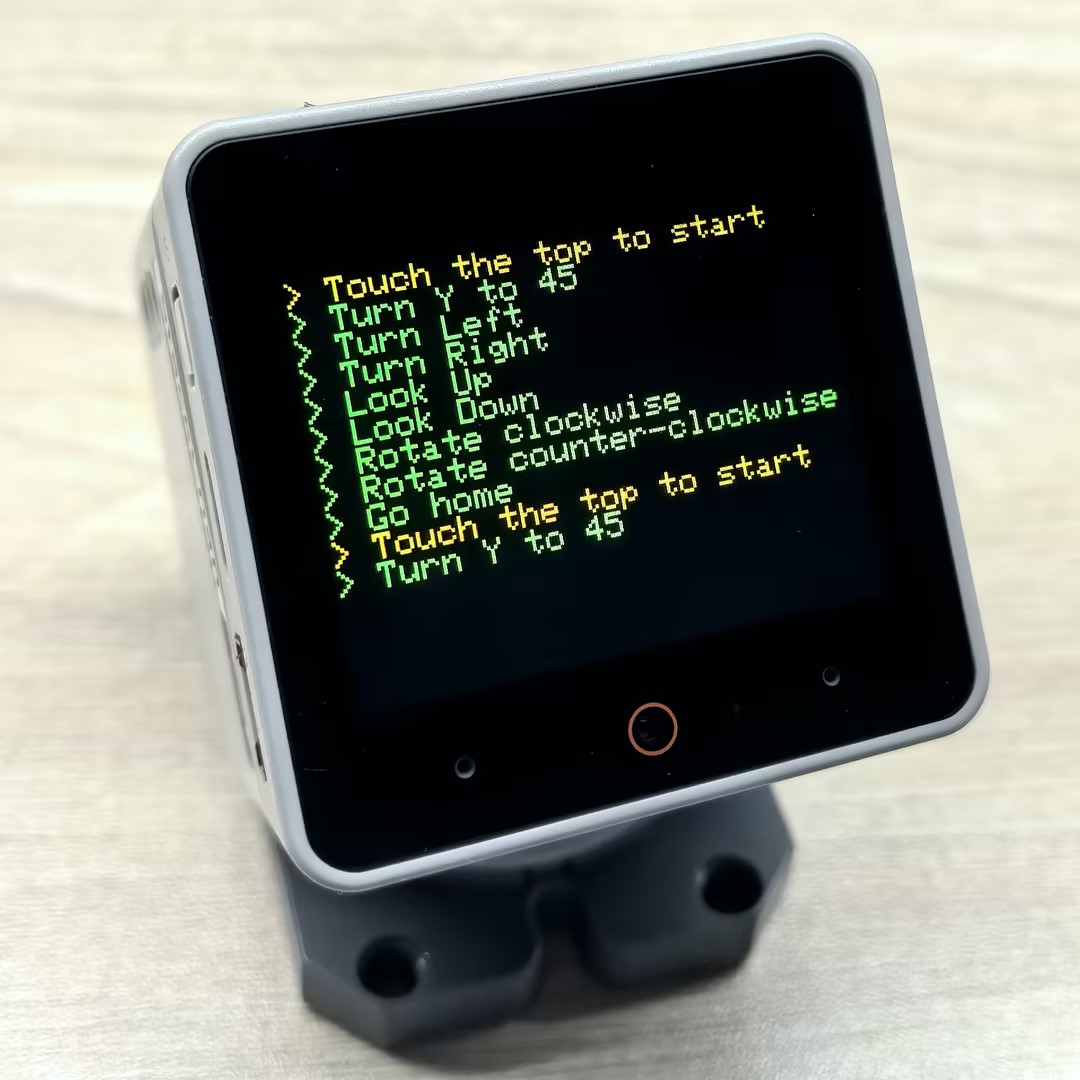
This program controls servo motion by touching the screen. Each time you touch the screen, the program executes the following actions in sequence:
- Move X servo to 0°, Y servo to 45°
- Move X servo to 90° (turn left)
- Move X servo to -90° (turn right)
- Move Y servo to 90° (look up)
- Move Y servo to 0° (look down)
- Rotate X servo clockwise at speed 800 for 2 seconds, then stop
- Rotate X servo counter-clockwise at speed 800 for 2 seconds, then stop
- Return to home position
Page Tools