

Arduino Quick Start
2. Devices & Examples
3. M5Unified
4. M5GFX
5. Extensions
Unit
Module
Atomic
Tab5
IoT
Accessories
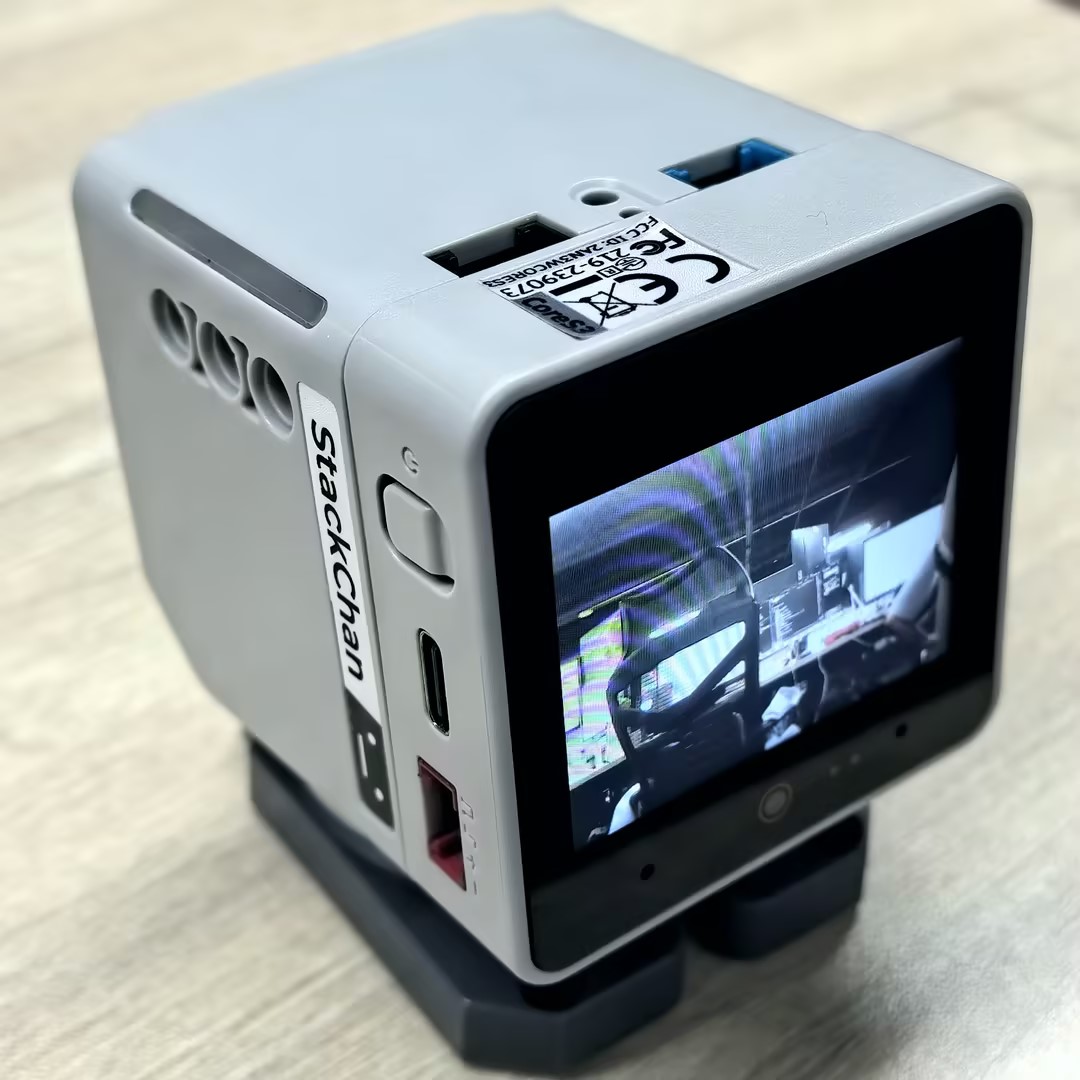
StackChan Camera
Example program for StackChan Camera usage.
Sample Program
Build Requirements
- M5Stack board manager version >= 3.2.2
- Board option = M5CoreS3
- M5Unified library version >= 0.2.11
cpp
1 2 3 4 5 6 7 8 9 10 11 12 13 14 15 16 17 18 19 20 21 22 23 24 25 26 27 28 29 30 31 32 33 34 35 36 37 38 39 40 41 42 43 44 45 46 47 48 49 50 51 52 53 54 55 56 57 58 59 60 61 62 63 64 65 66 67 68 69 70 71 72 73 74 75 76 77 78 79 80 81 82 83 84
#include "M5Unified.h"
#include "esp_camera.h"
class GC0308 {
private:
public:
    camera_fb_t* fb;
    sensor_t* sensor;
    camera_config_t* config;
    bool begin();
    bool get();
    bool free();
};
static camera_config_t camera_config = {
    .pin_pwdn     = -1,
    .pin_reset    = -1,
    .pin_xclk     = -1,
    .pin_sscb_sda = 12,
    .pin_sscb_scl = 11,
    .pin_d7       = 47,
    .pin_d6       = 48,
    .pin_d5       = 16,
    .pin_d4       = 15,
    .pin_d3       = 42,
    .pin_d2       = 41,
    .pin_d1       = 40,
    .pin_d0       = 39,
    .pin_vsync = 46,
    .pin_href  = 38,
    .pin_pclk  = 45,
    .xclk_freq_hz = 20000000,
    .ledc_timer   = LEDC_TIMER_0,
    .ledc_channel = LEDC_CHANNEL_0,
    .pixel_format  = PIXFORMAT_RGB565,
    .frame_size    = FRAMESIZE_QVGA,
    .jpeg_quality  = 0,
    .fb_count      = 2,
    .fb_location   = CAMERA_FB_IN_PSRAM,
    .grab_mode     = CAMERA_GRAB_WHEN_EMPTY,
    .sccb_i2c_port = -1,
};
bool GC0308::begin()
{
    M5.In_I2C.release();
    esp_err_t err = esp_camera_init(&camera_config);
    if (err != ESP_OK) {
        return false;
    }
    sensor = esp_camera_sensor_get();
    return true;
}
bool GC0308::get()
{
    fb = esp_camera_fb_get();
    if (!fb) {
        return false;
    }
    return true;
}
bool GC0308::free()
{
    if (fb) {
        esp_camera_fb_return(fb);
        return true;
    }
    return false;
}
GC0308 Camera;
void setup() {
    auto cfg = M5.config();
    M5.begin(cfg);
    if (!Camera.begin()) {
        Serial.println("Camera Init Fail");
    }
    Serial.println("Camera Init Success");
    Camera.sensor->set_framesize(Camera.sensor, FRAMESIZE_QVGA);
}
void loop() {
    if (Camera.get()) {
        M5.Display.pushImage(0, 0, M5.Display.width(),
                                 M5.Display.height(),
                                 (uint16_t *)Camera.fb->buf);
        Camera.free();
    }
}After flashing successfully, the StackChan screen will display the camera feed in real time.
Page Tools