Arduino Quick Start
2. Devices & Examples
3. M5Unified
4. M5GFX
5. Extensions
Unit
Module
Atomic
Tab5
IoT
Accessories
Unit NFC Arduino Tutorial
1. Preparation
1. Environment setup: Refer to the Arduino IDE Getting Started Guide to complete IDE installation, and install the corresponding board package and required libraries according to your development board.
2. Required libraries:
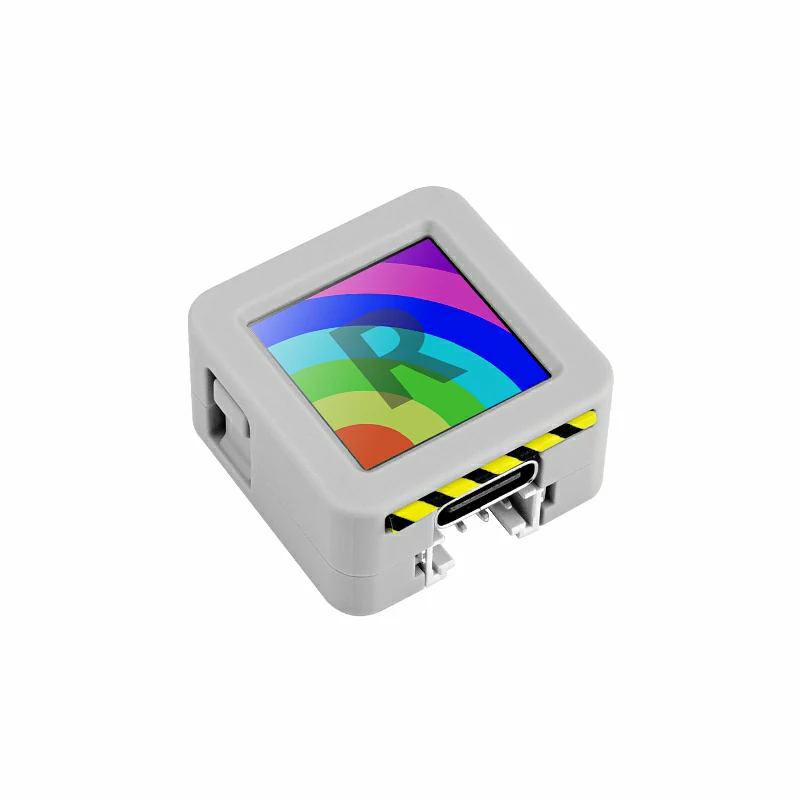
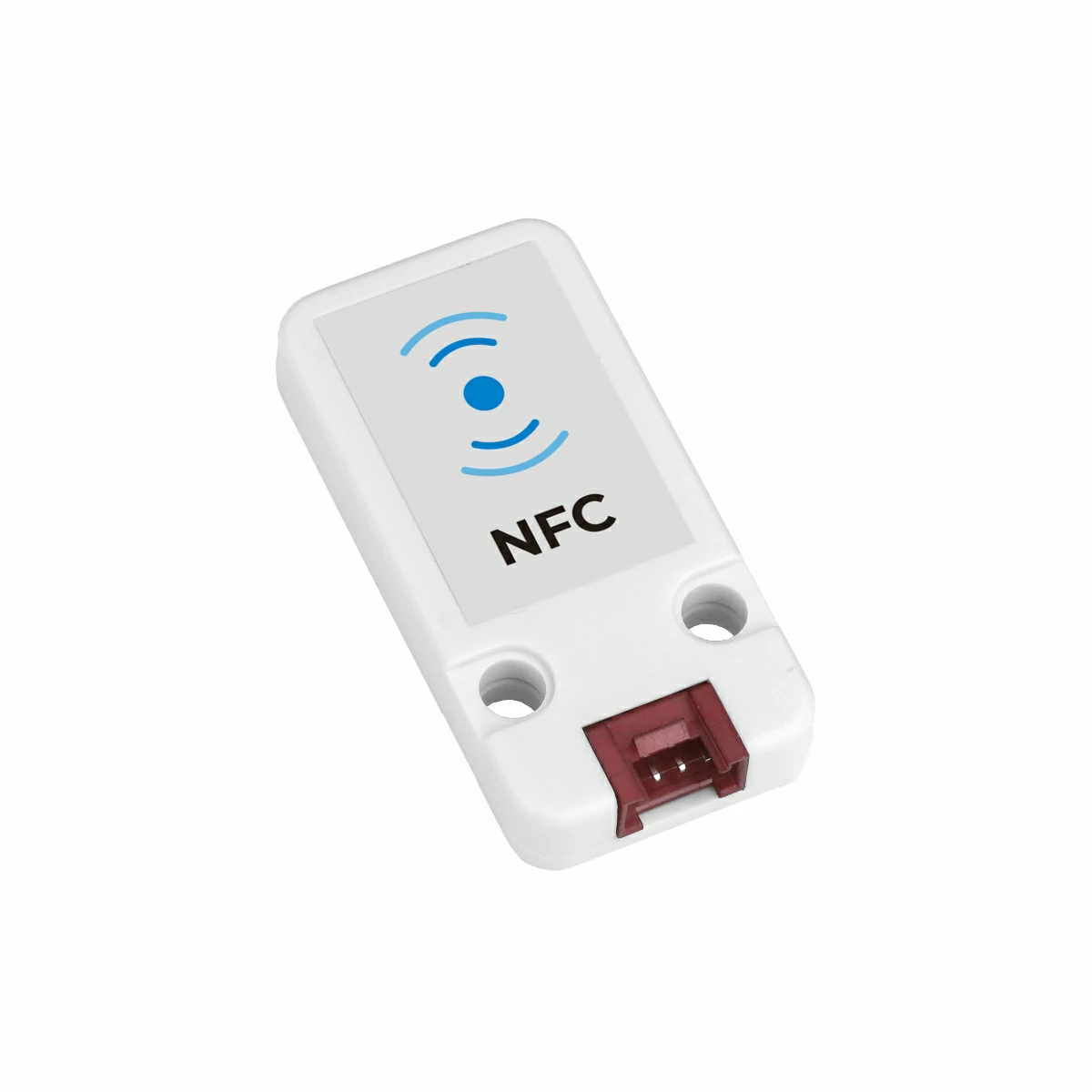
3. Required hardware:
2. Notes
3. Example Programs
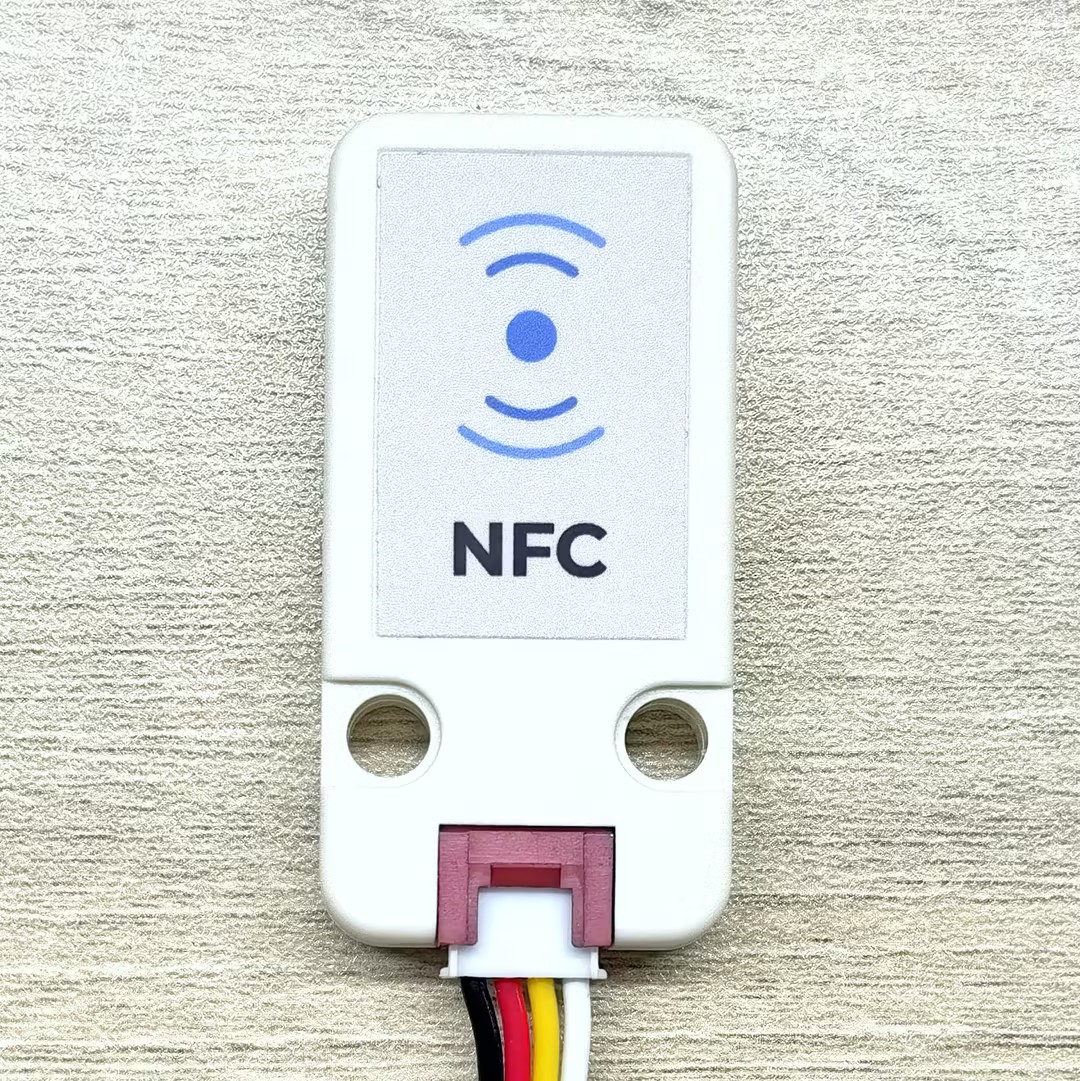
Please place the NFC tag card onto the Unit NFC sensing surface shown in the image below for testing to obtain the best read and write performance.
3.1 Basic Information
Core Objects
// NFC protocol layer instances
m5::nfc::NFCLayerA nfc_a{unit};             // NFC-A protocol layer (reader mode)
m5::nfc::EmulationLayerA emu_a{unit};       // NFC-A emulation layer (tag emulation mode)

// Card object
PICC picc{}; // Represents a detected cardMIFARE Classic Keys
constexpr Key keyA = DEFAULT_KEY;
constexpr Key keyB = DEFAULT_KEY;
// DEFAULT_KEY is 0xFFFFFFFFFFFF (Default value)NFC Reader Basic Workflow
A typical NFC reader operation flow includes the following steps:
- Initialization:
M5.begin()andWire.begin() - Detection: Use
nfc_a.detect()ornfc_a.detect(piccs)to find cards - Identification: Use
nfc_a.identify()to determine card type and memory layout - Activation: Use
nfc_a.reactivate()to get complete communication parameters - Authentication: For MIFARE Classic cards, use
mifareClassicAuthenticateA/B()for authentication - Operation: Perform read, write, or special operations
- Deactivation: Use
nfc_a.deactivate()to release the card
Card Object Common Methods
| Method | Return Value | Description |
|---|---|---|
picc.isMifareClassic() | bool | Check if it's Classic1K/4K |
picc.isMifareUltralight() | bool | Check if it's Ultralight series |
picc.isMifareDESFire() | bool | Check if it's DESFire series |
picc.isUserBlock(block) | bool | Check if block is user accessible |
picc.uidAsString() | string | Get UID as hex string |
picc.typeAsString() | string | Get card type name |
picc.userAreaSize() | uint16_t | Get user area size |
picc.totalSize() | uint16_t | Get total card capacity |
Tag Emulation Basic Concepts
Tag emulation (Tag Emulation) allows a device to act as an NFC card, enabling other NFC readers to detect and communicate with it. This is very common in applications that need to emulate various NFC card types (such as MIFARE Ultralight, NTAG, etc.).
Main steps of tag emulation:
- Create PICC object: Represents the virtual card to emulate
- Define card type and UID: Choose the specific card type and its unique identifier to emulate
- Prepare memory data: Set the data in the card memory (may contain NDEF messages, etc.)
- Embed UID: Correctly write the UID into the specified location in memory
- Start emulation: Call
emu_a.begin()to start emulation - Update state: Call
emu_a.update()in the main loop to handle reader queries
Tag Information Definition
constexpr Type type{Type::MIFARE_Ultralight};  // Select tag type to emulate (e.g., MIFARE_Ultralight or NTAG_213)
constexpr uint8_t uid[] = {0x04, 0x34, 0x56, 0x78, 0x9A, 0xBC, 0xDE};  // 7-byte UID
uint8_t picc_memory[64]{}; // Emulated tag memory buffer (size depends on card type)Tag Emulation API
Emulation Operations
| Method | Function |
|---|---|
picc.emulate(type, uid, uid_len) | Configure card type and UID to emulate |
emu_a.begin(picc, memory, mem_size) | Start emulation with card info and memory |
emu_a.emulatePICC() | Get current emulated PICC object |
emu_a.update() | Update emulation state (call in main loop) |
emu_a.state() | Get current emulation state |
State Values
The emulator has the following states:
None(None),Off(Off),Idle(Idle),Ready(Ready),Active(Active),Halt(Halt)
Helper Functions
| Function | Function |
|---|---|
embed_uid(memory, uid) | Embed 7-byte UID into Ultralight/NTAG memory layout |
bcc8(data, len, init) | Calculate BCC (Block Check Character) for UID verification |
3.2 Quick Scan Recognition
This example demonstrates how to quickly scan and recognize NFC cards. The program continuously detects cards within the reader range and performs a two-step identification process for each detected card: first preliminary classification using detect(), then precise identification using identify(). After successful identification, the card's UID, type, ATQA and SAK information are output. This is the basic step for implementing NFC applications.
#include <M5Unified.h>
#include <M5UnitUnified.h>
#include <M5UnitUnifiedNFC.h>
#include <M5Utility.h>
#include <Wire.h>
#include <vector>

using namespace m5::nfc::a; // Use NFC-A protocol namespace (ISO 14443-3A)

namespace {
auto& lcd = M5.Display;
m5::unit::UnitUnified Units; // Unit unified manager instance
m5::unit::UnitNFC unit{};  // NFC Unit instance (I2C interface)
m5::nfc::NFCLayerA nfc_a{unit}; // NFC-A protocol layer instance for ISO 14443-3A cards
}  // namespace

void setup()
{
    M5.begin();
    // The screen shall be in landscape mode
    if (lcd.height() > lcd.width()) {
        lcd.setRotation(1);
    }

    auto board = M5.getBoard();
    bool unit_ready{};// Unit initialization status flag

    auto pin_num_sda = M5.getPin(m5::pin_name_t::port_a_sda);
    auto pin_num_scl = M5.getPin(m5::pin_name_t::port_a_scl);
    M5_LOGI("getPin: SDA:%u SCL:%u", pin_num_sda, pin_num_scl);
    Wire.end(); // Close existing I2C connection first
    Wire.begin(pin_num_sda, pin_num_scl, 400 * 1000U);
    // Add NFC Unit to manager and initialize
    unit_ready = Units.add(unit, Wire) && Units.begin();
    if (!unit_ready) {
        // Initialization failed: turn screen red and enter infinite loop
        M5_LOGE("Failed to begin");
        lcd.fillScreen(TFT_RED);
        while (true) {
            m5::utility::delay(10000);
        }
    }
    M5_LOGI("M5UnitUnified initialized");
    M5_LOGI("%s", Units.debugInfo().c_str());

    lcd.setFont(&fonts::FreeMono9pt7b);
    lcd.fillScreen(0);
}

void loop()
{
    M5.update();
    Units.update();// Update all registered Units

    // Create PICC (card) list, try to detect nearby cards
    std::vector<PICC> piccs;
    if (nfc_a.detect(piccs)) { // Cards detected
        lcd.fillScreen(0);
        lcd.setCursor(0, 0);
        uint16_t idx{}; // Counter for successfully identified cards
        for (auto&& u : piccs) {
            // detect only performs a provisional classification based on sak, so further identification is required
            if (nfc_a.identify(u)) {// Perform precise identification of the card
                // Print card info: UID, type, ATQA, SAK, user area size, total size
                M5.Log.printf("PICC:%s %s %04X/%02X %u/%u\n", u.uidAsString().c_str(), u.typeAsString().c_str(), u.atqa,
                              u.sak, u.userAreaSize(), u.totalSize());
                lcd.printf("[%u]:PICC:\n<%s>\n%s\n", idx, u.uidAsString().c_str(), u.typeAsString().c_str());
                ++idx;
            } else {
                M5_LOGW("Failed to identify %s %s %04X/%02X %u/%u", u.uidAsString().c_str(), u.typeAsString().c_str(),
                        u.atqa, u.sak, u.userAreaSize(), u.totalSize());
            }
        }
        if (idx) {
            lcd.printf("==> %u PICC\n", idx);
            M5.Log.printf("==> %u PICC\n", idx);
        }
        nfc_a.deactivate();// Deactivate communication with all cards
    }
}After uploading the code above to the main controller, open the serial monitor and place one or more tag cards near the Unit NFC sensing surface to see the recognition results.
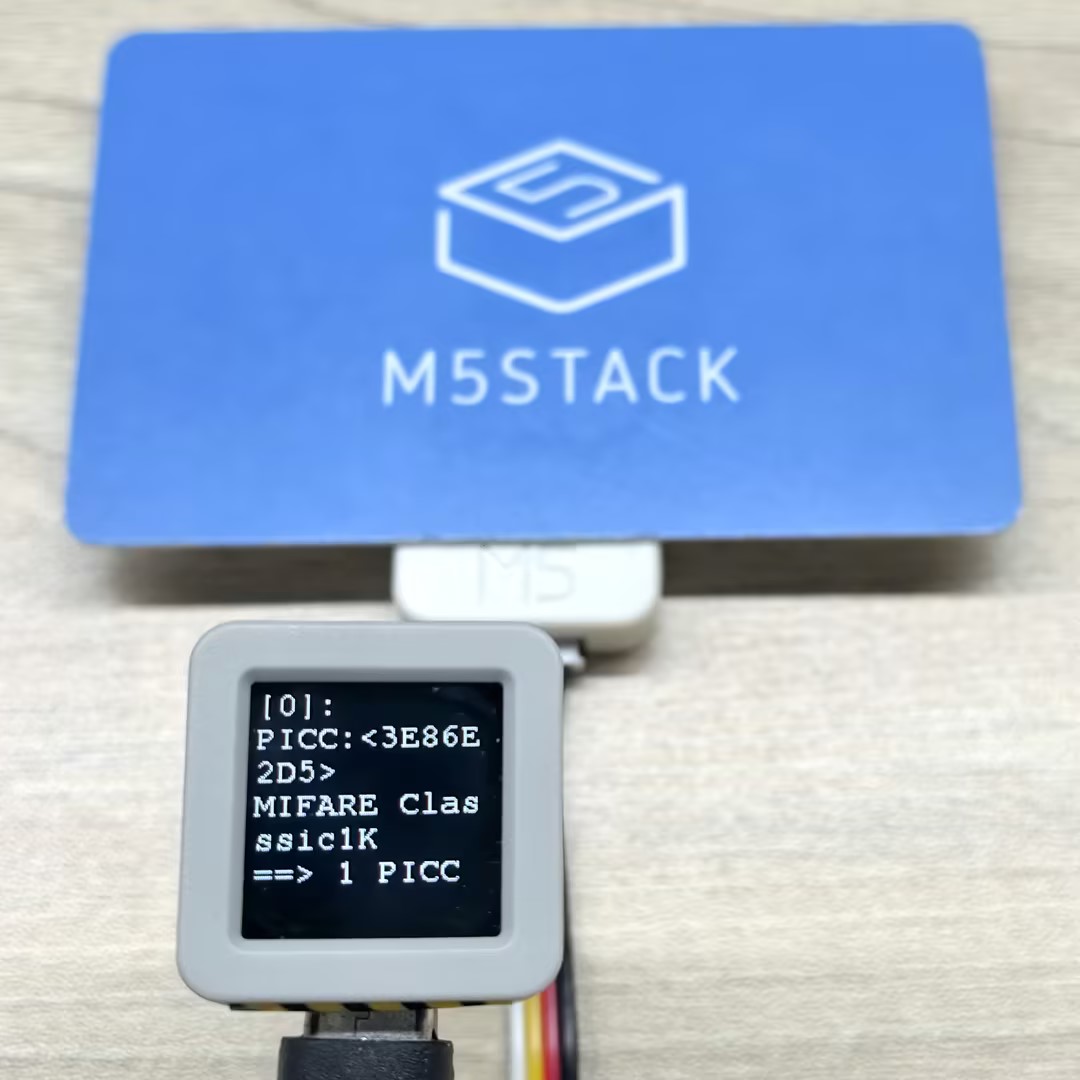
Serial monitor output example:
PICC:3E86E2D5 MIFARE Classsic1K 0004/08 752/1024
==> 1 PICC
PICC:047D9D82752291 MIFARE Ultralight EV1 11 0044/00 48/80
PICC:04327CD2B97880 MIFARE Plus 2K X/EV SL0 0044/20 1520/2048
==> 2 PICC3.3 Complete Data Reading
This process requires clicking BtnA to bring the card close to the reader. After the program detects the card, it automatically reads and prints the data to the screen and serial port. During the reading process, the program performs complete card identification and activation.
#include <M5Unified.h>
#include <M5UnitUnified.h>
#include <M5UnitUnifiedNFC.h>
#include <M5Utility.h>
#include <Wire.h>
#include <vector>

using namespace m5::nfc::a; // NFC-A protocol layer
using namespace m5::nfc::a::mifare; // MIFARE card common operations
using namespace m5::nfc::a::mifare::classic; // MIFARE Classic card specific operations

namespace {
auto& lcd = M5.Display;
m5::unit::UnitUnified Units; // Unit unified manager instance
m5::unit::UnitNFC unit{};  // NFC Unit instance (I2C interface)
m5::nfc::NFCLayerA nfc_a{unit}; // NFC-A protocol layer instance for ISO 14443-3A cards

// KeyA that can authenticate all blocks
// If it's a different key value, change it
constexpr Key keyA = DEFAULT_KEY;  // Default as 0xFFFFFFFFFFFF
}  // namespace

void setup()
{
    M5.begin();

    // The screen shall be in landscape mode
    if (lcd.height() > lcd.width()) {
        lcd.setRotation(1);
    }

    auto board = M5.getBoard();
    bool unit_ready{};// Unit initialization status flag

    auto pin_num_sda = M5.getPin(m5::pin_name_t::port_a_sda);
    auto pin_num_scl = M5.getPin(m5::pin_name_t::port_a_scl);
    M5_LOGI("getPin: SDA:%u SCL:%u", pin_num_sda, pin_num_scl);
    Wire.end();// Close existing I2C connection first
    Wire.begin(pin_num_sda, pin_num_scl, 400 * 1000U);
    // Add NFC Unit to manager and initialize
    unit_ready = Units.add(unit, Wire) && Units.begin();
    if (!unit_ready) {
        M5_LOGE("Failed to begin");
        lcd.fillScreen(TFT_RED);
        while (true) {
            m5::utility::delay(10000);
        }
    }

    M5_LOGI("M5UnitUnified initialized");
    M5_LOGI("%s", Units.debugInfo().c_str());

    lcd.setFont(&fonts::FreeMono9pt7b);
    lcd.fillScreen(0);
    lcd.setCursor(0, 0);
    lcd.printf("Please put the PICC\nand click\nBtnA");
    M5.Log.printf("Please put the PICC and click BtnA\n");
}

void loop()
{
    M5.update();
    Units.update();// Update all registered Units

    if (M5.BtnA.wasClicked()) {
        lcd.fillScreen(0);
        lcd.setCursor(0, 0);
        PICC picc{}; // Create card object
        if (nfc_a.detect(picc)) { // Detect a single card
            // Identify card type and reactivate (get full communication parameters)
            if (nfc_a.identify(picc) && nfc_a.reactivate(picc)) {
                lcd.printf("%s\n%s", picc.uidAsString().c_str(), picc.typeAsString().c_str());
                // Print detailed info: UID, type, user area size, total size
                M5.Log.printf("==== Dump %s %s %u/%u ====\n", picc.uidAsString().c_str(), picc.typeAsString().c_str(),
                              picc.userAreaSize(), picc.totalSize());
                // Dump all card data (needs key for MIFARE Classic, key parameter ignored for other types)
                nfc_a.dump(keyA);  // Need key if MIFARE classic, Ignore key if not MIFARE classic
                nfc_a.deactivate();
            } else {
                lcd.printf("Failed to identify");
                M5_LOGE("Failed to identify/activate %s", picc.uidAsString().c_str());
            }
        } else {
            lcd.printf("PICC NOT exists");
            M5.Log.printf("PICC NOT exists\n");
        }
    }
}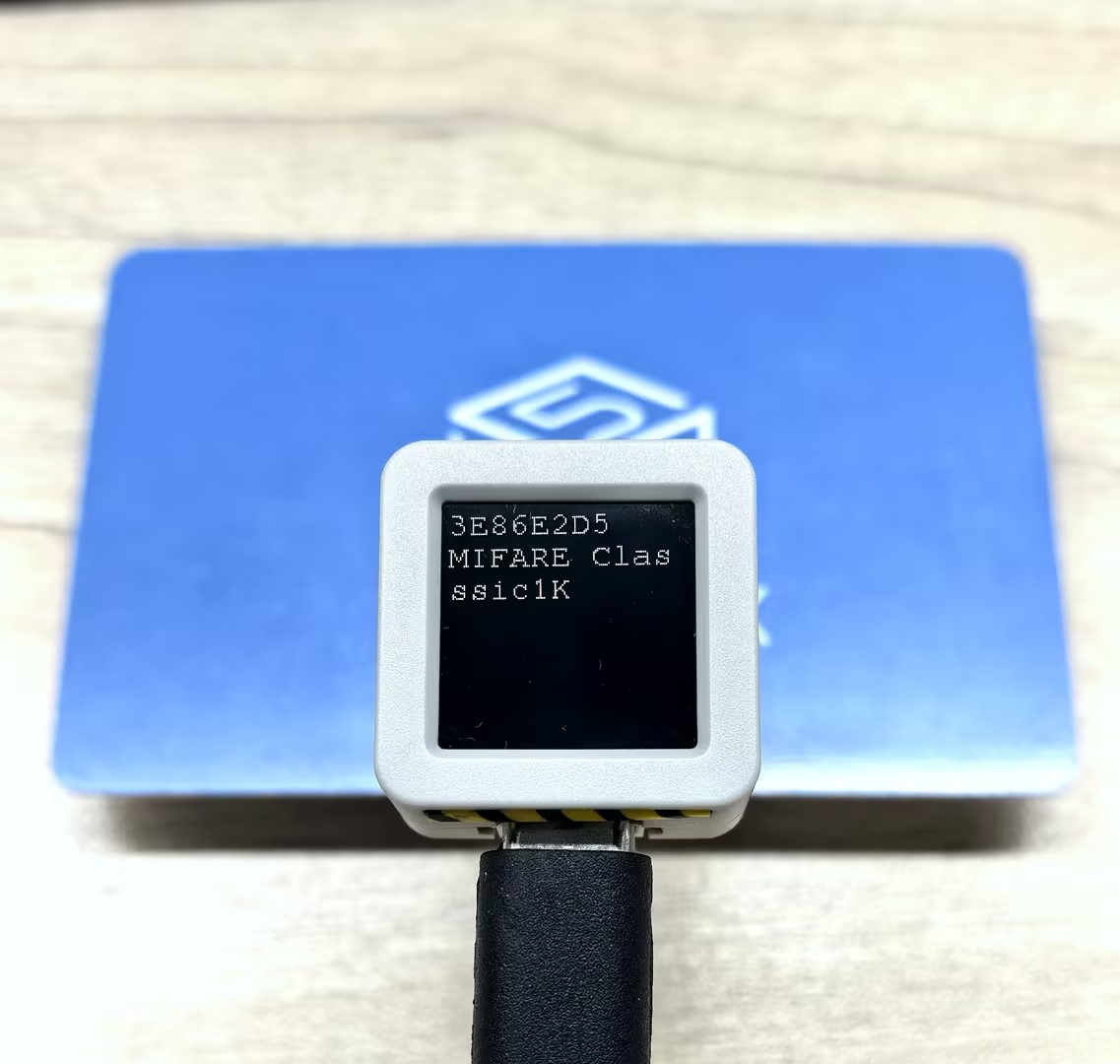
Serial monitor output example:
==== Dump 3E86E2D5 MIFARE Classsic1K 752/1024 ====
Sec[Blk]:00 01 02 03 04 05 06 07 08 09 0A 0B 0C 0D 0E 0F [Access]
-----------------------------------------------------------------
00)[000]:3E 86 E2 D5 8F 08 04 00 62 63 64 65 66 67 68 69 [0 0 0]
   [001]:00 00 00 00 00 00 00 00 00 00 00 00 00 00 00 00 [0 0 0]
   [002]:00 00 00 00 00 00 00 00 00 00 00 00 00 00 00 00 [0 0 0]
   [003]:00 00 00 00 00 00 FF 07 80 69 FF FF FF FF FF FF [0 0 1]
01)[004]:00 00 00 00 00 00 00 00 00 00 00 00 00 00 00 00 [0 0 0]
   [005]:00 00 00 00 00 00 00 00 00 00 00 00 00 00 00 00 [0 0 0]
   [006]:00 00 00 00 00 00 00 00 00 00 00 00 00 00 00 00 [0 0 0]
   [007]:00 00 00 00 00 00 FF 07 80 69 FF FF FF FF FF FF [0 0 1]
02)[008]:00 00 00 00 00 00 00 00 00 00 00 00 00 00 00 00 [0 0 0]
   [009]:00 00 00 00 00 00 00 00 00 00 00 00 00 00 00 00 [0 0 0]
   [010]:00 00 00 00 00 00 00 00 00 00 00 00 00 00 00 00 [0 0 0]
[011]:00 00 00 00 00 00 FF 07 80 69 FF FF FF FF FF FF [0 0 1]3.4 Tag Emulation
This example demonstrates NFC tag emulation functionality. When other NFC readers (such as smartphones) approach the tag, they can recognize and read the tag. The program supports emulation of two common tag card types: MIFARE Ultralight and NTAG 213, each configured with corresponding UID and memory data (containing NDEF messages).
Key Points:
- The emulation process must continuously call
update()to update state in the main loop - State changes (Off→Idle→Ready→Active→Halt) are displayed in real-time through screen indicators
- Card data can contain NDEF messages supporting various content types like URI, text, and images
#include <M5Unified.h>
#include <M5UnitUnified.h>
#include <M5UnitUnifiedNFC.h>
#include <M5Utility.h>
#include <Wire.h>
#include <vector>

using namespace m5::nfc; // NFC common namespace
using namespace m5::nfc::a; // NFC-A protocol layer
using namespace m5::nfc::a::mifare; // MIFARE card common operations
using namespace m5::nfc::a::mifare::classic; // MIFARE Classic card specific operation

namespace {
auto& lcd = M5.Display;
m5::unit::UnitUnified Units; // Unit unified manager instance
m5::unit::UnitNFC unit{};  // NFC Unit instance (I2C interface)
m5::nfc::EmulationLayerA emu_a{unit}; // Create NFC-A emulation layer instance to emulate the device as an NFC tag

PICC picc{}; // Card object to emulate

// ===== Select the tag type to emulate =====
#define EMU_MIFARE_ULTRALIGHT // MIFARE Ultralight tag
// #define EMU_NTAG213  // NTAG213 tag

// ===== MIFARE Ultralight emulation data =====
#if defined(EMU_MIFARE_ULTRALIGHT)
constexpr Type type{Type::MIFARE_Ultralight};
constexpr uint8_t uid[] = {0x04, 0x34, 0x56, 0x78, 0x9A, 0xBC, 0xDE};// 7-byte UID (Ultralight/NTAG series uses 7-byte UID)
// Emulated tag memory data (contains NDEF message: URL https://m5stack.com/ and text "Hello M5Stack")
uint8_t picc_memory[]   = {
    0x00, 0x00, 0x00, 0x00,  // Page 0: UID bytes (to be filled by embed_uid)
    0x00, 0x00, 0x00, 0x00,  // Page 1: UID bytes (continued)
    0x00, 0xA3, 0x00, 0x00,  // Page 2: Internal data, lock bits
    0xE1, 0x10, 0x06, 0x00,  // Page 3: CC (Capability Container) - NDEF format identifier
    0x03, 0x25, 0x91, 0x01,  // Page 4: NDEF TLV start
    0x0D, 0x55, 0x04, 0x6D,  // Page 5: URI record (https://)
    0x35, 0x73, 0x74, 0x61,  // Page 6: "5sta"
    0x63, 0x6B, 0x2E, 0x63,  // Page 7: "ck.c"
    0x6F, 0x6D, 0x2F, 0x51,  // Page 8: "om/" + text record start
    0x01, 0x10, 0x54, 0x02,  // Page 9: Text record header
    0x65, 0x6E, 0x48, 0x65,  // Page 10: "enHe" (language code "en" + "He")
    0x6C, 0x6C, 0x6F, 0x20,  // Page 11: "llo "
    0x4D, 0x35, 0x53, 0x74,  // Page 12: "M5St"
    0x61, 0x63, 0x6B, 0xFE,  // Page 13: "ack" + NDEF terminator 0xFE
    0x44, 0x45, 0x46, 0x00,  // Page 14: Padding data
    0x44, 0x45, 0x46, 0x00,  // Page 15: Padding data
};
// ===== NTAG213 emulation data =====
#elif defined(EMU_NTAG213)
constexpr Type type{Type::NTAG_213};
constexpr uint8_t uid[] = {0x99, 0x88, 0x77, 0x66, 0x55, 0x44, 0x33};// 7-byte UID
// Emulated tag memory data (contains multilingual NDEF message: URL + Chinese/English/Japanese text)
uint8_t picc_memory[]   = {
    0x00, 0x00, 0x00, 0x00,  // Page 0: UID bytes
    0x00, 0x00, 0x00, 0x00,  // Page 1: UID bytes (continued)
    0x00, 0x48, 0x00, 0x00,  // Page 2: Internal data, lock bits
    0xE1, 0x10, 0x12, 0x00,  // Page 3: CC (Capability Container)
    0x01, 0x03, 0xA0, 0x0C,  // Page 4: NDEF capability data
    0x34, 0x03, 0x58, 0x91,  // Page 5: NDEF TLV + message start
    0x01, 0x0D, 0x55, 0x04,  // Page 6: URI record header (https://)
    0x6D, 0x35, 0x73, 0x74,  // Page 7: "m5st"
    0x61, 0x63, 0x6B, 0x2E,  // Page 8: "ack."
    0x63, 0x6F, 0x6D, 0x2F,  // Page 9: "com/"
    0x11, 0x01, 0x11, 0x54,  // Page 10: Chinese text record header
    0x02, 0x7A, 0x68, 0xE4,  // Page 11: Language code "zh" + UTF-8 Chinese start
    0xBD, 0xA0, 0xE5, 0xA5,  // Page 12: UTF-8 encoding of "你好"
    0xBD, 0x20, 0x4D, 0x35,  // Page 13: " M5"
    0x53, 0x74, 0x61, 0x63,  // Page 14: "Stac"
    0x6B, 0x11, 0x01, 0x10,  // Page 15: "k" + English text record header
    0x54, 0x02, 0x65, 0x6E,  // Page 16: Language code "en"
    0x48, 0x65, 0x6C, 0x6C,  // Page 17: "Hell"
    0x6F, 0x20, 0x4D, 0x35,  // Page 18: "o M5"
    0x53, 0x74, 0x61, 0x63,  // Page 19: "Stac"
    0x6B, 0x51, 0x01, 0x1A,  // Page 20: "k" + Japanese text record header
    0x54, 0x02, 0x6A, 0x61,  // Page 21: Language code "ja"
    0xE3, 0x81, 0x93, 0xE3,  // Page 22: "こ" UTF-8
    0x82, 0x93, 0xE3, 0x81,  // Page 23: "ん" + start of "に"
    0xAB, 0xE3, 0x81, 0xA1,  // Page 24: "に" + "ち"
    0xE3, 0x81, 0xAF, 0x20,  // Page 25: "は "
    0x4D, 0x35, 0x53, 0x74,  // Page 26: "M5St"
    0x61, 0x63, 0x6B, 0xFE,  // Page 27: "ack" + NDEF terminator
    0x00, 0x00, 0x00, 0x00,  // Pages 28-39: Free user data area
    0x00, 0x00, 0x00, 0x00,  //
    0x00, 0x00, 0x00, 0x00,  //
    0x00, 0x00, 0x00, 0x00,  //
    0x00, 0x00, 0x00, 0x00,  //
    0x00, 0x00, 0x00, 0x00,  //
    0x00, 0x00, 0x00, 0x00,  //
    0x00, 0x00, 0x00, 0x00,  //
    0x00, 0x00, 0x00, 0x00,  //
    0x00, 0x00, 0x00, 0x00,  //
    0x00, 0x00, 0x00, 0x00,  //
    0x00, 0x00, 0x00, 0x00,  //
    0x00, 0x00, 0x00, 0xBD,  // Page 40: NTAG213 configuration page
    0x02, 0x00, 0x00, 0xFF,  // Page 41: Configuration page (continued)
    0x00, 0x00, 0x00, 0x00,  // Page 42: Password protection
    0x00, 0x00, 0x00, 0x00,  // Page 43: Password acknowledgment
    0x00, 0x00, 0x00, 0x00,  // Page 44: Reserved area
};
#else
#error "Choose the target to emulate"
#endif

/**
 * @brief Calculate BCC (Block Check Character) - XOR operation on byte sequence
 * @param p    Pointer to input data
 * @param len  Data length
 * @param init Initial value (default: 0)
 * @return     BCC check value
 */
uint8_t bcc8(const uint8_t* p, const uint8_t len, const uint8_t init = 0)
{
    uint8_t v = init;
    for (uint_fast8_t i = 0; i < len; ++i) {
        v ^= p[i];
    }
    return v;
}

/**
 * @brief Correctly embed 7-byte UID into Ultralight/NTAG memory layout
 *
 * UID storage format in Ultralight/NTAG memory:
 *   Page 0: [UID0, UID1, UID2, BCC0]  BCC0 = CT ^ UID0 ^ UID1 ^ UID2
 *   Page 1: [UID3, UID4, UID5, UID6]
 *   Page 2 prefix: [BCC1]  BCC1 = UID3 ^ UID4 ^ UID5 ^ UID6
 *
 * @param mem  Target memory buffer (at least 9 bytes)
 * @param uid  7-byte UID data
 */
void embed_uid(uint8_t mem[9], const uint8_t uid[7])
{
    memcpy(mem, uid, 3);
    mem[3] = bcc8(uid, 3, 0x88 /* CT */);
    memcpy(mem + 4, uid + 3, 4);
    mem[8] = bcc8(uid + 3, 4);
}

// Color table corresponding to emulation states
constexpr uint16_t color_table[] = {
    //  None,      Off,     Idle,     Ready,   Active,      Halt };
    TFT_BLACK, TFT_RED, TFT_BLUE, TFT_YELLOW, TFT_GREEN, TFT_MAGENTA};
// Character identifiers for emulation states
//                                 None,  Off,  Idle, Ready, Active, Halt
constexpr const char* state_table[] = {"-", "O", "I", "R", "A", "H"};
}  // namespace

void setup()
{
    M5.begin();
    Serial.begin(115200);

    // The screen shall be in landscape mode
    if (lcd.height() > lcd.width()) {
        lcd.setRotation(1);
    }

    // Emulation mode settings
    auto cfg      = unit.config();
    cfg.emulation = true;
    cfg.mode      = NFC::A;
    unit.config(cfg);

    auto board = M5.getBoard();
    bool unit_ready{};
    auto pin_num_sda = M5.getPin(m5::pin_name_t::port_a_sda);
    auto pin_num_scl = M5.getPin(m5::pin_name_t::port_a_scl);
    M5_LOGI("getPin: SDA:%u SCL:%u", pin_num_sda, pin_num_scl);
    Wire.end();// Close existing I2C connection first
    Wire.begin(pin_num_sda, pin_num_scl, 400 * 1000U);
    // Add NFC Unit to manager and initialize
    unit_ready = Units.add(unit, Wire) && Units.begin();
    if (!unit_ready) {
        M5_LOGE("Failed to begin");
        lcd.fillScreen(TFT_RED);
        while (true) {
            m5::utility::delay(10000);
        }
    }

    M5_LOGI("M5UnitUnified initialized");
    M5_LOGI("%s", Units.debugInfo().c_str());

    lcd.setFont(&fonts::FreeMono9pt7b);
    lcd.startWrite();
    lcd.fillScreen(TFT_RED);
    // Initialize emulation
    if (picc.emulate(type, uid, sizeof(uid))) {// Set card type and UID to emulate
        embed_uid(picc_memory, uid);// Embed UID into emulation memory
        // Start emulation layer with card object and memory data
        if (emu_a.begin(picc, picc_memory, sizeof(picc_memory))) {
            lcd.fillScreen(TFT_DARKGREEN);
            lcd.setTextColor(TFT_WHITE, TFT_DARKGREEN);
            lcd.setCursor(0, 16);
            // Get and display the emulated PICC info
            const auto& e_picc = emu_a.emulatePICC();
            Serial.printf("Emulation:%s %s ATQA:%04X SAK:%u\n", e_picc.typeAsString().c_str(),
                          e_picc.uidAsString().c_str(), e_picc.atqa, e_picc.sak);
            lcd.printf("%s\n%s\nATQA:%04X\nSAK:%u ", e_picc.typeAsString().c_str(), e_picc.uidAsString().c_str(),
                       e_picc.atqa, e_picc.sak);
        }
    }
    lcd.fillRect(0, 0, 32, 16, color_table[0]);
    lcd.drawString(state_table[0], 0, 0);
    lcd.endWrite();
}

void loop()
{
    M5.update();
    Units.update();  // Update all registered Units
    emu_a.update();  // Update emulation layer state (MUST be called in loop)

    // Monitor emulation state changes and update screen indicator
    static EmulationLayerA::State latest{}; // Record previous state
    auto state = emu_a.state(); // Get current emulation state
    if (latest != state) {
        latest = state;
        lcd.startWrite();
        // Update top-left color block and text based on state
        lcd.fillRect(0, 0, 32, 16, color_table[m5::stl::to_underlying(state)]);
        lcd.drawString(state_table[m5::stl::to_underlying(state)], 0, 0);
        Serial.println(state_table[m5::stl::to_underlying(state)]);
        lcd.endWrite();
    }
}After uploading the code above to the main controller, Unit NFC will emulate an NFC tag. When you bring a smartphone or other NFC reader close to Unit NFC, it can recognize the NFC tag and read the NDEF message content (URL + Text) stored in it. The serial monitor will output information about the emulated tag type, UID, ATQA and SAK. The top-left corner of the main controller screen displays a state indicator (Idle/Ready/Active, etc.).
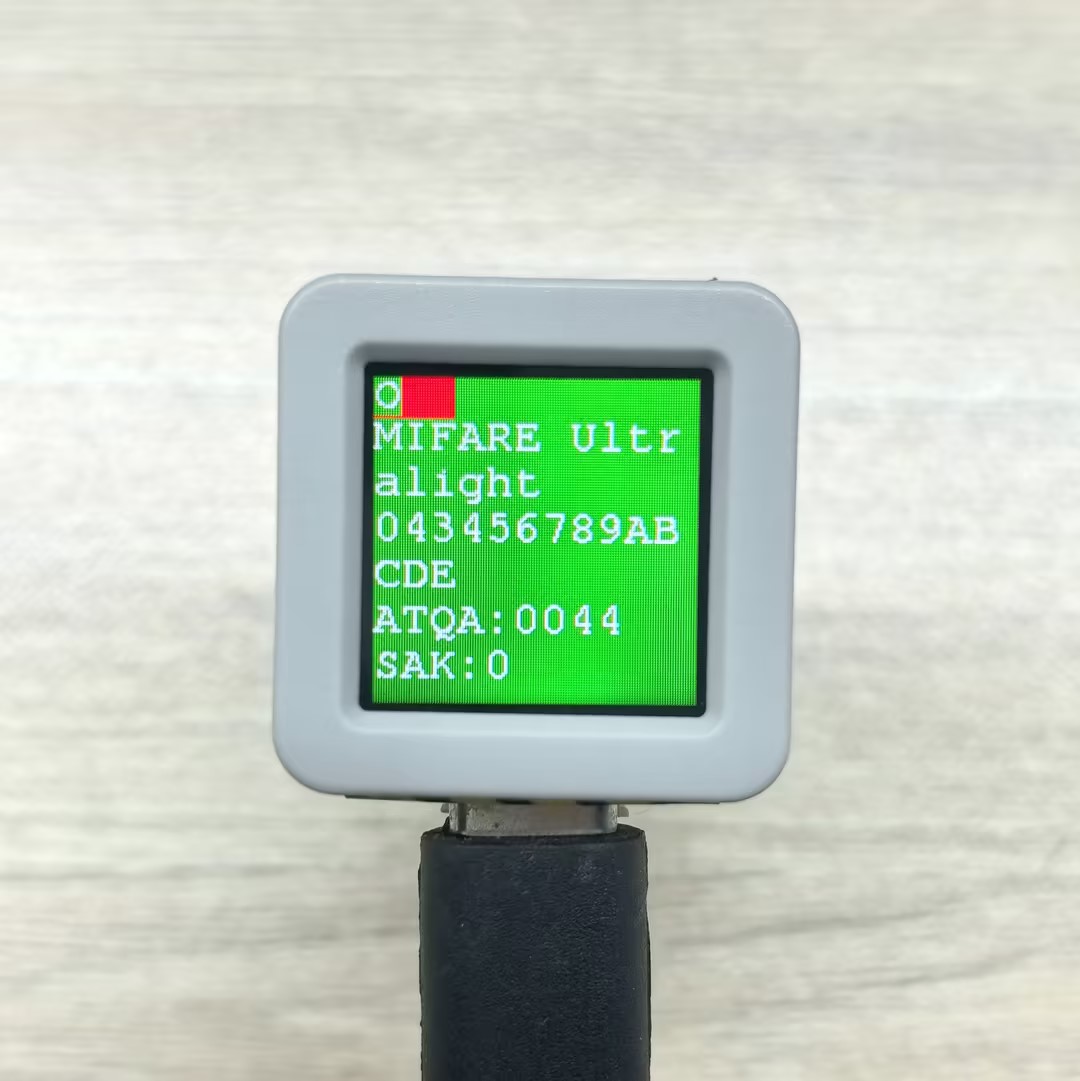
Example of tag information read by smartphone:

Serial monitor output example:
- MIFARE Ultralight
Emulation:MIFARE Ultralight 043456789ABCDE ATQA:0044 SAK:0
O
I
R
A
H
R
A
H
R
A
O- NTAG 213
Emulation:NTAG 213 99887766554433 ATQA:0044 SAK:0
O
I
R
A
H
R
A
H
R
A
O3.5 Direct Tag Read/Write
This example demonstrates how to directly read and write NFC tags, including two methods: cross-block continuous read/write and single-block read/write.
#include <M5Unified.h>
#include <M5UnitUnified.h>
#include <M5UnitUnifiedNFC.h>
#include <M5Utility.h>
#include <Wire.h>

using namespace m5::nfc; // NFC common namespace
using namespace m5::nfc::a; // NFC-A protocol layer
using namespace m5::nfc::a::mifare; // MIFARE card operations

namespace {
auto& lcd = M5.Display;
m5::unit::UnitUnified Units;// Unit unified manager instance
m5::unit::UnitNFC unit{};  // NFC Unit instance (I2C interface)
m5::nfc::NFCLayerA nfc_a{unit};// NFC-A protocol layer instance

// Classic default KeyA (0xFFFFFFFFFFFF)
// If your card uses a different key, change it here
constexpr classic::Key keyA = classic::DEFAULT_KEY;

// Test message strings (selected based on card capacity)
constexpr char long_msg[]  = "This is a sample message buffer used for testing NFC page writes and data integrity verification purposes.";// For large-capacity cards (user area >= 120 bytes)
constexpr char short_msg[] = "0123456789ABCDEFGHIJ";// For small-capacity cards (user area < 120 bytes)

/**
 * @brief Cross-block continuous read/write test (triggered by click)
 *
 * Write test message to card starting from specified block, read back and verify data integrity,
 * then clear by writing all zeros.
 * Uses high-level read()/write() API which handles cross-block/cross-sector operations automatically.
 *
 * Flow: Write -> Dump -> Read back & Verify -> Clear -> Dump
 *
 * @param sblock  Starting block number to write
 * @param msg     Test message string to write
 * @return true if all operations (write, verify, clear) succeeded
 */
bool read_write(const uint8_t sblock, const char* msg)
{
    auto len = strlen(msg);
    uint8_t buf[(strlen(msg) + 15) / 16 * 16]{};  // Round up to 16-byte alignment (Classic block size)
    uint16_t rx_len = sizeof(buf);

    // Write test message to card
    M5.Log.printf("================================ WRITE block:%u len:%zu\n", sblock, sizeof(buf));
    if (!nfc_a.write(sblock, (const uint8_t*)msg, len, keyA)) {
        M5_LOGE("Failed to write block %u", sblock);
        return false;
    }
    lcd.fillScreen(TFT_ORANGE);

    // Dump written data for visual confirmation
    nfc_a.mifareClassicAuthenticateA(classic::get_sector_trailer_block(sblock), keyA);// Authenticate sector before dump
    nfc_a.dump(sblock);

    // Read back and verify data integrity
    if (!nfc_a.read(buf, rx_len, sblock, keyA)) {
        M5_LOGE("Failed to read");
        return false;
    }
    lcd.fillScreen(TFT_BLUE);

    bool verify_ok = (memcmp(buf, msg, len) == 0);// Compare read data with original message
    M5.Log.printf("================================ VERIFY:%s\n", verify_ok ? "OK" : "NG");
    if (!verify_ok) {
        M5_LOGE("VERIFY NG!!");
        m5::utility::log::dump(buf, rx_len, false);// Dump read data for debugging
    }

    // Clear by writing all zeros
    memset(buf, 0, sizeof(buf));
    lcd.fillScreen(TFT_MAGENTA);
    if (!nfc_a.write(sblock, buf, sizeof(buf), keyA)) {
        M5_LOGE("Failed to clear");
        return false;
    }
    M5.Log.printf("================================ CLEAR\n");

    // Dump cleared data for visual confirmation
    nfc_a.mifareClassicAuthenticateA(classic::get_sector_trailer_block(sblock), keyA);
    nfc_a.dump(sblock);

    return true;
}

/**
 * @brief Single block read/write test
 *
 * Write a fixed test string to a single 16-byte block using low-level read16()/write16() API,
 * read back and verify, then clear.
 * Unlike read_write(), this operates on exactly one block without cross-sector handling.
 *
 * Flow: Authenticate -> Dump before -> Write -> Dump after -> Read & Verify -> Clear -> Dump
 *
 * @param block  Block number to read/write (must NOT be a sector trailer block)
 */
void read_write_single_block(const uint8_t block)
{
    constexpr char msg[] = "M5Unit-RFID";// Fixed test message (fits within 16-byte block)

    // Authenticate with KeyA before any read/write operation
    if (!nfc_a.mifareClassicAuthenticateA(block, keyA)) {
        M5_LOGE("Failed to AuthA");
        return;
    }

    // Dump block content before write
    M5.Log.printf("Before[%u] ----\n", block);
    nfc_a.dump(block);

    // Write test message to the block
    M5.Log.printf("Write\n");
    if (!nfc_a.write16(block, (const uint8_t*)msg, sizeof(msg))) {
        M5_LOGE("Failed to write");
        return;
    }

    // Dump block content after write
    M5.Log.printf("After[%u] ----\n", block);
    nfc_a.dump(block);

    // Read back and verify data integrity
    uint8_t rbuf[16]{};
    if (!nfc_a.read16(rbuf, block)) {
        M5_LOGE("Failed to read");
        return;
    }
    bool verify = (std::memcmp(rbuf, (const uint8_t*)msg, sizeof(msg)) == 0);// Compare read data with original
    M5.Log.printf("Verify %s\n", verify ? "OK" : "NG");

    // Clear block by writing minimal zero data (library pads to 16 bytes)
    M5.Log.printf("Clear\n");
    uint8_t c[1]{};
    if (!nfc_a.write16(block, c, sizeof(c))) {
        M5_LOGE("Failed to write");
        return;
    }

    // Dump block content after clear
    nfc_a.dump(block);
}

}  // namespace

void setup()
{
    M5.begin();

    // The screen shall be in landscape mode
    if (lcd.height() > lcd.width()) {
        lcd.setRotation(1);
    }

    auto pin_num_sda = M5.getPin(m5::pin_name_t::port_a_sda);
    auto pin_num_scl = M5.getPin(m5::pin_name_t::port_a_scl);
    M5_LOGI("getPin: SDA:%u SCL:%u", pin_num_sda, pin_num_scl);

    Wire.end();// Close existing I2C connection first
    Wire.begin(pin_num_sda, pin_num_scl, 400 * 1000U);

    // Add NFC Unit to manager and initialize
    bool unit_ready = Units.add(unit, Wire) && Units.begin();
    M5_LOGI("NFC Unit initialized: %s", unit_ready ? "OK" : "NG");

    lcd.setFont(&fonts::FreeMono9pt7b);
    lcd.setCursor(0, 0);
    lcd.printf("Put Classic card & click/hold BtnA");
    M5.Log.printf("Put Classic card & click/hold BtnA\n");
}

void loop()
{
    M5.update();
    Units.update();

    bool clicked = M5.BtnA.wasClicked();  // For cross-block read/write test
    bool held    = M5.BtnA.wasHold();     // For single block read/write test

    if (clicked || held) {
        PICC picc;
        if (nfc_a.detect(picc)) {
            lcd.fillScreen(TFT_DARKGREEN);

            if (nfc_a.identify(picc) && nfc_a.reactivate(picc)) {
                // Print card information: UID, type, user area size, total size
                M5.Log.printf("PICC:%s %s %u/%u\n",
                              picc.uidAsString().c_str(),
                              picc.typeAsString().c_str(),
                              picc.userAreaSize(),
                              picc.totalSize());

                // Only process MIFARE Classic cards, skip all other types
                if (!picc.isMifareClassic()) {
                    M5.Log.printf("Not a MIFARE Classic card, skipped\n");
                } else if (clicked) {
                    // Cross-block continuous read/write test
                    M5.Speaker.tone(2000, 30);
                    // Select message based on card capacity
                    const char* msg = (picc.userAreaSize() >= 120) ? long_msg : short_msg;
                    bool ret = read_write(picc.firstUserBlock(), msg);// Start from first user block
                    lcd.fillScreen(ret ? TFT_BLACK : TFT_RED);// Black = success, Red = failure

                } else if (held) {
                    // Single block read/write test
                    M5.Speaker.tone(4000, 30);
                    // Use second-to-last block (avoid sector trailer which contains keys and access bits)
                    read_write_single_block(picc.blocks - 2);
                }

                nfc_a.deactivate();// Release card communication
            } else {
                M5_LOGE("Failed to identify/activate");
            }
        } else {
            M5.Log.printf("PICC NOT detected\n");
        }

        lcd.setCursor(0, 0);
        lcd.printf("Put Classic card & click/hold BtnA");
        M5.Log.printf("Put Classic card & click/hold BtnA\n");
    }
}Serial monitor output example:
- Click BtnA (cross-block read/write test):
PICC:3E86E2D5 MIFARE Classsic1K 752/1024
================================ WRITE block:1 len:112
00)[000]:3E 86 E2 D5 8F 08 04 00 62 63 64 65 66 67 68 69 [0 0 0]
   [001]:54 68 69 73 20 69 73 20 61 20 73 61 6D 70 6C 65 [0 0 0]
   [002]:20 6D 65 73 73 61 67 65 20 62 75 66 66 65 72 20 [0 0 0]
   [003]:00 00 00 00 00 00 FF 07 80 69 FF FF FF FF FF FF [0 0 1]
================================ VERIFY:OK
================================ CLEAR
00)[000]:3E 86 E2 D5 8F 08 04 00 62 63 64 65 66 67 68 69 [0 0 0]
   [001]:00 00 00 00 00 00 00 00 00 00 00 00 00 00 00 00 [0 0 0]
   [002]:00 00 00 00 00 00 00 00 00 00 00 00 00 00 00 00 [0 0 0]
[003]:00 00 00 00 00 00 FF 07 80 69 FF FF FF FF FF FF [0 0 1]- Hold BtnA (single-block read/write test):
PICC:3E86E2D5 MIFARE Classsic1K 752/1024
Before[62] ----
15)[060]:00 00 00 00 00 00 00 00 00 00 00 00 00 00 00 00 [0 0 0]
   [061]:00 00 00 00 00 00 00 00 00 00 00 00 00 00 00 00 [0 0 0]
   [062]:00 00 00 00 00 00 00 00 00 00 00 00 00 00 00 00 [0 0 0]
   [063]:00 00 00 00 00 00 FF 07 80 69 FF FF FF FF FF FF [0 0 1]
Write
After[62] ----
15)[060]:00 00 00 00 00 00 00 00 00 00 00 00 00 00 00 00 [0 0 0]
   [061]:00 00 00 00 00 00 00 00 00 00 00 00 00 00 00 00 [0 0 0]
   [062]:4D 35 55 6E 69 74 2D 52 46 49 44 00 00 00 00 00 [0 0 0]
   [063]:00 00 00 00 00 00 FF 07 80 69 FF FF FF FF FF FF [0 0 1]
Verify OK
Clear
15)[060]:00 00 00 00 00 00 00 00 00 00 00 00 00 00 00 00 [0 0 0]
   [061]:00 00 00 00 00 00 00 00 00 00 00 00 00 00 00 00 [0 0 0]
   [062]:00 00 00 00 00 00 00 00 00 00 00 00 00 00 00 00 [0 0 0]
[063]:00 00 00 00 00 00 FF 07 80 69 FF FF FF FF FF FF [0 0 1]3.6 NDEF Format Read/Write Tags
This example demonstrates how to use Unit NFC to read and write NFC tags in NDEF format, including the following functions:
- Write multi-record messages containing URL and text in NDEF format
- Read NDEF messages from tags and parse the content display
- Write NDEF media records using embedded PNG image data
- Adapt message content to different capacity tags (select text length based on user area size)
#include <M5Unified.h>
#include <M5UnitUnified.h>
#include <M5UnitUnifiedNFC.h>
#include <M5Utility.h>
#include <Wire.h>
#include <algorithm>
#include <vector>

using namespace m5::nfc; // NFC common namespace
using namespace m5::nfc::a; // NFC-A protocol layer
using namespace m5::nfc::a::mifare; // MIFARE card operations
using namespace m5::nfc::ndef; // NDEF (NFC Data Exchange Format)

namespace {
auto& lcd = M5.Display;
m5::unit::UnitUnified Units;// Unit unified manager instance
m5::unit::UnitNFC unit{};  // NFC Unit instance (I2C interface)
m5::nfc::NFCLayerA nfc_a{unit};// NFC-A protocol layer instance

// PNG image binary data (64x64 pixels, used for writing to NDEF record)
constexpr uint8_t poji_64_png[] = {
    0x89, 0x50, 0x4e, 0x47, 0x0d, 0x0a, 0x1a, 0x0a, 0x00, 0x00, 0x00, 0x0d, 0x49, 0x48, 0x44, 0x52, 0x00, 0x00, 0x00,
    0x40, 0x00, 0x00, 0x00, 0x40, 0x01, 0x00, 0x00, 0x00, 0x00, 0x82, 0x12, 0x4c, 0x73, 0x00, 0x00, 0x00, 0x02, 0x62,
    0x4b, 0x47, 0x44, 0x00, 0x01, 0xdd, 0x8a, 0x13, 0xa4, 0x00, 0x00, 0x00, 0x09, 0x70, 0x48, 0x59, 0x73, 0x00, 0x00,
    0x00, 0x48, 0x00, 0x00, 0x00, 0x48, 0x00, 0x46, 0xc9, 0x6b, 0x3e, 0x00, 0x00, 0x00, 0x07, 0x74, 0x49, 0x4d, 0x45,
    0x07, 0xe8, 0x0b, 0x16, 0x08, 0x12, 0x36, 0x8d, 0x3c, 0xbe, 0xef, 0x00, 0x00, 0x00, 0x77, 0x74, 0x45, 0x58, 0x74,
    0x52, 0x61, 0x77, 0x20, 0x70, 0x72, 0x6f, 0x66, 0x69, 0x6c, 0x65, 0x20, 0x74, 0x79, 0x70, 0x65, 0x20, 0x38, 0x62,
    0x69, 0x6d, 0x00, 0x0a, 0x38, 0x62, 0x69, 0x6d, 0x0a, 0x20, 0x20, 0x20, 0x20, 0x20, 0x20, 0x34, 0x30, 0x0a, 0x33,
    0x38, 0x34, 0x32, 0x34, 0x39, 0x34, 0x64, 0x30, 0x34, 0x30, 0x34, 0x30, 0x30, 0x30, 0x30, 0x30, 0x30, 0x30, 0x30,
    0x30, 0x30, 0x30, 0x30, 0x33, 0x38, 0x34, 0x32, 0x34, 0x39, 0x34, 0x64, 0x30, 0x34, 0x32, 0x35, 0x30, 0x30, 0x30,
    0x30, 0x30, 0x30, 0x30, 0x30, 0x30, 0x30, 0x31, 0x30, 0x64, 0x34, 0x31, 0x64, 0x38, 0x63, 0x64, 0x39, 0x38, 0x66,
    0x30, 0x30, 0x62, 0x32, 0x30, 0x34, 0x65, 0x39, 0x38, 0x30, 0x30, 0x39, 0x39, 0x38, 0x0a, 0x65, 0x63, 0x66, 0x38,
    0x34, 0x32, 0x37, 0x65, 0x0a, 0xa6, 0x53, 0xc3, 0x8e, 0x00, 0x00, 0x00, 0x01, 0x6f, 0x72, 0x4e, 0x54, 0x01, 0xcf,
    0xa2, 0x77, 0x9a, 0x00, 0x00, 0x00, 0x6e, 0x49, 0x44, 0x41, 0x54, 0x28, 0xcf, 0x63, 0xf8, 0x0f, 0x05, 0x0c, 0xc3,
    0x98, 0xf1, 0x43, 0x1e, 0xcc, 0xf8, 0xbc, 0xf7, 0xf3, 0xf9, 0xbd, 0xe7, 0x81, 0x8c, 0xef, 0x36, 0xef, 0x81, 0x08,
    0xc8, 0x78, 0xc2, 0x71, 0xfe, 0xb3, 0x80, 0x3a, 0x90, 0xf1, 0x4e, 0x22, 0xfe, 0x97, 0x44, 0x39, 0x90, 0xf1, 0x5e,
    0x28, 0xfe, 0x97, 0xc7, 0x67, 0x20, 0xe3, 0x5c, 0xfc, 0xfc, 0x9f, 0xbf, 0x8a, 0x81, 0x8c, 0xf3, 0xff, 0xef, 0xff,
    0xfe, 0xff, 0x19, 0x99, 0xf1, 0xfe, 0xff, 0xfb, 0xef, 0xff, 0xbf, 0x03, 0x19, 0xcf, 0xff, 0x7f, 0x7f, 0x0f, 0x24,
    0x40, 0x0c, 0xa0, 0x15, 0x20, 0xc6, 0x67, 0x90, 0x95, 0x20, 0x2b, 0x7e, 0x83, 0x18, 0xf7, 0x07, 0x81, 0xdf, 0x69,
    0xcc, 0x00, 0x00, 0x17, 0xc5, 0xed, 0x7a, 0x25, 0x80, 0xdc, 0xb3, 0x00, 0x00, 0x00, 0x50, 0x65, 0x58, 0x49, 0x66,
    0x4d, 0x4d, 0x00, 0x2a, 0x00, 0x00, 0x00, 0x08, 0x00, 0x02, 0x01, 0x12, 0x00, 0x03, 0x00, 0x00, 0x00, 0x01, 0x00,
    0x01, 0x00, 0x00, 0x87, 0x69, 0x00, 0x04, 0x00, 0x00, 0x00, 0x01, 0x00, 0x00, 0x00, 0x26, 0x00, 0x00, 0x00, 0x00,
    0x00, 0x03, 0xa0, 0x01, 0x00, 0x03, 0x00, 0x00, 0x00, 0x01, 0x00, 0x01, 0x00, 0x00, 0xa0, 0x02, 0x00, 0x04, 0x00,
    0x00, 0x00, 0x01, 0x00, 0x00, 0x02, 0x00, 0xa0, 0x03, 0x00, 0x04, 0x00, 0x00, 0x00, 0x01, 0x00, 0x00, 0x02, 0x00,
    0x00, 0x00, 0x00, 0x00, 0x19, 0x25, 0x9b, 0x9b, 0x00, 0x00, 0x00, 0x25, 0x74, 0x45, 0x58, 0x74, 0x64, 0x61, 0x74,
    0x65, 0x3a, 0x63, 0x72, 0x65, 0x61, 0x74, 0x65, 0x00, 0x32, 0x30, 0x32, 0x34, 0x2d, 0x31, 0x31, 0x2d, 0x32, 0x32,
    0x54, 0x30, 0x38, 0x3a, 0x31, 0x35, 0x3a, 0x32, 0x31, 0x2b, 0x30, 0x30, 0x3a, 0x30, 0x30, 0x28, 0xd2, 0x30, 0x68,
    0x00, 0x00, 0x00, 0x25, 0x74, 0x45, 0x58, 0x74, 0x64, 0x61, 0x74, 0x65, 0x3a, 0x6d, 0x6f, 0x64, 0x69, 0x66, 0x79,
    0x00, 0x32, 0x30, 0x32, 0x33, 0x2d, 0x30, 0x34, 0x2d, 0x32, 0x38, 0x54, 0x30, 0x36, 0x3a, 0x35, 0x32, 0x3a, 0x32,
    0x35, 0x2b, 0x30, 0x30, 0x3a, 0x30, 0x30, 0xcf, 0xa4, 0xfa, 0x1c, 0x00, 0x00, 0x00, 0x28, 0x74, 0x45, 0x58, 0x74,
    0x64, 0x61, 0x74, 0x65, 0x3a, 0x74, 0x69, 0x6d, 0x65, 0x73, 0x74, 0x61, 0x6d, 0x70, 0x00, 0x32, 0x30, 0x32, 0x34,
    0x2d, 0x31, 0x31, 0x2d, 0x32, 0x32, 0x54, 0x30, 0x38, 0x3a, 0x31, 0x38, 0x3a, 0x35, 0x34, 0x2b, 0x30, 0x30, 0x3a,
    0x30, 0x30, 0xa3, 0x99, 0x04, 0x05, 0x00, 0x00, 0x00, 0x11, 0x74, 0x45, 0x58, 0x74, 0x65, 0x78, 0x69, 0x66, 0x3a,
    0x43, 0x6f, 0x6c, 0x6f, 0x72, 0x53, 0x70, 0x61, 0x63, 0x65, 0x00, 0x31, 0x0f, 0x9b, 0x02, 0x49, 0x00, 0x00, 0x00,
    0x12, 0x74, 0x45, 0x58, 0x74, 0x65, 0x78, 0x69, 0x66, 0x3a, 0x45, 0x78, 0x69, 0x66, 0x4f, 0x66, 0x66, 0x73, 0x65,
    0x74, 0x00, 0x33, 0x38, 0xad, 0xb8, 0xbe, 0x23, 0x00, 0x00, 0x00, 0x18, 0x74, 0x45, 0x58, 0x74, 0x65, 0x78, 0x69,
    0x66, 0x3a, 0x50, 0x69, 0x78, 0x65, 0x6c, 0x58, 0x44, 0x69, 0x6d, 0x65, 0x6e, 0x73, 0x69, 0x6f, 0x6e, 0x00, 0x35,
    0x31, 0x32, 0xb6, 0x2e, 0xb8, 0xdc, 0x00, 0x00, 0x00, 0x18, 0x74, 0x45, 0x58, 0x74, 0x65, 0x78, 0x69, 0x66, 0x3a,
    0x50, 0x69, 0x78, 0x65, 0x6c, 0x59, 0x44, 0x69, 0x6d, 0x65, 0x6e, 0x73, 0x69, 0x6f, 0x6e, 0x00, 0x35, 0x31, 0x32,
    0x2b, 0x21, 0x59, 0xaa, 0x00, 0x00, 0x00, 0x00, 0x49, 0x45, 0x4e, 0x44, 0xae, 0x42, 0x60, 0x82};

constexpr uint32_t poji_64_png_len = 738;// PNG image data length (bytes)

/**
 * @brief Format DESFire card (delete all applications and files)
 *
 * Note: DESFire Light does NOT support format operation
 */
void format_desfire()
{
    auto& picc = nfc_a.activatedPICC();

    if (picc.isMifareDESFire()) {
        desfire::DESFireFileSystem dfs(nfc_a);
        if (picc.type == Type::MIFARE_DESFire_Light) {
            M5_LOGW("DESFire light can NOT format");
            return;
        } else {
            if (!dfs.formatPICC(desfire::DESFIRE_DEFAULT_KEY)) {
                M5_LOGE("Failed to formatPICC");
                return;
            }
            uint32_t free_size{};
            if (dfs.selectApplication() && dfs.getFreeMemory(free_size)) {
                M5_LOGI("free(picc):%u", free_size);
            }
        }
    }
}

/**
 * @brief Read NDEF data and display
 *
 * Read NDEF message from activated card, parse and display each record on screen/serial.
 * Supports Well-known types (URI, text, etc.) and MIME types (such as PNG images).
 */
void read_ndef()
{
    // Disable non-test NDEF read path; keep only the current debug logging.
    bool valid{};
    if (!nfc_a.ndefIsValidFormat(valid)) {// Check if the data on the card is valid NDEF format
        M5_LOGE("Failed to ndefIsValidFormat");
        lcd.fillScreen(TFT_RED);
        return;
    }
    if (!valid) {
        M5.Log.printf("Data format is NOT NDEF\n");
        return;
    }

    TLV msg;
    // Read NDEF message TLV
    if (!nfc_a.ndefRead(msg)) {
        M5_LOGE("Failed to read");
        lcd.fillScreen(TFT_RED);
        return;
    }

    // If it does not exist, a Null TLV is returned
    if (msg.isMessageTLV()) {
        lcd.setCursor(0, lcd.fontHeight());
        // Iterate through all records in the NDEF message
        for (auto&& r : msg.records()) {
            switch (r.tnf()) {
                case TNF::Wellknown: {// Well-known type records (e.g., URI "U", Text "T")
                    auto s = r.payloadAsString().c_str();
                    M5.Log.printf("SZ:%3u TNF:%u T:%s [%s]\n", r.payloadSize(), r.tnf(), r.type(), s);
                    lcd.printf("T:%s [%s]\n", r.type(), s);
                } break;
                default:
                    // Other type records (e.g., MIME media type)
                    M5.Log.printf("SZ:%3u TNF:%u T:%s\n", r.payloadSize(), r.tnf(), r.type());
                    lcd.printf("T:%s\n", r.type());
                    // If it's a PNG image, draw it directly on screen
                    if (strcmp(r.type(), "image/png") == 0) {
                        lcd.drawPng(r.payload(), r.payloadSize(), lcd.width() >> 1, lcd.height() >> 1);
                    }
                    break;
            }
        }
    } else {
        M5.Log.printf("NDEF Message TLV is NOT exists\n");
    }
}

/**
 * @brief Write NDEF data to tag
 *
 * Build an NDEF message containing URI, multilingual text, and PNG image, and write it to the tag.
 * Automatically adjusts the number of records based on tag capacity.
 */
void write_ndef()
{
    auto& picc = nfc_a.activatedPICC();// Get currently activated card

    /*
      **** MIFARE Ultralight NOTICE ***************************
      Change the Ultralight series to NDEF format
      Note: This change cannot be undone
      *********************************************************
    */
    if (picc.isMifareUltralight()) {
        // Convert Ultralight card format to NDEF format (irreversible operation)
        if (!nfc_a.mifareUltralightChangeFormatToNDEF()) {
            M5_LOGE("Failed to mifareUltralightChangeFormatToNDEF");
            lcd.fillScreen(TFT_RED);
            return;
        }
        M5_LOGI("Changed NDEF format");
    }

    /*
      **** MIFARE DESFire NOTICE ******************************
      If the DESFire card is not in NDEF format, the PICC will be formatted
      This means all existing files and applications will be deleted!
      For DESFire light, the file structure is changed to comply with the NDEF specification,
      and the data is overwritten.
      *********************************************************
    */
    if (picc.isMifareDESFire() && picc.type != Type::MIFARE_DESFire_Light) {
        bool valid{};
        if (!nfc_a.ndefIsValidFormat(valid)) {
            lcd.fillScreen(TFT_RED);
            return;
        }
        M5_LOGI("NDEF format valid?:%u", valid);
        if (!valid) {
            format_desfire();// NDEF format invalid, format DESFire card first
            // Prepare NDEF file structure
            if (!nfc_a.ndefPrepareDesfire(picc.userAreaSize())) {
                M5_LOGE("Failed to prepare NDEF files");
                lcd.fillScreen(TFT_RED);
                return;
            }
            M5_LOGI("Prepare for NDEF OK");
        }
    }

    // Build NDEF message and write
    TLV msg{Tag::Message};
    Record r[5] = {};  // Wellknown as default

    // URI record
    r[0].setURIPayload("m5stack.com/", URIProtocol::HTTPS);
    // Text record with language type
    const char* en_data = "Hello M5Stack";
    r[1].setTextPayload(en_data, "en");
    const char* zh_data = "你好 M5Stack";
    r[2].setTextPayload(zh_data, "zh");
    const char* ja_data = "こんにちは M5Stack";
    r[3].setTextPayload(ja_data, "ja");

    // MIME record
    Record png{TNF::MIMEMedia};// Create MIME type record
    png.setType("image/png");// Set MIME type to PNG
    png.setPayload(poji_64_png, poji_64_png_len);// Set PNG image data as payload
    r[4] = png;

    // Calculate maximum available space (user area size minus 1 byte for terminator TLV)
    uint32_t max_user_size = nfc_a.activatedPICC().userAreaSize() - 1 /* terminator TLV */;
    for (auto&& rr : r) {
        msg.push_back(rr);
        if (msg.required() > max_user_size) {
            msg.pop_back(); // Exceeds capacity, remove the last added record
            break;
        }
    }

    // Write NDEF message to tag
    if (!nfc_a.ndefWrite(msg)) {
        M5_LOGE("Failed to write");
        lcd.fillScreen(TFT_RED);
        return;
    }
    M5.Log.printf("Write NDEF OK!\n");
}

}  // namespace

void setup()
{
    M5.begin();

    // The screen shall be in landscape mode
    if (lcd.height() > lcd.width()) {
        lcd.setRotation(1);
    }

    auto board = M5.getBoard();
    bool unit_ready{};
    auto pin_num_sda = M5.getPin(m5::pin_name_t::port_a_sda);
    auto pin_num_scl = M5.getPin(m5::pin_name_t::port_a_scl);
    M5_LOGI("getPin: SDA:%u SCL:%u", pin_num_sda, pin_num_scl);
    Wire.end();// Close existing I2C connection first
    Wire.begin(pin_num_sda, pin_num_scl, 400 * 1000U);
    // Add NFC Unit to manager and initialize
    unit_ready = Units.add(unit, Wire) && Units.begin();
    M5_LOGI("M5UnitUnified initialized");
    M5_LOGI("%s", Units.debugInfo().c_str());

    lcd.setFont(&fonts::FreeMono9pt7b);
    lcd.setCursor(0, 0);
    lcd.printf("Please put the PICC and click/hold BtnA");
    M5.Log.printf("Please put the PICC and click/hold BtnA\n");
}

void loop()
{
    M5.update();
    Units.update();
    bool clicked = M5.BtnA.wasClicked();  // For read
    bool held    = M5.BtnA.wasHold();     // For write

    if (clicked || held) {
        PICC picc{};
        if (nfc_a.detect(picc)) {
            if (nfc_a.identify(picc) && nfc_a.reactivate(picc)) {
                M5.Log.printf("PICC:%s %s %u/%u\n", picc.uidAsString().c_str(), picc.typeAsString().c_str(),
                              picc.userAreaSize(), picc.totalSize());
                // Check if card supports NDEF
                if (picc.supportsNDEF()) {
                    if (clicked) {
                        lcd.fillScreen(TFT_BLUE);
                        // nfc_a.dump();
                        read_ndef();
                    } else if (held) {
                        lcd.fillScreen(TFT_YELLOW);
                        write_ndef();
                        lcd.fillScreen(0);
                    }
                    M5.Log.printf("Please remove the PICC from the reader\n");
                } else {
                    M5.Log.printf("Not support the NDEF\n");
                }
            } else {
                M5_LOGE("Failed to identify/activate %s", picc.uidAsString().c_str());
            }
            nfc_a.deactivate();
            lcd.setCursor(0, lcd.height() / 2);
            lcd.printf("Please put the PICC and click/hold BtnA");
            M5.Log.printf("Please put the PICC and click/hold BtnA\n");
        } else {
            M5.Log.printf("PICC NOT exists\n");
        }
    }
}Serial monitor output example:
- Click BtnA (read NDEF):
PICC:047D9D82752291 MIFARE Ultralight EV1 11 48/80
SZ: 13 TNF:1 T:U [https://m5stack.com/]
SZ: 16 TNF:1 T:T [Hello M5Stack]- Hold BtnA (write NDEF):
PICC:047D9D82752291 MIFARE Ultralight EV1 11 48/80
Write NDEF OK!
Please remove the PICC from the reader3.7 E-wallet
This example demonstrates how to use Unit NFC to implement e-wallet functionality, supporting two modes:
Non-rechargeable wallet (click button): Only supports deduction operations, preventing illegal recharging, suitable for one-time consumption scenarios. This mode prevents recharging through specific permission settings, ensuring that consumption amounts can only decrease and not increase.
Rechargeable wallet (hold button): Supports both deduction and recharging, suitable for scenarios requiring repeated recharging. Through reasonable permission configuration, both operations are allowed, providing more flexible application experience.
The core principle of NFC e-wallet is to use MIFARE Classic card value blocks (Value Block) to store and manage amount information. Value blocks use a special internal format with data backup and anti-tampering mechanisms. Each value block occupies one block space (16 bytes) on the card, containing: amount value (4 bytes), amount inverse backup (4 bytes), amount backup (4 bytes), inverse backup (4 bytes). This redundant design prevents data from being maliciously tampered with.
Related APIs
Authentication Operations
| Method | Function |
|---|---|
mifareClassicAuthenticateA(block, key) | Authenticate sector with Key A |
mifareClassicAuthenticateB(block, key) | Authenticate sector with Key B |
mifareClassicWriteAccessCondition(block, mode, keyA, keyB) | Modify block access permissions |
Value Block Operations
| Method | Function |
|---|---|
mifareClassicWriteValueBlock(block, value) | Initialize value block, write amount |
mifareClassicDecrementValueBlock(block, amount) | Deduction operation |
mifareClassicIncrementValueBlock(block, amount) | Recharging operation |
mifareClassicRestoreValueBlock(block) | Restore value block from card to buffer |
mifareClassicTransferValueBlock(block) | Transfer buffer data to card |
Status Query
| Method | Function |
|---|---|
activatedPICC() | Get current activated card object |
picc.isUserBlock(block) | Check if block is user accessible |
dump(block) | Print block hex content for debugging |
Workflow Comparison
| Workflow Stage | Non-Rechargeable Wallet | Rechargeable Wallet |
|---|---|---|
| 1. Authentication | Key A authentication | Key A authentication, then Key B |
| 2. Initialize | Set to READ_WRITE_BLOCK mode | Set to READ_WRITE_BLOCK mode |
| 3. Set amount | Write initial amount | Write initial amount |
| 4. Permission | VALUE_BLOCK_NON_RECHARGEABLE (no write) | VALUE_BLOCK_RECHARGEABLE (allow R/W) |
| 5. Deduction | Supported ✓ | Supported ✓ |
| 6. Recharge | Not supported ✗ (fails) | Supported ✓ |
| 7. Data copy | Copy value block to adjacent block | Copy value block to adjacent block |
| 8. Restore | Restore to normal block | Restore permissions and clear |
Core difference: The key difference between the two modes is the setting of permission bits. Non-rechargeable mode prevents the Increment command from executing through permission bit configuration, while rechargeable mode allows both operations.
(Code and examples remain the same as the Chinese version...)
Running Results Explanation
After running the code according to the process, setup() initializes the device and displays promption information. In loop():
- Click BtnA: Execute non-rechargeable wallet demo
- Hold BtnA: Execute rechargeable wallet demo
Each operation process:
- Detect and identify MIFARE Classic card
- Execute the corresponding e-wallet function
- Use
dump()to print block content to verify data changes - Restore block to normal state
Output information explanation:
- After
PICC:is the card UID, type, and capacity information [062]:format indicates sector 15, block 62 dataV:1234567indicates the amount stored in the value block[0 0 1]indicates permission bits (C1 C2 C3) that determine read/write and increment permissions
Output Examples
Execute non-rechargeable wallet:
- Initialize to 1234567, after deduction of 4567 becomes 1230000
- Recharge attempt fails (expected behavior)
- Copy value block to adjacent block via transfer command
- Finally restore to normal read/write block
Execute rechargeable wallet:
- Initialize to 1234567, after deduction of 4567 becomes 1230000
- After recharging 99 becomes 1230099 (different from non-rechargeable)
- Permission bits change from
[0 0 1]to[1 1 0]indicating both operations supported
Serial monitor output (same as Chinese version with s replaced)
4. Compile & Upload
- 1. Press and hold the reset button on AtomS3R (about 2 seconds) until the internal green LED lights up, then release. The device is now in download mode, waiting for programming. The green LED turns off after the button is released, confirming that the device is in download mode.
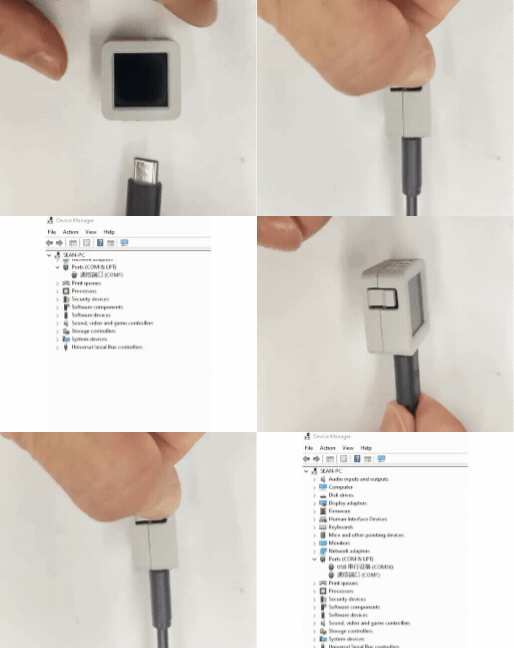
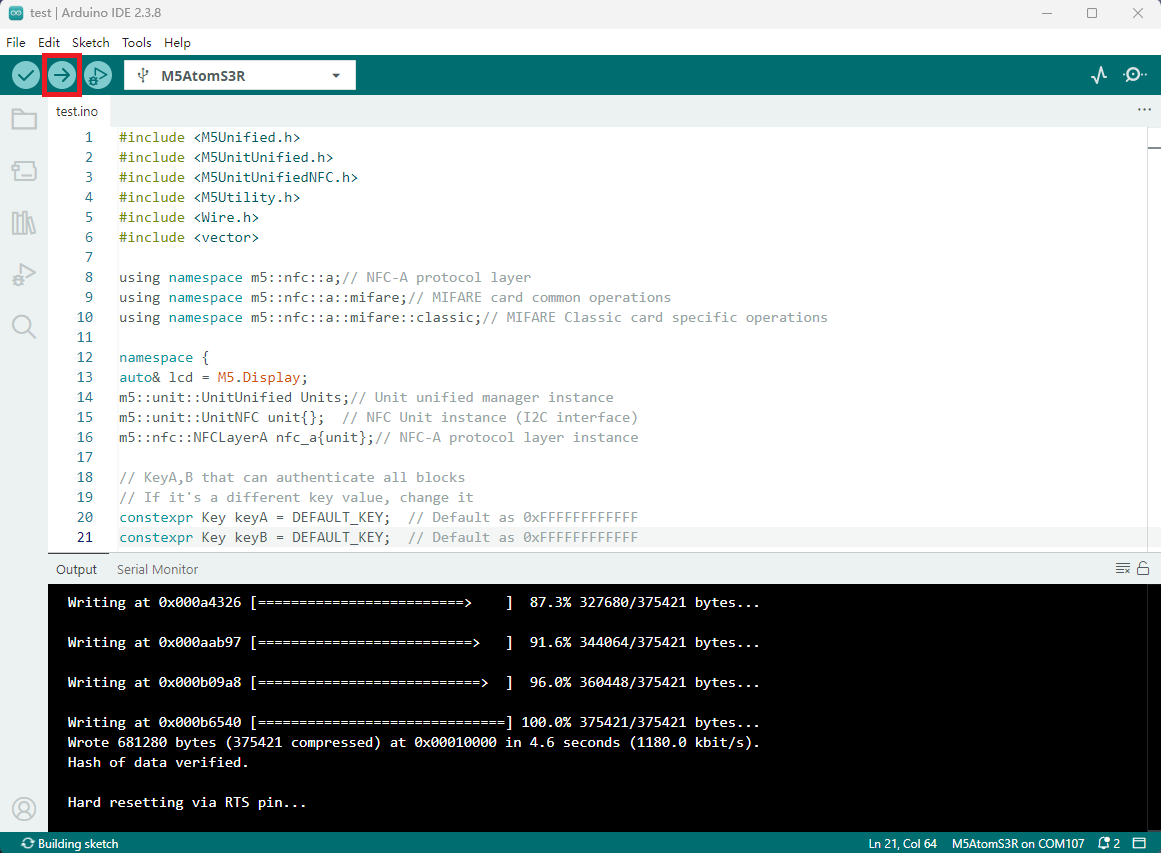
- Select the device port and click the compile and upload button in the upper left corner of Arduino IDE, wait for the program to complete compilation and upload to the device.