Arduino入門
2. デバイス&サンプル
3. M5Unified
4. M5GFX
5. 拡張モジュール&サンプル
Unit
Module
Atomic
Tab5
IoT
アクセサリー
Unit NFC Arduino チュートリアル
1. 準備作業
1. 環境構築: Arduino IDE入門ガイドを参考にして、IDE のインストールと対応するボードパッケージおよび必要なライブラリのインストールを完了してください。
2. 必須ライブラリ:
3. 必須ハードウェア:
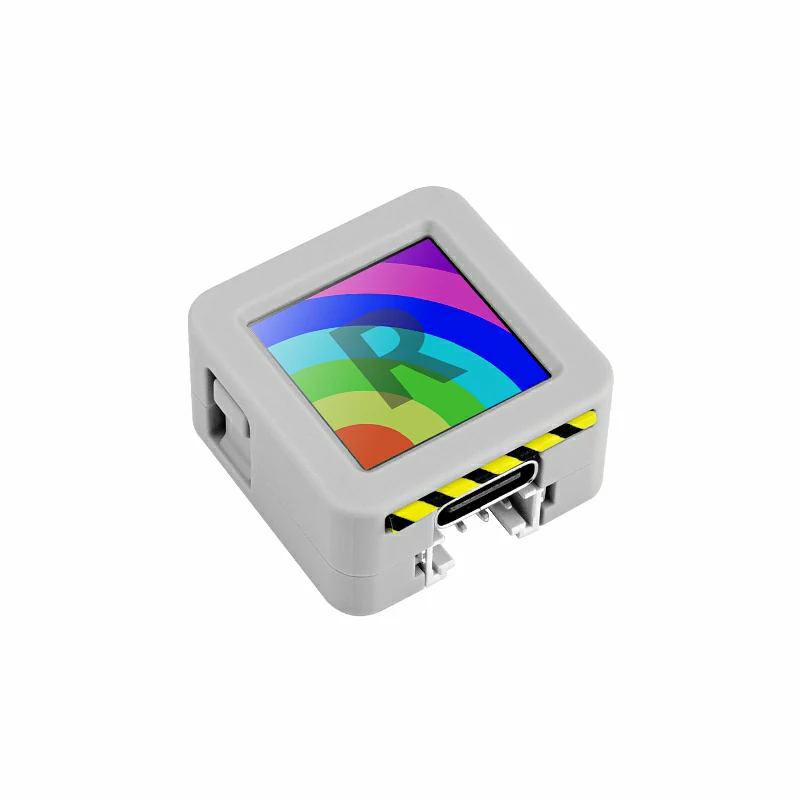
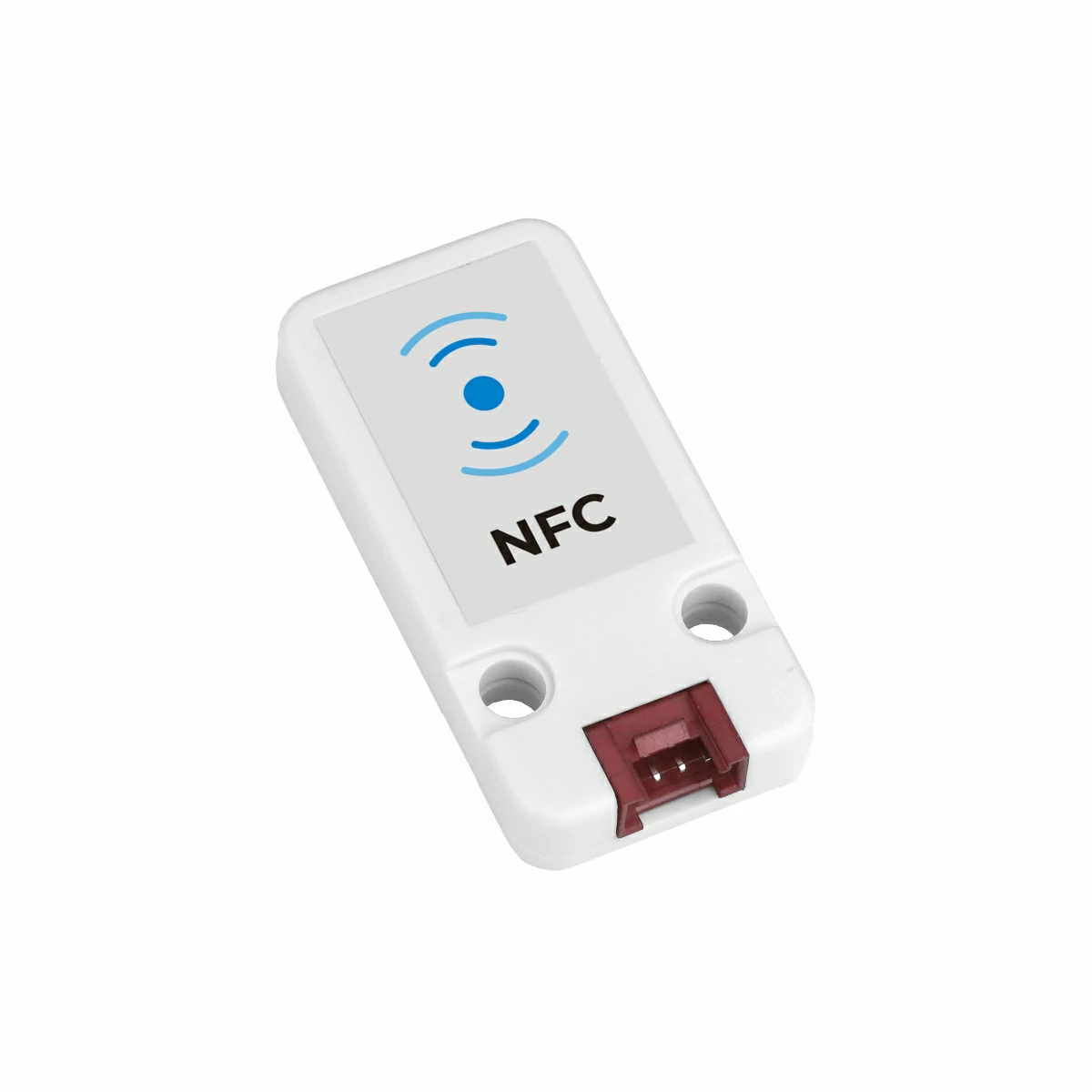
2. 注意事項
3. サンプル プログラム
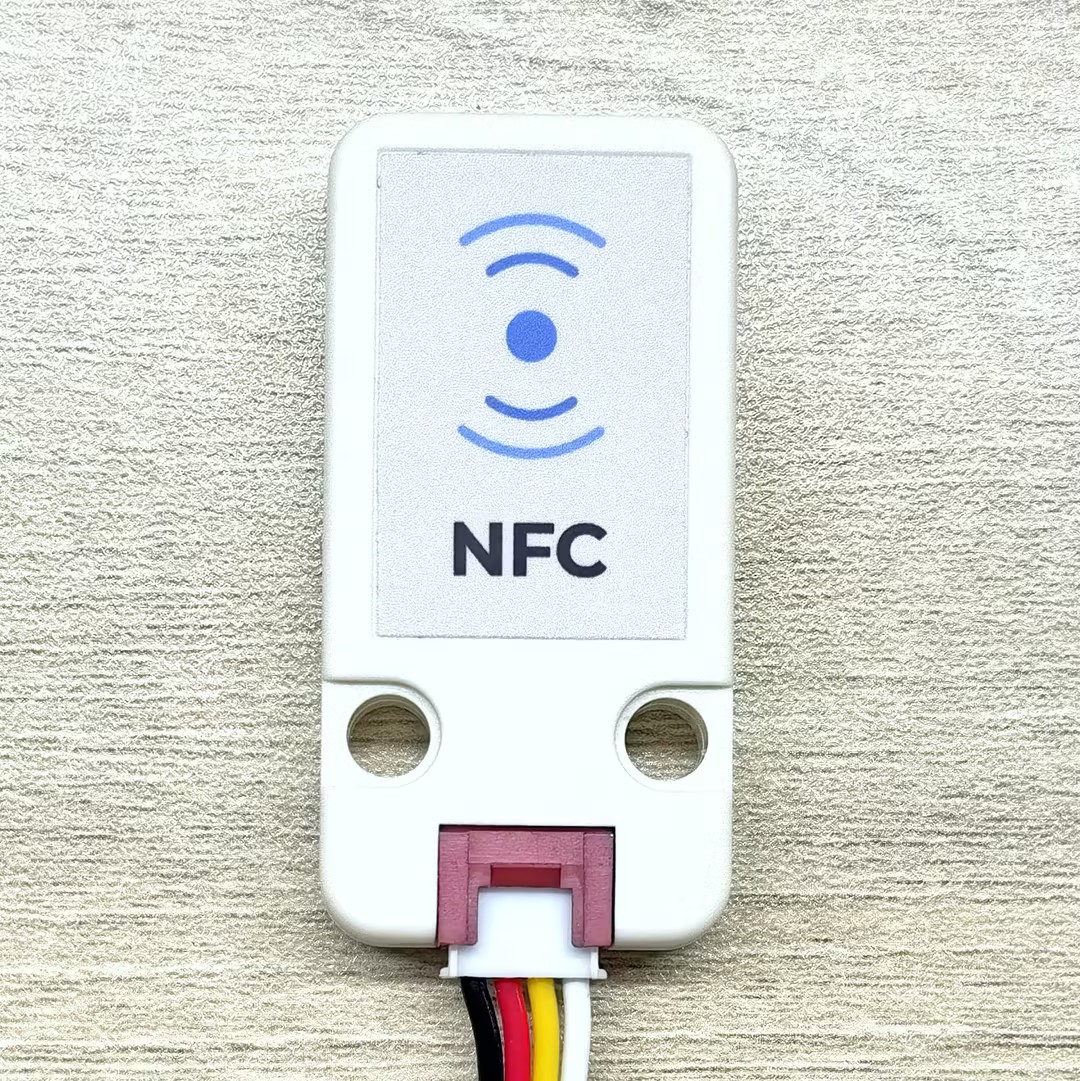
最適な読み書き性能を得るため、テストの際は、下の画像に示すユニットの NFC 検出面に NFC タグカードを置いてください。
3.1 基本情報
コアオブジェクト
// NFC protocol layer instances
m5::nfc::NFCLayerA nfc_a{unit};             // NFC-A protocol layer (reader mode)
m5::nfc::EmulationLayerA emu_a{unit};       // NFC-A emulation layer (tag emulation mode)

// Card object
PICC picc{}; // Represents a detected cardMIFARE Classicキー
constexpr Key keyA = DEFAULT_KEY;
constexpr Key keyB = DEFAULT_KEY;
// DEFAULT_KEY is 0xFFFFFFFFFFFF (Default value)NFCリーダーの基本動作フロー
典型的なNFCリーダー操作フローには、以下の手順が含まれます:
- 初期化:
M5.begin()およびWire.begin() - 検出:
nfc_a.detect()またはnfc_a.detect(piccs)を使用してカードを検索 - 識別:
nfc_a.identify()を使用してカード類型とメモリレイアウトを決定 - アクティベーション:
nfc_a.reactivate()を使用して完全な通信パラメータを取得 - 認証: MIFARE Classicカード の場合は
mifareClassicAuthenticateA/B()で認証 - 操作: 読み込み、書き込み、または特別な操作を実行
- 非アクティベーション:
nfc_a.deactivate()を使用してカードを解放
カード オブジェクトの共通メソッド
| メソッド | 戻り値 | 説明 |
|---|---|---|
picc.isMifareClassic() | bool | Classic1K/4K か確認 |
picc.isMifareUltralight() | bool | Ultralight シリーズか確認 |
picc.isMifareDESFire() | bool | DESFire シリーズか確認 |
picc.isUserBlock(block) | bool | ブロックがユーザーアクセス可能か確認 |
picc.uidAsString() | string | UIDを16 進数文字列として取得 |
picc.typeAsString() | string | カード型名を取得 |
picc.userAreaSize() | uint16_t | ユーザー領域サイズを取得 |
picc.totalSize() | uint16_t | カード容量を取得 |
タグ エミュレーション 基本概念
タグエミュレーション(Tag Emulation)により、デバイスはNFCカード としに機能し、他のNFCリーダーにより検出・通信が可能になります。これはさまざまなNFCカード型(MIFARE Ultralight、NTAG など)をエミュレーションする必要があるアプリケーションで非常に一般的です。
タグエミュレーション の主要な手順:
- PICC オブジェクトを作成: エミュレートする仮想カードを表現
- カード型とUID 定義: エミュレートする特定のカード型とその一意の識別子を選択
- メモリデータを準備: カードメモリ内のデータを設定(NDEF メッセージなどを含む場合がある)
- UIDを埋め込む: UIDをメモリ内の指定位置に正しく書き込む
- エミュレーション開始:
emu_a.begin()を呼び出してエミュレーションを開始 - 状態更新: メインループで
emu_a.update()を呼び出してリーダークエリを処理
タグ情報定義
constexpr Type type{Type::MIFARE_Ultralight};  // Select tag type to emulate (e.g., MIFARE_Ultralight or NTAG_213)
constexpr uint8_t uid[] = {0x04, 0x34, 0x56, 0x78, 0x9A, 0xBC, 0xDE};  // 7-byte UID
uint8_t picc_memory[64]{}; // Emulated tag memory buffer (size depends on card type)タグ エミュレーション API
エミュレーション操作
| メソッド | 関数 |
|---|---|
picc.emulate(type, uid, uid_len) | エミュレートするカード型とUID を構成 |
emu_a.begin(picc, memory, mem_size) | カード情報とメモリでエミュレーション開始 |
emu_a.emulatePICC() | 現在エミュレートしている PICC オブジェクトを取得 |
emu_a.update() | エミュレーション状態を更新(メインループで呼び出し) |
emu_a.state() | 現在のエミュレーション状態を取得 |
状態値
エミュレータには以下の状態があります:
None(なし)、Off(オフ)、Idle(アイドル)、Ready(準備完了)、Active(アクティブ)、Halt(停止)
ヘルパー関数
| 関数 | 関数 |
|---|---|
embed_uid(memory, uid) | 7バイトUID をUltralight/NTAG メモリレイアウトに埋め込む |
bcc8(data, len, init) | BCC(ブロックチェック文字)を計算してUID 検証 |
3.2 迅速なスキャン認識
このサンプルは、NFCカードを迅速にスキャン・認識する方法を示します。プログラムはリーダー範囲内のカードを継続的に検出し、検出されたカードごとに2 段階の識別プロセスを実行します:まず detect() を使用して予備分類を行い、次に identify() を使用して正確な識別を行います。識別成功後、カードのUID、型、ATQA、SAK 情報が出力されます。これはNFCアプリケーション実装の基本的なステップです。
#include <M5Unified.h>
#include <M5UnitUnified.h>
#include <M5UnitUnifiedNFC.h>
#include <M5Utility.h>
#include <Wire.h>
#include <vector>

using namespace m5::nfc::a; // Use NFC-A protocol namespace (ISO 14443-3A)

namespace {
auto& lcd = M5.Display;
m5::unit::UnitUnified Units; // Unit unified manager instance
m5::unit::UnitNFC unit{};  // NFC Unit instance (I2C interface)
m5::nfc::NFCLayerA nfc_a{unit}; // NFC-A protocol layer instance for ISO 14443-3A cards
}  // namespace

void setup()
{
    M5.begin();
    // The screen shall be in landscape mode
    if (lcd.height() > lcd.width()) {
        lcd.setRotation(1);
    }

    auto board = M5.getBoard();
    bool unit_ready{};// Unit initialization status flag

    auto pin_num_sda = M5.getPin(m5::pin_name_t::port_a_sda);
    auto pin_num_scl = M5.getPin(m5::pin_name_t::port_a_scl);
    M5_LOGI("getPin: SDA:%u SCL:%u", pin_num_sda, pin_num_scl);
    Wire.end(); // Close existing I2C connection first
    Wire.begin(pin_num_sda, pin_num_scl, 400 * 1000U);
    // Add NFC Unit to manager and initialize
    unit_ready = Units.add(unit, Wire) && Units.begin();
    if (!unit_ready) {
        // Initialization failed: turn screen red and enter infinite loop
        M5_LOGE("Failed to begin");
        lcd.fillScreen(TFT_RED);
        while (true) {
            m5::utility::delay(10000);
        }
    }
    M5_LOGI("M5UnitUnified initialized");
    M5_LOGI("%s", Units.debugInfo().c_str());

    lcd.setFont(&fonts::FreeMono9pt7b);
    lcd.fillScreen(0);
}

void loop()
{
    M5.update();
    Units.update();// Update all registered Units

    // Create PICC (card) list, try to detect nearby cards
    std::vector<PICC> piccs;
    if (nfc_a.detect(piccs)) { // Cards detected
        lcd.fillScreen(0);
        lcd.setCursor(0, 0);
        uint16_t idx{}; // Counter for successfully identified cards
        for (auto&& u : piccs) {
            // detect only performs a provisional classification based on sak, so further identification is required
            if (nfc_a.identify(u)) {// Perform precise identification of the card
                // Print card info: UID, type, ATQA, SAK, user area size, total size
                M5.Log.printf("PICC:%s %s %04X/%02X %u/%u\n", u.uidAsString().c_str(), u.typeAsString().c_str(), u.atqa,
                              u.sak, u.userAreaSize(), u.totalSize());
                lcd.printf("[%u]:PICC:\n<%s>\n%s\n", idx, u.uidAsString().c_str(), u.typeAsString().c_str());
                ++idx;
            } else {
                M5_LOGW("Failed to identify %s %s %04X/%02X %u/%u", u.uidAsString().c_str(), u.typeAsString().c_str(),
                        u.atqa, u.sak, u.userAreaSize(), u.totalSize());
            }
        }
        if (idx) {
            lcd.printf("==> %u PICC\n", idx);
            M5.Log.printf("==> %u PICC\n", idx);
        }
        nfc_a.deactivate();// Deactivate communication with all cards
    }
}上記のコードをメインコントローラーに upload した後、シリアルモニターを開き、Unit NFCセンシングサーフェスの近くに1 枚以上のタグカードを配置すると、認識結果が表示されます。
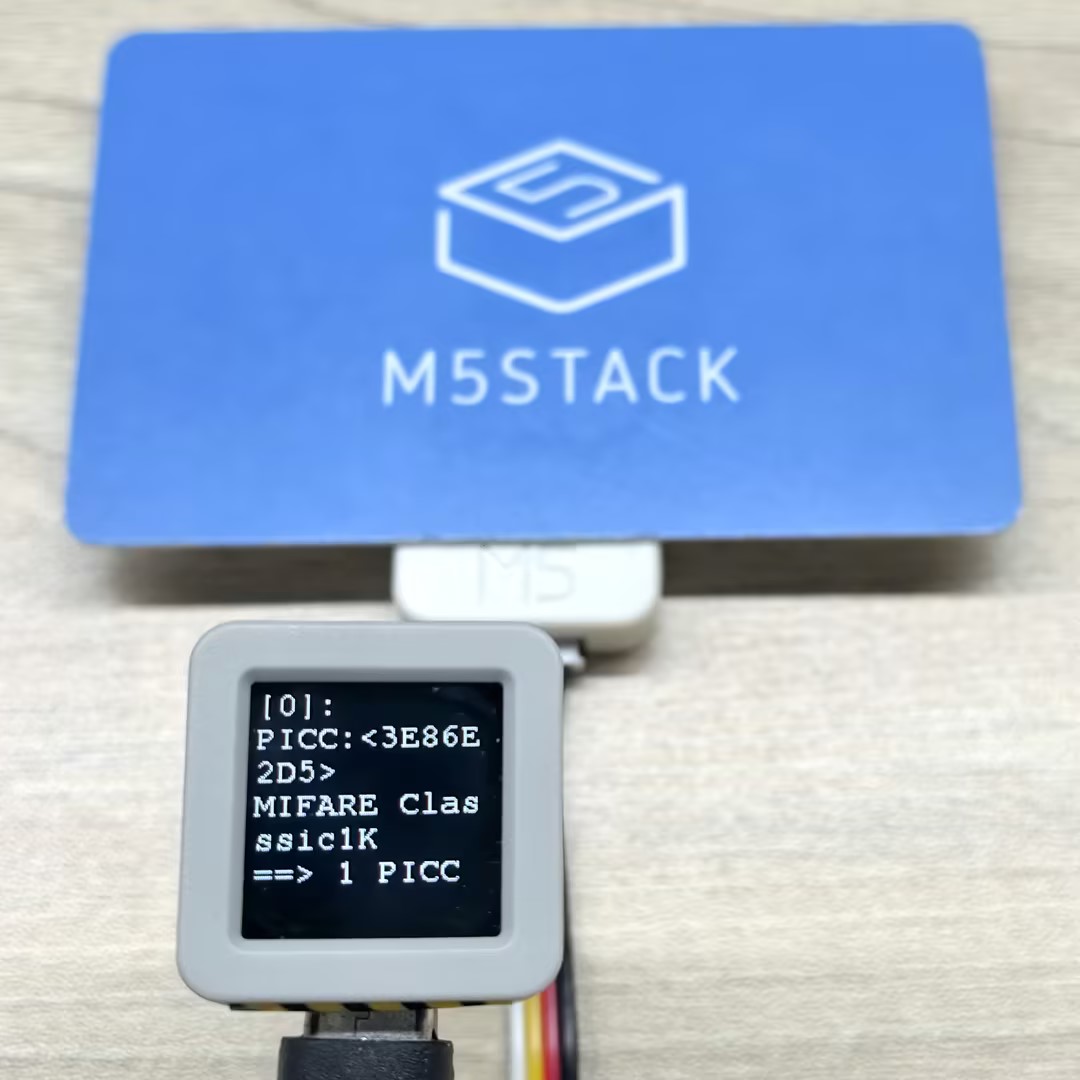
シリアルモニター 出力例:
PICC:3E86E2D5 MIFARE Classsic1K 0004/08 752/1024
==> 1 PICC
PICC:047D9D82752291 MIFARE Ultralight EV1 11 0044/00 48/80
PICC:04327CD2B97880 MIFARE Plus 2K X/EV SL0 0044/20 1520/2048
==> 2 PICC3.3 データ読み取り完了
このプロセスでは BtnA をクリックしてカードをリーダーに近づけます。プログラムがカードを検出した後、自動的に読み取ってスクリーンとシリアルポートにデータを出力します。読み取りプロセス中に、プログラムはカードの完全な識別とアクティベーションを実行します。
#include <M5Unified.h>
#include <M5UnitUnified.h>
#include <M5UnitUnifiedNFC.h>
#include <M5Utility.h>
#include <Wire.h>
#include <vector>

using namespace m5::nfc::a; // NFC-A protocol layer
using namespace m5::nfc::a::mifare; // MIFARE card common operations
using namespace m5::nfc::a::mifare::classic; // MIFARE Classic card specific operations

namespace {
auto& lcd = M5.Display;
m5::unit::UnitUnified Units; // Unit unified manager instance
m5::unit::UnitNFC unit{};  // NFC Unit instance (I2C interface)
m5::nfc::NFCLayerA nfc_a{unit}; // NFC-A protocol layer instance for ISO 14443-3A cards

// KeyA that can authenticate all blocks
// If it's a different key value, change it
constexpr Key keyA = DEFAULT_KEY;  // Default as 0xFFFFFFFFFFFF
}  // namespace

void setup()
{
    M5.begin();

    // The screen shall be in landscape mode
    if (lcd.height() > lcd.width()) {
        lcd.setRotation(1);
    }

    auto board = M5.getBoard();
    bool unit_ready{};// Unit initialization status flag

    auto pin_num_sda = M5.getPin(m5::pin_name_t::port_a_sda);
    auto pin_num_scl = M5.getPin(m5::pin_name_t::port_a_scl);
    M5_LOGI("getPin: SDA:%u SCL:%u", pin_num_sda, pin_num_scl);
    Wire.end();// Close existing I2C connection first
    Wire.begin(pin_num_sda, pin_num_scl, 400 * 1000U);
    // Add NFC Unit to manager and initialize
    unit_ready = Units.add(unit, Wire) && Units.begin();
    if (!unit_ready) {
        M5_LOGE("Failed to begin");
        lcd.fillScreen(TFT_RED);
        while (true) {
            m5::utility::delay(10000);
        }
    }

    M5_LOGI("M5UnitUnified initialized");
    M5_LOGI("%s", Units.debugInfo().c_str());

    lcd.setFont(&fonts::FreeMono9pt7b);
    lcd.fillScreen(0);
    lcd.setCursor(0, 0);
    lcd.printf("Please put the PICC\nand click\nBtnA");
    M5.Log.printf("Please put the PICC and click BtnA\n");
}

void loop()
{
    M5.update();
    Units.update();// Update all registered Units

    if (M5.BtnA.wasClicked()) {
        lcd.fillScreen(0);
        lcd.setCursor(0, 0);
        PICC picc{}; // Create card object
        if (nfc_a.detect(picc)) { // Detect a single card
            // Identify card type and reactivate (get full communication parameters)
            if (nfc_a.identify(picc) && nfc_a.reactivate(picc)) {
                lcd.printf("%s\n%s", picc.uidAsString().c_str(), picc.typeAsString().c_str());
                // Print detailed info: UID, type, user area size, total size
                M5.Log.printf("==== Dump %s %s %u/%u ====\n", picc.uidAsString().c_str(), picc.typeAsString().c_str(),
                              picc.userAreaSize(), picc.totalSize());
                // Dump all card data (needs key for MIFARE Classic, key parameter ignored for other types)
                nfc_a.dump(keyA);  // Need key if MIFARE classic, Ignore key if not MIFARE classic
                nfc_a.deactivate();
            } else {
                lcd.printf("Failed to identify");
                M5_LOGE("Failed to identify/activate %s", picc.uidAsString().c_str());
            }
        } else {
            lcd.printf("PICC NOT exists");
            M5.Log.printf("PICC NOT exists\n");
        }
    }
}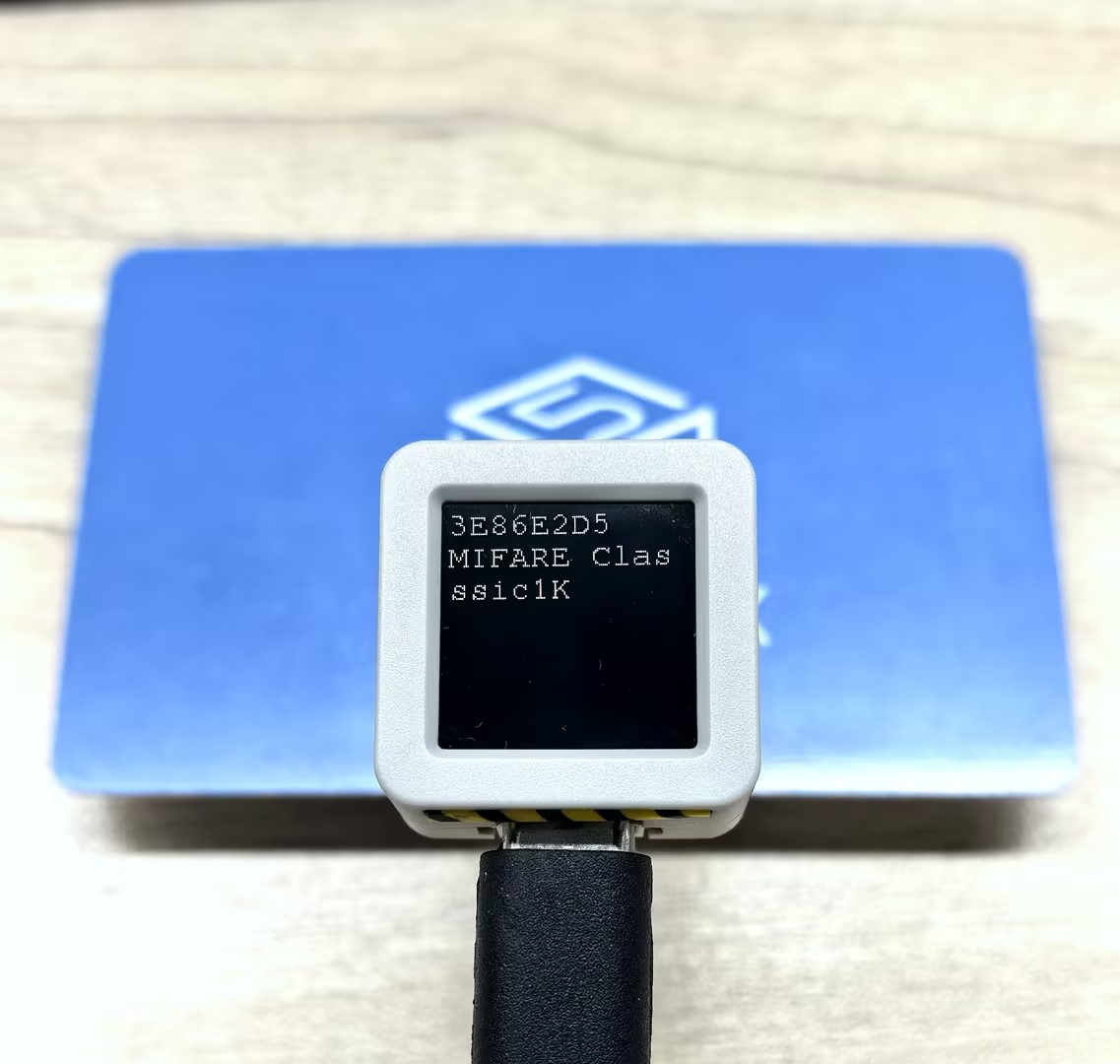
シリアルモニター 出力例:
==== Dump 3E86E2D5 MIFARE Classsic1K 752/1024 ====
Sec[Blk]:00 01 02 03 04 05 06 07 08 09 0A 0B 0C 0D 0E 0F [Access]
-----------------------------------------------------------------
00)[000]:3E 86 E2 D5 8F 08 04 00 62 63 64 65 66 67 68 69 [0 0 0]
   [001]:00 00 00 00 00 00 00 00 00 00 00 00 00 00 00 00 [0 0 0]
   [002]:00 00 00 00 00 00 00 00 00 00 00 00 00 00 00 00 [0 0 0]
   [003]:00 00 00 00 00 00 FF 07 80 69 FF FF FF FF FF FF [0 0 1]
01)[004]:00 00 00 00 00 00 00 00 00 00 00 00 00 00 00 00 [0 0 0]
   [005]:00 00 00 00 00 00 00 00 00 00 00 00 00 00 00 00 [0 0 0]
   [006]:00 00 00 00 00 00 00 00 00 00 00 00 00 00 00 00 [0 0 0]
   [007]:00 00 00 00 00 00 FF 07 80 69 FF FF FF FF FF FF [0 0 1]
02)[008]:00 00 00 00 00 00 00 00 00 00 00 00 00 00 00 00 [0 0 0]
   [009]:00 00 00 00 00 00 00 00 00 00 00 00 00 00 00 00 [0 0 0]
   [010]:00 00 00 00 00 00 00 00 00 00 00 00 00 00 00 00 [0 0 0]
[011]:00 00 00 00 00 00 FF 07 80 69 FF FF FF FF FF FF [0 0 1]3.4 タグ エミュレーション
このサンプルはNFC タグエミュレーション機能を示します。他のNFCリーダー(スマートフォンなど)がタグに近づくと、タグを認識して読み取ることができます。プログラムは MIFARE Ultralight と NTAG 213の2つの一般的なタグカード型のエミュレーションをサポートしており、対応するUID とメモリデータ(NDEFメッセージを含む)を持つように各型が構成されています。
重要なポイント:
- エミュレーションプロセスではメインループで会必須
update()を継続的に呼び出して状態を更新 - 状態変化(Off→Idle→Ready→Active→Halt)はスクリーン指標を通じてリアルタイム表示
- カードデータはURI、テキスト、画像などのさまざまなコンテンツタイプをサポートするNDEFメッセージを含めることができます
#include <M5Unified.h>
#include <M5UnitUnified.h>
#include <M5UnitUnifiedNFC.h>
#include <M5Utility.h>
#include <Wire.h>
#include <vector>

using namespace m5::nfc; // NFC common namespace
using namespace m5::nfc::a; // NFC-A protocol layer
using namespace m5::nfc::a::mifare; // MIFARE card common operations
using namespace m5::nfc::a::mifare::classic; // MIFARE Classic card specific operation

namespace {
auto& lcd = M5.Display;
m5::unit::UnitUnified Units; // Unit unified manager instance
m5::unit::UnitNFC unit{};  // NFC Unit instance (I2C interface)
m5::nfc::EmulationLayerA emu_a{unit}; // Create NFC-A emulation layer instance to emulate the device as an NFC tag

PICC picc{}; // Card object to emulate

// ===== Select the tag type to emulate =====
#define EMU_MIFARE_ULTRALIGHT // MIFARE Ultralight tag
// #define EMU_NTAG213  // NTAG213 tag

// ===== MIFARE Ultralight emulation data =====
#if defined(EMU_MIFARE_ULTRALIGHT)
constexpr Type type{Type::MIFARE_Ultralight};
constexpr uint8_t uid[] = {0x04, 0x34, 0x56, 0x78, 0x9A, 0xBC, 0xDE};// 7-byte UID (Ultralight/NTAG series uses 7-byte UID)
// Emulated tag memory data (contains NDEF message: URL https://m5stack.com/ and text "Hello M5Stack")
uint8_t picc_memory[]   = {
    0x00, 0x00, 0x00, 0x00,  // Page 0: UID bytes (to be filled by embed_uid)
    0x00, 0x00, 0x00, 0x00,  // Page 1: UID bytes (continued)
    0x00, 0xA3, 0x00, 0x00,  // Page 2: Internal data, lock bits
    0xE1, 0x10, 0x06, 0x00,  // Page 3: CC (Capability Container) - NDEF format identifier
    0x03, 0x25, 0x91, 0x01,  // Page 4: NDEF TLV start
    0x0D, 0x55, 0x04, 0x6D,  // Page 5: URI record (https://)
    0x35, 0x73, 0x74, 0x61,  // Page 6: "5sta"
    0x63, 0x6B, 0x2E, 0x63,  // Page 7: "ck.c"
    0x6F, 0x6D, 0x2F, 0x51,  // Page 8: "om/" + text record start
    0x01, 0x10, 0x54, 0x02,  // Page 9: Text record header
    0x65, 0x6E, 0x48, 0x65,  // Page 10: "enHe" (language code "en" + "He")
    0x6C, 0x6C, 0x6F, 0x20,  // Page 11: "llo "
    0x4D, 0x35, 0x53, 0x74,  // Page 12: "M5St"
    0x61, 0x63, 0x6B, 0xFE,  // Page 13: "ack" + NDEF terminator 0xFE
    0x44, 0x45, 0x46, 0x00,  // Page 14: Padding data
    0x44, 0x45, 0x46, 0x00,  // Page 15: Padding data
};
// ===== NTAG213 emulation data =====
#elif defined(EMU_NTAG213)
constexpr Type type{Type::NTAG_213};
constexpr uint8_t uid[] = {0x99, 0x88, 0x77, 0x66, 0x55, 0x44, 0x33};// 7-byte UID
// Emulated tag memory data (contains multilingual NDEF message: URL + Chinese/English/Japanese text)
uint8_t picc_memory[]   = {
    0x00, 0x00, 0x00, 0x00,  // Page 0: UID bytes
    0x00, 0x00, 0x00, 0x00,  // Page 1: UID bytes (continued)
    0x00, 0x48, 0x00, 0x00,  // Page 2: Internal data, lock bits
    0xE1, 0x10, 0x12, 0x00,  // Page 3: CC (Capability Container)
    0x01, 0x03, 0xA0, 0x0C,  // Page 4: NDEF capability data
    0x34, 0x03, 0x58, 0x91,  // Page 5: NDEF TLV + message start
    0x01, 0x0D, 0x55, 0x04,  // Page 6: URI record header (https://)
    0x6D, 0x35, 0x73, 0x74,  // Page 7: "m5st"
    0x61, 0x63, 0x6B, 0x2E,  // Page 8: "ack."
    0x63, 0x6F, 0x6D, 0x2F,  // Page 9: "com/"
    0x11, 0x01, 0x11, 0x54,  // Page 10: Chinese text record header
    0x02, 0x7A, 0x68, 0xE4,  // Page 11: Language code "zh" + UTF-8 Chinese start
    0xBD, 0xA0, 0xE5, 0xA5,  // Page 12: UTF-8 encoding of "你好"
    0xBD, 0x20, 0x4D, 0x35,  // Page 13: " M5"
    0x53, 0x74, 0x61, 0x63,  // Page 14: "Stac"
    0x6B, 0x11, 0x01, 0x10,  // Page 15: "k" + English text record header
    0x54, 0x02, 0x65, 0x6E,  // Page 16: Language code "en"
    0x48, 0x65, 0x6C, 0x6C,  // Page 17: "Hell"
    0x6F, 0x20, 0x4D, 0x35,  // Page 18: "o M5"
    0x53, 0x74, 0x61, 0x63,  // Page 19: "Stac"
    0x6B, 0x51, 0x01, 0x1A,  // Page 20: "k" + Japanese text record header
    0x54, 0x02, 0x6A, 0x61,  // Page 21: Language code "ja"
    0xE3, 0x81, 0x93, 0xE3,  // Page 22: "こ" UTF-8
    0x82, 0x93, 0xE3, 0x81,  // Page 23: "ん" + start of "に"
    0xAB, 0xE3, 0x81, 0xA1,  // Page 24: "に" + "ち"
    0xE3, 0x81, 0xAF, 0x20,  // Page 25: "は "
    0x4D, 0x35, 0x53, 0x74,  // Page 26: "M5St"
    0x61, 0x63, 0x6B, 0xFE,  // Page 27: "ack" + NDEF terminator
    0x00, 0x00, 0x00, 0x00,  // Pages 28-39: Free user data area
    0x00, 0x00, 0x00, 0x00,  //
    0x00, 0x00, 0x00, 0x00,  //
    0x00, 0x00, 0x00, 0x00,  //
    0x00, 0x00, 0x00, 0x00,  //
    0x00, 0x00, 0x00, 0x00,  //
    0x00, 0x00, 0x00, 0x00,  //
    0x00, 0x00, 0x00, 0x00,  //
    0x00, 0x00, 0x00, 0x00,  //
    0x00, 0x00, 0x00, 0x00,  //
    0x00, 0x00, 0x00, 0x00,  //
    0x00, 0x00, 0x00, 0x00,  //
    0x00, 0x00, 0x00, 0xBD,  // Page 40: NTAG213 configuration page
    0x02, 0x00, 0x00, 0xFF,  // Page 41: Configuration page (continued)
    0x00, 0x00, 0x00, 0x00,  // Page 42: Password protection
    0x00, 0x00, 0x00, 0x00,  // Page 43: Password acknowledgment
    0x00, 0x00, 0x00, 0x00,  // Page 44: Reserved area
};
#else
#error "Choose the target to emulate"
#endif

/**
 * @brief BCC(ブロックチェック文字)を計算する - バイト列のXOR操作
 * @param p    入力データへのポインタ
 * @param len  データ長
 * @param init 初期値(デフォルト:0)
 * @return     BCC チェック値
 */
uint8_t bcc8(const uint8_t* p, const uint8_t len, const uint8_t init = 0)
{
    uint8_t v = init;
    for (uint_fast8_t i = 0; i < len; ++i) {
        v ^= p[i];
    }
    return v;
}

/**
 * @brief 7バイトUIDをUltralight/NAGメモリレイアウトに正しく埋め込む
 *
 * Ultralight/NAGメモリ内のUID保存形式:
 *   ページ 0: [UID0, UID1, UID2, BCC0]  BCC0 = CT ^ UID0 ^ UID1 ^ UID2
 *   ページ 1: [UID3, UID4, UID5, UID6]
 *   ページ 2 プレフィックス: [BCC1]  BCC1 = UID3 ^ UID4 ^ UID5 ^ UID6
 *
 * @param mem  ターゲットメモリ バッファ(最低 9 バイト)
 * @param uid  7バイトUIDデータ
 */
void embed_uid(uint8_t mem[9], const uint8_t uid[7])
{
    memcpy(mem, uid, 3);
    mem[3] = bcc8(uid, 3, 0x88 /* CT */);
    memcpy(mem + 4, uid + 3, 4);
    mem[8] = bcc8(uid + 3, 4);
}

// Color table corresponding to emulation states
constexpr uint16_t color_table[] = {
    //  None,      Off,     Idle,     Ready,   Active,      Halt };
    TFT_BLACK, TFT_RED, TFT_BLUE, TFT_YELLOW, TFT_GREEN, TFT_MAGENTA};
// Character identifiers for emulation states
//                                 None,  Off,  Idle, Ready, Active, Halt
constexpr const char* state_table[] = {"-", "O", "I", "R", "A", "H"};
}  // namespace

void setup()
{
    M5.begin();
    Serial.begin(115200);

    // The screen shall be in landscape mode
    if (lcd.height() > lcd.width()) {
        lcd.setRotation(1);
    }

    // Emulation mode settings
    auto cfg      = unit.config();
    cfg.emulation = true;
    cfg.mode      = NFC::A;
    unit.config(cfg);

    auto board = M5.getBoard();
    bool unit_ready{};
    auto pin_num_sda = M5.getPin(m5::pin_name_t::port_a_sda);
    auto pin_num_scl = M5.getPin(m5::pin_name_t::port_a_scl);
    M5_LOGI("getPin: SDA:%u SCL:%u", pin_num_sda, pin_num_scl);
    Wire.end();// Close existing I2C connection first
    Wire.begin(pin_num_sda, pin_num_scl, 400 * 1000U);
    // Add NFC Unit to manager and initialize
    unit_ready = Units.add(unit, Wire) && Units.begin();
    if (!unit_ready) {
        M5_LOGE("Failed to begin");
        lcd.fillScreen(TFT_RED);
        while (true) {
            m5::utility::delay(10000);
        }
    }

    M5_LOGI("M5UnitUnified initialized");
    M5_LOGI("%s", Units.debugInfo().c_str());

    lcd.setFont(&fonts::FreeMono9pt7b);
    lcd.startWrite();
    lcd.fillScreen(TFT_RED);
    // Initialize emulation
    if (picc.emulate(type, uid, sizeof(uid))) {// Set card type and UID to emulate
        embed_uid(picc_memory, uid);// Embed UID into emulation memory
        // Start emulation layer with card object and memory data
        if (emu_a.begin(picc, picc_memory, sizeof(picc_memory))) {
            lcd.fillScreen(TFT_DARKGREEN);
            lcd.setTextColor(TFT_WHITE, TFT_DARKGREEN);
            lcd.setCursor(0, 16);
            // Get and display the emulated PICC info
            const auto& e_picc = emu_a.emulatePICC();
            Serial.printf("Emulation:%s %s ATQA:%04X SAK:%u\n", e_picc.typeAsString().c_str(),
                          e_picc.uidAsString().c_str(), e_picc.atqa, e_picc.sak);
            lcd.printf("%s\n%s\nATQA:%04X\nSAK:%u ", e_picc.typeAsString().c_str(), e_picc.uidAsString().c_str(),
                       e_picc.atqa, e_picc.sak);
        }
    }
    lcd.fillRect(0, 0, 32, 16, color_table[0]);
    lcd.drawString(state_table[0], 0, 0);
    lcd.endWrite();
}

void loop()
{
    M5.update();
    Units.update();  // Update all registered Units
    emu_a.update();  // Update emulation layer state (MUST be called in loop)

    // Monitor emulation state changes and update screen indicator
    static EmulationLayerA::State latest{}; // Record previous state
    auto state = emu_a.state(); // Get current emulation state
    if (latest != state) {
        latest = state;
        lcd.startWrite();
        // Update top-left color block and text based on state
        lcd.fillRect(0, 0, 32, 16, color_table[m5::stl::to_underlying(state)]);
        lcd.drawString(state_table[m5::stl::to_underlying(state)], 0, 0);
        Serial.println(state_table[m5::stl::to_underlying(state)]);
        lcd.endWrite();
    }
}上記のコードをメインコントローラーに upload した後、Unit NFCはNFCタグをエミュレートします。スマートフォンまたは他のNFCリーダーをUnit NFCに近づけると、NFC タグを認識してそれに保存されているNDEF メッセージコンテンツ(URL + テキスト)を読み取ることができます。シリアルモニターはエミュレートされたタグ型、UID、ATQA、SAK 情報を出力します。メインコントローラー画面の左上隅は状態指標(アイドル/準備完了/アクティブなど)を表示します。
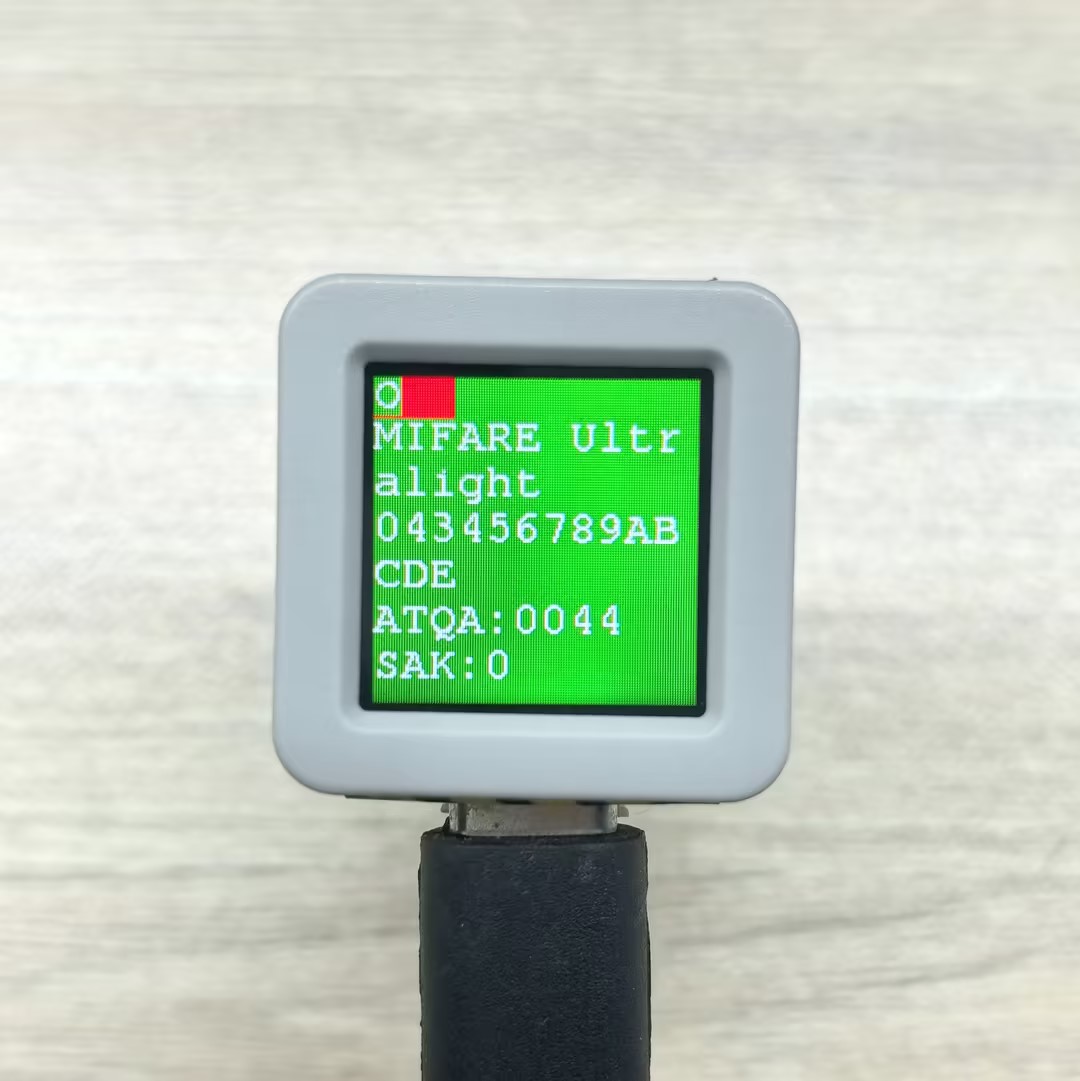
スマートフォンで読み取られたタグ情報の例:

シリアルモニター 出力例:
- MIFARE Ultralight
Emulation:MIFARE Ultralight 043456789ABCDE ATQA:0044 SAK:0
O
I
R
A
H
R
A
H
R
A
O- NTAG 213
Emulation:NTAG 213 99887766554433 ATQA:0044 SAK:0
O
I
R
A
H
R
A
H
R
A
O3.5 直接タグ読み書き
このサンプルはNFCタグの直接読み書き機能を示しており、2つの方法をサポート します:ブロック間連続読み書きと単一ブロック読み書きです。
#include <M5Unified.h>
#include <M5UnitUnified.h>
#include <M5UnitUnifiedNFC.h>
#include <M5Utility.h>
#include <Wire.h>

using namespace m5::nfc; // NFC common namespace
using namespace m5::nfc::a; // NFC-A protocol layer
using namespace m5::nfc::a::mifare; // MIFARE card operations

namespace {
auto& lcd = M5.Display;
m5::unit::UnitUnified Units;// Unit unified manager instance
m5::unit::UnitNFC unit{};  // NFC Unit instance (I2C interface)
m5::nfc::NFCLayerA nfc_a{unit};// NFC-A protocol layer instance

// Classic default KeyA (0xFFFFFFFFFFFF)
// If your card uses a different key, change it here
constexpr classic::Key keyA = classic::DEFAULT_KEY;

// Test message strings (selected based on card capacity)
constexpr char long_msg[]  = "This is a sample message buffer used for testing NFC page writes and data integrity verification purposes.";// For large-capacity cards (user area >= 120 bytes)
constexpr char short_msg[] = "0123456789ABCDEFGHIJ";// For small-capacity cards (user area < 120 bytes)

/**
 * @brief ブロック間連続読み書きテスト(クリックでトリガー)
 *
 * 指定されたブロックからカードへテストメッセージを書き込み、
 * データを読み取って整合性を検証し、その後すべてのゼロを書き込んでクリア します。
 * 高レベルread()/write() API を使用し、ブロック/セクター間操作を自動的に処理 します。
 *
 * フロー: 書き込み -> ダンプ -> 読み取ると検証 -> クリア -> ダンプ
 *
 * @param sblock  書き込みを開始するブロック番号
 * @param msg     書き込むテストメッセージ文字列
 * @return すべての操作(書き込み、検証、クリア)が成功した場合は true
 */
bool read_write(const uint8_t sblock, const char* msg)
{
    auto len = strlen(msg);
    uint8_t buf[(strlen(msg) + 15) / 16 * 16]{};  // Round up to 16-byte alignment (Classic block size)
    uint16_t rx_len = sizeof(buf);

    // Write test message to card
    M5.Log.printf("================================ WRITE block:%u len:%zu\n", sblock, sizeof(buf));
    if (!nfc_a.write(sblock, (const uint8_t*)msg, len, keyA)) {
        M5_LOGE("Failed to write block %u", sblock);
        return false;
    }
    lcd.fillScreen(TFT_ORANGE);

    // Dump written data for visual confirmation
    nfc_a.mifareClassicAuthenticateA(classic::get_sector_trailer_block(sblock), keyA);// Authenticate sector before dump
    nfc_a.dump(sblock);

    // Read back and verify data integrity
    if (!nfc_a.read(buf, rx_len, sblock, keyA)) {
        M5_LOGE("Failed to read");
        return false;
    }
    lcd.fillScreen(TFT_BLUE);

    bool verify_ok = (memcmp(buf, msg, len) == 0);// Compare read data with original message
    M5.Log.printf("================================ VERIFY:%s\n", verify_ok ? "OK" : "NG");
    if (!verify_ok) {
        M5_LOGE("VERIFY NG!!");
        m5::utility::log::dump(buf, rx_len, false);// Dump read data for debugging
    }

    // Clear by writing all zeros
    memset(buf, 0, sizeof(buf));
    lcd.fillScreen(TFT_MAGENTA);
    if (!nfc_a.write(sblock, buf, sizeof(buf), keyA)) {
        M5_LOGE("Failed to clear");
        return false;
    }
    M5.Log.printf("================================ CLEAR\n");

    // Dump cleared data for visual confirmation
    nfc_a.mifareClassicAuthenticateA(classic::get_sector_trailer_block(sblock), keyA);
    nfc_a.dump(sblock);

    return true;
}

/**
 * @brief 単一ブロック読み書きテスト
 *
 * 低レベルread16()/write16() API を使用して、16バイトの単一ブロックに
 * 固定テスト文字列を書き込み、読み取って検証し、その後クリア します。
 * read_write() とは異なり、セクター間処理なしで正確に1つのブロックで動作 します。
 *
 * フロー: 認証 -> 書き込み前ダンプ -> 書き込み -> 書き込み後ダンプ -> 読み取ると検証 -> クリア -> ダンプ
 *
 * @param block  読み書きするブロック番号(セクタートレーラブロックであってはいけません)
 */
void read_write_single_block(const uint8_t block)
{
    constexpr char msg[] = "M5Unit-RFID";// Fixed test message (fits within 16-byte block)

    // Authenticate with KeyA before any read/write operation
    if (!nfc_a.mifareClassicAuthenticateA(block, keyA)) {
        M5_LOGE("Failed to AuthA");
        return;
    }

    // Dump block content before write
    M5.Log.printf("Before[%u] ----\n", block);
    nfc_a.dump(block);

    // Write test message to the block
    M5.Log.printf("Write\n");
    if (!nfc_a.write16(block, (const uint8_t*)msg, sizeof(msg))) {
        M5_LOGE("Failed to write");
        return;
    }

    // Dump block content after write
    M5.Log.printf("After[%u] ----\n", block);
    nfc_a.dump(block);

    // Read back and verify data integrity
    uint8_t rbuf[16]{};
    if (!nfc_a.read16(rbuf, block)) {
        M5_LOGE("Failed to read");
        return;
    }
    bool verify = (std::memcmp(rbuf, (const uint8_t*)msg, sizeof(msg)) == 0);// Compare read data with original
    M5.Log.printf("Verify %s\n", verify ? "OK" : "NG");

    // Clear block by writing minimal zero data (library pads to 16 bytes)
    M5.Log.printf("Clear\n");
    uint8_t c[1]{};
    if (!nfc_a.write16(block, c, sizeof(c))) {
        M5_LOGE("Failed to write");
        return;
    }

    // Dump block content after clear
    nfc_a.dump(block);
}

}  // namespace

void setup()
{
    M5.begin();

    // The screen shall be in landscape mode
    if (lcd.height() > lcd.width()) {
        lcd.setRotation(1);
    }

    auto pin_num_sda = M5.getPin(m5::pin_name_t::port_a_sda);
    auto pin_num_scl = M5.getPin(m5::pin_name_t::port_a_scl);
    M5_LOGI("getPin: SDA:%u SCL:%u", pin_num_sda, pin_num_scl);

    Wire.end();// Close existing I2C connection first
    Wire.begin(pin_num_sda, pin_num_scl, 400 * 1000U);

    // Add NFC Unit to manager and initialize
    bool unit_ready = Units.add(unit, Wire) && Units.begin();
    M5_LOGI("NFC Unit initialized: %s", unit_ready ? "OK" : "NG");

    lcd.setFont(&fonts::FreeMono9pt7b);
    lcd.setCursor(0, 0);
    lcd.printf("Put Classic card & click/hold BtnA");
    M5.Log.printf("Put Classic card & click/hold BtnA\n");
}

void loop()
{
    M5.update();
    Units.update();

    bool clicked = M5.BtnA.wasClicked();  // For cross-block read/write test
    bool held    = M5.BtnA.wasHold();     // For single block read/write test

    if (clicked || held) {
        PICC picc;
        if (nfc_a.detect(picc)) {
            lcd.fillScreen(TFT_DARKGREEN);

            if (nfc_a.identify(picc) && nfc_a.reactivate(picc)) {
                // Print card information: UID, type, user area size, total size
                M5.Log.printf("PICC:%s %s %u/%u\n",
                              picc.uidAsString().c_str(),
                              picc.typeAsString().c_str(),
                              picc.userAreaSize(),
                              picc.totalSize());

                // Only process MIFARE Classic cards, skip all other types
                if (!picc.isMifareClassic()) {
                    M5.Log.printf("Not a MIFARE Classic card, skipped\n");
                } else if (clicked) {
                    // Cross-block continuous read/write test
                    M5.Speaker.tone(2000, 30);
                    // Select message based on card capacity
                    const char* msg = (picc.userAreaSize() >= 120) ? long_msg : short_msg;
                    bool ret = read_write(picc.firstUserBlock(), msg);// Start from first user block
                    lcd.fillScreen(ret ? TFT_BLACK : TFT_RED);// Black = success, Red = failure

                } else if (held) {
                    // Single block read/write test
                    M5.Speaker.tone(4000, 30);
                    // Use second-to-last block (avoid sector trailer which contains keys and access bits)
                    read_write_single_block(picc.blocks - 2);
                }

                nfc_a.deactivate();// Release card communication
            } else {
                M5_LOGE("Failed to identify/activate");
            }
        } else {
            M5.Log.printf("PICC NOT detected\n");
        }

        lcd.setCursor(0, 0);
        lcd.printf("Put Classic card & click/hold BtnA");
        M5.Log.printf("Put Classic card & click/hold BtnA\n");
    }
}シリアルモニター 出力例:
- BtnA クリック(ブロック間読み書き テスト):
PICC:3E86E2D5 MIFARE Classsic1K 752/1024
================================ WRITE block:1 len:112
00)[000]:3E 86 E2 D5 8F 08 04 00 62 63 64 65 66 67 68 69 [0 0 0]
   [001]:54 68 69 73 20 69 73 20 61 20 73 61 6D 70 6C 65 [0 0 0]
   [002]:20 6D 65 73 73 61 67 65 20 62 75 66 66 65 72 20 [0 0 0]
   [003]:00 00 00 00 00 00 FF 07 80 69 FF FF FF FF FF FF [0 0 1]
================================ VERIFY:OK
================================ CLEAR
00)[000]:3E 86 E2 D5 8F 08 04 00 62 63 64 65 66 67 68 69 [0 0 0]
   [001]:00 00 00 00 00 00 00 00 00 00 00 00 00 00 00 00 [0 0 0]
   [002]:00 00 00 00 00 00 00 00 00 00 00 00 00 00 00 00 [0 0 0]
[003]:00 00 00 00 00 00 FF 07 80 69 FF FF FF FF FF FF [0 0 1]- BtnA ホールド(単一ブロック読み書き テスト):
PICC:3E86E2D5 MIFARE Classsic1K 752/1024
Before[62] ----
15)[060]:00 00 00 00 00 00 00 00 00 00 00 00 00 00 00 00 [0 0 0]
   [061]:00 00 00 00 00 00 00 00 00 00 00 00 00 00 00 00 [0 0 0]
   [062]:00 00 00 00 00 00 00 00 00 00 00 00 00 00 00 00 [0 0 0]
   [063]:00 00 00 00 00 00 FF 07 80 69 FF FF FF FF FF FF [0 0 1]
Write
After[62] ----
15)[060]:00 00 00 00 00 00 00 00 00 00 00 00 00 00 00 00 [0 0 0]
   [061]:00 00 00 00 00 00 00 00 00 00 00 00 00 00 00 00 [0 0 0]
   [062]:4D 35 55 6E 69 74 2D 52 46 49 44 00 00 00 00 00 [0 0 0]
   [063]:00 00 00 00 00 00 FF 07 80 69 FF FF FF FF FF FF [0 0 1]
Verify OK
Clear
15)[060]:00 00 00 00 00 00 00 00 00 00 00 00 00 00 00 00 [0 0 0]
   [061]:00 00 00 00 00 00 00 00 00 00 00 00 00 00 00 00 [0 0 0]
   [062]:00 00 00 00 00 00 00 00 00 00 00 00 00 00 00 00 [0 0 0]
[063]:00 00 00 00 00 00 FF 07 80 69 FF FF FF FF FF FF [0 0 1]3.6 NDEF 形式タグの読み書き
このサンプルは、Unit NFCを使用してNDEF 形式でNFCタグを読み書きする方法を示し、以下の機能をサポートしています:
- URLとテキストを含む複数レコードメッセージをNDEF 形式で書き込む
- タグからNDEFメッセージを読み取ってコンテンツを解析表示
- 埋め込みPNG 画像データを使用でNDEFメディアレコードを書き込む
- 異なるタグ容量のメッセージコンテンツを調整(ユーザー領域サイズに基づいてテキスト長を選択)
#include <M5Unified.h>
#include <M5UnitUnified.h>
#include <M5UnitUnifiedNFC.h>
#include <M5Utility.h>
#include <Wire.h>
#include <algorithm>
#include <vector>

using namespace m5::nfc; // NFC common namespace
using namespace m5::nfc::a; // NFC-A protocol layer
using namespace m5::nfc::a::mifare; // MIFARE card operations
using namespace m5::nfc::ndef; // NDEF (NFC Data Exchange Format)

namespace {
auto& lcd = M5.Display;
m5::unit::UnitUnified Units;// Unit unified manager instance
m5::unit::UnitNFC unit{};  // NFC Unit instance (I2C interface)
m5::nfc::NFCLayerA nfc_a{unit};// NFC-A protocol layer instance

// PNG image binary data (64x64 pixels, used for writing to NDEF record)
constexpr uint8_t poji_64_png[] = {
    0x89, 0x50, 0x4e, 0x47, 0x0d, 0x0a, 0x1a, 0x0a, 0x00, 0x00, 0x00, 0x0d, 0x49, 0x48, 0x44, 0x52, 0x00, 0x00, 0x00,
    0x40, 0x00, 0x00, 0x00, 0x40, 0x01, 0x00, 0x00, 0x00, 0x00, 0x82, 0x12, 0x4c, 0x73, 0x00, 0x00, 0x00, 0x02, 0x62,
    0x4b, 0x47, 0x44, 0x00, 0x01, 0xdd, 0x8a, 0x13, 0xa4, 0x00, 0x00, 0x00, 0x09, 0x70, 0x48, 0x59, 0x73, 0x00, 0x00,
    0x00, 0x48, 0x00, 0x00, 0x00, 0x48, 0x00, 0x46, 0xc9, 0x6b, 0x3e, 0x00, 0x00, 0x00, 0x07, 0x74, 0x49, 0x4d, 0x45,
    0x07, 0xe8, 0x0b, 0x16, 0x08, 0x12, 0x36, 0x8d, 0x3c, 0xbe, 0xef, 0x00, 0x00, 0x00, 0x77, 0x74, 0x45, 0x58, 0x74,
    0x52, 0x61, 0x77, 0x20, 0x70, 0x72, 0x6f, 0x66, 0x69, 0x6c, 0x65, 0x20, 0x74, 0x79, 0x70, 0x65, 0x20, 0x38, 0x62,
    0x69, 0x6d, 0x00, 0x0a, 0x38, 0x62, 0x69, 0x6d, 0x0a, 0x20, 0x20, 0x20, 0x20, 0x20, 0x20, 0x34, 0x30, 0x0a, 0x33,
    0x38, 0x34, 0x32, 0x34, 0x39, 0x34, 0x64, 0x30, 0x34, 0x30, 0x34, 0x30, 0x30, 0x30, 0x30, 0x30, 0x30, 0x30, 0x30,
    0x30, 0x30, 0x30, 0x30, 0x33, 0x38, 0x34, 0x32, 0x34, 0x39, 0x34, 0x64, 0x30, 0x34, 0x32, 0x35, 0x30, 0x30, 0x30,
    0x30, 0x30, 0x30, 0x30, 0x30, 0x30, 0x30, 0x31, 0x30, 0x64, 0x34, 0x31, 0x64, 0x38, 0x63, 0x64, 0x39, 0x38, 0x66,
    0x30, 0x30, 0x62, 0x32, 0x30, 0x34, 0x65, 0x39, 0x38, 0x30, 0x30, 0x39, 0x39, 0x38, 0x0a, 0x65, 0x63, 0x66, 0x38,
    0x34, 0x32, 0x37, 0x65, 0x0a, 0xa6, 0x53, 0xc3, 0x8e, 0x00, 0x00, 0x00, 0x01, 0x6f, 0x72, 0x4e, 0x54, 0x01, 0xcf,
    0xa2, 0x77, 0x9a, 0x00, 0x00, 0x00, 0x6e, 0x49, 0x44, 0x41, 0x54, 0x28, 0xcf, 0x63, 0xf8, 0x0f, 0x05, 0x0c, 0xc3,
    0x98, 0xf1, 0x43, 0x1e, 0xcc, 0xf8, 0xbc, 0xf7, 0xf3, 0xf9, 0xbd, 0xe7, 0x81, 0x8c, 0xef, 0x36, 0xef, 0x81, 0x08,
    0xc8, 0x78, 0xc2, 0x71, 0xfe, 0xb3, 0x80, 0x3a, 0x90, 0xf1, 0x4e, 0x22, 0xfe, 0x97, 0x44, 0x39, 0x90, 0xf1, 0x5e,
    0x28, 0xfe, 0x97, 0xc7, 0x67, 0x20, 0xe3, 0x5c, 0xfc, 0xfc, 0x9f, 0xbf, 0x8a, 0x81, 0x8c, 0xf3, 0xff, 0xef, 0xff,
    0xfe, 0xff, 0x19, 0x99, 0xf1, 0xfe, 0xff, 0xfb, 0xef, 0xff, 0xbf, 0x03, 0x19, 0xcf, 0xff, 0x7f, 0x7f, 0x0f, 0x24,
    0x40, 0x0c, 0xa0, 0x15, 0x20, 0xc6, 0x67, 0x90, 0x95, 0x20, 0x2b, 0x7e, 0x83, 0x18, 0xf7, 0x07, 0x81, 0xdf, 0x69,
    0xcc, 0x00, 0x00, 0x17, 0xc5, 0xed, 0x7a, 0x25, 0x80, 0xdc, 0xb3, 0x00, 0x00, 0x00, 0x50, 0x65, 0x58, 0x49, 0x66,
    0x4d, 0x4d, 0x00, 0x2a, 0x00, 0x00, 0x00, 0x08, 0x00, 0x02, 0x01, 0x12, 0x00, 0x03, 0x00, 0x00, 0x00, 0x01, 0x00,
    0x01, 0x00, 0x00, 0x87, 0x69, 0x00, 0x04, 0x00, 0x00, 0x00, 0x01, 0x00, 0x00, 0x00, 0x26, 0x00, 0x00, 0x00, 0x00,
    0x00, 0x03, 0xa0, 0x01, 0x00, 0x03, 0x00, 0x00, 0x00, 0x01, 0x00, 0x01, 0x00, 0x00, 0xa0, 0x02, 0x00, 0x04, 0x00,
    0x00, 0x00, 0x01, 0x00, 0x00, 0x02, 0x00, 0xa0, 0x03, 0x00, 0x04, 0x00, 0x00, 0x00, 0x01, 0x00, 0x00, 0x02, 0x00,
    0x00, 0x00, 0x00, 0x00, 0x19, 0x25, 0x9b, 0x9b, 0x00, 0x00, 0x00, 0x25, 0x74, 0x45, 0x58, 0x74, 0x64, 0x61, 0x74,
    0x65, 0x3a, 0x63, 0x72, 0x65, 0x61, 0x74, 0x65, 0x00, 0x32, 0x30, 0x32, 0x34, 0x2d, 0x31, 0x31, 0x2d, 0x32, 0x32,
    0x54, 0x30, 0x38, 0x3a, 0x31, 0x35, 0x3a, 0x32, 0x31, 0x2b, 0x30, 0x30, 0x3a, 0x30, 0x30, 0x28, 0xd2, 0x30, 0x68,
    0x00, 0x00, 0x00, 0x25, 0x74, 0x45, 0x58, 0x74, 0x64, 0x61, 0x74, 0x65, 0x3a, 0x6d, 0x6f, 0x64, 0x69, 0x66, 0x79,
    0x00, 0x32, 0x30, 0x32, 0x33, 0x2d, 0x30, 0x34, 0x2d, 0x32, 0x38, 0x54, 0x30, 0x36, 0x3a, 0x35, 0x32, 0x3a, 0x32,
    0x35, 0x2b, 0x30, 0x30, 0x3a, 0x30, 0x30, 0xcf, 0xa4, 0xfa, 0x1c, 0x00, 0x00, 0x00, 0x28, 0x74, 0x45, 0x58, 0x74,
    0x64, 0x61, 0x74, 0x65, 0x3a, 0x74, 0x69, 0x6d, 0x65, 0x73, 0x74, 0x61, 0x6d, 0x70, 0x00, 0x32, 0x30, 0x32, 0x34,
    0x2d, 0x31, 0x31, 0x2d, 0x32, 0x32, 0x54, 0x30, 0x38, 0x3a, 0x31, 0x38, 0x3a, 0x35, 0x34, 0x2b, 0x30, 0x30, 0x3a,
    0x30, 0x30, 0xa3, 0x99, 0x04, 0x05, 0x00, 0x00, 0x00, 0x11, 0x74, 0x45, 0x58, 0x74, 0x65, 0x78, 0x69, 0x66, 0x3a,
    0x43, 0x6f, 0x6c, 0x6f, 0x72, 0x53, 0x70, 0x61, 0x63, 0x65, 0x00, 0x31, 0x0f, 0x9b, 0x02, 0x49, 0x00, 0x00, 0x00,
    0x12, 0x74, 0x45, 0x58, 0x74, 0x65, 0x78, 0x69, 0x66, 0x3a, 0x45, 0x78, 0x69, 0x66, 0x4f, 0x66, 0x66, 0x73, 0x65,
    0x74, 0x00, 0x33, 0x38, 0xad, 0xb8, 0xbe, 0x23, 0x00, 0x00, 0x00, 0x18, 0x74, 0x45, 0x58, 0x74, 0x65, 0x78, 0x69,
    0x66, 0x3a, 0x50, 0x69, 0x78, 0x65, 0x6c, 0x58, 0x44, 0x69, 0x6d, 0x65, 0x6e, 0x73, 0x69, 0x6f, 0x6e, 0x00, 0x35,
    0x31, 0x32, 0xb6, 0x2e, 0xb8, 0xdc, 0x00, 0x00, 0x00, 0x18, 0x74, 0x45, 0x58, 0x74, 0x65, 0x78, 0x69, 0x66, 0x3a,
    0x50, 0x69, 0x78, 0x65, 0x6c, 0x59, 0x44, 0x69, 0x6d, 0x65, 0x6e, 0x73, 0x69, 0x6f, 0x6e, 0x00, 0x35, 0x31, 0x32,
    0x2b, 0x21, 0x59, 0xaa, 0x00, 0x00, 0x00, 0x00, 0x49, 0x45, 0x4e, 0x44, 0xae, 0x42, 0x60, 0x82};

constexpr uint32_t poji_64_png_len = 738;// PNG image data length (bytes)

/**
 * @brief DESFire カードをフォーマット(すべてのアプリケーションとファイルを削除)
 *
 * 注意:DESFire Light はformat操作をサポートしません
 */
void format_desfire()
{
    auto& picc = nfc_a.activatedPICC();

    if (picc.isMifareDESFire()) {
        desfire::DESFireFileSystem dfs(nfc_a);
        if (picc.type == Type::MIFARE_DESFire_Light) {
            M5_LOGW("DESFire light can NOT format");
            return;
        } else {
            if (!dfs.formatPICC(desfire::DESFIRE_DEFAULT_KEY)) {
                M5_LOGE("Failed to formatPICC");
                return;
            }
            uint32_t free_size{};
            if (dfs.selectApplication() && dfs.getFreeMemory(free_size)) {
                M5_LOGI("free(picc):%u", free_size);
            }
        }
    }
}

/**
 * @brief NDEFデータを読み取って表示
 *
 * アクティブ化されたカードからNDEFメッセージを読み取り、
 * 解析して各レコードをスクリーン/シリアルに表示 します。
 * Well-known 型(URI、テキストなど)およびMIME型(PNG画像など)をサポート します。
 */
void read_ndef()
{
    // Disable non-test NDEF read path; keep only the current debug logging.
    bool valid{};
    if (!nfc_a.ndefIsValidFormat(valid)) {// Check if the data on the card is valid NDEF format
        M5_LOGE("Failed to ndefIsValidFormat");
        lcd.fillScreen(TFT_RED);
        return;
    }
    if (!valid) {
        M5.Log.printf("Data format is NOT NDEF\n");
        return;
    }

    TLV msg;
    // Read NDEF message TLV
    if (!nfc_a.ndefRead(msg)) {
        M5_LOGE("Failed to read");
        lcd.fillScreen(TFT_RED);
        return;
    }

    // If it does not exist, a Null TLV is returned
    if (msg.isMessageTLV()) {
        lcd.setCursor(0, lcd.fontHeight());
        // Iterate through all records in the NDEF message
        for (auto&& r : msg.records()) {
            switch (r.tnf()) {
                case TNF::Wellknown: {// Well-known type records (e.g., URI "U", Text "T")
                    auto s = r.payloadAsString().c_str();
                    M5.Log.printf("SZ:%3u TNF:%u T:%s [%s]\n", r.payloadSize(), r.tnf(), r.type(), s);
                    lcd.printf("T:%s [%s]\n", r.type(), s);
                } break;
                default:
                    // Other type records (e.g., MIME media type)
                    M5.Log.printf("SZ:%3u TNF:%u T:%s\n", r.payloadSize(), r.tnf(), r.type());
                    lcd.printf("T:%s\n", r.type());
                    // If it's a PNG image, draw it directly on screen
                    if (strcmp(r.type(), "image/png") == 0) {
                        lcd.drawPng(r.payload(), r.payloadSize(), lcd.width() >> 1, lcd.height() >> 1);
                    }
                    break;
            }
        }
    } else {
        M5.Log.printf("NDEF Message TLV is NOT exists\n");
    }
}

/**
 * @brief NDEFデータをタグに書き込む
 *
 * URI、多言語テキスト、PNG画像を含むNDEFメッセージを作成して、タグに書き込み ます。
 * タグ容量に基づいてレコード数を自動調整 します。
 */
void write_ndef()
{
    auto& picc = nfc_a.activatedPICC();// Get currently activated card

    /*
      **** MIFARE Ultralight 注意 ****
      Ultralight シリーズをNDEF形式に変更
      注意:この変更は取り消せません
      *****************************
    */
    if (picc.isMifareUltralight()) {
        // Convert Ultralight card format to NDEF format (irreversible operation)
        if (!nfc_a.mifareUltralightChangeFormatToNDEF()) {
            M5_LOGE("Failed to mifareUltralightChangeFormatToNDEF");
            lcd.fillScreen(TFT_RED);
            return;
        }
        M5_LOGI("Changed NDEF format");
    }

    /*
      **** MIFARE DESFire 注意 ****
      DESFire カードがNDEF形式でない場合、PICC はフォーマットされます
      つまり、既存のすべてのファイルとアプリケーションが削除されます!
      DESFire light の場合、ファイル構造はNDEF仕様に準拠するように変更され、
      データは上書きされます。
      *****************************
    */
    if (picc.isMifareDESFire() && picc.type != Type::MIFARE_DESFire_Light) {
        bool valid{};
        if (!nfc_a.ndefIsValidFormat(valid)) {
            lcd.fillScreen(TFT_RED);
            return;
        }
        M5_LOGI("NDEF format valid?:%u", valid);
        if (!valid) {
            format_desfire();// NDEF format invalid, format DESFire card first
            // Prepare NDEF file structure
            if (!nfc_a.ndefPrepareDesfire(picc.userAreaSize())) {
                M5_LOGE("Failed to prepare NDEF files");
                lcd.fillScreen(TFT_RED);
                return;
            }
            M5_LOGI("Prepare for NDEF OK");
        }
    }

    // Build NDEF message and write
    TLV msg{Tag::Message};
    Record r[5] = {};  // Wellknown as default

    // URI record
    r[0].setURIPayload("m5stack.com/", URIProtocol::HTTPS);
    // Text record with language type
    const char* en_data = "Hello M5Stack";
    r[1].setTextPayload(en_data, "en");
    const char* zh_data = "你好 M5Stack";
    r[2].setTextPayload(zh_data, "zh");
    const char* ja_data = "こんにちは M5Stack";
    r[3].setTextPayload(ja_data, "ja");

    // MIME record
    Record png{TNF::MIMEMedia};// Create MIME type record
    png.setType("image/png");// Set MIME type to PNG
    png.setPayload(poji_64_png, poji_64_png_len);// Set PNG image data as payload
    r[4] = png;

    // Calculate maximum available space (user area size minus 1 byte for terminator TLV)
    uint32_t max_user_size = nfc_a.activatedPICC().userAreaSize() - 1 /* terminator TLV */;
    for (auto&& rr : r) {
        msg.push_back(rr);
        if (msg.required() > max_user_size) {
            msg.pop_back(); // Exceeds capacity, remove the last added record
            break;
        }
    }

    // Write NDEF message to tag
    if (!nfc_a.ndefWrite(msg)) {
        M5_LOGE("Failed to write");
        lcd.fillScreen(TFT_RED);
        return;
    }
    M5.Log.printf("Write NDEF OK!\n");
}

}  // namespace

void setup()
{
    M5.begin();

    // The screen shall be in landscape mode
    if (lcd.height() > lcd.width()) {
        lcd.setRotation(1);
    }

    auto board = M5.getBoard();
    bool unit_ready{};
    auto pin_num_sda = M5.getPin(m5::pin_name_t::port_a_sda);
    auto pin_num_scl = M5.getPin(m5::pin_name_t::port_a_scl);
    M5_LOGI("getPin: SDA:%u SCL:%u", pin_num_sda, pin_num_scl);
    Wire.end();// Close existing I2C connection first
    Wire.begin(pin_num_sda, pin_num_scl, 400 * 1000U);
    // Add NFC Unit to manager and initialize
    unit_ready = Units.add(unit, Wire) && Units.begin();
    M5_LOGI("M5UnitUnified initialized");
    M5_LOGI("%s", Units.debugInfo().c_str());

    lcd.setFont(&fonts::FreeMono9pt7b);
    lcd.setCursor(0, 0);
    lcd.printf("Please put the PICC and click/hold BtnA");
    M5.Log.printf("Please put the PICC and click/hold BtnA\n");
}

void loop()
{
    M5.update();
    Units.update();
    bool clicked = M5.BtnA.wasClicked();  // For read
    bool held    = M5.BtnA.wasHold();     // For write

    if (clicked || held) {
        PICC picc{};
        if (nfc_a.detect(picc)) {
            if (nfc_a.identify(picc) && nfc_a.reactivate(picc)) {
                M5.Log.printf("PICC:%s %s %u/%u\n", picc.uidAsString().c_str(), picc.typeAsString().c_str(),
                              picc.userAreaSize(), picc.totalSize());
                // Check if card supports NDEF
                if (picc.supportsNDEF()) {
                    if (clicked) {
                        lcd.fillScreen(TFT_BLUE);
                        // nfc_a.dump();
                        read_ndef();
                    } else if (held) {
                        lcd.fillScreen(TFT_YELLOW);
                        write_ndef();
                        lcd.fillScreen(0);
                    }
                    M5.Log.printf("Please remove the PICC from the reader\n");
                } else {
                    M5.Log.printf("Not support the NDEF\n");
                }
            } else {
                M5_LOGE("Failed to identify/activate %s", picc.uidAsString().c_str());
            }
            nfc_a.deactivate();
            lcd.setCursor(0, lcd.height() / 2);
            lcd.printf("Please put the PICC and click/hold BtnA");
            M5.Log.printf("Please put the PICC and click/hold BtnA\n");
        } else {
            M5.Log.printf("PICC NOT exists\n");
        }
    }
}シリアルモニター 出力例:
- BtnA クリック(NDEFを読み取る):
PICC:047D9D82752291 MIFARE Ultralight EV1 11 48/80
SZ: 13 TNF:1 T:U [https://m5stack.com/]
SZ: 16 TNF:1 T:T [Hello M5Stack]- BtnA ホールド(NDEFを書き込み):
PICC:047D9D82752291 MIFARE Ultralight EV1 11 48/80
Write NDEF OK!
Please remove the PICC from the reader3.7 電子ウォレット
このサンプルは、Unit NFCを使用して電子ウォレット機能を実装する方法を示し、2つのモード(非充電可能ウォレット)をサポートしています:
非充電可能ウォレット(ボタンクリック):控除操作のみをサポートし、不正な充電を防止し、1 回限りの消費シナリオに適しています。このモードは特定のアクセス許可設定を通じて充電を防止し、消費額のみが減少し、増加しないようにします。
充電可能ウォレット(ボタンホールド):控除と充電の両方をサポートし、繰り返し充電が必要なシナリオに適しています。妥当なアクセス許可設定を通じて、両方の操作を許可し、より柔軟なアプリケーション体験を提供 します。
NFC 電子ウォレット の中核原理は、MIFARE Classic カードValue Block(バリューブロック)を使用して金額情報を保存・管理することです。バリューブロックは特別な内部形式を使用し、データバックアップと改ざん防止メカニズムがあります。各バリューブロックはカード上の1つのブロック領域(16バイト)を占有し、次を含みます:金額値(4バイト)、金額逆バックアップ(4バイト)、金額バックアップ(4バイト)、逆バックアップ(4バイト)。この冗長設計により、データが悪意を持って改ざんされるのを防ぎます。
関連 API
認証操作
| メソッド | 関数 |
|---|---|
mifareClassicAuthenticateA(block, key) | KeyAでセクターを認証 |
mifareClassicAuthenticateB(block, key) | KeyBでセクターを認証 |
mifareClassicWriteAccessCondition(block, mode, keyA, keyB) | ブロックアクセス許可を変更 |
バリューブロック操作
| メソッド | 関数 |
|---|---|
mifareClassicWriteValueBlock(block, value) | バリューブロック を初期化、金額を書き込む |
mifareClassicDecrementValueBlock(block, amount) | 控除操作 |
mifareClassicIncrementValueBlock(block, amount) | 充電操作 |
mifareClassicRestoreValueBlock(block) | バリューブロック をカードからバッファに復元 |
mifareClassicTransferValueBlock(block) | バッファデータをカードに転送 |
ステータスクエリ
| メソッド | 関数 |
|---|---|
activatedPICC() | 現在アクティベートされたカード オブジェクトを取得 |
picc.isUserBlock(block) | ブロックがユーザーアクセス可能かチェック |
dump(block) | デバッグ用 16 進ブロック内容を出力 |
ワークフロー比較
| ワークフロー段階 | 非充電可能ウォレット | 充電可能ウォレット |
|---|---|---|
| 1. 認証 | KeyA 認証 | KeyA 認証、その後 KeyB |
| 2. 初期化 | READ_WRITE_BLOCKモードに設定 | READ_WRITE_BLOCKモードに設定 |
| 3. 金額設定 | 初期金額を書き込む | 初期金額を書き込む |
| 4. アクセス許可 | VALUE_BLOCK_NON_RECHARGEABLE(書き込み不可) | VALUE_BLOCK_RECHARGEABLE(読み書き許可) |
| 5. 控除 | サポート ✓ | サポート ✓ |
| 6. 充電 | サポートされていない ✗ (失敗) | サポート ✓ |
| 7. データコピー | バリューブロック を隣接ブロックにコピー | バリューブロック を隣接ブロックにコピー |
| 8. 復元 | 通常ブロックに復元 | アクセス許可を復元してクリア |
中核的な違い: 2つのモード間の主な違いは、アクセス許可ビットの設定です。非充電可能モードはアクセス許可ビット設定を通じてIncrement コマンドの実行を防ぎ、充電可能モードは両方の操作を許可 します。
(코드 및 예제는 中文版과 동일하게 유지합니다...)
実行結果説明
プロセスに従ってコードを実行した後、setup() はデバイスを初期化してプロンプト情報を表示 します。loop() では:
- BtnA をクリック: 非充電可能ウォレットデモを実行
- BtnA をホールド: 充電可能ウォレットデモを実行
各操作プロセス:
- MIFARE Classic カードを検出して識別
- 対応する電子ウォレット機能を実行
dump()を使用してブロック内容を出力して、データ変更を確認- ブロックを通常の状態に復元
出力情報の説明:
PICC:の後は、カード UID、型、容量情報です[062]:形式はセクタ15、ブロック62データを示V:1234567はバリューブロック に保存されている金額を示[0 0 1]はアクセス許可ビット(C1 C2 C3)を示し、読み書きと増分アクセス許可を決定
出力例
非充電可能ウォレットを実行:
- 1234567 に初期化、4567を控除した後 1230000になる
- 充電の試みが失敗(予想される動作)
- 転送コマンド経由でバリューブロック を隣接ブロックにコピー
- 最後に通常の読み書きブロックに復元
充電可能ウォレットを実行:
- 1234567に初期化、4567を控除した後 1230000になる
- 99を充電した後 1230099になる(非充電可能と異なる)
- アクセス許可ビットが
[0 0 1]から[1 1 0]に変更され、両方の操作がサポートされていることを示
シリアルモニター 出力(中文版と同じですが文字が置き換わっています)
4. コンパイル & アップロード
- 1. AtomS3Rのリセットボタンを長押し(約2秒)して、内部グリーンLEDが点灯するまで押してから放す。デバイスはダウンロードモードになり、プログラミングを待機しています。 ボタンを離すと緑色 LEDが消灯し、デバイスがダウンロードモードに入ったことを確認できます。
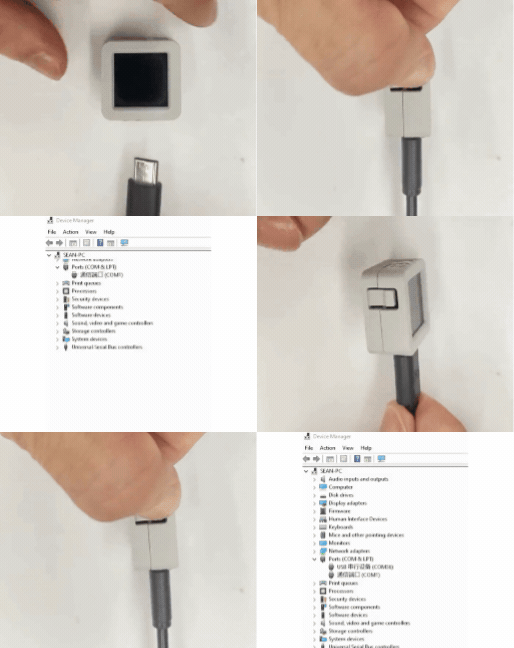
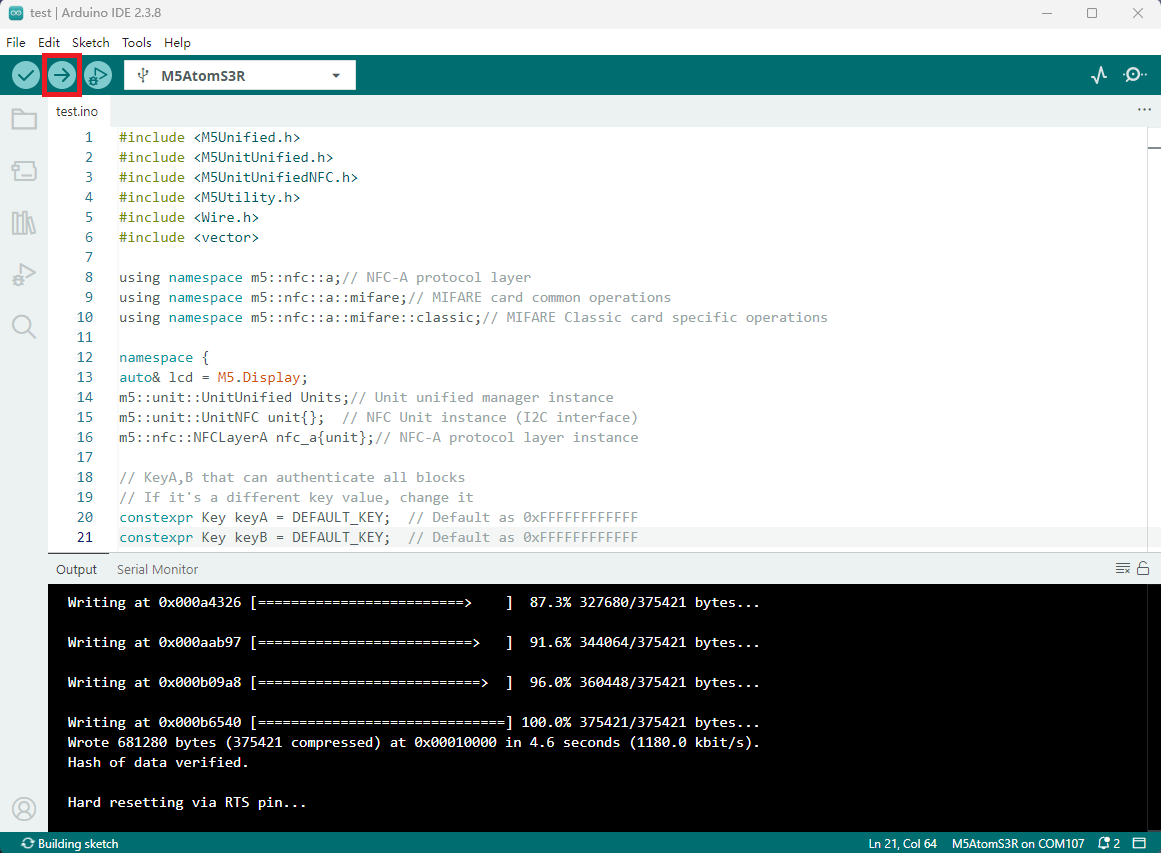
- デバイスポートを選択し、Arduino IDE の左上隅のコンパイルとアップロードボタンをクリックして、プログラムのコンパイルと デバイスへのアップロードが完了するまで待機します。