

Arduino入門
2. デバイス&サンプル
3. M5Unified
4. M5GFX
5. 拡張モジュール&サンプル
Unit
Module
Atomic
Tab5
IoT
アクセサリー
Atomic Stepmotor Base Arduino 使用チュートリアル
1. 準備
環境構築: Arduino IDE 入門チュートリアル を参考に IDE をインストールし、使用する開発ボードに応じたボードマネージャーおよび必要なライブラリをインストールしてください。
使用するライブラリ:
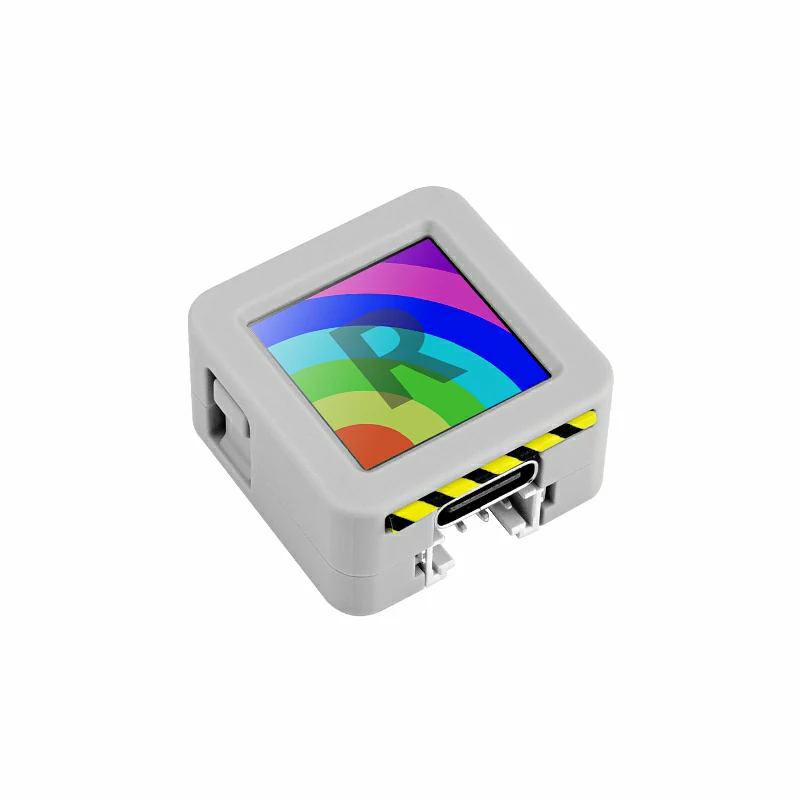
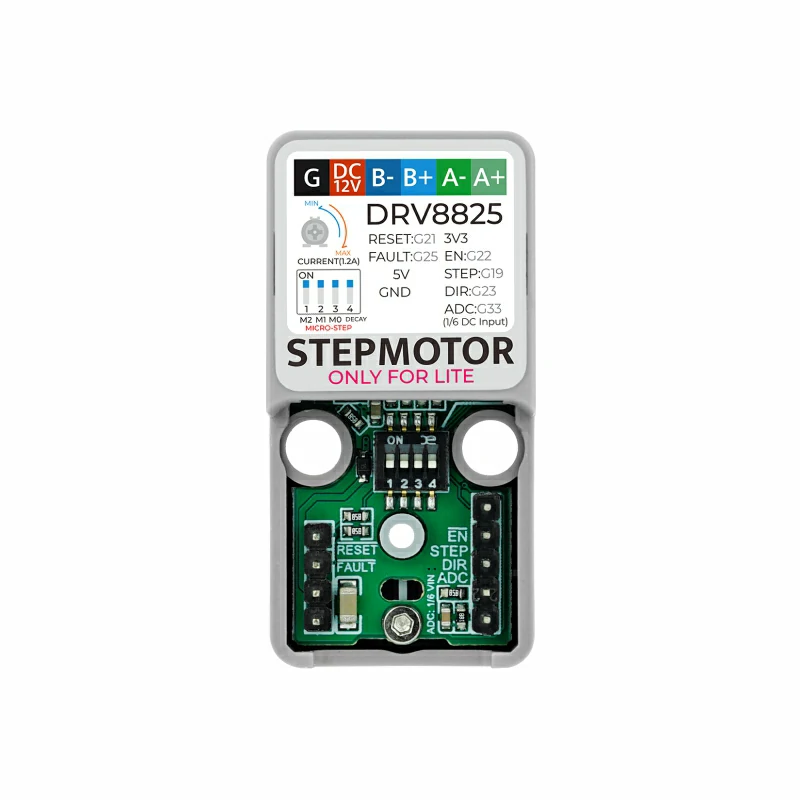
使用ハードウェア:
2. ステッピングモーター制御の基礎
ステッピングモーターは電気パルスを角変位に変換するモーターです。各パルスでシャフトが一定角度だけ回転します。この特性により、3DプリンタやCNC、ロボットなど精密な位置制御が必要な用途に適しています。
1. 構成:
- ステータ (stator): 複数の巻線で構成され、通電により磁場を作ります。
- ロータ (rotor): 歯付きの鉄心などが使われ、ステータ磁場の影響で回転します。
2. 動作原理:
- A相/B相の巻線を順次通電することで回転磁界を作り、ロータがそれに追従して回転します。1パルスは巻線の状態を1回切り替え、ロータは1ステップ分だけ進みます。パルス周波数で回転速度を制御し、パルス数で総回転量を決定します。
3. 主要パラメータ:
- 相数 (Phases): 巻線の相数(2相、3相、4相、5相など)。
- 全ステップ数 (Number of Full Steps): 1回転に必要な基本パルス数。例えば一般的な2相モータは200ステップ/回転(200全ステップで360°)。
- ステップ角 (Step Angle): 1全ステップあたりの角度。ステップ角 = 360° / 全ステップ数。200ステップなら1.8°。
- マイクロステップ (Microstepping): 電流制御で全ステップを細分化することで精度と回転の滑らかさを向上させます。1/2、1/4、1/8、1/16など。
- 回転速度 (Speed): 通常RPMで表し、パルス周波数と負荷に依存します。RPM = (パルス周波数 / 全ステップ数) × 60。
- ホールディングトルク (Holding Torque): 停止時に外力に抵抗できる最大トルク。機種により0.1~5 N·m程度。
3. サンプルプログラム
- 本チュートリアルでは AtomS3R を使用し、Atomic Stepmotor Base に接続して制御します。ドライバは step/dir/enable 信号で制御します。配線に合わせてピン定義を変更してください。AtomS3R の例では
G5 (EN),G6 (STEP),G7 (DIR)を使用します。
3.1 DIPスイッチ (マイクロステップ設定)
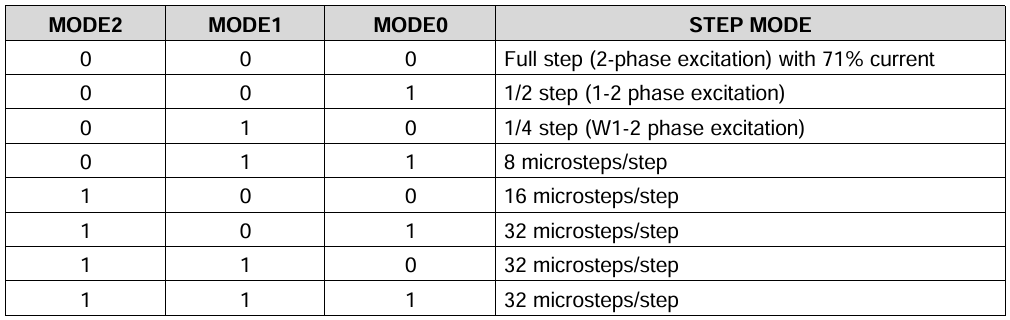
Atomic Stepmotor Base の DIP スイッチでマイクロステップを設定できます。4つのスイッチ M2、M1、M0、DECAY は DRV8825 の MODE2、MODE1、MODE0、DECAY に対応します。M2/M1/M0 でマイクロステップを選択し、DECAY は電流減衰モードの選択に使います。詳細は DRV8825 のデータシートを参照してください: https://m5stack.oss-cn-shenzhen.aliyuncs.com/resource/docs/datasheet/module/DRV8825_en.pdf
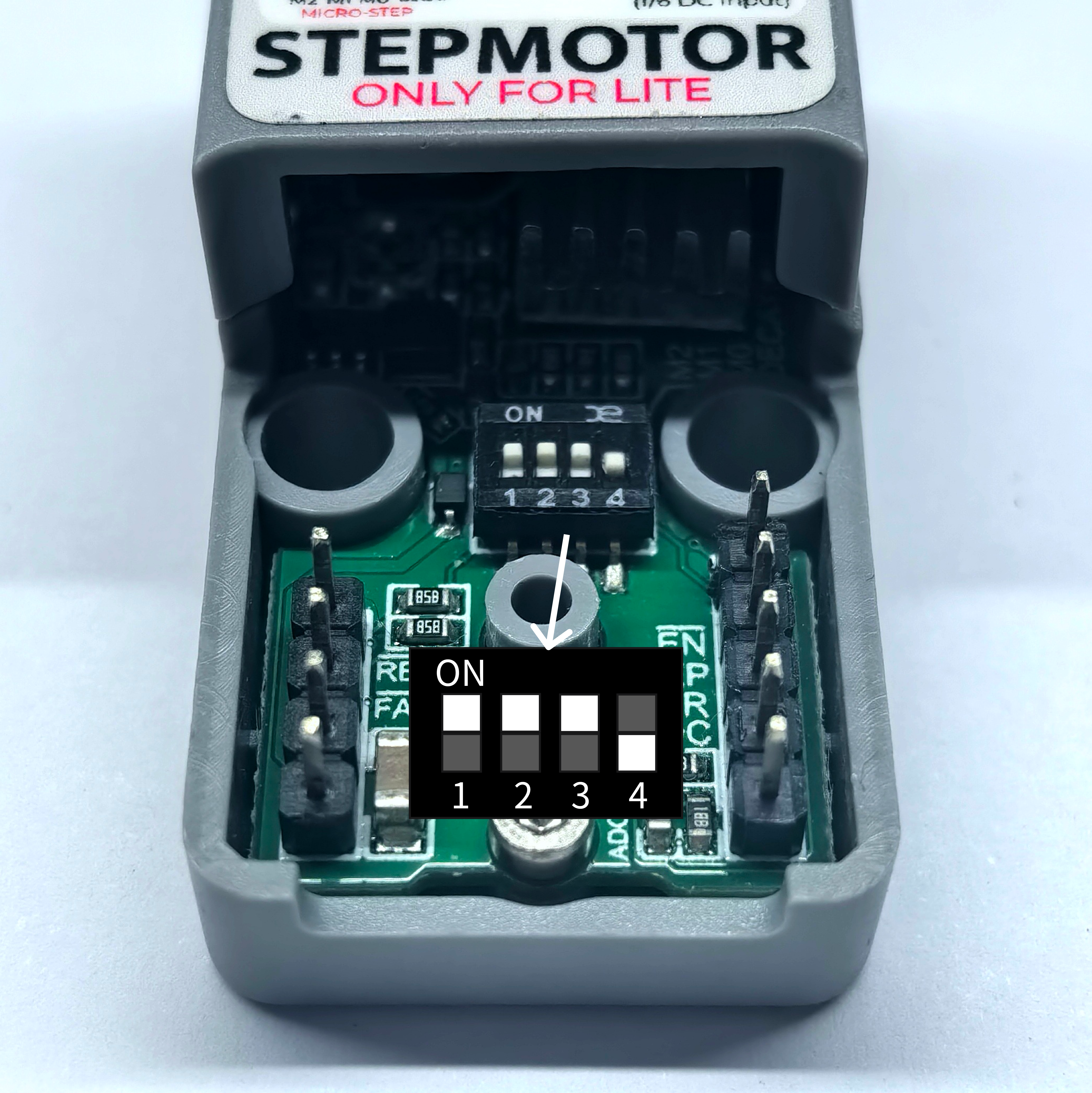
下記スケッチでは step_division 変数でマイクロステップ倍率を指定します。DIP の設定に合わせて値を変更してください。本例では 1/32 マイクロステップを使用しています。
3.2 サンプルコード
cpp
1 2 3 4 5 6 7 8 9 10 11 12 13 14 15 16 17 18 19 20 21 22 23 24 25 26 27 28 29 30 31 32 33 34 35 36 37 38 39 40 41 42 43 44 45 46 47 48 49 50 51 52 53 54 55 56 57 58 59 60 61 62 63 64 65 66 67 68 69 70 71 72 73 74 75 76 77 78 79 80 81 82 83 84 85 86 87 88 89 90 91 92 93 94 95 96 97 98 99 100 101 102 103 104 105 106 107 108 109 110 111 112 113 114 115 116 117 118 119 120 121 122 123 124 125 126 127 128 129 130 131 132 133 134 135 136 137 138 139 140 141 142 143 144 145 146 147 148 149 150 151 152 153 154 155 156 157 158 159 160 161 162 163 164 165 166 167 168 169 170 171 172 173 174 175 176 177 178 179 180 181 182 183 184 185 186
#include "M5Unified.h"
#include "M5GFX.h"

// Stepper motor configuration parameters
int step_division = 32;           // Motor microstepping division factor
int number_of_steps = 200;       // Number of steps per full revolution of the motor
int en_pin = 5;                  // Motor driver enable pin
int step_pin = 6;                // Motor step control pin
int dir_pin = 7;                 // Motor direction control pin

// Timing variables for step control
unsigned long step_interval = 10000;  // Microsecond interval between step pulses
unsigned long last_step_time = 0;     // Timestamp of the last step pulse
unsigned long target_step_time1 = 0;  // Target time for step pin HIGH state
unsigned long target_step_time2 = 0;  // Target time for step pin LOW state

void motor_setSpeed(float rpm);               // Set motor rotation speed (revolutions per minute)
void motor_powerEnable(bool ena);             // Enable/disable motor driver
void motor_setDirection(long steps_to_move);  // Set rotation direction based on step count
void motor_move();                            // Generate a single step pulse
void motor_moveInterval(unsigned long target_delay);  // Control step pulse timing
void motor_dynamicMove(int s1, int s2);       // Step with dynamic acceleration/deceleration
void motor_step(long steps_to_move);          // Move specified steps without acceleration
void motor_step_accdec(long steps_to_move, long steps_acc, long steps_dec);  // Move with acceleration/deceleration

void setup() {
  M5.begin();
  M5.Lcd.setFont(&fonts::FreeMonoBoldOblique9pt7b);  // Set display font
  M5.Lcd.drawCenterString("Motor", 64, 64);          // Display title at center

  pinMode(en_pin, OUTPUT);
  pinMode(dir_pin, OUTPUT);
  pinMode(step_pin, OUTPUT);

  motor_setSpeed(0);       // Set initial speed to 0
  motor_powerEnable(true); // Enable motor driver
  delay(1600);             // Short delay for initialization
}

void loop() {
  M5.update();

  if (M5.BtnA.wasPressed()) {
    motor_setSpeed(300);   // Set motor speed to 300 RPM
    motor_step(1200);      // Rotate 1200 steps clockwise
    motor_step(-1200);     // Rotate 1200 steps counter-clockwise
  }
}

// ---- Function Definitions ----

/**
 * Set motor rotation speed in revolutions per minute (RPM)
 * Calculates step interval based on RPM, steps per revolution, and microstepping
 * @param rpm Target rotation speed in revolutions per minute
 */
void motor_setSpeed(float rpm) {
  // Calculate microsecond interval between steps:
  // 60,000,000 microseconds/minute ÷ (steps/rev × RPM × microsteps)
  step_interval = 60000000L / (number_of_steps * rpm * step_division);
}

/**
 * Enable or disable the motor driver
 * @param ena True to enable motor (driver active), false to disable
 */
void motor_powerEnable(bool ena) {
  digitalWrite(en_pin, ena ? LOW : HIGH);  // Typically, LOW enables most drivers
}

/**
 * Set motor rotation direction based on step count sign
 * @param steps_to_move Positive for clockwise, negative for counter-clockwise
 */
void motor_setDirection(long steps_to_move) {
  if (steps_to_move < 0) {
    digitalWrite(dir_pin, HIGH);  // Set direction pin for counter-clockwise
  } else {
    digitalWrite(dir_pin, LOW);   // Set direction pin for clockwise
  }
}

/**
 * Generate a single step pulse (HIGH then LOW) with proper timing
 */
void motor_move() {
  digitalWrite(step_pin, HIGH);    // Set step pin HIGH to trigger step
  motor_moveInterval(step_interval);  // Maintain HIGH state and then transition to LOW
}

/**
 * Control timing for step pin state transitions
 * Ensures proper duration for HIGH and LOW states of the step pulse
 * @param target_delay Total duration of one step cycle (HIGH + LOW) in microseconds
 */
void motor_moveInterval(unsigned long target_delay) {
  // Calculate target times for state transitions
  target_step_time1 = last_step_time + (target_delay / 2);  // Midpoint (HIGH to LOW)
  target_step_time2 = last_step_time + target_delay;        // End of cycle (LOW to next step)

  // Wait for HIGH state duration
  if (target_step_time1 >= last_step_time) {
    while (micros() < target_step_time1) {}  // Handle normal time progression
  } else {
    while ((long)(micros()) < (long)target_step_time1) {}  // Handle micros() rollover
  }

  digitalWrite(step_pin, LOW);  // Set step pin LOW after half the interval

  // Wait for remaining LOW state duration
  if (target_step_time2 >= last_step_time) {
    while (micros() < target_step_time2) {}  // Handle normal time progression
  } else {
    while ((long)(micros()) < (long)target_step_time2) {}  // Handle micros() rollover
  }

  last_step_time = micros();  // Update last step timestamp
}

/**
 * Generate a step with dynamic speed adjustment for acceleration/deceleration
 * @param s1 Current step in acceleration/deceleration phase
 * @param s2 Total steps in acceleration/deceleration phase
 */
void motor_dynamicMove(int s1, int s2) {
  digitalWrite(step_pin, HIGH);  // Start step pulse

  // Calculate speed ratio using polynomial for smooth acceleration/deceleration
  double r1 = (double)s1 / (double)s2;
  double r2 = 0.1 + 0.2*r1 + 2.2*r1*r1 - 1.5*r1*r1*r1;

  // Adjust step interval based on calculated ratio
  motor_moveInterval((unsigned long)(step_interval / r2));
}

/**
 * Move motor specified number of steps without acceleration
 * Converts input steps to microstepped steps using step_division
 * @param steps_to_move Number of steps to move (positive = clockwise, negative = counter-clockwise)
 */
void motor_step(long steps_to_move) {
  steps_to_move *= step_division;  // Convert to microstepped steps
  motor_setDirection(steps_to_move);  // Set rotation direction
  last_step_time = micros();        // Initialize step timestamp

  // Generate each step pulse
  for (long i = abs(steps_to_move); i > 0; i--) {
    motor_move();
  }
}

/**
 * Move motor with acceleration, constant speed, and deceleration phases
 * @param steps_to_move Total steps to move (signed for direction)
 * @param steps_acc Number of steps used for acceleration phase
 * @param steps_dec Number of steps used for deceleration phase
 */
void motor_step_accdec(long steps_to_move, long steps_acc, long steps_dec) {
  // Convert all step counts to microstepped values
  steps_to_move *= step_division;
  steps_acc *= step_division;
  steps_dec *= step_division;

  motor_setDirection(steps_to_move);  // Set rotation direction
  last_step_time = micros();          // Initialize step timestamp

  // Acceleration phase: gradually increase speed
  if (steps_acc > 0) {
    for (long i = 1; i <= steps_acc; i++) {
      motor_dynamicMove(i, steps_acc);
    }
  }

  // Constant speed phase: maintain steady speed
  long constant_steps = abs(steps_to_move) - abs(steps_acc) - abs(steps_dec);
  for (long i = constant_steps; i > 0; i--) {
    motor_move();
  }

  // Deceleration phase: gradually decrease speed
  if (steps_dec > 0) {
    for (long i = (steps_dec - 1); i >= 0; i--) {
      motor_dynamicMove(i, steps_dec);
    }
  }
}4. コンパイルとアップロード
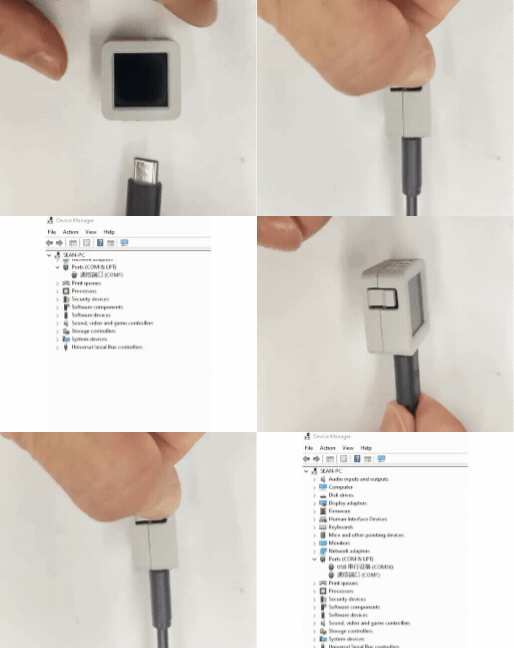
- 1. ダウンロードモード:デバイスごとにプログラム書き込み前にはダウンロードモードにする必要があります。使用する主制御デバイスによって手順が異なる場合があります。詳細は Arduino IDE 入門チュートリアル ページ下部のデバイス別プログラム書き込みチュートリアル一覧を参照し、具体的な操作方法を確認してください。
- AtomS3R の場合、リセットボタンを長押し(約 2 秒)し、内部の緑色 LED が点灯したらボタンを離します。この時点でデバイスはダウンロードモードに入り、書き込み待機状態になります。 ボタンを離すと緑色 LEDが消灯し、デバイスがダウンロードモードに入ったことを確認できます。
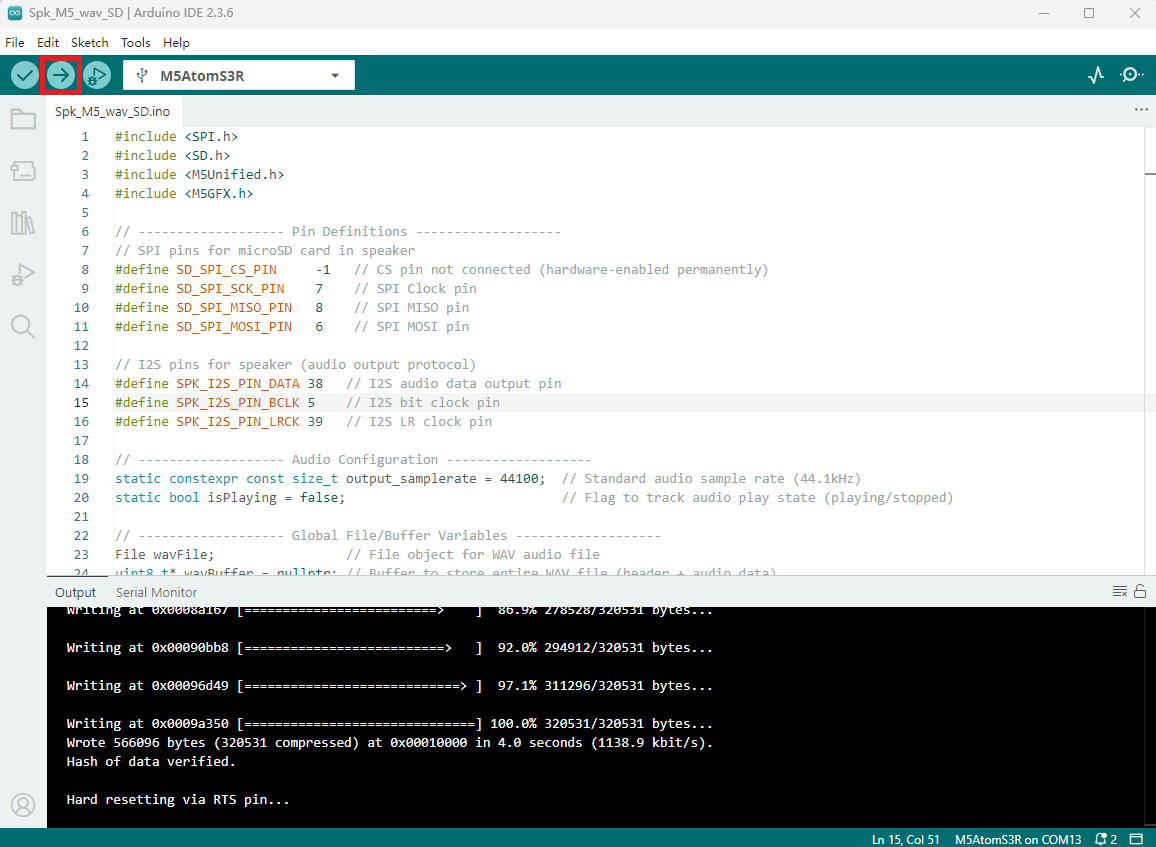
- 2. デバイスポートを選択し、Arduino IDE 左上のコンパイル&アップロードボタンをクリックして、プログラムがコンパイルされデバイスにアップロードされるまで待ちます。
5. ステッピングモーター制御です
- 電源投入後に画面を一度タップすると、ステッピングモーターが正転で6回転(1200ステップ)し、その後逆転で6回転(1200ステップ)します。以下のデモを参照してください。
Page Tools