Arduino入門
2. デバイス&サンプル
3. M5Unified
4. M5GFX
5. 拡張モジュール&サンプル
Unit
Module
Atomic
Tab5
IoT
アクセサリー
StamPLC PoE Arduino チュートリアル
1. 準備作業
環境構築:Arduino IDE 入門ガイドを参考に IDE をインストールし、使用する開発ボードに応じてボードマネージャと必要なドライバ/ライブラリをインストールしてください。
使用ライブラリ:
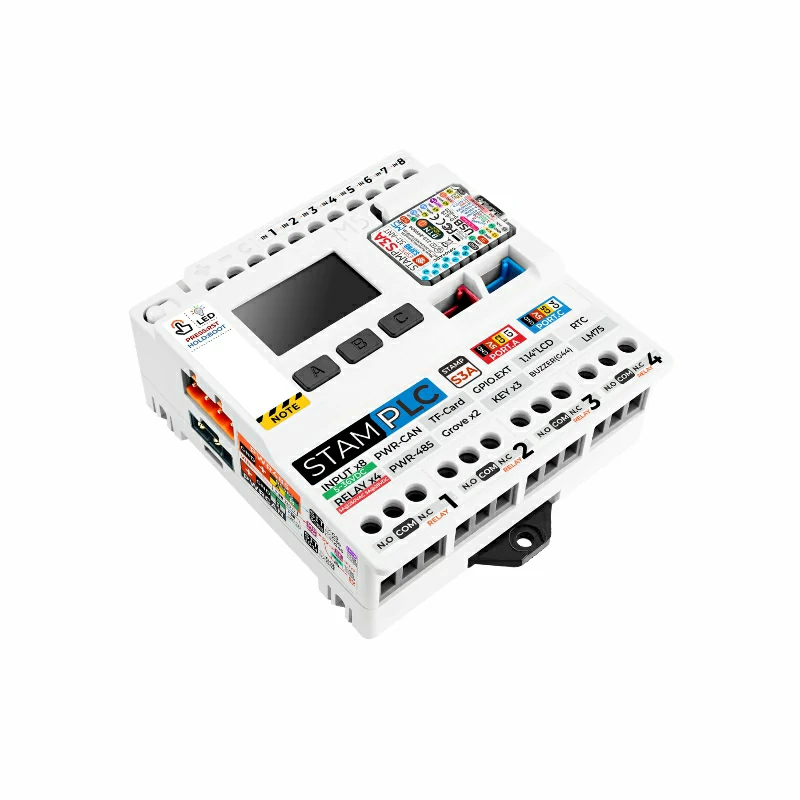
使用ハードウェア:
2. サンプルプログラム
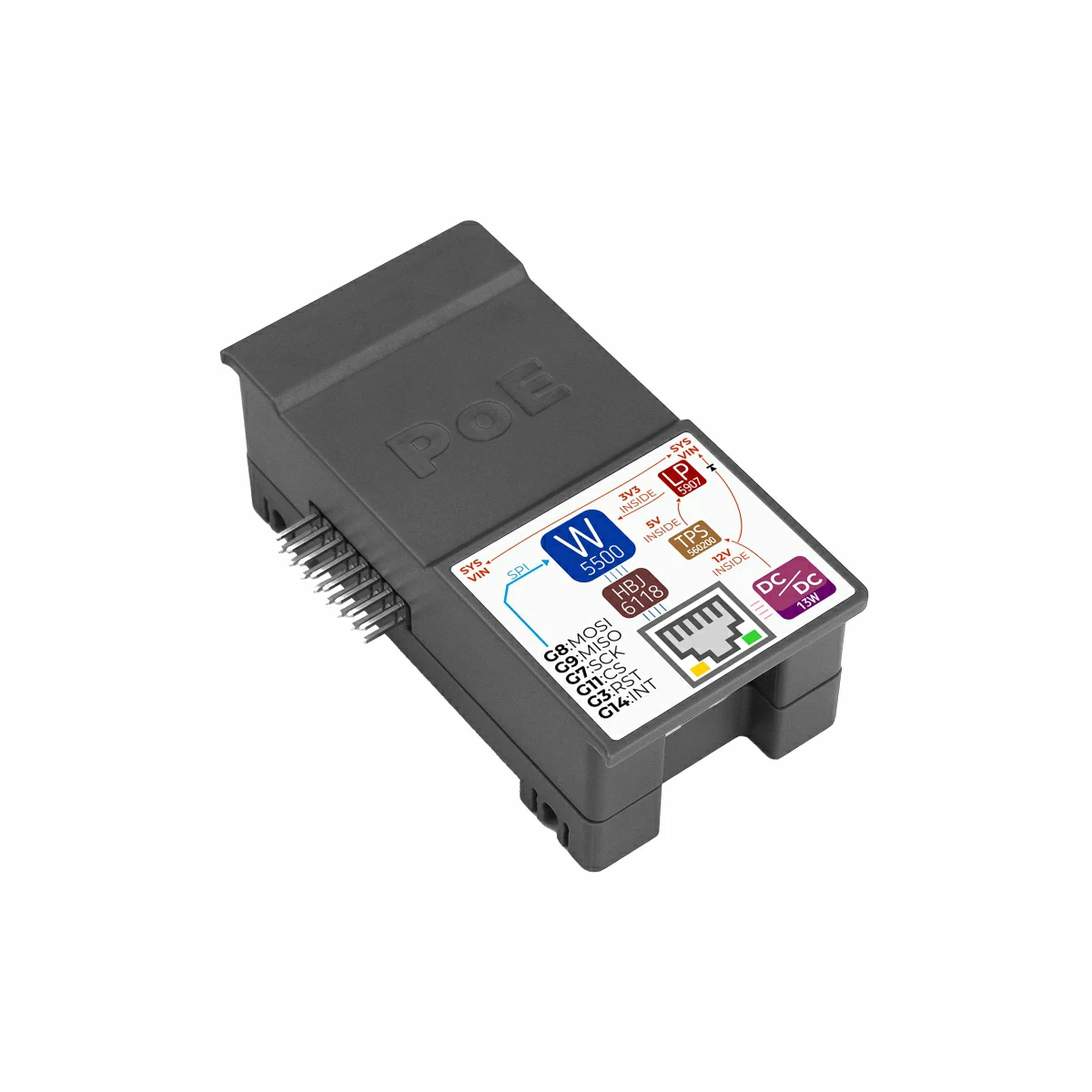
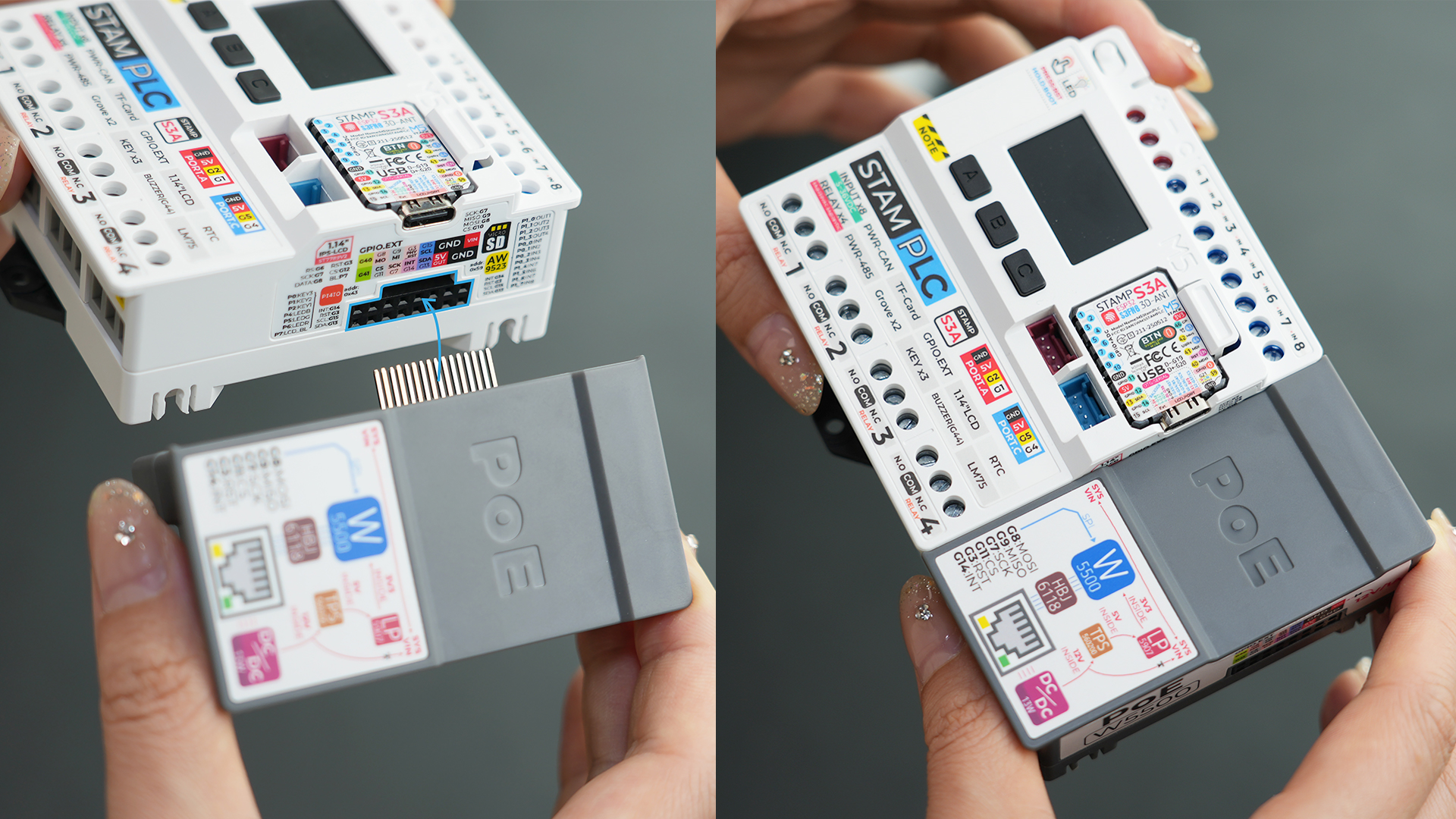
- 本チュートリアルで使用するメインコントローラは StamPLC で、StamPLC PoE と組み合わせて使用します。StamPLC PoE は SPI プロトコルでホストと通信します。実際の配線に合わせてプログラム内のピン定義を修正してください。接続後の対応 SPI IO は
G7 (SCK)、G8 (MISO)、G9 (MOSI)、G11 (CS)です。 実機の接続・組み立ては下図の通りです:
2.1 Web サーバ
#include "M5StamPLC.h"
#include "SPI.h"
#include "M5_Ethernet.h"

#define SCK  7
#define MISO 9
#define MOSI 8
#define CS   11

byte mac[] = {0xDE, 0xAD, 0xBE, 0xEF, 0xFE, 0x99};// Custom MAC address
// IPAddress ip(192, 168, 1, 177);                   // Static IP (Custom)

EthernetServer server(80);// Initialize the Web Server on port 80 (standard HTTP port)

void setup() {
    M5StamPLC.begin();
    Serial.begin(115200);

    M5StamPLC.Display.setTextDatum(middle_center);
    M5StamPLC.Display.setFont(&fonts::FreeMonoBold12pt7b);

    SPI.begin(SCK, MISO, MOSI, -1);
    Ethernet.init(CS);

    M5StamPLC.Display.drawString("Init...", M5StamPLC.Display.width() / 2, M5StamPLC.Display.height() / 2);
    Serial.println("Initializing...");
    delay(500);

    // To use a static IP, use Ethernet.begin(mac, ip)
    // Attempt to obtain an IP address via DHCP
    while (Ethernet.begin(mac) != 1) {
        Serial.println("Error getting IP address via DHCP, trying again...");
        delay(1000);
    }

    // Check for Ethernet hardware presence
    if (Ethernet.hardwareStatus() == EthernetNoHardware) {
        Serial.println(
            "Ethernet shield was not found. Sorry, can't run without "
            "hardware. :(");
        while (true) {
            delay(1);  // Do nothing if hardware is missing
        }
    }
    if (Ethernet.linkStatus() == LinkOFF) {
        Serial.println("Ethernet cable is not connected.");
    }

    // Start web server
    server.begin();
    Serial.print("Server is at ");
    Serial.println(Ethernet.localIP());
    M5StamPLC.Display.clear();
    M5StamPLC.Display.drawString(Ethernet.localIP().toString().c_str(),
                              M5StamPLC.Display.width() / 2, M5StamPLC.Display.height() / 2);
    delay(1000);
}

long lastTime;

void loop() {
    // Listen for incoming client connections
    EthernetClient client = server.available();
    if (client) {
        Serial.println("new client");

        boolean currentLineIsBlank = true; // HTTP requests terminate with a blank line

        while (client.connected()) {
            if (client.available()) {
                char c = client.read();
                Serial.write(c); // Echo request to Serial Monitor for debugging
                // If you've gotten to the end of the line (received a newline
                // character) and the line is blank, the http request has ended,
                // so you can send a reply
                if (c == '\n' && currentLineIsBlank) {
                    // Send a standard http response header
                    client.println("HTTP/1.1 200 OK");
                    client.println("Content-Type: text/html");
                    client.println(
                        "Connection: close");  // Connection will be closed
                                               // after completion of the
                                               // response
                    client.println("Refresh: 5");  // Refresh the page
                                                   // automatically every 5 sec
                    client.println();
                    client.println("<!DOCTYPE HTML>");
                    client.println("<html>");
                    client.print("<h2>Hello M5Stack User!</h2>");
                    client.println("</html>");
                    break;
                }
                if (c == '\n') {
                    // Starting a new line
                    currentLineIsBlank = true;
                } else if (c != '\r') {
                    // You've gotten a character on the current line
                    currentLineIsBlank = false;
                }
            }
        }
        // Give the web browser time to receive the data
        delay(1);
        // Close the connection:
        client.stop();
        Serial.println("client disconnected");
    }
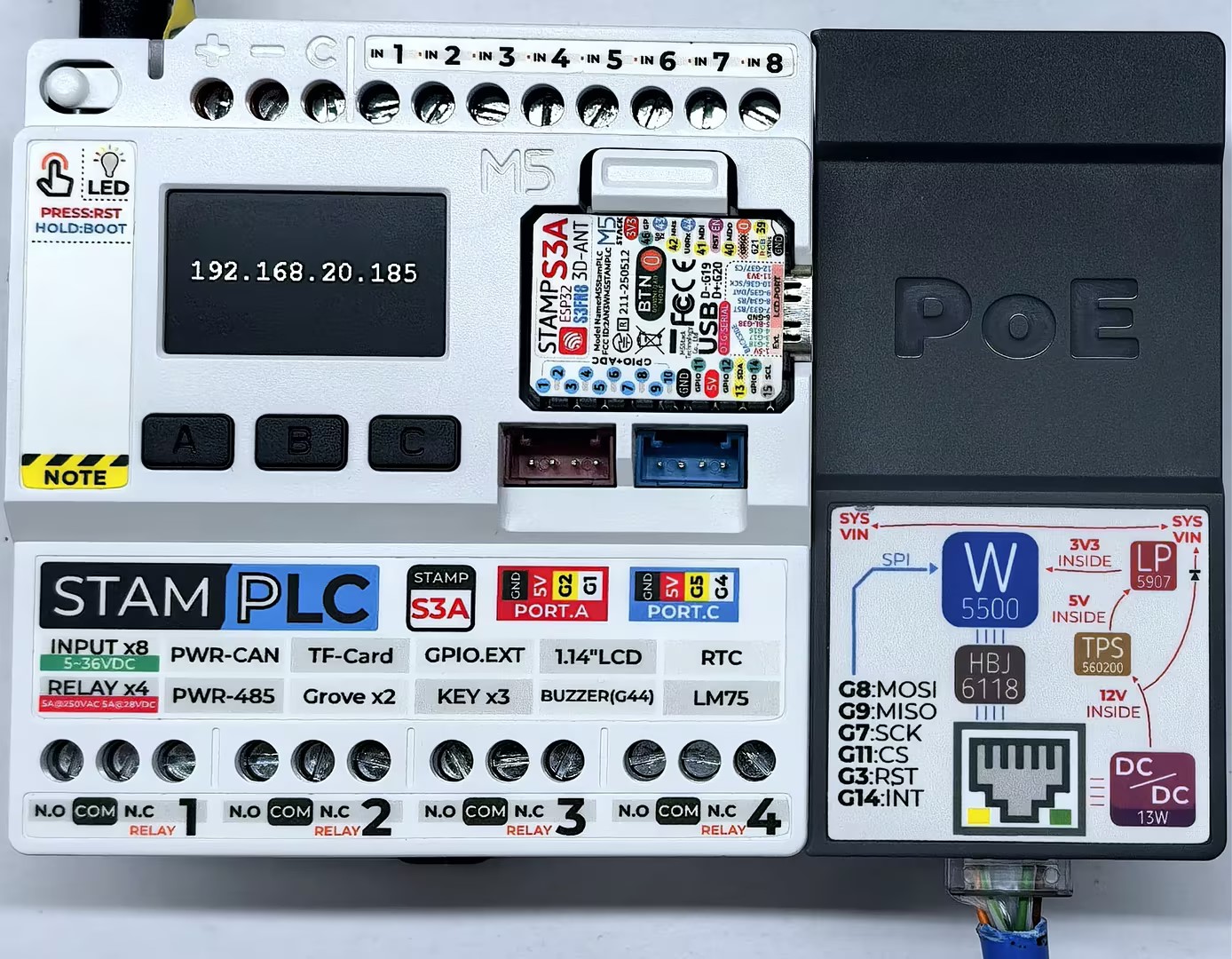
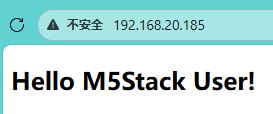
}デバイスの電源投入後、StamPLC は StamPLC PoE モジュールを自動初期化し、Web サーバを作成します。サーバの IP アドレスが画面に表示されます。ブラウザでこの IP アドレスにアクセスすると、ページに Hello M5 User! が表示され、5 秒ごとに自動更新されます。
シリアルモニタの出力例:
Initializing...
Server is at 192.168.20.185
new client
GET / HTTP/1.1
Host: 192.168.20.185
Connection: keep-alive
Upgrade-Insecure-Requests: 1
User-Agent: Mozilla/5.0 (Windows NT 10.0; Win64; x64) AppleWebKit/537.36 (KHTML, like Gecko) Chrome/143.0.0.0 Safari/537.36 Edg/143.0.0.0
Accept: text/html,application/xhtml+xml,application/xml;q=0.9,image/avif,image/webp,image/apng,*/*;q=0.8,application/signed-exchange;v=b3;q=0.7
Accept-Encoding: gzip, deflate
Accept-Language: zh-CN,zh;q=0.9,en;q=0.8,en-GB;q=0.7,en-US;q=0.6,ja;q=0.5,ko;q=0.4

client disconnected2.2 MQTT
#include "M5StamPLC.h"
#include "SPI.h"
#include "M5_Ethernet.h"
#include "PubSubClient.h"

#define SCK  7
#define MISO 9
#define MOSI 8
#define CS   11

#define PUB_INTERVAL 3000 // Publishing interval  unit: ms
#define PUB_TOPIC "StamPLC_PoE_Send"
#define SUB_TOPIC "StamPLC_PoE_Receive"

byte mac[] = {0xDE, 0xAD, 0xBE, 0xEF, 0xFE, 0x99};// Custom MAC address
// IPAddress ip(192, 168, 1, 177);                   // Static IP (Custom)

const char* mqtt_server = "mqtt.m5stack.com";// MQTT broker address
EthernetClient ethClient;
PubSubClient client(ethClient);

// Handle incoming MQTT messages
void callback(char* topic, byte* payload, unsigned int length) {
    Serial.print("Message arrived [");
    Serial.print(topic);
    Serial.print("] ");

    String payloadStr;
    for (int i = 0; i < length; i++) {
        payloadStr += (char)payload[i];
    }
    Serial.print(payloadStr);
    M5StamPLC.Display.fillRect(0, 0, 240, 68, TFT_BLACK);
    M5StamPLC.Display.drawString("Rece: " + payloadStr, M5StamPLC.Display.width() / 2, 40);

}

// Connect or reconnect to the MQTT broker
void reconnect() {
    // Loop until we're reconnected
    while (!client.connected()) {
        Serial.print("Attempting MQTT connection...\n");
        // Attempt to connect
        if (client.connect("arduinoClient")) {
            Serial.println("Connected");
            M5StamPLC.Display.clear();
            M5StamPLC.Display.drawString("Connected!", M5StamPLC.Display.width() / 2, M5StamPLC.Display.height() / 2);

            // Once connected, publish an announcement...
            client.publish(PUB_TOPIC, "Client connected");
            // ... and resubscribe
            client.subscribe(SUB_TOPIC);
        } else {
            M5StamPLC.Display.clear();
            M5StamPLC.Display.drawString("Failed!", M5StamPLC.Display.width() / 2, 60);
            Serial.print("Failed, rc=");
            Serial.print(client.state());
            Serial.println(" try again in 5s");
            // Wait 5 seconds before retrying
            delay(5000);
        }
    }
}

void setup() {
    M5StamPLC.begin();
    Serial.begin(115200);

    M5StamPLC.Display.setTextColor(GREEN);
    M5StamPLC.Display.setTextDatum(middle_center);
    M5StamPLC.Display.setFont(&fonts::FreeMonoBold12pt7b);

    SPI.begin(SCK, MISO, MOSI, -1);
    Ethernet.init(CS);

    M5StamPLC.Display.drawString("Init...", M5StamPLC.Display.width() / 2, M5StamPLC.Display.height() / 2);
    Serial.println("Initializing...");

    // To use a static IP, use Ethernet.begin(mac, ip)
    // Attempt to obtain an IP address via DHCP
    while (Ethernet.begin(mac) != 1) {
        Serial.println("Error getting IP address via DHCP, trying again...");
        delay(1000);
    }

    // Check for Ethernet hardware presence
    if (Ethernet.hardwareStatus() == EthernetNoHardware) {
        Serial.println(
            "Ethernet shield was not found. Sorry, can't run without :(");
        while (true) {
            delay(1);  // Do nothing if hardware is missing
        }
    }
    if (Ethernet.linkStatus() == LinkOFF) {
        Serial.println("Ethernet cable is not connected.");
    }

    Serial.print("IP Address: ");
    Serial.println(Ethernet.localIP());

    M5StamPLC.Display.clear();
    M5StamPLC.Display.drawString(Ethernet.localIP().toString().c_str(),
                              M5StamPLC.Display.width() / 2, M5StamPLC.Display.height() / 2);
    // --- MQTT Setup ---
    client.setServer(mqtt_server, 1883);
    client.setCallback(callback);// Register incoming message handler
    delay(1000);
}

long lastTime;

void loop() {
    if (!client.connected()) {
        reconnect();
        delay(500);
        M5StamPLC.Display.clear();
        M5StamPLC.Display.drawString("Rece: NULL", M5StamPLC.Display.width() / 2, 40);
    } else {
        client.loop();// Essential to process incoming messages and maintain the heartbeat
        if (millis() - lastTime > PUB_INTERVAL) {
            lastTime = millis();
            M5StamPLC.Display.fillRect(0, 68, 240, 67, TFT_BLACK);
            M5StamPLC.Display.drawString("Send: " + String(lastTime) + " ms", M5StamPLC.Display.width() / 2, 100);
            String data = "Hello world: " + String(lastTime);
            client.publish(PUB_TOPIC, data.c_str());
            Serial.println("Send Message [" PUB_TOPIC "] " + data);
        }
    }
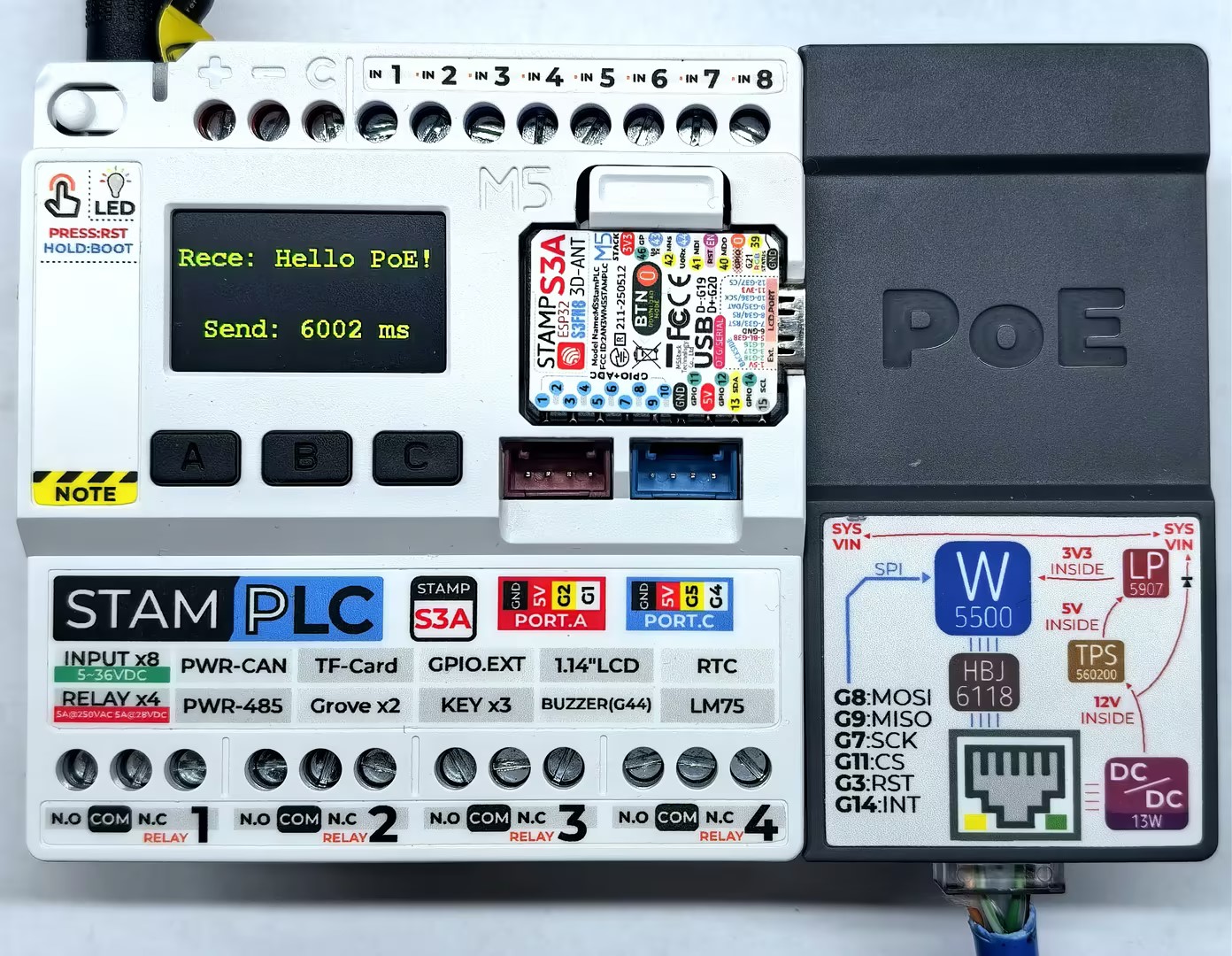
}デバイスの電源投入後、StamPLC は StamPLC PoE モジュールを自動設定して MQTT サーバへ接続します。接続成功後は 3 秒ごとにサーバへメッセージを送信します。画面には送受信に関する情報が表示され、シリアルモニタでは詳細ログを確認できます。
シリアルモニタの出力例:
Initializing...
IP Address: 192.168.20.185
Attempting MQTT connection...
Connected
Send Message [StamPLC_PoE_Send] Hello world: 3001
Send Message [StamPLC_PoE_Send] Hello world: 6002
Message arrived [StamPLC_PoE_Receive] Hello PoE!
...2.3 HTTP
#include "M5StamPLC.h"
#include "SPI.h"
#include "M5_Ethernet.h"
#include "ArduinoHttpClient.h"

#define SCK  7
#define MISO 9
#define MOSI 8
#define CS   11

byte mac[] = {0xDE, 0xAD, 0xBE, 0xEF, 0xFE, 0x99};// Custom MAC address
// IPAddress ip(192, 168, 1, 177);                   // Static IP (Custom)

const char* http_server = "httpbin.org";// Target HTTP server
EthernetClient ethClient;
HttpClient client = HttpClient(ethClient, http_server);

void setup() {
    M5StamPLC.begin();
    Serial.begin(115200);

    M5StamPLC.Display.setTextColor(GREEN);
    M5StamPLC.Display.setTextDatum(middle_center);
    M5StamPLC.Display.setFont(&fonts::FreeMonoBold12pt7b);

    SPI.begin(SCK, MISO, MOSI, -1);
    Ethernet.init(CS);

    M5StamPLC.Display.drawString("Init...", M5StamPLC.Display.width() / 2, 60);
    Serial.println("Initializing...");

    // To use a static IP, use Ethernet.begin(mac, ip)
    // Attempt to obtain an IP address via DHCP
    while (Ethernet.begin(mac) != 1) {
        Serial.println("Error getting IP address via DHCP, trying again...");
        delay(1000);
    }

    // Check for Ethernet hardware presence
    if (Ethernet.hardwareStatus() == EthernetNoHardware) {
        Serial.println(
            "Ethernet shield was not found. Sorry, can't run without hardware. :(");
        while (true) {
            delay(1);  // Do nothing if hardware is missing
        }
    }
    if (Ethernet.linkStatus() == LinkOFF) {
        Serial.println("Ethernet cable is not connected.");
    }

    Serial.print("IP Address: ");
    Serial.println(Ethernet.localIP());

    M5StamPLC.Display.clear();
    M5StamPLC.Display.drawString(Ethernet.localIP().toString().c_str(),
                              M5StamPLC.Display.width() / 2, M5StamPLC.Display.height() / 2);
    delay(1000);
}

void loop() {
    // --- GET request ---
    M5StamPLC.Display.clear();
    M5StamPLC.Display.drawString("GET", M5StamPLC.Display.width() / 2, 20);
    Serial.println("making GET request");

    client.get("/get");
    // read the status code and body of the response
    int statusCode  = client.responseStatusCode();
    String response = client.responseBody();

    Serial.print("Status code: ");
    Serial.println(statusCode);
    Serial.print("Response: ");
    Serial.println(response);
    Serial.println("Wait five seconds");

    M5StamPLC.Display.drawString("STATUS:", M5StamPLC.Display.width() / 2, 60);
    M5StamPLC.Display.drawString(String(statusCode), M5StamPLC.Display.width() / 2, 100);

    delay(5000);

    // --- POST request ---
    M5StamPLC.Display.clear();
    M5StamPLC.Display.drawString("POST", M5StamPLC.Display.width() / 2, 20);
    Serial.println("making POST request");

    String contentType = "application/x-www-form-urlencoded";
    String postData    = "name=Alice&age=12";

    client.post("/post", contentType, postData);

    // read the status code and body of the response
    statusCode = client.responseStatusCode();
    response   = client.responseBody();

    Serial.print("Status code: ");
    Serial.println(statusCode);
    Serial.print("Response: ");
    Serial.println(response);
    Serial.println("Wait five seconds");

    M5StamPLC.Display.drawString("STATUS:", M5StamPLC.Display.width() / 2, 60);
    M5StamPLC.Display.drawString(String(statusCode), M5StamPLC.Display.width() / 2, 100);

    delay(5000);
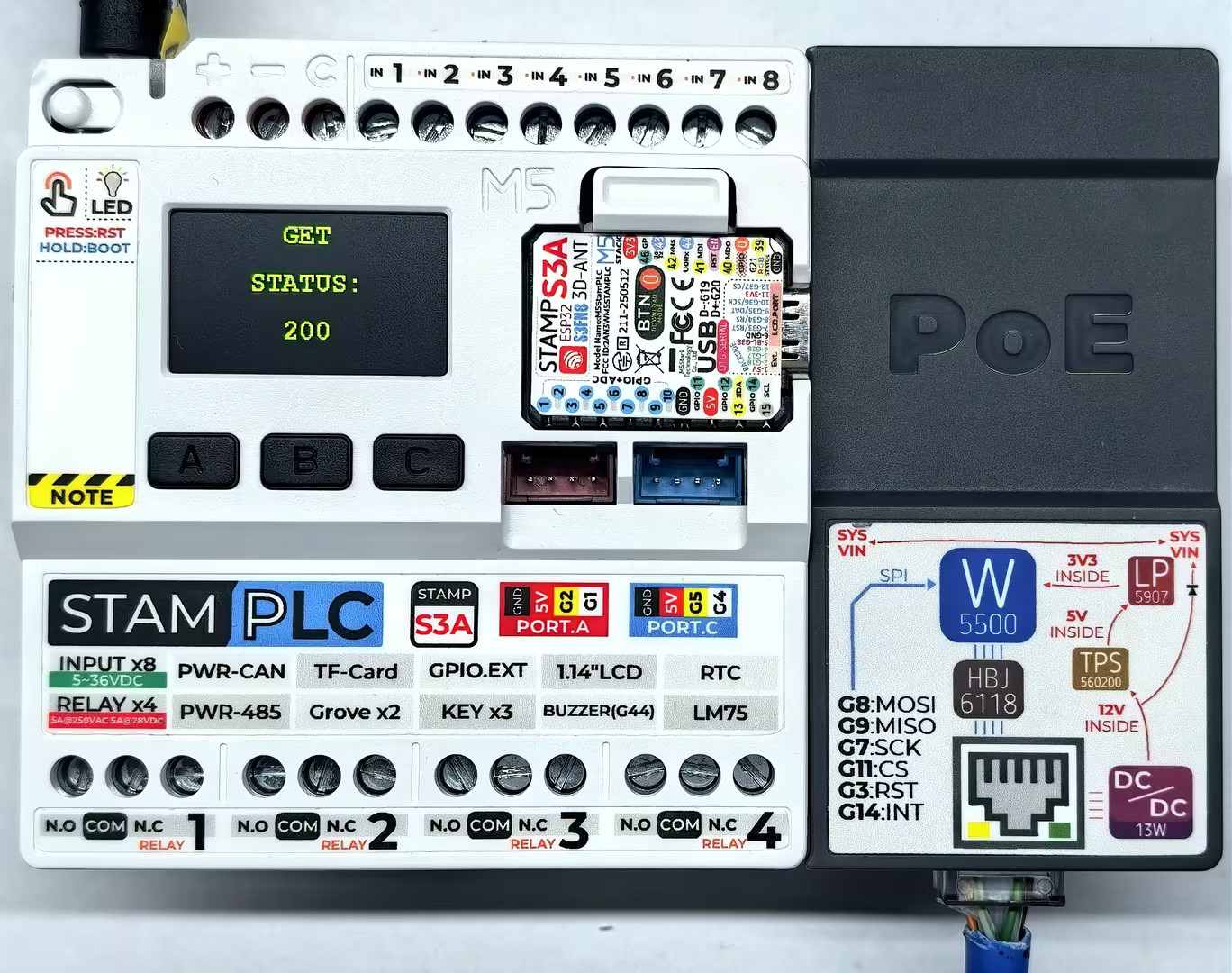
}デバイスの電源投入後、StamPLC は StamPLC PoE モジュールを自動設定して HTTP サーバへ接続し、GET/POST リクエストを繰り返し送信します。メイン画面にはリクエスト状態が表示され、シリアルモニタでは詳細情報を確認できます。
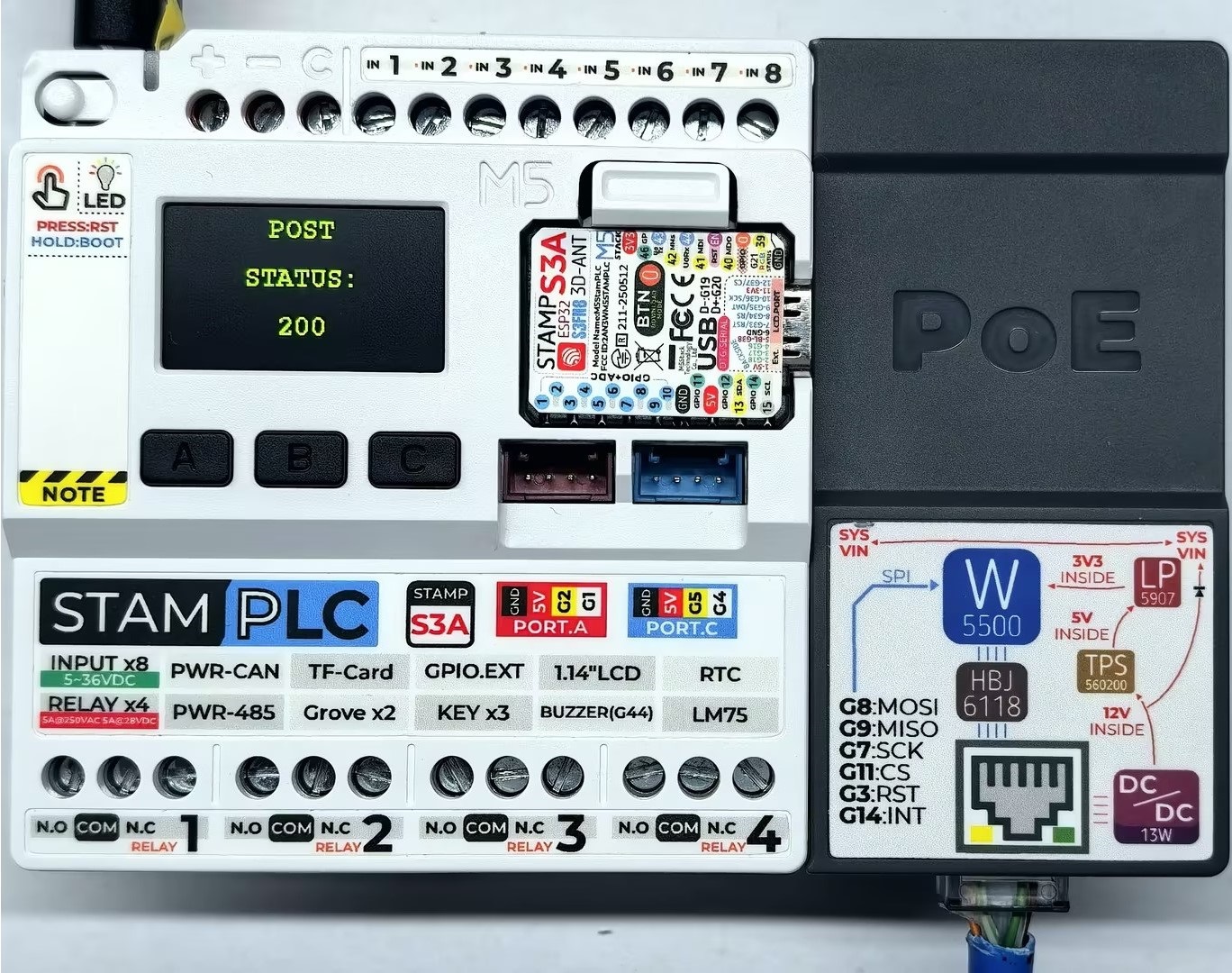
シリアルモニタの出力例:
Initializing...
IP Address: 192.168.20.185
making GET request
Status code: 200
Response: {
  "args": {},
  "headers": {
    "Host": "httpbin.org",
    "User-Agent": "Arduino/2.2.0",
    "X-Amzn-Trace-Id": "Root=1-69524204-7d767e3110e3bd6d1e28f6a8"
  },
  "origin": "113.88.164.214",
  "url": "http://httpbin.org/get"
}

Wait five seconds
making POST request
Status code: 200
Response: {
  "args": {},
  "data": "",
  "files": {},
  "form": {
    "age": "12",
    "name": "Alice"
  },
  "headers": {
    "Content-Length": "17",
    "Content-Type": "application/x-www-form-urlencoded",
    "Host": "httpbin.org",
    "User-Agent": "Arduino/2.2.0",
    "X-Amzn-Trace-Id": "Root=1-6952420a-588b0f181a6d7b311e694e06"
  },
  "json": null,
  "origin": "113.88.164.214",
  "url": "http://httpbin.org/post"
}2.4 NTP
NTP は、コンピュータネットワーク上でデバイスの時計を同期するためのプロトコルで、高精度かつ信頼性の高い時刻同期を実現できます。以下のサンプルでは、無料で利用できる公開 NTP サーバ cn.pool.ntp.org を使用しています。
#include "M5StamPLC.h"
#include "SPI.h"
#include "M5_Ethernet.h"

#define SCK  7
#define MISO 9
#define MOSI 8
#define CS   11

byte mac[] = {0xDE, 0xAD, 0xBE, 0xEF, 0xFE, 0x99};// Custom MAC address
// IPAddress ip(192, 168, 1, 177);                   // Static IP (Custom)

const char* ntpServerName = "cn.pool.ntp.org";     // NTP Server address
const uint16_t localPort = 8888;                   // Local port to listen for UDP packets
const int timeZone = 8;                            // Time zone offset (Beijing is UTC+8)
const int NTP_PACKET_SIZE = 48;                    // NTP packet size

byte packetBuffer[NTP_PACKET_SIZE];                // Buffer for incoming and outgoing packets
EthernetUDP Udp;

void sendNTPpacket(const char* address);
void printFormattedTime(uint32_t rawTime);

void setup() {
    M5StamPLC.begin();
    Serial.begin(115200);

    M5StamPLC.Display.setTextColor(GREEN);
    M5StamPLC.Display.setTextDatum(middle_center);
    M5StamPLC.Display.setFont(&fonts::FreeMonoBold12pt7b);

    SPI.begin(SCK, MISO, MOSI, -1);
    Ethernet.init(CS);

    M5StamPLC.Display.drawString("Init...", M5StamPLC.Display.width() / 2, M5StamPLC.Display.height() / 2);
    Serial.println("Initializing...");

    // To use a static IP, use Ethernet.begin(mac, ip)
    // Attempt to obtain an IP address via DHCP
    while (Ethernet.begin(mac) != 1) {
        Serial.println("Error getting IP address via DHCP, trying again...");
        delay(1000);
    }

    // Check for Ethernet hardware presence
    if (Ethernet.hardwareStatus() == EthernetNoHardware) {
        Serial.println(
            "Ethernet shield was not found. Sorry, can't run without hardware. :(");
        while (true) {
            delay(1);  // Do nothing if hardware is missing
        }
    }
    if (Ethernet.linkStatus() == LinkOFF) {
        Serial.println("Ethernet cable is not connected.");
    }

    Serial.print("IP Address: ");
    Serial.println(Ethernet.localIP());

    M5StamPLC.Display.clear();
    M5StamPLC.Display.drawString(Ethernet.localIP().toString().c_str(),
                              M5StamPLC.Display.width() / 2, M5StamPLC.Display.height() / 2);
    M5StamPLC.Display.setTextDatum(top_left);

    Udp.begin(localPort); // Start listening for UDP packets
    delay(1000);
}

void loop() {
    Serial.println("Sending NTP packet...");
    sendNTPpacket(ntpServerName);

    delay(1000); // Wait for packet to return

    if (Udp.parsePacket()) { // Check if a response is received
        Serial.println("Packet received");
        Udp.read(packetBuffer, NTP_PACKET_SIZE);

        // --- Parse NTP Timestamp ---
        // NTP timestamp is located at bytes 40-43, representing seconds since Jan 1, 1900
        uint32_t highWord = word(packetBuffer[40], packetBuffer[41]);
        uint32_t lowWord = word(packetBuffer[42], packetBuffer[43]);
        uint32_t secsSince1900 = highWord << 16 | lowWord; // Combine into a 32-bit unsigned integer

        // --- Convert to Unix Epoch Time ---
        // Unix epoch starts in 1970; NTP starts in 1900.
        // The 70-year difference (including leap years) is 2,208,988,800 seconds.
        const uint32_t seventyYears = 2208988800UL;
        uint32_t epoch = secsSince1900 - seventyYears;

        uint32_t bjTime = epoch + (timeZone * 3600); // Adjust for Beijing time zone
        printFormattedTime(bjTime);
    } else {
        Serial.println("No packet received yet.");
    }

    delay(4000); // Sync every 5 seconds, 4+1
}

// Send an NTP request to the given address
void sendNTPpacket(const char* address) {
    memset(packetBuffer, 0, NTP_PACKET_SIZE);
    // Set the NTP request header
    // 0b00011011 represents: LI=00=0 (no warning), VN=011=3 (Version 3), Mode=011=3 (Client mode)
    packetBuffer[0] = 0b00011011;

    Udp.beginPacket(address, 123); // NTP requests are on port 123
    Udp.write(packetBuffer, NTP_PACKET_SIZE);
    Udp.endPacket();
}

// Format and display the time
void printFormattedTime(uint32_t rawTime) {
    int hours = (rawTime % 86400L) / 3600; // 86400 seconds = 1 day
    int minutes = (rawTime % 3600) / 60;
    int seconds = rawTime % 60;

    String timeStr = "Time: " + String(hours) + ":" +
                     (minutes < 10 ? "0" : "") + String(minutes) + ":" +
                     (seconds < 10 ? "0" : "") + String(seconds);

    Serial.println(timeStr);

    M5StamPLC.Display.clear();
    M5StamPLC.Display.drawString("Beijing", 10, 30);
    M5StamPLC.Display.drawString(timeStr, 10, 60);
}デバイスの電源投入後、StamPLC は StamPLC PoE モジュールを自動設定して NTP サーバに接続し、5 秒ごとに時刻を同期します。
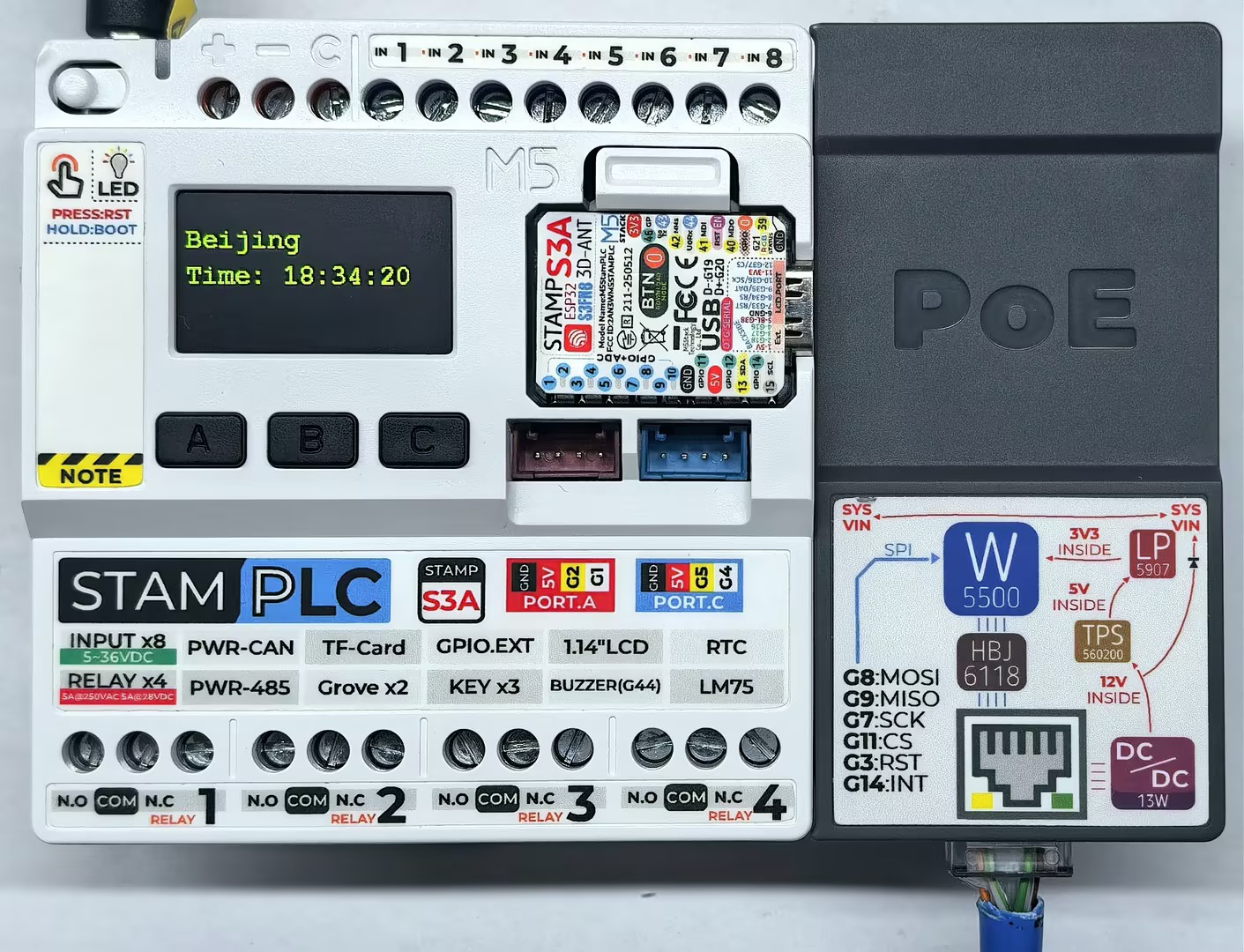
シリアルモニタの出力例:
Initializing...
IP Address: 192.168.20.185
Sending NTP packet...
No packet received yet.
Sending NTP packet...
Packet received
Time: 18:34:20
Sending NTP packet...
Packet received
Time: 18:34:253. コンパイルと書き込み
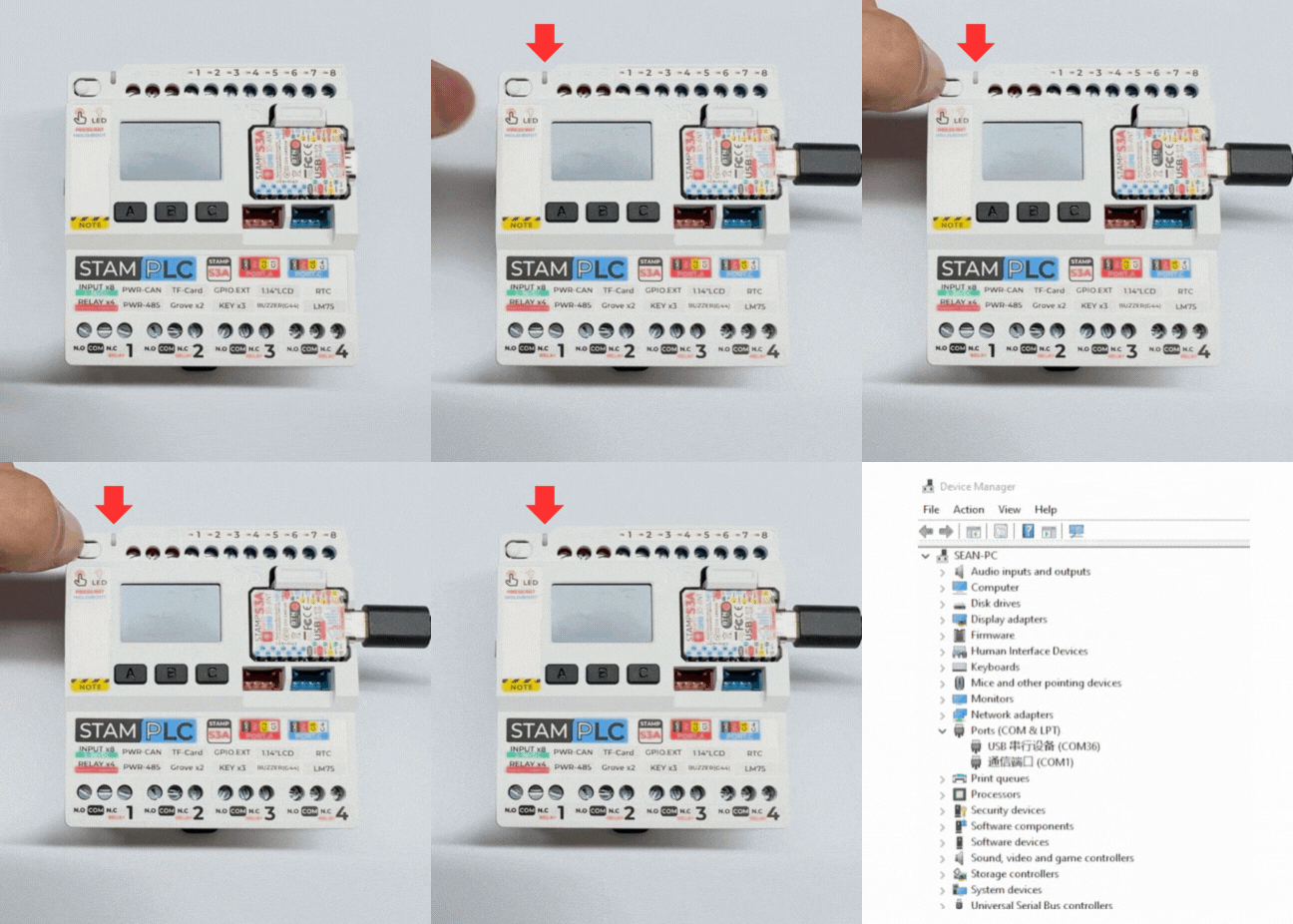
- StamPLC 本体の Boot ボタンを長押しし、赤色 LED が点灯したらボタンを離します。デバイスはダウンロードモードに入り、書き込み待機状態になります。 ボタンを離すと赤色 LEDが消灯し、デバイスがダウンロードモードに入ったことを確認できます。
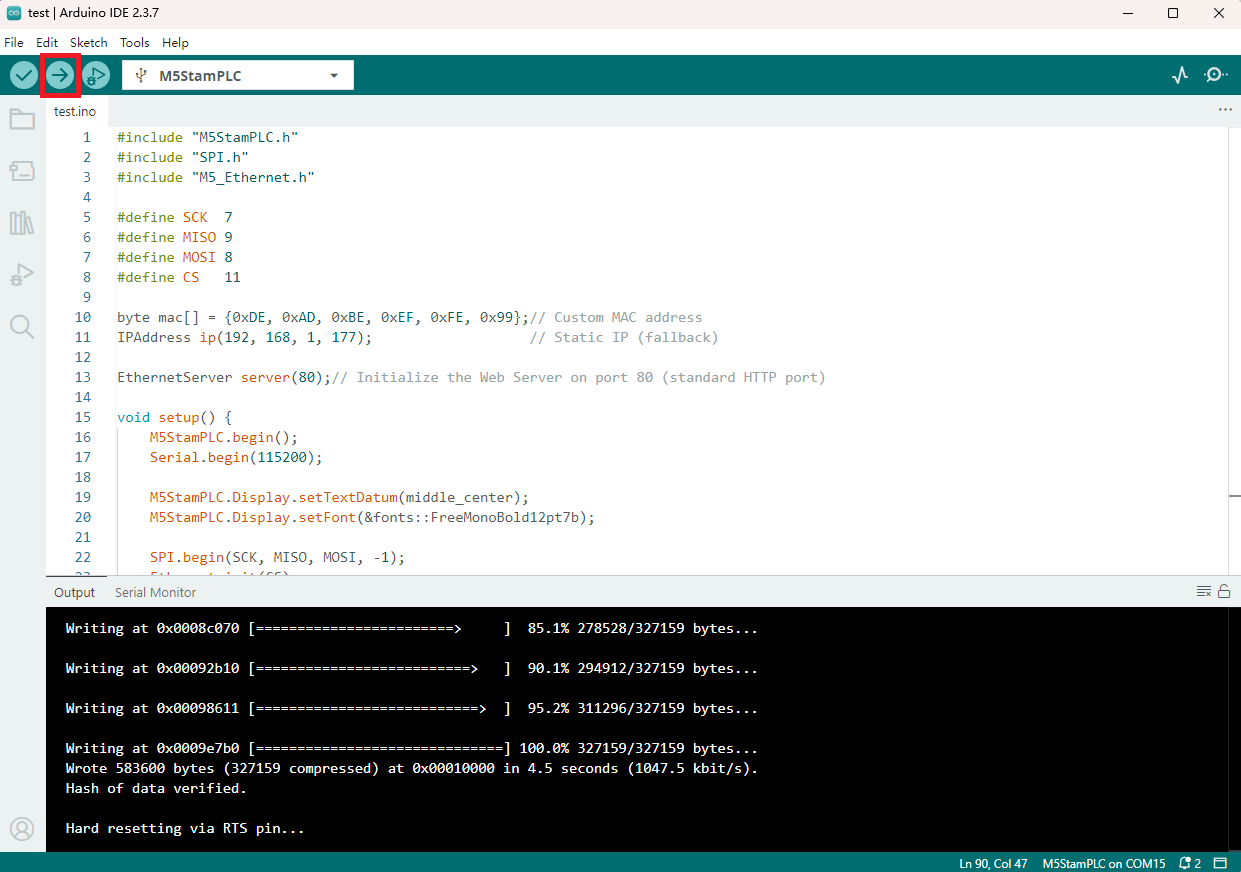
- デバイスポートを選択し、上記のサンプルプログラムのいずれかを貼り付けます。Arduino IDE の左上隅にあるコンパイルおよびアップロードボタンをクリックし、プログラムのコンパイルとデバイスへのアップロードが完了するまで待ちます。