

Arduino入門
2. デバイス&サンプル
3. M5Unified
4. M5GFX
5. 拡張モジュール&サンプル
Unit
Module
Atomic
Tab5
IoT
アクセサリー
StackChan NFC 近場通信
基礎説明
コンパイル要件
- M5Stack ボードマネージャーバージョン >= 3.2.2
- 開発ボード選択 = M5CoreS3
- M5Unified ライブラリバージョン >= 0.2.11
- M5StackChan ライブラリバージョン >= 1.0.0
コアオブジェクト
// NFC protocol layer instances
m5::nfc::NFCLayerA nfc_a{unit};             // NFC-A protocol layer (reader mode)
m5::nfc::EmulationLayerA emu_a{unit};       // NFC-A emulation layer (tag emulation mode)

// Card object
PICC picc{}; // Represents a detected cardMIFARE Classic キー
constexpr Key keyA = DEFAULT_KEY;
constexpr Key keyB = DEFAULT_KEY;
// DEFAULT_KEY is 0xFFFFFFFFFFFF (Default value)リーダー基本ワークフロー
典型的な NFC リーダー操作フローには以下のステップが含まれます:
- 初期化:
M5.begin()とWire.begin() - 検出:
nfc_a.detect()またはnfc_a.detect(piccs)を使用してカードを検出 - 識別:
nfc_a.identify()を使用してカードタイプとメモリレイアウトを確認 - アクティベーション:
nfc_a.reactivate()を使用して完全な通信パラメータを取得 - 認証: MIFARE Classic カードの場合、
mifareClassicAuthenticateA/B()で認証 - 操作: 読み取り、書き込み、または特殊操作を実行
- 非アクティベーション:
nfc_a.deactivate()を使用してカードを解放
カードオブジェクト共通メソッド
| メソッド | 戻り値 | 説明 |
|---|---|---|
picc.isMifareClassic() | bool | Classic1K/4K かどうかを確認 |
picc.isMifareUltralight() | bool | Ultralight シリーズかを確認 |
picc.isMifareDESFire() | bool | DESFire シリーズかを確認 |
picc.isUserBlock(block) | bool | ブロックが利用可能か確認 |
picc.uidAsString() | string | UID を16 進文字列で取得 |
picc.typeAsString() | string | カードタイプ名を取得 |
picc.userAreaSize() | uint16_t | ユーザーエリアサイズを取得 |
picc.totalSize() | uint16_t | カード総容量を取得 |
タグエミュレーション基本概念
タグエミュレーション(Tag Emulation)により、デバイスは NFC カードとして機能でき、他の NFC リーダーが検出して通信できるようになります。これは、様々な NFC カードタイプ(MIFARE Ultralight、NTAG など)をエミュレートする必要があるアプリケーションで一般的に使用されます。
タグエミュレーションの主なステップ:
- PICC オブジェクトを作成: エミュレートする仮想カードを表す
- カードタイプと UID を定義: エミュレートする特定のカードタイプとその一意識別子を選択
- メモリデータを準備: カードメモリ内のデータを設定(NDEF メッセージを含むことも可)
- UID を埋め込む: UID をメモリの指定された位置に正しく書き込む
- エミュレーション開始:
emu_a.begin()を呼び出してエミュレーションを開始 - 状態更新: メインループで
emu_a.update()を呼び出してリーダーのクエリを処理
タグ情報定義
constexpr Type type{Type::MIFARE_Ultralight};  // Select tag type to emulate (e.g., MIFARE_Ultralight or NTAG_213)
constexpr uint8_t uid[] = {0x04, 0x34, 0x56, 0x78, 0x9A, 0xBC, 0xDE};  // 7-byte UID
uint8_t picc_memory[64]{}; // Emulated tag memory buffer (size depends on card type)タグエミュレーション API
エミュレーション操作
| メソッド | 機能 |
|---|---|
picc.emulate(type, uid, uid_len) | エミュレートするカードタイプと UID を設定 |
emu_a.begin(picc, memory, mem_size) | カードとメモリデータでエミュレーション開始 |
emu_a.emulatePICC() | 現在エミュレート中の PICC を取得 |
emu_a.update() | エミュレーション状態を更新(ループで呼出) |
emu_a.state() | 現在のエミュレーション状態を取得 |
状態値
エミュレータには以下のような状態があります:
None(なし)、Off(オフ)、Idle(アイドル)、Ready(準備完了)、Active(活動中)、Halt(停止)
ヘルパー関数
| 関数 | 機能 |
|---|---|
embed_uid(memory, uid) | 7 バイト UID を Ultralight/NTAG メモリレイアウトに埋め込む |
bcc8(data, len, init) | UID 検証用 BCC(ブロックチェックキャラクタ)を計算 |
クイックスキャン識別
本サンプルはNFCカードを高速スキャンして識別する方法を示しています。このプログラムはリーダーの範囲内のカードを継続的に検出し、検出された各カードに対して2 段階の識別プロセスを実行します。まずdetect()で初期分類を行い、次にidentify()で正確な識別を行います。識別成功後、カードのUID、タイプ、ATQA、SAK 等の情報を出力します。これはNFCアプリケーション実装の基本ステップです。
#include <M5StackChan.h>
#include <M5UnitUnified.h>
#include <M5UnitUnifiedNFC.h>
#include <M5Utility.h>
#include <vector>

using namespace m5::nfc::a; // Use NFC-A protocol namespace (ISO 14443-3A)
using namespace m5::nfc::a::mifare; // MIFARE card common operations
using namespace m5::nfc::a::mifare::classic; // MIFARE Classic card specific operations

namespace {
auto& lcd = M5StackChan.Display();
m5::unit::UnitUnified Units; // Unit unified manager instance
m5::unit::UnitNFC unit{};  // NFC Unit instance (I2C interface)
m5::nfc::NFCLayerA nfc_a{unit}; // NFC-A protocol layer instance for ISO 14443-3A cards

// KeyA that can authenticate all blocks
// If it's a different key value, change it
constexpr Key keyA = DEFAULT_KEY;  // Default as 0xFFFFFFFFFFFF
}  // namespace

void setup()
{
    M5StackChan.begin();
    // The screen shall be in landscape mode
    if (lcd.height() > lcd.width()) {
        lcd.setRotation(1);
    }

    bool unit_ready{};// Unit initialization status flag

    // Add NFC Unit to manager and initialize
    unit_ready = Units.add(unit, M5.In_I2C) && Units.begin();
    if (!unit_ready) {
        // Initialization failed: turn screen red and enter infinite loop
        M5_LOGE("Failed to begin");
        lcd.fillScreen(TFT_RED);
        while (true) {
            m5::utility::delay(10000);
        }
    }
    M5_LOGI("M5UnitUnified initialized");
    M5_LOGI("%s", Units.debugInfo().c_str());

    lcd.setFont(&fonts::FreeMonoBold9pt7b);
    lcd.fillScreen(0);
    lcd.printf("Place tag on the top\nand touch screen to detect");
    M5.Log.printf("Place tag on the top and touch screen to detect\n");
}

void loop()
{
    M5StackChan.update();
    Units.update();// Update all registered Units

    if (M5.Touch.getCount() && M5.Touch.getDetail(0).wasClicked()) {
        lcd.fillScreen(0);
        lcd.setCursor(0, 0);
        PICC picc{}; // Create card object
        if (nfc_a.detect(picc)) { // Detect a single card
            // Identify card type and reactivate (get full communication parameters)
            if (nfc_a.identify(picc) && nfc_a.reactivate(picc)) {
                lcd.printf("%s\n%s", picc.uidAsString().c_str(), picc.typeAsString().c_str());
                // Print detailed info: UID, type, user area size, total size
                M5.Log.printf("==== Dump %s %s %u/%u ====\n", picc.uidAsString().c_str(), picc.typeAsString().c_str(),
                              picc.userAreaSize(), picc.totalSize());
                // Dump all card data (needs key for MIFARE Classic, key parameter ignored for other types)
                nfc_a.dump(keyA);  // Need key if MIFARE classic, Ignore key if not MIFARE classic
                nfc_a.deactivate();
            } else {
                lcd.printf("Failed to identify");
                M5_LOGE("Failed to identify/activate %s", picc.uidAsString().c_str());
            }
        } else {
            lcd.printf("PICC NOT exists");
            M5.Log.printf("PICC NOT exists\n");
        }
    }
}上記のコードをメインコントローラーにアップロード後、シリアルモニターを開き、StackChanの上部にNFCタグをかざすと、識別結果が表示されます。
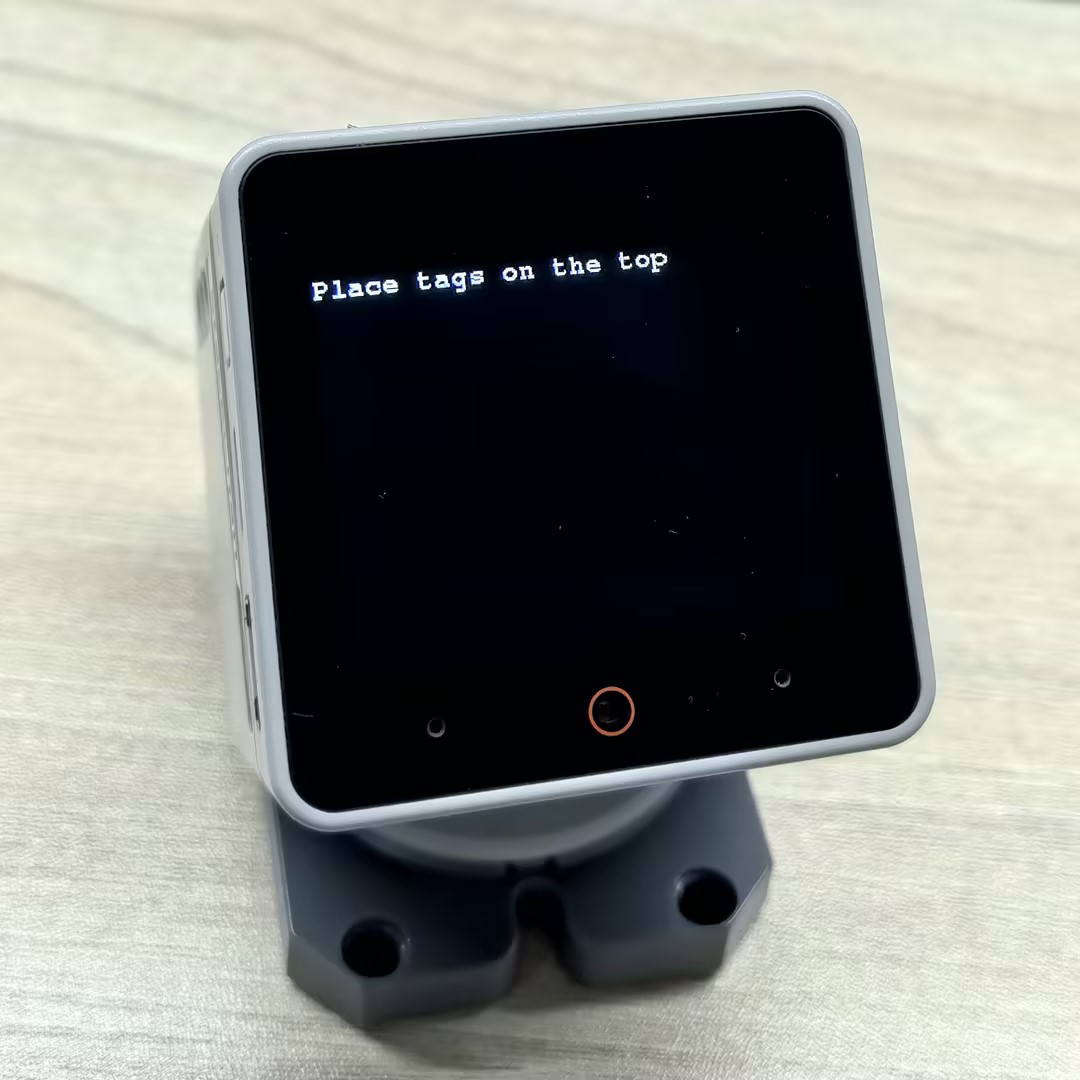
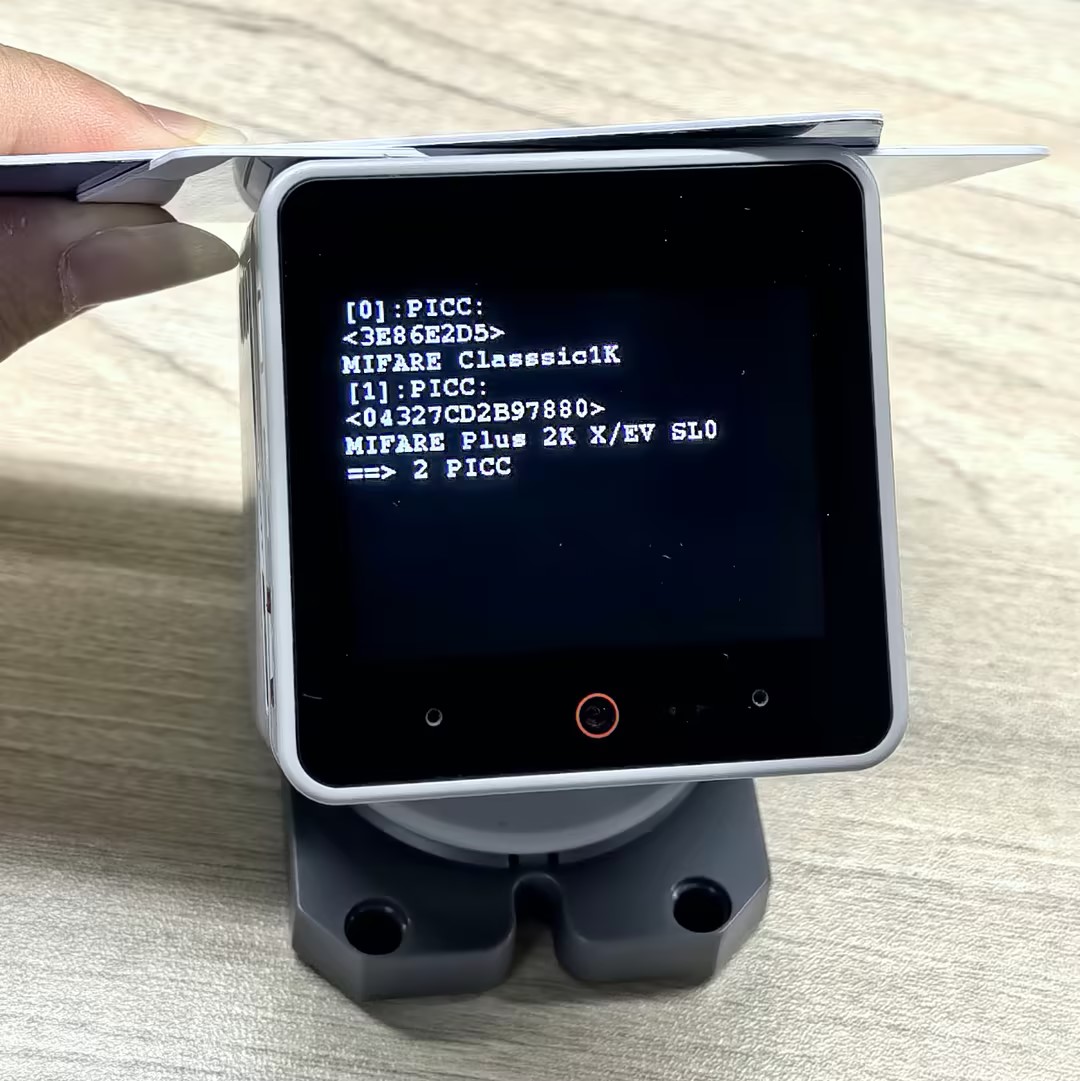
シリアルモニター出力例:
PICC:3E86E2D5 MIFARE Classsic1K 0004/08 752/1024
PICC:04327CD2B97880 MIFARE Plus 2K X/EV SL0 0044/20 1520/2048
==> 2 PICC完全なデータ読み取り
このプロセスでは、スクリーンをタッチするときにカードをStackChanの上部に置く必要があります。プログラムはカードを検出した後、自動的に読み込みを実行し、データをスクリーンとシリアルポートの両方に出力します。読み込みプロセス中に、プログラムは完全なカード識別とアクティベーションを実行します。
#include <M5Unified.h>
#include <M5UnitUnified.h>
#include <M5UnitUnifiedNFC.h>
#include <M5Utility.h>
#include <Wire.h>
#include <vector>

using namespace m5::nfc::a; // NFC-A protocol layer
using namespace m5::nfc::a::mifare; // MIFARE card common operations
using namespace m5::nfc::a::mifare::classic; // MIFARE Classic card specific operations

namespace {
auto& lcd = M5.Display;
m5::unit::UnitUnified Units; // Unit unified manager instance
m5::unit::UnitNFC unit{};  // NFC Unit instance (I2C interface)
m5::nfc::NFCLayerA nfc_a{unit}; // NFC-A protocol layer instance for ISO 14443-3A cards

// KeyA that can authenticate all blocks
// If it's a different key value, change it
constexpr Key keyA = DEFAULT_KEY;  // Default as 0xFFFFFFFFFFFF
}  // namespace

void setup()
{
    M5.begin();

    // The screen shall be in landscape mode
    if (lcd.height() > lcd.width()) {
        lcd.setRotation(1);
    }

    bool unit_ready{};// Unit initialization status flag

    // Add NFC Unit to manager and initialize
    unit_ready = Units.add(unit, M5.In_I2C) && Units.begin();
    if (!unit_ready) {
        M5_LOGE("Failed to begin");
        lcd.fillScreen(TFT_RED);
        while (true) {
            m5::utility::delay(10000);
        }
    }

    M5_LOGI("M5UnitUnified initialized");
    M5_LOGI("%s", Units.debugInfo().c_str());

    lcd.setFont(&fonts::FreeMono9pt7b);
    lcd.fillScreen(0);
    lcd.setCursor(0, 0);
    lcd.printf("Please put the PICC\nand click\nBtnA");
    M5.Log.printf("Please put the PICC and click BtnA\n");
}

void loop()
{
    M5.update();
    Units.update();// Update all registered Units

    if (M5.BtnA.wasClicked()) {
        lcd.fillScreen(0);
        lcd.setCursor(0, 0);
        PICC picc{}; // Create card object
        if (nfc_a.detect(picc)) { // Detect a single card
            // Identify card type and reactivate (get full communication parameters)
            if (nfc_a.identify(picc) && nfc_a.reactivate(picc)) {
                lcd.printf("%s\n%s", picc.uidAsString().c_str(), picc.typeAsString().c_str());
                // Print detailed info: UID, type, user area size, total size
                M5.Log.printf("==== Dump %s %s %u/%u ====\n", picc.uidAsString().c_str(), picc.typeAsString().c_str(),
                              picc.userAreaSize(), picc.totalSize());
                // Dump all card data (needs key for MIFARE Classic, key parameter ignored for other types)
                nfc_a.dump(keyA);  // Need key if MIFARE classic, Ignore key if not MIFARE classic
                nfc_a.deactivate();
            } else {
                lcd.printf("Failed to identify");
                M5_LOGE("Failed to identify/activate %s", picc.uidAsString().c_str());
            }
        } else {
            lcd.printf("PICC NOT exists");
            M5.Log.printf("PICC NOT exists\n");
        }
    }
}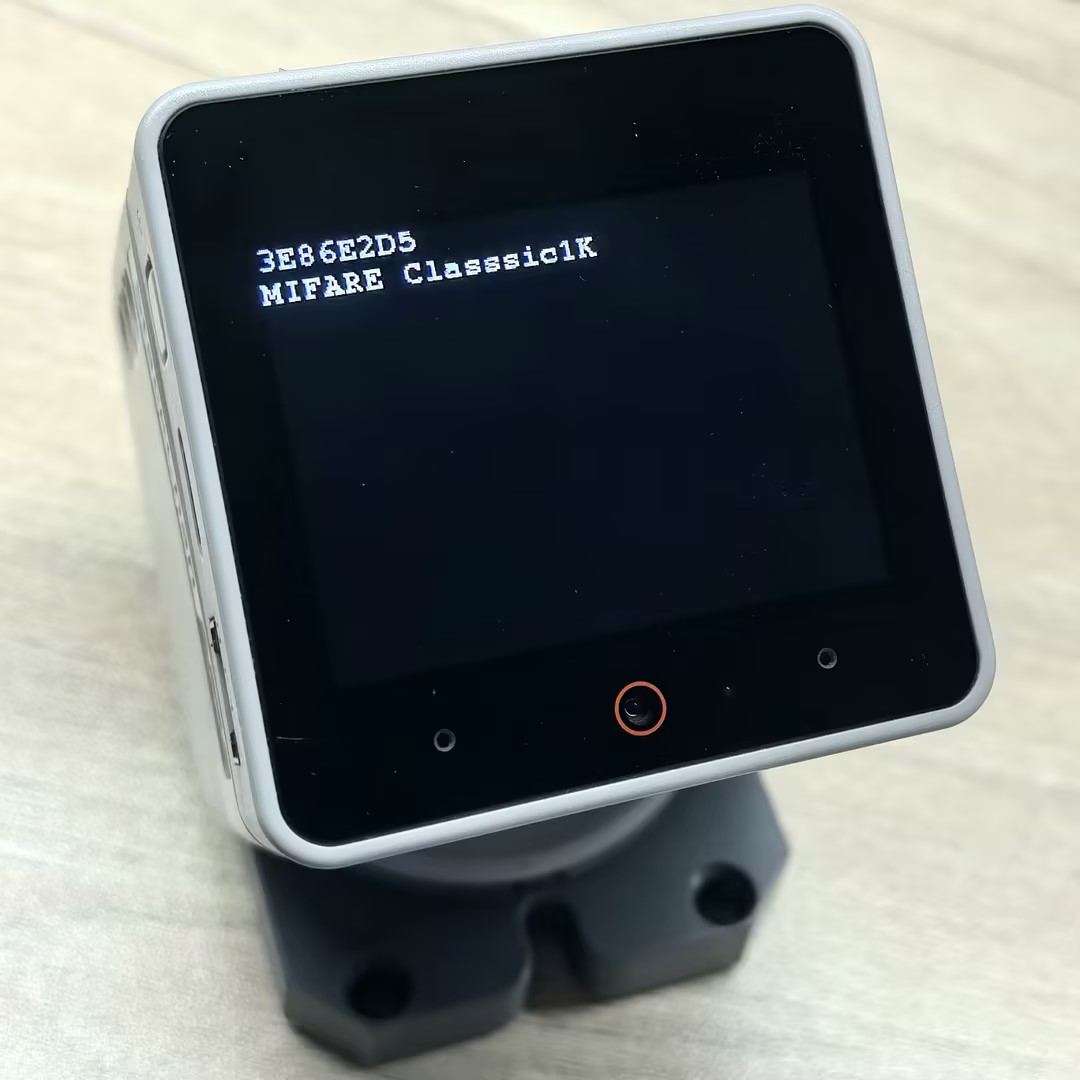
シリアルモニター出力例:
==== Dump 3E86E2D5 MIFARE Classsic1K 752/1024 ====
Sec[Blk]:00 01 02 03 04 05 06 07 08 09 0A 0B 0C 0D 0E 0F [Access]
-----------------------------------------------------------------
00)[000]:3E 86 E2 D5 8F 08 04 00 62 63 64 65 66 67 68 69 [0 0 0]
   [001]:00 00 00 00 00 00 00 00 00 00 00 00 00 00 00 00 [0 0 0]
   [002]:00 00 00 00 00 00 00 00 00 00 00 00 00 00 00 00 [0 0 0]
   [003]:00 00 00 00 00 00 FF 07 80 69 FF FF FF FF FF FF [0 0 1]
01)[004]:00 00 00 00 00 00 00 00 00 00 00 00 00 00 00 00 [0 0 0]
   [005]:00 00 00 00 00 00 00 00 00 00 00 00 00 00 00 00 [0 0 0]
   [006]:00 00 00 00 00 00 00 00 00 00 00 00 00 00 00 00 [0 0 0]
   [007]:00 00 00 00 00 00 FF 07 80 69 FF FF FF FF FF FF [0 0 1]
02)[008]:00 00 00 00 00 00 00 00 00 00 00 00 00 00 00 00 [0 0 0]
   [009]:00 00 00 00 00 00 00 00 00 00 00 00 00 00 00 00 [0 0 0]
   [010]:00 00 00 00 00 00 00 00 00 00 00 00 00 00 00 00 [0 0 0]
   [011]:00 00 00 00 00 00 FF 07 80 69 FF FF FF FF FF FF [0 0 1]
03)[012]:00 00 00 00 00 00 00 00 00 00 00 00 00 00 00 00 [0 0 0]
   [013]:00 00 00 00 00 00 00 00 00 00 00 00 00 00 00 00 [0 0 0]
   [014]:00 00 00 00 00 00 00 00 00 00 00 00 00 00 00 00 [0 0 0]
   [015]:00 00 00 00 00 00 FF 07 80 69 FF FF FF FF FF FF [0 0 1]
04)[016]:00 00 00 00 00 00 00 00 00 00 00 00 00 00 00 00 [0 0 0]
   [017]:00 00 00 00 00 00 00 00 00 00 00 00 00 00 00 00 [0 0 0]
   [018]:00 00 00 00 00 00 00 00 00 00 00 00 00 00 00 00 [0 0 0]
   [019]:00 00 00 00 00 00 FF 07 80 69 FF FF FF FF FF FF [0 0 1]
05)[020]:00 00 00 00 00 00 00 00 00 00 00 00 00 00 00 00 [0 0 0]
   [021]:00 00 00 00 00 00 00 00 00 00 00 00 00 00 00 00 [0 0 0]
   [022]:00 00 00 00 00 00 00 00 00 00 00 00 00 00 00 00 [0 0 0]
   [023]:00 00 00 00 00 00 FF 07 80 69 FF FF FF FF FF FF [0 0 1]
06)[024]:00 00 00 00 00 00 00 00 00 00 00 00 00 00 00 00 [0 0 0]
   [025]:00 00 00 00 00 00 00 00 00 00 00 00 00 00 00 00 [0 0 0]
   [026]:00 00 00 00 00 00 00 00 00 00 00 00 00 00 00 00 [0 0 0]
   [027]:00 00 00 00 00 00 FF 07 80 69 FF FF FF FF FF FF [0 0 1]
07)[028]:00 00 00 00 00 00 00 00 00 00 00 00 00 00 00 00 [0 0 0]
   [029]:00 00 00 00 00 00 00 00 00 00 00 00 00 00 00 00 [0 0 0]
   [030]:00 00 00 00 00 00 00 00 00 00 00 00 00 00 00 00 [0 0 0]
   [031]:00 00 00 00 00 00 FF 07 80 69 FF FF FF FF FF FF [0 0 1]
08)[032]:00 00 00 00 00 00 00 00 00 00 00 00 00 00 00 00 [0 0 0]
   [033]:00 00 00 00 00 00 00 00 00 00 00 00 00 00 00 00 [0 0 0]
   [034]:00 00 00 00 00 00 00 00 00 00 00 00 00 00 00 00 [0 0 0]
   [035]:00 00 00 00 00 00 FF 07 80 69 FF FF FF FF FF FF [0 0 1]
09)[036]:00 00 00 00 00 00 00 00 00 00 00 00 00 00 00 00 [0 0 0]
   [037]:00 00 00 00 00 00 00 00 00 00 00 00 00 00 00 00 [0 0 0]
   [038]:00 00 00 00 00 00 00 00 00 00 00 00 00 00 00 00 [0 0 0]
   [039]:00 00 00 00 00 00 FF 07 80 69 FF FF FF FF FF FF [0 0 1]
10)[040]:00 00 00 00 00 00 00 00 00 00 00 00 00 00 00 00 [0 0 0]
   [041]:00 00 00 00 00 00 00 00 00 00 00 00 00 00 00 00 [0 0 0]
   [042]:00 00 00 00 00 00 00 00 00 00 00 00 00 00 00 00 [0 0 0]
   [043]:00 00 00 00 00 00 FF 07 80 69 FF FF FF FF FF FF [0 0 1]
11)[044]:00 00 00 00 00 00 00 00 00 00 00 00 00 00 00 00 [0 0 0]
   [045]:00 00 00 00 00 00 00 00 00 00 00 00 00 00 00 00 [0 0 0]
   [046]:00 00 00 00 00 00 00 00 00 00 00 00 00 00 00 00 [0 0 0]
   [047]:00 00 00 00 00 00 FF 07 80 69 FF FF FF FF FF FF [0 0 1]
12)[048]:00 00 00 00 00 00 00 00 00 00 00 00 00 00 00 00 [0 0 0]
   [049]:00 00 00 00 00 00 00 00 00 00 00 00 00 00 00 00 [0 0 0]
   [050]:00 00 00 00 00 00 00 00 00 00 00 00 00 00 00 00 [0 0 0]
   [051]:00 00 00 00 00 00 FF 07 80 69 FF FF FF FF FF FF [0 0 1]
13)[052]:00 00 00 00 00 00 00 00 00 00 00 00 00 00 00 00 [0 0 0]
   [053]:00 00 00 00 00 00 00 00 00 00 00 00 00 00 00 00 [0 0 0]
   [054]:00 00 00 00 00 00 00 00 00 00 00 00 00 00 00 00 [0 0 0]
   [055]:00 00 00 00 00 00 FF 07 80 69 FF FF FF FF FF FF [0 0 1]
14)[056]:00 00 00 00 00 00 00 00 00 00 00 00 00 00 00 00 [0 0 0]
   [057]:00 00 00 00 00 00 00 00 00 00 00 00 00 00 00 00 [0 0 0]
   [058]:00 00 00 00 00 00 00 00 00 00 00 00 00 00 00 00 [0 0 0]
   [059]:00 00 00 00 00 00 FF 07 80 69 FF FF FF FF FF FF [0 0 1]
15)[060]:00 00 00 00 00 00 00 00 00 00 00 00 00 00 00 00 [0 0 0]
   [061]:00 00 00 00 00 00 00 00 00 00 00 00 00 00 00 00 [0 0 0]
   [062]:00 00 00 00 00 00 00 00 00 00 00 00 00 00 00 00 [0 0 0]
[063]:00 00 00 00 00 00 FF 07 80 69 FF FF FF FF FF FF [0 0 1]タグエミュレーション
本サンプルはNFCタグエミュレーション機能を示しています。スマートフォンなどの他のNFCリーダーがStackChanの上に近づくと、エミュレートされたNFCタグを検出して読み込むことができます。プログラムは2つの一般的なタグカードタイプ (MIFARE UltralightとNTAG 213) のエミュレーションをサポートし、各タイプに対応するUID とメモリデータ (NDEFメッセージを含む) があります。
重要なポイント:
- エミュレーション中、メインループで
update()を継続的に呼び出す必要があります。 - 状態の変化 (Off→Idle→Ready→Active→Halt) がスクリーンインジケーターでリアルタイムに表示されます。
- カードデータには、複数のコンテンツタイプ (URI、テキスト、画像など) をサポートするNDEFメッセージを含めることができます。
#include <M5StackChan.h>
#include <M5UnitUnified.h>
#include <M5UnitUnifiedNFC.h>
#include <M5Utility.h>
#include <vector>

using namespace m5::nfc; // NFC common namespace
using namespace m5::nfc::a; // Use NFC-A protocol namespace (ISO 14443-3A)
using namespace m5::nfc::a::mifare; // MIFARE card common operations
using namespace m5::nfc::a::mifare::classic; // MIFARE Classic card specific operations

namespace {
auto& lcd = M5StackChan.Display();
m5::unit::UnitUnified Units; // Unit unified manager instance
m5::unit::UnitNFC unit{};  // NFC Unit instance (I2C interface)
m5::nfc::EmulationLayerA emu_a{unit}; // Create NFC-A emulation layer instance to emulate the device as an NFC tag

PICC picc{}; // Card object to emulate

// ===== Select the tag type to emulate =====
#define EMU_MIFARE_ULTRALIGHT // MIFARE Ultralight tag
// #define EMU_NTAG213  // NTAG213 tag

// ===== MIFARE Ultralight emulation data =====
#if defined(EMU_MIFARE_ULTRALIGHT)
constexpr Type type{Type::MIFARE_Ultralight};
constexpr uint8_t uid[] = {0x04, 0x34, 0x56, 0x78, 0x9A, 0xBC, 0xDE};// 7-byte UID (Ultralight/NTAG series uses 7-byte UID)
// Emulated tag memory data (contains NDEF message: URL https://m5stack.com/ and text "Hello M5Stack")
uint8_t picc_memory[]   = {
    0x00, 0x00, 0x00, 0x00,  // Page 0: UID bytes (to be filled by embed_uid)
    0x00, 0x00, 0x00, 0x00,  // Page 1: UID bytes (continued)
    0x00, 0xA3, 0x00, 0x00,  // Page 2: Internal data, lock bits
    0xE1, 0x10, 0x06, 0x00,  // Page 3: CC (Capability Container) - NDEF format identifier
    0x03, 0x25, 0x91, 0x01,  // Page 4: NDEF TLV start
    0x0D, 0x55, 0x04, 0x6D,  // Page 5: URI record (https://)
    0x35, 0x73, 0x74, 0x61,  // Page 6: "5sta"
    0x63, 0x6B, 0x2E, 0x63,  // Page 7: "ck.c"
    0x6F, 0x6D, 0x2F, 0x51,  // Page 8: "om/" + text record start
    0x01, 0x10, 0x54, 0x02,  // Page 9: Text record header
    0x65, 0x6E, 0x48, 0x65,  // Page 10: "enHe" (language code "en" + "He")
    0x6C, 0x6C, 0x6F, 0x20,  // Page 11: "llo "
    0x4D, 0x35, 0x53, 0x74,  // Page 12: "M5St"
    0x61, 0x63, 0x6B, 0xFE,  // Page 13: "ack" + NDEF terminator 0xFE
    0x44, 0x45, 0x46, 0x00,  // Page 14: Padding data
    0x44, 0x45, 0x46, 0x00,  // Page 15: Padding data
};
// ===== NTAG213 emulation data =====
#elif defined(EMU_NTAG213)
constexpr Type type{Type::NTAG_213};
constexpr uint8_t uid[] = {0x99, 0x88, 0x77, 0x66, 0x55, 0x44, 0x33};// 7-byte UID
// Emulated tag memory data (contains multilingual NDEF message: URL + Chinese/English/Japanese text)
uint8_t picc_memory[]   = {
    0x00, 0x00, 0x00, 0x00,  // Page 0: UID bytes
    0x00, 0x00, 0x00, 0x00,  // Page 1: UID bytes (continued)
    0x00, 0x48, 0x00, 0x00,  // Page 2: Internal data, lock bits
    0xE1, 0x10, 0x12, 0x00,  // Page 3: CC (Capability Container)
    0x01, 0x03, 0xA0, 0x0C,  // Page 4: NDEF capability data
    0x34, 0x03, 0x58, 0x91,  // Page 5: NDEF TLV + message start
    0x01, 0x0D, 0x55, 0x04,  // Page 6: URI record header (https://)
    0x6D, 0x35, 0x73, 0x74,  // Page 7: "m5st"
    0x61, 0x63, 0x6B, 0x2E,  // Page 8: "ack."
    0x63, 0x6F, 0x6D, 0x2F,  // Page 9: "com/"
    0x11, 0x01, 0x11, 0x54,  // Page 10: Chinese text record header
    0x02, 0x7A, 0x68, 0xE4,  // Page 11: Language code "zh" + UTF-8 Chinese start
    0xBD, 0xA0, 0xE5, 0xA5,  // Page 12: UTF-8 encoding of "你好"
    0xBD, 0x20, 0x4D, 0x35,  // Page 13: " M5"
    0x53, 0x74, 0x61, 0x63,  // Page 14: "Stac"
    0x6B, 0x11, 0x01, 0x10,  // Page 15: "k" + English text record header
    0x54, 0x02, 0x65, 0x6E,  // Page 16: Language code "en"
    0x48, 0x65, 0x6C, 0x6C,  // Page 17: "Hell"
    0x6F, 0x20, 0x4D, 0x35,  // Page 18: "o M5"
    0x53, 0x74, 0x61, 0x63,  // Page 19: "Stac"
    0x6B, 0x51, 0x01, 0x1A,  // Page 20: "k" + Japanese text record header
    0x54, 0x02, 0x6A, 0x61,  // Page 21: Language code "ja"
    0xE3, 0x81, 0x93, 0xE3,  // Page 22: "こ" UTF-8
    0x82, 0x93, 0xE3, 0x81,  // Page 23: "ん" + start of "に"
    0xAB, 0xE3, 0x81, 0xA1,  // Page 24: "に" + "ち"
    0xE3, 0x81, 0xAF, 0x20,  // Page 25: "は "
    0x4D, 0x35, 0x53, 0x74,  // Page 26: "M5St"
    0x61, 0x63, 0x6B, 0xFE,  // Page 27: "ack" + NDEF terminator
    0x00, 0x00, 0x00, 0x00,  // Pages 28-39: Free user data area
    0x00, 0x00, 0x00, 0x00,  //
    0x00, 0x00, 0x00, 0x00,  //
    0x00, 0x00, 0x00, 0x00,  //
    0x00, 0x00, 0x00, 0x00,  //
    0x00, 0x00, 0x00, 0x00,  //
    0x00, 0x00, 0x00, 0x00,  //
    0x00, 0x00, 0x00, 0x00,  //
    0x00, 0x00, 0x00, 0x00,  //
    0x00, 0x00, 0x00, 0x00,  //
    0x00, 0x00, 0x00, 0x00,  //
    0x00, 0x00, 0x00, 0x00,  //
    0x00, 0x00, 0x00, 0xBD,  // Page 40: NTAG213 configuration page
    0x02, 0x00, 0x00, 0xFF,  // Page 41: Configuration page (continued)
    0x00, 0x00, 0x00, 0x00,  // Page 42: Password protection
    0x00, 0x00, 0x00, 0x00,  // Page 43: Password acknowledgment
    0x00, 0x00, 0x00, 0x00,  // Page 44: Reserved area
};
#else
#error "Choose the target to emulate"
#endif

/**
 * @brief BCC (ブロックチェックキャラクター) を計算 - バイト列のXOR操作
 * @param p    入力データへのポインタ
 * @param len  データ長
 * @param init 初期値 (デフォルト: 0)
 * @return     BCC チェック値
 */
uint8_t bcc8(const uint8_t* p, const uint8_t len, const uint8_t init = 0)
{
    uint8_t v = init;
    for (uint_fast8_t i = 0; i < len; ++i) {
        v ^= p[i];
    }
    return v;
}

/**
 * @brief 7バイトUIDをウルトラライト/NTAGメモリレイアウトに正しく埋め込む
 *
 * ウルトラライト/NTAGメモリ内のUID保存フォーマット:
 *   ページ 0: [UID0, UID1, UID2, BCC0]  BCC0 = CT ^ UID0 ^ UID1 ^ UID2
 *   ページ 1: [UID3, UID4, UID5, UID6]
 *   ページ 2 プレフィックス: [BCC1]  BCC1 = UID3 ^ UID4 ^ UID5 ^ UID6
 *
 * @param mem  ターゲットメモリバッファー (最低9バイト)
 * @param uid  7バイトUIDデータ
 */
void embed_uid(uint8_t mem[9], const uint8_t uid[7])
{
    memcpy(mem, uid, 3);
    mem[3] = bcc8(uid, 3, 0x88 /* CT */);
    memcpy(mem + 4, uid + 3, 4);
    mem[8] = bcc8(uid + 3, 4);
}

// Color table corresponding to emulation states
constexpr uint16_t color_table[] = {
    //  None,      Off,     Idle,     Ready,   Active,      Halt };
    TFT_BLACK, TFT_RED, TFT_BLUE, TFT_YELLOW, TFT_GREEN, TFT_MAGENTA};
// Character identifiers for emulation states
//                                 None,  Off,  Idle, Ready, Active, Halt
constexpr const char* state_table[] = {"-", "O", "I", "R", "A", "H"};
}  // namespace

void setup()
{
    M5StackChan.begin();
    Serial.begin(115200);
    // The screen shall be in landscape mode
    if (lcd.height() > lcd.width()) {
        lcd.setRotation(1);
    }

    // Emulation settings
    auto cfg      = unit.config();
    cfg.emulation = true;
    cfg.mode      = NFC::A;
    unit.config(cfg);

    bool unit_ready{};// Unit initialization status flag

    // Add NFC Unit to manager and initialize
    unit_ready = Units.add(unit, M5.In_I2C) && Units.begin();
    if (!unit_ready) {
        // Initialization failed: turn screen red and enter infinite loop
        M5_LOGE("Failed to begin");
        lcd.fillScreen(TFT_RED);
        while (true) {
            m5::utility::delay(10000);
        }
    }
    M5_LOGI("M5UnitUnified initialized");
    M5_LOGI("%s", Units.debugInfo().c_str());

    lcd.setFont(&fonts::FreeMonoBold9pt7b);
    lcd.startWrite();
    lcd.fillScreen(TFT_RED);
    // Initialize emulation
    if (picc.emulate(type, uid, sizeof(uid))) {// Set card type and UID to emulate
        embed_uid(picc_memory, uid);// Embed UID into emulation memory
        // Start emulation layer with card object and memory data
        if (emu_a.begin(picc, picc_memory, sizeof(picc_memory))) {
            lcd.fillScreen(TFT_DARKGREEN);
            lcd.setTextColor(TFT_WHITE, TFT_DARKGREEN);
            lcd.setCursor(0, 16);
            // Get and display the emulated PICC info
            const auto& e_picc = emu_a.emulatePICC();
            Serial.printf("Emulation:%s %s ATQA:%04X SAK:%u\n", e_picc.typeAsString().c_str(),
                          e_picc.uidAsString().c_str(), e_picc.atqa, e_picc.sak);
            lcd.printf("%s\n%s\nATQA:%04X\nSAK:%u ", e_picc.typeAsString().c_str(), e_picc.uidAsString().c_str(),
                       e_picc.atqa, e_picc.sak);
        }
    }
    lcd.fillRect(0, 0, 32, 16, color_table[0]);
    lcd.drawString(state_table[0], 0, 0);
    lcd.endWrite();
}

void loop()
{
    M5StackChan.update();
    Units.update();// Update all registered Units
    emu_a.update();  // Update emulation layer state (MUST be called in loop)

    // Monitor emulation state changes and update screen indicator
    static EmulationLayerA::State latest{}; // Record previous state
    auto state = emu_a.state(); // Get current emulation state
    if (latest != state) {
        latest = state;
        lcd.startWrite();
        // Update top-left color block and text based on state
        lcd.fillRect(0, 0, 32, 16, color_table[m5::stl::to_underlying(state)]);
        lcd.drawString(state_table[m5::stl::to_underlying(state)], 0, 0);
        Serial.println(state_table[m5::stl::to_underlying(state)]);
        lcd.endWrite();
    }
}メインコントローラーに上記のコードをアップロード後、StackChanの上部はNFCタグとしてエミュレートされます。スマートフォンまたは他のNFCリーダーがそれに近づくと、NFCタグを検出して、保存されているNDEFメッセージコンテンツ (URL + テキスト) を読み込むことができます。シリアルモニターはエミュレートされたタグのタイプ、UID、ATQA、およびSAK 情報を出力します。メインコントローラー画面の左上隅には、状態インジケーター (Idle/Ready/Active など) が表示されます。
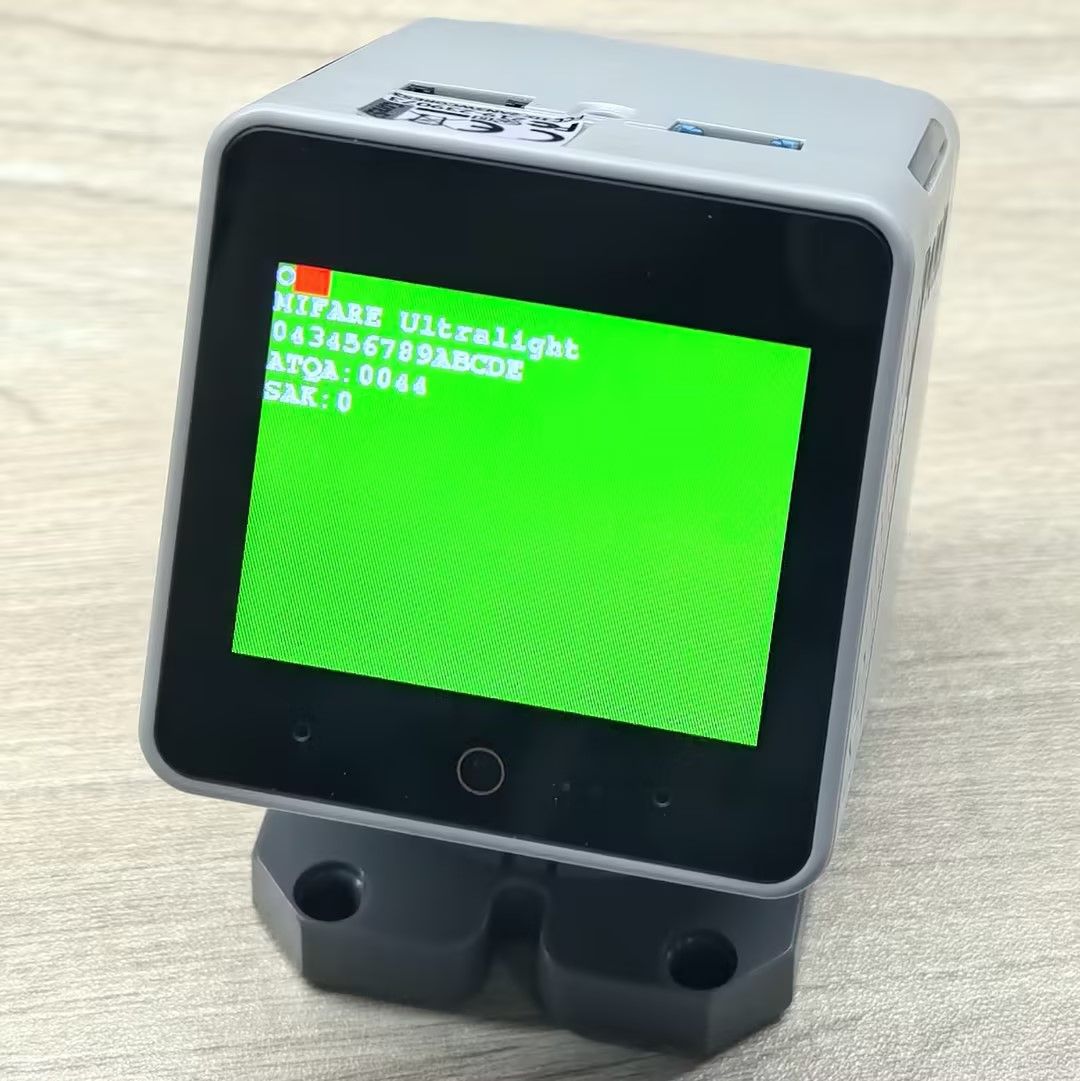
スマートフォンで読み込んだタグ情報の例:

シリアルモニター出力例:
- MIFAREウルトラライト
Emulation:MIFARE Ultralight 043456789ABCDE ATQA:0044 SAK:0
O
I
R
A
H
R
A
H
R
A
O- NTAG 213
Emulation:NTAG 213 99887766554433 ATQA:0044 SAK:0
O
I
R
A
H
R
A
H
R
A
Oカードの直接読み書き
本サンプルはNFCカードの直接読み書き方法を示しており、クロスブロック連続読み書きとシングルブロック読み書きの両方の方法を含みます。
#include <M5StackChan.h>
#include <M5UnitUnified.h>
#include <M5UnitUnifiedNFC.h>
#include <M5Utility.h>
#include <vector>

using namespace m5::nfc; // NFC common namespace
using namespace m5::nfc::a; // Use NFC-A protocol namespace (ISO 14443-3A)
using namespace m5::nfc::a::mifare; // MIFARE card common operations

namespace {
auto& lcd = M5StackChan.Display();
m5::unit::UnitUnified Units; // Unit unified manager instance
m5::unit::UnitNFC unit{};  // NFC Unit instance (I2C interface)
m5::nfc::NFCLayerA nfc_a{unit};// NFC-A protocol layer instance

// Classic default KeyA (0xFFFFFFFFFFFF)
// If your card uses a different key, change it here
constexpr classic::Key keyA = classic::DEFAULT_KEY;

// Test message strings (selected based on card capacity)
constexpr char long_msg[]  = "This is a sample message buffer used for testing NFC page writes and data integrity verification purposes.";// For large-capacity cards (user area >= 120 bytes)
constexpr char short_msg[] = "0123456789ABCDEFGHIJ";// For small-capacity cards (user area < 120 bytes)

/**
 * @brief クロスブロック連続読み書きテスト (クリックでトリガー)
 *
 * 指定されたブロックから開始して、カードにテストメッセージを書き込み、読み戻してデータ整合性を確認し、
 * その後ゼロを書き込むことでクリアします。
 * クロスブロック/クロスセクター操作を自動的に処理する高レベルread()/write() APIを使用します。
 *
 * フロー: Write -> Dump -> Read back & Verify -> Clear -> Dump
 *
 * @param sblock  書き込むスターティングブロック番号
 * @param msg     書き込むテストメッセージ文字列
 * @return すべての操作 (write、verify、clear) が成功した場合、true
 */
bool read_write(const uint8_t sblock, const char* msg)
{
    auto len = strlen(msg);
    uint8_t buf[(strlen(msg) + 15) / 16 * 16]{};  // Round up to 16-byte alignment (Classic block size)
    uint16_t rx_len = sizeof(buf);

    // Write test message to card
    M5.Log.printf("================================ WRITE block:%u len:%zu\n", sblock, sizeof(buf));
    if (!nfc_a.write(sblock, (const uint8_t*)msg, len, keyA)) {
        M5_LOGE("Failed to write block %u", sblock);
        return false;
    }
    lcd.fillScreen(TFT_ORANGE);

    // Dump written data for visual confirmation
    nfc_a.mifareClassicAuthenticateA(classic::get_sector_trailer_block(sblock), keyA);// Authenticate sector before dump
    nfc_a.dump(sblock);

    // Read back and verify data integrity
    if (!nfc_a.read(buf, rx_len, sblock, keyA)) {
        M5_LOGE("Failed to read");
        return false;
    }
    lcd.fillScreen(TFT_BLUE);

    bool verify_ok = (memcmp(buf, msg, len) == 0);// Compare read data with original message
    M5.Log.printf("================================ VERIFY:%s\n", verify_ok ? "OK" : "NG");
    if (!verify_ok) {
        M5_LOGE("VERIFY NG!!");
        m5::utility::log::dump(buf, rx_len, false);// Dump read data for debugging
    }

    // Clear by writing all zeros
    memset(buf, 0, sizeof(buf));
    lcd.fillScreen(TFT_MAGENTA);
    if (!nfc_a.write(sblock, buf, sizeof(buf), keyA)) {
        M5_LOGE("Failed to clear");
        return false;
    }
    M5.Log.printf("================================ CLEAR\n");

    // Dump cleared data for visual confirmation
    nfc_a.mifareClassicAuthenticateA(classic::get_sector_trailer_block(sblock), keyA);
    nfc_a.dump(sblock);

    return true;
}

/**
 * @brief シングルブロック読み書きテスト
 *
 * 低レベルread16()/write16() APIを使用して、固定テスト文字列を単一の16バイトブロックに書き込み、
 * 読み戻してデータ整合性を確認し、その後クリアします。
 * read_write()とは異なり、クロスセクター処理なしで正確に1ブロックで動作します。
 *
 * フロー: Authenticate -> Dump before -> Write -> Dump after -> Read & Verify -> Clear -> Dump
 *
 * @param block  読み書きするブロック番号 (セクタートレーラーブロック以外である必要があります)
 */
void read_write_single_block(const uint8_t block)
{
    constexpr char msg[] = "M5Unit-RFID";// Fixed test message (fits within 16-byte block)

    // Authenticate with KeyA before any read/write operation
    if (!nfc_a.mifareClassicAuthenticateA(block, keyA)) {
        M5_LOGE("Failed to AuthA");
        return;
    }

    // Dump block content before write
    M5.Log.printf("Before[%u] ----\n", block);
    nfc_a.dump(block);

    // Write test message to the block
    M5.Log.printf("Write\n");
    if (!nfc_a.write16(block, (const uint8_t*)msg, sizeof(msg))) {
        M5_LOGE("Failed to write");
        return;
    }

    // Dump block content after write
    M5.Log.printf("After[%u] ----\n", block);
    nfc_a.dump(block);

    // Read back and verify data integrity
    uint8_t rbuf[16]{};
    if (!nfc_a.read16(rbuf, block)) {
        M5_LOGE("Failed to read");
        return;
    }
    bool verify = (std::memcmp(rbuf, (const uint8_t*)msg, sizeof(msg)) == 0);// Compare read data with original
    M5.Log.printf("Verify %s\n", verify ? "OK" : "NG");

    // Clear block by writing minimal zero data (library pads to 16 bytes)
    M5.Log.printf("Clear\n");
    uint8_t c[1]{};
    if (!nfc_a.write16(block, c, sizeof(c))) {
        M5_LOGE("Failed to write");
        return;
    }

    // Dump block content after clear
    nfc_a.dump(block);
}

}  // namespace

void setup()
{
    M5StackChan.begin();
    Serial.begin(115200);
    // The screen shall be in landscape mode
    if (lcd.height() > lcd.width()) {
        lcd.setRotation(1);
    }

    bool unit_ready{};// Unit initialization status flag

    // Add NFC Unit to manager and initialize
    unit_ready = Units.add(unit, M5.In_I2C) && Units.begin();
    if (!unit_ready) {
        // Initialization failed: turn screen red and enter infinite loop
        M5_LOGE("Failed to begin");
        lcd.fillScreen(TFT_RED);
        while (true) {
            m5::utility::delay(10000);
        }
    }
    M5_LOGI("M5UnitUnified initialized");
    M5_LOGI("%s", Units.debugInfo().c_str());

    lcd.setFont(&fonts::FreeMonoBold9pt7b);
    lcd.setCursor(0, 0);
    lcd.printf("Put Classic card\nand touch/hold screen");
    M5.Log.printf("Put Classic card and touch/hold screen\n");
}

void loop()
{
    M5StackChan.update();
    Units.update();// Update all registered Units

    bool clicked = M5.Touch.getDetail().wasClicked();  // For cross-block read/write test
    bool held    = M5.Touch.getDetail().wasHold();     // For single block read/write test

    if (clicked || held) {
        PICC picc;
        if (nfc_a.detect(picc)) {
            lcd.fillScreen(TFT_DARKGREEN);

            if (nfc_a.identify(picc) && nfc_a.reactivate(picc)) {
                // Print card information: UID, type, user area size, total size
                M5.Log.printf("PICC:%s %s %u/%u\n",
                              picc.uidAsString().c_str(),
                              picc.typeAsString().c_str(),
                              picc.userAreaSize(),
                              picc.totalSize());

                // Only process MIFARE Classic cards, skip all other types
                if (!picc.isMifareClassic()) {
                    M5.Log.printf("Not a MIFARE Classic card, skipped\n");
                } else if (clicked) {
                    // Cross-block continuous read/write test
                    M5.Speaker.tone(2000, 30);
                    // Select message based on card capacity
                    const char* msg = (picc.userAreaSize() >= 120) ? long_msg : short_msg;
                    bool ret = read_write(picc.firstUserBlock(), msg);// Start from first user block
                    lcd.fillScreen(ret ? TFT_BLACK : TFT_RED);// Black = success, Red = failure

                } else if (held) {
                    // Single block read/write test
                    M5.Speaker.tone(4000, 30);
                    // Use second-to-last block (avoid sector trailer which contains keys and access bits)
                    read_write_single_block(picc.blocks - 2);
                }

                nfc_a.deactivate();// Release card communication
            } else {
                M5_LOGE("Failed to identify/activate");
            }
        } else {
            M5.Log.printf("PICC NOT detected\n");
        }

        lcd.setCursor(0, 0);
        lcd.printf("Put Classic card\nand touch/hold screen");
        M5.Log.printf("Put Classic card and touch/hold screen\n");
    }
}シリアルモニター出力例:
- クリック (クロスブロック読み書きテスト):
PICC:3E86E2D5 MIFARE Classsic1K 752/1024
================================ WRITE block:1 len:112
00)[000]:3E 86 E2 D5 8F 08 04 00 62 63 64 65 66 67 68 69 [0 0 0]
   [001]:54 68 69 73 20 69 73 20 61 20 73 61 6D 70 6C 65 [0 0 0]
   [002]:20 6D 65 73 73 61 67 65 20 62 75 66 66 65 72 20 [0 0 0]
   [003]:00 00 00 00 00 00 FF 07 80 69 FF FF FF FF FF FF [0 0 1]
================================ VERIFY:OK
================================ CLEAR
00)[000]:3E 86 E2 D5 8F 08 04 00 62 63 64 65 66 67 68 69 [0 0 0]
   [001]:00 00 00 00 00 00 00 00 00 00 00 00 00 00 00 00 [0 0 0]
   [002]:00 00 00 00 00 00 00 00 00 00 00 00 00 00 00 00 [0 0 0]
[003]:00 00 00 00 00 00 FF 07 80 69 FF FF FF FF FF FF [0 0 1]- ホールド (シングルブロック読み書きテスト):
PICC:3E86E2D5 MIFARE Classsic1K 752/1024
Before[62] ----
15)[060]:00 00 00 00 00 00 00 00 00 00 00 00 00 00 00 00 [0 0 0]
   [061]:00 00 00 00 00 00 00 00 00 00 00 00 00 00 00 00 [0 0 0]
   [062]:00 00 00 00 00 00 00 00 00 00 00 00 00 00 00 00 [0 0 0]
   [063]:00 00 00 00 00 00 FF 07 80 69 FF FF FF FF FF FF [0 0 1]
Write
After[62] ----
15)[060]:00 00 00 00 00 00 00 00 00 00 00 00 00 00 00 00 [0 0 0]
   [061]:00 00 00 00 00 00 00 00 00 00 00 00 00 00 00 00 [0 0 0]
   [062]:4D 35 55 6E 69 74 2D 52 46 49 44 00 00 00 00 00 [0 0 0]
   [063]:00 00 00 00 00 00 FF 07 80 69 FF FF FF FF FF FF [0 0 1]
Verify OK
Clear
15)[060]:00 00 00 00 00 00 00 00 00 00 00 00 00 00 00 00 [0 0 0]
   [061]:00 00 00 00 00 00 00 00 00 00 00 00 00 00 00 00 [0 0 0]
   [062]:00 00 00 00 00 00 00 00 00 00 00 00 00 00 00 00 [0 0 0]
[063]:00 00 00 00 00 00 FF 07 80 69 FF FF FF FF FF FF [0 0 1]NDEF 形式のカード読み書き
本サンプルはStackChanを使用してNDEF 形式のNFCタグを読み書きする方法を示しており、以下の機能を含みます。
- NDEF 形式のURLおよびテキストを含むマルチレコードメッセージを書き込む
- タグからNDEFメッセージを読み込んで、表示されたコンテンツを解析する
- 組み込みPNGイメージデータを使用してNDEFメディアレコードを書き込む
- 異なる容量のタグのメッセージコンテンツを適応させる (ユーザー領域サイズに基づいてテキスト長を選択)
#include <M5StackChan.h>
#include <M5UnitUnified.h>
#include <M5UnitUnifiedNFC.h>
#include <M5Utility.h>
#include <algorithm>
#include <vector>

using namespace m5::nfc; // NFC common namespace
using namespace m5::nfc::a; // Use NFC-A protocol namespace (ISO 14443-3A)
using namespace m5::nfc::a::mifare; // MIFARE card common operations
using namespace m5::nfc::ndef; // NDEF (NFC Data Exchange Format)

namespace {
auto& lcd = M5StackChan.Display();
m5::unit::UnitUnified Units; // Unit unified manager instance
m5::unit::UnitNFC unit{};  // NFC Unit instance (I2C interface)
m5::nfc::NFCLayerA nfc_a{unit};// NFC-A protocol layer instance

// PNG image binary data (64x64 pixels, used for writing to NDEF record)
constexpr uint8_t poji_64_png[] = {
    0x89, 0x50, 0x4e, 0x47, 0x0d, 0x0a, 0x1a, 0x0a, 0x00, 0x00, 0x00, 0x0d, 0x49, 0x48, 0x44, 0x52, 0x00, 0x00, 0x00,
    0x40, 0x00, 0x00, 0x00, 0x40, 0x01, 0x00, 0x00, 0x00, 0x00, 0x82, 0x12, 0x4c, 0x73, 0x00, 0x00, 0x00, 0x02, 0x62,
    0x4b, 0x47, 0x44, 0x00, 0x01, 0xdd, 0x8a, 0x13, 0xa4, 0x00, 0x00, 0x00, 0x09, 0x70, 0x48, 0x59, 0x73, 0x00, 0x00,
    0x00, 0x48, 0x00, 0x00, 0x00, 0x48, 0x00, 0x46, 0xc9, 0x6b, 0x3e, 0x00, 0x00, 0x00, 0x07, 0x74, 0x49, 0x4d, 0x45,
    0x07, 0xe8, 0x0b, 0x16, 0x08, 0x12, 0x36, 0x8d, 0x3c, 0xbe, 0xef, 0x00, 0x00, 0x00, 0x77, 0x74, 0x45, 0x58, 0x74,
    0x52, 0x61, 0x77, 0x20, 0x70, 0x72, 0x6f, 0x66, 0x69, 0x6c, 0x65, 0x20, 0x74, 0x79, 0x70, 0x65, 0x20, 0x38, 0x62,
    0x69, 0x6d, 0x00, 0x0a, 0x38, 0x62, 0x69, 0x6d, 0x0a, 0x20, 0x20, 0x20, 0x20, 0x20, 0x20, 0x34, 0x30, 0x0a, 0x33,
    0x38, 0x34, 0x32, 0x34, 0x39, 0x34, 0x64, 0x30, 0x34, 0x30, 0x34, 0x30, 0x30, 0x30, 0x30, 0x30, 0x30, 0x30, 0x30,
    0x30, 0x30, 0x30, 0x30, 0x33, 0x38, 0x34, 0x32, 0x34, 0x39, 0x34, 0x64, 0x30, 0x34, 0x32, 0x35, 0x30, 0x30, 0x30,
    0x30, 0x30, 0x30, 0x30, 0x30, 0x30, 0x30, 0x31, 0x30, 0x64, 0x34, 0x31, 0x64, 0x38, 0x63, 0x64, 0x39, 0x38, 0x66,
    0x30, 0x30, 0x62, 0x32, 0x30, 0x34, 0x65, 0x39, 0x38, 0x30, 0x30, 0x39, 0x39, 0x38, 0x0a, 0x65, 0x63, 0x66, 0x38,
    0x34, 0x32, 0x37, 0x65, 0x0a, 0xa6, 0x53, 0xc3, 0x8e, 0x00, 0x00, 0x00, 0x01, 0x6f, 0x72, 0x4e, 0x54, 0x01, 0xcf,
    0xa2, 0x77, 0x9a, 0x00, 0x00, 0x00, 0x6e, 0x49, 0x44, 0x41, 0x54, 0x28, 0xcf, 0x63, 0xf8, 0x0f, 0x05, 0x0c, 0xc3,
    0x98, 0xf1, 0x43, 0x1e, 0xcc, 0xf8, 0xbc, 0xf7, 0xf3, 0xf9, 0xbd, 0xe7, 0x81, 0x8c, 0xef, 0x36, 0xef, 0x81, 0x08,
    0xc8, 0x78, 0xc2, 0x71, 0xfe, 0xb3, 0x80, 0x3a, 0x90, 0xf1, 0x4e, 0x22, 0xfe, 0x97, 0x44, 0x39, 0x90, 0xf1, 0x5e,
    0x28, 0xfe, 0x97, 0xc7, 0x67, 0x20, 0xe3, 0x5c, 0xfc, 0xfc, 0x9f, 0xbf, 0x8a, 0x81, 0x8c, 0xf3, 0xff, 0xef, 0xff,
    0xfe, 0xff, 0x19, 0x99, 0xf1, 0xfe, 0xff, 0xfb, 0xef, 0xff, 0xbf, 0x03, 0x19, 0xcf, 0xff, 0x7f, 0x7f, 0x0f, 0x24,
    0x40, 0x0c, 0xa0, 0x15, 0x20, 0xc6, 0x67, 0x90, 0x95, 0x20, 0x2b, 0x7e, 0x83, 0x18, 0xf7, 0x07, 0x81, 0xdf, 0x69,
    0xcc, 0x00, 0x00, 0x17, 0xc5, 0xed, 0x7a, 0x25, 0x80, 0xdc, 0xb3, 0x00, 0x00, 0x00, 0x50, 0x65, 0x58, 0x49, 0x66,
    0x4d, 0x4d, 0x00, 0x2a, 0x00, 0x00, 0x00, 0x08, 0x00, 0x02, 0x01, 0x12, 0x00, 0x03, 0x00, 0x00, 0x00, 0x01, 0x00,
    0x01, 0x00, 0x00, 0x87, 0x69, 0x00, 0x04, 0x00, 0x00, 0x00, 0x01, 0x00, 0x00, 0x00, 0x26, 0x00, 0x00, 0x00, 0x00,
    0x00, 0x03, 0xa0, 0x01, 0x00, 0x03, 0x00, 0x00, 0x00, 0x01, 0x00, 0x01, 0x00, 0x00, 0xa0, 0x02, 0x00, 0x04, 0x00,
    0x00, 0x00, 0x01, 0x00, 0x00, 0x02, 0x00, 0xa0, 0x03, 0x00, 0x04, 0x00, 0x00, 0x00, 0x01, 0x00, 0x00, 0x02, 0x00,
    0x00, 0x00, 0x00, 0x00, 0x19, 0x25, 0x9b, 0x9b, 0x00, 0x00, 0x00, 0x25, 0x74, 0x45, 0x58, 0x74, 0x64, 0x61, 0x74,
    0x65, 0x3a, 0x63, 0x72, 0x65, 0x61, 0x74, 0x65, 0x00, 0x32, 0x30, 0x32, 0x34, 0x2d, 0x31, 0x31, 0x2d, 0x32, 0x32,
    0x54, 0x30, 0x38, 0x3a, 0x31, 0x35, 0x3a, 0x32, 0x31, 0x2b, 0x30, 0x30, 0x3a, 0x30, 0x30, 0x28, 0xd2, 0x30, 0x68,
    0x00, 0x00, 0x00, 0x25, 0x74, 0x45, 0x58, 0x74, 0x64, 0x61, 0x74, 0x65, 0x3a, 0x6d, 0x6f, 0x64, 0x69, 0x66, 0x79,
    0x00, 0x32, 0x30, 0x32, 0x33, 0x2d, 0x30, 0x34, 0x2d, 0x32, 0x38, 0x54, 0x30, 0x36, 0x3a, 0x35, 0x32, 0x3a, 0x32,
    0x35, 0x2b, 0x30, 0x30, 0x3a, 0x30, 0x30, 0xcf, 0xa4, 0xfa, 0x1c, 0x00, 0x00, 0x00, 0x28, 0x74, 0x45, 0x58, 0x74,
    0x64, 0x61, 0x74, 0x65, 0x3a, 0x74, 0x69, 0x6d, 0x65, 0x73, 0x74, 0x61, 0x6d, 0x70, 0x00, 0x32, 0x30, 0x32, 0x34,
    0x2d, 0x31, 0x31, 0x2d, 0x32, 0x32, 0x54, 0x30, 0x38, 0x3a, 0x31, 0x38, 0x3a, 0x35, 0x34, 0x2b, 0x30, 0x30, 0x3a,
    0x30, 0x30, 0xa3, 0x99, 0x04, 0x05, 0x00, 0x00, 0x00, 0x11, 0x74, 0x45, 0x58, 0x74, 0x65, 0x78, 0x69, 0x66, 0x3a,
    0x43, 0x6f, 0x6c, 0x6f, 0x72, 0x53, 0x70, 0x61, 0x63, 0x65, 0x00, 0x31, 0x0f, 0x9b, 0x02, 0x49, 0x00, 0x00, 0x00,
    0x12, 0x74, 0x45, 0x58, 0x74, 0x65, 0x78, 0x69, 0x66, 0x3a, 0x45, 0x78, 0x69, 0x66, 0x4f, 0x66, 0x66, 0x73, 0x65,
    0x74, 0x00, 0x33, 0x38, 0xad, 0xb8, 0xbe, 0x23, 0x00, 0x00, 0x00, 0x18, 0x74, 0x45, 0x58, 0x74, 0x65, 0x78, 0x69,
    0x66, 0x3a, 0x50, 0x69, 0x78, 0x65, 0x6c, 0x58, 0x44, 0x69, 0x6d, 0x65, 0x6e, 0x73, 0x69, 0x6f, 0x6e, 0x00, 0x35,
    0x31, 0x32, 0xb6, 0x2e, 0xb8, 0xdc, 0x00, 0x00, 0x00, 0x18, 0x74, 0x45, 0x58, 0x74, 0x65, 0x78, 0x69, 0x66, 0x3a,
    0x50, 0x69, 0x78, 0x65, 0x6c, 0x59, 0x44, 0x69, 0x6d, 0x65, 0x6e, 0x73, 0x69, 0x6f, 0x6e, 0x00, 0x35, 0x31, 0x32,
    0x2b, 0x21, 0x59, 0xaa, 0x00, 0x00, 0x00, 0x00, 0x49, 0x45, 0x4e, 0x44, 0xae, 0x42, 0x60, 0x82};

constexpr uint32_t poji_64_png_len = 738;// PNG image data length (bytes)

/**
 * @brief Format DESFire card (delete all applications and files)
 *
 * Note: DESFire Light does NOT support format operation
 */
void format_desfire()
{
    auto& picc = nfc_a.activatedPICC();

    if (picc.isMifareDESFire()) {
        desfire::DESFireFileSystem dfs(nfc_a);
        if (picc.type == Type::MIFARE_DESFire_Light) {
            M5_LOGW("DESFire light can NOT format");
            return;
        } else {
            if (!dfs.formatPICC(desfire::DESFIRE_DEFAULT_KEY)) {
                M5_LOGE("Failed to formatPICC");
                return;
            }
            uint32_t free_size{};
            if (dfs.selectApplication() && dfs.getFreeMemory(free_size)) {
                M5_LOGI("free(picc):%u", free_size);
            }
        }
    }
}

/**
 * @brief Read NDEF data and display
 *
 * Read NDEF message from activated card, parse and display each record on screen/serial.
 * Supports Well-known types (URI, text, etc.) and MIME types (such as PNG images).
 */
void read_ndef()
{
    // Disable non-test NDEF read path; keep only the current debug logging.
    bool valid{};
    if (!nfc_a.ndefIsValidFormat(valid)) {// Check if the data on the card is valid NDEF format
        M5_LOGE("Failed to ndefIsValidFormat");
        lcd.fillScreen(TFT_RED);
        return;
    }
    if (!valid) {
        M5.Log.printf("Data format is NOT NDEF\n");
        return;
    }

    TLV msg;
    // Read NDEF message TLV
    if (!nfc_a.ndefRead(msg)) {
        M5_LOGE("Failed to read");
        lcd.fillScreen(TFT_RED);
        return;
    }

    // If it does not exist, a Null TLV is returned
    if (msg.isMessageTLV()) {
        lcd.setCursor(0, lcd.fontHeight());
        // Iterate through all records in the NDEF message
        for (auto&& r : msg.records()) {
            switch (r.tnf()) {
                case TNF::Wellknown: {// Well-known type records (e.g., URI "U", Text "T")
                    auto s = r.payloadAsString().c_str();
                    M5.Log.printf("SZ:%3u TNF:%u T:%s [%s]\n", r.payloadSize(), r.tnf(), r.type(), s);
                    lcd.printf("T:%s [%s]\n", r.type(), s);
                } break;
                default:
                    // Other type records (e.g., MIME media type)
                    M5.Log.printf("SZ:%3u TNF:%u T:%s\n", r.payloadSize(), r.tnf(), r.type());
                    lcd.printf("T:%s\n", r.type());
                    // If it's a PNG image, draw it directly on screen
                    if (strcmp(r.type(), "image/png") == 0) {
                        lcd.drawPng(r.payload(), r.payloadSize(), lcd.width() >> 1, lcd.height() >> 1);
                    }
                    break;
            }
        }
    } else {
        M5.Log.printf("NDEF Message TLV is NOT exists\n");
    }
}

/**
 * @brief Write NDEF data to tag
 *
 * Build an NDEF message containing URI, multilingual text, and PNG image, and write it to the tag.
 * Automatically adjusts the number of records based on tag capacity.
 */
void write_ndef()
{
    auto& picc = nfc_a.activatedPICC();// Get currently activated card

    /*
      **** MIFARE Ultralight NOTICE ***************************
      Change the Ultralight series to NDEF format
      Note: This change cannot be undone
      *********************************************************
    */
    if (picc.isMifareUltralight()) {
        // Convert Ultralight card format to NDEF format (irreversible operation)
        if (!nfc_a.mifareUltralightChangeFormatToNDEF()) {
            M5_LOGE("Failed to mifareUltralightChangeFormatToNDEF");
            lcd.fillScreen(TFT_RED);
            return;
        }
        M5_LOGI("Changed NDEF format");
    }

    /*
      **** MIFARE DESFire NOTICE ******************************
      If the DESFire card is not in NDEF format, the PICC will be formatted
      This means all existing files and applications will be deleted!
      For DESFire light, the file structure is changed to comply with the NDEF specification,
      and the data is overwritten.
      *********************************************************
    */
    if (picc.isMifareDESFire() && picc.type != Type::MIFARE_DESFire_Light) {
        bool valid{};
        if (!nfc_a.ndefIsValidFormat(valid)) {
            lcd.fillScreen(TFT_RED);
            return;
        }
        M5_LOGI("NDEF format valid?:%u", valid);
        if (!valid) {
            format_desfire();// NDEF format invalid, format DESFire card first
            // Prepare NDEF file structure
            if (!nfc_a.ndefPrepareDesfire(picc.userAreaSize())) {
                M5_LOGE("Failed to prepare NDEF files");
                lcd.fillScreen(TFT_RED);
                return;
            }
            M5_LOGI("Prepare for NDEF OK");
        }
    }

    // Build NDEF message and write
    TLV msg{Tag::Message};
    Record r[5] = {};  // Wellknown as default

    // URI record
    r[0].setURIPayload("m5stack.com/", URIProtocol::HTTPS);
    // Text record with language type
    const char* en_data = "Hello M5Stack";
    r[1].setTextPayload(en_data, "en");
    const char* zh_data = "你好 M5Stack";
    r[2].setTextPayload(zh_data, "zh");
    const char* ja_data = "こんにちは M5Stack";
    r[3].setTextPayload(ja_data, "ja");

    // MIME record
    Record png{TNF::MIMEMedia};// Create MIME type record
    png.setType("image/png");// Set MIME type to PNG
    png.setPayload(poji_64_png, poji_64_png_len);// Set PNG image data as payload
    r[4] = png;

    // Calculate maximum available space (user area size minus 1 byte for terminator TLV)
    uint32_t max_user_size = nfc_a.activatedPICC().userAreaSize() - 1 /* terminator TLV */;
    for (auto&& rr : r) {
        msg.push_back(rr);
        if (msg.required() > max_user_size) {
            msg.pop_back(); // Exceeds capacity, remove the last added record
            break;
        }
    }

    // Write NDEF message to tag
    if (!nfc_a.ndefWrite(msg)) {
        M5_LOGE("Failed to write");
        lcd.fillScreen(TFT_RED);
        return;
    }
    M5.Log.printf("Write NDEF OK!\n");
}

}  // namespace

void setup()
{
    M5StackChan.begin();
    Serial.begin(115200);
    // The screen shall be in landscape mode
    if (lcd.height() > lcd.width()) {
        lcd.setRotation(1);
    }

    bool unit_ready{};// Unit initialization status flag

    // Add NFC Unit to manager and initialize
    unit_ready = Units.add(unit, M5.In_I2C) && Units.begin();
    if (!unit_ready) {
        // Initialization failed: turn screen red and enter infinite loop
        M5_LOGE("Failed to begin");
        lcd.fillScreen(TFT_RED);
        while (true) {
            m5::utility::delay(10000);
        }
    }
    M5_LOGI("M5UnitUnified initialized");
    M5_LOGI("%s", Units.debugInfo().c_str());

    lcd.setFont(&fonts::FreeMonoBold9pt7b);
    lcd.setCursor(0, 0);
    lcd.printf("Put the tag and\ntouch/hold screen");
    M5.Log.printf("Put the tag and touch/hold screen\n");
}

void loop()
{
    M5StackChan.update();
    Units.update();// Update all registered Units

    bool clicked = M5.Touch.getDetail().wasClicked();  // For cross-block read/write test
    bool held    = M5.Touch.getDetail().wasHold();     // For single block read/write test

    if (clicked || held) {
        PICC picc{};
        if (nfc_a.detect(picc)) {
            if (nfc_a.identify(picc) && nfc_a.reactivate(picc)) {
                M5.Log.printf("PICC:%s %s %u/%u\n", picc.uidAsString().c_str(), picc.typeAsString().c_str(),
                              picc.userAreaSize(), picc.totalSize());
                // Check if card supports NDEF
                if (picc.supportsNDEF()) {
                    if (clicked) {
                        lcd.fillScreen(TFT_BLUE);
                        // nfc_a.dump();
                        read_ndef();
                    } else if (held) {
                        lcd.fillScreen(TFT_YELLOW);
                        write_ndef();
                        lcd.fillScreen(0);
                    }
                    M5.Log.printf("Please remove the PICC from the reader\n");
                } else {
                    M5.Log.printf("Not support the NDEF\n");
                }
            } else {
                M5_LOGE("Failed to identify/activate %s", picc.uidAsString().c_str());
            }
            nfc_a.deactivate();
            lcd.setCursor(0, 0);
            lcd.printf("Put the tag and\ntouch/hold screen");
            M5.Log.printf("Put the tag and touch/hold screen\n");
        } else {
            M5.Log.printf("PICC NOT exists\n");
        }
    }
}シリアルモニター出力例:
- クリック (NDEF 読み込み):
PICC:047D9D82752291 MIFARE Ultralight EV1 11 48/80
SZ: 13 TNF:1 T:U [https://m5stack.com/]
SZ: 16 TNF:1 T:T [Hello M5Stack]- ホールド (NDEF 書き込み):
PICC:047D9D82752291 MIFARE Ultralight EV1 11 48/80
Write NDEF OK!
Please remove the PICC from the reader電子ウォレット
本サンプルはStackChanを使用して電子ウォレット機能を実装する方法を示しており、以下の2つのモードをサポートしています:
非充電可能ウォレット(クリック):控除操作のみをサポートし、不正な充電を防ぎます。ワンタイム消費シナリオに適しています。このモードは特定の権限設定を通じて充電を禁止し、消費額が減少するだけで増加しないようにします。
充電可能ウォレット(ホールド):控除と充電の両方の操作をサポートし、反復的な充電が必要なシナリオに適しています。適切な権限構成を通じて両方の操作を許可し、より柔軟なユーザー体験を提供します。
NFCの電子ウォレットの中核原理は、MIFARE Classicカードの値ブロック(Value Block)を使用して金額情報を保存・管理することです。値ブロックは特殊な内部形式を採用し、データのバックアップと改ざん防止メカニズムが含まれています。各値ブロックはカード上に1つのブロック空間(16バイト)を占有し、以下を含みます:金額値(4バイト)、金額補数バックアップ(4バイト)、金額バックアップ(4バイト)、補数バックアップ(4バイト)。この冗長設計によりデータが悪意で改ざんされるのを防げます。
関連 API
認証操作
| メソッド | 機能 |
|---|---|
mifareClassicAuthenticateA(block, key) | KeyAでセクター認証 |
mifareClassicAuthenticateB(block, key) | KeyBでセクター認証 |
mifareClassicWriteAccessCondition(block, mode, keyA, keyB) | ブロックアクセス権限を変更 |
値ブロック操作
| メソッド | 機能 |
|---|---|
mifareClassicWriteValueBlock(block, value) | 値ブロックを初期化、金額を書き込み |
mifareClassicDecrementValueBlock(block, amount) | 控除操作 |
mifareClassicIncrementValueBlock(block, amount) | 充電操作 |
mifareClassicRestoreValueBlock(block) | 値ブロックをバッファに復元 |
mifareClassicTransferValueBlock(block) | バッファデータをカードに転送 |
ステータス照会
| メソッド | 機能 |
|---|---|
activatedPICC() | 現在アクティブなカードを取得 |
picc.isUserBlock(block) | ブロックがユーザー利用可能かチェック |
dump(block) | デバッグ用ブロックの16 進数内容を出力 |
ワークフロー比較
| ステージ | 非充電可能ウォレット | 充電可能ウォレット |
|---|---|---|
| 1. 認証 | KeyA 認証 | KeyA 認証後権限設定、KeyB 認証 |
| 2. 初期化 | READ_WRITE_BLOCKモードを設定 | READ_WRITE_BLOCKモードを設定 |
| 3. 金額設定 | 初期金額を書き込み | 初期金額を書き込み |
| 4. 権限設定 | VALUE_BLOCK_NON_RECHARGEABLE | VALUE_BLOCK_RECHARGEABLE |
| 5. 控除 | サポート ✓ | サポート ✓ |
| 6. 充電 | 非サポート ✗ | サポート ✓ |
| 7. データ再利用 | 隣接ブロックにコピーしてバックアップ | 隣接ブロックにコピー |
| 8. 復元 | 通常ブロックに復元 | 権限ビットを復元クリア |
中核的な違い:2つのモード間の主な違いは権限ビットの設定です。非充電可能モードは権限ビット構成を通じてIncrementコマンドを実行不可にしますが、充電可能モードは両方の操作を許可します。
コード
#include <M5StackChan.h>
#include <M5UnitUnified.h>
#include <M5UnitUnifiedNFC.h>
#include <M5Utility.h>
#include <vector>
using namespace m5::nfc::a;// NFC-A protocol layer
using namespace m5::nfc::a::mifare;// MIFARE card common operations
using namespace m5::nfc::a::mifare::classic;// MIFARE Classic card specific operations
namespace {
auto& lcd = M5StackChan.Display();
m5::unit::UnitUnified Units; // Unit unified manager instance
m5::unit::UnitNFC unit{};  // NFC Unit instance (I2C interface)
m5::nfc::NFCLayerA nfc_a{unit};// NFC-A protocol layer instance
// KeyA,B that can authenticate all blocks
// If it's a different key value, change it
constexpr Key keyA = DEFAULT_KEY;  // Default as 0xFFFFFFFFFFFF
constexpr Key keyB = DEFAULT_KEY;  // Default as 0xFFFFFFFFFFFF
/* @brief Non-rechargeable e-wallet demonstration: create and use value block
 *
 * This function demonstrates how to create a non-rechargeable value block on a MIFARE Classic card and perform decrement operations.
 * Main steps include:
 *   1. Authenticate sector
 *   2. Set block access to read/write
 *   3. Initialize value block with initial amount
 *   4. Change access to non-rechargeable mode
 *   5. Demonstrate decrementing the amount
 *   6. Attempt to recharge (should fail)
 *   7. Demonstrate copying value block
 *   8. Finally restore block to normal read/write
 *
 * @param block Block number, must be user block and not sector trailer
 * @param akey  KeyA for authentication
 * @param bkey  KeyB for modifying access conditions
 */
void non_rechargeable_value_block(const uint8_t block, const Key& akey, const Key& bkey)
{
    auto& picc = nfc_a.activatedPICC();// Get the currently activated PICC object
    // Verify that block and block-1 are both user blocks (not config or sector trailer)
    if (!picc.isUserBlock(block) || !picc.isUserBlock(block - 1)) {
        M5_LOGE("block and block - 1 must be user block %u %u", block, block - 1);
        return;
    }
    // Step 1: Authenticate sector with KeyA
    if (!nfc_a.mifareClassicAuthenticateA(block, akey)) {
        M5_LOGE("Failed to AUTH A %u/%u", block, block);
        return;
    }
    // Change read/write block
    if (!nfc_a.mifareClassicWriteAccessCondition(block, READ_WRITE_BLOCK, akey, bkey)) {
        M5_LOGE("Failed to WriteAccessCondition %u", block);
        return;
    }
    // Write initial value
    if (!nfc_a.mifareClassicWriteValueBlock(block, 1234567)) {
        M5_LOGE("Failed to WriteValue %u", block);
        return;
    }
    // After writing the value, change it to the value block (Non rechargeable)
    if (!nfc_a.mifareClassicWriteAccessCondition(block, VALUE_BLOCK_NON_RECHARGEABLE, akey, bkey)) {
        M5_LOGE("Failed to WriteAccessCondition %u", block);
        return;
    }
    M5.Log.printf("==== Initial value\n");
    nfc_a.dump(block);
    // Decrement and transfer value
    if (!nfc_a.mifareClassicDecrementValueBlock(block, 4567u)) {
        M5_LOGE("Failed to decrement %u", block);
        return;
    }
    M5.Log.printf("==== Decrement done\n");
    nfc_a.dump(block);
    // Incremental operations cannot be performed because charging is not possible
    if (nfc_a.mifareClassicIncrementValueBlock(block, 9876543)) {
        M5_LOGE("Oops!?!?");
        return;
    } else {
        // Passing through this block is normal
        M5.Log.printf("Incremental operations cannot be performed because charging is not possible\n");
        // The Increment command failed, causing a HALT, so need reactivate and auth
        if (!nfc_a.reactivate()) {
            M5_LOGE("Failed to reactivate");
            return;
        }
        if (!nfc_a.mifareClassicAuthenticateA(block, akey)) {
            M5_LOGE("Failed to AUTH %u/%u", block, block);
            return;
        }
        M5.Log.printf("==== Can NOT increment\n");
        nfc_a.dump(block);
    }
    // Copy value block
    if (!nfc_a.mifareClassicRestoreValueBlock(block)) {
        M5_LOGE("Failed to restore %u", block);
        return;
    }
    if (!nfc_a.mifareClassicTransferValueBlock(block - 1)) {
        M5_LOGE("Failed to transfer %u", block);
        return;
    }
    M5.Log.printf("==== Copy from %u to %u\n", block, block - 1);
    nfc_a.dump(block);
    // Change read/write block and clear
    if (!nfc_a.mifareClassicWriteAccessCondition(block, READ_WRITE_BLOCK, akey, bkey)) {
        M5_LOGE("Failed to WriteAccessCondition%u", block);
        return;
    }
    uint8_t c[1]{};
    if (!nfc_a.write16(block, c, sizeof(c)) || !nfc_a.write16(block - 1, c, sizeof(c))) {
        M5_LOGE("Failed to Write %u/%u", block, block - 1);
        return;
    }
    M5.Log.printf("==== To be normal block\n");
    nfc_a.dump(block);
}

/**
 * @brief Rechargeable e-wallet demonstration: create, decrement, and recharge value block
 *
 * Rechargeable e-wallet characteristics:
 *   - Set amount on initialization
 *   - Supports both decrement and recharge
 *   - Sector trailer access: KeyB must be read-only
 *   - Supports transfer to adjacent block
 *
 * Workflow:
 *   1. Set sector trailer so KeyB is read-only
 *   2. Authenticate sector with KeyB
 *   3. Set block access to readable/writable
 *   4. Initialize value block with initial amount
 *   5. Change access condition to rechargeable mode
 *   6. Demonstrate decrement operation
 *   7. Demonstrate recharge (increment) operation
 *   8. Demonstrate transfer operation
 *   9. Restore access permissions to default
 *   10. Restore block to normal
 *
 * @param block Block number to operate
 * @param akey  MIFARE Classic KeyA (for authentication)
 * @param bkey  MIFARE Classic KeyB (for authentication)
 */
void rechargeable_value_block(const uint8_t block, const Key& akey, const Key& bkey)
{
    auto& picc = nfc_a.activatedPICC();
    // Verify both blocks are user blocks
    if (!picc.isUserBlock(block) || !picc.isUserBlock(block - 1)) {
        M5_LOGE("block and block - 1 must be user block %u %u", block, block - 1);
        return;
    }
    // Auth A
    uint8_t stb = get_sector_trailer_block(block);
    if (!nfc_a.mifareClassicAuthenticateA(stb, akey)) {
        M5_LOGE("Failed to AUTH A %u/%u", block, stb);
        return;
    }
    // KeyB authentication is required for Increment operations
    // Additionally, KeyB must be read-only
    // Some cards may function even if the sector trailer access bit is 001, but strictly speaking, 110 or similar is
    // preferable
    // Change Sector trailer access bits
    //       RkeyA  WkeyA    RAb       WAb     ***RkeyB***   WkeyB
    // 011 | never | key B | key A|B | key B | ***never*** | key B |
    if (!nfc_a.mifareClassicWriteAccessCondition(stb, 0x03 /*011*/, akey, bkey)) {
        M5_LOGE("Failed to WriteAccessCondition %u", stb);
        return;
    }
    // Auth B
    if (!nfc_a.mifareClassicAuthenticateB(block, bkey)) {
        M5_LOGE("Failed to AUTH B %u/%u", block, stb);
        return;
    }
    // Change read/write block
    if (!nfc_a.mifareClassicWriteAccessCondition(block, READ_WRITE_BLOCK, akey, bkey)) {
        M5_LOGE("Failed to WriteAccessCondition %u", block);
        return;
    }
    // Write initial value
    if (!nfc_a.mifareClassicWriteValueBlock(block, 1234567)) {
        M5_LOGE("Failed to WriteValue %u", block);
        return;
    }
    // After writing the value, change it to the value block (rechargeable)
    if (!nfc_a.mifareClassicWriteAccessCondition(block, VALUE_BLOCK_RECHARGEABLE, akey, bkey)) {
        M5_LOGE("Failed to WriteAccessCondition %u", block);
        return;
    }
    M5.Log.printf("==== Initial value\n");
    nfc_a.dump(block);
    // Decrement and transfer value
    if (!nfc_a.mifareClassicDecrementValueBlock(block, 4567u)) {
        M5_LOGE("Failed to decrement %u", block);
        return;
    }
    M5.Log.printf("==== Decrement done\n");
    nfc_a.dump(block);
    // Increment and transfer value
    if (!nfc_a.mifareClassicIncrementValueBlock(block, 99u)) {
        M5_LOGE("Failed to increment %u", block);
        return;
    }
    M5.Log.printf("==== Increment done\n");
    nfc_a.dump(block);
    // Copy value block
    if (!nfc_a.mifareClassicRestoreValueBlock(block)) {
        M5_LOGE("Failed to restore %u", block);
        return;
    }
    if (!nfc_a.mifareClassicTransferValueBlock(block - 1)) {
        M5_LOGE("Failed to transfer %u", block);
        return;
    }
    M5.Log.printf("==== Copy from %u to %u\n", block, block - 1);
    nfc_a.dump(block);
    // Change read/write block and clear
    if (!nfc_a.mifareClassicWriteAccessCondition(block, READ_WRITE_BLOCK, akey, bkey)) {
        M5_LOGE("Failed to WriteAccessCondition%u", block);
        return;
    }
    // Clear both blocks
    uint8_t c[1]{};
    if (!nfc_a.write16(block, c, sizeof(c)) || !nfc_a.write16(block - 1, c, sizeof(c))) {
        M5_LOGE("Failed to Write %u/%u", block, block - 1);
        return;
    }
    // Restore access bits
    if (!nfc_a.mifareClassicWriteAccessCondition(stb, 0x01 /*001*/, akey, bkey)) {
        M5_LOGE("Failed to WriteAccessCondition %u", stb);
        return;
    }
    // Finally authenticate with KeyA once more
    if (!nfc_a.mifareClassicAuthenticateA(stb, akey)) {
        M5_LOGE("Failed to AUTH A %u/%u", block, stb);
        return;
    }
    M5.Log.printf("==== To be normal block\n");
    nfc_a.dump(block);
}
// Scan all sectors and restore any value blocks to normal read/write blocks
// Also restores sector trailer access bits to default (001)
// Tries multiple key combinations: KeyA/KeyB may have been changed by previous operations
void restore_all_value_blocks(const Key& akey, const Key& bkey)
{
    auto& picc = nfc_a.activatedPICC();
    uint8_t st_block{};
    uint32_t restored{};
    constexpr Key zero_key = {0x00, 0x00, 0x00, 0x00, 0x00, 0x00};
    // Try to authenticate with multiple keys
    // Note: After a failed auth, PICC goes to HALT state. Need reactivate before retry.
    auto try_auth = [&](uint8_t stb) -> bool {
        if (nfc_a.mifareClassicAuthenticateA(stb, akey)) {
            M5_LOGI("Auth KeyA(default) OK for trailer %u", stb);
            return true;
        }
        nfc_a.reactivate();
        if (nfc_a.mifareClassicAuthenticateA(stb, zero_key)) {
            M5_LOGI("Auth KeyA(zero) OK for trailer %u", stb);
            return true;
        }
        nfc_a.reactivate();
        if (nfc_a.mifareClassicAuthenticateB(stb, bkey)) {
            M5_LOGI("Auth KeyB(default) OK for trailer %u", stb);
            return true;
        }
        nfc_a.reactivate();
        if (nfc_a.mifareClassicAuthenticateB(stb, zero_key)) {
            M5_LOGI("Auth KeyB(zero) OK for trailer %u", stb);
            return true;
        }
        nfc_a.reactivate();
        return false;
    };
    // Pass 1: Restore sector trailer access bits first
    // Some access conditions require KeyB for trailer writes
    for (uint_fast16_t stb = 3; stb < picc.blocks; stb = get_sector_trailer_block(stb + 1)) {
        if (!try_auth(stb)) {
            M5_LOGW("Cannot auth sector trailer %u, skip", stb);
            continue;
        }
        // Try with current auth (KeyA)
        if (nfc_a.mifareClassicWriteAccessCondition(stb, 0x01 /*001*/, akey, bkey)) {
            M5_LOGI("Restored trailer %u with KeyA", stb);
            continue;
        }
        M5_LOGW("KeyA write failed for trailer %u, trying KeyB...", stb);
        // KeyA write failed -> need KeyB auth for this trailer
        nfc_a.reactivate();
        if (nfc_a.mifareClassicAuthenticateB(stb, bkey)) {
            if (nfc_a.mifareClassicWriteAccessCondition(stb, 0x01, akey, bkey)) {
                M5_LOGI("Restored trailer %u with KeyB(default)", stb);
                continue;
            }
        }
        nfc_a.reactivate();
        if (nfc_a.mifareClassicAuthenticateB(stb, zero_key)) {
            if (nfc_a.mifareClassicWriteAccessCondition(stb, 0x01, akey, bkey)) {
                M5_LOGI("Restored trailer %u with KeyB(zero)", stb);
                continue;
            }
        }
        M5_LOGE("Cannot restore trailer %u", stb);
        nfc_a.reactivate();
    }
    // Pass 2: Find and restore value blocks
    st_block = 0;
    for (uint_fast16_t block = 0; block < picc.blocks; ++block) {
        uint8_t stb = get_sector_trailer_block(block);
        if (stb != st_block) {
            st_block = stb;
            if (!try_auth(stb)) {
                block = stb;
                continue;
            }
        }
        if (block == stb || !picc.isUserBlock(block)) {
            continue;
        }
        bool vb{};
        if (!nfc_a.mifareClassicIsValueBlock(vb, block)) {
            continue;
        }
        if (!vb) {
            continue;
        }
        M5.Log.printf("Found value block [%u], restoring...\n", block);
        // Change to read/write block
        if (!nfc_a.mifareClassicWriteAccessCondition(block, READ_WRITE_BLOCK, akey, bkey)) {
            M5_LOGE("Failed to change access condition %u", block);
            continue;
        }
        // Clear block data
        uint8_t c[1]{};
        if (!nfc_a.write16(block, c, sizeof(c))) {
            M5_LOGE("Failed to clear %u", block);
            continue;
        }
        ++restored;
    }
    M5.Log.printf("Restored %u value blocks\n", restored);
}
}  // namespace
void setup()
{
    M5StackChan.begin();
    Serial.begin(115200);
    // The screen shall be in landscape mode
    if (lcd.height() > lcd.width()) {
        lcd.setRotation(1);
    }
    bool unit_ready{};// Unit initialization status flag
    // Add NFC Unit to manager and initialize
    unit_ready = Units.add(unit, M5.In_I2C) && Units.begin();
    if (!unit_ready) {
        // Initialization failed: turn screen red and enter infinite loop
        M5_LOGE("Failed to begin");
        lcd.fillScreen(TFT_RED);
        while (true) {
            m5::utility::delay(10000);
        }
    }
    M5_LOGI("M5UnitUnified initialized");
    M5_LOGI("%s", Units.debugInfo().c_str());
    lcd.setFont(&fonts::FreeMonoBold9pt7b);
    lcd.setCursor(0, 0);
    lcd.printf("Put the tag and\ntouch/hold screen");
    M5.Log.printf("Put the tag and touch/hold screen\n");
}
void loop()
{
    M5StackChan.update();
    Units.update();// Update all registered Units
    bool clicked = M5.Touch.getDetail().wasClicked();  // For cross-block read/write test
    bool held    = M5.Touch.getDetail().wasHold();     // For single block read/write test
    if (clicked || held) {
        PICC picc{};
        if (nfc_a.detect(picc)) {// Detect a single card
            if (nfc_a.identify(picc) && nfc_a.reactivate(picc)) {// Identify card and reactivate for full parameters
                // Print card info: UID, type, user area size, total size
                M5.Log.printf("PICC:%s %s %u/%u\n", picc.uidAsString().c_str(), picc.typeAsString().c_str(),
                              picc.userAreaSize(), picc.totalSize());
                // Check if card is MIFARE Classic (supports e-wallet)
                if (picc.isMifareClassic()) {
                    if (clicked) {
                        lcd.fillScreen(TFT_BLUE);
                        M5.Log.print("Non rechargeable\n");
                        // Demonstrate non-rechargeable e-wallet: amount can only decrease, cannot recharge
                        non_rechargeable_value_block(picc.blocks - 2, keyA, keyB);
                        // nfc_a.dump(DEFAULT_KEY);
                    } else if (held) {
                        M5.Speaker.tone(4000, 30);
                        lcd.fillScreen(TFT_YELLOW);
                        M5.Log.print("Rechargeable\n");
                        // Demonstrate rechargeable e-wallet: amount can both decrease and recharge
                        rechargeable_value_block(picc.blocks - 2, keyA, keyB);
                        // restore_all_value_blocks(DEFAULT_KEY, DEFAULT_KEY);
                    }
                    M5.Log.printf("Please remove the PICC from the reader\n");
                } else {
                    M5.Log.printf("Not support the value block\n");
                }
                nfc_a.deactivate();
            } else {
                M5_LOGE("Failed to identify/activate %s", picc.uidAsString().c_str());
            }
        } else {
            M5.Log.printf("PICC NOT exists\n");
        }
        lcd.setCursor(0, 0);
        lcd.printf("Put the tag and\ntouch/hold screen");
        M5.Log.printf("Put the tag and touch/hold screen\n");
    }
}実行結果の説明
コードの流れに従って実行すると、setup() でデバイスを初期化し、案内メッセージを表示します。loop() では:
- シングルタップ:チャージ不可電子ウォレットのデモを実行
- 長押し:チャージ可能電子ウォレットのデモを実行
各操作の流れ:
- MIFARE Classic カードを検出・識別する
- 対応する電子ウォレット関数を実行する
dump()でブロックの内容を出力し、データの変化を確認する- ブロックを通常状態に戻す
出力情報の説明:
PICC:の後にカードの UID・種別・容量情報が続く[062]:という形式はセクター 15 のブロック 62 のデータを示すV:1234567は値ブロックに格納された残高を示す[0 0 1]はアクセスビット(C1 C2 C3)を示し、読み書きおよびインクリメント権限を決定する
出力例
チャージ不可ウォレットの実行:
- 初期値を 1234567 に設定し、4567 を引き落とすと 1230000 になる
- チャージを試みると失敗する(想定どおりの動作)
- 転送コマンドで値ブロックを隣接ブロックにコピーする
- 最終的に通常の読み書きブロックに戻す
チャージ可能ウォレットの実行:
- 初期値を 1234567 に設定し、4567 を引き落とすと 1230000 になる
- 99 をチャージすると 1230099 になる(チャージ不可との違い)
- アクセスビットが
[0 0 1]から[1 1 0]に変わり、両操作がサポートされることを示す
シリアルモニター出力例:
- シングルタップ(チャージ不可ウォレット):
PICC:3E86E2D5 MIFARE Classsic1K 752/1024
Non rechargeable
==== Initial value
15)[060]:00 00 00 00 00 00 00 00 00 00 00 00 00 00 00 00 [0 0 0]
   [061]:00 00 00 00 00 00 00 00 00 00 00 00 00 00 00 00 [0 0 0]
   [062]:87 D6 12 00 78 29 ED FF 87 D6 12 00 3E C1 3E C1 [0 0 1] V:1234567 A: 62
   [063]:00 00 00 00 00 00 FF 03 C0 69 FF FF FF FF FF FF [0 0 1]
==== Decrement done
15)[060]:00 00 00 00 00 00 00 00 00 00 00 00 00 00 00 00 [0 0 0]
   [061]:00 00 00 00 00 00 00 00 00 00 00 00 00 00 00 00 [0 0 0]
   [062]:B0 C4 12 00 4F 3B ED FF B0 C4 12 00 3E C1 3E C1 [0 0 1] V:1230000 A: 62
   [063]:00 00 00 00 00 00 FF 03 C0 69 FF FF FF FF FF FF [0 0 1]
Incremental operations cannot be performed because charging is not possible
==== Can NOT increment
15)[060]:00 00 00 00 00 00 00 00 00 00 00 00 00 00 00 00 [0 0 0]
   [061]:00 00 00 00 00 00 00 00 00 00 00 00 00 00 00 00 [0 0 0]
   [062]:B0 C4 12 00 4F 3B ED FF B0 C4 12 00 3E C1 3E C1 [0 0 1] V:1230000 A: 62
   [063]:00 00 00 00 00 00 FF 03 C0 69 FF FF FF FF FF FF [0 0 1]
==== Copy from 62 to 61
15)[060]:00 00 00 00 00 00 00 00 00 00 00 00 00 00 00 00 [0 0 0]
   [061]:B0 C4 12 00 4F 3B ED FF B0 C4 12 00 3E C1 3E C1 [0 0 0] V:1230000 A: 62
   [062]:B0 C4 12 00 4F 3B ED FF B0 C4 12 00 3E C1 3E C1 [0 0 1] V:1230000 A: 62
   [063]:00 00 00 00 00 00 FF 03 C0 69 FF FF FF FF FF FF [0 0 1]
==== To be normal block
15)[060]:00 00 00 00 00 00 00 00 00 00 00 00 00 00 00 00 [0 0 0]
   [061]:00 00 00 00 00 00 00 00 00 00 00 00 00 00 00 00 [0 0 0]
   [062]:00 00 00 00 00 00 00 00 00 00 00 00 00 00 00 00 [0 0 0]
   [063]:00 00 00 00 00 00 FF 07 80 69 FF FF FF FF FF FF [0 0 1]
Please remove the PICC from the reader- 長押し(チャージ可能ウォレット):
PICC:3E86E2D5 MIFARE Classsic1K 752/1024
Rechargeable
==== Initial value
15)[060]:00 00 00 00 00 00 00 00 00 00 00 00 00 00 00 00 [0 0 0]
   [061]:00 00 00 00 00 00 00 00 00 00 00 00 00 00 00 00 [0 0 0]
   [062]:87 D6 12 00 78 29 ED FF 87 D6 12 00 3E C1 3E C1 [1 1 0] V:1234567 A: 62
   [063]:00 00 00 00 00 00 3B 47 8C 69 00 00 00 00 00 00 [0 1 1]
==== Decrement done
15)[060]:00 00 00 00 00 00 00 00 00 00 00 00 00 00 00 00 [0 0 0]
   [061]:00 00 00 00 00 00 00 00 00 00 00 00 00 00 00 00 [0 0 0]
   [062]:B0 C4 12 00 4F 3B ED FF B0 C4 12 00 3E C1 3E C1 [1 1 0] V:1230000 A: 62
   [063]:00 00 00 00 00 00 3B 47 8C 69 00 00 00 00 00 00 [0 1 1]
==== Increment done
15)[060]:00 00 00 00 00 00 00 00 00 00 00 00 00 00 00 00 [0 0 0]
   [061]:00 00 00 00 00 00 00 00 00 00 00 00 00 00 00 00 [0 0 0]
   [062]:13 C5 12 00 EC 3A ED FF 13 C5 12 00 3E C1 3E C1 [1 1 0] V:1230099 A: 62
   [063]:00 00 00 00 00 00 3B 47 8C 69 00 00 00 00 00 00 [0 1 1]
==== Copy from 62 to 61
15)[060]:00 00 00 00 00 00 00 00 00 00 00 00 00 00 00 00 [0 0 0]
   [061]:13 C5 12 00 EC 3A ED FF 13 C5 12 00 3E C1 3E C1 [0 0 0] V:1230099 A: 62
   [062]:13 C5 12 00 EC 3A ED FF 13 C5 12 00 3E C1 3E C1 [1 1 0] V:1230099 A: 62
   [063]:00 00 00 00 00 00 3B 47 8C 69 00 00 00 00 00 00 [0 1 1]
==== To be normal block
15)[060]:00 00 00 00 00 00 00 00 00 00 00 00 00 00 00 00 [0 0 0]
   [061]:00 00 00 00 00 00 00 00 00 00 00 00 00 00 00 00 [0 0 0]
   [062]:00 00 00 00 00 00 00 00 00 00 00 00 00 00 00 00 [0 0 0]
   [063]:00 00 00 00 00 00 FF 07 80 69 FF FF FF FF FF FF [0 0 1]
Please remove the PICC from the reader