Arduino Quick Start
2. Devices & Examples
3. M5Unified
4. M5GFX
5. Extensions
Unit
Module
Atomic
Tab5
IoT
Accessories
Tab5 Keyboard Arduino Tutorial
1. Preparation
Environment setup: Refer to the Arduino IDE Getting Started Tutorial to install the IDE, then install the board manager package and required driver libraries for the development board you are using.
Required driver libraries:
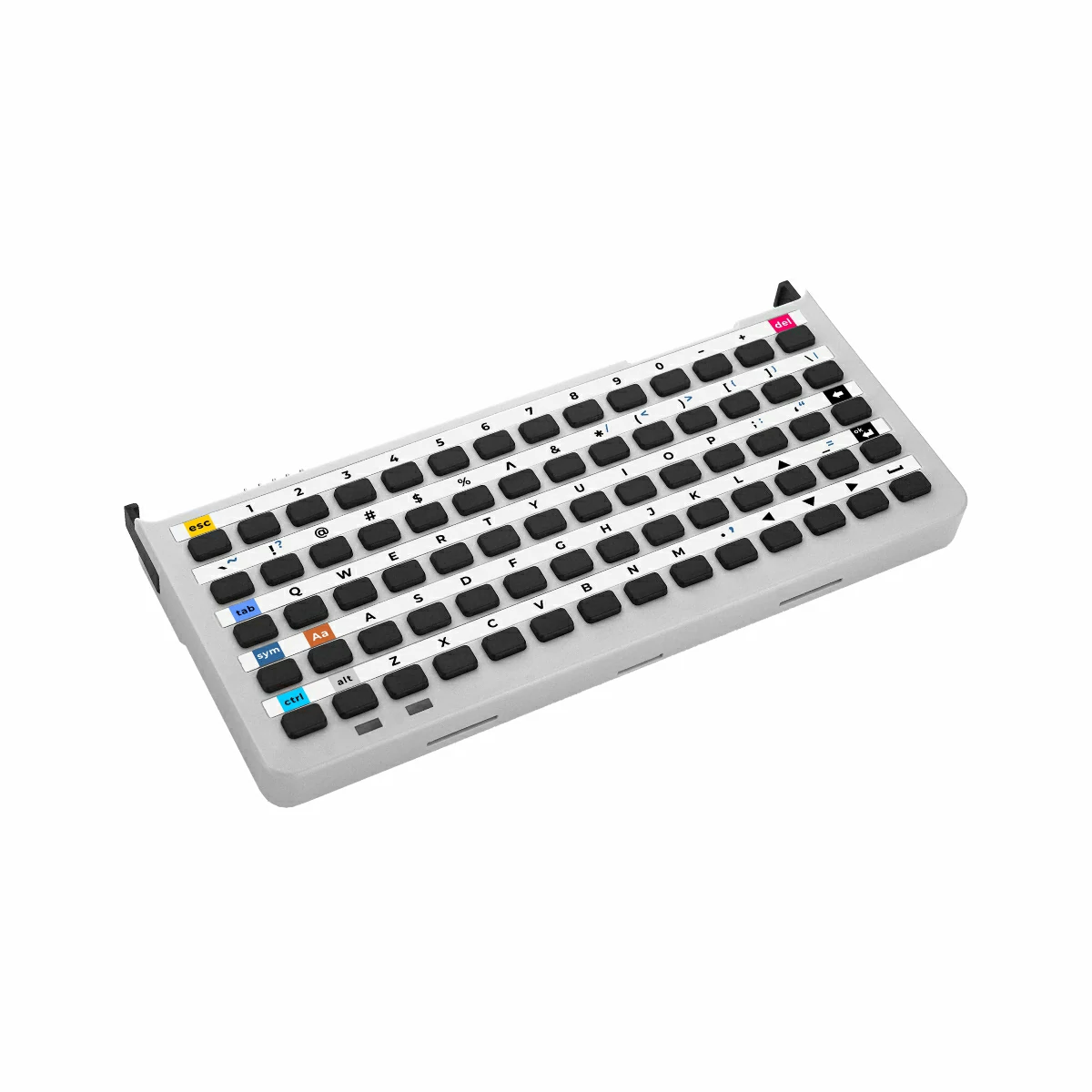
Hardware products used:

2. Example Program
- In this tutorial, the main controller is Tab5, and the keyboard input expansion module is Tab5 Keyboard. Tab5 Keyboard communicates with the Tab5 host via the I2C protocol. After the device is connected, the corresponding I2C IO pins are
G0 (SDA)andG1 (SCL), and the interrupt pin isG50 (INT). Tab5 Keyboard supports three operating modes: Normal mode, HID mode, and Character mode, each suitable for different application scenarios.
2.1 Basic Instructions
Library Objects, Basic Data, and Interfaces
UnitUnifiedis used to manage and update Unit devices uniformly, andUnitTab5Keyboardis the driver object for Tab5 Keyboard. In a program,M5.update()andUnits.update()are usually called together inloop()to update device states, and interfaces such asunit.empty(),unit.oldest(), andunit.discard()are then used to read and process events in the keyboard event queue.
m5::unit::UnitUnified Units;
m5::unit::UnitTab5Keyboard unit;- The library provides constants and utility functions such as
KEY_COUNT,KEY_COL_COUNT, andtoKeyIndex(row, col), which can be used to convert between row/column coordinates and key indexes. - Modifier key positions are fixed at
Sym(3,0),Aa(3,1),Ctrl(4,0), andAlt(4,1). In Normal mode,isSym(),isAa(),isCtrl(), andisAlt()can be used to read their real-time states directly.
Operating Modes
Tab5 Keyboard supports 3 keyboard operating modes:
| Mode | Enum value | Event type | Application |
|---|---|---|---|
| Normal mode | Mode::Normal | EventType::Key | Reads physical key row/column coordinates, detects press/release, Hold, software Repeat, and modifier key state. |
| HID mode | Mode::HID | EventType::Hid | Gets standard USB HID: modifier + keycode, suitable for forwarding to a USB HID keyboard or host application. |
| Character mode | Mode::Character | EventType::Character | Reads character strings directly, suitable for text input scenarios. A single event can contain up to 9 bytes of character data. |
You can switch modes through cfg.mode or unit.writeMode():
auto cfg = unit.config();
cfg.mode = m5::unit::tab5_keyboard::Mode::HID;
unit.config(cfg);
// or
unit.writeMode(m5::unit::tab5_keyboard::Mode::HID);Switching modes clears the event queue of the previous mode and releases the INT interrupt signal.
Keyboard Configuration
config_tis used to set the initial behavior ofbegin(). Common fields are as follows:start_periodic: Whether to automatically start periodic updates duringbegin(). The default istrue.mode: Keyboard operating mode. The default isMode::Normal.irq_pin: INT interrupt pin. The default for Tab5 ExtPort1 is50; set it to-1to disable INT-driven mode and use polling instead.interval_ms: Read interval in polling mode. The default is50ms.software_repeat: Whether to enable software repeat triggering in Normal mode. The default isfalse.repeat_initial_ms: Waiting time before the first repeat trigger after a key is held down. The default is400ms.repeat_rate_ms: Repeat trigger interval. The default is80ms.holding_threshold_ms: Hold detection threshold. The default is800ms.
The prototype is as follows:
struct config_t {
//! Start periodic measurement during begin() (mirrors the other M5Unit keyboards).
//! When true, begin() calls startPeriodicMeasurement(), which enables the INT for the
//! active mode (only if irq_pin >= 0) and begins draining events. Set false to defer and
//! call startPeriodicMeasurement() manually later.
bool start_periodic{true};
//! Initial keyboard operation mode applied during begin() (REG_MODE_KEYBOARD 0x10).
//! Default is Mode::Normal (matrix coordinate events).
tab5_keyboard::Mode mode{tab5_keyboard::Mode::Normal};
//! GPIO pin number connected to the active-low INT signal.
//! Default is 50 (Tab5 ExtPort1 J9 pin 10, confirmed via M5Tab5-UserDemo BSP).
//! Set to a valid GPIO number (0..GPIO_NUM_MAX-1) to enable ISR-driven event polling.
//! Set to -1 to disable INT-driven mode and use unconditional polling.
int8_t irq_pin{50};
//! Polling interval in milliseconds for non-interrupt-driven operation.
//! @note Used only when update() is NOT INT-gated (irq_pin < 0, INT disabled, software_repeat,
//! or a forced update). In that mode the device event queue is drained at most once per
//! interval_ms. When INT-driven, draining is event-driven and this value is unused.
uint32_t interval_ms{50};
//! Enable software auto-repeat (Normal mode only).
//! @note Effective only when @c mode == tab5_keyboard::Mode::Normal. In HID and Character
//! modes this flag is ignored because repeat handling is owned by the device firmware
//! (or there is no row/col context to repeat). The repeat state is automatically
//! cleared by a release event and by writeMode().
bool software_repeat{false};
//! Initial delay before the first repeat event is emitted (milliseconds).
//! @note Measured from the press time recorded for the currently held key.
//! @note Also used as the bitwise "repeating" threshold (see isRepeating()).
uint32_t repeat_initial_ms{400};
//! Interval between subsequent repeat events (milliseconds).
uint32_t repeat_rate_ms{80};
//! Hold detection threshold (milliseconds).
//! @note Used by the bitwise tracker for isHolding() / wasHold().
//! Normal mode only; HID and Character modes do not track bitwise state.
uint32_t holding_threshold_ms{800};
};RGB Mode
- Tab5 Keyboard has 2 built-in RGB indicator LEDs. You can use
RgbModeto set firmware-bound mode or custom mode.
| Mode | Enum value | Description |
|---|---|---|
| Bind | RgbMode::Bind | Default mode, The firmware automatically controls the indicators; the right RGB2 indicates the current keyboard mode: blue for Normal mode, green for HID mode, and purple for Character mode; the left RGB1 indicates modifier keys or operating status. |
| Custom | RgbMode::Custom | The user controls RGB1/RGB2 colors through writeRgb(). |
Custom mode example:
unit.writeRgbMode(m5::unit::tab5_keyboard::RgbMode::Custom);
unit.writeBrightness(50); // Brightness range: 0-100
unit.writeRgb(0, 255, 0, 0); // RGB1: red
unit.writeRgb(1, 0, 0, 255); // RGB2: blue- In
writeRgb(idx, r, g, b),idx = 0indicates the left RGB1, andidx = 1indicates the right RGB2. The color component range is0-255. - You can use
readRgbMode(),readRgb(), andreadBrightness()to read the current RGB mode, color, and brightness.
Event Reading
Units.update()reads events from the device into the internal queue. User code can process all pending events in order throughunit.empty(),unit.oldest(), andunit.discard().
while (!unit.empty()) {
const auto evt = unit.oldest();
switch (evt.type) {
case m5::unit::tab5_keyboard::EventType::Key:
// evt.key.row / evt.key.col / evt.key.pressed
break;
case m5::unit::tab5_keyboard::EventType::Hid:
// evt.modifier / evt.hid.keycode
break;
case m5::unit::tab5_keyboard::EventType::Character:
// evt.modifier / evt.chr.length / evt.chr.chars
break;
default:
break;
}
unit.discard();
}- In Normal mode,
evt.key.pressedindicates whether the current event is a press or release, andevt.repeatindicates whether the event was generated by software Repeat. - In HID and Character modes,
evt.modifiercan be used withevt.isCtrl(),evt.isShift(), andevt.isAlt()to determine modifier key states. - To view the current device queue length, call
readEventCount(); to clear the event queue of the current mode, callclearEventQueue().
Key State in Normal Mode
- Normal mode maintains the bit state of each key. You can use parameterless interfaces to determine whether any key exists in a given state, or use
kidxor(row, col)to query a single key.
| Interface | Description |
|---|---|
isPressed() / isPressed(row, col) | Whether the key is currently pressed. |
wasPressed() / wasPressed(row, col) | Whether the key was just pressed in this update. |
wasReleased() / wasReleased(row, col) | Whether the key was just released in this update. |
isHolding() / isHolding(row, col) | Whether the key has exceeded the Hold threshold and is still pressed. |
wasHold() / wasHold(row, col) | Whether the key just entered the Hold state in this update. |
isRepeating() / isRepeating(row, col) | Whether software Repeat was triggered in this update. |
- You can also use
nowBits(),previousBits(),pressedBits(),releasedBits(),holdingBits(),wasHoldBits(), andrepeatingBits()to obtain completestd::bitset<KEY_COUNT>snapshots. keyMatrixToChar(row, col)can be used in Normal mode together with the currentSym/Aastates to convert physical key row/column coordinates into ASCII characters. For keys with no ASCII output, such as arrow keys, Esc, and Del, usekeyMatrixToHidBase()/keyMatrixToHidSym()to obtain HID keycodes.
Common Helper APIs
| Interface | Description |
|---|---|
readMode() / writeMode() | Reads or switches the keyboard operating mode. |
readInterruptEnable() / writeInterruptEnable() | Reads or sets the INT enable bits for each mode. |
readInterruptStatus() / clearInterrupt() | Reads or clears interrupt status. |
readI2CAddress() / changeI2CAddress() | Reads or modifies the device I2C address. The modified address is written to Flash; avoid calling it frequently. |
hidUsageToChar(keycode, modifier) | Converts a HID keycode and modifier key into a character. |
isModifierKey(row, col) | Determines whether the specified row/column is a Sym/Aa/Ctrl/Alt modifier key. |
2.2 Normal Mode
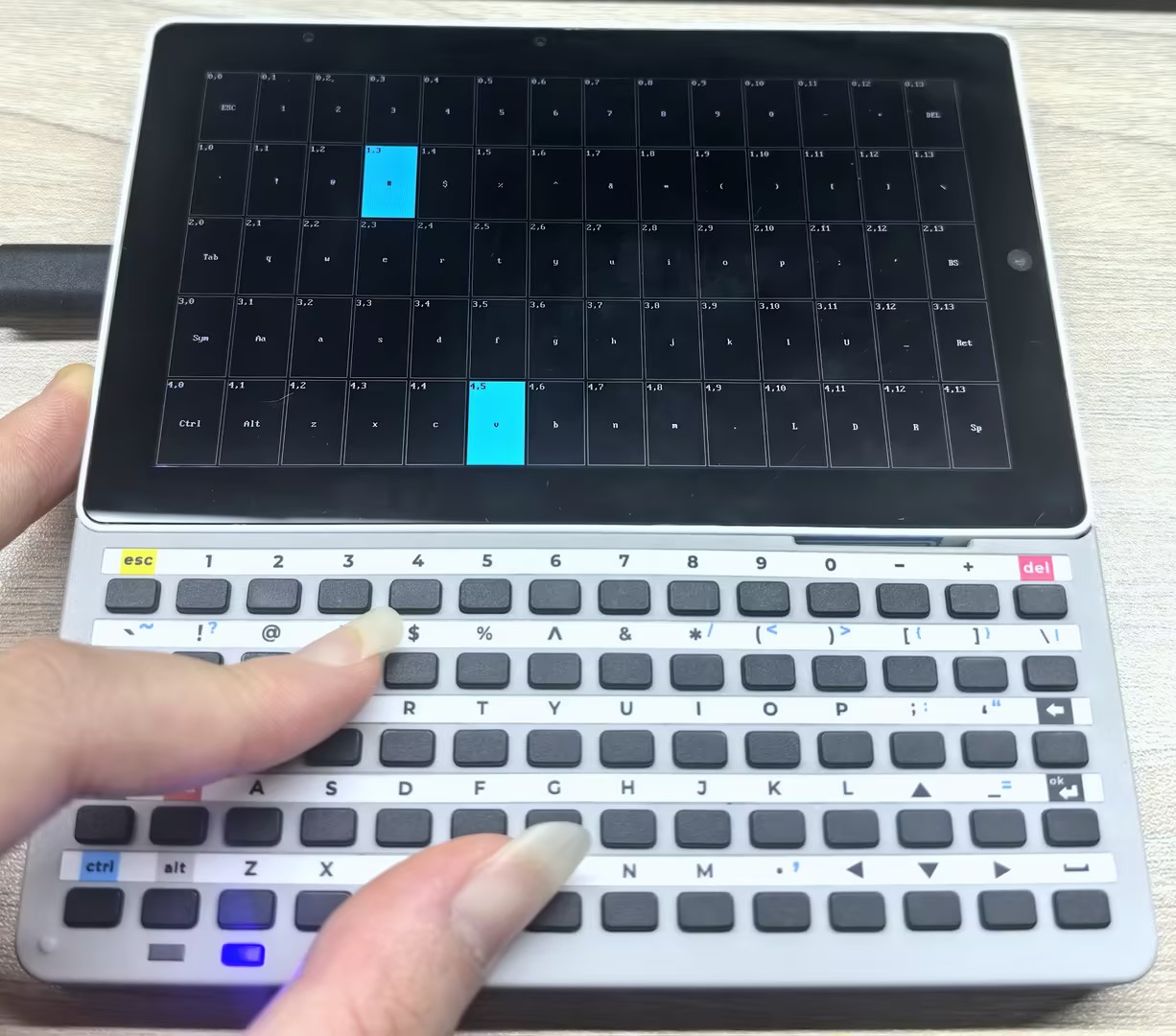
- In Normal mode, Tab5 Keyboard reports the row/column position of physical keys and displays the current modifier key state. The following program demonstrates how to read this information and visualize it on the Tab5 LCD. Key states are divided into the following types, with priority from high to low:
- Repeating (green) - A key event triggered by software auto-repeat. After a key is held for longer than
repeat_initial_ms, it enters this state and continues to trigger at the frequency ofrepeat_rate_msuntil the key is released. - WasHold (blue) - A key that triggered the hold event exactly in the current frame. After a key is held for longer than
holding_threshold_ms, it enters this state and switches to Holding in the next frame. - Holding (cyan) - A key that has exceeded the hold threshold and is still pressed.
- Pressed (white) - A key that has been pressed but has not yet exceeded the hold threshold.
- Released (black) - A key that has been released (border only, no fill).
- Repeating (green) - A key event triggered by software auto-repeat. After a key is held for longer than
/*
Key matrix visualizer example using M5UnitUnified for UnitTab5Keyboard.
Renders the 5 x 14 Tab5 keyboard matrix on the Tab5 LCD with per-key
color-coded state:
Green — software repeat firing (isRepeating)
Blue — hold threshold just crossed this frame (wasHold)
Cyan — key held past threshold and still down (isHolding)
White — key pressed but not yet at hold threshold (isPressed)
Black — key released (outline only)
The screen is redrawn every loop iteration so that transient one-frame
states (isRepeating, wasHold) are always visible. Tab5 has sufficient
CPU headroom to absorb the cost.
*/
#include <M5Unified.h>
#include <M5UnitUnified.h>
#include <M5UnitUnifiedKEYBOARD.h>
#include <M5HAL.hpp>
#include <M5Utility.h>
namespace {
auto& lcd = M5.Display;
m5::unit::UnitUnified Units;
m5::unit::UnitTab5Keyboard unit;
// Tab5 Keyboard connects via ExtPort1 (10-pin internal connector) on M5Stack Tab5.
// Pin assignment matches the SimpleDisplay example.
// INT = GPIO50 -- handled by config_t default (irq_pin = 50)
// SDA = GPIO0
// SCL = GPIO1
constexpr int8_t TAB5_KEYBOARD_SDA = 0;
constexpr int8_t TAB5_KEYBOARD_SCL = 1;
// Matrix geometry (5 rows x 14 cols) -- pulled from the unit's namespace constants
// so the code automatically tracks any future change in KEY_COL_COUNT / KEY_COUNT.
constexpr uint8_t MATRIX_ROWS = m5::unit::tab5_keyboard::KEY_COUNT / m5::unit::tab5_keyboard::KEY_COL_COUNT;
constexpr uint8_t MATRIX_COLS = m5::unit::tab5_keyboard::KEY_COL_COUNT;
// Visual style — cell fill colors ordered by priority (highest first).
constexpr uint16_t COLOR_BG = TFT_BLACK;
constexpr uint16_t COLOR_CELL_BORDER = TFT_DARKGRAY;
constexpr uint16_t COLOR_CELL_LABEL = TFT_LIGHTGRAY; // label on released cell
constexpr uint16_t COLOR_FILL_REPEAT = TFT_GREEN; // isRepeating (one-shot)
constexpr uint16_t COLOR_FILL_WAS_HOLD = TFT_BLUE; // wasHold (one-shot)
constexpr uint16_t COLOR_FILL_HOLDING = TFT_CYAN; // isHolding (sustained)
constexpr uint16_t COLOR_FILL_PRESSED = TFT_WHITE; // isPressed (normal)
// Key state enum — used by draw_cell() to select fill / label colors.
enum class CellState : uint8_t {
Released = 0,
Pressed = 1,
Holding = 2,
WasHold = 3,
Repeating = 4,
};
// Minimum gap between adjacent cells; keeps a visible grid even on small displays.
constexpr int CELL_PADDING = 2;
bool setup_tab5_keyboard()
{
// Normal mode is required: this example reads bitwise per-key state, which is
// only populated in Normal mode. INT pin defaults to GPIO50 (Tab5 ExtPort1).
{
auto cfg = unit.config();
cfg.mode = m5::unit::tab5_keyboard::Mode::Normal;
// Enable software auto-repeat so isRepeating() / wasHold() states are
// exercised and rendered with distinct colors.
cfg.software_repeat = true;
cfg.repeat_initial_ms = 1000;
cfg.repeat_rate_ms = 1000;
cfg.holding_threshold_ms = 500;
unit.config(cfg);
}
M5_LOGI("Tab5 ExtPort1 I2C: SDA:%d SCL:%d", TAB5_KEYBOARD_SDA, TAB5_KEYBOARD_SCL);
Wire.end();
Wire.begin(TAB5_KEYBOARD_SDA, TAB5_KEYBOARD_SCL, unit.component_config().clock);
if (!Units.add(unit, Wire) || !Units.begin()) {
return false;
}
// begin() applies cfg.mode and (when start_periodic is true) enables the matching INT
// and starts draining events, so no manual writeInterruptEnable()/startPeriodicMeasurement().
M5.Log.printf("Firmware:%02X\n", unit.firmwareVersion());
return true;
}
// Pre-computed cell rectangles. Filled once by layout_matrix() in setup().
struct CellRect {
int16_t x;
int16_t y;
int16_t w;
int16_t h;
};
CellRect cells[MATRIX_ROWS][MATRIX_COLS];
// Maximum bytes for a single cell label including the null terminator.
constexpr size_t LABEL_BUF_LEN = 6;
const char* modifier_label(const uint8_t row, const uint8_t col)
{
// Tab5 keyboard modifier key positions (see unit_Tab5Keyboard.hpp isModifierKey()).
if (row == 3 && col == 0) return "Sym";
if (row == 3 && col == 1) return "Aa";
if (row == 4 && col == 0) return "Ctrl";
if (row == 4 && col == 1) return "Alt";
return nullptr;
}
const char* control_label(const char c)
{
switch (c) {
case 0x08:
return "BS";
case 0x09:
return "Tab";
case 0x0A:
case 0x0D:
return "Ret";
case 0x1B:
return "ESC";
case 0x20:
return "Sp";
case 0x7F:
return "DEL";
default:
return nullptr;
}
}
// Map USB HID keycodes that hidUsageToChar() does not translate to ASCII
// (Escape, Forward Delete, arrow keys, etc.) to short labels. Detection goes
// through the HID keycode because the ASCII path returns 0 for these keys.
const char* hid_named_label(const uint8_t hid_keycode)
{
switch (hid_keycode) {
case 0x29:
return "ESC"; // Escape
case 0x4C:
return "DEL"; // Forward Delete
case 0x4F:
return "R"; // Right Arrow
case 0x50:
return "L"; // Left Arrow
case 0x51:
return "D"; // Down Arrow
case 0x52:
return "U"; // Up Arrow
default:
return nullptr;
}
}
// Compute the live label for (row, col). Reflects the current Sym/Aa state via
// keyMatrixToChar(), so pressing Sym swaps the rendered glyphs to their symbol
// variants, and Aa adds the shift modifier.
void cell_label(const uint8_t row, const uint8_t col, char* dst, const size_t n)
{
const char* mod = modifier_label(row, col);
if (mod != nullptr) {
snprintf(dst, n, "%s", mod);
return;
}
// Arrow keys are detected via HID keycode (they have no ASCII representation).
// Mirror keyMatrixToChar()'s Sym dispatch so the Sym layer's arrows are picked up too.
const auto mapping = unit.isSym() ? m5::unit::tab5_keyboard::keyMatrixToHidSym(row, col)
: m5::unit::tab5_keyboard::keyMatrixToHidBase(row, col);
const char* named = hid_named_label(mapping.keycode);
if (named != nullptr) {
snprintf(dst, n, "%s", named);
return;
}
const char c = unit.keyMatrixToChar(row, col);
const char* ctrl = control_label(c);
if (ctrl != nullptr) {
snprintf(dst, n, "%s", ctrl);
} else if (c >= 0x21 && c < 0x7F) {
dst[0] = c;
dst[1] = '\0';
} else if (c != 0) {
snprintf(dst, n, "0x%02X", static_cast<uint8_t>(c));
} else {
dst[0] = '\0';
}
}
void layout_matrix()
{
const int cw = lcd.width() / MATRIX_COLS;
const int ch = lcd.height() / MATRIX_ROWS;
const int off_x = (lcd.width() - cw * MATRIX_COLS) / 2;
const int off_y = (lcd.height() - ch * MATRIX_ROWS) / 2;
for (uint8_t row = 0; row < MATRIX_ROWS; ++row) {
for (uint8_t col = 0; col < MATRIX_COLS; ++col) {
cells[row][col] = CellRect{static_cast<int16_t>(off_x + col * cw), static_cast<int16_t>(off_y + row * ch),
static_cast<int16_t>(cw), static_cast<int16_t>(ch)};
}
}
}
// Return the fill color for a given cell state.
uint16_t cell_fill_color(const CellState state)
{
switch (state) {
case CellState::Repeating:
return COLOR_FILL_REPEAT;
case CellState::WasHold:
return COLOR_FILL_WAS_HOLD;
case CellState::Holding:
return COLOR_FILL_HOLDING;
case CellState::Pressed:
return COLOR_FILL_PRESSED;
default:
return COLOR_BG;
}
}
// Choose a legible text color given the cell background.
// Dark backgrounds (black / blue / green) → white text.
// Light backgrounds (white / cyan) → black text.
uint16_t cell_label_color(const CellState state)
{
switch (state) {
case CellState::Holding:
case CellState::Pressed:
return TFT_BLACK;
default:
return COLOR_CELL_LABEL; // white / gray on dark background
}
}
// Render one cell directly to the LCD. Caller is expected to wrap multiple
// draw_cell() calls in lcd.startWrite() / lcd.endWrite() to batch the SPI
// transactions.
void draw_cell(const uint8_t row, const uint8_t col, const CellState state)
{
const CellRect& r = cells[row][col];
const int16_t ix = r.x + CELL_PADDING;
const int16_t iy = r.y + CELL_PADDING;
const int16_t iw = r.w - CELL_PADDING * 2;
const int16_t ih = r.h - CELL_PADDING * 2;
if (iw <= 0 || ih <= 0) {
return;
}
const uint16_t fill = cell_fill_color(state);
lcd.fillRect(ix, iy, iw, ih, fill);
lcd.drawRect(ix, iy, iw, ih, COLOR_CELL_BORDER);
const uint16_t fg = cell_label_color(state);
const uint16_t bg = fill;
// Cell coordinate label "row,col" at top-left for easier debugging.
if (iw >= 24 && ih >= 16) {
lcd.setTextDatum(top_left);
lcd.setTextColor(fg, bg);
lcd.setCursor(ix + 2, iy + 2);
lcd.printf("%u,%u", row, col);
}
// Key imprint centered in the cell. Computed live so Sym/Aa modifier state
// is reflected (e.g. pressing Sym swaps glyphs to their symbol variants).
char label[LABEL_BUF_LEN];
cell_label(row, col, label, sizeof(label));
if (label[0] != '\0' && iw >= 20 && ih >= 24) {
lcd.setTextDatum(middle_center);
lcd.setTextColor(fg, bg);
lcd.drawString(label, ix + iw / 2, iy + ih / 2 + 4);
}
}
// Determine the highest-priority visual state for the key at flat index kidx.
// Priority (highest → lowest): Repeating > WasHold > Holding > Pressed > Released.
CellState key_cell_state(const uint8_t kidx)
{
if (unit.isRepeating(kidx)) {
return CellState::Repeating;
}
if (unit.wasHold(kidx)) {
return CellState::WasHold;
}
if (unit.isHolding(kidx)) {
return CellState::Holding;
}
if (unit.isPressed(kidx)) {
return CellState::Pressed;
}
return CellState::Released;
}
// Per-cell cached state for incremental redraw. Initialized to Released so the
// first frame after setup() repaints every cell.
CellState prev_states[m5::unit::tab5_keyboard::KEY_COUNT]{};
bool prev_sym = false;
bool prev_aa = false;
bool initial_draw_done = false;
// Redraw only the cells whose state changed since the previous frame. Sym/Aa
// changes relabel every cell, so they force a full redraw.
void draw_dirty_cells()
{
const bool sym_changed = (unit.isSym() != prev_sym);
const bool aa_changed = (unit.isAa() != prev_aa);
const bool full_redraw = !initial_draw_done || sym_changed || aa_changed;
lcd.startWrite(); // Batch SPI transactions across all cell draws this frame.
for (uint8_t row = 0; row < MATRIX_ROWS; ++row) {
for (uint8_t col = 0; col < MATRIX_COLS; ++col) {
const uint8_t kidx = static_cast<uint8_t>(row * MATRIX_COLS + col);
const CellState state = key_cell_state(kidx);
if (!full_redraw && state == prev_states[kidx]) {
continue;
}
draw_cell(row, col, state);
prev_states[kidx] = state;
}
}
lcd.endWrite();
prev_sym = unit.isSym();
prev_aa = unit.isAa();
initial_draw_done = true;
}
} // namespace
void setup()
{
M5.begin();
M5.setTouchButtonHeightByRatio(100);
// Keep the LCD in landscape (Tab5: 1280x720 native).
if (lcd.height() > lcd.width()) {
lcd.setRotation(3);
}
lcd.fillScreen(TFT_LIGHTGRAY);
if (!setup_tab5_keyboard()) {
M5_LOGE("Failed to begin UnitTab5Keyboard");
lcd.fillScreen(TFT_RED);
while (true) {
m5::utility::delay(10000);
}
}
M5_LOGI("M5UnitUnified initialized");
M5_LOGI("%s", Units.debugInfo().c_str());
// Direct-to-LCD rendering: paint the matrix background once, then let
// draw_dirty_cells() incrementally refresh only the cells whose state
// changed. This avoids the ~450 KB / frame cost of pushing a full-screen
// sprite over SPI.
lcd.setFont(&fonts::AsciiFont8x16);
lcd.fillScreen(COLOR_BG);
layout_matrix();
draw_dirty_cells(); // initial_draw_done=false → forces a full repaint.
}
void loop()
{
M5.update();
Units.update();
draw_dirty_cells();
m5::utility::delay(1000 / 60);
}After flashing the program, press any key on Tab5 Keyboard. The corresponding key cell on the Tab5 LCD will light up and show the row/column coordinates of that key and the current modifier key states (Sym/Aa/Ctrl/Alt). Holding a key for more than 500ms enters the Holding state and changes the cell color to cyan; holding it for more than 1000ms enters the Repeating state and changes the cell color to green, then continues triggering at a frequency of 1000ms until the key is released.
2.3 HID Mode
- In HID mode, Tab5 Keyboard converts key events into standard HID keycodes and reports them. Through the Tab5 USB Type-A port, Tab5 can emulate a USB keyboard device and send HID reports to a host computer.
USB HID Keyboard
#include <M5Unified.h>
#include <M5UnitUnified.h>
#include <M5UnitUnifiedKEYBOARD.h>
#include <M5HAL.hpp>
#include <M5Utility.h>
#include "USB.h"
#include "USBHIDKeyboard.h"
#include <algorithm>
#include <cctype>
#include <string>

namespace {
auto& lcd = M5.Display;

m5::unit::UnitUnified Units;
m5::unit::UnitTab5Keyboard unit;
USBHIDKeyboard Keyboard;

// Tab5 Keyboard uses ExtPort1 on Tab5.
constexpr int8_t TAB5_KEYBOARD_SDA = 0;
constexpr int8_t TAB5_KEYBOARD_SCL = 1;
constexpr size_t MAX_LOG_LINES     = 7;

constexpr uint8_t HID_BACKSPACE = 0x2A;
constexpr uint8_t HID_DELETE    = 0x4C;
constexpr uint8_t HID_LEFT      = 0x50;
constexpr uint8_t HID_DOWN      = 0x51;
constexpr uint8_t HID_UP        = 0x52;
constexpr uint8_t HID_RIGHT     = 0x4F;
constexpr uint8_t HID_ENTER     = 0x28;
constexpr uint8_t HID_TAB       = 0x2B;
constexpr uint8_t HID_ESCAPE    = 0x29;
constexpr uint8_t HID_SPACE     = 0x2C;

constexpr uint8_t HID_MOD_CTRL  = 0x01;
constexpr uint8_t HID_MOD_SHIFT = 0x02;
constexpr uint8_t HID_MOD_ALT   = 0x04;

constexpr uint32_t USB_KEY_RELEASE_DELAY_MS = 5;

constexpr uint16_t COLOR_BG         = TFT_BLACK;
constexpr uint16_t COLOR_PANEL      = 0x2104;
constexpr uint16_t COLOR_BORDER     = 0x5AEB;
constexpr uint16_t COLOR_TEXT       = TFT_WHITE;
constexpr uint16_t COLOR_MUTED      = 0xAD55;
constexpr uint16_t COLOR_ACCENT     = TFT_CYAN;
constexpr uint16_t COLOR_MOD_ACTIVE = TFT_GREEN;
constexpr uint16_t COLOR_WARN       = TFT_ORANGE;

struct EventLogLine {
    std::string line1;
    std::string line2;
};

EventLogLine log_lines[MAX_LOG_LINES];
size_t log_head{};
size_t log_count{};
uint8_t last_modifier{};
uint8_t last_keycode{};
uint32_t sent_count{};

// Dirty flags keep the screen refresh incremental instead of redrawing all UI.
bool header_dirty{true};
bool log_dirty{true};
bool status_dirty{true};

struct Rect {
    int16_t x;
    int16_t y;
    int16_t w;
    int16_t h;
};

Rect header_rect;
Rect info_rect;
Rect status_rect;
Rect log_rect;

bool needs_redraw()
{
    return header_dirty || log_dirty || status_dirty;
}

void mark_event_dirty()
{
    log_dirty    = true;
    status_dirty = true;
}

void push_log(const std::string& line1, const std::string& line2)
{
    // Store event messages in a small ring buffer for the on-screen log panel.
    log_lines[log_head] = EventLogLine{line1, line2};
    log_head            = (log_head + 1U) % MAX_LOG_LINES;
    if (log_count < MAX_LOG_LINES) {
        ++log_count;
    }
}

std::string key_name(const uint8_t keycode, const char c)
{
    switch (keycode) {
        case HID_BACKSPACE:
            return "Backspace";
        case HID_DELETE:
            return "Delete";
        case HID_LEFT:
            return "Left";
        case HID_RIGHT:
            return "Right";
        case HID_UP:
            return "Up";
        case HID_DOWN:
            return "Down";
        case HID_ENTER:
            return "Enter";
        case HID_TAB:
            return "Tab";
        case HID_ESCAPE:
            return "Esc";
        case HID_SPACE:
            return "Space";
        default:
            break;
    }
    if (c != 0 && std::isprint(static_cast<unsigned char>(c))) {
        return std::string(1, c);
    }
    return m5::utility::formatString("kc=0x%02X", keycode);
}

void send_usb_hid_report(const uint8_t modifier, const uint8_t keycode)
{
    if (keycode == 0U) {
        return;
    }

    // Send one press report followed by an empty report to release the key.
    KeyReport report{};
    report.modifiers = modifier;
    report.keys[0]   = keycode;
    Keyboard.sendReport(&report);

    m5::utility::delay(USB_KEY_RELEASE_DELAY_MS);
    KeyReport release{};
    Keyboard.sendReport(&release);
}

void forward_hid_event(const m5::unit::tab5_keyboard::Event& evt)
{
    // Forward the HID code from the Tab5 keyboard unit to the host computer.
    last_modifier = evt.modifier;
    last_keycode  = evt.hid.keycode;
    ++sent_count;

    const char c  = m5::unit::tab5_keyboard::hidUsageToChar(evt.hid.keycode, evt.modifier);
    const auto name = key_name(evt.hid.keycode, c);

    send_usb_hid_report(evt.modifier, evt.hid.keycode);

    Serial.printf("USB HID mod=0x%02X key=0x%02X name=%s\n", evt.modifier, evt.hid.keycode, name.c_str());
    push_log(m5::utility::formatString("Mod:0x%02X Key:0x%02X", evt.modifier, evt.hid.keycode),
             m5::utility::formatString("USB:%s", name.c_str()));
    M5_LOGI("[Forward] modifier=0x%02X keycode=0x%02X name=%s", evt.modifier, evt.hid.keycode, name.c_str());
}

void drain_keyboard_events()
{
    // The unit stores events internally; drain all pending HID events each loop.
    while (!unit.empty()) {
        const auto evt = unit.oldest();
        if (evt.type == m5::unit::tab5_keyboard::EventType::Hid) {
            forward_hid_event(evt);
            mark_event_dirty();
        }
        unit.discard();
    }
}

void layout_screen()
{
    const int16_t w = lcd.width();
    const int16_t h = lcd.height();
    header_rect     = Rect{0, 0, w, 104};
    status_rect     = Rect{0, static_cast<int16_t>(h - 82), w, 82};
    log_rect        = Rect{static_cast<int16_t>(w * 2 / 3), 104, static_cast<int16_t>(w - w * 2 / 3),
                           static_cast<int16_t>(h - 104 - 82)};
    info_rect       = Rect{0, 104, static_cast<int16_t>(w * 2 / 3), static_cast<int16_t>(h - 104 - 82)};
}

void draw_panel(const Rect& r, const uint16_t color)
{
    lcd.fillRect(r.x, r.y, r.w, r.h, color);
    lcd.drawRect(r.x, r.y, r.w, r.h, COLOR_BORDER);
}

void draw_header()
{
    lcd.fillRect(header_rect.x, header_rect.y, header_rect.w, header_rect.h, COLOR_BG);
    lcd.setTextDatum(top_left);
    lcd.setTextColor(COLOR_ACCENT, COLOR_BG);
    lcd.setFont(&fonts::FreeMonoBold18pt7b);
    lcd.drawString("Tab5 USB HID Keyboard", 16, 8);

    lcd.setTextColor(COLOR_MUTED, COLOR_BG);
    lcd.drawString("HID mode  Tab5 acts as PC keyboard", 18, 58);
}

void draw_info()
{
    draw_panel(info_rect, COLOR_PANEL);
    lcd.setTextDatum(top_left);
    lcd.setFont(&fonts::FreeMonoBold18pt7b);
    lcd.setTextColor(COLOR_MUTED, COLOR_PANEL);
    lcd.drawString("How to use", info_rect.x + 14, info_rect.y + 10);

    lcd.setTextColor(COLOR_TEXT, COLOR_PANEL);
    lcd.drawString("1. Connect Tab5 to the computer", info_rect.x + 14, info_rect.y + 58);
    lcd.drawString("2. PC recognizes a USB keyboard", info_rect.x + 14, info_rect.y + 100);
    lcd.drawString("3. Focus any text box on PC", info_rect.x + 14, info_rect.y + 142);
    lcd.drawString("4. Type on the Tab5 keyboard", info_rect.x + 14, info_rect.y + 184);
}

void draw_modifier_badge(const char* label, const bool active, const int16_t x, const int16_t y)
{
    const int16_t w = 126;
    const int16_t h = 42;
    const uint16_t fill = active ? COLOR_MOD_ACTIVE : COLOR_BG;
    const uint16_t fg   = active ? TFT_BLACK : COLOR_MUTED;
    lcd.fillRoundRect(x, y, w, h, 7, fill);
    lcd.drawRoundRect(x, y, w, h, 7, COLOR_BORDER);
    lcd.setTextDatum(middle_center);
    lcd.setFont(&fonts::FreeMonoBold18pt7b);
    lcd.setTextColor(fg, fill);
    lcd.drawString(label, x + w / 2, y + h / 2);
}

void draw_status()
{
    draw_panel(status_rect, COLOR_BG);
    lcd.setTextDatum(top_left);
    lcd.setFont(&fonts::FreeMonoBold18pt7b);
    lcd.setTextColor(COLOR_ACCENT, COLOR_BG);
    lcd.drawString("Last Modifier", 16, status_rect.y + 8);

    draw_modifier_badge("Ctrl", (last_modifier & HID_MOD_CTRL) != 0U, 300, status_rect.y + 18);
    draw_modifier_badge("Aa", (last_modifier & HID_MOD_SHIFT) != 0U, 436, status_rect.y + 18);
    draw_modifier_badge("Sym", false, 572, status_rect.y + 18);
    draw_modifier_badge("Alt", (last_modifier & HID_MOD_ALT) != 0U, 708, status_rect.y + 18);

    lcd.setTextColor(COLOR_MUTED, COLOR_BG);
    lcd.setTextDatum(top_right);
    lcd.drawString(m5::utility::formatString("sent:%u key:0x%02X", static_cast<unsigned>(sent_count), last_keycode)
                       .c_str(),
                   status_rect.w - 16, status_rect.y + 20);
}

void draw_log()
{
    draw_panel(log_rect, COLOR_BG);
    lcd.setTextDatum(top_left);
    lcd.setFont(&fonts::FreeMonoBold18pt7b);
    lcd.setTextColor(COLOR_WARN, COLOR_BG);
    lcd.drawString("Events", log_rect.x + 12, log_rect.y + 10);

    int16_t y            = log_rect.y + 52;
    const int16_t line_h = lcd.fontHeight();
    for (size_t i = 0; i < log_count; ++i) {
        const size_t idx = (log_head + MAX_LOG_LINES - log_count + i) % MAX_LOG_LINES;
        lcd.setTextColor(COLOR_ACCENT, COLOR_BG);
        lcd.drawString(log_lines[idx].line1.c_str(), log_rect.x + 12, y);
        y += line_h;
        lcd.setTextColor(COLOR_MUTED, COLOR_BG);
        lcd.drawString(log_lines[idx].line2.c_str(), log_rect.x + 12, y);
        y += line_h + 4;
    }
}

void draw_screen()
{
    lcd.startWrite();
    if (header_dirty) {
        draw_header();
        draw_info();
        header_dirty = false;
    }
    if (log_dirty) {
        draw_log();
        log_dirty = false;
    }
    if (status_dirty) {
        draw_status();
        status_dirty = false;
    }
    lcd.endWrite();
}

bool setup_tab5_keyboard()
{
    auto cfg            = unit.config();
    // HID mode gives USB HID modifier/keycode pairs from the keyboard unit.
    cfg.mode            = m5::unit::tab5_keyboard::Mode::HID;
    cfg.start_periodic = true;
    cfg.irq_pin         = 50;
    unit.config(cfg);

    M5_LOGI("Tab5 ExtPort1 I2C: SDA:%d SCL:%d", TAB5_KEYBOARD_SDA, TAB5_KEYBOARD_SCL);
    // Reconfigure Wire for Tab5 ExtPort1 before attaching the keyboard unit.
    Wire.end();
    Wire.begin(TAB5_KEYBOARD_SDA, TAB5_KEYBOARD_SCL, unit.component_config().clock);
    if (!Units.add(unit, Wire) || !Units.begin()) {
        return false;
    }

    M5.Log.printf("Firmware:%02X\n", unit.firmwareVersion());
    return true;
}

}  // namespace

void setup()
{
    M5.begin();
    Serial.begin(115200);
    // Start the USB HID device stack so the PC enumerates Tab5 as a keyboard.
    Keyboard.begin();
    USB.begin();
    Serial.println("# Tab5 USB HID keyboard ready");
    M5.setTouchButtonHeightByRatio(100);

    if (lcd.height() > lcd.width()) {
        lcd.setRotation(3);
    }
    layout_screen();
    lcd.fillScreen(COLOR_BG);

    if (!setup_tab5_keyboard()) {
        M5_LOGE("Failed to begin UnitTab5Keyboard");
        lcd.fillScreen(TFT_RED);
        lcd.setTextColor(TFT_WHITE, TFT_RED);
        lcd.setTextDatum(middle_center);
        lcd.drawString("UnitTab5Keyboard begin failed", lcd.width() / 2, lcd.height() / 2);
        while (true) {
            m5::utility::delay(10000);
        }
    }

    push_log("Forwarder ready", "Mode:HID");
    draw_screen();
}

void loop()
{
    M5.update();
    Units.update();
    drain_keyboard_events();

    if (needs_redraw()) {
        draw_screen();
    }
    m5::utility::delay(1000 / 60);
}After flashing the program, connect the Tab5 USB Type-A port to a computer. The computer will recognize a new USB keyboard device. Pressing any key at this point sends the corresponding HID keycode to the computer over USB, and the LCD displays the most recently sent HID event information (modifier key state, keycode, and key name). The typed content will appear at the text input cursor on the computer.
0x00 empty report packet to notify the host that the key has been released, as shown by Mod:0x00 Key:0x00 USB:kc=0x00 on the Tab5 in the figure below.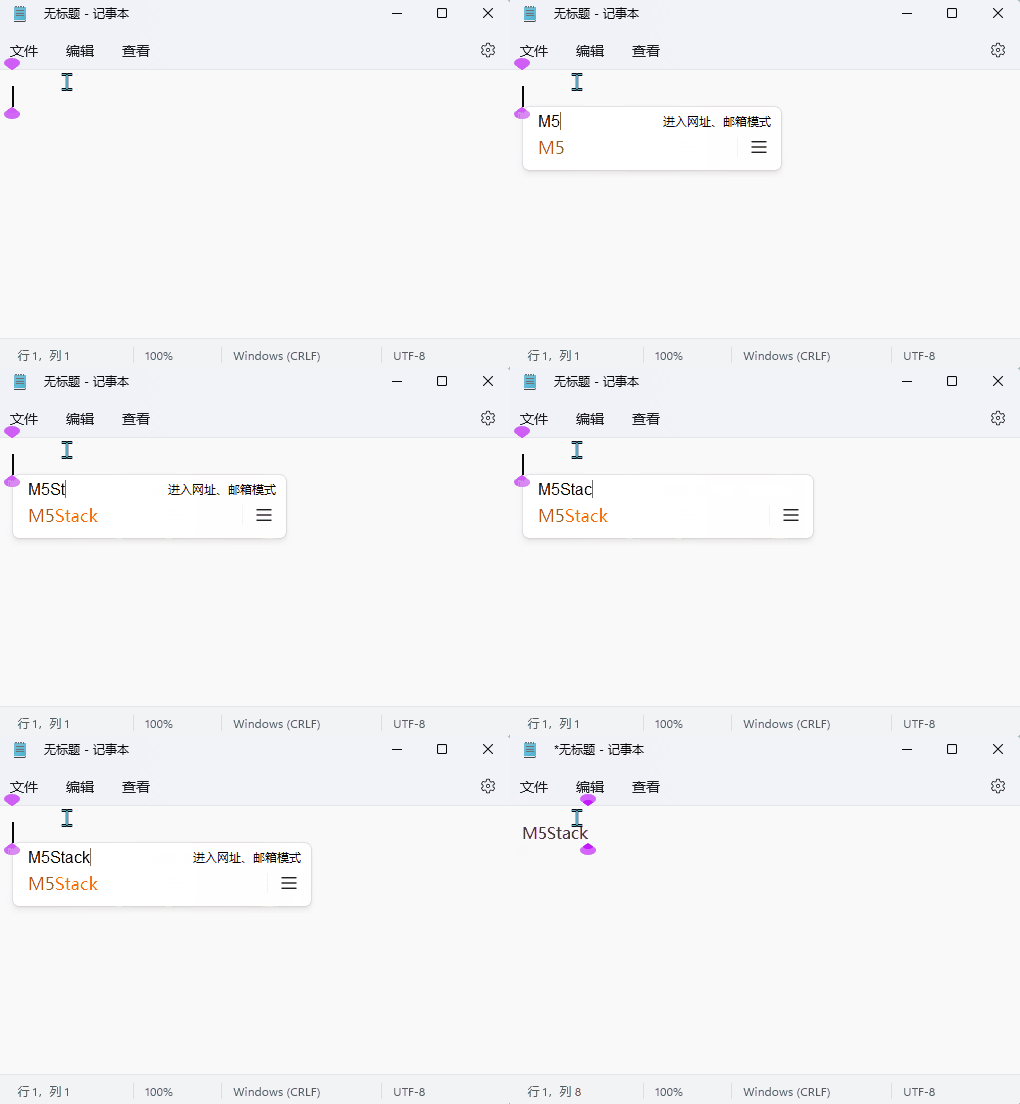
BLE HID Keyboard
/*
  Tab5 Keyboard BLE HID keyboard example using M5UnitUnified.

  The Tab5 reads UnitTab5Keyboard in HID mode and sends each HID event as a
  Bluetooth LE HID keyboard report. Pair the host with "Tab5 BLE Keyboard".
*/
#include <M5Unified.h>
#include <M5UnitUnified.h>
#include <M5UnitUnifiedKEYBOARD.h>
#include <M5HAL.hpp>
#include <M5Utility.h>
#include <BLE2902.h>
#include <BLEAdvertising.h>
#include <BLEDevice.h>
#include <BLEHIDDevice.h>
#include <BLESecurity.h>
#include <BLEServer.h>
#include <algorithm>
#include <cctype>
#include <string>

namespace {
auto& lcd = M5.Display;

m5::unit::UnitUnified Units;
m5::unit::UnitTab5Keyboard unit;

BLEHIDDevice* hid_device{};
BLECharacteristic* input_report{};
BLEServer* ble_server{};

// Tab5 Keyboard uses ExtPort1 on Tab5.
constexpr int8_t TAB5_KEYBOARD_SDA = 0;
constexpr int8_t TAB5_KEYBOARD_SCL = 1;
constexpr size_t MAX_LOG_LINES     = 7;

constexpr uint8_t REPORT_ID_KEYBOARD = 1;

constexpr uint8_t HID_BACKSPACE = 0x2A;
constexpr uint8_t HID_DELETE    = 0x4C;
constexpr uint8_t HID_LEFT      = 0x50;
constexpr uint8_t HID_DOWN      = 0x51;
constexpr uint8_t HID_UP        = 0x52;
constexpr uint8_t HID_RIGHT     = 0x4F;
constexpr uint8_t HID_ENTER     = 0x28;
constexpr uint8_t HID_TAB       = 0x2B;
constexpr uint8_t HID_ESCAPE    = 0x29;
constexpr uint8_t HID_SPACE     = 0x2C;

constexpr uint8_t HID_MOD_CTRL  = 0x01;
constexpr uint8_t HID_MOD_SHIFT = 0x02;
constexpr uint8_t HID_MOD_ALT   = 0x04;

constexpr uint32_t BLE_KEY_RELEASE_DELAY_MS = 8;

constexpr uint16_t COLOR_BG         = TFT_BLACK;
constexpr uint16_t COLOR_PANEL      = 0x2104;
constexpr uint16_t COLOR_BORDER     = 0x5AEB;
constexpr uint16_t COLOR_TEXT       = TFT_WHITE;
constexpr uint16_t COLOR_MUTED      = 0xAD55;
constexpr uint16_t COLOR_ACCENT     = TFT_CYAN;
constexpr uint16_t COLOR_MOD_ACTIVE = TFT_GREEN;
constexpr uint16_t COLOR_WARN       = TFT_ORANGE;

// Standard boot keyboard report map: modifier, reserved, six key slots.
const uint8_t keyboard_report_map[] = {
    0x05, 0x01,        // Usage Page (Generic Desktop)
    0x09, 0x06,        // Usage (Keyboard)
    0xA1, 0x01,        // Collection (Application)
    0x85, REPORT_ID_KEYBOARD,  // Report ID
    0x05, 0x07,        // Usage Page (Keyboard/Keypad)
    0x19, 0xE0,        // Usage Minimum (Keyboard LeftControl)
    0x29, 0xE7,        // Usage Maximum (Keyboard Right GUI)
    0x15, 0x00,        // Logical Minimum (0)
    0x25, 0x01,        // Logical Maximum (1)
    0x75, 0x01,        // Report Size (1)
    0x95, 0x08,        // Report Count (8)
    0x81, 0x02,        // Input (Data, Variable, Absolute)
    0x95, 0x01,        // Report Count (1)
    0x75, 0x08,        // Report Size (8)
    0x81, 0x01,        // Input (Constant)
    0x95, 0x06,        // Report Count (6)
    0x75, 0x08,        // Report Size (8)
    0x15, 0x00,        // Logical Minimum (0)
    0x25, 0x65,        // Logical Maximum (101)
    0x05, 0x07,        // Usage Page (Keyboard/Keypad)
    0x19, 0x00,        // Usage Minimum (Reserved)
    0x29, 0x65,        // Usage Maximum (Keyboard Application)
    0x81, 0x00,        // Input (Data, Array)
    0xC0               // End Collection
};

struct EventLogLine {
    std::string line1;
    std::string line2;
};

EventLogLine log_lines[MAX_LOG_LINES];
size_t log_head{};
size_t log_count{};
uint8_t last_modifier{};
uint8_t last_keycode{};
uint32_t sent_count{};
bool ble_connected{};
bool ble_authenticated{};

// Dirty flags keep the screen refresh incremental instead of redrawing all UI.
bool header_dirty{true};
bool log_dirty{true};
bool status_dirty{true};

struct Rect {
    int16_t x;
    int16_t y;
    int16_t w;
    int16_t h;
};

Rect header_rect;
Rect info_rect;
Rect status_rect;
Rect log_rect;

class ServerCallbacks : public BLEServerCallbacks {
    void onConnect(BLEServer*) override
    {
        ble_connected = true;
        ble_authenticated = false;
        status_dirty  = true;
    }

    void onDisconnect(BLEServer* server) override
    {
        ble_connected = false;
        ble_authenticated = false;
        status_dirty  = true;
        BLESecurity::resetSecurity();
    }
};

class SecurityCallbacks : public BLESecurityCallbacks {
    bool onSecurityRequest() override
    {
        return true;
    }

#if defined(CONFIG_BLUEDROID_ENABLED)
    void onAuthenticationComplete(esp_ble_auth_cmpl_t desc) override
    {
        ble_authenticated = desc.success;
        status_dirty      = true;
        Serial.printf("BLE authentication %s\n", desc.success ? "ok" : "failed");
    }
#endif

#if defined(CONFIG_NIMBLE_ENABLED)
    void onAuthenticationComplete(ble_gap_conn_desc* desc) override
    {
        ble_authenticated = desc != nullptr;
        status_dirty      = true;
        Serial.printf("BLE authentication %s\n", ble_authenticated ? "ok" : "failed");
    }
#endif
};

bool needs_redraw()
{
    return header_dirty || log_dirty || status_dirty;
}

void mark_event_dirty()
{
    log_dirty    = true;
    status_dirty = true;
}

void push_log(const std::string& line1, const std::string& line2)
{
    // Store event messages in a small ring buffer for the on-screen log panel.
    log_lines[log_head] = EventLogLine{line1, line2};
    log_head            = (log_head + 1U) % MAX_LOG_LINES;
    if (log_count < MAX_LOG_LINES) {
        ++log_count;
    }
}

std::string key_name(const uint8_t keycode, const char c)
{
    switch (keycode) {
        case HID_BACKSPACE:
            return "Backspace";
        case HID_DELETE:
            return "Delete";
        case HID_LEFT:
            return "Left";
        case HID_RIGHT:
            return "Right";
        case HID_UP:
            return "Up";
        case HID_DOWN:
            return "Down";
        case HID_ENTER:
            return "Enter";
        case HID_TAB:
            return "Tab";
        case HID_ESCAPE:
            return "Esc";
        case HID_SPACE:
            return "Space";
        default:
            break;
    }
    if (c != 0 && std::isprint(static_cast<unsigned char>(c))) {
        return std::string(1, c);
    }
    return m5::utility::formatString("kc=0x%02X", keycode);
}

void send_ble_hid_report(const uint8_t modifier, const uint8_t keycode)
{
    if (!ble_connected || !ble_authenticated || input_report == nullptr || keycode == 0U) {
        return;
    }

    // Report format: modifier, reserved, key[0..5]. Send press, then release.
    uint8_t report[8]{};
    report[0] = modifier;
    report[2] = keycode;
    input_report->setValue(report, sizeof(report));
    input_report->notify();

    m5::utility::delay(BLE_KEY_RELEASE_DELAY_MS);
    uint8_t release[8]{};
    input_report->setValue(release, sizeof(release));
    input_report->notify();
}

void forward_hid_event(const m5::unit::tab5_keyboard::Event& evt)
{
    // Forward the HID code from the Tab5 keyboard unit to the paired BLE host.
    last_modifier = evt.modifier;
    last_keycode  = evt.hid.keycode;
    ++sent_count;

    const char c    = m5::unit::tab5_keyboard::hidUsageToChar(evt.hid.keycode, evt.modifier);
    const auto name = key_name(evt.hid.keycode, c);

    send_ble_hid_report(evt.modifier, evt.hid.keycode);

    Serial.printf("BLE HID mod=0x%02X key=0x%02X name=%s connected=%u\n", evt.modifier, evt.hid.keycode,
                  name.c_str(), ble_connected);
    push_log(m5::utility::formatString("Mod:0x%02X Key:0x%02X", evt.modifier, evt.hid.keycode),
             m5::utility::formatString("BLE:%s", name.c_str()));
    M5_LOGI("[BLE] modifier=0x%02X keycode=0x%02X name=%s", evt.modifier, evt.hid.keycode, name.c_str());
}

void drain_keyboard_events()
{
    // The unit stores events internally; drain all pending HID events each loop.
    while (!unit.empty()) {
        const auto evt = unit.oldest();
        if (evt.type == m5::unit::tab5_keyboard::EventType::Hid) {
            forward_hid_event(evt);
            mark_event_dirty();
        }
        unit.discard();
    }
}

void layout_screen()
{
    const int16_t w = lcd.width();
    const int16_t h = lcd.height();
    header_rect     = Rect{0, 0, w, 104};
    status_rect     = Rect{0, static_cast<int16_t>(h - 82), w, 82};
    log_rect        = Rect{static_cast<int16_t>(w * 2 / 3), 104, static_cast<int16_t>(w - w * 2 / 3),
                           static_cast<int16_t>(h - 104 - 82)};
    info_rect       = Rect{0, 104, static_cast<int16_t>(w * 2 / 3), static_cast<int16_t>(h - 104 - 82)};
}

void draw_panel(const Rect& r, const uint16_t color)
{
    lcd.fillRect(r.x, r.y, r.w, r.h, color);
    lcd.drawRect(r.x, r.y, r.w, r.h, COLOR_BORDER);
}

void draw_header()
{
    lcd.fillRect(header_rect.x, header_rect.y, header_rect.w, header_rect.h, COLOR_BG);
    lcd.setTextDatum(top_left);
    lcd.setTextColor(COLOR_ACCENT, COLOR_BG);
    lcd.setFont(&fonts::FreeMonoBold18pt7b);
    lcd.drawString("Tab5 BLE HID Keyboard", 16, 8);

    lcd.setTextColor(COLOR_MUTED, COLOR_BG);
    lcd.drawString("HID mode  Tab5 acts as BLE keyboard", 18, 58);
}

void draw_info()
{
    draw_panel(info_rect, COLOR_PANEL);
    lcd.setTextDatum(top_left);
    lcd.setFont(&fonts::FreeMonoBold18pt7b);
    lcd.setTextColor(COLOR_MUTED, COLOR_PANEL);
    lcd.drawString("How to use", info_rect.x + 14, info_rect.y + 10);

    lcd.setTextColor(COLOR_TEXT, COLOR_PANEL);
    lcd.drawString("1. Pair host with Tab5 BLE Keyboard", info_rect.x + 14, info_rect.y + 58);
    lcd.drawString("2. Host recognizes a BLE keyboard", info_rect.x + 14, info_rect.y + 100);
    lcd.drawString("3. Focus any text box on host", info_rect.x + 14, info_rect.y + 142);
    lcd.drawString("4. Type on the Tab5 keyboard", info_rect.x + 14, info_rect.y + 184);
}

void draw_modifier_badge(const char* label, const bool active, const int16_t x, const int16_t y)
{
    const int16_t w = 126;
    const int16_t h = 42;
    const uint16_t fill = active ? COLOR_MOD_ACTIVE : COLOR_BG;
    const uint16_t fg   = active ? TFT_BLACK : COLOR_MUTED;
    lcd.fillRoundRect(x, y, w, h, 7, fill);
    lcd.drawRoundRect(x, y, w, h, 7, COLOR_BORDER);
    lcd.setTextDatum(middle_center);
    lcd.setFont(&fonts::FreeMonoBold18pt7b);
    lcd.setTextColor(fg, fill);
    lcd.drawString(label, x + w / 2, y + h / 2);
}

void draw_status()
{
    draw_panel(status_rect, COLOR_BG);
    lcd.setTextDatum(top_left);
    lcd.setFont(&fonts::FreeMonoBold18pt7b);
    lcd.setTextColor(COLOR_ACCENT, COLOR_BG);
    lcd.drawString("Last Modifier", 16, status_rect.y + 8);

    draw_modifier_badge("Ctrl", (last_modifier & HID_MOD_CTRL) != 0U, 300, status_rect.y + 18);
    draw_modifier_badge("Aa", (last_modifier & HID_MOD_SHIFT) != 0U, 436, status_rect.y + 18);
    draw_modifier_badge("Sym", false, 572, status_rect.y + 18);
    draw_modifier_badge("Alt", (last_modifier & HID_MOD_ALT) != 0U, 708, status_rect.y + 18);

    lcd.setTextColor(ble_connected ? COLOR_MOD_ACTIVE : COLOR_WARN, COLOR_BG);
    lcd.setTextDatum(top_right);
    lcd.drawString(ble_connected ? (ble_authenticated ? "BLE bonded" : "BLE connected") : "BLE pairing",
                   status_rect.w - 16, status_rect.y + 8);

    lcd.setTextColor(COLOR_MUTED, COLOR_BG);
    lcd.drawString(m5::utility::formatString("sent:%u key:0x%02X", static_cast<unsigned>(sent_count), last_keycode)
                       .c_str(),
                   status_rect.w - 16, status_rect.y + 42);
}

void draw_log()
{
    draw_panel(log_rect, COLOR_BG);
    lcd.setTextDatum(top_left);
    lcd.setFont(&fonts::FreeMonoBold18pt7b);
    lcd.setTextColor(COLOR_WARN, COLOR_BG);
    lcd.drawString("Events", log_rect.x + 12, log_rect.y + 10);

    int16_t y            = log_rect.y + 52;
    const int16_t line_h = lcd.fontHeight();
    for (size_t i = 0; i < log_count; ++i) {
        const size_t idx = (log_head + MAX_LOG_LINES - log_count + i) % MAX_LOG_LINES;
        lcd.setTextColor(COLOR_ACCENT, COLOR_BG);
        lcd.drawString(log_lines[idx].line1.c_str(), log_rect.x + 12, y);
        y += line_h;
        lcd.setTextColor(COLOR_MUTED, COLOR_BG);
        lcd.drawString(log_lines[idx].line2.c_str(), log_rect.x + 12, y);
        y += line_h + 4;
    }
}

void draw_screen()
{
    lcd.startWrite();
    if (header_dirty) {
        draw_header();
        draw_info();
        header_dirty = false;
    }
    if (log_dirty) {
        draw_log();
        log_dirty = false;
    }
    if (status_dirty) {
        draw_status();
        status_dirty = false;
    }
    lcd.endWrite();
}

bool setup_ble_hid_keyboard()
{
    BLEDevice::init("Tab5 BLE Keyboard");

    // HID hosts expect bonding/encryption. Without it, reconnect after reset can
    // look connected briefly and then disconnect, or force pairing again.
    BLESecurity::setCapability(ESP_IO_CAP_NONE);
    BLESecurity::setAuthenticationMode(true, false, true);
    BLESecurity::setInitEncryptionKey(ESP_BLE_ENC_KEY_MASK | ESP_BLE_ID_KEY_MASK);
    BLESecurity::setRespEncryptionKey(ESP_BLE_ENC_KEY_MASK | ESP_BLE_ID_KEY_MASK);
    BLESecurity::setKeySize(16);
    BLEDevice::setSecurityCallbacks(new SecurityCallbacks());

    ble_server = BLEDevice::createServer();
    if (ble_server == nullptr) {
        return false;
    }
    ble_server->setCallbacks(new ServerCallbacks());
#if !defined(CONFIG_BT_NIMBLE_EXT_ADV) || defined(CONFIG_BLUEDROID_ENABLED)
    ble_server->advertiseOnDisconnect(true);
#endif

    hid_device  = new BLEHIDDevice(ble_server);
    input_report = hid_device->inputReport(REPORT_ID_KEYBOARD);
    hid_device->manufacturer()->setValue("M5Stack");
    hid_device->pnp(0x02, 0x303A, 0x4001, 0x0100);
    hid_device->hidInfo(0x00, 0x01);
    hid_device->reportMap((uint8_t*)keyboard_report_map, sizeof(keyboard_report_map));
    hid_device->setBatteryLevel(100);
    hid_device->startServices();

    BLEAdvertising* advertising = BLEDevice::getAdvertising();
    advertising->setAppearance(HID_KEYBOARD);
    advertising->addServiceUUID(hid_device->hidService()->getUUID());
    advertising->setScanResponse(true);
    advertising->start();
    return true;
}

bool setup_tab5_keyboard()
{
    auto cfg            = unit.config();
    // HID mode gives BLE HID modifier/keycode pairs from the keyboard unit.
    cfg.mode            = m5::unit::tab5_keyboard::Mode::HID;
    cfg.start_periodic = true;
    cfg.irq_pin         = 50;
    unit.config(cfg);

    M5_LOGI("Tab5 ExtPort1 I2C: SDA:%d SCL:%d", TAB5_KEYBOARD_SDA, TAB5_KEYBOARD_SCL);
    // Reconfigure Wire for Tab5 ExtPort1 before attaching the keyboard unit.
    Wire.end();
    Wire.begin(TAB5_KEYBOARD_SDA, TAB5_KEYBOARD_SCL, unit.component_config().clock);
    if (!Units.add(unit, Wire) || !Units.begin()) {
        return false;
    }

    M5.Log.printf("Firmware:%02X\n", unit.firmwareVersion());
    return true;
}

}  // namespace

void setup()
{
    M5.begin();
    Serial.begin(115200);
    M5.setTouchButtonHeightByRatio(100);

    if (lcd.height() > lcd.width()) {
        lcd.setRotation(3);
    }
    layout_screen();
    lcd.fillScreen(COLOR_BG);

    if (!setup_ble_hid_keyboard()) {
        M5_LOGE("Failed to start BLE HID keyboard");
        lcd.fillScreen(TFT_RED);
        lcd.setTextColor(TFT_WHITE, TFT_RED);
        lcd.setTextDatum(middle_center);
        lcd.drawString("BLE HID begin failed", lcd.width() / 2, lcd.height() / 2);
        while (true) {
            m5::utility::delay(10000);
        }
    }

    if (!setup_tab5_keyboard()) {
        M5_LOGE("Failed to begin UnitTab5Keyboard");
        lcd.fillScreen(TFT_RED);
        lcd.setTextColor(TFT_WHITE, TFT_RED);
        lcd.setTextDatum(middle_center);
        lcd.drawString("UnitTab5Keyboard begin failed", lcd.width() / 2, lcd.height() / 2);
        while (true) {
            m5::utility::delay(10000);
        }
    }

    Serial.println("# Tab5 BLE HID keyboard ready");
    push_log("BLE HID ready", "Pair:Tab5 BLE Keyboard");
    draw_screen();
}

void loop()
{
    M5.update();
    Units.update();
    drain_keyboard_events();

    if (needs_redraw()) {
        draw_screen();
    }
    m5::utility::delay(1000 / 60);
}After flashing the program, open the Bluetooth settings on a phone or computer and pair with the device named Tab5 BLE Keyboard. When BLE bonded is displayed in the lower-right corner of the screen, pairing is successful. Then enter content in any text input field on that device; the Tab5 will display the most recently sent HID event information (modifier key state, keycode, and key name), and the typed content will appear in the text input field on the phone or computer.
0x00 empty report packet to notify the host that the key has been released, as shown by Mod:0x00 Key:0x00 BLE:kc=0x00 on the Tab5 in the figure below.2.In the demonstration below, the data cable is used only to power the Tab5. The BLE HID keyboard function is implemented entirely through a wireless Bluetooth connection.
2.4 Character Mode
- In Character mode, Tab5 Keyboard directly reports the input characters and the current modifier key state, making it suitable for application scenarios that need to directly obtain text input content.
/*
  Tab5 Keyboard Character-mode input example using M5UnitUnified.

  Character mode reports ready-to-use character strings from the keyboard
  firmware. It is the simplest mode for text input, but it does not provide
  physical row/column data or full navigation-key editing semantics.
*/
#include <M5Unified.h>
#include <M5UnitUnified.h>
#include <M5UnitUnifiedKEYBOARD.h>
#include <M5HAL.hpp>
#include <M5Utility.h>
#include <algorithm>
#include <cctype>
#include <string>

namespace {
auto& lcd = M5.Display;

m5::unit::UnitUnified Units;
m5::unit::UnitTab5Keyboard unit;

constexpr int8_t TAB5_KEYBOARD_SDA = 0;
constexpr int8_t TAB5_KEYBOARD_SCL = 1;
constexpr size_t TEXT_CONTEXT_CHARS = 15 * 39;
constexpr size_t MAX_TEXT_LENGTH   = TEXT_CONTEXT_CHARS;
constexpr size_t MAX_LOG_LINES     = 7;

constexpr uint16_t COLOR_BG     = TFT_BLACK;
constexpr uint16_t COLOR_PANEL  = 0x2104;
constexpr uint16_t COLOR_BORDER = 0x5AEB;
constexpr uint16_t COLOR_TEXT   = TFT_WHITE;
constexpr uint16_t COLOR_MUTED  = 0xAD55;
constexpr uint16_t COLOR_ACCENT = TFT_CYAN;
constexpr uint16_t COLOR_MOD_ACTIVE = TFT_GREEN;
constexpr uint16_t COLOR_WARN   = TFT_ORANGE;

std::string text_buffer;
struct EventLogLine {
    std::string position;
    std::string key;
};

EventLogLine log_lines[MAX_LOG_LINES];
size_t log_head{};
size_t log_count{};
uint8_t last_modifier{};
bool header_dirty{true};
bool text_dirty{true};
bool log_dirty{true};
bool status_dirty{true};

struct Rect {
    int16_t x;
    int16_t y;
    int16_t w;
    int16_t h;
};

Rect header_rect;
Rect text_rect;
Rect status_rect;
Rect log_rect;

bool needs_redraw()
{
    return header_dirty || text_dirty || log_dirty || status_dirty;
}

void mark_editor_dirty()
{
    text_dirty   = true;
    log_dirty    = true;
    status_dirty = true;
}

void push_log(const std::string& position, const std::string& key)
{
    log_lines[log_head] = EventLogLine{position, key};
    log_head            = (log_head + 1U) % MAX_LOG_LINES;
    if (log_count < MAX_LOG_LINES) {
        ++log_count;
    }
}

void push_log(const std::string& line)
{
    push_log(line, "");
}

void print_serial_header(const char* mode)
{
    Serial.printf("\n[Tab5Keyboard] %s mode key monitor ready\n", mode);
    Serial.println("Open this serial monitor to see every key event.");
}

void append_char(const char c)
{
    switch (c) {
        case '\b':
        case 0x7F:
            if (!text_buffer.empty()) {
                text_buffer.pop_back();
            }
            break;
        case '\r':
        case '\n':
            text_buffer += '\n';
            break;
        case '\t':
            text_buffer += "    ";
            break;
        default:
            if (std::isprint(static_cast<unsigned char>(c))) {
                text_buffer += c;
            }
            break;
    }

    if (text_buffer.size() > MAX_TEXT_LENGTH) {
        text_buffer.erase(0, text_buffer.size() - MAX_TEXT_LENGTH);
    }
}

void process_character_event(const m5::unit::tab5_keyboard::Event& evt)
{
    last_modifier = evt.modifier;
    for (uint8_t i = 0; i < evt.chr.length && evt.chr.chars[i] != '\0'; ++i) {
        append_char(evt.chr.chars[i]);
    }
    push_log(m5::utility::formatString("CHAR mod=0x%02X", evt.modifier),
             m5::utility::formatString("Key: \"%s\"", evt.chr.chars));
    Serial.printf("[Character] modifier=0x%02X length=%u chars=\"%s\"\n", evt.modifier, evt.chr.length,
                  evt.chr.chars);
    M5_LOGI("[Char] modifier=0x%02X length=%u chars=\"%s\"", evt.modifier, evt.chr.length, evt.chr.chars);
}

void drain_keyboard_events()
{
    while (!unit.empty()) {
        const auto evt = unit.oldest();
        if (evt.type == m5::unit::tab5_keyboard::EventType::Character) {
            process_character_event(evt);
            mark_editor_dirty();
        }
        unit.discard();
    }
}

void layout_screen()
{
    const int16_t w = lcd.width();
    const int16_t h = lcd.height();
    header_rect     = Rect{0, 0, w, 104};
    status_rect     = Rect{0, static_cast<int16_t>(h - 82), w, 82};
    log_rect        = Rect{static_cast<int16_t>(w * 2 / 3), 104, static_cast<int16_t>(w - w * 2 / 3),
                           static_cast<int16_t>(h - 104 - 82)};
    text_rect       = Rect{0, 104, static_cast<int16_t>(w * 2 / 3), static_cast<int16_t>(h - 104 - 82)};
}

void draw_panel(const Rect& r, const uint16_t color)
{
    lcd.fillRect(r.x, r.y, r.w, r.h, color);
    lcd.drawRect(r.x, r.y, r.w, r.h, COLOR_BORDER);
}

void draw_header()
{
    lcd.fillRect(header_rect.x, header_rect.y, header_rect.w, header_rect.h, COLOR_BG);
    lcd.setTextDatum(top_left);
    lcd.setFont(&fonts::FreeMonoBold18pt7b);
    lcd.setTextColor(COLOR_ACCENT, COLOR_BG);
    lcd.drawString("Tab5 Character Input", 16, 8);

    lcd.setTextColor(COLOR_MUTED, COLOR_BG);
    lcd.drawString("Character mode  Text input  Touch=Clear", 18, 58);
}

void draw_text_area()
{
    draw_panel(text_rect, COLOR_PANEL);
    lcd.setTextDatum(top_left);
    lcd.setFont(&fonts::FreeMonoBold18pt7b);
    lcd.setTextColor(COLOR_MUTED, COLOR_PANEL);
    lcd.drawString("Text", text_rect.x + 14, text_rect.y + 10);

    lcd.setTextColor(COLOR_TEXT, COLOR_PANEL);
    const int16_t text_left   = text_rect.x + 14;
    const int16_t text_top    = text_rect.y + 58;
    const int16_t text_right  = text_rect.x + text_rect.w - 14;
    const int16_t text_bottom = text_rect.y + text_rect.h - 10;
    int16_t x                 = text_left;
    int16_t y                 = text_top;

    const int16_t char_h    = lcd.fontHeight();
    const int16_t max_lines = std::max<int16_t>(1, (text_bottom - text_top) / char_h);
    const size_t start      = text_buffer.size() > TEXT_CONTEXT_CHARS ? text_buffer.size() - TEXT_CONTEXT_CHARS : 0;
    int16_t lines{};

    for (size_t i = start; i < text_buffer.size() && lines < max_lines; ++i) {
        const char c = text_buffer[i];
        if (c == '\n') {
            x = text_left;
            y = static_cast<int16_t>(y + char_h);
            ++lines;
        } else {
            char s[2] = {c, '\0'};
            const int16_t char_w = std::max<int16_t>(1, lcd.textWidth(s));
            if (x + char_w > text_right) {
                x = text_left;
                y = static_cast<int16_t>(y + char_h);
                ++lines;
                if (lines >= max_lines) break;
            }
            if (y + char_h <= text_bottom) {
                lcd.drawString(s, x, y);
                x = static_cast<int16_t>(x + char_w);
            }
        }
    }

    if (text_buffer.empty()) {
        lcd.setTextColor(COLOR_MUTED, COLOR_PANEL);
        lcd.drawString("Start typing...", text_left, text_top);
    }
}

void draw_modifier_badge(const char* label, const bool active, const int16_t x, const int16_t y)
{
    const int16_t w = 126;
    const int16_t h = 42;
    const uint16_t fill = active ? COLOR_MOD_ACTIVE : COLOR_BG;
    const uint16_t fg   = active ? TFT_BLACK : COLOR_MUTED;
    lcd.fillRoundRect(x, y, w, h, 7, fill);
    lcd.drawRoundRect(x, y, w, h, 7, COLOR_BORDER);
    lcd.setTextDatum(middle_center);
    lcd.setFont(&fonts::FreeMonoBold18pt7b);
    lcd.setTextColor(fg, fill);
    lcd.drawString(label, x + w / 2, y + h / 2);
}

void draw_status()
{
    draw_panel(status_rect, COLOR_BG);
    lcd.setTextDatum(top_left);
    lcd.setFont(&fonts::FreeMonoBold18pt7b);
    lcd.setTextColor(COLOR_ACCENT, COLOR_BG);
    lcd.drawString("Last Modifier", 16, status_rect.y + 8);

    draw_modifier_badge("Ctrl", (last_modifier & 0x11U) != 0U, 300, status_rect.y + 18);
    draw_modifier_badge("Aa", (last_modifier & 0x22U) != 0U, 436, status_rect.y + 18);
    draw_modifier_badge("Sym", false, 572, status_rect.y + 18);
    draw_modifier_badge("Alt", (last_modifier & 0x44U) != 0U, 708, status_rect.y + 18);

    lcd.setTextColor(COLOR_MUTED, COLOR_BG);
    lcd.setTextDatum(top_right);
    lcd.drawString(m5::utility::formatString("chars: %u", static_cast<unsigned>(text_buffer.size())).c_str(),
                   status_rect.w - 16, status_rect.y + 20);
}

void draw_log()
{
    draw_panel(log_rect, COLOR_BG);
    lcd.setTextDatum(top_left);
    lcd.setFont(&fonts::FreeMonoBold18pt7b);
    lcd.setTextColor(COLOR_WARN, COLOR_BG);
    lcd.drawString("Events", log_rect.x + 12, log_rect.y + 10);

    int16_t y            = log_rect.y + 52;
    const int16_t line_h = lcd.fontHeight();
    for (size_t i = 0; i < log_count; ++i) {
        const size_t idx = (log_head + MAX_LOG_LINES - log_count + i) % MAX_LOG_LINES;
        lcd.setTextColor(COLOR_ACCENT, COLOR_BG);
        lcd.drawString(log_lines[idx].position.c_str(), log_rect.x + 12, y);
        y += line_h;
        if (!log_lines[idx].key.empty()) {
            lcd.setTextColor(COLOR_MUTED, COLOR_BG);
            lcd.drawString(log_lines[idx].key.c_str(), log_rect.x + 12, y);
            y += line_h;
        }
        y += 4;
    }
}

void draw_screen()
{
    lcd.startWrite();
    if (header_dirty) {
        draw_header();
        header_dirty = false;
    }
    if (text_dirty) {
        draw_text_area();
        text_dirty = false;
    }
    if (log_dirty) {
        draw_log();
        log_dirty = false;
    }
    if (status_dirty) {
        draw_status();
        status_dirty = false;
    }
    lcd.endWrite();
}

bool setup_tab5_keyboard()
{
    auto cfg            = unit.config();
    cfg.mode            = m5::unit::tab5_keyboard::Mode::Character;
    cfg.start_periodic = true;
    cfg.irq_pin         = 50;
    unit.config(cfg);

    M5_LOGI("Tab5 ExtPort1 I2C: SDA:%d SCL:%d", TAB5_KEYBOARD_SDA, TAB5_KEYBOARD_SCL);
    Wire.end();
    Wire.begin(TAB5_KEYBOARD_SDA, TAB5_KEYBOARD_SCL, unit.component_config().clock);
    if (!Units.add(unit, Wire) || !Units.begin()) {
        return false;
    }

    M5.Log.printf("Firmware:%02X\n", unit.firmwareVersion());
    return true;
}

}  // namespace

void setup()
{
    M5.begin();
    Serial.begin(115200);
    print_serial_header("Character");
    M5.setTouchButtonHeightByRatio(100);

    if (lcd.height() > lcd.width()) {
        lcd.setRotation(3);
    }
    layout_screen();
    lcd.fillScreen(COLOR_BG);

    if (!setup_tab5_keyboard()) {
        M5_LOGE("Failed to begin UnitTab5Keyboard");
        lcd.fillScreen(TFT_RED);
        lcd.setTextColor(TFT_WHITE, TFT_RED);
        lcd.setTextDatum(middle_center);
        lcd.drawString("UnitTab5Keyboard begin failed", lcd.width() / 2, lcd.height() / 2);
        while (true) {
            m5::utility::delay(10000);
        }
    }

    push_log("Keyboard ready");
    draw_screen();
}

void loop()
{
    M5.update();
    Units.update();
    drain_keyboard_events();

    if (M5.Touch.getDetail().wasClicked()) {
        text_buffer.clear();
        push_log("Clear text");
        mark_editor_dirty();
    }

    if (needs_redraw()) {
        draw_screen();
    }
    m5::utility::delay(1000 / 30);
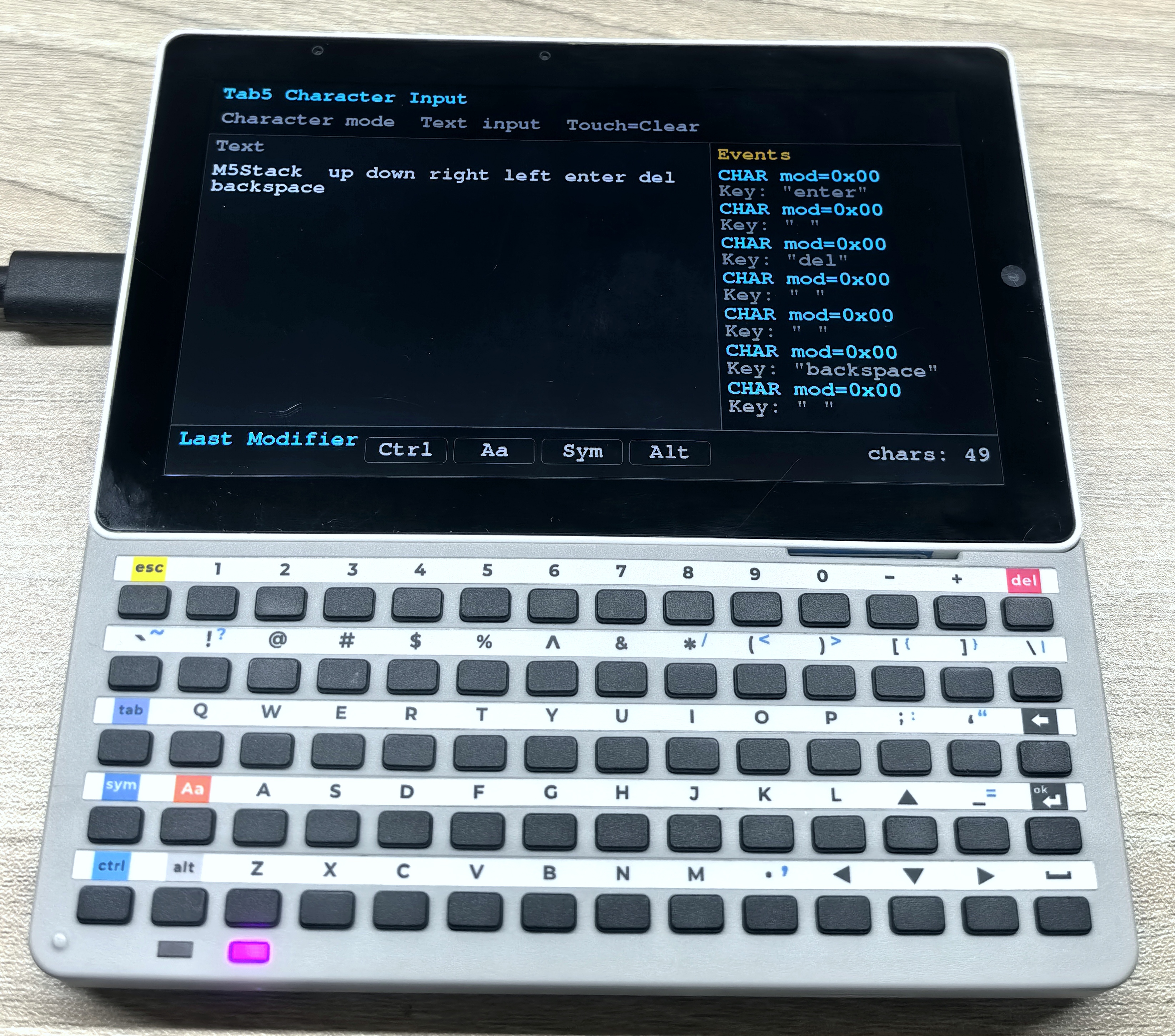
}After flashing the program, you can see the character content and modifier key state for each key input in the serial monitor and in the text area on the LCD. Touch the screen to clear the text content.
2.5 Comprehensive Keyboard Example
- The following example program uses Normal mode to implement a simple text editor, demonstrating how to use Tab5 to control various Tab5 Keyboard functions for text input, cursor movement, event logging, and more. The program displays the current text content, cursor position, and recent key events on the screen.
/*
  Tab5 Keyboard input example using M5UnitUnified for UnitTab5Keyboard.

    This example uses Normal mode so the Tab5 keyboard behaves like a small text
    editor: printable keys insert text, Backspace/Delete remove text, and the
    arrow keys move the cursor. The current editing state is shown on screen.
*/
#include <M5Unified.h>
#include <M5UnitUnified.h>
#include <M5UnitUnifiedKEYBOARD.h>
#include <M5HAL.hpp>
#include <M5Utility.h>
#include <algorithm>
#include <cctype>
#include <limits>
#include <string>

namespace {
auto& lcd = M5.Display;

m5::unit::UnitUnified Units;
m5::unit::UnitTab5Keyboard unit;

constexpr int8_t TAB5_KEYBOARD_SDA = 0;
constexpr int8_t TAB5_KEYBOARD_SCL = 1;
constexpr size_t TEXT_CONTEXT_CHARS = 15 * 39;
constexpr size_t MAX_TEXT_LENGTH   = TEXT_CONTEXT_CHARS;
constexpr size_t MAX_LOG_LINES     = 7;

constexpr uint8_t HID_BACKSPACE = 0x2A;
constexpr uint8_t HID_DELETE    = 0x4C;
constexpr uint8_t HID_LEFT      = 0x50;
constexpr uint8_t HID_DOWN      = 0x51;
constexpr uint8_t HID_UP        = 0x52;
constexpr uint8_t HID_RIGHT     = 0x4F;

constexpr uint16_t COLOR_BG         = TFT_BLACK;
constexpr uint16_t COLOR_PANEL      = 0x2104;  // dark gray
constexpr uint16_t COLOR_BORDER     = 0x5AEB;
constexpr uint16_t COLOR_TEXT       = TFT_WHITE;
constexpr uint16_t COLOR_CURSOR     = TFT_GREEN;
constexpr uint16_t COLOR_MUTED      = 0xAD55;
constexpr uint16_t COLOR_ACCENT     = TFT_CYAN;
constexpr uint16_t COLOR_MOD_ACTIVE = TFT_GREEN;
constexpr uint16_t COLOR_WARN       = TFT_ORANGE;

std::string text_buffer;
size_t cursor_pos{};
struct EventLogLine {
    std::string position;
    std::string key;
};

EventLogLine log_lines[MAX_LOG_LINES];
size_t log_head{};
size_t log_count{};
bool header_dirty{true};
bool text_dirty{true};
bool log_dirty{true};
bool status_dirty{true};

struct Rect {
    int16_t x;
    int16_t y;
    int16_t w;
    int16_t h;
};

Rect header_rect;
Rect text_rect;
Rect status_rect;
Rect log_rect;

bool needs_redraw()
{
    return header_dirty || text_dirty || log_dirty || status_dirty;
}

void mark_editor_dirty()
{
    text_dirty   = true;
    log_dirty    = true;
    status_dirty = true;
}

void push_log(const std::string& position, const std::string& key)
{
    // Keep a small ring buffer so the screen always shows the latest key events.
    log_lines[log_head] = EventLogLine{position, key};
    log_head            = (log_head + 1U) % MAX_LOG_LINES;
    if (log_count < MAX_LOG_LINES) {
        ++log_count;
    }
}

void push_log(const std::string& line)
{
    push_log(line, "");
}

void print_serial_header(const char* mode)
{
    Serial.printf("\n[Tab5Keyboard] %s mode key monitor ready\n", mode);
    Serial.println("Open this serial monitor to see every key event.");
}

size_t line_begin(const size_t pos)
{
    // Cursor movement is based on logical text lines separated by '\n'.
    size_t i = std::min(pos, text_buffer.size());
    while (i > 0 && text_buffer[i - 1] != '\n') {
        --i;
    }
    return i;
}

size_t line_end(const size_t pos)
{
    size_t i = std::min(pos, text_buffer.size());
    while (i < text_buffer.size() && text_buffer[i] != '\n') {
        ++i;
    }
    return i;
}

struct VisualCursorPosition {
    int16_t line{};
    int16_t x{};
};

void prepare_text_font()
{
    lcd.setFont(&fonts::FreeMonoBold18pt7b);
}

int16_t text_left()
{
    return text_rect.x + 14;
}

int16_t text_right()
{
    return text_rect.x + text_rect.w - 14;
}

VisualCursorPosition visual_cursor_position(const size_t pos)
{
    prepare_text_font();
    const int16_t left  = text_left();
    const int16_t right = text_right();
    int16_t x           = left;
    int16_t line{};

    for (size_t i = 0; i < text_buffer.size(); ++i) {
        const char c = text_buffer[i];
        if (c != '\n') {
            char s[2] = {c, '\0'};
            const int16_t char_w = std::max<int16_t>(1, lcd.textWidth(s));
            if (x + char_w > right) {
                x = left;
                ++line;
            }
        }

        if (i == pos) {
            return VisualCursorPosition{line, x};
        }

        if (c == '\n') {
            x = left;
            ++line;
        } else {
            char s[2] = {c, '\0'};
            x = static_cast<int16_t>(x + std::max<int16_t>(1, lcd.textWidth(s)));
        }
    }

    return VisualCursorPosition{line, x};
}

size_t cursor_pos_on_visual_line(const int16_t target_line, const int16_t target_x)
{
    prepare_text_font();
    const int16_t left  = text_left();
    const int16_t right = text_right();
    int16_t x           = left;
    int16_t line{};
    size_t best_pos     = cursor_pos;
    int32_t best_delta  = std::numeric_limits<int32_t>::max();

    auto consider = [&](const size_t pos) {
        if (line != target_line) {
            return;
        }
        const int32_t delta = std::abs(static_cast<int32_t>(x) - static_cast<int32_t>(target_x));
        if (delta < best_delta) {
            best_delta = delta;
            best_pos   = pos;
        }
    };

    for (size_t i = 0; i < text_buffer.size(); ++i) {
        const char c = text_buffer[i];
        if (c != '\n') {
            char s[2] = {c, '\0'};
            const int16_t char_w = std::max<int16_t>(1, lcd.textWidth(s));
            if (x + char_w > right) {
                x = left;
                ++line;
            }
        }

        consider(i);

        if (c == '\n') {
            x = left;
            ++line;
        } else {
            char s[2] = {c, '\0'};
            x = static_cast<int16_t>(x + std::max<int16_t>(1, lcd.textWidth(s)));
        }
    }

    consider(text_buffer.size());
    return best_pos;
}

void move_cursor_left()
{
    if (cursor_pos > 0) {
        --cursor_pos;
    }
}

void move_cursor_right()
{
    if (cursor_pos < text_buffer.size()) {
        ++cursor_pos;
    }
}

void move_cursor_up()
{
    const auto current = visual_cursor_position(cursor_pos);
    if (current.line == 0) {
        return;
    }
    cursor_pos = cursor_pos_on_visual_line(static_cast<int16_t>(current.line - 1), current.x);
}

void move_cursor_down()
{
    const auto current = visual_cursor_position(cursor_pos);
    const size_t next  = cursor_pos_on_visual_line(static_cast<int16_t>(current.line + 1), current.x);
    if (next == cursor_pos) {
        return;
    }
    cursor_pos = next;
}

void insert_char(const char c)
{
    // All text edits happen at cursor_pos so input behaves like a text box.
    switch (c) {
        case '\b':
            if (cursor_pos > 0) {
                text_buffer.erase(cursor_pos - 1, 1);
                --cursor_pos;
            }
            break;
        case 0x7F:
            if (cursor_pos < text_buffer.size()) {
                text_buffer.erase(cursor_pos, 1);
            }
            break;
        case '\r':
        case '\n':
            text_buffer.insert(cursor_pos, 1, '\n');
            ++cursor_pos;
            break;
        case '\t':
            text_buffer.insert(cursor_pos, "    ");
            cursor_pos += 4;
            break;
        default:
            if (std::isprint(static_cast<unsigned char>(c))) {
                text_buffer.insert(cursor_pos, 1, c);
                ++cursor_pos;
            }
            break;
    }

    if (text_buffer.size() > MAX_TEXT_LENGTH) {
        const size_t removed = text_buffer.size() - MAX_TEXT_LENGTH;
        text_buffer.erase(0, removed);
        cursor_pos = cursor_pos > removed ? cursor_pos - removed : 0;
    }
}

void delete_at_cursor()
{
    insert_char(0x7F);
}

void backspace_at_cursor()
{
    insert_char('\b');
}

std::string display_name_for_char(const char c)
{
    switch (c) {
        case '\b':
            return "Backspace";
        case 0x7F:
            return "Delete";
        case '\t':
            return "Tab";
        case '\r':
        case '\n':
            return "Enter";
        case 0x1B:
            return "Esc";
        default:
            break;
    }
    if (std::isprint(static_cast<unsigned char>(c))) {
        return std::string(1, c);
    }
    return m5::utility::formatString("0x%02X", static_cast<uint8_t>(c));
}

void process_character_event(const m5::unit::tab5_keyboard::Event& evt)
{
    for (uint8_t i = 0; i < evt.chr.length && evt.chr.chars[i] != '\0'; ++i) {
        insert_char(evt.chr.chars[i]);
    }

    push_log(m5::utility::formatString("CHAR mod=0x%02X", evt.modifier),
             m5::utility::formatString("Key: \"%s\"", evt.chr.chars));
    M5_LOGI("[Char] modifier=0x%02X length=%u chars=\"%s\"", evt.modifier, evt.chr.length, evt.chr.chars);
}

void process_key_event(const m5::unit::tab5_keyboard::Event& evt)
{
    if (!evt.key.pressed) {
        return;
    }

    // Normal mode gives row/col events; convert them to HID usage codes for editor behavior.
    const auto mapping = unit.isSym() ? m5::unit::tab5_keyboard::keyMatrixToHidSym(evt.key.row, evt.key.col)
                                      : m5::unit::tab5_keyboard::keyMatrixToHidBase(evt.key.row, evt.key.col);
    const uint8_t modifier = static_cast<uint8_t>(mapping.modifier | (unit.isAa() ? 0x02 : 0x00) |
                                                  (unit.isCtrl() ? 0x01 : 0x00) | (unit.isAlt() ? 0x04 : 0x00));
    const char c = m5::unit::tab5_keyboard::hidUsageToChar(mapping.keycode, modifier);

    const char* action = nullptr;
    switch (mapping.keycode) {
        case HID_BACKSPACE:
            backspace_at_cursor();
            action = "Backspace";
            break;
        case HID_DELETE:
            // Delete removes the character after the cursor, unlike Backspace.
            delete_at_cursor();
            action = "Delete";
            break;
        case HID_LEFT:
            move_cursor_left();
            action = "Left";
            break;
        case HID_RIGHT:
            move_cursor_right();
            action = "Right";
            break;
        case HID_UP:
            move_cursor_up();
            action = "Up";
            break;
        case HID_DOWN:
            move_cursor_down();
            action = "Down";
            break;
        default:
            if (c != 0) {
                insert_char(c);
            }
            break;
    }

    const auto name = action ? std::string(action) : (c ? display_name_for_char(c) : std::string("matrix"));
    push_log(m5::utility::formatString("Row:%u  Col:%u", evt.key.row, evt.key.col),
             m5::utility::formatString("Key:%s%s", name.c_str(), evt.repeat ? " repeat" : ""));
    Serial.printf("[Normal] row=%u col=%u pressed=%u repeat=%u sym=%u aa=%u ctrl=%u alt=%u hid=0x%02X mod=0x%02X key=%s\n",
                  evt.key.row, evt.key.col, evt.key.pressed, evt.repeat, unit.isSym(), unit.isAa(), unit.isCtrl(),
                  unit.isAlt(), mapping.keycode, modifier, name.c_str());
    M5_LOGI("[Key] row=%u col=%u pressed=%u repeat=%u char=%s", evt.key.row, evt.key.col, evt.key.pressed,
            evt.repeat, name.c_str());
}

void process_hid_event(const m5::unit::tab5_keyboard::Event& evt)
{
    const char c = m5::unit::tab5_keyboard::hidUsageToChar(evt.hid.keycode, evt.modifier);
    if (c != 0) {
        insert_char(c);
    }

    const auto name = c ? display_name_for_char(c) : m5::utility::formatString("kc=0x%02X", evt.hid.keycode);
    push_log(m5::utility::formatString("HID mod=0x%02X", evt.modifier),
             m5::utility::formatString("Key:%s", name.c_str()));
    Serial.printf("[HID] modifier=0x%02X keycode=0x%02X key=%s\n", evt.modifier, evt.hid.keycode, name.c_str());
    M5_LOGI("[HID] modifier=0x%02X keycode=0x%02X char=%s", evt.modifier, evt.hid.keycode, name.c_str());
}

void drain_keyboard_events()
{
    // Drain all queued keyboard events every frame before redrawing the UI.
    while (!unit.empty()) {
        const auto evt = unit.oldest();
        switch (evt.type) {
            case m5::unit::tab5_keyboard::EventType::Character:
                process_character_event(evt);
                break;
            case m5::unit::tab5_keyboard::EventType::Key:
                process_key_event(evt);
                break;
            case m5::unit::tab5_keyboard::EventType::Hid:
                process_hid_event(evt);
                break;
            case m5::unit::tab5_keyboard::EventType::None:
            default:
                break;
        }
        unit.discard();
        mark_editor_dirty();
    }
}

void layout_screen()
{
    // Split the Tab5 LCD into text input, event log, header, and status regions.
    const int16_t w = lcd.width();
    const int16_t h = lcd.height();
    header_rect     = Rect{0, 0, w, 104};
    status_rect     = Rect{0, static_cast<int16_t>(h - 82), w, 82};
    log_rect        = Rect{static_cast<int16_t>(w * 2 / 3), 104, static_cast<int16_t>(w - w * 2 / 3),
                           static_cast<int16_t>(h - 104 - 82)};
    text_rect       = Rect{0, 104, static_cast<int16_t>(w * 2 / 3), static_cast<int16_t>(h - 104 - 82)};
}

void draw_panel(const Rect& r, const uint16_t color)
{
    lcd.fillRect(r.x, r.y, r.w, r.h, color);
    lcd.drawRect(r.x, r.y, r.w, r.h, COLOR_BORDER);
}

void draw_header()
{
    lcd.fillRect(header_rect.x, header_rect.y, header_rect.w, header_rect.h, COLOR_BG);
    lcd.setTextDatum(top_left);
    lcd.setTextColor(COLOR_ACCENT, COLOR_BG);
    lcd.setFont(&fonts::FreeMonoBold18pt7b);
    lcd.drawString("Tab5 Keyboard Input", 16, 8);

    lcd.setTextColor(COLOR_MUTED, COLOR_BG);
    lcd.drawString("BS=Prev  Del=Next  Arrow=Move Touch=Clear", 18, 58);
}

void draw_text_area()
{
    draw_panel(text_rect, COLOR_PANEL);
    lcd.setTextDatum(top_left);
    lcd.setFont(&fonts::FreeMonoBold18pt7b);
    lcd.setTextColor(COLOR_MUTED, COLOR_PANEL);
    lcd.drawString("Text", text_rect.x + 14, text_rect.y + 10);

    lcd.setTextColor(COLOR_TEXT, COLOR_PANEL);
    const int16_t text_left   = text_rect.x + 14;
    const int16_t text_top    = text_rect.y + 58;
    const int16_t text_right  = text_rect.x + text_rect.w - 14;
    const int16_t text_bottom = text_rect.y + text_rect.h - 10;
    int16_t x                 = text_left;
    int16_t y                 = text_top;

    const int16_t char_h    = lcd.fontHeight();
    const int16_t max_lines = std::max<int16_t>(1, (text_bottom - text_top) / char_h);
    const size_t start      = cursor_pos > TEXT_CONTEXT_CHARS ? cursor_pos - TEXT_CONTEXT_CHARS : 0;
    int16_t lines{};
    int16_t cursor_x{};
    int16_t cursor_y{};
    bool cursor_visible{};

    auto mark_cursor = [&]() {
        // Store the cursor position and draw it after text so it is never covered by glyphs.
        cursor_x       = x;
        cursor_y       = y;
        cursor_visible = x < text_right && y + char_h <= text_bottom;
    };

    auto advance_line = [&]() {
        x = text_left;
        y = static_cast<int16_t>(y + char_h);
        ++lines;
    };

    for (size_t i = start; i < text_buffer.size() && lines < max_lines; ++i) {
        const char c = text_buffer[i];
        if (c == '\n') {
            if (i == cursor_pos) {
                mark_cursor();
            }
            advance_line();
        } else {
            char s[2] = {c, '\0'};
            const int16_t char_w = std::max<int16_t>(1, lcd.textWidth(s));
            // Wrap manually so typed text never spills into the Events panel.
            if (x + char_w > text_right) {
                advance_line();
                if (lines >= max_lines) {
                    break;
                }
            }
            if (i == cursor_pos) {
                mark_cursor();
            }
            if (y + char_h <= text_bottom) {
                lcd.drawString(s, x, y);
                x = static_cast<int16_t>(x + char_w);
            }
        }
    }

    if (cursor_pos == text_buffer.size() && lines < max_lines) {
        mark_cursor();
    }

    if (text_buffer.empty()) {
        lcd.setTextColor(COLOR_MUTED, COLOR_PANEL);
        lcd.drawString("Start typing...", text_left + lcd.textWidth("|") + 8, text_top);
    } else if (cursor_visible) {
        lcd.fillRect(cursor_x, cursor_y, 4, char_h, COLOR_CURSOR);
    }
}

void draw_modifier_badge(const char* label, const bool active, const int16_t x, const int16_t y)
{
    const int16_t w = 126;
    const int16_t h = 42;
    const uint16_t fill = active ? COLOR_MOD_ACTIVE : COLOR_BG;
    const uint16_t fg   = active ? TFT_BLACK : COLOR_MUTED;
    lcd.fillRoundRect(x, y, w, h, 7, fill);
    lcd.drawRoundRect(x, y, w, h, 7, COLOR_BORDER);
    lcd.setTextDatum(middle_center);
    lcd.setFont(&fonts::FreeMonoBold18pt7b);
    lcd.setTextColor(fg, fill);
    lcd.drawString(label, x + w / 2, y + h / 2);
}

void draw_status()
{
    draw_panel(status_rect, COLOR_BG);
    lcd.setTextDatum(top_left);
    lcd.setFont(&fonts::FreeMonoBold18pt7b);
    lcd.setTextColor(COLOR_ACCENT, COLOR_BG);
    lcd.drawString("Modifiers", 16, status_rect.y + 8);

    draw_modifier_badge("Ctrl", unit.isCtrl(), 220, status_rect.y + 18);
    draw_modifier_badge("Aa", unit.isAa(), 356, status_rect.y + 18);
    draw_modifier_badge("Sym", unit.isSym(), 492, status_rect.y + 18);
    draw_modifier_badge("Alt", unit.isAlt(), 628, status_rect.y + 18);

    lcd.setTextColor(COLOR_MUTED, COLOR_BG);
    lcd.setTextDatum(top_right);
    lcd.drawString(m5::utility::formatString("chars: %u  cursor: %u", static_cast<unsigned>(text_buffer.size()),
                                             static_cast<unsigned>(cursor_pos))
                       .c_str(),
                   status_rect.w - 16, status_rect.y + 20);
}

void draw_log()
{
    draw_panel(log_rect, COLOR_BG);
    lcd.setTextDatum(top_left);
    lcd.setFont(&fonts::FreeMonoBold18pt7b);
    lcd.setTextColor(COLOR_WARN, COLOR_BG);
    lcd.drawString("Events", log_rect.x + 12, log_rect.y + 10);

    lcd.setTextColor(COLOR_MUTED, COLOR_BG);
    int16_t y            = log_rect.y + 52;
    const int16_t line_h = lcd.fontHeight();
    for (size_t i = 0; i < log_count; ++i) {
        const size_t idx = (log_head + MAX_LOG_LINES - log_count + i) % MAX_LOG_LINES;
        lcd.setTextColor(COLOR_ACCENT, COLOR_BG);
        lcd.drawString(log_lines[idx].position.c_str(), log_rect.x + 12, y);
        y += line_h;
        if (!log_lines[idx].key.empty()) {
            lcd.setTextColor(COLOR_MUTED, COLOR_BG);
            lcd.drawString(log_lines[idx].key.c_str(), log_rect.x + 12, y);
            y += line_h;
        }
        y += 4;
    }
}

void draw_screen()
{
    // Incremental redraw: each draw_* function clears only its own panel.
    lcd.startWrite();
    if (header_dirty) {
        draw_header();
        header_dirty = false;
    }
    if (text_dirty) {
        draw_text_area();
        text_dirty = false;
    }
    if (log_dirty) {
        draw_log();
        log_dirty = false;
    }
    if (status_dirty) {
        draw_status();
        status_dirty = false;
    }
    lcd.endWrite();
}

bool setup_tab5_keyboard()
{
    // Normal mode is required here because it exposes physical row/col events and modifier state.
    auto cfg            = unit.config();
    cfg.mode            = m5::unit::tab5_keyboard::Mode::Normal;
    cfg.start_periodic = true;
    cfg.irq_pin         = 50;// INT pin defaults to GPIO50 (Tab5 ExtPort1)
    cfg.software_repeat = true;
    unit.config(cfg);

    M5_LOGI("Tab5 ExtPort1 I2C: SDA:%d SCL:%d", TAB5_KEYBOARD_SDA, TAB5_KEYBOARD_SCL);
    Wire.end();
    Wire.begin(TAB5_KEYBOARD_SDA, TAB5_KEYBOARD_SCL, unit.component_config().clock);
    if (!Units.add(unit, Wire) || !Units.begin()) {
        return false;
    }

    M5.Log.printf("Firmware:%02X\n", unit.firmwareVersion());
    return true;
}

}  // namespace

void setup()
{
    M5.begin();
    Serial.begin(115200);
    print_serial_header("Normal");
    M5.setTouchButtonHeightByRatio(100);

    if (lcd.height() > lcd.width()) {
        lcd.setRotation(3);
    }
    layout_screen();
    lcd.fillScreen(COLOR_BG);

    if (!setup_tab5_keyboard()) {
        M5_LOGE("Failed to begin UnitTab5Keyboard");
        lcd.fillScreen(TFT_RED);
        lcd.setTextColor(TFT_WHITE, TFT_RED);
        lcd.setTextDatum(middle_center);
        lcd.drawString("UnitTab5Keyboard begin failed", lcd.width() / 2, lcd.height() / 2);
        while (true) {
            m5::utility::delay(10000);
        }
    }

    push_log("Keyboard ready");
    draw_screen();
}

void loop()
{
    M5.update();
    Units.update();
    drain_keyboard_events();

    // A single touch clears the editor contents without using any keyboard key.
    if (M5.Touch.getDetail().wasClicked()) {
        text_buffer.clear();
        cursor_pos = 0;
        push_log("Clear text");
        mark_editor_dirty();
    }

    if (needs_redraw()) {
        draw_screen();
    }
    m5::utility::delay(1000 / 30);
}After flashing the program, a simple text editor interface appears on the screen. The top area shows the title and shortcut key hints, the left side is the text input area, the right side is the event log, and the bottom area shows the current modifier key states and text statistics. Press keys to observe cursor movement, text editing, event logging, and other behaviors.