

Arduino Quick Start
2. Devices & Examples
3. M5Unified
4. M5GFX
5. Extensions
Unit
Atomic
Tab5
IoT
Accessories
StopWatch M5PM1 & M5IOE1 Power Management
1. Multi-Level Power Switch Design
StopWatch integrates M5PM1 + M5IOE1 internally. Combined with the hardware circuitry, it implements a multi-level power switch design. Different power switch levels control the power supply to related peripherals and interfaces. Users can switch between different power enable levels according to runtime requirements and turn off unused peripherals to achieve low power consumption for the whole device.
M5PM1 / M5IOE1 Driver Libraries
Using the M5PM1 / M5IOE1 driver libraries allows convenient configuration of the M5PM1 / M5IOE1 pin functions for low-power wake-up and peripheral power switching.
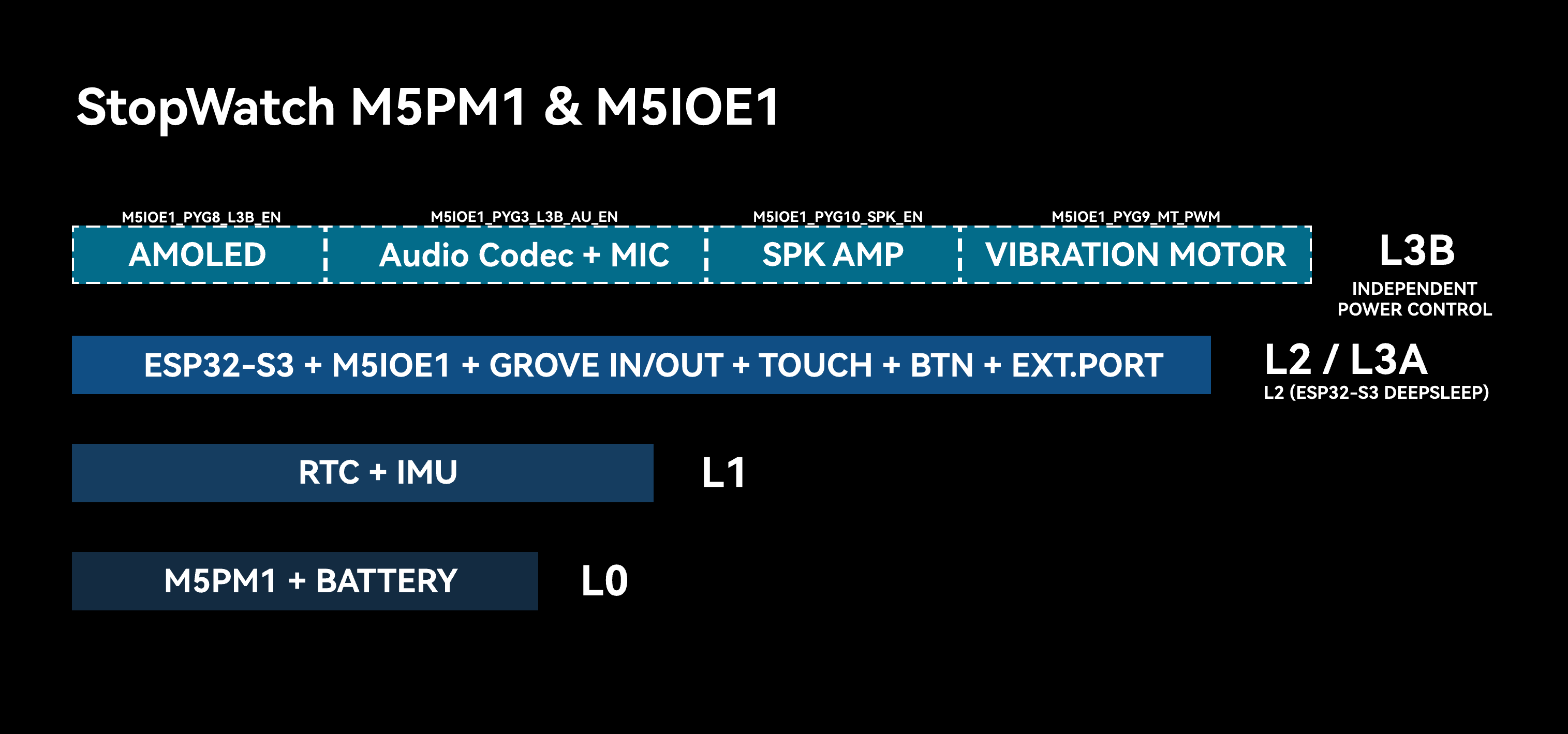
DCDC3V3_EN_PP, LDO3V3_EN_PP, and CHG_EN_PP are turned on). During the M5Unified initialization process, M5IOE1 is further controlled to enable L3B so that additional peripheral power or enable pins become available.L0
At this power level, the battery keeps supplying power to M5PM1. As long as the battery is not depleted, this power level remains active, and M5PM1 supports basic button-based power on/off operations.
L1
This level enables power for the IMU and RTC peripherals. The power switch at this level uses M5PM1 LDO3V3_EN_PP (PM_3V3_L1_EN), which can be controlled using the following API.
pm1.setLdoEnable(true); // L1 ON
pm1.setLdoEnable(false); // L1 OFFAt the same time, the IMU INT1 interrupt pin and the RTC timer interrupt pin are connected to PYG4 of M5PM1. By configuring the relevant registers, IMU and RTC power can be kept on while M5PM1 enters sleep mode. Flipping the device can trigger the IMU interrupt (active high), or the RTC timer interrupt can be triggered (active low), waking up M5PM1. The following API can be used to keep IMU and RTC (L1) power enabled.
pm1.setLdoEnable(true);
pm1.ldoSetPowerHold(true);
pm1.setLedEnLevel(true);
pm1.shutdown();L2 / L3A
At this power level, the ESP32-S3, Grove interface, M5IOE1 expansion chip, user button pull-up power, EXT.PORT interface 3V3_L2 output, and CH442E switch chip power are enabled (the switch chip is used to switch the EXT.PORT MUX_IO_1/2 function between UART0 and USB).
The input/output power of the Grove expansion interface needs to be controlled through the EXT_5V_EN (BOOST5V_EN_PP) pin of M5PM1.
When the ESP32-S3 is in sleep mode, the power level is L2. When the ESP32-S3 is active, the power level is L3A. The ESP32-S3 can turn off its own power supply (L2 -> L1/L0) by controlling M5PM1 to enter sleep mode.
When the Grove EXT_5V interface is turned off, it is in input mode and requires an external 5V input supply. In usage scenarios without external power input, the following API can be used to re-enable EXT_5V output mode.
M5.Power.setExtOutput(true); // EXT_5V OUTPUT
// M5.Power.setExtOutput(false); // EXT_5V INPUTL3B
The L3B level controls the power supply or related configuration of peripherals with relatively high power consumption, such as the display, speaker, and vibration motor. This level is controlled by the M5IOE1 IO expansion chip, allowing some peripherals at this level to be controlled independently.
| M5IOE1 | PYG1 | PYG3 | PYG9 | PYG8 | PYG10 | PYG4 | PYG5 |
|---|---|---|---|---|---|---|---|
| Ext.Port Select | PYB_MUX_CTR | ||||||
| Audio L3B | PYB_AU_EN | ||||||
| Vibration Motor | PYB_MT_PWM | ||||||
| 3V3_L3B | PYB_L3B_EN | ||||||
| Speaker AMP AW8737A | PYB_SPK_EN | ||||||
| Touch | PYB_TP_RST | ||||||
| AMOLED | PYB_OLED_RST |
- PYG1(PYB_MUX_CTR): Rear expansion interface
MUX_IO_1/2switching betweenUSB / UARTfunctions - PYG3(PYB_AU_EN): ES8311 power supply + MIC power supply
- PYG9(PYB_MT_PWM): Vibration motor PWM signal
- PYG8(PYB_L3B_EN): AMOLED display power supply
- PYG10(PYB_SPK_EN): AW8737A speaker amplifier enable
- PYG4(PYB_TP_RST): Touch reset
- PYG5(PYB_OLED_RST): Display reset
For specific peripheral power control, use the following M5IOE1 API for independent control:
ioe1.pinMode(M5IOE1_PIN_1, OUTPUT);
ioe1.digitalWrite(M5IOE1_PIN_1, LOW);2. M5PM1 Sleep
Manual Sleep
M5PM1 can be manually controlled by software to enter sleep mode and reduce overall system power consumption. Under the default configuration, entering sleep directly falls back to the L0 power level, where only M5PM1 remains powered.
pm1.shutdown();In some special use cases (such as IMU wake-up or ESP32-S3 SoC sleep), M5PM1 is allowed to enter sleep mode while still keeping power supplied to certain peripheral levels for wake-up sources or state retention.
Such applications require configuring the power switch pin states of the corresponding levels and enabling power hold before M5PM1 enters sleep mode.
I2C Idle Sleep
M5PM1 supports automatic sleep based on idle I2C communication time to reduce overall system power consumption. After entering sleep mode, the first communication between ESP32-S3 and M5PM1 is used to wake up M5PM1, so that communication fails. Valid communication will complete on the next transaction after wake-up.
m5pm1_err_t setI2cSleepTime(uint8_t seconds);3. M5PM1 Timer
M5PM1 supports timer functionality. When the countdown ends, corresponding actions such as power on, power off, and reset can be executed.
m5pm1_err_t timerSet(uint32_t seconds, m5pm1_tim_action_t action);typedef enum {
M5PM1_TIM_ACTION_STOP = 0b000, // 停止,无动作
// Stop, no action
M5PM1_TIM_ACTION_FLAG = 0b001, // 仅设置标志
// Set flag only
M5PM1_TIM_ACTION_REBOOT = 0b010, // 系统复位
// System reboot
M5PM1_TIM_ACTION_POWERON = 0b011, // 开机
// Power on
M5PM1_TIM_ACTION_POWEROFF = 0b100 // 关机
// Power off
} m5pm1_tim_action_t;Timed Power On / Power Off Example
Example description: After the device powers on, clicking Button A configures a 10-second timer to trigger power-on after shutdown. Clicking Button B configures a timer that triggers M5PM1 power-off after 10 seconds (the device can be powered on again by clicking the power button).
#include <M5Unified.h>
#include <M5PM1.h>
M5PM1 pm1;
void setup(void)
{
M5.begin();
Serial.begin(115200);
// Initialize PM1
m5pm1_err_t err = pm1.begin(&M5.In_I2C, M5PM1_DEFAULT_ADDR, M5PM1_I2C_FREQ_100K);
if (err == M5PM1_OK) {
Serial.println("PM1 initialization successful");
} else {
Serial.printf("PM1 initialization failed, error code: %d\n", err);
}
pm1.setSingleResetDisable(false);
M5.Display.fillScreen(BLACK);
M5.Display.setTextColor(WHITE);
M5.Display.setTextFont(&fonts::FreeMonoBold12pt7b);
M5.Display.setCursor(80, 150);
M5.Display.println("Timer Power Test");
M5.Display.println(" BtnA: After 10s ON");
M5.Display.println(" BtnB: After 10s OFF");
}
void loop(void)
{
M5.update();
if (M5.BtnA.wasPressed()) {
M5.Display.fillScreen(BLACK);
M5.Display.setCursor(40, 80);
M5.Display.println("Shutdown");
M5.Display.println(" After 10s");
M5.Display.println(" Power ON");
delay(500);
pm1.timerSet(10, M5PM1_TIM_ACTION_POWERON);
pm1.shutdown();
}
if (M5.BtnB.wasPressed()) {
M5.Display.fillScreen(BLACK);
M5.Display.setCursor(40, 80);
M5.Display.println(" After 10s");
M5.Display.println(" Power OFF");
delay(500);
pm1.timerSet(10, M5PM1_TIM_ACTION_POWEROFF);
}
} 4. IMU Wake-up
BMI270 Driver Library
IMU M5PM1 Wake-up
When the power is switched to L1 mode, only the IMU, RTC, and M5PM1 remain powered in the device. After configuring the IMU wake-up function, M5PM1 also enters sleep mode while keeping the L1 output power (3V3_L1_EN) enabled to maintain IMU operation.
At this point, flipping or moving the device can trigger the IMU wake-up signal, waking up M5PM1 to restart.
After M5PM1 wakes up, the L0, L1, and L2 power-on sequence will run again, and the ESP32-S3 will reinitialize.
Example description: After the device powers on, click Button A to configure IMU interrupt mode and enable M5PM1 L1 power hold, then M5PM1 enters sleep mode. Flipping or moving the device triggers M5PM1 wake-up, and the ESP32-S3 powers on again.
#include <M5Unified.h>
#include <M5PM1.h>
#include <Wire.h>
#include "SparkFun_BMI270_Arduino_Library.h"
BMI270 imu;
M5PM1 pm1;
void setup(void)
{
M5.begin();
Serial.begin(115200);
Wire1.setPins(M5.getPin(m5::pin_name_t::in_i2c_sda), M5.getPin(m5::pin_name_t::in_i2c_scl));
// Initialize PM1
m5pm1_err_t err = pm1.begin(&M5.In_I2C, M5PM1_DEFAULT_ADDR, M5PM1_I2C_FREQ_100K);
if (err == M5PM1_OK) {
Serial.println("PM1 initialization successful");
pm1.gpioSetWakeEnable(M5PM1_GPIO_NUM_0, true);
pm1.gpioSetWakeEdge(M5PM1_GPIO_NUM_0, M5PM1_GPIO_WAKE_FALLING); // Falling edge
} else {
Serial.printf("PM1 initialization failed, error code: %d\n", err);
}
pm1.setSingleResetDisable(false);
// Check if sensor is connected and initialize
// Address defaults to 0x68)
while(imu.beginI2C(BMI2_I2C_PRIM_ADDR, Wire1) != BMI2_OK)
{
Serial.println("Error: BMI270 not connected, check wiring and I2C address!");
delay(1000);
}
imu.disableFeature(BMI2_ANY_MOTION);
Serial.println("BMI270 initialization successful");
M5.Display.setFont(&fonts::FreeMonoBold12pt7b);
M5.Display.clear();
M5.Display.setCursor(40, 100);
M5.Display.printf("IMU Wakeup Test\n\n");
M5.Display.println(" Press BtnA to Sleep");
M5.Display.println(" Shake to wake up");
}
void loop(void)
{
M5.update();
if (M5.BtnA.wasPressed()) {
int8_t ret = imu.enableFeature(BMI2_ANY_MOTION);
// Optional
// bmi2_sens_config config;
// config.type = BMI2_ANY_MOTION;
// config.cfg.any_motion.threshold = 0xA0;// 1LSB equals to 0.48mg. Default is 83mg. Lower is more sensitive
// config.cfg.any_motion.duration = 0x0A; // 1LSB equals 20ms. Default is 100ms.
// ret |= imu.setConfig(config);
//
bmi2_int_pin_config intPinConfig;
intPinConfig.pin_type = BMI2_INT1;
intPinConfig.int_latch = BMI2_INT_NON_LATCH;
intPinConfig.pin_cfg[0].lvl = BMI2_INT_ACTIVE_LOW;
intPinConfig.pin_cfg[0].od = BMI2_INT_PUSH_PULL;
intPinConfig.pin_cfg[0].output_en = BMI2_INT_OUTPUT_ENABLE;
intPinConfig.pin_cfg[0].input_en = BMI2_INT_INPUT_DISABLE;
ret |= imu.setInterruptPinConfig(intPinConfig);
ret |= imu.mapInterruptToPin(BMI2_ANY_MOTION_INT, BMI2_INT1);
if (!ret){
Serial.println("BMI270 AnyMotionInterrupt enabled successfully");
} else {
Serial.println("Failed to enable BMI270 AnyMotionInterrupt");
}
M5.Display.clear();
M5.Display.setCursor(40, 100);
M5.Display.println("Power OFF");
delay(1000);
// Shutdown
pm1.setLdoEnable(true);
pm1.ldoSetPowerHold(true);
pm1.setLedEnLevel(true);
pm1.shutdown();
}
}Example effect demonstration:
IMU ESP32-S3 Wake-up
The PYG1_IRQ pin of M5PM1 is electrically connected to G12 of the ESP32-S3. A chained wake-up signal can be used to wake the ESP32-S3. The implementation steps are as follows:
- Configure M5PM1
PYG0as input mode. This pin is connected to the IMUINT1output signal. - Configure M5PM1
PYG1_IRQas an IRQ output signal pin. When the state ofPYG0(IMU interrupt signal) changes,PYG1_IRQoutputs an interrupt signal. - Configure the ESP32-S3 to enter sleep mode and set the wake-up pin to
G12. - Flip or move the device: trigger the IMU wake-up signal -> trigger M5PM1
PYG1_IRQ-> wake up ESP32-S3.
Example description: After the device powers on, clicking Button A configures IMU interrupt mode. Flipping or moving the device triggers the GPIO interrupt handler. Clicking Button A again clears the M5PM1 IRQ flag so that the test can be run again.
#include <M5Unified.h>
#include <M5PM1.h>
#include <Wire.h>
#include "SparkFun_BMI270_Arduino_Library.h"
#include "driver/rtc_io.h"

BMI270 imu;
M5PM1 pm1;

void setup(void)
{
    M5.begin();
    Serial.begin(115200);

    Wire1.setPins(M5.getPin(m5::pin_name_t::in_i2c_sda), M5.getPin(m5::pin_name_t::in_i2c_scl));

    // Initialize PM1
    m5pm1_err_t err = pm1.begin(&M5.In_I2C, M5PM1_DEFAULT_ADDR, M5PM1_I2C_FREQ_100K);

    if (err == M5PM1_OK) {
        Serial.println("PM1 initialization successful");
        pm1.irqClearGpioAll();
        pm1.irqClearSysAll();
        pm1.irqClearBtnAll();

        pm1.irqSetGpioMaskAll(M5PM1_IRQ_MASK_ENABLE);
        pm1.irqSetSysMaskAll(M5PM1_IRQ_MASK_ENABLE);
        pm1.irqSetBtnMaskAll(M5PM1_IRQ_MASK_ENABLE);

        pm1.irqSetGpioMask(M5PM1_IRQ_GPIO0, M5PM1_IRQ_MASK_DISABLE);
        pm1.gpioSetMode(M5PM1_GPIO_NUM_0, M5PM1_GPIO_MODE_INPUT);
        pm1.gpioSetPull(M5PM1_GPIO_NUM_0, M5PM1_GPIO_PULL_UP);

        pm1.gpioSetMode(M5PM1_GPIO_NUM_1, M5PM1_GPIO_MODE_OUTPUT);
        pm1.gpioSetDrive(M5PM1_GPIO_NUM_1, M5PM1_GPIO_DRIVE_PUSHPULL);
        pm1.gpioSetFunc(M5PM1_GPIO_NUM_1, M5PM1_GPIO_FUNC_IRQ);
    } else {
        Serial.printf("PM1 initialization failed, error code: %d\n", err);
    }
    pm1.setSingleResetDisable(false);

    // Check if sensor is connected and initialize
    // Address defaults to 0x68)
    while(imu.beginI2C(BMI2_I2C_PRIM_ADDR, Wire1) != BMI2_OK)
    {
        Serial.println("Error: BMI270 not connected, check wiring and I2C address!");
        delay(1000);
    }
    imu.disableFeature(BMI2_ANY_MOTION);
    Serial.println("BMI270 initialization successful");

    M5.Display.setFont(&fonts::FreeMonoBold12pt7b);
    M5.Display.clear();
    M5.Display.setCursor(40, 100);
    M5.Display.printf("IMU IRQ Test\n\n");
    M5.Display.println("     Press BtnA to Sleep");
    M5.Display.println("     Shake to wake up");
}

volatile bool pm1IrqTriggered = false;

void ARDUINO_ISR_ATTR pm1_irq_handler()
{
    pm1IrqTriggered = true;
}

void loop(void)
{
    M5.update();

    if (pm1IrqTriggered) {
        pm1IrqTriggered = false;

        Serial.println("PM1 IRQ triggered");

        uint16_t status = 0;
        imu.getInterruptStatus(&status);
        Serial.printf("BMI270 interrupt status: 0x%04X\n", status);

        M5.Display.setCursor(40, 130);
        M5.Display.println("PM1 IRQ triggered");
    }

    if (M5.BtnA.wasPressed()) {
        pm1.irqClearGpioAll();
        pm1.irqClearSysAll();
        pm1.irqClearBtnAll();
        int8_t ret = imu.enableFeature(BMI2_ANY_MOTION);
        // Optional
        // bmi2_sens_config config;
        // config.type = BMI2_ANY_MOTION;
        // ret |= imu.getConfig(&config);
        // config.cfg.any_motion.threshold = 0xE0;// 1LSB equals to 0.48mg. Default is 83mg. Lower is more sensitive
        // config.cfg.any_motion.duration = 0x0A; // 1LSB equals 20ms. Default is 100ms.
        // ret |= imu.setConfig(config);

        bmi2_int_pin_config intPinConfig;
        intPinConfig.pin_type = BMI2_INT1;
        intPinConfig.int_latch = BMI2_INT_NON_LATCH;
        intPinConfig.pin_cfg[0].lvl = BMI2_INT_ACTIVE_HIGH;// active - high
        intPinConfig.pin_cfg[0].od = BMI2_INT_PUSH_PULL;
        intPinConfig.pin_cfg[0].output_en = BMI2_INT_OUTPUT_ENABLE;
        intPinConfig.pin_cfg[0].input_en = BMI2_INT_INPUT_DISABLE;
        ret |= imu.setInterruptPinConfig(intPinConfig);
        ret |= imu.mapInterruptToPin(BMI2_ANY_MOTION_INT, BMI2_INT1);
        if (!ret){
            Serial.println("BMI270 AnyMotionInterrupt enabled successfully");
        } else {
            Serial.println("Failed to enable BMI270 AnyMotionInterrupt");
        }

        M5.Display.clear();
        M5.Display.setCursor(40, 100);
        M5.Display.println("Now Shake!");

        // Choose either of the two pieces of code below.
        pinMode(GPIO_NUM_12, INPUT_PULLUP);
        attachInterrupt(GPIO_NUM_12, pm1_irq_handler, FALLING);

        // esp_sleep_enable_ext0_wakeup(GPIO_NUM_12, 0);  // 0 = Low
        // rtc_gpio_pullup_en(GPIO_NUM_12);
        // Serial.println("Going to sleep now");
        // esp_deep_sleep_start();
    }
}Example effect demonstration:
5. RTC Wake-up
RTC M5PM1 Wake-up
When the power is switched to L1 mode, only the IMU, RTC, and M5PM1 remain powered in the device. After configuring the RTC timer wake-up function, M5PM1 enters sleep mode while keeping the L1 output power (3V3_L1_EN) enabled to maintain RTC operation.
At this point, an RTC timer wake-up can be configured to trigger M5PM1 wake-up and power the ESP32-S3 on again.
After M5PM1 wakes up, the L0, L1, and L2 power-on sequence will run again, and the ESP32-S3 will reinitialize.
Example description: After the device powers on, clicking Button A configures the RTC timer wake-up, then M5PM1 enters sleep mode. Five seconds later, the RTC wake-up triggers and the ESP32-S3 powers on again.
#include <M5Unified.h>
#include <M5PM1.h>

M5PM1 pm1;

void setup(void)
{
    M5.begin();
    Serial.begin(115200);

    // Initialize PM1
    m5pm1_err_t err = pm1.begin(&M5.In_I2C, M5PM1_DEFAULT_ADDR, M5PM1_I2C_FREQ_100K);

    if (err == M5PM1_OK) {
        Serial.println("PM1 initialization successful");
        pm1.gpioSetWakeEnable(M5PM1_GPIO_NUM_0, true);
        pm1.gpioSetWakeEdge(M5PM1_GPIO_NUM_0, M5PM1_GPIO_WAKE_FALLING);  // Falling edge
    } else {
        Serial.printf("PM1 initialization failed, error code: %d\n", err);
    }
    pm1.setSingleResetDisable(false);

    M5.Display.setFont(&fonts::FreeMonoBold12pt7b);
    M5.Display.clear();
    M5.Display.setCursor(40, 100);
    M5.Display.printf("RTC Wakeup Test\n\n");
    M5.Display.println("     Press BtnA to Sleep");
}

void loop(void)
{
    M5.update();
    if (M5.BtnA.wasPressed()) {
        M5.Rtc.clearIRQ();

        if (M5.Rtc.setTimerIRQ(5000)){// 5s later wakeup
            Serial.println("RTC IRQ enabled successfully");
            M5.Display.clear();
            M5.Display.setCursor(40, 100);
            M5.Display.printf("Power OFF");
            M5.Display.setCursor(40, 130);
            M5.Display.printf("5s later wakeup");
            delay(500);
            // Shutdown
            pm1.setLdoEnable(true);
            pm1.ldoSetPowerHold(true);
            pm1.setLedEnLevel(true);
            pm1.shutdown();
        } else {
            Serial.println("Failed to enable RTC IRQ");
        }
    }
}Example effect demonstration:
RTC ESP32-S3 Wake-up
The RTC wake-up configuration steps are similar to IMU ESP32-S3 wake-up. The difference is that RTC wake-up does not require configuring the BMI270 interrupt as IMU wake-up does, but it still relies on the chain RTC IRQ -> M5PM1 GPIO -> PYG1_IRQ -> ESP32-S3 G12.
#include <M5Unified.h>
#include <M5PM1.h>
#include "driver/rtc_io.h"

M5PM1 pm1;

void setup(void) {
  M5.begin();
  Serial.begin(115200);
  M5.Display.setFont(&fonts::FreeMonoBold12pt7b);
  M5.Display.clear();
  M5.Display.setCursor(40, 100);
  M5.Display.printf("RTC IRQ Test\n\n");
  M5.Display.println("     Press BtnA to Sleep");

  // Initialize PM1
  m5pm1_err_t err = pm1.begin(&M5.In_I2C, M5PM1_DEFAULT_ADDR, M5PM1_I2C_FREQ_100K);

  if (err == M5PM1_OK) {
    Serial.println("PM1 initialization successful");
    pm1.irqClearGpioAll();
    pm1.irqClearSysAll();
    pm1.irqClearBtnAll();

    pm1.irqSetGpioMaskAll(M5PM1_IRQ_MASK_ENABLE);
    pm1.irqSetSysMaskAll(M5PM1_IRQ_MASK_ENABLE);
    pm1.irqSetBtnMaskAll(M5PM1_IRQ_MASK_ENABLE);

    pm1.irqSetGpioMask(M5PM1_IRQ_GPIO0, M5PM1_IRQ_MASK_DISABLE);
    pm1.gpioSetMode(M5PM1_GPIO_NUM_0, M5PM1_GPIO_MODE_INPUT);
    pm1.gpioSetPull(M5PM1_GPIO_NUM_0, M5PM1_GPIO_PULL_UP);

    pm1.gpioSetMode(M5PM1_GPIO_NUM_1, M5PM1_GPIO_MODE_OUTPUT);
    pm1.gpioSetDrive(M5PM1_GPIO_NUM_1, M5PM1_GPIO_DRIVE_PUSHPULL);
    pm1.gpioSetFunc(M5PM1_GPIO_NUM_1, M5PM1_GPIO_FUNC_IRQ);
  } else {
    Serial.printf("PM1 initialization failed, error code: %d\n", err);
  }
  pm1.setSingleResetDisable(false);
  delay(200);
  M5.Rtc.clearIRQ();
  delay(200);
}

volatile bool pm1IrqTriggered = false;

void ARDUINO_ISR_ATTR pm1_irq_handler() {
    pm1IrqTriggered = true;
}

void loop(void) {
    M5.update();

    if (pm1IrqTriggered) {
        pm1IrqTriggered = false;
        M5.Rtc.setTimerIRQ(0);
        M5.Rtc.clearIRQ();
        pm1.irqClearGpioAll();
        pm1.irqClearSysAll();
        pm1.irqClearBtnAll();

        Serial.println("PM1 IRQ triggered");
        M5.Display.setCursor(40, 130);
        M5.Display.println("PM1 IRQ triggered");
    }

    if (M5.BtnA.wasPressed()) {
        if (M5.Rtc.setTimerIRQ(5000)){// Set Timer IRQ
            Serial.println("RTC IRQ enabled successfully");
            M5.Display.clear();
            M5.Display.setCursor(40, 100);
            M5.Display.printf("Wait for IRQ to wake up...");

            // Choose either of the two pieces of code below.
            pinMode(GPIO_NUM_12, INPUT_PULLUP);
            attachInterrupt(GPIO_NUM_12, pm1_irq_handler, FALLING);

            // esp_sleep_enable_ext0_wakeup(GPIO_NUM_12, 0);  // 0 = Low
            // rtc_gpio_pullup_en(GPIO_NUM_12);
            // Serial.println("Going to sleep now");
            // esp_deep_sleep_start();
        } else {
            Serial.println("Failed to enable RTC IRQ");
        }
    }
}Example effect demonstration:
6. M5IOE1 Peripheral Control
M5IOE1, as an independent IO expansion chip, controls part of the L3B power-level peripheral supply and related configuration, such as the display, speaker, and vibration motor. Through the M5IOE1 API, these peripherals can be controlled independently for more flexible power management.
IOE_TP_EN, IOE_OLED_RST, and IOE_L3B_EN. If these pins are pulled low and then powered on again, the display must be reinitialized before it can display and accept touch input normally. Please wait for a future M5Unified library update for this support. The same applies to the control API. For example, ioe1.digitalWrite(IOE_L3B_EN, LOW) can be used to control the L3B power switch.#include <M5Unified.h>
#include <M5PM1.h>
#include <M5IOE1.h>
M5PM1 pm1;
M5IOE1 ioe1;
#define IOE_MUX_EN M5IOE1_PIN_1
#define IOE_AU_EN M5IOE1_PIN_3
#define IOE_MT_PWM M5IOE1_PIN_9
#define IOE_L3B_EN M5IOE1_PIN_8
#define IOE_SPK_EN M5IOE1_PIN_10
#define IOE_TP_EN M5IOE1_PIN_4
#define IOE_OLED_RST M5IOE1_PIN_5
void setup(void)
{
M5.begin();
Serial.begin(115200);
// Initialize PM1
m5pm1_err_t pm1_err = pm1.begin(&M5.In_I2C, M5PM1_DEFAULT_ADDR, M5PM1_I2C_FREQ_100K);
if (pm1_err == M5PM1_OK) {
Serial.println("PM1 initialization successful");
} else {
Serial.printf("PM1 initialization failed, error code: %d\n", pm1_err);
}
pm1.setSingleResetDisable(false);
// Initialize IOE1
m5ioe1_err_t ioe1_err = ioe1.begin(&M5.In_I2C, M5IOE1_DEFAULT_ADDR, M5IOE1_I2C_FREQ_100K);
if (ioe1_err == M5IOE1_OK) {
Serial.println("IOE1 initialization successful");
} else {
Serial.printf("IOE1 initialization failed, error code: %d\n", ioe1_err);
}
ioe1.pinMode(IOE_MUX_EN, OUTPUT);
ioe1.pinMode(IOE_AU_EN, OUTPUT);
ioe1.pinMode(IOE_MT_PWM, OUTPUT);
ioe1.pinMode(IOE_L3B_EN, OUTPUT);
ioe1.pinMode(IOE_SPK_EN, OUTPUT);
ioe1.pinMode(IOE_TP_EN, OUTPUT);
ioe1.pinMode(IOE_OLED_RST, OUTPUT);
ioe1.setPwmFrequency(2000);
ioe1.setPwmDuty(M5IOE1_PWM_CH1, 0);
M5.Display.setFont(&fonts::FreeMonoBold12pt7b);
M5.Display.clear();
M5.Display.setCursor(40, 100);
M5.Display.printf("IOE1 Power Test Begin\n\n");
delay(1000);
}
void loop(void)
{
M5.update();
// MUX IO
M5.Display.clear();
M5.Display.setCursor(40, 100);
M5.Display.printf("MUX IO set to UART0");
ioe1.digitalWrite(IOE_MUX_EN, LOW);
delay(1000);
M5.Display.setCursor(40, 130);
M5.Display.printf("MUX IO set to USB");
ioe1.digitalWrite(IOE_MUX_EN, HIGH);
delay(1000);
// Speaker
M5.Display.clear();
M5.Display.setCursor(40, 100);
M5.Display.printf("Speaker off");
ioe1.digitalWrite(IOE_SPK_EN, LOW);
M5.Speaker.tone(10000, 100);
M5.Display.setCursor(40, 130);
M5.Display.printf("No sound");
delay(1000);
M5.Display.setCursor(40, 160);
M5.Display.printf("1s later hear sound");
ioe1.digitalWrite(IOE_SPK_EN, HIGH);
delay(1000);
M5.Speaker.tone(4000, 200);
delay(1000);
// Vibration Motor
M5.Display.clear();
M5.Display.setCursor(40, 100);
M5.Display.printf("Motor off");
ioe1.setPwmDuty(M5IOE1_PWM_CH1, 0);
M5.Display.setCursor(40, 130);
M5.Display.printf("No vibration");
delay(1000);
M5.Display.setCursor(40, 160);
M5.Display.printf("1s vibrate");
ioe1.digitalWrite(IOE_MT_PWM, HIGH);
ioe1.setPwmDuty(M5IOE1_PWM_CH1, 50);
delay(1000);
ioe1.setPwmDuty(M5IOE1_PWM_CH1, 0);
delay(200);
// Audio
M5.Display.clear();
M5.Display.setCursor(40, 100);
M5.Display.printf("Audio off");
ioe1.digitalWrite(IOE_AU_EN, LOW);
M5.Speaker.end();
M5.Speaker.begin();
M5.Speaker.setVolume(128);
M5.Speaker.tone(10000, 100);
M5.Display.setCursor(40, 130);
M5.Display.printf("No sound");
delay(1000);
M5.Display.setCursor(40, 160);
M5.Display.printf("1s later hear sound");
ioe1.digitalWrite(IOE_AU_EN, HIGH);
M5.Speaker.end();
M5.Speaker.begin();
M5.Speaker.setVolume(128);
delay(1000);
M5.Speaker.tone(6000, 200);
delay(1000);
}After uploading successfully, the program will sequentially demonstrate the control effects of rear expansion interface switching, speaker, vibration motor, and audio amplifier.