Arduino Quick Start
2. Devices & Examples
3. M5Unified
4. M5GFX
5. Extensions
Unit
Module
Atomic
Tab5
IoT
Accessories
Module USB v1.2 Arduino Guide
1. Preparation
1. Environment setup: Follow the Arduino IDE guide to install the IDE, then install the board package for the board you are using.
2. Required libraries:
3. Required hardware:
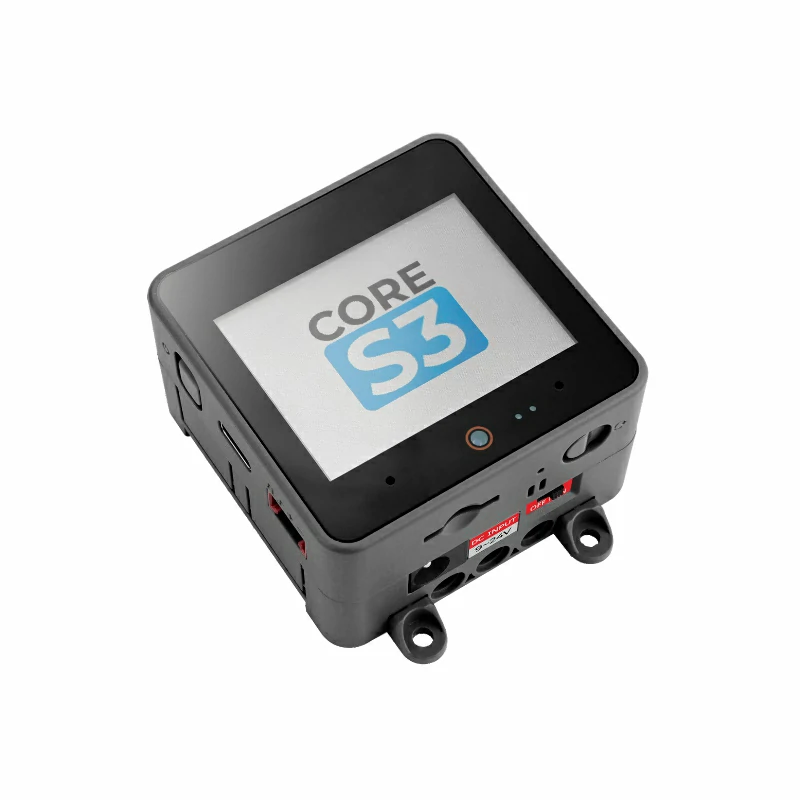
- CoreS3
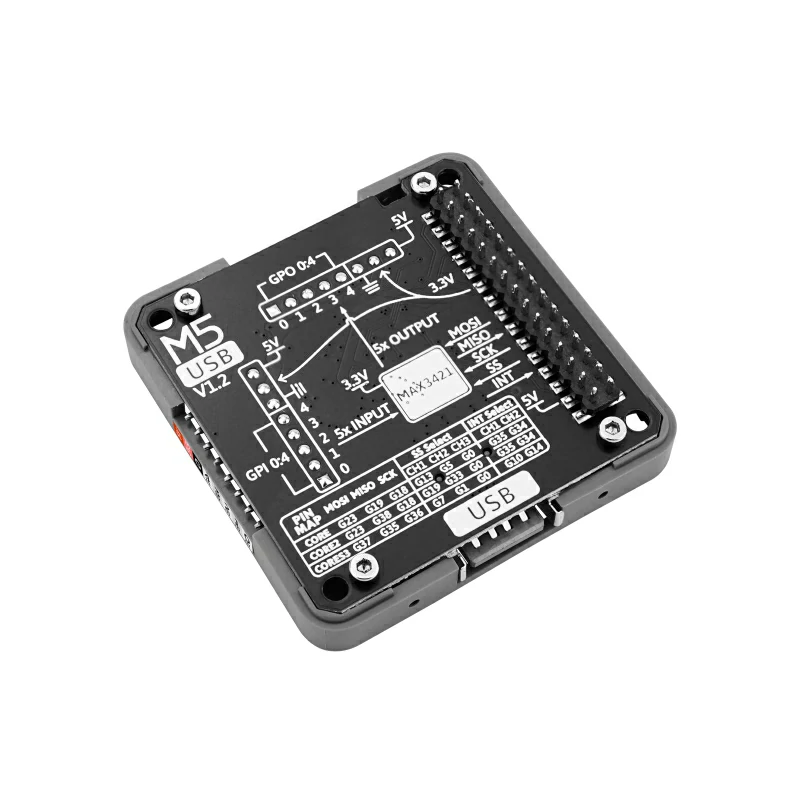
- Module USB v1.2
- USB mouse
- USB keyboard
2. Notes
3. Example Programs
- This tutorial uses CoreS3 as the host device with Module USB v1.2 to provide USB host functionality. Module USB v1.2 communicates with the host over SPI. Adjust the pin definitions in the example to match the actual circuit connections. The corresponding SPI I/O after connection is
G36 (SCK),G37 (MOSI),G35 (MISO),G1 (CS), andG10 (INT).
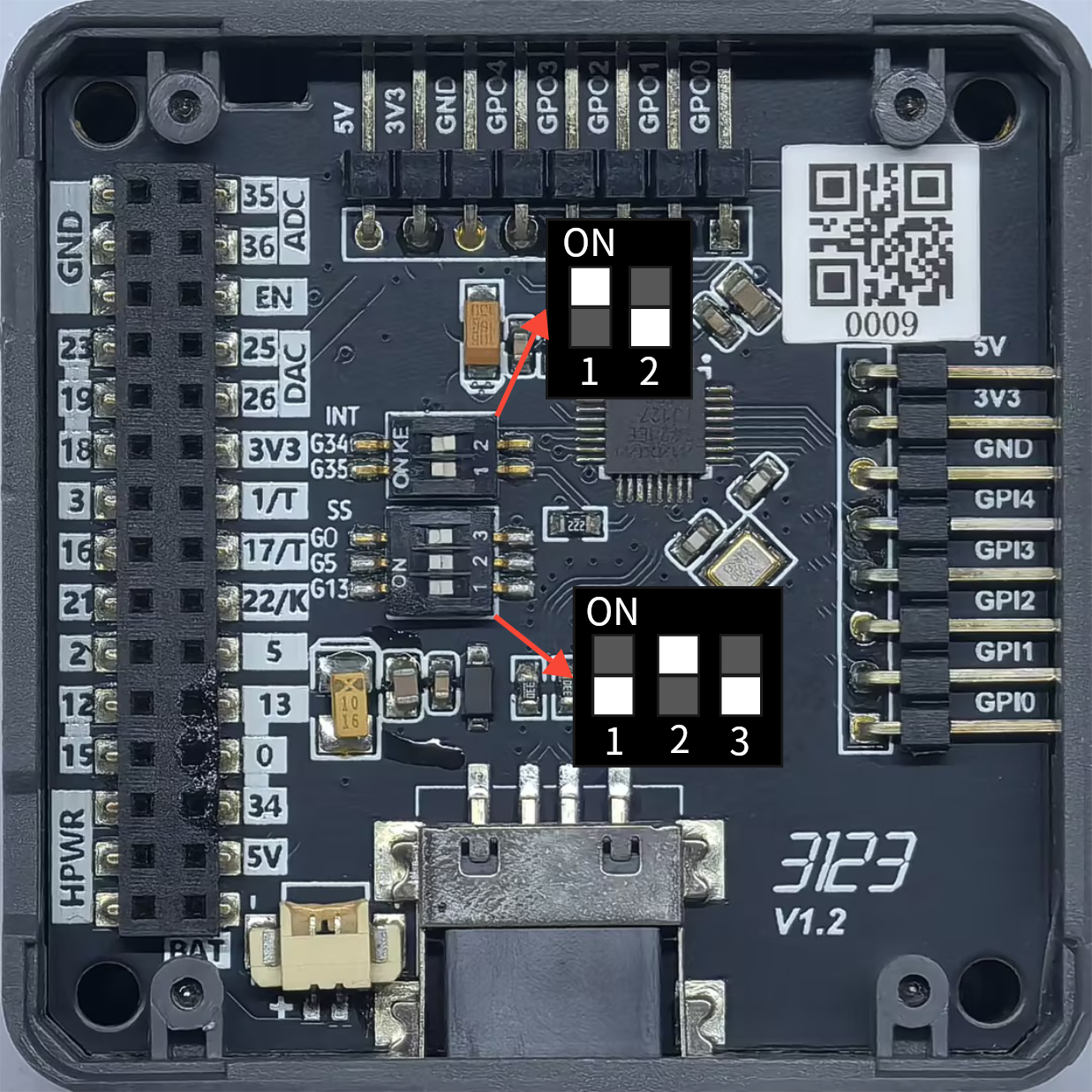
Set the DIP switches as shown below:
3.1 USB Mouse
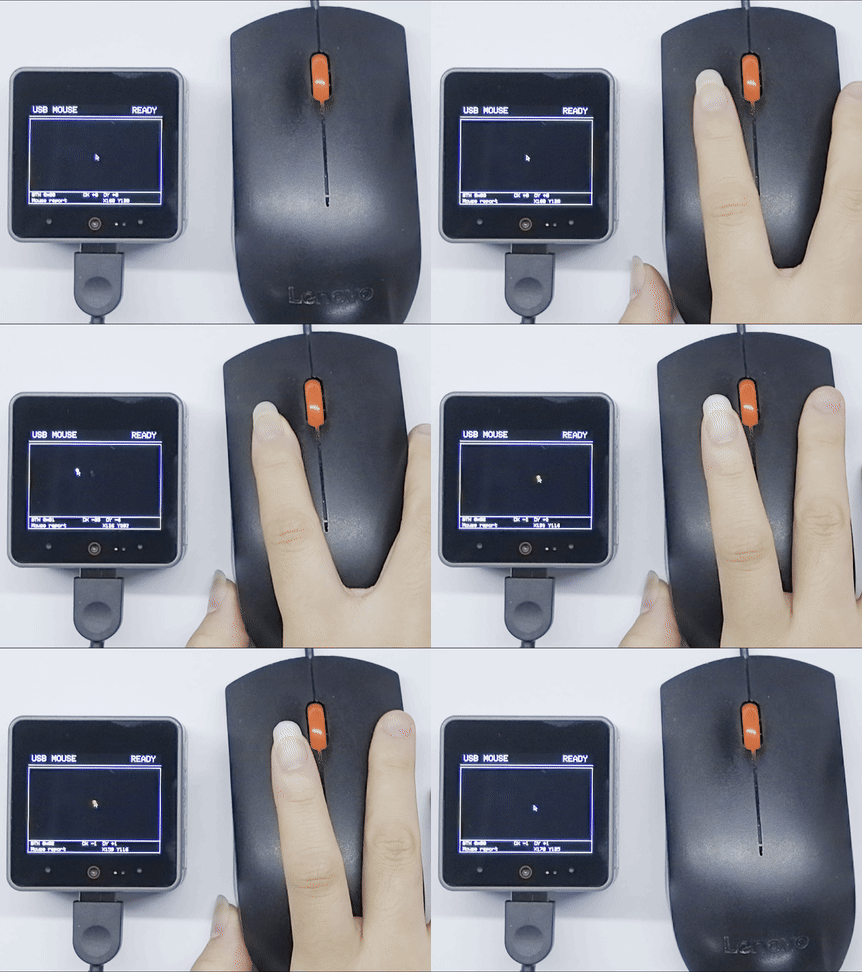
This example uses the MAX3421E controller on Module USB v1.2 in USB host mode. Connect a USB mouse to the module's USB port. The top of the CoreS3 screen shows the connection status, the center shows the mouse activity area and pointer, and the bottom shows button, movement, coordinate, and latest-status information. The program updates the interface and outputs HID reports over the serial port as you move or click the mouse.
#include <M5Unified.h>
#include <M5_Max3421E_Usb.h>

// CoreS3: SCK=36, MOSI=37, MISO=35, CS=1, INT=10.
M5_USBH_Host USBHost(&SPI, 36, 37, 35, 1, 10);
M5Canvas mouse_canvas(&M5.Display);

// Track the pointer, button state, last movement, and connection status.
static int cursor_x = 160;
static int cursor_y = 120;
static uint8_t mouse_buttons = 0;
static int8_t mouse_dx = 0;
static int8_t mouse_dy = 0;
static bool mouse_connected = false;
static const char* mouse_status = "WAITING FOR MOUSE";

void drawPointer()
{
    // Draw a small pointer marker inside the activity area.
    mouse_canvas.drawLine(cursor_x, cursor_y, cursor_x, cursor_y + 10, WHITE);
    mouse_canvas.drawLine(cursor_x, cursor_y, cursor_x + 7,
                          cursor_y + 7, WHITE);
    mouse_canvas.drawLine(cursor_x + 4, cursor_y + 7, cursor_x + 7,
                          cursor_y + 7, WHITE);
    mouse_canvas.drawLine(cursor_x + 4, cursor_y + 7, cursor_x,
                          cursor_y + 10, WHITE);
    mouse_canvas.drawLine(cursor_x + 3, cursor_y + 7, cursor_x + 6,
                          cursor_y + 12, WHITE);
}

void renderMouseUI()
{
    // Redraw the complete screen from the current mouse state.
    mouse_canvas.fillSprite(BLACK);
    mouse_canvas.setTextColor(WHITE, BLACK);
    mouse_canvas.setTextSize(2);
    mouse_canvas.setTextWrap(false, false);

    mouse_canvas.setCursor(8, 5);
    mouse_canvas.print("USB MOUSE");
    mouse_canvas.setCursor(248, 5);
    mouse_canvas.print(mouse_connected ? "READY" : "WAIT");
    mouse_canvas.drawLine(0, 28, 319, 28, WHITE);

    // Keep the pointer inside the bordered activity area.
    mouse_canvas.drawRect(0, 34, 319, 204, WHITE);
    drawPointer();
    if (mouse_buttons & 0x01) {
        mouse_canvas.fillCircle(cursor_x, cursor_y, 3, WHITE);
    }
    if (mouse_buttons & 0x02) {
        mouse_canvas.fillCircle(cursor_x, cursor_y, 3, GREEN);
    }

    mouse_canvas.drawLine(0, 209, 319, 209, WHITE);
    mouse_canvas.setTextSize(1.25f);
    mouse_canvas.setCursor(8, 212);
    mouse_canvas.printf("BTN 0x%02X", mouse_buttons);
    mouse_canvas.setCursor(132, 212);
    mouse_canvas.printf("DX %+d  DY %+d", mouse_dx, mouse_dy);
    mouse_canvas.setCursor(8, 226);
    mouse_canvas.printf("%s", mouse_status);
    mouse_canvas.setCursor(180, 226);
    mouse_canvas.printf("X%03d Y%03d", cursor_x, cursor_y);
    mouse_canvas.pushSprite(0, 0);
}

void showMouseStatus(const char* status, uint8_t buttons = 0,
                     int16_t move_x = 0, int16_t move_y = 0)
{
    // Update the values shown in the footer before rendering.
    mouse_status = status;
    mouse_buttons = buttons;
    mouse_dx = move_x;
    mouse_dy = move_y;
    renderMouseUI();
}

void movePointer(int16_t move_x, int16_t move_y)
{
    // Clamp movement so the pointer never overwrites the border.
    cursor_x = constrain(cursor_x + move_x, 8, 308);
    cursor_y = constrain(cursor_y + move_y, 42, 190);
}

void setup()
{
    // Initialize the display, serial port, sprite, and USB host.
    M5.begin();
    Serial.begin(115200);
    mouse_canvas.createSprite(320, 240);
    showMouseStatus("Waiting for mouse...");

    Serial.println("M5Module USB HOST HID");
    if (USBHost.begin(0)) {
        Serial.println("MODULE INIT OK");
        showMouseStatus("USB host ready");
    } else {
        Serial.println("MODULE INIT ERROR");
        showMouseStatus("USB host error");
    }
}

void loop()
{
    // Poll the USB host so HID callbacks can receive reports.
    USBHost.task();
    delay(1);
}

void tuh_hid_report_sent_cb(uint8_t dev_addr, uint8_t instance,
                            uint8_t const* report, uint16_t len)
{
    // This host example does not send HID reports.
    (void)dev_addr;
    (void)instance;
    (void)report;
    (void)len;
}

// Invoked when a USB HID device is connected.
void tuh_hid_mount_cb(uint8_t dev_addr, uint8_t instance,
                      uint8_t const* desc_report, uint16_t desc_len)
{
    (void)desc_report;
    (void)desc_len;

    uint16_t vid;
    uint16_t pid;
    tuh_vid_pid_get(dev_addr, &vid, &pid);
    Serial.printf("HID mounted: address=%d, instance=%d, VID=%04X, PID=%04X\r\n",
                  dev_addr, instance, vid, pid);
    mouse_connected = true;
    showMouseStatus("Mouse connected");

    if (!tuh_hid_receive_report(dev_addr, instance)) {
        Serial.println("Cannot request HID report");
    }
}

// Invoked when a USB HID device is disconnected.
void tuh_hid_umount_cb(uint8_t dev_addr, uint8_t instance)
{
    Serial.printf("HID unmounted: address=%d, instance=%d\r\n",
                  dev_addr, instance);
    mouse_connected = false;
    showMouseStatus("Mouse disconnected");
}

// Invoked when a HID report is received from the interrupt endpoint.
void tuh_hid_report_received_cb(uint8_t dev_addr, uint8_t instance,
                                uint8_t const* report, uint16_t len)
{
    if (len >= 3) {
        // A boot mouse report starts with buttons, X movement, and Y movement.
        // Button bits are left=0x01, right=0x02, and middle=0x04.
        const uint8_t buttons = report[0];
        const int8_t move_x = static_cast<int8_t>(report[1]);
        const int8_t move_y = static_cast<int8_t>(report[2]);

        movePointer(move_x, move_y);
        showMouseStatus("Mouse report", buttons, move_x, move_y);
        Serial.printf("HID report: buttons=0x%02X, dx=%d, dy=%d\r\n",
                      buttons, move_x, move_y);

        // Use the middle button to clear the canvas.
        if (buttons & 0x04) {
            mouse_canvas.fillSprite(BLACK);
            mouse_canvas.pushSprite(0, 0);
        }
    }

    if (!tuh_hid_receive_report(dev_addr, instance)) {
        Serial.println("Cannot request next HID report");
    }
}After the program starts and the module initializes successfully, the CoreS3 screen shows the USB host and device status, and the serial monitor outputs information similar to the following:
M5Module USB HOST HID
MODULE INIT OK
HID mounted: address=1, instance=0, VID=XXXX, PID=XXXX
HID report: buttons=0x00, dx=1, dy=0The pointer moves on the CoreS3 screen as you move the mouse. Pressing the left or right mouse button draws a white or green marker at the pointer position, respectively. Pressing the middle button clears the screen.
3.2 USB Keyboard
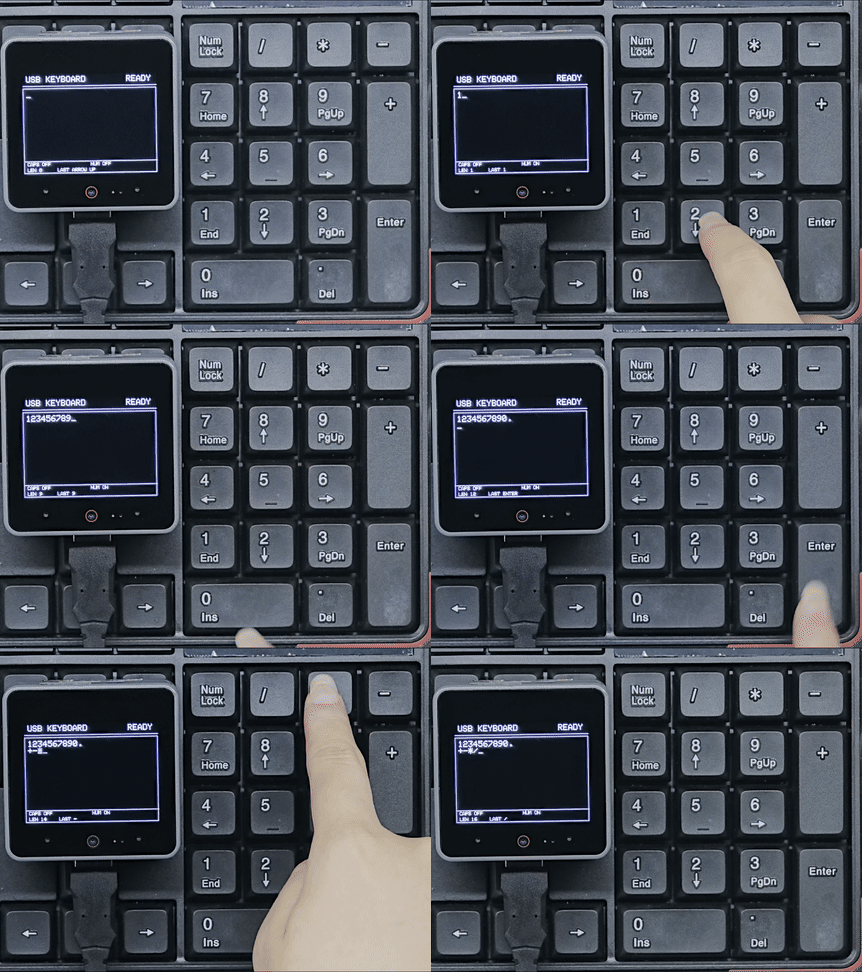
This example uses the MAX3421E controller on Module USB v1.2 in USB host mode. After connecting a USB keyboard, the CoreS3 screen displays white input text on a black background, the cursor, and keyboard status. The serial port outputs HID reports and the decoded characters.
#include <M5Unified.h>
#include <M5_Max3421E_Usb.h>

// CoreS3: SCK=36, MOSI=37, MISO=35, CS=1, INT=10.
M5_USBH_Host USBHost(&SPI, 36, 37, 35, 1, 10);
M5Canvas canvas(&M5.Display);

// Store text editing state and the current keyboard status.
String typed_text;
String last_key = "--";
uint8_t previous_keys[6] = {0};
bool caps_lock = false;
bool num_lock = false;
bool keyboard_connected = false;
uint16_t cursor_position = 0;

static constexpr uint16_t MAX_TEXT_LENGTH = 240;
static constexpr uint16_t MAX_LAYOUT_LINES = MAX_TEXT_LENGTH + 1;
static constexpr int16_t INPUT_LEFT = 8;
static constexpr int16_t INPUT_TOP = 42;
static constexpr int16_t INPUT_RIGHT = 312;
static constexpr int16_t INPUT_LINE_HEIGHT = 16;
static constexpr uint8_t INPUT_MAX_LINES = 10;

// Each entry stores the character range displayed on one visual line.
struct InputLine {
    uint16_t start;
    uint16_t end;
};

InputLine input_lines[MAX_LAYOUT_LINES];
uint16_t input_line_count = 1;

bool isNewKey(uint8_t key)
{
    // Process a key only once while it remains pressed.
    for (uint8_t previous : previous_keys)
        if (previous == key) return false;
    return true;
}

char keyToAscii(uint8_t key, bool shifted)
{
    // Convert standard HID keyboard usages to printable characters.
    if (key >= 0x04 && key <= 0x1D) {
        char value = 'a' + key - 0x04;
        if (shifted != caps_lock) {
            value = value - 'a' + 'A';
        }
        return value;
    }

    if (key >= 0x1E && key <= 0x27) {
        static const char normal[] = "1234567890";
        static const char shifted_values[] = "!@#$%^&*()";
        return shifted ? shifted_values[key - 0x1E] : normal[key - 0x1E];
    }

    if (key == 0x2C) return ' ';
    if (key >= 0x2D && key <= 0x38) {
        static const char normal[] = "-=[]\\\0;'\x60,./";
        static const char shifted_values[] = "_+{}|\0:\"~<>?";
        return (shifted ? shifted_values : normal)[key - 0x2D];
    }
    return key >= 0x54 && key <= 0x57 ? "/*-+"[key - 0x54] : 0;
}

char keypadToAscii(uint8_t key)
{
    // Convert keypad number keys only when NumLock is active.
    if (!num_lock) return 0;
    if (key >= 0x59 && key <= 0x61) return '1' + key - 0x59;
    return key == 0x62 ? '0' : key == 0x63 ? '.' : 0;
}

void limitTextLength()
{
    // Keep the buffer bounded and keep the cursor within the buffer.
    if (typed_text.length() > MAX_TEXT_LENGTH) {
        const uint16_t removed =
            typed_text.length() - MAX_TEXT_LENGTH;
        typed_text.remove(0, removed);
        if (cursor_position >= removed) {
            cursor_position -= removed;
        } else {
            cursor_position = 0;
        }
    }
    if (cursor_position > typed_text.length()) {
        cursor_position = typed_text.length();
    }
}

void insertText(const String& value)
{
    // Insert text at the cursor instead of replacing the whole buffer.
    String updated = typed_text.substring(0, cursor_position);
    updated += value;
    updated += typed_text.substring(cursor_position);
    typed_text = updated;
    cursor_position += value.length();
    limitTextLength();
}

void buildInputLayout()
{
    // Rebuild visual lines for explicit newlines and automatic wrapping.
    canvas.setTextSize(2);
    const int32_t text_width = INPUT_RIGHT - INPUT_LEFT - canvas.textWidth("_");
    const uint16_t length = typed_text.length();
    String current_line;

    input_line_count = 1;
    input_lines[0] = {0, 0};

    for (uint16_t i = 0; i < length; ++i) {
        const char value = typed_text[i];
        if (value == '\n') {
            input_lines[input_line_count - 1].end = i;
            if (input_line_count < MAX_LAYOUT_LINES) {
                input_lines[input_line_count++] = {i + 1, i + 1};
            }
            current_line = "";
            continue;
        }

        String candidate = current_line;
        candidate += value;
        if (current_line.length() > 0 &&
            canvas.textWidth(candidate) > text_width) {
            input_lines[input_line_count - 1].end = i;
            if (input_line_count < MAX_LAYOUT_LINES) {
                input_lines[input_line_count++] = {i, i};
            }
            current_line = "";
        }

        current_line += value;
        input_lines[input_line_count - 1].end = i + 1;
    }
}

uint16_t cursorLine()
{
    // Find the visual line containing the current insertion point.
    uint16_t cursor_line = 0;
    for (uint16_t i = 0; i < input_line_count; ++i) {
        if (cursor_position < input_lines[i].start) {
            break;
        }
        cursor_line = i;
        if (cursor_position < input_lines[i].end ||
            cursor_position == input_lines[i].start) {
            break;
        }
    }
    return cursor_line;
}

void moveCursorVertical(int8_t direction)
{
    // Preserve the column when moving between visual lines.
    buildInputLayout();

    const uint16_t current_line = cursorLine();
    int16_t target_line = static_cast<int16_t>(current_line) + direction;
    if (target_line < 0 ||
        target_line >= static_cast<int16_t>(input_line_count)) {
        return;
    }

    const uint16_t column = cursor_position -
                            input_lines[current_line].start;
    const uint16_t target_length =
        input_lines[target_line].end - input_lines[target_line].start;
    cursor_position = input_lines[target_line].start +
                      (column < target_length ? column : target_length);
}

void moveCursorToLineEdge(bool end)
{
    // Move to the beginning or end of the current visual line.
    buildInputLayout();
    const uint16_t current_line = cursorLine();
    cursor_position = end ? input_lines[current_line].end
                          : input_lines[current_line].start;
}

void logSpecialKey(const char* name)
{
    last_key = name;
    Serial.printf("Character: [%s]\r\n", name);
}

enum NavAction : uint8_t {
    NAV_LOG, NAV_HOME, NAV_PAGE_UP, NAV_DELETE, NAV_END, NAV_PAGE_DOWN,
    NAV_RIGHT, NAV_LEFT, NAV_DOWN, NAV_UP
};

struct NavKey {
    uint8_t key;
    const char* name;
    NavAction action;
};

static const NavKey nav_keys[] = {
    // Map navigation usages, including the numeric keypad alternatives.
    {0x49, "INSERT", NAV_LOG}, {0x4A, "HOME", NAV_HOME},
    {0x4B, "PAGE UP", NAV_PAGE_UP}, {0x4C, "DELETE", NAV_DELETE},
    {0x4D, "END", NAV_END}, {0x4E, "PAGE DOWN", NAV_PAGE_DOWN},
    {0x4F, "ARROW RIGHT", NAV_RIGHT}, {0x50, "ARROW LEFT", NAV_LEFT},
    {0x51, "ARROW DOWN", NAV_DOWN}, {0x52, "ARROW UP", NAV_UP},
    {0x59, "KEYPAD END", NAV_END}, {0x5A, "KEYPAD DOWN", NAV_DOWN},
    {0x5B, "KEYPAD PAGE DOWN", NAV_PAGE_DOWN},
    {0x5C, "KEYPAD LEFT", NAV_LEFT}, {0x5E, "KEYPAD RIGHT", NAV_RIGHT},
    {0x5F, "KEYPAD HOME", NAV_HOME}, {0x60, "KEYPAD UP", NAV_UP},
    {0x61, "KEYPAD PAGE UP", NAV_PAGE_UP},
    {0x62, "KEYPAD INSERT", NAV_LOG},
    {0x63, "KEYPAD DELETE", NAV_DELETE}
};

bool handleNavigationKey(uint8_t key)
{
    // NumLock changes keypad navigation keys into numeric input.
    if (key >= 0x59 && key <= 0x63 && num_lock) {
        return false;
    }

    const NavKey* nav = nullptr;
    for (const NavKey& item : nav_keys) {
        if (item.key == key) {
            nav = &item;
            break;
        }
    }
    if (nav == nullptr) return false;

    switch (nav->action) {
    case NAV_HOME: moveCursorToLineEdge(false); break;
    case NAV_PAGE_UP: moveCursorVertical(-INPUT_MAX_LINES); break;
    case NAV_DELETE:
        if (cursor_position < typed_text.length()) {
            typed_text.remove(cursor_position, 1);
        }
        break;
    case NAV_END: moveCursorToLineEdge(true); break;
    case NAV_PAGE_DOWN: moveCursorVertical(INPUT_MAX_LINES); break;
    case NAV_RIGHT:
        if (cursor_position < typed_text.length()) ++cursor_position;
        break;
    case NAV_LEFT:
        if (cursor_position > 0) --cursor_position;
        break;
    case NAV_DOWN: moveCursorVertical(1); break;
    case NAV_UP: moveCursorVertical(-1); break;
    default: break;
    }
    logSpecialKey(nav->name);
    return true;
}

void renderTypedText()
{
    // Draw the editor, status indicators, and cursor in one frame.
    limitTextLength();

    canvas.fillSprite(BLACK);
    canvas.setTextColor(WHITE, BLACK);
    canvas.setTextSize(2);
    canvas.setTextWrap(false, false);

    canvas.setCursor(8, 5);
    canvas.print("USB KEYBOARD");
    canvas.setCursor(248, 5);
    canvas.print(keyboard_connected ? "READY" : "WAIT");
    canvas.drawLine(0, 28, 319, 28, WHITE);

    canvas.drawRect(0, 34, 319, 204, WHITE);

    // Keep wrapping inside the input box and keep the cursor visible.
    buildInputLayout();
    const uint16_t cursor_line = cursorLine();

    uint16_t first_line = 0;
    if (input_line_count > INPUT_MAX_LINES) {
        first_line = input_line_count - INPUT_MAX_LINES;
        if (cursor_line < first_line) {
            first_line = cursor_line;
        } else if (cursor_line >= first_line + INPUT_MAX_LINES) {
            first_line = cursor_line - INPUT_MAX_LINES + 1;
        }
    }

    canvas.setClipRect(4, 38, 312, 165);
    for (uint16_t i = first_line;
         i < input_line_count && i < first_line + INPUT_MAX_LINES; ++i) {
        canvas.setCursor(INPUT_LEFT,
                         INPUT_TOP + (i - first_line) * INPUT_LINE_HEIGHT);
        canvas.print(typed_text.substring(input_lines[i].start,
                                          input_lines[i].end));
    }

    const String cursor_prefix =
        typed_text.substring(input_lines[cursor_line].start, cursor_position);
    canvas.setCursor(
        INPUT_LEFT + canvas.textWidth(cursor_prefix),
        INPUT_TOP + (cursor_line - first_line) * INPUT_LINE_HEIGHT);
    canvas.print("_");
    canvas.clearClipRect();

    canvas.drawLine(0, 209, 319, 209, WHITE);
    canvas.setTextWrap(false, false);
    canvas.setTextSize(1.25f);
    canvas.setCursor(8, 212);
    canvas.printf("CAPS %s", caps_lock ? "ON" : "OFF");
    canvas.setCursor(160, 212);
    canvas.printf("NUM %s", num_lock ? "ON" : "OFF");
    canvas.setCursor(8, 226);
    canvas.printf("LEN %u", static_cast<unsigned>(typed_text.length()));
    canvas.setCursor(80, 226);
    canvas.printf("LAST %s", last_key.c_str());

    canvas.pushSprite(0, 0);
}

void appendKeyboardReport(uint8_t const* report, uint16_t len)
{
    // Parse the standard 8-byte boot keyboard report.
    // Byte 0 holds modifiers; bytes 2-7 hold up to six key usages.
    if (len < 8) {
        return;
    }

    // Left/right Shift bits are 0x02 and 0x20 in the modifier byte.
    const bool shifted = (report[0] & 0x22) != 0;
    for (uint8_t i = 2; i < 8; ++i) {
        const uint8_t key = report[i];
        if (key == 0 || !isNewKey(key)) {
            continue;
        }

        // Toggle lock keys, handle navigation, then insert printable text.
        if (key == 0x39) {
            caps_lock = !caps_lock;
            last_key = caps_lock ? "CAPS ON" : "CAPS OFF";
            Serial.printf("Character: [CAPS LOCK %s]\r\n",
                          caps_lock ? "ON" : "OFF");
        } else if (key == 0x53) {
            num_lock = !num_lock;
            last_key = num_lock ? "NUM ON" : "NUM OFF";
            Serial.printf("Character: [NUM LOCK %s]\r\n",
                          num_lock ? "ON" : "OFF");
        } else if (handleNavigationKey(key)) {
        } else if (key == 0x28 || key == 0x58) {
            insertText("\n");
            logSpecialKey("ENTER");
        } else if (key == 0x2A) {
            if (cursor_position > 0) {
                typed_text.remove(cursor_position - 1, 1);
                --cursor_position;
            }
            logSpecialKey("BACKSPACE");
        } else if (key == 0x2B) {
            insertText("    ");
            logSpecialKey("TAB");
        } else {
            char value = keyToAscii(key, shifted);
            if (value == 0) {
                value = keypadToAscii(key);
            }
            if (value != 0) {
                String insertion;
                insertion += value;
                insertText(insertion);
                last_key = String(value);
                Serial.printf("Character: '%c' (HID usage: 0x%02X)\r\n",
                              value, key);
            }
        }
    }

    // Save this report so held keys are ignored on the next report.
    for (uint8_t i = 0; i < 6; ++i) {
        previous_keys[i] = report[i + 2];
    }
    renderTypedText();
}

void setup()
{
    // Initialize the display, editor state, serial port, and USB host.
    M5.begin();
    Serial.begin(115200);

    canvas.createSprite(320, 240);
    typed_text = "";
    last_key = "START";
    num_lock = false;
    keyboard_connected = false;
    cursor_position = 0;
    renderTypedText();

    Serial.println("M5Module USB HOST Keyboard");
    if (USBHost.begin(0)) {
        Serial.println("MODULE INIT OK");
        last_key = "HOST READY";
        renderTypedText();
    } else {
        Serial.println("MODULE INIT ERROR");
        last_key = "HOST ERROR";
        renderTypedText();
    }
}

void loop()
{
    // Poll the USB host so keyboard reports reach the HID callback.
    USBHost.task();
    delay(1);
}

void tuh_hid_mount_cb(uint8_t dev_addr, uint8_t instance,
                      uint8_t const* desc_report, uint16_t desc_len)
{
    // Start requesting reports after a keyboard is connected.
    (void)desc_report;
    (void)desc_len;

    uint16_t vid;
    uint16_t pid;
    tuh_vid_pid_get(dev_addr, &vid, &pid);
    Serial.printf("HID mounted: address=%d, instance=%d, VID=%04X, PID=%04X\r\n",
                  dev_addr, instance, vid, pid);
    keyboard_connected = true;
    last_key = "CONNECTED";
    renderTypedText();

    if (!tuh_hid_receive_report(dev_addr, instance)) {
        Serial.println("Cannot request HID report");
    }
}

void tuh_hid_umount_cb(uint8_t dev_addr, uint8_t instance)
{
    // Update the screen when the keyboard is disconnected.
    Serial.printf("HID unmounted: address=%d, instance=%d\r\n",
                  dev_addr, instance);
    keyboard_connected = false;
    last_key = "DISCONNECTED";
    renderTypedText();
}

void tuh_hid_report_received_cb(uint8_t dev_addr, uint8_t instance,
                                uint8_t const* report, uint16_t len)
{
    // Print both the raw report and the decoded key information.
    Serial.print("Keyboard report: ");
    for (uint16_t i = 0; i < len; ++i) {
        Serial.printf("0x%02X ", report[i]);
    }
    Serial.println();

    appendKeyboardReport(report, len);

    if (len >= 8) {
        Serial.printf("Modifiers: 0x%02X, Keys:", report[0]);
        for (uint8_t i = 2; i < 8; ++i) {
            if (report[i] != 0) {
                Serial.printf(" 0x%02X", report[i]);
            }
        }
        Serial.println();
    }

    if (!tuh_hid_receive_report(dev_addr, instance)) {
        Serial.println("Cannot request next HID report");
    }
}After the program starts and the module initializes successfully, the CoreS3 screen shows the USB host and keyboard status, and the serial monitor outputs information similar to the following:
M5Module USB HOST Keyboard
MODULE INIT OK
HID mounted: address=1, instance=0, VID=XXXX, PID=XXXX
Keyboard report: 0x00 0x00 0x04 0x00 0x00 0x00 0x00 0x00
Character: 'a' (HID usage: 0x04)
Modifiers: 0x00, Keys: 0x04When you enter characters or use editing and navigation keys, the text and cursor on the CoreS3 screen update together. The bottom shows keyboard status and the most recent key, while the serial port outputs HID reports and decoded characters.
4. Compile and Upload
- 1. Enter download mode: Press and hold the CoreS3 reset button for about 2 seconds until the internal green LED turns on, then release the button. The green LED turns off after release, indicating that the device has entered download mode and is ready for upload.
.gif)
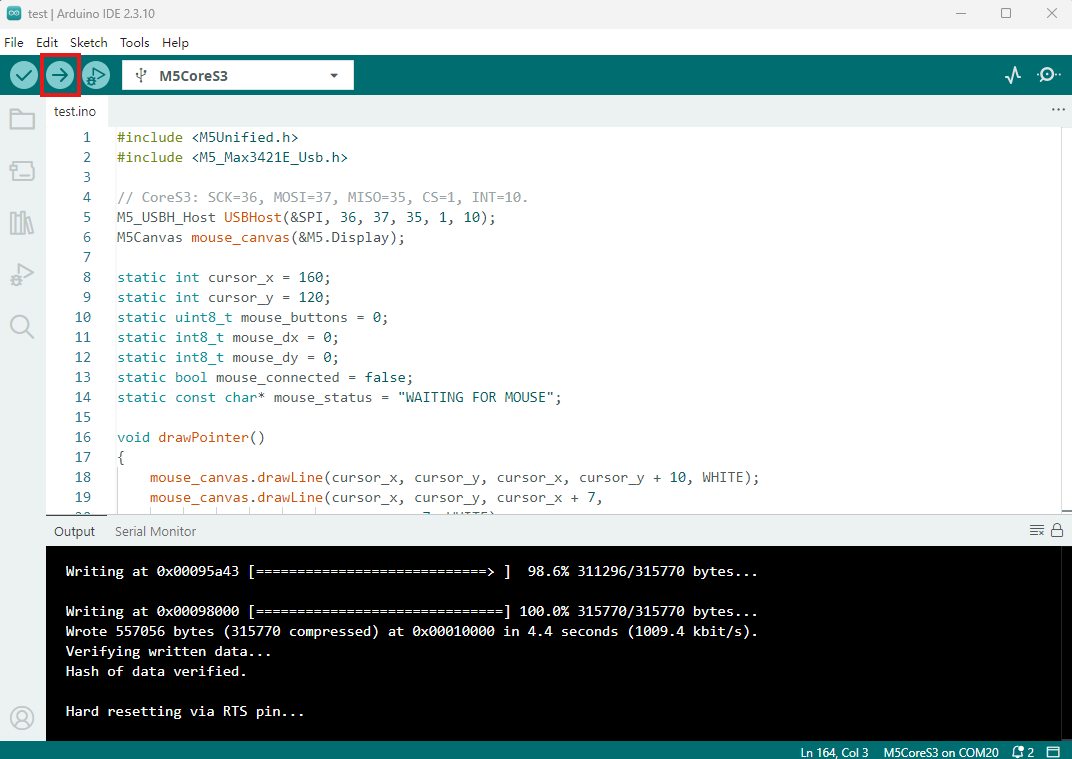
- 2. Select the device port, click the Compile and Upload button in the upper-left corner of Arduino IDE, and wait for the program to compile and upload.