

Arduino Quick Start
2. Devices & Examples
3. M5Unified
4. M5GFX
5. Extensions
Unit
Module
Atomic
Tab5
IoT
Accessories
PaperMono Display
APIs and example programs for the PaperMono display.
Example Programs
Build Requirements
- M5Stack Board Manager version >= 3.3.9
- Board option =
M5PaperMono - M5Unified library version >= 0.2.20
- M5GFX library version >= 0.2.27
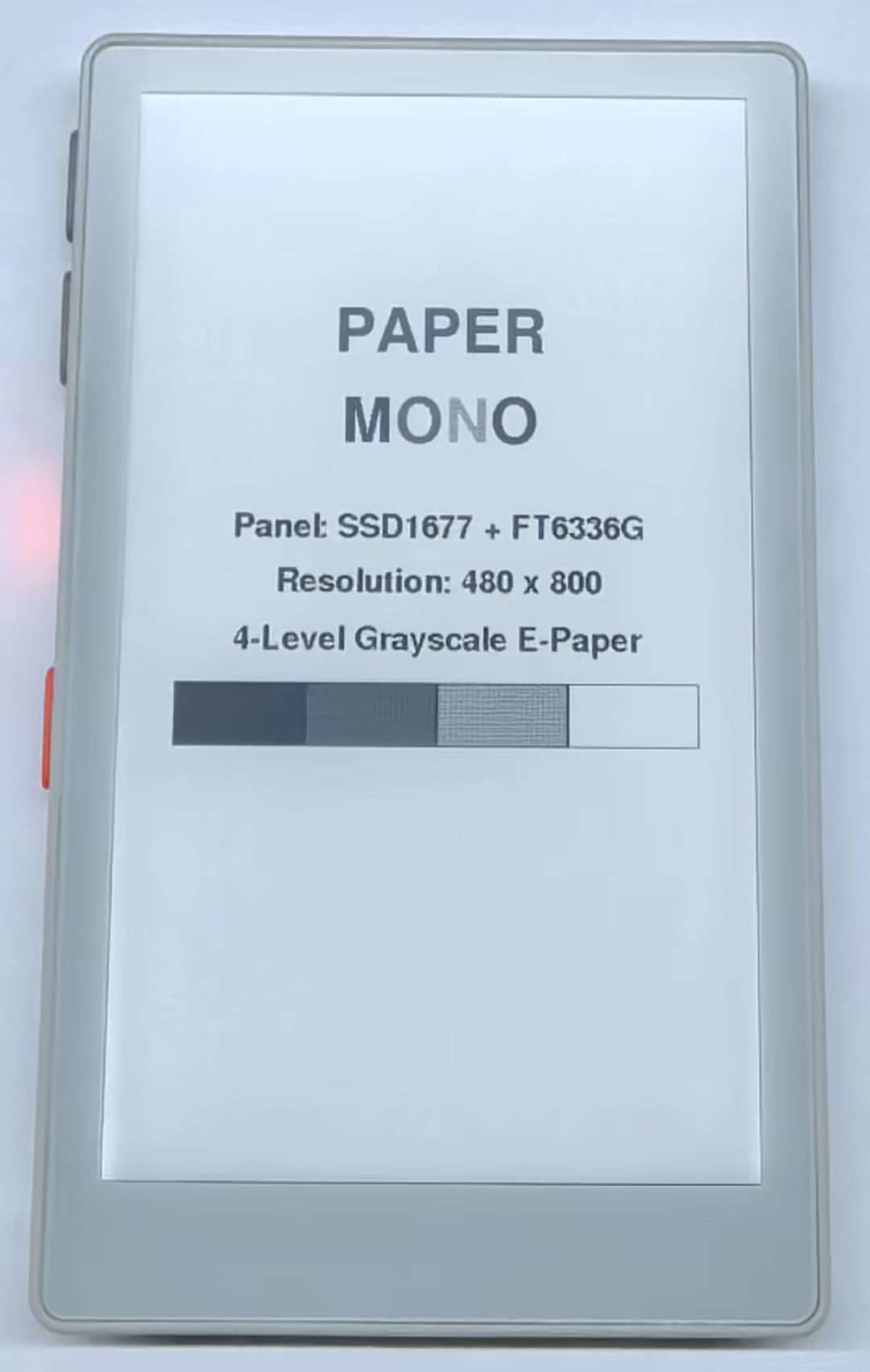
Basic Display
#include <Arduino.h>
#include <M5Unified.h>

M5Canvas canvas(&M5.Display);

static void drawBlackBorder()
{
    const int screenW = M5.Display.width();
    const int screenH = M5.Display.height();

    canvas.drawRect(0, 0, screenW, screenH, TFT_BLACK);
    canvas.drawRect(2, 2, screenW - 4, screenH - 4, TFT_BLACK);
    canvas.drawRect(4, 4, screenW - 8, screenH - 8, TFT_BLACK);
}

static int drawGrayscaleWordCentered(const char* word, int y, const uint16_t* colors, int colorCount)
{
    const int screenW = M5.Display.width();
    const int len     = strlen(word);
    int totalW        = 0;

    for (int i = 0; i < len; ++i) {
        totalW += canvas.textWidth(String(word[i]));
    }

    int x = (screenW - totalW) / 2;
    for (int i = 0; i < len; ++i) {
        canvas.setTextColor(colors[i % colorCount]);
        String ch(word[i]);
        canvas.drawString(ch, x, y);
        x += canvas.textWidth(ch);
    }
    return x;
}

static void drawMainDemo()
{
    const int screenW = M5.Display.width();
    const int screenH = M5.Display.height();

    static const uint16_t paperColors[1] = {TFT_BLACK};
    static const uint16_t monoColors[4] = {
        TFT_BLACK,
        TFT_RED,
        TFT_DARKGREY,
        TFT_BLACK
    };
    static const uint16_t grayColors[4] = {
        TFT_BLACK,
        TFT_RED,
        TFT_DARKGREY,
        TFT_WHITE
    };

    canvas.fillSprite(TFT_WHITE);
    drawBlackBorder();

    canvas.setTextDatum(top_left);
    canvas.setTextSize(1);
    canvas.setFont(&fonts::FreeSansBold24pt7b);

    drawGrayscaleWordCentered("PAPER", 168, paperColors, 1);
    drawGrayscaleWordCentered("MONO", 236, monoColors, 4);

    canvas.setFont(&fonts::FreeSansBold12pt7b);
    canvas.setTextColor(TFT_BLACK);
    canvas.setTextDatum(middle_center);
    canvas.drawString("Panel: SSD1677 + FT6336G", screenW / 2, 336);

    char resolutionBuf[32];
    snprintf(
        resolutionBuf,
        sizeof(resolutionBuf),
        "Resolution: %d x %d",
        screenW,
        screenH
    );
    canvas.drawString(resolutionBuf, screenW / 2, 376);

    canvas.drawString(
        "4-Level Grayscale E-Paper",
        screenW / 2,
        418
    );

    const int barX  = 46;
    const int barY  = 448;
    const int barW  = screenW - 92;
    const int barH  = 46;
    const int cellW = barW / 4;

    for (int i = 0; i < 4; ++i) {
        const int x = barX + i * cellW;
        const int w = (i == 3) ? (barX + barW - x) : cellW;

        canvas.fillRect(x, barY, w, barH, grayColors[i]);
        canvas.drawRect(x, barY, w, barH, TFT_BLACK);
    }

    canvas.pushSprite(0, 0);
}

void setup()
{
    auto cfg = M5.config();
    cfg.clear_display = false;
    M5.begin(cfg);

    M5.Display.setEpdMode(epd_mode_t::epd_quality);
    canvas.createSprite(M5.Display.width(), M5.Display.height());
    drawMainDemo();
}

void loop()
{
    M5.update();
    delay(100);
}
Refresh Modes
PaperMono supports the following four e-paper refresh modes. Faster refresh speeds generally provide lower display quality and less ghosting control. Actual refresh times also depend on the image content.
M5.Display.setEpdMode(epd_mode_t::epd_quality); // High quality, slowest refresh
M5.Display.setEpdMode(epd_mode_t::epd_text);    // Text mode, faster refresh, lower quality
M5.Display.setEpdMode(epd_mode_t::epd_fast);    // Fast refresh, lower quality
M5.Display.setEpdMode(epd_mode_t::epd_fastest); // Fastest refresh, lowest qualityReference refresh times for PaperMono are shown below:
| Refresh Mode | Reference Time |
|---|---|
epd_quality | 4.71 s |
epd_text | 0.45 s |
epd_fast | 0.34 s |
epd_fastest | 0.07 s |
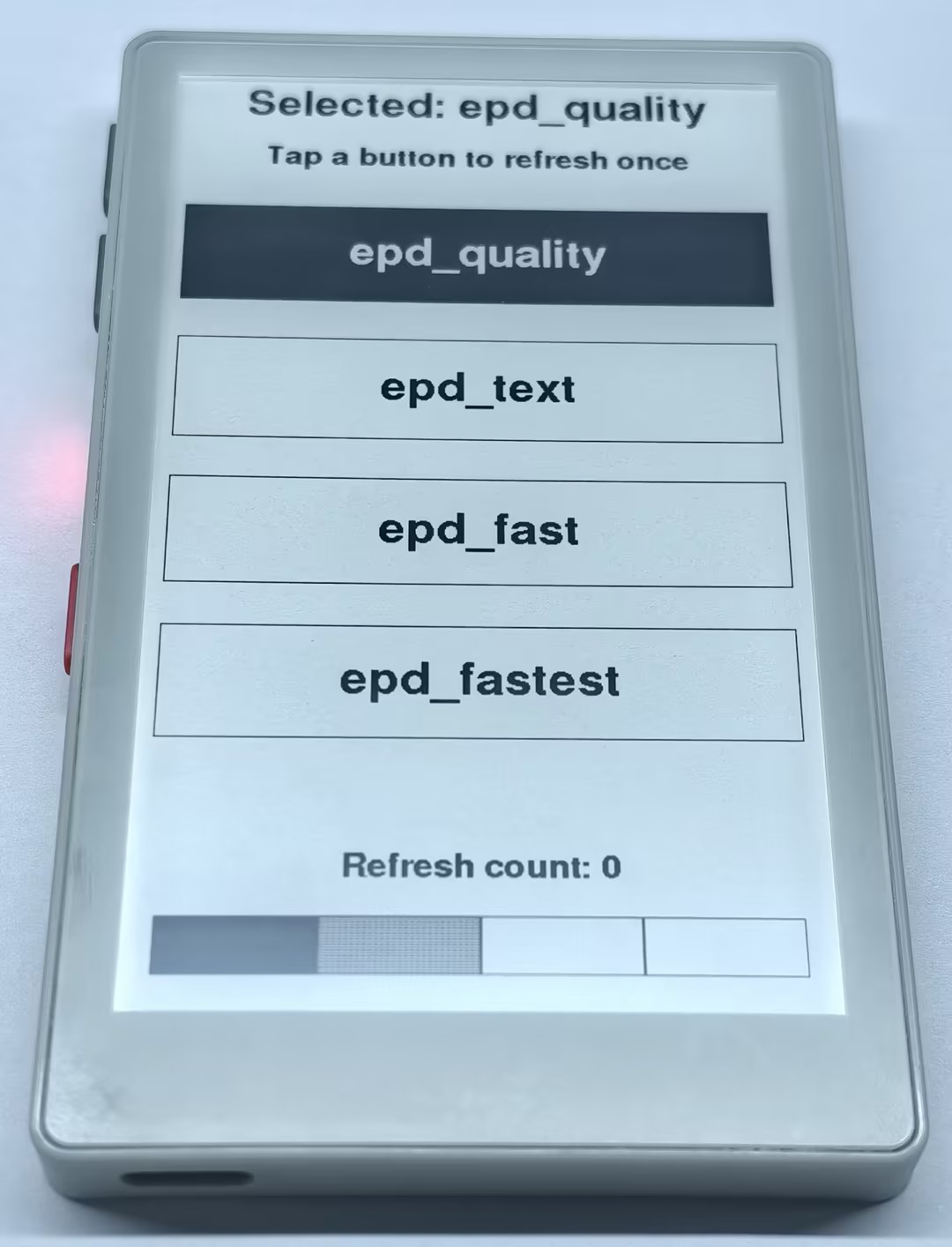
After calling M5.Display.setEpdMode(), subsequent screen updates use the selected mode. Use epd_text for text interfaces and epd_quality for images or scenes requiring better grayscale quality. After multiple consecutive fast partial refreshes, perform a high-quality full-screen refresh as needed to reduce ghosting.
#include <M5Unified.h>
#include <M5GFX.h>

M5Canvas canvas(&M5.Display);

struct ModeOption {
    const char* name;
    epd_mode_t mode;
};

const ModeOption modeOptions[] = {
    {"epd_quality", epd_mode_t::epd_quality},
    {"epd_text", epd_mode_t::epd_text},
    {"epd_fast", epd_mode_t::epd_fast},
    {"epd_fastest", epd_mode_t::epd_fastest},
};

constexpr std::size_t MODE_COUNT = sizeof(modeOptions) / sizeof(modeOptions[0]);
constexpr int BUTTON_X = 16;
constexpr int BUTTON_Y = 130;
constexpr int BUTTON_H = 90;
constexpr int BUTTON_GAP = 34;

std::size_t selectedMode = 0;
uint32_t refreshCount = 0;
LGFX_Button modeButtons[MODE_COUNT];

int buttonWidth()
{
    return M5.Display.width() - BUTTON_X * 2;
}

void initModeButtons()
{
    const int width = buttonWidth();
    for (std::size_t i = 0; i < MODE_COUNT; ++i) {
        const int y = BUTTON_Y + static_cast<int>(i) * (BUTTON_H + BUTTON_GAP);
        modeButtons[i].initButtonUL(&M5.Lcd, BUTTON_X, y, width, BUTTON_H,
                                    TFT_BLACK, TFT_WHITE, TFT_BLACK,
                                    modeOptions[i].name, 1, 1);
    }
}

void drawScreen()
{
    const int w = M5.Display.width();
    const int h = M5.Display.height();

    canvas.fillSprite(TFT_WHITE);
    canvas.setTextDatum(middle_center);
    canvas.setFont(&fonts::FreeSansBold18pt7b);
    canvas.setTextColor(TFT_BLACK);

    char selectedText[40];
    snprintf(selectedText, sizeof(selectedText), "Selected: %s", modeOptions[selectedMode].name);
    canvas.drawString(selectedText, w / 2, 30);

    canvas.setFont(&fonts::FreeSansBold12pt7b);
    canvas.drawString("Tap a button to refresh once", w / 2, 82);

    canvas.setFont(&fonts::FreeSansBold18pt7b);

    for (std::size_t i = 0; i < MODE_COUNT; ++i) {
        const int y = BUTTON_Y + static_cast<int>(i) * (BUTTON_H + BUTTON_GAP);
        const bool selected = i == selectedMode;
        const int width = buttonWidth();

        if (selected) {
            canvas.fillRect(BUTTON_X, y, width, BUTTON_H, TFT_BLACK);
        } else {
            canvas.fillRect(BUTTON_X, y, width, BUTTON_H, TFT_WHITE);
        }
        canvas.drawRect(BUTTON_X, y, width, BUTTON_H, TFT_BLACK);
        canvas.setTextColor(selected ? TFT_WHITE : TFT_BLACK);
        canvas.drawString(modeOptions[i].name, w / 2, y + BUTTON_H / 2);
    }

    char countText[32];
    snprintf(countText, sizeof(countText), "Refresh count: %lu", (unsigned long)refreshCount);
    canvas.setFont(&fonts::FreeSansBold12pt7b);
    canvas.setTextColor(TFT_BLACK);
    canvas.drawString(countText, w / 2, h - 110);

    const int stripeY = h - 75;
    const int stripeW = (w - 48) / 4;
    const uint16_t stripeColors[] = {TFT_BLACK, TFT_DARKGREY, TFT_LIGHTGREY, TFT_WHITE};
    for (int i = 0; i < 4; ++i) {
        const int x = 24 + i * stripeW;
        canvas.fillRect(x, stripeY, stripeW, 42, stripeColors[i]);
        canvas.drawRect(x, stripeY, stripeW, 42, TFT_BLACK);
    }

    canvas.pushSprite(0, 0);
}

void selectMode(std::size_t index)
{
    selectedMode = index;
    M5.Display.setEpdMode(modeOptions[selectedMode].mode);
    ++refreshCount;
    drawScreen();
}

void setup()
{
    auto cfg = M5.config();
    cfg.clear_display = false;
    M5.begin(cfg);
    M5.Display.setRotation(0);
    M5.Display.setEpdMode(modeOptions[selectedMode].mode);

    initModeButtons();
    canvas.createSprite(M5.Display.width(), M5.Display.height());
    drawScreen();
}

void loop()
{
    M5.update();
    m5::touch_point_t touchPoint;
    const bool touched = M5.Display.getTouchRaw(&touchPoint, 1) > 0;

    for (std::size_t i = 0; i < MODE_COUNT; ++i) {
        const bool inside = touched && modeButtons[i].contains(touchPoint.x, touchPoint.y);
        modeButtons[i].press(inside);
        if (modeButtons[i].justPressed()) {
            selectMode(i);
        }
    }
    delay(5);
}E-paper is not suitable for continuous high-frequency refreshes. When testing different modes, wait for the current refresh to complete before selecting the next button.
Front Light Brightness
The PaperMono front light is controlled by the M5PM1 through PWM. Use M5.Display.setBrightness() to set its brightness. The brightness range is 0 ~ 255; setting it to 0 turns the front light off.
M5.Display.setBrightness(255); // 0 ~ 255
M5.Display.setBrightness(0);   // Turn off the front light