

Arduino Quick Start
2. Devices & Examples
3. M5Unified
4. M5GFX
5. Extensions
Unit
Module
Atomic
Tab5
IoT
Accessories
Cap CC1101 Arduino Tutorial
1. Preparation
Environment setup: Refer to the Arduino IDE Getting Started Guide to install the IDE, then install the board package and required libraries for the board you are using.
Libraries used:
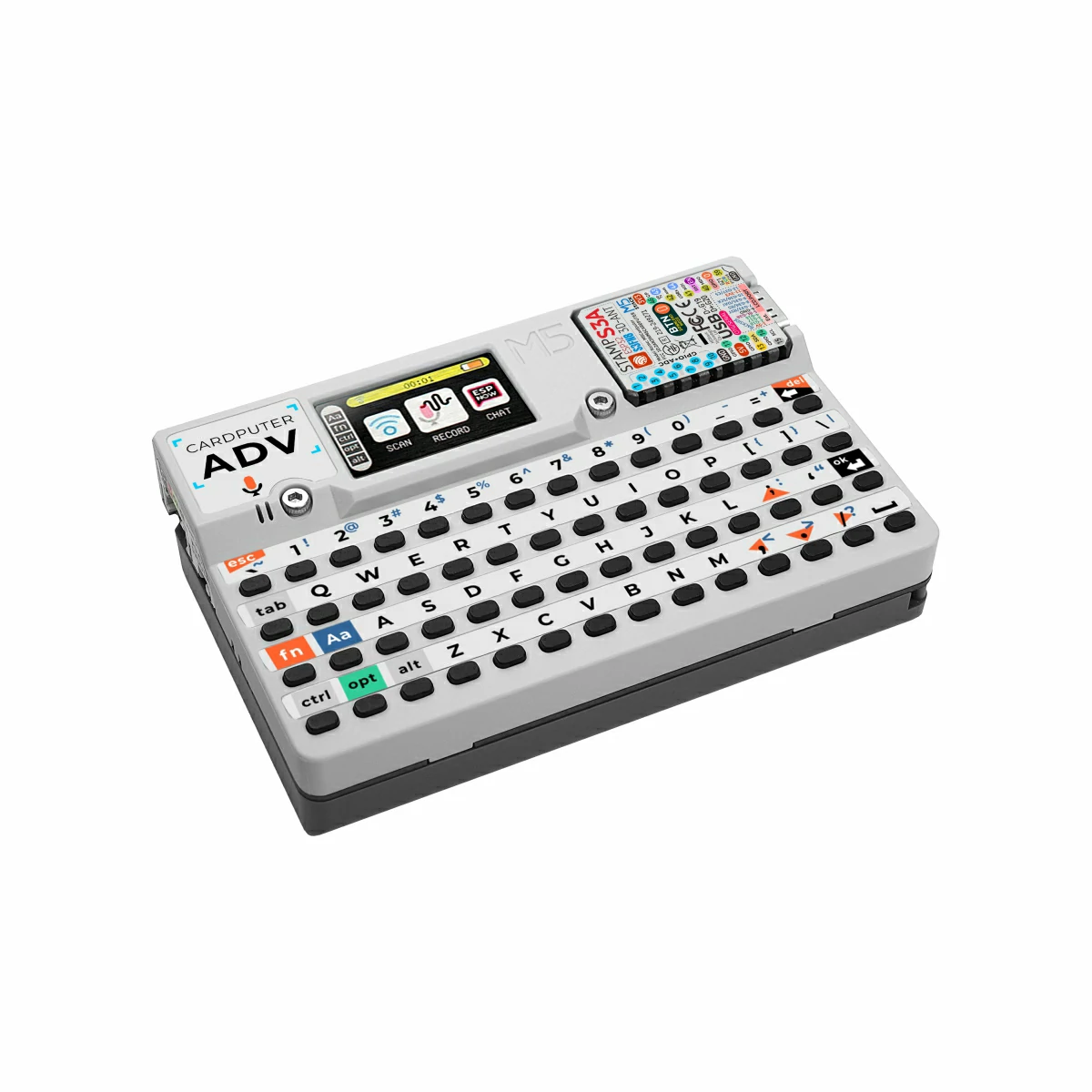
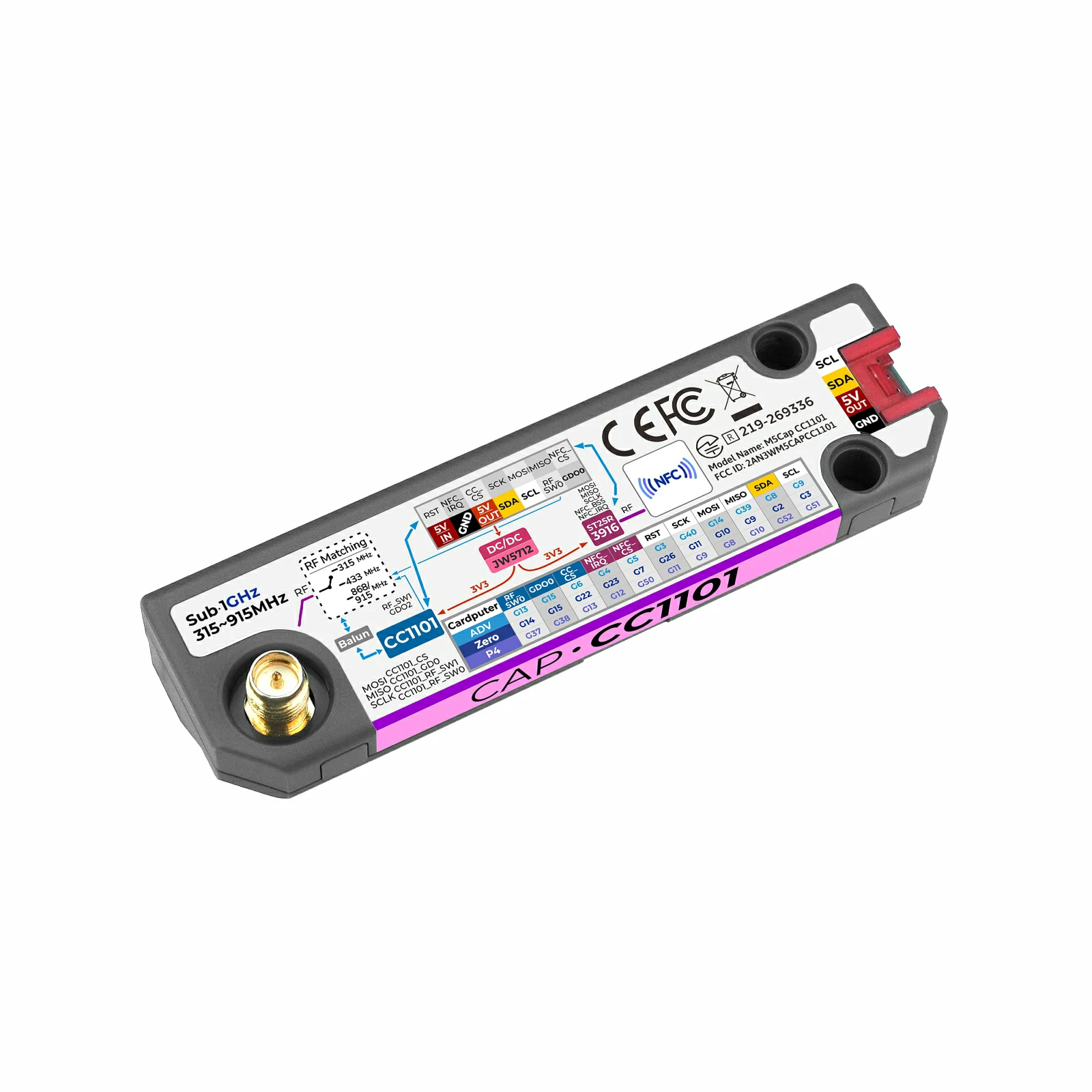
Hardware used:
2. Compile and Upload
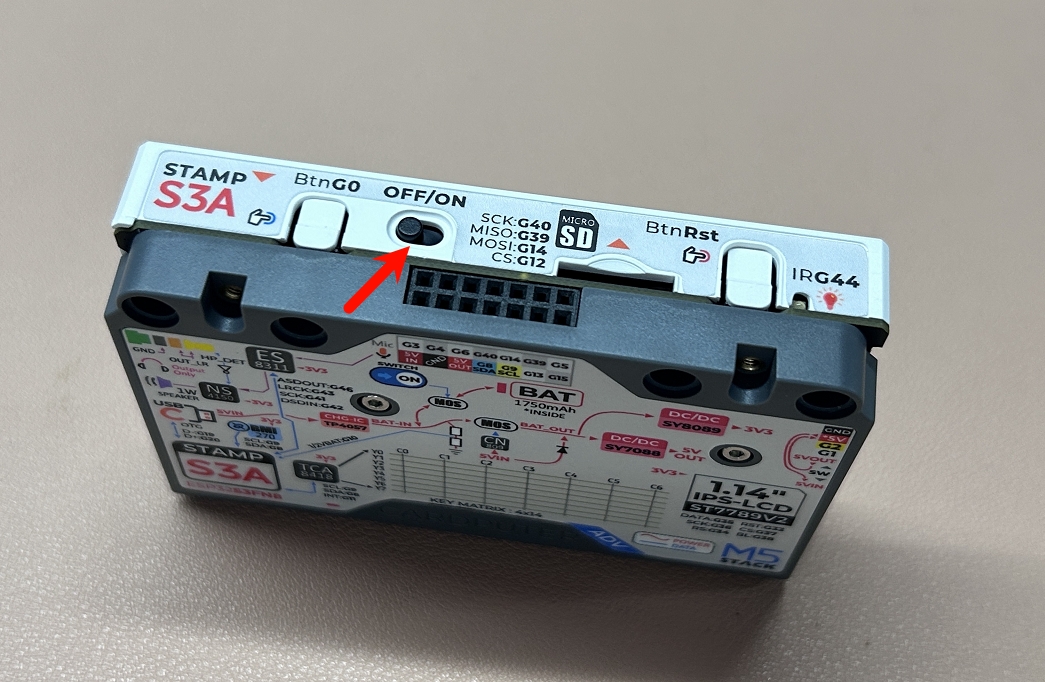
- Set the power switch on the side of the Cardputer-Adv to the
OFFposition. Then hold theG0button before powering on the device, release it after power is applied, and the device will enter download mode for flashing.
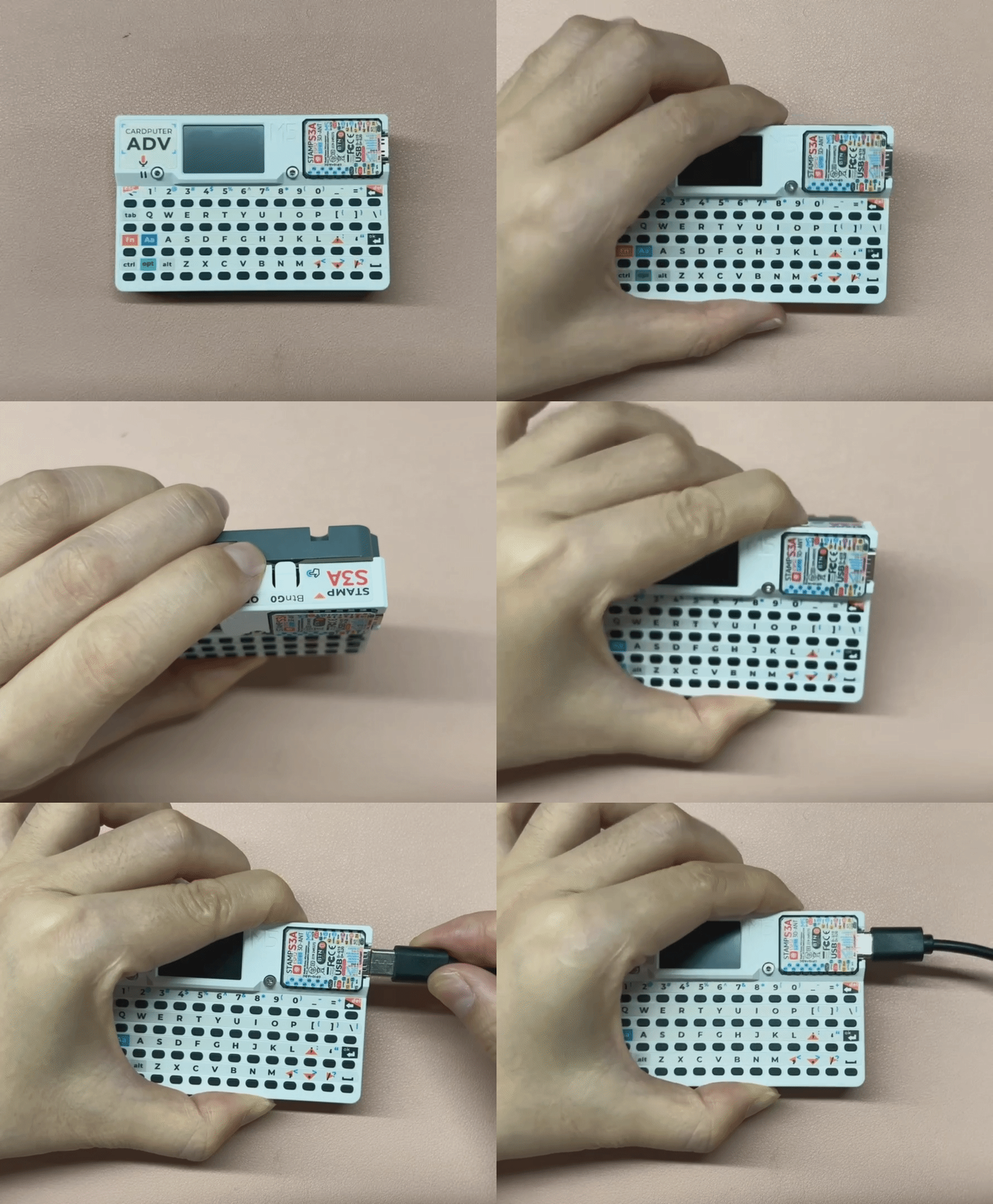
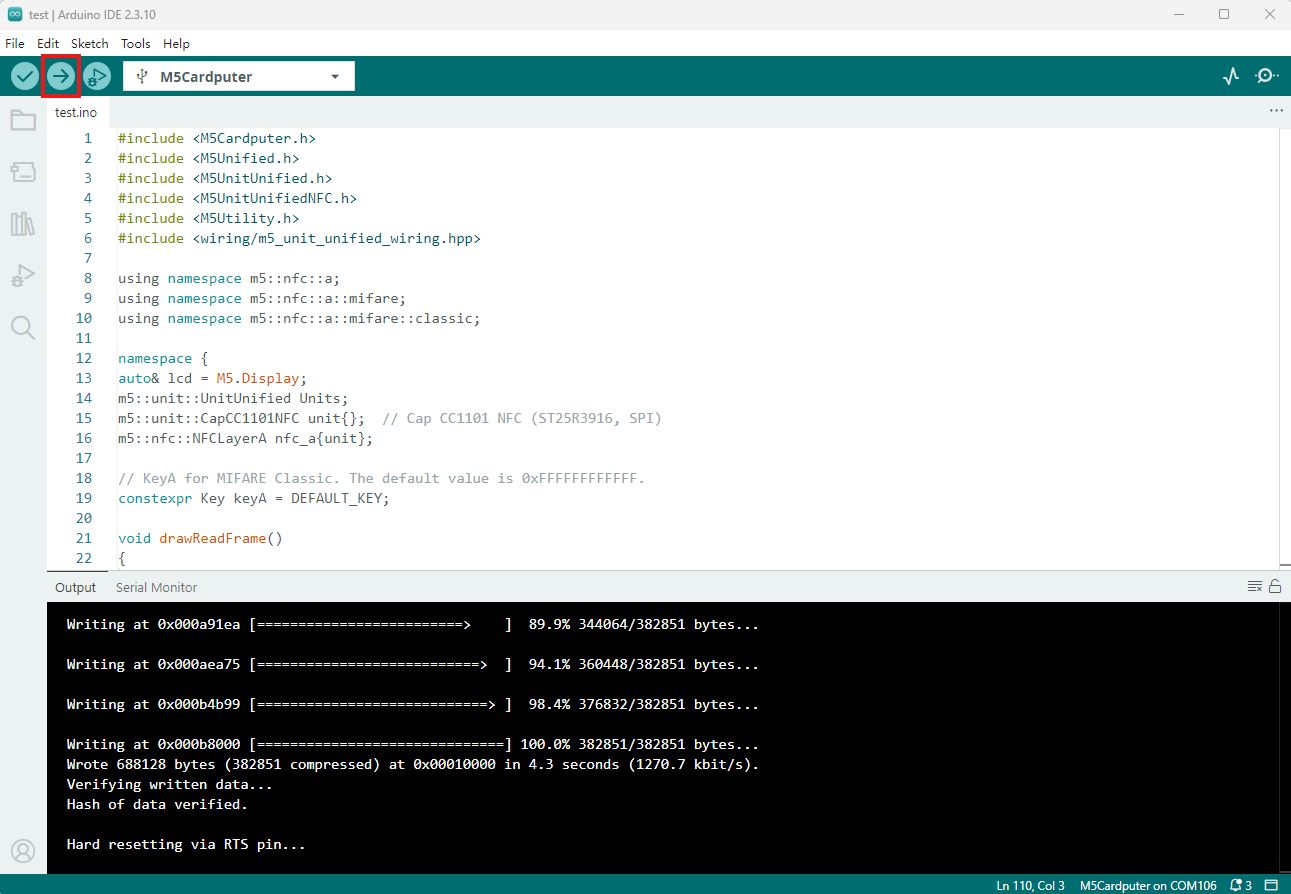
- Select the device port, click the Compile and Upload button in the upper-left corner of Arduino IDE, and wait for the program to compile and upload to the device.
3. Example Programs
- The controller used in this tutorial is the Cardputer-Adv paired with the Cap CC1101. Both the RF and NFC sections of the Cap CC1101 communicate over SPI. The CC1101 SPI pins are
G5 (CS),G14 (MOSI),G39 (MISO), andG40 (SCK), withG15 (GD0)as the interrupt pin. The NFC (ST25R3916) SPI pins areG5 (CS),G14 (MOSI),G39 (MISO), andG40 (SCK), withG4 (IRQ)as the interrupt pin.
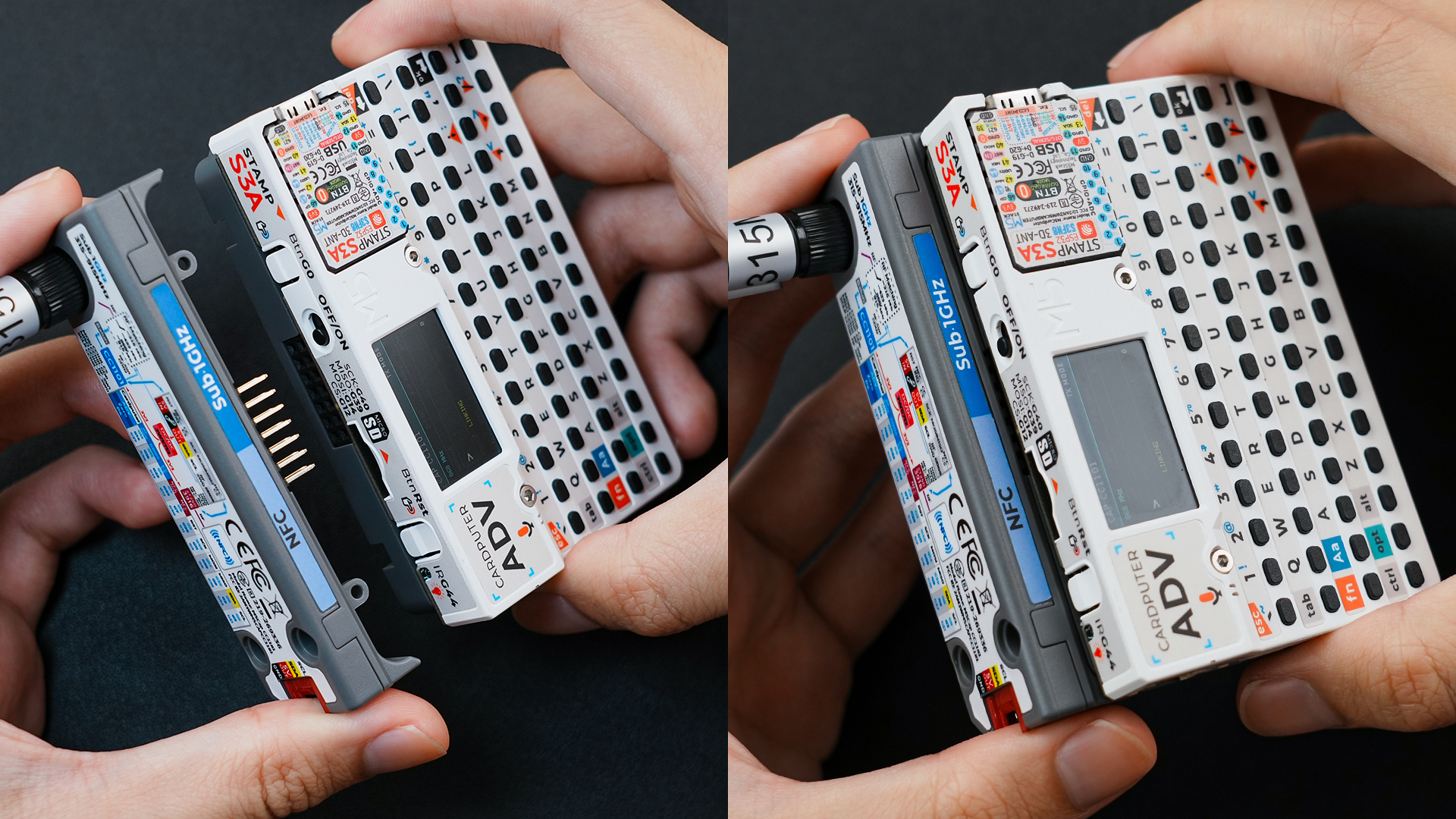
The assembled hardware connection is shown below:
3.1 RF Example
NSS, TRQ, GD02, and RST. However, the RadioLib library automatically maps the remaining SPI pins (MOSI, MISO, and SCK) according to the controller in use. These are the pins defined by default during M5Unified initialization; on the Cardputer-Adv they are G14 (MOSI), G39 (MISO), and G40 (SCK), so they do not need to be specified manually.The RF band is controlled by RF_SW0 and RF_SW1: RF_SW0 is connected to G13 on the Cardputer-Adv, and RF_SW1 is connected to GDO2 on the CC1101. The program sets the logic levels of both switches according to CC1101_FREQ: 315MHz uses RF_SW0=0 and RF_SW1=0, 433MHz uses RF_SW0=0 and RF_SW1=1, and 868MHz/915MHz uses RF_SW0=1 and RF_SW1=1. The host controls the high and low output levels of CC1101 GDO2 through SPI for RF_SW1.
Transmitter
#include <M5Unified.h>
#include <RadioLib.h>

#define CC1101_FREQ         915.0f  // carrier frequency in MHz (float). Must match receiver
#define CC1101_BIT_RATE     2.4f    // bit rate in kbps (float). Recommend 2.4 = 2400 bits/s
#define CC1101_FREQ_OFFSET  25.4f   // frequency offset in kHz (float). FSK deviation
#define CC1101_BW           58.0    // receiver filter bandwidth in kHz (float). Must be >= signal occupied BW
#define CC1101_TX_POWER     10      // output power in dBm (must be one of allowed values: -30,-20,-15,-10,0,5,7,10)
#define CC1101_PREAMBLE_LEN 16      // preamble length in bits (supported values: 16--2 Bytes, 24--3 Bytes, 32--4 Bytes, 48--6 Bytes, 64--8 Bytes, 96--12 Bytes, 128--16 Bytes, 192--24 Bytes).

constexpr int CC1101_CS = 5;
constexpr int CC1101_GDO0 = 15;
constexpr int RF_SW0 = 13;

//        CC1101 PIN          CSN,       GD00,    RST(unused),   GD02
CC1101 radio = new Module(CC1101_CS, CC1101_GDO0, RADIOLIB_NC, RADIOLIB_NC);

// Tracks the result of the last transmission attempt (error code from RadioLib)
int transmissionState = RADIOLIB_ERR_NONE;

// Special attribute for ESP8266/ESP32 to place ISR in RAM (faster interrupt response)
#if defined(ESP8266) || defined(ESP32)
ICACHE_RAM_ATTR
#endif
// Packet sent flag
volatile bool transmittedFlag = false;

bool transmitPending = false;
uint32_t transmitStartMillis = 0;
constexpr uint32_t TX_WAIT_MS = 100;

// This function is called when a complete packet is transmitted by the module
// IMPORTANT: this function MUST be 'void' type and MUST NOT have any arguments!
void setFlag(void)
{
    // we sent a packet, set the flag
    transmittedFlag = true;
}

void setRfBand()
{
    bool rf_sw0{};
    bool rf_sw1{};

    // Select RF switch states for the configured carrier frequency.
    if (CC1101_FREQ == 315.0f) {
        rf_sw0 = false;
        rf_sw1 = false;
    } else if (CC1101_FREQ == 433.0f) {
        rf_sw0 = false;
        rf_sw1 = true;
    } else if (CC1101_FREQ == 868.0f || CC1101_FREQ == 915.0f) {
        rf_sw0 = true;
        rf_sw1 = true;
    } else {
        return;
    }

    // RF_SW0 is controlled directly by the host GPIO.
    pinMode(RF_SW0, OUTPUT);
    digitalWrite(RF_SW0, rf_sw0 ? HIGH : LOW);

    // Drive RF_SW1 from CC1101 GDO2 through SPI.
    const uint8_t gdo2_config = RADIOLIB_CC1101_GDOX_HW_TO_0 |
                                (rf_sw1 ? RADIOLIB_CC1101_GDO2_INV : RADIOLIB_CC1101_GDO2_NORM);
    if (radio.setDIOMapping(2, gdo2_config) != RADIOLIB_ERR_NONE) {
        Serial.println(F("RF switch setup failed"));
        while (true) { delay(10); }
    }
}

void setup()
{
    M5.begin();
    Serial.begin(115200);
    M5.Display.setFont(&fonts::FreeMonoBold9pt7b);

    // Init CC1101
    Serial.printf("[CC1101] Initializing ...");
    int state = radio.begin(CC1101_FREQ, CC1101_BIT_RATE, CC1101_FREQ_OFFSET, CC1101_BW, CC1101_TX_POWER, CC1101_PREAMBLE_LEN);
    if (state == RADIOLIB_ERR_NONE) {
        Serial.println(F("Init success!"));
    } else {
        Serial.print(F("Init failed, code: "));
        Serial.println(state);
        while (true) { delay(10); }
    }
    setRfBand();

    // Register callback function after sending packet successfully
    radio.setPacketSentAction(setFlag);

    // Send first packet to enable flag
    Serial.printf("[CC1101] Sending first packet...");
    transmissionState = radio.startTransmit("Hello World!");
    setRfBand();

    transmitPending = transmissionState == RADIOLIB_ERR_NONE;
    transmitStartMillis = millis();

    M5.Display.setCursor(5,0);
    M5.Display.printf("Hello World!\n");
}

// Counter to keep track of transmitted packets
int count = 0;

void loop()
{
    if (transmittedFlag ||
        (transmitPending &&
         millis() - transmitStartMillis >= TX_WAIT_MS)) {
        // reset flag
        transmittedFlag = false;
        transmitPending = false;

        if (transmissionState == RADIOLIB_ERR_NONE) {
            // packet was successfully sent
            Serial.println(F("Transmission finished!"));
            M5.Display.println("Send sucessfully!");

            // NOTE: when using interrupt-driven transmit method,
            //       it is not possible to automatically measure
            //       transmission data rate using getDataRate()

        } else {
            Serial.print(F("Send failed, code: "));
            Serial.println(transmissionState);
            M5.Display.print("\nSend failed\ncode:");
            M5.Display.println(transmissionState);
        }

        // Clean up after transmission is finished
        // This will ensure transmitter is disabled,
        // RF switch is powered down etc.
        radio.finishTransmit();
        setRfBand();

        // Wait a second before transmitting again
        delay(1000);

        Serial.printf("[CC1101] Sending #%d packet ... ", count);
        // You can transmit C-string or Arduino string up to 256 characters long
        String str        = "Cap CC1101 #" + String(count++);
        transmissionState = radio.startTransmit(str);
        setRfBand();

        transmitPending = transmissionState == RADIOLIB_ERR_NONE;
        transmitStartMillis = millis();

        M5.Display.clear();
        M5.Display.setCursor(0,5);
        M5.Display.printf("[CC1101]\nSending #%d packet\n......\n", count);

        // You can also transmit byte array up to 256 bytes long
        /*
          byte byteArr[] = {0x01, 0x23, 0x45, 0x67,
                            0x89, 0xAB, 0xCD, 0xEF};
          transmissionState = radio.startTransmit(byteArr, 8);
        */
    }
}Receiver
#include <M5Unified.h>
#include <RadioLib.h>

#define CC1101_FREQ         915.0f  // carrier frequency in MHz (float). Must match receiver
#define CC1101_BIT_RATE     2.4f    // bit rate in kbps (float). Recommend 2.4 = 2400 bits/s
#define CC1101_FREQ_OFFSET  25.4f   // frequency offset in kHz (float). FSK deviation
#define CC1101_BW           58.0    // receiver filter bandwidth in kHz (float). Must be >= signal occupied BW
#define CC1101_TX_POWER     10      // output power in dBm (must be one of allowed values: -30,-20,-15,-10,0,5,7,10)
#define CC1101_PREAMBLE_LEN 16      // preamble length in bits (supported values: 16--2 Bytes, 24--3 Bytes, 32--4 Bytes, 48--6 Bytes, 64--8 Bytes, 96--12 Bytes, 128--16 Bytes, 192--24 Bytes).

constexpr int CC1101_CS = 5;
constexpr int CC1101_GDO0 = 15;
constexpr int RF_SW0 = 13;

//        CC1101 PIN          CSN,       GD00,    RST(unused),   GD02
CC1101 radio = new Module(CC1101_CS, CC1101_GDO0, RADIOLIB_NC, RADIOLIB_NC);

#if defined(ESP8266) || defined(ESP32)
ICACHE_RAM_ATTR
#endif
// Packet received flag
volatile bool receivedFlag = false;
// This function is called when a complete packet is received by the module
// IMPORTANT: This function MUST be 'void' type and MUST NOT have any arguments!
void setFlag(void)
{
    receivedFlag = true;
}

void setRfBand()
{
    bool rf_sw0{};
    bool rf_sw1{};

    // Select RF switch states for the configured carrier frequency.
    if (CC1101_FREQ == 315.0f) {
        rf_sw0 = false;
        rf_sw1 = false;
    } else if (CC1101_FREQ == 433.0f) {
        rf_sw0 = false;
        rf_sw1 = true;
    } else if (CC1101_FREQ == 868.0f || CC1101_FREQ == 915.0f) {
        rf_sw0 = true;
        rf_sw1 = true;
    } else {
        return;
    }

    // RF_SW0 is controlled directly by the host GPIO.
    pinMode(RF_SW0, OUTPUT);
    digitalWrite(RF_SW0, rf_sw0 ? HIGH : LOW);

    // Drive RF_SW1 from CC1101 GDO2 through SPI.
    const uint8_t gdo2_config = RADIOLIB_CC1101_GDOX_HW_TO_0 |
                                (rf_sw1 ? RADIOLIB_CC1101_GDO2_INV : RADIOLIB_CC1101_GDO2_NORM);
    if (radio.setDIOMapping(2, gdo2_config) != RADIOLIB_ERR_NONE) {
        Serial.println(F("RF switch setup failed"));
        while (true) { delay(10); }
    }
}

void setup()
{
    M5.begin();
    Serial.begin(115200);
    M5.Display.setFont(&fonts::FreeMonoBold9pt7b);

    // Init CC1101
    Serial.printf("[CC1101] Initializing ... ");
    int state = radio.begin(CC1101_FREQ, CC1101_BIT_RATE, CC1101_FREQ_OFFSET, CC1101_BW, CC1101_TX_POWER, CC1101_PREAMBLE_LEN);
    if (state == RADIOLIB_ERR_NONE) {
        Serial.println(F("Init success!"));
    } else {
        Serial.print(F("Init failed, code: "));
        Serial.println(state);
        while (true) { delay(10); }
    }
    setRfBand();

    // Register callback function after receiving packet successfully
    radio.setPacketReceivedAction(setFlag);

    // Start listening for FSK packets
    Serial.printf("[CC1101] Starting to listen ... ");
    state = radio.startReceive();
    setRfBand();
    if (state == RADIOLIB_ERR_NONE) {
        Serial.println(F("Listen successfully!"));
    } else {
        Serial.print(F("Listen failed, code: "));
        Serial.println(state);
        while (true) { delay(10); }
    }

    // If needed, 'listen' mode can be disabled by calling any of the following methods:
    // radio.standby()
    // radio.sleep()
    // radio.transmit();
    // radio.receive();
    // radio.scanChannel();
}

void loop()
{
    if (receivedFlag) {
        // reset flag
        receivedFlag = false;

        // Read received data as an Arduino String
        String str;
        int state = radio.readData(str);

        // Read received data as byte array
        /*
          byte byteArr[8];
          int numBytes = radio.getPacketLength();
          int state = radio.readData(byteArr, numBytes);
        */

        if (state == RADIOLIB_ERR_NONE) {
            // Packet was successfully received
            Serial.printf("[CC1101] Received packet:\n");
            M5.Display.clear();
            M5.Display.setCursor(0,5);
            M5.Display.printf("[CC1101]\nReceived packet:\n");

            // Data of the packet
            Serial.printf("[CC1101] Data:\t\t");
            Serial.println(str);
            M5.Display.printf("Data: %s\n", str.c_str());

            // RSSI (Received Signal Strength Indicator)
            Serial.printf("[CC1101] RSSI:\t\t");
            Serial.print(radio.getRSSI());
            Serial.println(F(" dBm"));
            M5.Display.printf("RSSI: %0.2f dBm\n", radio.getRSSI());

            // SNR (Signal-to-Noise Ratio)
            Serial.printf("[CC1101] SNR:\t\t");
            Serial.print(radio.getSNR());
            Serial.println(F(" dB"));
            M5.Display.printf("SNR:  %0.2f dB\n", radio.getSNR());

            // LQI (Link Quality Indicator), lower is better
            Serial.print(F("[CC1101] LQI:\t\t"));
            Serial.println(radio.getLQI());
            M5.Display.printf("LQI:  %d\n", radio.getLQI());

        } else if (state == RADIOLIB_ERR_CRC_MISMATCH) {
            // Packet was received, but is malformed
            Serial.println(F("CRC error!"));

        } else {
            Serial.print(F("Receive failed, code: "));
            Serial.println(state);
        }

        radio.startReceive();
        setRfBand();
    }
}This example sends strings containing a counter from the transmitter; the receiver prints the received string and displays RSSI, SNR, and LQI.
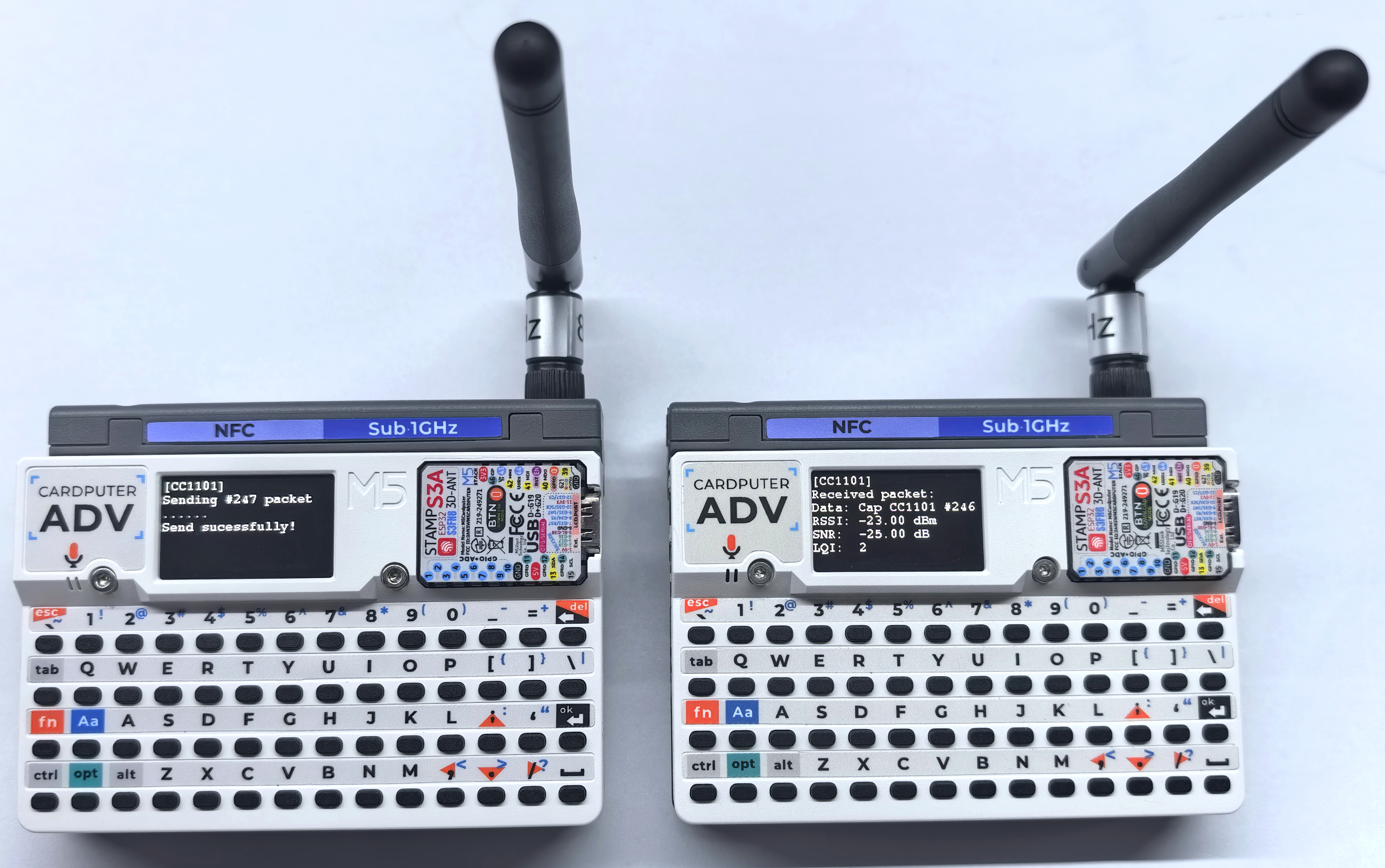
- Transmitter serial output example:
[CC1101] Sending #247 packet ... Transmission finished!- Receiver serial output example:
[CC1101] Received packet:
[CC1101] Data:            Cap CC1101 #246
[CC1101] RSSI:            -23.00 dBm
[CC1101] SNR:             -25.00 dB
[CC1101] LQI: 23.2 NFC Examples
MOSI, MISO, and SCK) according to the controller in use; on the Cardputer-Adv they are G14 (MOSI), G39 (MISO), and G40 (SCK). The NFC chip-select and interrupt pins are G6 (CS) and G4 (IRQ), respectively, so they do not need to be specified manually.Complete Data Read
This example uses the Tab key on the Cardputer-Adv keyboard to trigger a complete read. The program detects, identifies, and activates an NFC-A tag, then outputs the card data to the serial monitor using dump(); MIFARE Classic tags are authenticated with the default key 0xFFFFFFFFFFFF.
#include <M5Cardputer.h>
#include <M5Unified.h>
#include <M5UnitUnified.h>
#include <M5UnitUnifiedNFC.h>
#include <M5Utility.h>
#include <wiring/m5_unit_unified_wiring.hpp>

using namespace m5::nfc::a;
using namespace m5::nfc::a::mifare;
using namespace m5::nfc::a::mifare::classic;

namespace {
auto& lcd = M5.Display;
m5::unit::UnitUnified Units;
m5::unit::CapCC1101NFC unit{};  // Cap CC1101 NFC (ST25R3916, SPI)
m5::nfc::NFCLayerA nfc_a{unit};

// KeyA for MIFARE Classic. The default value is 0xFFFFFFFFFFFF.
constexpr Key keyA = DEFAULT_KEY;

void drawReadFrame()
{
    lcd.fillScreen(TFT_BLACK);
    lcd.setTextDatum(textdatum_t::top_left);
    lcd.setFont(&fonts::FreeMonoBold9pt7b);
    lcd.setTextColor(TFT_CYAN);
    lcd.drawString("NFC READ", 4, 0);
}

void drawReadStatus(const char* title, const char* detail, const uint16_t accent)
{
    drawReadFrame();
    lcd.setFont(&fonts::FreeMonoBold9pt7b);
    lcd.setTextColor(accent);
    lcd.drawString(title, 4, 20);
    lcd.setTextColor(TFT_WHITE);
    lcd.drawString(detail, 4, 38);
    lcd.drawString("TAB: SCAN", 4, 108);
}

void drawCardInfo(const PICC& picc)
{
    drawReadFrame();
    lcd.setFont(&fonts::FreeMonoBold9pt7b);
    lcd.setTextColor(TFT_CYAN);
    lcd.drawString("UID:", 4, 20);
    lcd.drawString("TYPE:", 4, 56);
    lcd.setTextColor(TFT_WHITE);
    lcd.drawString(picc.uidAsString().c_str(), 4, 38);
    lcd.drawString(picc.typeAsString().c_str(), 4, 74);
    lcd.drawString("TAB: SCAN", 4, 108);
}
}  // namespace

void setup()
{
    auto cfg = M5.config();
    M5Cardputer.begin(cfg, true);

    if (lcd.height() > lcd.width()) {
        lcd.setRotation(1);
    }

    // Cap CC1101 uses SPI mode 1. The library maps the Cardputer-Adv pins:
    // SCK=G40, MOSI=G14, MISO=G39, NFC CS=G6, NFC IRQ=G4.
    bool unit_ready = m5::unit::wiring::addSPI(Units, unit, 10000000, 1) && Units.begin();
    if (!unit_ready) {
        M5_LOGE("Failed to begin");
        lcd.fillScreen(TFT_RED);
        m5::unit::wiring::failStop();
    }

    M5_LOGI("M5UnitUnified initialized");
    M5_LOGI("%s", Units.debugInfo().c_str());

        drawReadStatus("READY TO SCAN", "PLACE TAG NEAR", TFT_GREEN);
}

void loop()
{
    M5Cardputer.update();
    Units.update();

    if (!M5Cardputer.Keyboard.isChange() || !M5Cardputer.Keyboard.isPressed() ||
        !M5Cardputer.Keyboard.keysState().tab) {
        return;
    }

    PICC picc{};
    if (!nfc_a.detect(picc)) {
        drawReadStatus("NO TAG FOUND", "MOVE TAG CLOSER", TFT_ORANGE);
        M5.Log.printf("PICC NOT exists\n");
        return;
    }

    if (!nfc_a.identify(picc) || !nfc_a.reactivate(picc)) {
        drawReadStatus("READ ERROR", "COULD NOT IDENTIFY", TFT_RED);
        M5_LOGE("Failed to identify/activate %s", picc.uidAsString().c_str());
        return;
    }

    M5.Speaker.tone(3000, 20);
    drawCardInfo(picc);
    M5.Log.printf("==== Dump %s %s %u/%u ====\n", picc.uidAsString().c_str(), picc.typeAsString().c_str(),
                  picc.userAreaSize(), picc.totalSize());

    // Dump all card data. keyA is ignored for non-MIFARE Classic tags.
    nfc_a.dump(keyA);
    nfc_a.deactivate();
}Bring the tag close to the NFC sensing area of the Cap CC1101 and press the Tab key on the Cardputer-Adv keyboard. Detailed card data will be output to the serial monitor.
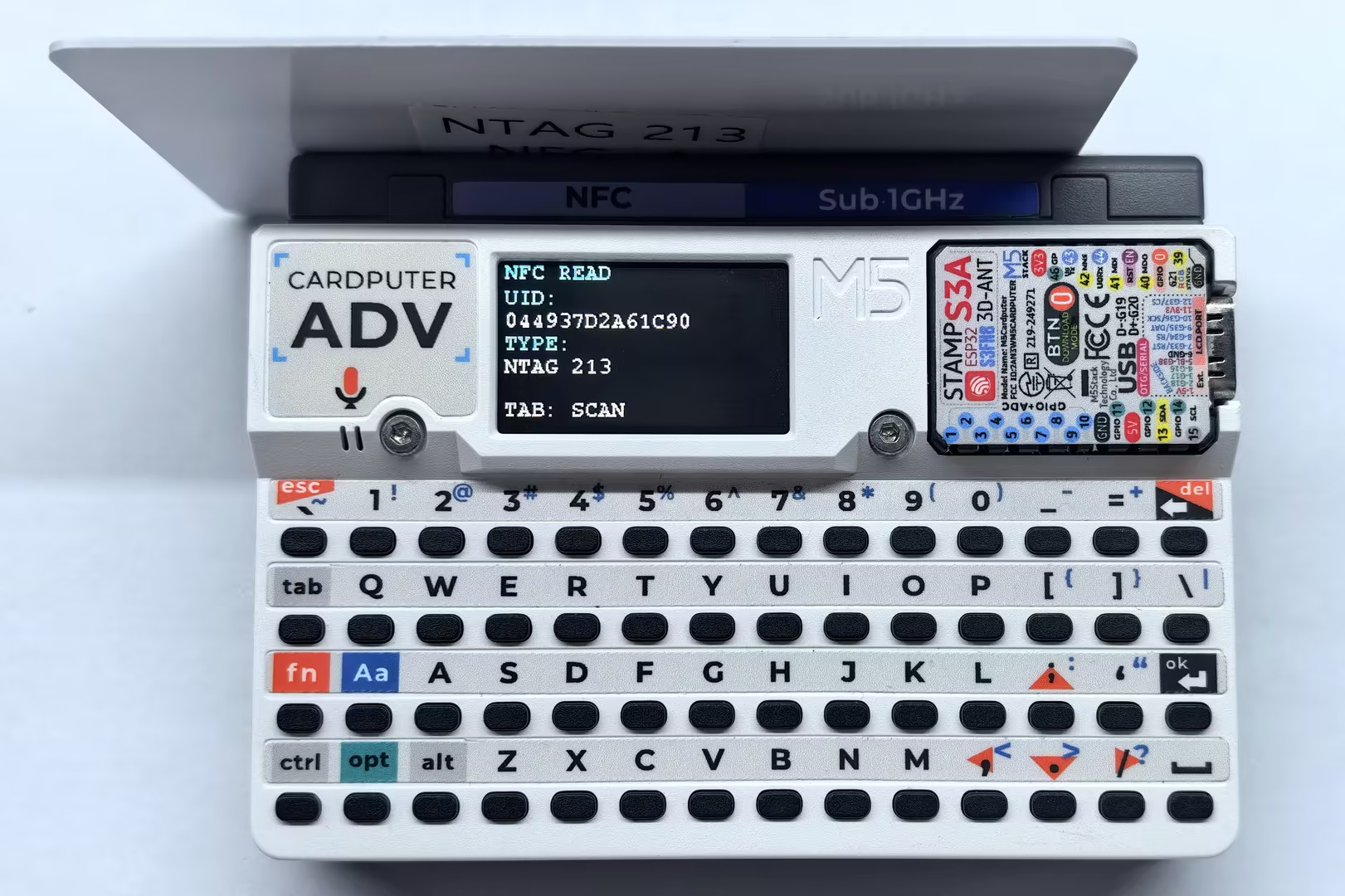
- Serial output example:
==== Dump 044937D2A61C90 NTAG 213 144/180 ====
Page    :00 01 02 03
--------------------
[000/00]:04 49 37 F2
[001/01]:D2 A6 1C 90
[002/02]:F8 48 00 00
[003/03]:E1 10 12 00
[004/04]:03 25 91 01
[005/05]:0D 55 04 6D
[006/06]:35 73 74 61
[007/07]:63 6B 2E 63
[008/08]:6F 6D 2F 51
[009/09]:01 10 54 02
[010/0A]:65 6E 48 65
[011/0B]:6C 6C 6F 20
[012/0C]:4D 35 53 74
[013/0D]:61 63 6B FE
[014/0E]:01 1A 54 02
[015/0F]:6A 61 E3 81
[016/10]:93 E3 82 93
[017/11]:E3 81 AB E3
[018/12]:81 A1 E3 81
[019/13]:AF 20 4D 35
[020/14]:53 74 61 63
[021/15]:6B 51 01 11
[022/16]:54 02 7A 68
[023/17]:E4 BD A0 E5
[024/18]:A5 BD 20 4D
[025/19]:35 53 74 61
[026/1A]:63 6B FE 78
[027/1B]:00 00 00 00
[028/1C]:00 00 00 00
[029/1D]:00 00 00 00
[030/1E]:00 00 00 00
[031/1F]:00 00 00 00
[032/20]:00 00 00 00
[033/21]:00 00 00 00
[034/22]:00 00 00 00
[035/23]:00 00 00 00
[036/24]:00 00 00 00
[037/25]:00 00 00 00
[038/26]:00 00 00 00
[039/27]:00 00 00 00
[040/28]:00 00 00 BD
[041/29]:04 00 00 FF
[042/2A]:00 05 00 00
[043/2B]:00 00 00 00
[044/2C]:00 00 00 00Read/Write NDEF-Formatted Tags
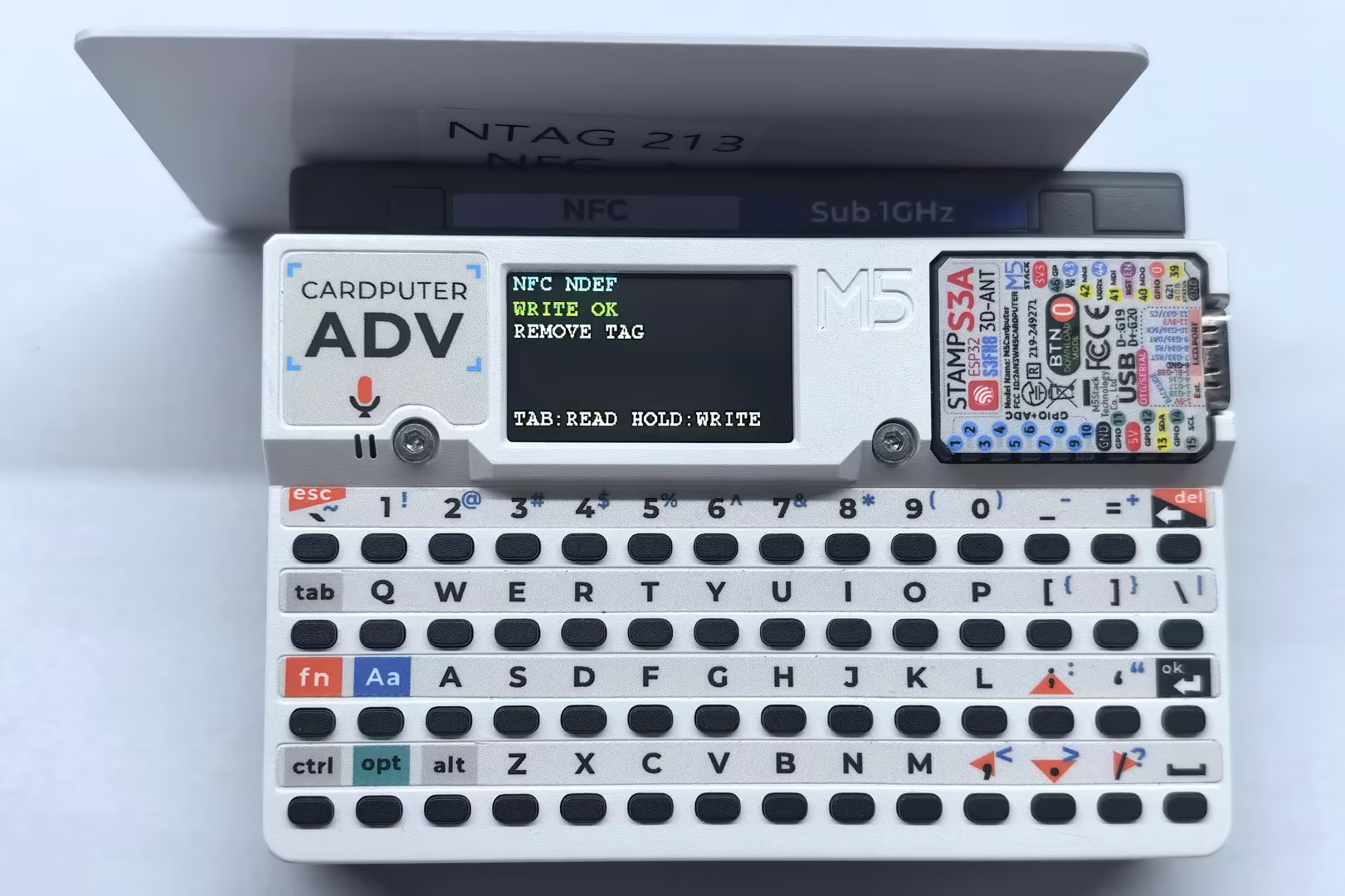
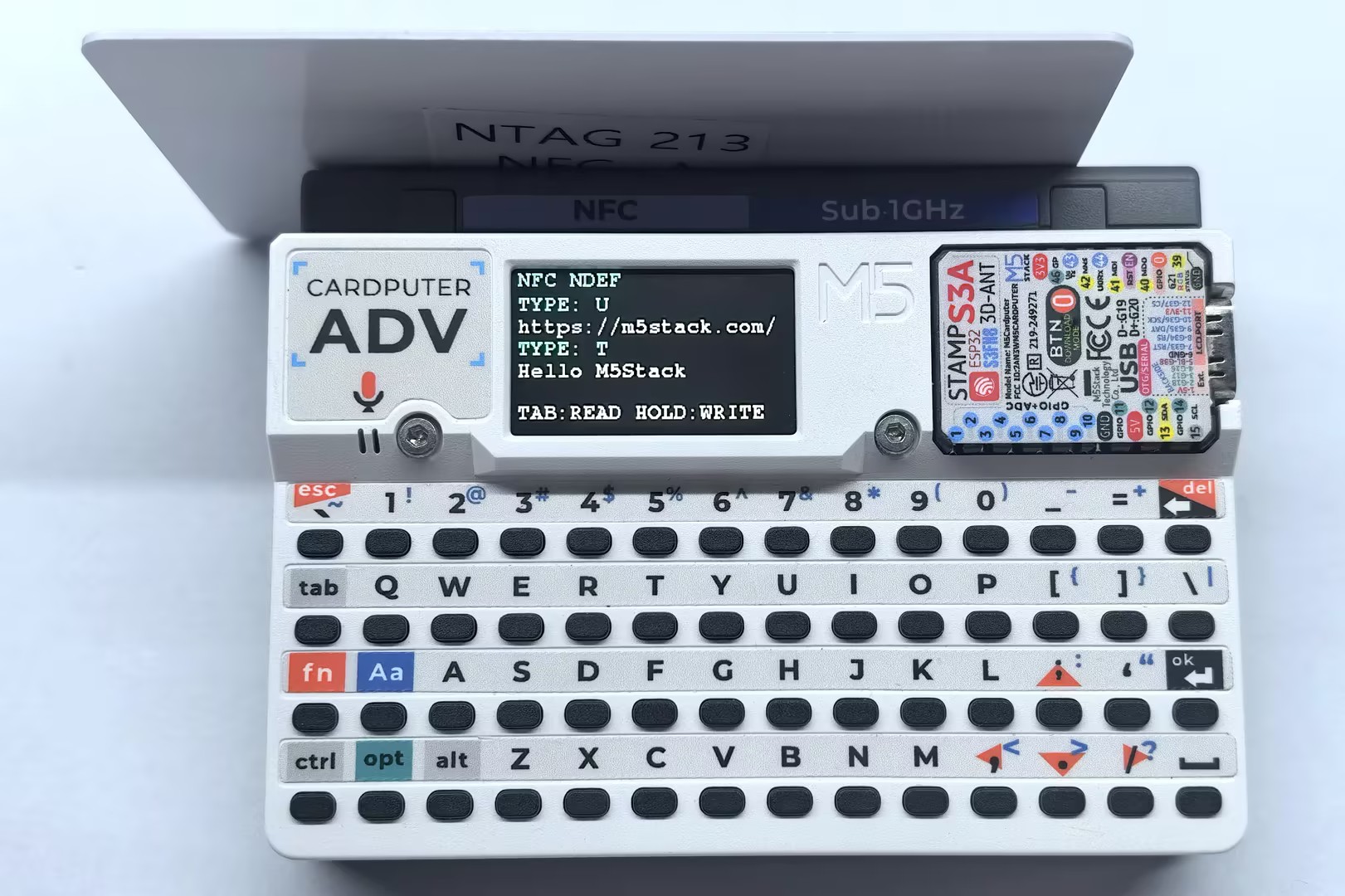
In this example, tap the Tab key on the Cardputer-Adv keyboard to read an NDEF message, or hold it for about 600ms to write the example URL and text.
mifareUltralightChangeFormatToNDEF() changes the tag format. This operation cannot be undone; make sure the tag contains no data that needs to be preserved.#include <M5Cardputer.h>
#include <M5Unified.h>
#include <M5UnitUnified.h>
#include <M5UnitUnifiedNFC.h>
#include <M5Utility.h>
#include <wiring/m5_unit_unified_wiring.hpp>
#include <string>
using namespace m5::nfc;
using namespace m5::nfc::a;
using namespace m5::nfc::a::mifare;
using namespace m5::nfc::ndef;
namespace {
auto& lcd = M5.Display;
m5::unit::UnitUnified Units;
m5::unit::CapCC1101NFC unit{}; // Cap CC1101 NFC (ST25R3916, SPI)
m5::nfc::NFCLayerA nfc_a{unit};
constexpr uint32_t TAB_HOLD_TIME_MS = 600;
bool tab_was_pressed{};
bool tab_hold_handled{};
uint32_t tab_pressed_at{};
void drawNdefFrame()
{
lcd.fillScreen(TFT_BLACK);
lcd.setTextDatum(textdatum_t::top_left);
lcd.setFont(&fonts::FreeMonoBold9pt7b);
lcd.setTextColor(TFT_CYAN);
lcd.drawString("NFC NDEF", 4, 0);
lcd.setTextColor(TFT_WHITE);
lcd.drawString("TAB:READ HOLD:WRITE", 4, 108);
}
void drawNdefStatus(const char* title, const char* detail, const uint16_t accent)
{
drawNdefFrame();
lcd.setFont(&fonts::FreeMonoBold9pt7b);
lcd.setTextColor(accent);
lcd.drawString(title, 4, 20);
lcd.setTextColor(TFT_WHITE);
lcd.drawString(detail, 4, 38);
}
void drawNdefRecord(const uint8_t index, const char* type, const std::string& payload)
{
if (index > 1) {
return;
}
const int y = 20 + index * 36;
lcd.setFont(&fonts::FreeMonoBold9pt7b);
lcd.setTextColor(TFT_CYAN);
lcd.drawString("TYPE:", 4, y);
lcd.drawString(type, 70, y);
lcd.setTextColor(TFT_WHITE);
lcd.drawString(payload.c_str(), 4, y + 18);
}
}
void readNdef()
{
bool valid{};
if (!nfc_a.ndefIsValidFormat(valid)) {
M5_LOGE("Failed to check NDEF format");
drawNdefStatus("CHECK ERROR", "TRY AGAIN", TFT_RED);
return;
}
if (!valid) {
M5.Log.printf("Data format is NOT NDEF\n");
drawNdefStatus("NOT NDEF", "FORMAT TAG FIRST", TFT_ORANGE);
return;
}
TLV message{};
if (!nfc_a.ndefRead(message)) {
M5_LOGE("Failed to read NDEF");
drawNdefStatus("READ ERROR", "TRY AGAIN", TFT_RED);
return;
}
if (!message.isMessageTLV()) {
M5.Log.printf("NDEF Message TLV is NOT exists\n");
drawNdefStatus("NDEF EMPTY", "NO RECORD", TFT_ORANGE);
return;
}
drawNdefFrame();
uint8_t record_index{};
for (auto&& record : message.records()) {
const auto payload = record.payloadAsString();
M5.Log.printf("TNF:%u Type:%s Payload:%s\n", record.tnf(), record.type(), payload.c_str());
drawNdefRecord(record_index++, record.type(), payload);
}
}
void writeNdef()
{
auto& picc = nfc_a.activatedPICC();
if (picc.isMifareUltralight()) {
// This changes an unformatted Ultralight tag to NDEF format.
if (!nfc_a.mifareUltralightChangeFormatToNDEF()) {
M5_LOGE("Failed to change tag to NDEF format");
drawNdefStatus("FORMAT ERROR", "TRY AGAIN", TFT_RED);
return;
}
}
TLV message{Tag::Message};
Record url{};
url.setURIPayload("m5stack.com/", URIProtocol::HTTPS);
message.push_back(url);
Record text{};
text.setTextPayload("Hello M5Stack", "en");
message.push_back(text);
if (picc.userAreaSize() < 2 || message.required() > picc.userAreaSize() - 1) {
M5.Log.printf("NDEF message is too large\n");
drawNdefStatus("TOO LARGE", "USE MORE MEMORY", TFT_ORANGE);
return;
}
if (!nfc_a.ndefWrite(message)) {
M5_LOGE("Failed to write NDEF");
drawNdefStatus("WRITE ERROR", "TRY AGAIN", TFT_RED);
return;
}
M5.Log.printf("Write NDEF OK\n");
drawNdefStatus("WRITE OK", "REMOVE TAG", TFT_GREEN);
}
void setup()
{
auto cfg = M5.config();
M5Cardputer.begin(cfg, true);
if (lcd.height() > lcd.width()) {
lcd.setRotation(1);
}
// Cap CC1101 uses SPI mode 1. The library maps the Cardputer-Adv pins.
bool unit_ready = m5::unit::wiring::addSPI(Units, unit, 10000000, 1) && Units.begin();
if (!unit_ready) {
M5_LOGE("Failed to begin");
lcd.fillScreen(TFT_RED);
m5::unit::wiring::failStop();
}
M5_LOGI("M5UnitUnified initialized");
M5_LOGI("%s", Units.debugInfo().c_str());
drawNdefStatus("READY", "TAB READ / HOLD WRITE", TFT_GREEN);
}
void loop()
{
M5Cardputer.update();
Units.update();
const bool tab_pressed = M5Cardputer.Keyboard.keysState().tab;
bool read_request{};
bool write_request{};
if (tab_pressed && !tab_was_pressed) {
tab_pressed_at = millis();
tab_hold_handled = false;
}
if (tab_pressed && !tab_hold_handled &&
millis() - tab_pressed_at >= TAB_HOLD_TIME_MS) {
write_request = true;
tab_hold_handled = true;
}
if (!tab_pressed && tab_was_pressed && !tab_hold_handled) {
read_request = true;
}
tab_was_pressed = tab_pressed;
if (!read_request && !write_request) {
return;
}
PICC picc{};
if (!nfc_a.detect(picc)) {
drawNdefStatus("NO TAG FOUND", "MOVE TAG CLOSER", TFT_ORANGE);
M5.Log.printf("PICC NOT exists\n");
return;
}
if (!nfc_a.identify(picc) || !nfc_a.reactivate(picc)) {
drawNdefStatus("READ ERROR", "COULD NOT IDENTIFY", TFT_RED);
M5_LOGE("Failed to identify/activate %s", picc.uidAsString().c_str());
return;
}
M5.Log.printf("PICC:%s %s %u/%u\n", picc.uidAsString().c_str(), picc.typeAsString().c_str(),
picc.userAreaSize(), picc.totalSize());
if (!picc.supportsNDEF()) {
M5.Speaker.tone(1000, 50);
drawNdefStatus("NO NDEF", "TAG NOT SUPPORTED", TFT_ORANGE);
M5.Log.printf("NDEF not supported\n");
} else if (read_request) {
M5.Speaker.tone(2000, 30);
drawNdefStatus("READING", "KEEP TAG CLOSE", TFT_CYAN);
readNdef();
} else {
M5.Speaker.tone(4000, 30);
drawNdefStatus("WRITING", "KEEP TAG CLOSE", TFT_YELLOW);
writeNdef();
}
nfc_a.deactivate();
}The read result is displayed on the screen and in the serial monitor. After a successful write, remove the tag before verifying the content with a phone or NFC reader.
- Serial output example for writing:
PICC:044937D2A61C90 NTAG 213 144/180
Write NDEF OK- Serial output example for reading:
PICC:044937D2A61C90 NTAG 213 144/180
TNF:1 Type:U Payload:https://m5stack.com/
TNF:1 Type:T Payload:Hello M5StackTag Emulation
This example emulates the Cap CC1101 as a MIFARE Ultralight tag containing an NDEF message. After the program starts, bring a phone or another NFC reader close to the NFC sensing area of the Cap CC1101 to read the emulated tag.
#include <M5Unified.h>
#include <M5UnitUnified.h>
#include <M5UnitUnifiedNFC.h>
#include <M5Utility.h>
#include <wiring/m5_unit_unified_wiring.hpp>
#include <cstring>
#include <cstdio>

using namespace m5::nfc;
using namespace m5::nfc::a;
using namespace m5::nfc::a::mifare;

namespace {
auto& lcd = M5.Display;
m5::unit::UnitUnified Units;
m5::unit::CapCC1101NFC unit{};  // Cap CC1101 NFC (ST25R3916, SPI)
m5::nfc::EmulationLayerA emu_a{unit};

PICC picc{};
constexpr Type type{Type::MIFARE_Ultralight};
constexpr uint8_t uid[] = {0x04, 0x34, 0x56, 0x78, 0x9A, 0xBC, 0xDE};

// MIFARE Ultralight memory containing a URL and a text NDEF record.
uint8_t picc_memory[] = {
    0x00, 0x00, 0x00, 0x00,  // Page 0: UID, filled by embed_uid()
    0x00, 0x00, 0x00, 0x00,  // Page 1: UID, filled by embed_uid()
    0x00, 0xA3, 0x00, 0x00,  // Page 2: internal data and lock bits
    0xE1, 0x10, 0x06, 0x00,  // Page 3: NDEF Capability Container
    0x03, 0x25, 0x91, 0x01,  // Page 4: NDEF TLV and URI record
    0x0D, 0x55, 0x04, 0x6D,  // Page 5: URI payload
    0x35, 0x73, 0x74, 0x61,  // Page 6
    0x63, 0x6B, 0x2E, 0x63,  // Page 7
    0x6F, 0x6D, 0x2F, 0x51,  // Page 8: URL end and text record header
    0x51, 0x01, 0x10, 0x54,  // Page 9: text record header (ME=1)
    0x65, 0x6E, 0x48, 0x65,  // Page 10: "enHe"
    0x6C, 0x6C, 0x6F, 0x20,  // Page 11: "llo "
    0x4D, 0x35, 0x53, 0x74,  // Page 12: "M5St"
    0x61, 0x63, 0x6B, 0xFE,  // Page 13: "ack" and NDEF terminator
    0x44, 0x45, 0x46, 0x00,  // Page 14: padding
    0x44, 0x45, 0x46, 0x00,  // Page 15: padding
};

uint8_t bcc8(const uint8_t* data, const uint8_t length, const uint8_t init = 0)
{
    uint8_t value = init;
    for (uint_fast8_t i = 0; i < length; ++i) {
        value ^= data[i];
    }
    return value;
}

void embed_uid(uint8_t memory[9], const uint8_t tag_uid[7])
{
    memcpy(memory, tag_uid, 3);
    memory[3] = bcc8(tag_uid, 3, 0x88);  // CT ^ UID0 ^ UID1 ^ UID2
    memcpy(memory + 4, tag_uid + 3, 4);
    memory[8] = bcc8(tag_uid + 3, 4);
}

constexpr uint16_t state_colors[] = {
    TFT_DARKGREY, TFT_RED, TFT_YELLOW, TFT_CYAN, TFT_GREEN, TFT_MAGENTA};
constexpr const char* state_names[] = {"NONE", "OFF", "IDLE", "READY", "ACTIVE", "HALT"};

void drawEmulationFrame(const PICC& emulated_picc)
{
    char atqa_text[24]{};

    snprintf(atqa_text, sizeof(atqa_text), "ATQA:%04X SAK:%u", emulated_picc.atqa, emulated_picc.sak);
    lcd.fillScreen(TFT_BLACK);
    lcd.setTextDatum(textdatum_t::top_left);
    lcd.setFont(&fonts::FreeMonoBold9pt7b);
    lcd.setTextColor(TFT_CYAN);
    lcd.drawString("NFC EMULATOR", 4, 0);
    lcd.drawString("TYPE:", 4, 18);
    lcd.drawString("UID:", 4, 54);
    lcd.setTextColor(TFT_WHITE);
    lcd.drawString(emulated_picc.typeAsString().c_str(), 4, 36);
    lcd.drawString(emulated_picc.uidAsString().c_str(), 4, 72);
    lcd.drawString(atqa_text, 4, 90);
}

void drawEmulationState(const EmulationLayerA::State state)
{
    const auto index = m5::stl::to_underlying(state);

    lcd.fillRect(0, 108, lcd.width(), 27, TFT_BLACK);
    lcd.setFont(&fonts::FreeMonoBold9pt7b);
    lcd.setTextColor(TFT_CYAN);
    lcd.drawString("STATE:", 4, 108);
    lcd.setTextColor(state_colors[index]);
    lcd.drawString(state_names[index], 70, 108);
}
}  // namespace

void setup()
{
    M5.begin();

    if (lcd.height() > lcd.width()) {
        lcd.setRotation(1);
    }

    auto cfg = unit.config();
    cfg.emulation = true;
    cfg.mode = NFC::A;
    unit.config(cfg);

    // Cap CC1101 uses SPI mode 1. The library maps the Cardputer-Adv pins.
    bool unit_ready = m5::unit::wiring::addSPI(Units, unit, 10000000, 1) && Units.begin();
    if (!unit_ready) {
        M5_LOGE("Failed to begin");
        lcd.fillScreen(TFT_RED);
        m5::unit::wiring::failStop();
    }

    M5_LOGI("M5UnitUnified initialized");
    M5_LOGI("%s", Units.debugInfo().c_str());

    if (!picc.emulate(type, uid, sizeof(uid))) {
        M5_LOGE("Failed to configure emulated PICC");
        m5::unit::wiring::failStop();
    }
    embed_uid(picc_memory, uid);
    if (!emu_a.begin(picc, picc_memory, sizeof(picc_memory))) {
        M5_LOGE("Failed to begin emulation");
        m5::unit::wiring::failStop();
    }

    const auto& emulated_picc = emu_a.emulatePICC();
    M5.Log.printf("Emulation:%s %s ATQA:%04X SAK:%u\n", emulated_picc.typeAsString().c_str(),
                  emulated_picc.uidAsString().c_str(), emulated_picc.atqa, emulated_picc.sak);
    drawEmulationFrame(emulated_picc);
    drawEmulationState(emu_a.state());
}

void loop()
{
    M5.update();
    Units.update();
    emu_a.update();  // Must be called continuously during emulation.

    static EmulationLayerA::State latest{};
    const auto state = emu_a.state();
    if (latest != state) {
        latest = state;
        const auto index = m5::stl::to_underlying(state);
        drawEmulationState(state);
        M5.Log.printf("Emulation state: %s\n", state_names[index]);
    }
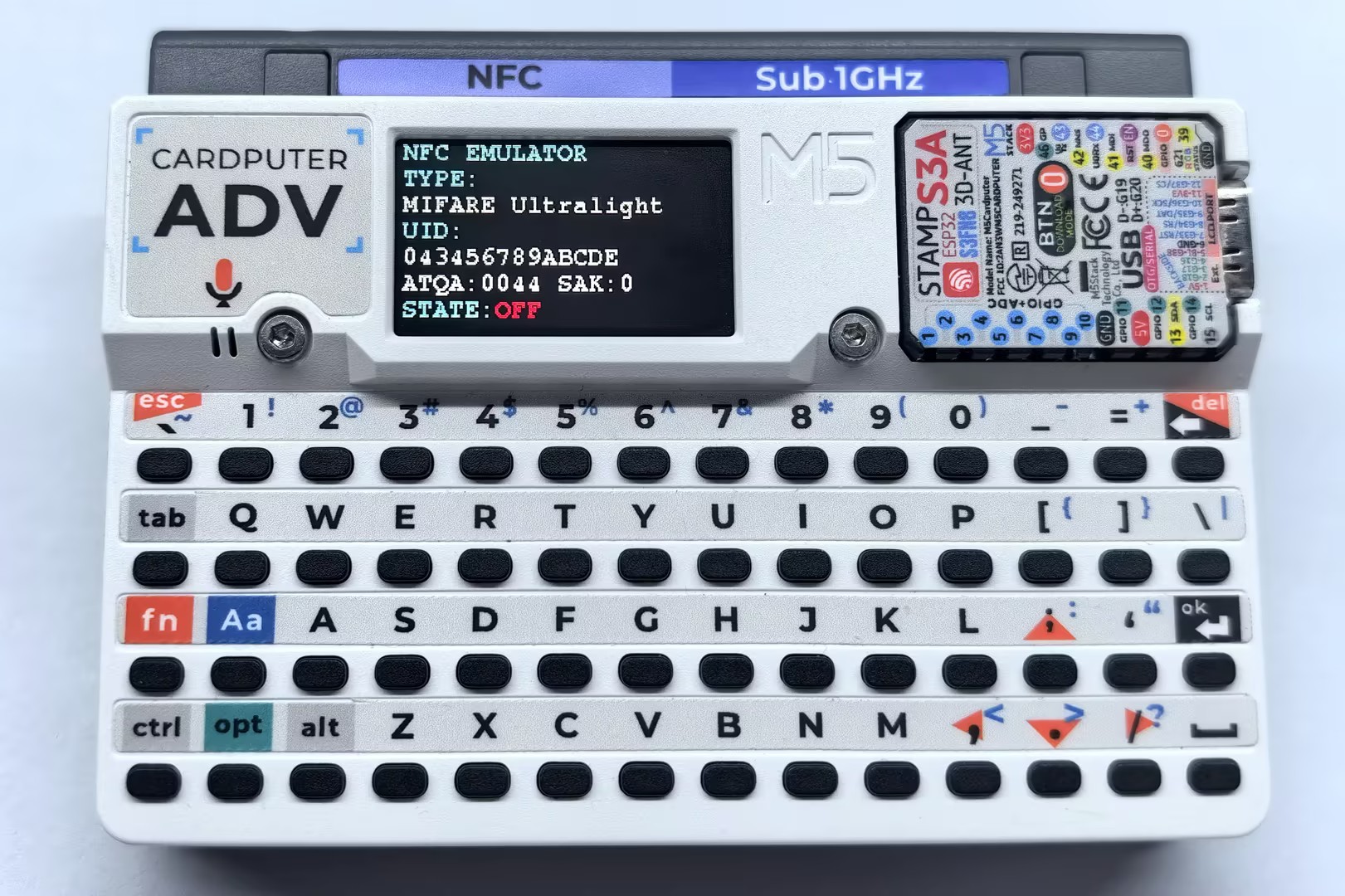
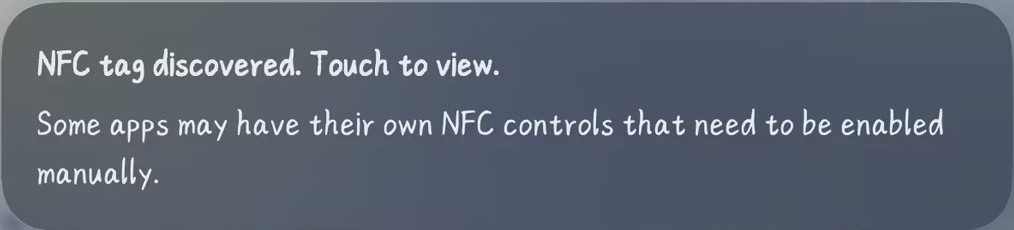
}Bring a phone or another NFC reader close to the NFC sensing area of the Cap CC1101; the tag information and state logs will be output on the screen and in the serial monitor.
- Example of tag information read by a phone:
- Serial output example:
Emulation:MIFARE Ultralight 043456789ABCDE ATQA:0044 SAK:0
Emulation state: IDLE
Emulation state: READY
Emulation state: ACTIVE
Emulation state: HALT
Emulation state: READY
Emulation state: OFF
Emulation state: IDLE
Emulation state: READY
Emulation state: ACTIVE
Emulation state: HALT
Emulation state: READY
Emulation state: ACTIVE
Emulation state: OFF