

Arduino Quick Start
2. Devices & Examples
3. M5Unified
4. M5GFX
5. Extensions
Unit
Module
Atomic
Tab5
IoT
Accessories
PaperMono Touchscreen
APIs and example programs for the PaperMono touchscreen.
Example Programs
Build Requirements
- M5Stack Board Manager version >= 3.3.9
- Board option =
M5PaperMono - M5Unified library version >= 0.2.20
- M5GFX library version >= 0.2.27
PaperMono Touch Area
The touch IC firmware applies an inset to the touch boundaries. The valid touch coordinate range is limited to X: 5 ~ 475 (total width: 480px) and Y: 5 ~ 795 (total height: 800px).
cpp
1 2 3 4 5 6 7 8 9 10 11 12 13 14 15 16 17 18 19 20 21 22 23 24 25 26 27 28 29 30 31 32 33 34 35 36 37 38 39 40 41 42 43 44 45 46 47 48 49 50 51 52 53 54 55 56 57 58 59 60 61 62 63 64 65 66 67 68 69 70 71 72 73 74 75 76 77 78 79 80 81 82 83 84 85 86 87 88 89 90 91 92 93 94 95
#include <M5Unified.h>

constexpr uint_fast8_t MAX_TOUCH_POINTS = 2;

M5Canvas canvas(&M5.Display);
m5::touch_point_t touchPoints[MAX_TOUCH_POINTS];
m5::touch_point_t lastPoints[MAX_TOUCH_POINTS];
uint_fast8_t lastCount = 0;
uint32_t lastRefresh = 0;

bool touchChanged(const m5::touch_point_t* points, uint_fast8_t count)
{
    if (count != lastCount) {
        return true;
    }

    for (uint_fast8_t i = 0; i < count; ++i) {
        if (points[i].x != lastPoints[i].x || points[i].y != lastPoints[i].y
            || points[i].id != lastPoints[i].id) {
            return true;
        }
    }
    return false;
}

void saveTouchPoints(const m5::touch_point_t* points, uint_fast8_t count)
{
    lastCount = count;
    for (uint_fast8_t i = 0; i < count; ++i) {
        lastPoints[i] = points[i];
    }
}

void drawTouchPoints(const m5::touch_point_t* points, uint_fast8_t count)
{
    const int w = M5.Display.width();

    canvas.fillSprite(TFT_WHITE);
    canvas.setTextDatum(top_center);
    canvas.setFont(&fonts::FreeSansBold18pt7b);
    canvas.setTextColor(TFT_BLACK);
    canvas.drawString("PaperMono Touch Test", w / 2, 30);

    canvas.setFont(&fonts::FreeSansBold12pt7b);
    char text[40];
    snprintf(text, sizeof(text), "Touch points: %u / %u", static_cast<unsigned>(count),
             static_cast<unsigned>(MAX_TOUCH_POINTS));
    canvas.drawString(text, w / 2, 100);

    const uint16_t pointColors[] = {
        TFT_BLACK, TFT_DARKGREY, TFT_LIGHTGREY, TFT_BLACK, TFT_DARKGREY
    };

    for (uint_fast8_t i = 0; i < count; ++i) {
        char line[48];
        snprintf(line, sizeof(line), "Point %u: X:%d  Y:%d", static_cast<unsigned>(i + 1),
                 points[i].x, points[i].y);
        canvas.drawString(line, w / 2, 155 + i * 55);
        canvas.drawCircle(points[i].x, points[i].y, 24, TFT_BLACK);
        canvas.fillCircle(points[i].x, points[i].y, 8, pointColors[i]);
    }

    canvas.pushSprite(0, 0);
}

void setup()
{
    auto cfg = M5.config();
    cfg.clear_display = false;
    M5.begin(cfg);
    M5.Display.setEpdMode(epd_mode_t::epd_fastest);

    canvas.createSprite(M5.Display.width(), M5.Display.height());
    drawTouchPoints(nullptr, 0);
}

void loop()
{
    M5.update();
    const uint_fast8_t count = M5.Display.getTouchRaw(touchPoints, MAX_TOUCH_POINTS);

    if (touchChanged(touchPoints, count)
        && (count == 0 || millis() - lastRefresh >= 150)) {
        Serial.printf("Touch points: %u\r\n", static_cast<unsigned>(count));
        for (uint_fast8_t i = 0; i < count; ++i) {
            Serial.printf("Point %u: x:%d, y:%d\r\n", static_cast<unsigned>(i + 1),
                          touchPoints[i].x, touchPoints[i].y);
        }

        drawTouchPoints(touchPoints, count);
        saveTouchPoints(touchPoints, count);
        lastRefresh = millis();
    }
    delay(20);
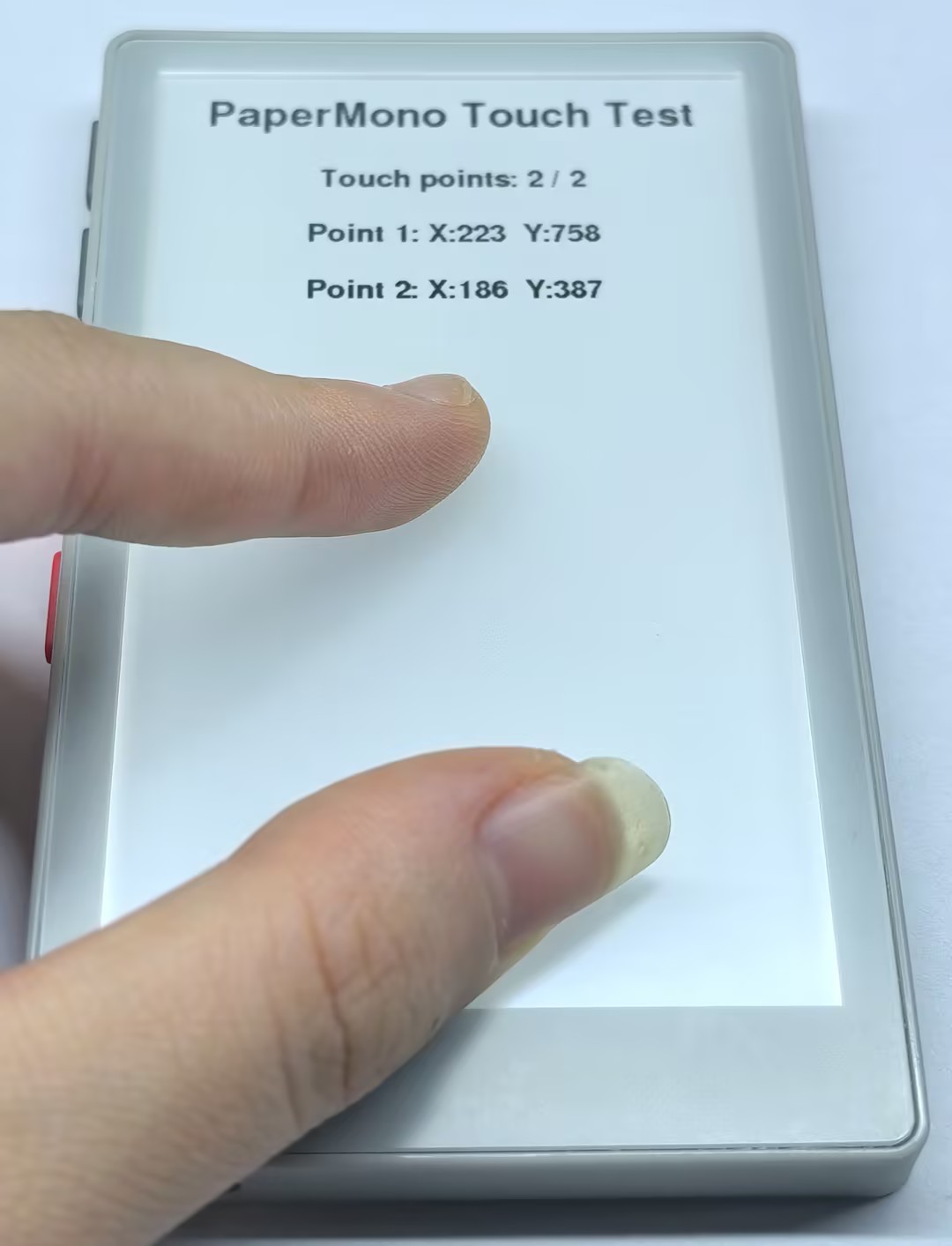
}The PaperMono touchscreen displays the number and coordinates of the current touch points and supports up to two touch points. The screen refreshes whenever the touch points change.
API
The PaperMono touchscreen features use Touch_Class from the M5Unified library. For more information, refer to the following documentation:
Page Tools