

Arduino Quick Start
2. Devices & Examples
3. M5Unified
4. M5GFX
5. Extensions
Unit
Module
Atomic
Tab5
IoT
Accessories
PaperMono NFC Near-Field Communication
APIs and example programs for PaperMono NFC near-field communication.
Example Programs
Build Requirements
- M5Stack Board Manager version >= 3.3.9
- Board option =
M5PaperMono - M5Unified library version >= 0.2.20
- M5GFX library version >= 0.2.27
- M5UnitUnifiedNFC library version >= 0.1.0
The PaperMono NFC / RFID enable and reset signal PYB_NFC_EN is connected to M5IOE1 GPIO4 (M5IOE1_PIN_4). The example first configures this pin as an output and drives it high to release reset and enable the NFC module. If this operation is omitted, the NFC module may fail to initialize correctly.
Quick Scan and Identification
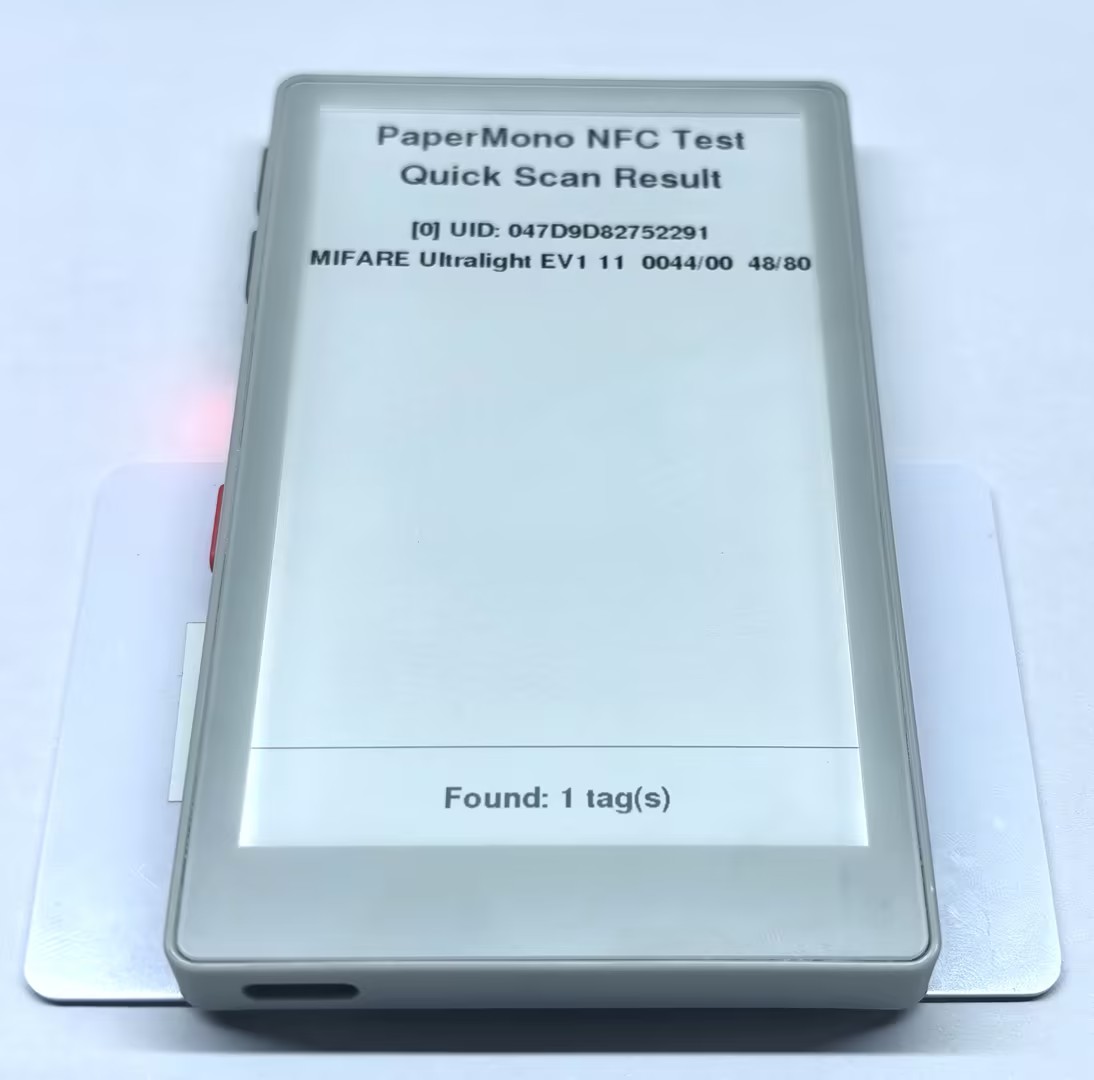
This example continuously detects NFC-A tags in the PaperMono sensing area and outputs the UID, type, ATQA, SAK, user area capacity, and total capacity.
#include <M5Unified.h>
#include <M5UnitUnified.h>
#include <M5UnitUnifiedNFC.h>
#include <utility/M5IOE1_Class.hpp>
#include <vector>

using namespace m5::nfc::a;

namespace {
auto& lcd = M5.Display;
m5::unit::UnitUnified Units;
m5::unit::UnitNFC unit{};
m5::nfc::NFCLayerA nfc_a{unit};

constexpr uint8_t NFC_IRQ_PIN = 6;
constexpr auto NFC_CONTROL_PIN = m5::M5IOE1_Class::gpio4;
constexpr int STATUS_HEIGHT = 92;
}  // namespace

void drawBottomStatus(const char* message)
{
    const int top = lcd.height() - STATUS_HEIGHT;
    lcd.fillRect(0, top, lcd.width(), STATUS_HEIGHT, TFT_WHITE);
    lcd.drawFastHLine(0, top, lcd.width(), TFT_BLACK);
    lcd.setTextColor(TFT_BLACK, TFT_WHITE);
    lcd.setTextDatum(middle_center);
    lcd.setFont(&fonts::FreeSansBold12pt7b);
    lcd.drawString(message, lcd.width() / 2, top + STATUS_HEIGHT / 2);
}

void stopOnError(const char* message)
{
    M5_LOGE("%s", message);
    lcd.fillScreen(TFT_WHITE);
    lcd.setTextColor(TFT_BLACK, TFT_WHITE);
    lcd.setTextDatum(middle_center);
    lcd.setFont(&fonts::FreeSansBold18pt7b);
    lcd.drawString("PaperMono NFC Test", lcd.width() / 2, lcd.height() / 2 - 48);
    lcd.drawString(message, lcd.width() / 2, lcd.height() / 2 + 40);
    lcd.display();
    while (true) {
        delay(1000);
    }
}

void drawReadyScreen()
{
    lcd.fillScreen(TFT_WHITE);
    lcd.setTextColor(TFT_BLACK, TFT_WHITE);
    lcd.setTextDatum(middle_center);
    lcd.setFont(&fonts::FreeSansBold18pt7b);
    lcd.drawString("PaperMono NFC Test", lcd.width() / 2, 90);
    lcd.drawString("Quick Scan", lcd.width() / 2, 170);
    lcd.drawString("Place NFC-A tag", lcd.width() / 2, 300);
    drawBottomStatus("Waiting for NFC-A tag");
    lcd.display();
}

void setup()
{
    Serial.begin(115200);

    auto cfg = M5.config();
    cfg.clear_display = false;
    M5.begin(cfg);
    lcd.setRotation(0);
    lcd.setEpdMode(epd_mode_t::epd_text);

    auto& ioe = M5.getIOExpander(0);
    ioe.setHighImpedance(NFC_CONTROL_PIN, false);
    ioe.setDirection(NFC_CONTROL_PIN, true);
    ioe.digitalWrite(NFC_CONTROL_PIN, true);
    delay(10);

    auto nfc_cfg = unit.config();
    nfc_cfg.using_irq = true;
    nfc_cfg.irq = NFC_IRQ_PIN;
    unit.config(nfc_cfg);

    if (!(Units.add(unit, M5.In_I2C) && Units.begin())) {
        stopOnError("NFC init failed");
    }

    M5_LOGI("M5Unit-NFC initialized");
    M5_LOGI("%s", Units.debugInfo().c_str());
    drawReadyScreen();
}

void loop()
{
    M5.update();
    Units.update();

    static bool tagWasShown = false;
    std::vector<PICC> piccs;
    if (!nfc_a.detect(piccs)) {
        tagWasShown = false;
        delay(20);
        return;
    }
    if (tagWasShown) {
        nfc_a.deactivate();
        delay(100);
        return;
    }
    tagWasShown = true;

    lcd.fillScreen(TFT_WHITE);
    lcd.setTextColor(TFT_BLACK, TFT_WHITE);
    lcd.setTextDatum(top_center);
    lcd.setFont(&fonts::FreeSansBold18pt7b);
    lcd.drawString("PaperMono NFC Test", lcd.width() / 2, 24);
    lcd.drawString("Quick Scan Result", lcd.width() / 2, 76);
    lcd.setFont(&fonts::FreeSansBold12pt7b);

    uint16_t identified = 0;
    int y = 150;
    for (auto& picc : piccs) {
        if (!nfc_a.identify(picc)) {
            M5_LOGW("Failed to identify %s", picc.uidAsString().c_str());
            continue;
        }

        M5.Log.printf("PICC:%s %s %04X/%02X %u/%u\n", picc.uidAsString().c_str(),
                      picc.typeAsString().c_str(), picc.atqa, picc.sak, picc.userAreaSize(),
                      picc.totalSize());

        if (identified < 5) {
            char uidLine[64];
            char infoLine[96];
            snprintf(uidLine, sizeof(uidLine), "[%u] UID: %s", identified, picc.uidAsString().c_str());
            snprintf(infoLine, sizeof(infoLine), "%s  %04X/%02X  %u/%u", picc.typeAsString().c_str(),
                     picc.atqa, picc.sak, picc.userAreaSize(), picc.totalSize());
            lcd.drawString(uidLine, lcd.width() / 2, y);
            lcd.drawString(infoLine, lcd.width() / 2, y + 38);
            y += 92;
        }
        ++identified;
    }

    char countLine[32];
    snprintf(countLine, sizeof(countLine), "Found: %u tag(s)", identified);
    drawBottomStatus(countLine);
    nfc_a.deactivate();
    lcd.display();
    M5.Log.printf("==> %u PICC\n", identified);
    delay(500);
}Bring one or more NFC-A tags close to the PaperMono NFC sensing area. The identification results appear on the screen and are also output to the Serial Monitor.
Full Data Read
This example uses BtnA to trigger a full read. The program detects, identifies, and reactivates the tag, then uses nfc_a.dump() to output all tag data to the Serial Monitor. The screen displays basic tag information and the read status.
For MIFARE Classic tags, the program authenticates using the default KeyA, FFFFFFFFFFFF. If the tag key has been changed, replace keyA in the code with the actual key.
#include <M5Unified.h>
#include <M5UnitUnified.h>
#include <M5UnitUnifiedNFC.h>
#include <utility/M5IOE1_Class.hpp>

using namespace m5::nfc::a;
using namespace m5::nfc::a::mifare;
using namespace m5::nfc::a::mifare::classic;

namespace {
auto& lcd = M5.Display;
m5::unit::UnitUnified Units;
m5::unit::UnitNFC unit{};
m5::nfc::NFCLayerA nfc_a{unit};

constexpr uint8_t NFC_IRQ_PIN = 6;
constexpr auto NFC_CONTROL_PIN = m5::M5IOE1_Class::gpio4;
constexpr Key keyA = DEFAULT_KEY;
constexpr int STATUS_HEIGHT = 92;
}  // namespace

void drawBottomStatus(const char* message)
{
    const int top = lcd.height() - STATUS_HEIGHT;
    lcd.fillRect(0, top, lcd.width(), STATUS_HEIGHT, TFT_WHITE);
    lcd.drawFastHLine(0, top, lcd.width(), TFT_BLACK);
    lcd.setTextColor(TFT_BLACK, TFT_WHITE);
    lcd.setTextDatum(middle_center);
    lcd.setFont(&fonts::FreeSansBold12pt7b);
    lcd.drawString(message, lcd.width() / 2, top + STATUS_HEIGHT / 2);
}

void stopOnError(const char* message)
{
    M5_LOGE("%s", message);
    lcd.fillScreen(TFT_WHITE);
    lcd.setTextColor(TFT_BLACK, TFT_WHITE);
    lcd.setTextDatum(middle_center);
    lcd.setFont(&fonts::FreeSansBold18pt7b);
    lcd.drawString("PaperMono NFC Test", lcd.width() / 2, lcd.height() / 2 - 48);
    lcd.drawString(message, lcd.width() / 2, lcd.height() / 2 + 40);
    lcd.display();
    while (true) {
        delay(1000);
    }
}

void drawReadyScreen()
{
    lcd.fillScreen(TFT_WHITE);
    lcd.setTextColor(TFT_BLACK, TFT_WHITE);
    lcd.setTextDatum(middle_center);
    lcd.setFont(&fonts::FreeSansBold18pt7b);
    lcd.drawString("PaperMono NFC Test", lcd.width() / 2, 110);
    lcd.drawString("Complete Reading", lcd.width() / 2, 190);
    lcd.drawString("Place tag and press BtnA", lcd.width() / 2, 340);
    drawBottomStatus("BtnA: scan and dump tag");
    lcd.display();
}

void setup()
{
    Serial.begin(115200);

    auto cfg = M5.config();
    cfg.clear_display = false;
    M5.begin(cfg);
    lcd.setRotation(0);
    lcd.setEpdMode(epd_mode_t::epd_text);

    auto& ioe = M5.getIOExpander(0);
    ioe.setHighImpedance(NFC_CONTROL_PIN, false);
    ioe.setDirection(NFC_CONTROL_PIN, true);
    ioe.digitalWrite(NFC_CONTROL_PIN, true);
    delay(10);

    auto nfc_cfg = unit.config();
    nfc_cfg.using_irq = true;
    nfc_cfg.irq = NFC_IRQ_PIN;
    unit.config(nfc_cfg);

    if (!(Units.add(unit, M5.In_I2C) && Units.begin())) {
        stopOnError("NFC init failed");
    }

    M5_LOGI("M5Unit-NFC initialized");
    M5_LOGI("%s", Units.debugInfo().c_str());
    drawReadyScreen();
}

void loop()
{
    M5.update();
    Units.update();

    if (!M5.BtnA.wasClicked()) {
        delay(20);
        return;
    }

    lcd.fillScreen(TFT_WHITE);
    lcd.setTextColor(TFT_BLACK, TFT_WHITE);
    lcd.setTextDatum(middle_center);
    lcd.setFont(&fonts::FreeSansBold18pt7b);
    lcd.drawString("PaperMono NFC Test", lcd.width() / 2, 80);
    lcd.drawString("Reading...", lcd.width() / 2, 180);
    drawBottomStatus("Waiting for tag...");
    lcd.display();

    PICC picc{};
    if (!nfc_a.detect(picc)) {
        drawBottomStatus("PICC not found");
        lcd.display();
        M5.Log.printf("PICC NOT exists\n");
        delay(500);
        drawReadyScreen();
        return;
    }

    if (!nfc_a.identify(picc) || !nfc_a.reactivate(picc)) {
        drawBottomStatus("Identify failed");
        lcd.display();
        M5_LOGE("Failed to identify/activate %s", picc.uidAsString().c_str());
        nfc_a.deactivate();
        delay(500);
        drawReadyScreen();
        return;
    }

    lcd.fillScreen(TFT_WHITE);
    lcd.setTextColor(TFT_BLACK, TFT_WHITE);
    lcd.setTextDatum(top_center);
    lcd.setFont(&fonts::FreeSansBold18pt7b);
    lcd.drawString("PaperMono NFC Test", lcd.width() / 2, 30);
    lcd.drawString("Complete Reading", lcd.width() / 2, 86);
    lcd.setFont(&fonts::FreeSansBold12pt7b);
    lcd.drawString(picc.uidAsString().c_str(), lcd.width() / 2, 190);
    lcd.drawString(picc.typeAsString().c_str(), lcd.width() / 2, 240);
    drawBottomStatus("Dumping data to Serial...");
    lcd.display();

    M5.Log.printf("==== Dump %s %s %u/%u ====\n", picc.uidAsString().c_str(),
                  picc.typeAsString().c_str(), picc.userAreaSize(), picc.totalSize());
    nfc_a.dump(keyA);
    M5.Log.printf("==== Dump complete ====\n");

    drawBottomStatus("Dump complete");
    lcd.display();
    nfc_a.deactivate();
    delay(800);
    drawReadyScreen();
}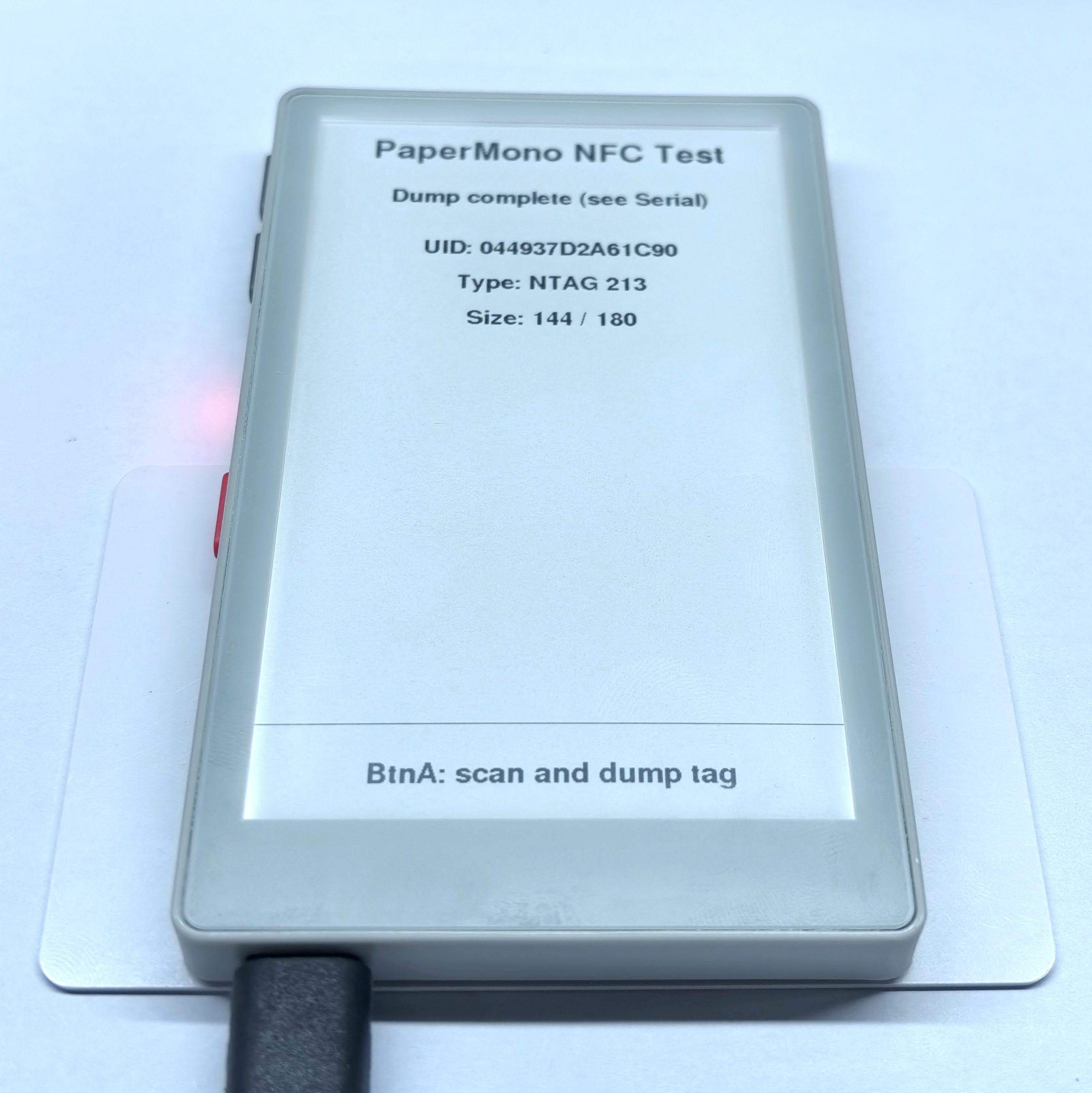
Example Serial Monitor output:
[000/00]:04 49 37 F2
[001/01]:D2 A6 1C 90
[002/02]:F8 48 00 00
[003/03]:E1 10 12 00
[004/04]:49 41 4D 4C
[005/05]:49 55 42 4F
[006/06]:20 4D 35 53
[007/07]:54 41 43 4B
[008/08]:20 37 36 39
[009/09]:39 00 00 00
[010/0A]:00 00 00 00
[011/0B]:6C 6C 6F 20
[012/0C]:4D 35 53 74
[013/0D]:61 63 6B 11
[014/0E]:01 1A 54 02
[015/0F]:6A 61 E3 81
[016/10]:93 E3 82 93
[017/11]:E3 81 AB E3
[018/12]:81 A1 E3 81
[019/13]:AF 20 4D 35
[020/14]:53 74 61 63
[021/15]:6B 51 01 11
[022/16]:54 02 7A 68
[023/17]:E4 BD A0 E5
[024/18]:A5 BD 20 4D
[025/19]:35 53 74 61
[026/1A]:63 6B FE 78
[027/1B]:00 00 00 00
[028/1C]:00 00 00 00
[029/1D]:00 00 00 00
[030/1E]:00 00 00 00
[031/1F]:00 00 00 00
[032/20]:00 00 00 00
[033/21]:00 00 00 00
[034/22]:00 00 00 00
[035/23]:00 00 00 00
[036/24]:00 00 00 00
[037/25]:00 00 00 00
[038/26]:00 00 00 00
[039/27]:00 00 00 00
[040/28]:00 00 00 BD
[041/29]:04 00 00 FF
[042/2A]:00 05 00 00
[043/2B]:00 00 00 00
[044/2C]:00 00 00 00
==== Dump complete ====Reading and Writing NDEF Tags
In this example, click BtnA to read an NDEF message and click BtnB to write an NDEF message. The program checks whether the tag supports NDEF. When reading, it outputs the record contents to the screen and Serial Monitor; when writing, it saves an HTTPS URI record and a text record.
mifareUltralightChangeFormatToNDEF() changes the tag format. This operation cannot be undone, so make sure the tag contains no data that must be retained.#include <M5Unified.h>
#include <M5UnitUnified.h>
#include <M5UnitUnifiedNFC.h>
#include <utility/M5IOE1_Class.hpp>
#include <vector>
using namespace m5::nfc;
using namespace m5::nfc::a;
using namespace m5::nfc::a::mifare;
using namespace m5::nfc::ndef;
namespace {
auto& lcd = M5.Display;
m5::unit::UnitUnified Units; // Unit manager
m5::unit::UnitNFC unit{}; // NFC unit driver
m5::nfc::NFCLayerA nfc_a{unit}; // NFC-A protocol layer
constexpr uint8_t NFC_IRQ_PIN = 6; // NFC interrupt pin
constexpr auto NFC_CONTROL_PIN = m5::M5IOE1_Class::gpio4; // NFC power-enable pin (IO expander)
// Layout constants
constexpr int STATUS_HEIGHT = 92; // Bottom hint bar height
constexpr int TITLE_Y = 30; // Title position
constexpr int STATUS_Y = 100; // Status line below the title
constexpr int CONTENT_TOP = 160; // First data line position
constexpr int LINE_STEP = 44; // Vertical spacing between data lines
constexpr const char* KEY_HINT = "BtnA: Read BtnB: Write"; // Fixed key hint text
} // namespace
// Draw the fixed key-hint bar at the bottom
void drawBottomStatus(const char* message)
{
const int top = lcd.height() - STATUS_HEIGHT;
lcd.fillRect(0, top, lcd.width(), STATUS_HEIGHT, TFT_WHITE);
lcd.drawFastHLine(0, top, lcd.width(), TFT_BLACK); // Separator line
lcd.setTextColor(TFT_BLACK, TFT_WHITE);
lcd.setTextDatum(middle_center);
lcd.setFont(&fonts::FreeSansBold12pt7b);
lcd.drawString(message, lcd.width() / 2, top + STATUS_HEIGHT / 2);
}
// Render one page: title + status + data lines + bottom key hint
void renderPage(const char* status, const std::vector<String>& lines)
{
lcd.fillScreen(TFT_WHITE);
lcd.setTextColor(TFT_BLACK, TFT_WHITE);
// Title
lcd.setTextDatum(top_center);
lcd.setFont(&fonts::FreeSansBold18pt7b);
lcd.drawString("PaperMono NFC Test", lcd.width() / 2, TITLE_Y);
// Status / prompt line
lcd.setFont(&fonts::FreeSansBold12pt7b);
lcd.drawString(status, lcd.width() / 2, STATUS_Y);
// Data lines, stop before the bottom hint bar
int y = CONTENT_TOP;
for (auto&& line : lines) {
if (y + LINE_STEP >= lcd.height() - STATUS_HEIGHT) break;
lcd.drawString(line, lcd.width() / 2, y);
y += LINE_STEP;
}
drawBottomStatus(KEY_HINT);
lcd.display();
}
// Show a fatal error and halt
void stopOnError(const char* message)
{
M5_LOGE("%s", message);
renderPage(message, {});
while (true) {
delay(1000);
}
}
// Initial screen
void drawReadyScreen()
{
renderPage("Click BtnA to Read, BtnB to Write", {});
}
// Read NDEF and show the result under the title
void readNdef()
{
std::vector<String> lines;
// Verify the tag is NDEF formatted
bool valid = false;
if (!nfc_a.ndefIsValidFormat(valid)) {
M5_LOGE("Failed to check NDEF format");
renderPage("NDEF check failed", lines);
return;
}
if (!valid) {
M5.Log.printf("Data format is NOT NDEF\n");
renderPage("Tag is not NDEF formatted", lines);
return;
}
// Read raw NDEF data
TLV message;
if (!nfc_a.ndefRead(message)) {
M5_LOGE("Failed to read NDEF");
renderPage("NDEF read failed", lines);
return;
}
// No message TLV present
if (!message.isMessageTLV()) {
M5.Log.printf("NDEF Message TLV is NOT exists\n");
renderPage("No NDEF message", lines);
return;
}
// Collect each record into display lines
char buf[192];
for (auto&& record : message.records()) {
if (record.tnf() == TNF::Wellknown) {
// Well-known type: show type and decoded payload
const auto payload = record.payloadAsString();
M5.Log.printf("SZ:%3u TNF:%u T:%s [%s]\n", record.payloadSize(), record.tnf(),
record.type(), payload.c_str());
snprintf(buf, sizeof(buf), "Type: %s", record.type());
lines.push_back(String(buf));
snprintf(buf, sizeof(buf), "%s", payload.c_str());
lines.push_back(String(buf));
} else {
// Other types: show type only
M5.Log.printf("SZ:%3u TNF:%u T:%s\n", record.payloadSize(), record.tnf(),
record.type());
snprintf(buf, sizeof(buf), "Type: %s", record.type());
lines.push_back(String(buf));
}
}
renderPage("NDEF Read Result", lines);
}
// Write NDEF, output written data into outLines for display
bool writeNdef(std::vector<String>& outLines)
{
auto& picc = nfc_a.activatedPICC();
// Format MIFARE Ultralight as NDEF if needed
if (picc.isMifareUltralight() && !nfc_a.mifareUltralightChangeFormatToNDEF()) {
M5_LOGE("Failed to format MIFARE Ultralight as NDEF");
return false;
}
// Reserve one byte for the terminator TLV
const uint32_t maxUserSize = picc.userAreaSize() > 1 ? picc.userAreaSize() - 1 : 0;
if (maxUserSize == 0) {
M5_LOGE("Invalid NDEF user area size");
return false;
}
// Build the message with a URI and a text record
TLV message{Tag::Message};
Record uri;
Record text;
uri.setURIPayload("m5stack.com/", URIProtocol::HTTPS);
text.setTextPayload("Hello PaperMono", "en");
// Add URI record if it fits
message.push_back(uri);
if (message.required() > maxUserSize) {
message.pop_back();
return false;
}
outLines.push_back(String("URI: https://m5stack.com/"));
// Add text record if it still fits
message.push_back(text);
if (message.required() > maxUserSize) {
message.pop_back();
} else {
outLines.push_back(String("Text: Hello PaperMono"));
}
// Write to the tag
if (message.records().empty() || !nfc_a.ndefWrite(message)) {
M5_LOGE("Failed to write NDEF");
outLines.clear();
return false;
}
M5.Log.printf("Write NDEF OK!\n");
return true;
}
void setup()
{
Serial.begin(115200);
// Keep current display content on boot
auto cfg = M5.config();
cfg.clear_display = false;
M5.begin(cfg);
lcd.setRotation(0);
lcd.setEpdMode(epd_mode_t::epd_text);
// Enable NFC unit power via IO expander
auto& ioe = M5.getIOExpander(0);
ioe.setHighImpedance(NFC_CONTROL_PIN, false);
ioe.setDirection(NFC_CONTROL_PIN, true);
ioe.digitalWrite(NFC_CONTROL_PIN, true);
delay(10);
// Configure NFC to use the IRQ pin
auto nfc_cfg = unit.config();
nfc_cfg.using_irq = true;
nfc_cfg.irq = NFC_IRQ_PIN;
unit.config(nfc_cfg);
// Register and start the NFC unit
if (!(Units.add(unit, M5.In_I2C) && Units.begin())) {
stopOnError("NFC init failed");
}
M5_LOGI("M5Unit-NFC initialized");
M5_LOGI("%s", Units.debugInfo().c_str());
drawReadyScreen();
}
void loop()
{
M5.update();
Units.update();
// Check button input
const bool readRequested = M5.BtnA.wasClicked(); // BtnA -> Read
const bool writeRequested = M5.BtnB.wasClicked(); // BtnB -> Write
if (!readRequested && !writeRequested) {
delay(20);
return;
}
// Prompt user to place the tag
renderPage(readRequested ? "Place tag for READ..." : "Place tag for WRITE...", {});
// Detect a tag in the field
PICC picc{};
if (!nfc_a.detect(picc)) {
M5.Log.printf("PICC NOT exists\n");
renderPage("PICC not found", {});
return;
}
// Identify and (re)activate the tag
if (!nfc_a.identify(picc) || !nfc_a.reactivate(picc)) {
M5_LOGE("Failed to identify/activate %s", picc.uidAsString().c_str());
renderPage("Identify failed", {});
nfc_a.deactivate();
return;
}
M5.Log.printf("PICC:%s %s %u/%u\n", picc.uidAsString().c_str(), picc.typeAsString().c_str(),
picc.userAreaSize(), picc.totalSize());
// Dispatch based on tag capability and requested action
if (!picc.supportsNDEF()) {
M5.Log.printf("Not support the NDEF\n");
renderPage("Tag does not support NDEF", {});
} else if (readRequested) {
readNdef();
} else {
std::vector<String> lines;
const bool ok = writeNdef(lines);
renderPage(ok ? "NDEF Write Result" : "NDEF write failed", lines);
}
M5.Log.printf("Please remove the PICC from the reader\n");
nfc_a.deactivate();
}- Write
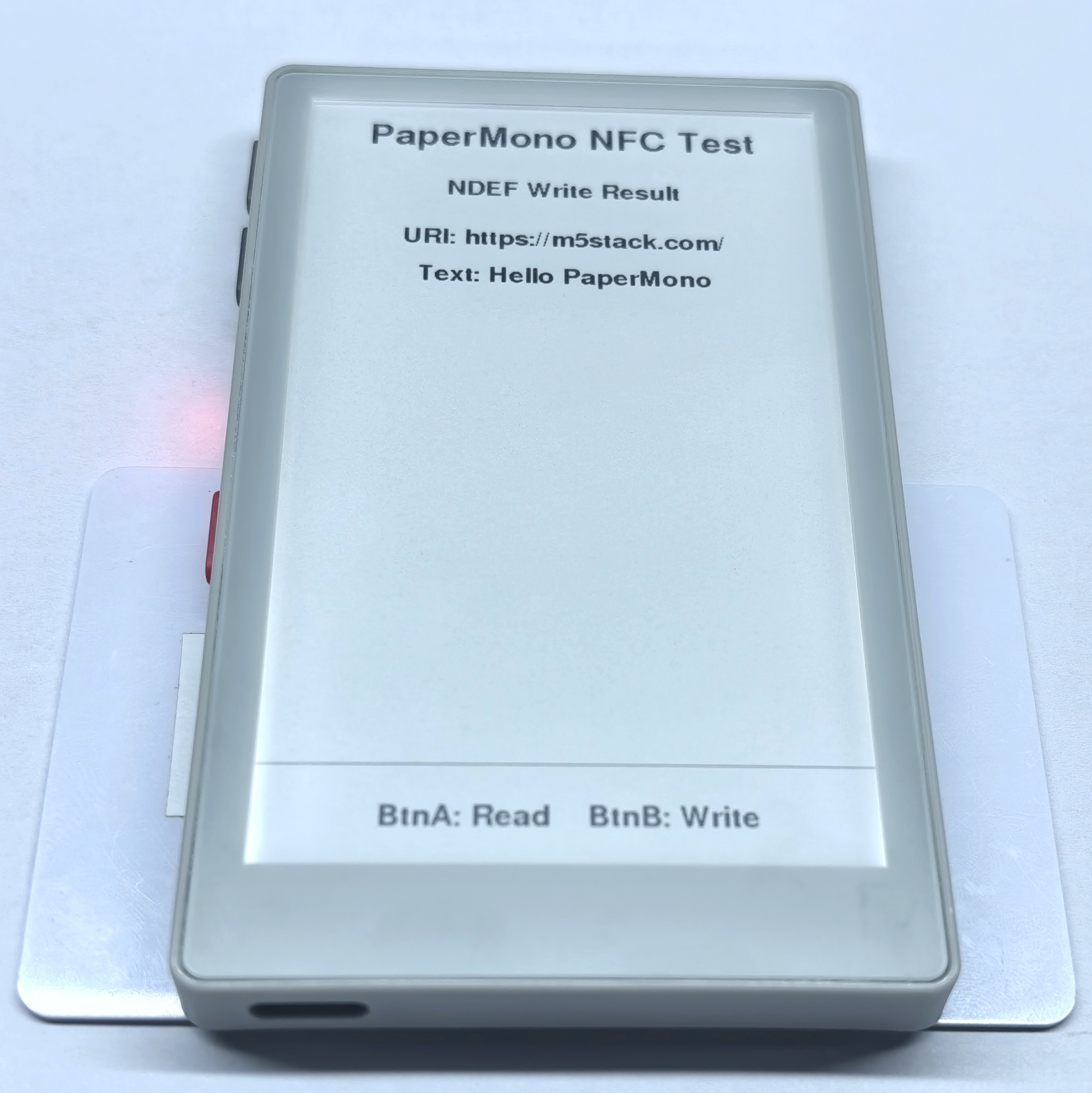
Example Serial Monitor output:
PICC:047D9D82752291 MIFARE Ultralight EV1 11 48/80
Write NDEF OK!
Please remove the PICC from the reader- Read
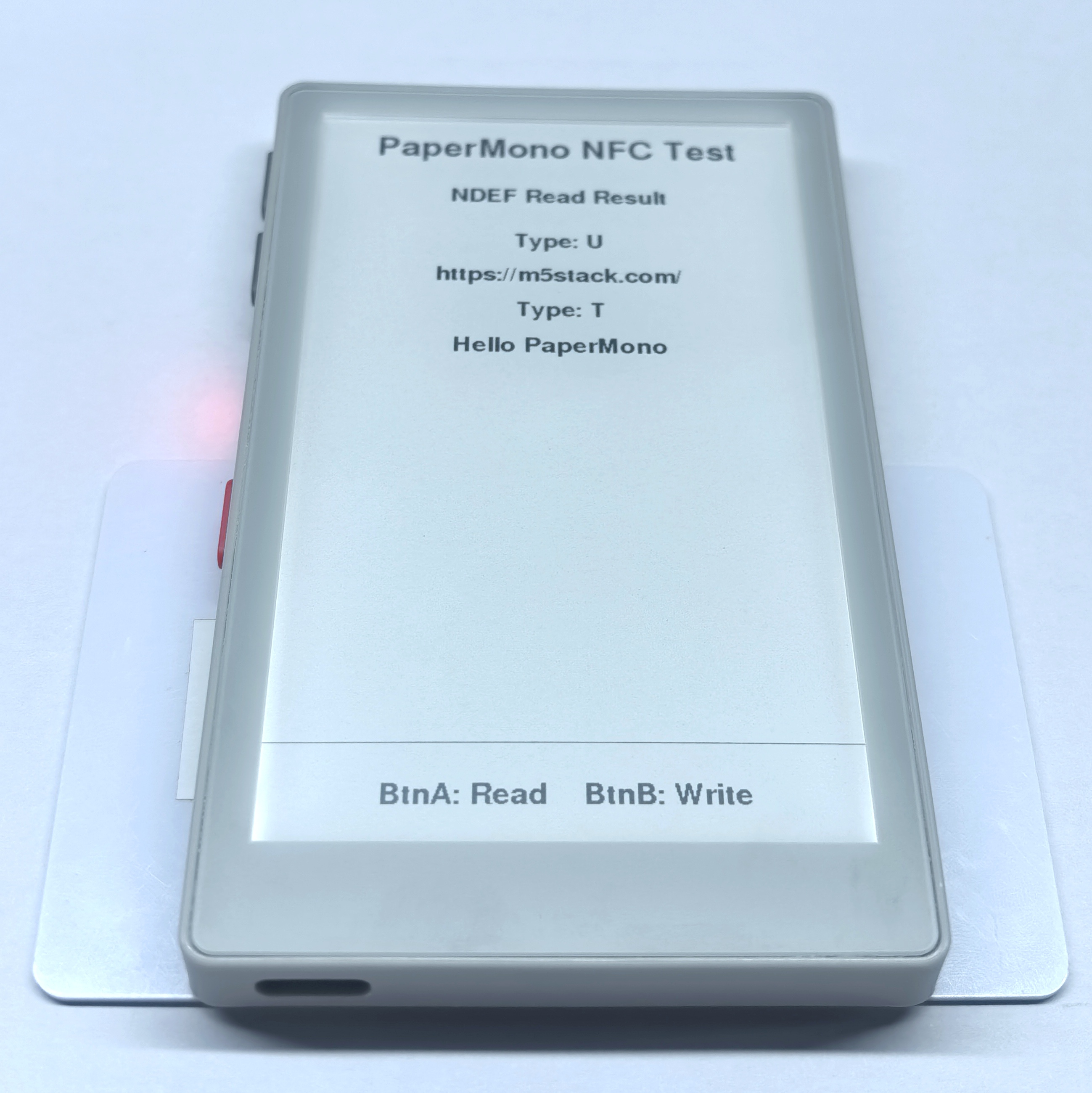
Example Serial Monitor output:
PICC:047D9D82752291 MIFARE Ultralight EV1 11 48/80
SZ: 13 TNF:1 T:U [https://m5stack.com/]
SZ: 18 TNF:1 T:T [Hello PaperMono]
Please remove the PICC from the readerTag Emulation
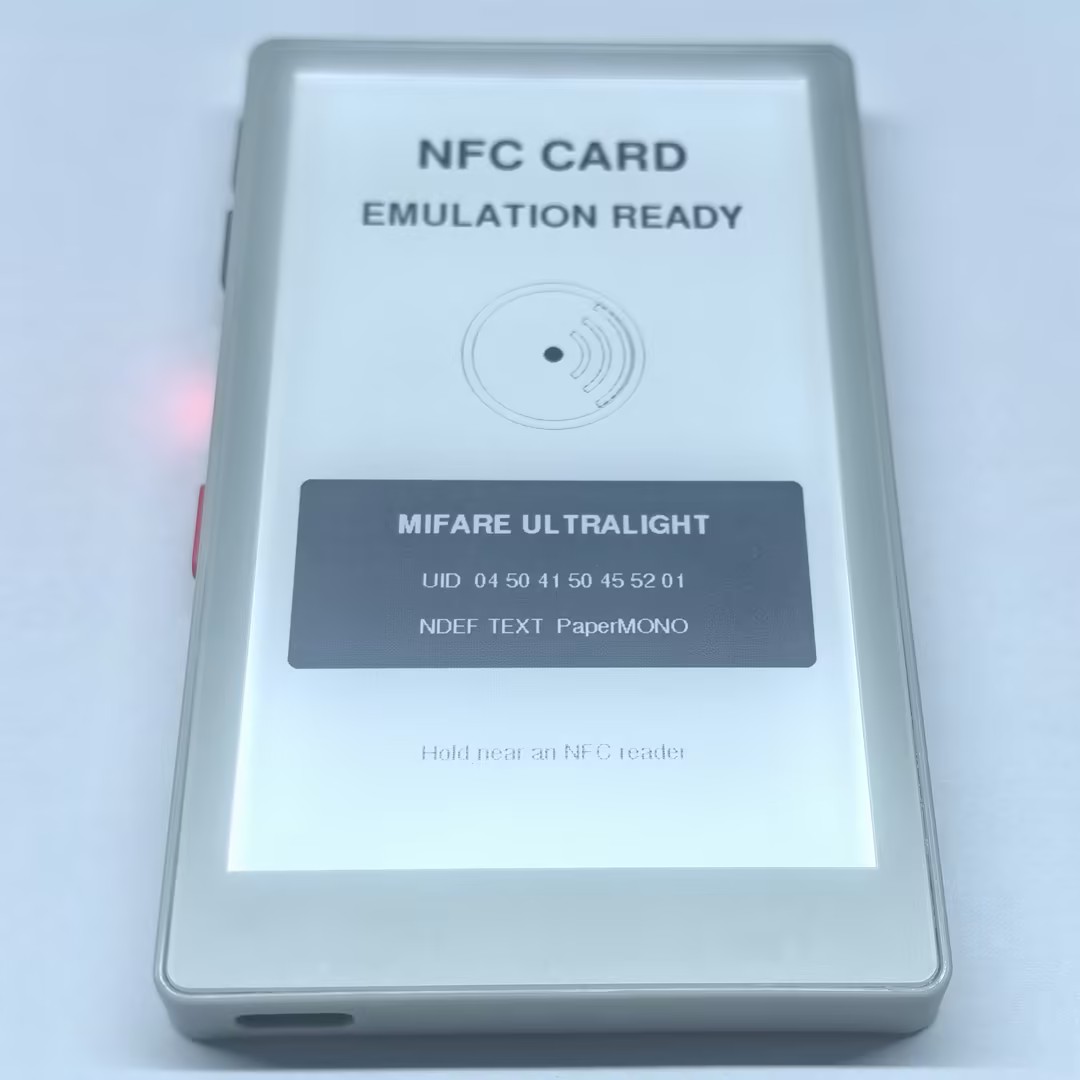
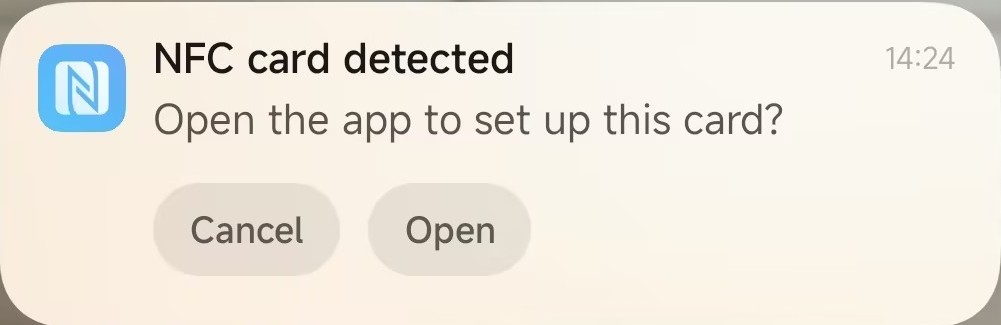
This example emulates PaperMono as a MIFARE Ultralight NFC-A tag with the fixed UID 04504150455201 and an NDEF record containing the text PaperMONO. After successful initialization, the screen displays the emulated tag information. The program continuously handles reader requests and outputs NFC-A state changes to the Serial Monitor.
#include <Arduino.h>
#include <M5Unified.h>
#include <M5UnitUnified.h>
#include <M5UnitUnifiedNFC.h>
#include <wiring/m5_unit_unified_wiring.hpp>

namespace {

using m5::nfc::NFC;
using m5::nfc::EmulationLayerA;
using m5::nfc::a::PICC;
using m5::nfc::a::Type;

constexpr uint16_t kBlack = 0x0000;
constexpr uint16_t kDark = 0x52AA;
constexpr uint16_t kWhite = 0xFFFF;
constexpr uint8_t kFrontlightBrightness = 160;
constexpr int kNfcIrqPin = 6;

// Seven-byte NFC-A UID used by this demo.
constexpr uint8_t kUid[] = {0x04, 0x50, 0x41, 0x50, 0x45, 0x52, 0x01};

// MIFARE Ultralight memory. Page 4 contains an NDEF Text record whose
// language is "en" and whose text is exactly "PaperMONO".
uint8_t cardMemory[64] = {
    0x00, 0x00, 0x00, 0x00,  // UID0, UID1, UID2, BCC0
    0x00, 0x00, 0x00, 0x00,  // UID3, UID4, UID5, UID6
    0x00, 0xA3, 0x00, 0x00,  // BCC1, internal, lock bytes
    0xE1, 0x10, 0x06, 0x00,  // Capability Container
    0x03, 0x10, 0xD1, 0x01,  // NDEF TLV and record header
    0x0C, 0x54, 0x02, 0x65,  // payload length, Text type, language length, 'e'
    0x6E, 0x50, 0x61, 0x70,  // 'nPaper'
    0x65, 0x72, 0x4D, 0x4F,  // 'erMO'
    0x4E, 0x4F, 0xFE, 0x00,  // 'NO', terminator
};

m5::unit::UnitUnified units;
m5::unit::UnitNFC nfc;
EmulationLayerA emulation(nfc);
PICC card;
M5Canvas canvas(&M5.Display);

uint8_t calculateBcc(const uint8_t* data, size_t length,
                     uint8_t initial = 0)
{
    uint8_t value = initial;
    for (size_t i = 0; i < length; ++i) {
        value ^= data[i];
    }
    return value;
}

void embedUid()
{
    memcpy(cardMemory, kUid, 3);
    cardMemory[3] = calculateBcc(kUid, 3, 0x88);
    memcpy(cardMemory + 4, kUid + 3, 4);
    cardMemory[8] = calculateBcc(kUid + 3, 4);
}

void drawNfcMark(int cx, int cy)
{
    canvas.drawCircle(cx, cy, 78, kBlack);
    canvas.drawCircle(cx, cy, 69, kBlack);
    canvas.fillCircle(cx, cy, 8, kBlack);
    canvas.drawArc(cx, cy, 31, 25, 305, 55, kBlack);
    canvas.drawArc(cx, cy, 49, 43, 305, 55, kBlack);
    canvas.drawArc(cx, cy, 67, 61, 305, 55, kBlack);
}

void drawReadyScreen(bool ready)
{
    M5.Display.setEpdMode(epd_mode_t::epd_fast);
    canvas.fillSprite(kWhite);
    canvas.setTextDatum(middle_center);
    canvas.setTextColor(kBlack, kWhite);

    canvas.setFont(&fonts::FreeSansBold24pt7b);
    canvas.drawString("NFC CARD", 240, 100);
    canvas.setFont(&fonts::FreeSansBold18pt7b);
    canvas.setTextColor(ready ? kBlack : kDark, kWhite);
    canvas.drawString(ready ? "EMULATION READY" : "INITIALIZATION FAILED",
                      240, 170);

    drawNfcMark(240, 320);

    canvas.fillRoundRect(34, 450, 412, 176, 8, kBlack);
    canvas.setTextColor(kWhite, kBlack);
    canvas.setFont(&fonts::FreeSansBold12pt7b);
    canvas.drawString("MIFARE ULTRALIGHT", 240, 495);
    canvas.setFont(&fonts::FreeSans9pt7b);
    canvas.drawString("UID  04 50 41 50 45 52 01", 240, 548);
    canvas.drawString("NDEF TEXT  PaperMONO", 240, 590);

    canvas.setTextColor(kDark, kWhite);
    canvas.drawString(ready ? "Hold near an NFC reader"
                            : "Check serial output",
                      240, 700);
    canvas.pushSprite(0, 0);
}

bool beginCardEmulation()
{
    auto config = nfc.config();
    config.emulation = true;
    config.mode = NFC::A;
    config.using_irq = true;
    config.irq = kNfcIrqPin;
    nfc.config(config);

    if (!m5::unit::wiring::i2cClass(units, nfc, M5.In_I2C) ||
        !units.begin()) {
        return false;
    }

    embedUid();
    return card.emulate(Type::MIFARE_Ultralight, kUid, sizeof(kUid)) &&
           emulation.begin(card, cardMemory, sizeof(cardMemory));
}

const char* stateName(EmulationLayerA::State state)
{
    static constexpr const char* names[] = {
        "None", "Off", "Idle", "Ready", "Active", "Halt"
    };
    return names[static_cast<unsigned>(state)];
}

}  // namespace

void setup()
{
    Serial.begin(115200);
    delay(100);
    Serial.println("PaperMono NFC-A card emulation demo");

    auto config = M5.config();
    config.clear_display = false;
    config.internal_rtc = false;
    config.internal_imu = false;
    config.internal_mic = false;
    M5.begin(config);

    M5.Display.setRotation(0);
    M5.Display.setBrightness(kFrontlightBrightness);
    canvas.setColorDepth(16);
    if (!canvas.createSprite(M5.Display.width(), M5.Display.height())) {
        Serial.println("Display canvas allocation failed");
        return;
    }

    const bool ready = beginCardEmulation();
    drawReadyScreen(ready);
    if (!ready) {
        Serial.println("NFC-A emulation initialization failed");
        return;
    }

    const auto& picc = emulation.emulatePICC();
    Serial.printf("NFC-A emulation ready: %s\n",
                  picc.typeAsString().c_str());
    Serial.printf("UID: %s, ATQA: %04X, SAK: %u\n",
                  picc.uidAsString().c_str(), picc.atqa, picc.sak);
    Serial.println("NDEF text: PaperMONO");
}

void loop()
{
    // Keep the loop short because NFC-A response timing is strict.
    units.update();
    emulation.update();

    static EmulationLayerA::State previous = EmulationLayerA::State::None;
    const auto state = emulation.state();
    if (state != previous) {
        Serial.printf("NFC-A state: %s\n", stateName(state));
        previous = state;
    }
    yield();
}
Example tag information read by a smartphone:
Example Serial Monitor output:
PaperMono NFC-A card emulation demo
NFC-A emulation ready: MIFARE Ultralight
UID: 04504150455201, ATQA: 0044, SAK: 0
NDEF text: PaperMONO
NFC-A state: Off
NFC-A state: Idle
NFC-A state: Off
NFC-A state: Idle
NFC-A state: Ready
NFC-A state: Active
NFC-A state: Off