Arduino 上手教程
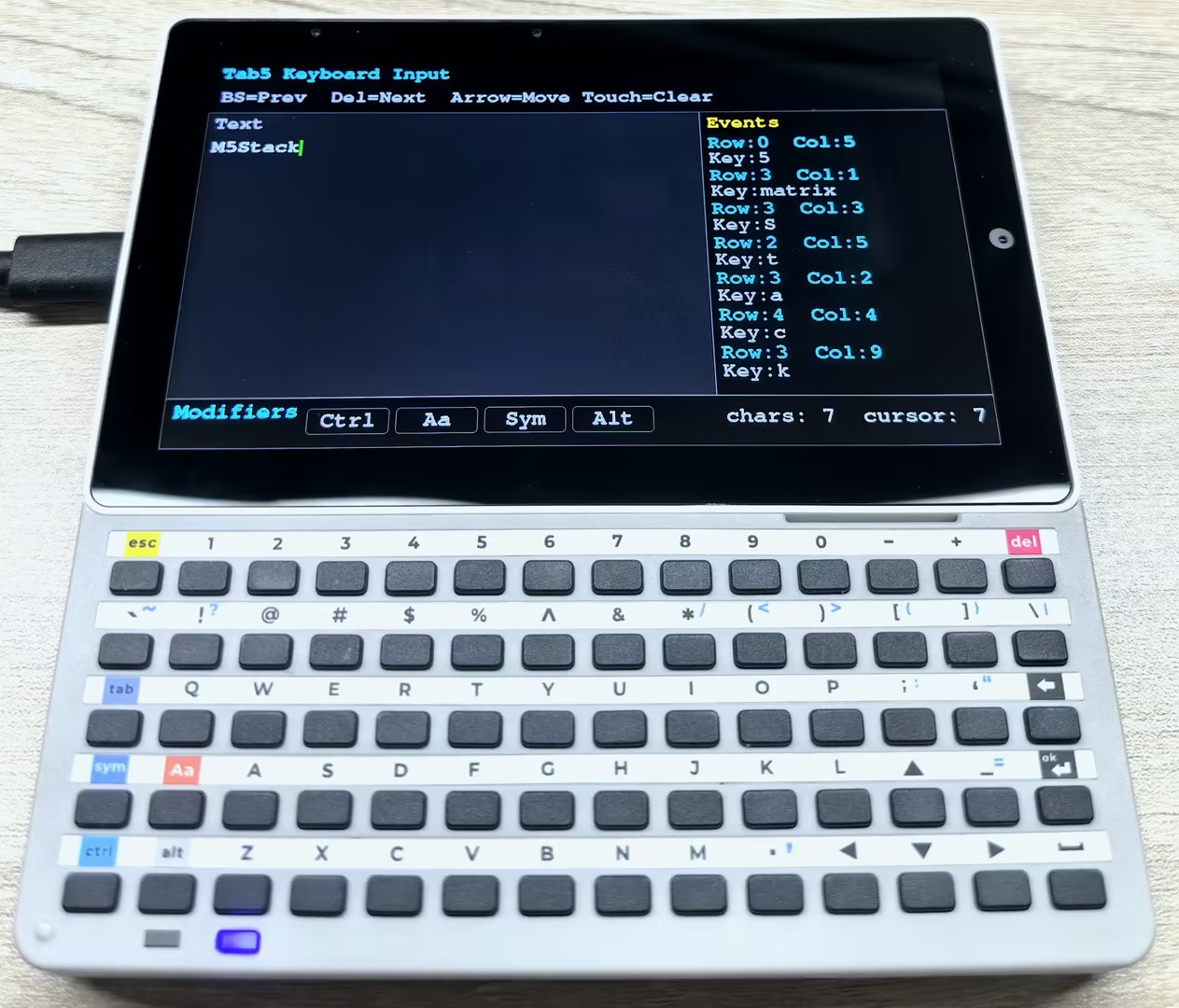
2. 设备开发 & 案例程序
3. M5Unified
4. M5GFX
5. 扩展模块
Unit
Module
Atomic
Tab5
IoT
Tab5 Keyboard Arduino 使用教程
1. 准备工作
环境配置: 参考 Arduino IDE 上手教程完成 IDE 安装,并根据实际使用的开发板安装对应的板管理,与需要的驱动库。
使用到的驱动库:
使用到的硬件产品:

2. 案例程序
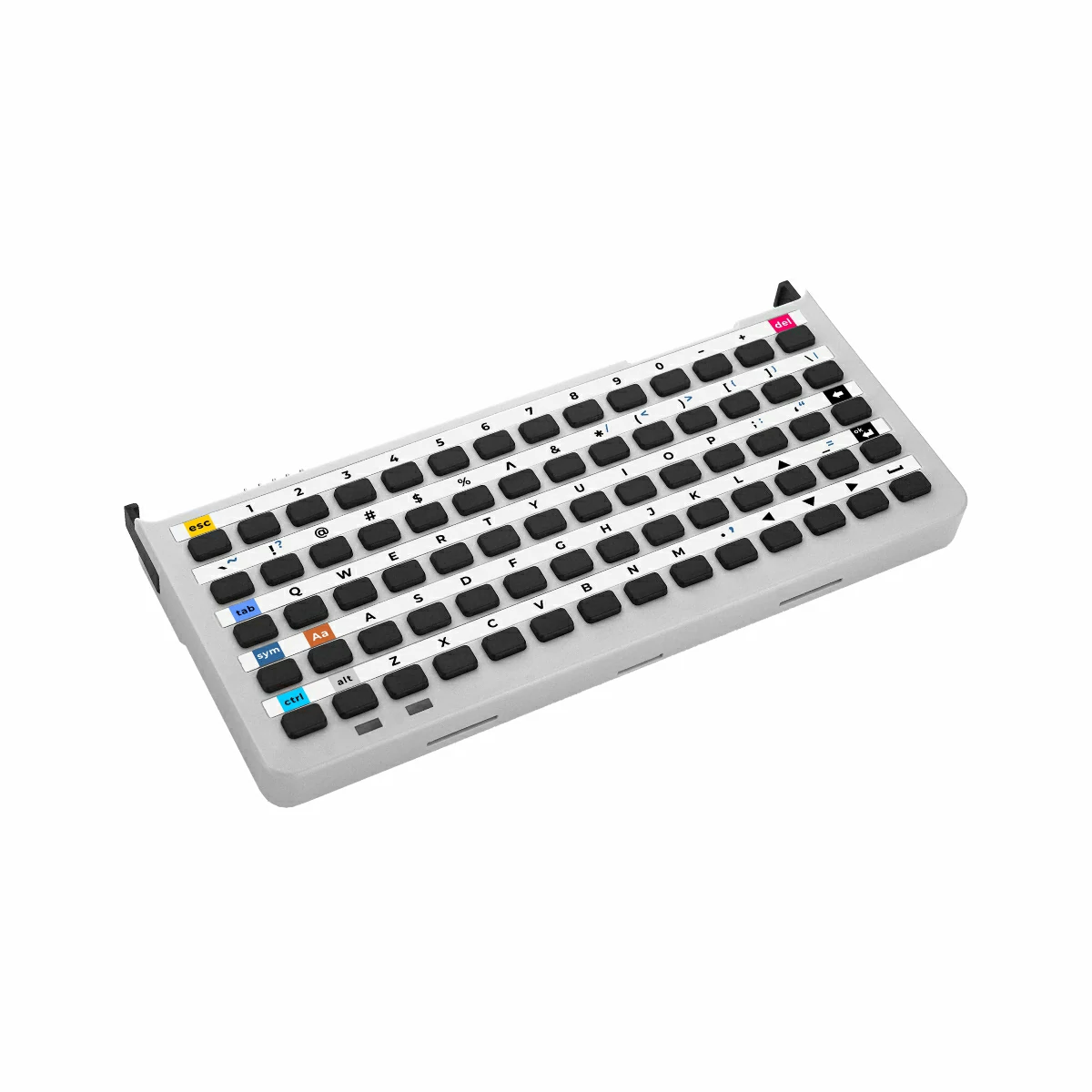
- 本教程中使用的主控设备为 Tab5,使用的键盘输入扩展模块为 Tab5 Keyboard。Tab5 Keyboard 通过 I2C 协议与 Tab5 主机通信,设备连接后对应的 I2C IO 为
G0 (SDA)、G1 (SCL),中断引脚为G50 (INT)。Tab5 Keyboard 支持三种工作模式:普通模式、HID 模式和字符模式,分别适用于不同的应用场景。
2.1 基础说明
库对象与基本数据及接口
UnitUnified用于统一管理与更新 Unit 设备,UnitTab5Keyboard为 Tab5 Keyboard 的驱动对象。程序中通常在loop()中同时调用M5.update()与Units.update()进行设备状态更新,再通过unit.empty()、unit.oldest()、unit.discard()等接口来读取和处理键盘事件队列中的事件。
m5::unit::UnitUnified Units;
m5::unit::UnitTab5Keyboard unit;- 库中提供了
KEY_COUNT、KEY_COL_COUNT、toKeyIndex(row, col)等常量与工具函数,可用于行列坐标与按键索引之间的转换。 - 修饰键位置固定为
Sym(3,0)、Aa(3,1)、Ctrl(4,0)、Alt(4,1),普通模式下可使用isSym()、isAa()、isCtrl()、isAlt()直接读取实时状态。
工作模式
Tab5 Keyboard 支持 3 种键盘工作模式:
| 模式 | 枚举值 | 事件类型 | 适用场景 |
|---|---|---|---|
| 普通模式 | Mode::Normal | EventType::Key | 读取物理按键行列坐标、检测按下/松开、Hold、软件 Repeat、修饰键状态。 |
| HID 模式 | Mode::HID | EventType::Hid | 获取标准 USB HID: modifier + keycode,适合转发到 USB HID 键盘或主机应用。 |
| 字符模式 | Mode::Character | EventType::Character | 直接读取字符字符串,适合文本输入场景。单次事件最多包含 9 字节字符数据。 |
可通过 cfg.mode 或 unit.writeMode() 切换模式:
auto cfg = unit.config();
cfg.mode = m5::unit::tab5_keyboard::Mode::HID;
unit.config(cfg);
// or
unit.writeMode(m5::unit::tab5_keyboard::Mode::HID);切换模式时会清空上一个模式的事件队列,并释放 INT 中断信号。
键盘配置
config_t用于设置begin()时的初始行为。常用字段如下:start_periodic:是否在begin()时自动开始周期更新,默认为true。mode:键盘工作模式,默认为Mode::Normal。irq_pin:INT 中断引脚,Tab5 ExtPort1 默认为50;设置为-1时禁用 INT 驱动,改用轮询方式。interval_ms:轮询模式下的读取间隔,默认为50ms。software_repeat:是否启用普通模式下的软件重复触发,默认为false。repeat_initial_ms:按住后首次重复触发前的等待时间,默认为400ms。repeat_rate_ms:重复触发间隔,默认为80ms。holding_threshold_ms:Hold 判定阈值,默认为800ms。
原型如下:
struct config_t {
//! Start periodic measurement during begin() (mirrors the other M5Unit keyboards).
//! When true, begin() calls startPeriodicMeasurement(), which enables the INT for the
//! active mode (only if irq_pin >= 0) and begins draining events. Set false to defer and
//! call startPeriodicMeasurement() manually later.
bool start_periodic{true};
//! Initial keyboard operation mode applied during begin() (REG_MODE_KEYBOARD 0x10).
//! Default is Mode::Normal (matrix coordinate events).
tab5_keyboard::Mode mode{tab5_keyboard::Mode::Normal};
//! GPIO pin number connected to the active-low INT signal.
//! Default is 50 (Tab5 ExtPort1 J9 pin 10, confirmed via M5Tab5-UserDemo BSP).
//! Set to a valid GPIO number (0..GPIO_NUM_MAX-1) to enable ISR-driven event polling.
//! Set to -1 to disable INT-driven mode and use unconditional polling.
int8_t irq_pin{50};
//! Polling interval in milliseconds for non-interrupt-driven operation.
//! @note Used only when update() is NOT INT-gated (irq_pin < 0, INT disabled, software_repeat,
//! or a forced update). In that mode the device event queue is drained at most once per
//! interval_ms. When INT-driven, draining is event-driven and this value is unused.
uint32_t interval_ms{50};
//! Enable software auto-repeat (Normal mode only).
//! @note Effective only when @c mode == tab5_keyboard::Mode::Normal. In HID and Character
//! modes this flag is ignored because repeat handling is owned by the device firmware
//! (or there is no row/col context to repeat). The repeat state is automatically
//! cleared by a release event and by writeMode().
bool software_repeat{false};
//! Initial delay before the first repeat event is emitted (milliseconds).
//! @note Measured from the press time recorded for the currently held key.
//! @note Also used as the bitwise "repeating" threshold (see isRepeating()).
uint32_t repeat_initial_ms{400};
//! Interval between subsequent repeat events (milliseconds).
uint32_t repeat_rate_ms{80};
//! Hold detection threshold (milliseconds).
//! @note Used by the bitwise tracker for isHolding() / wasHold().
//! Normal mode only; HID and Character modes do not track bitwise state.
uint32_t holding_threshold_ms{800};
};RGB 模式
- Tab5 Keyboard 内置 2 个 RGB 指示灯,可通过
RgbMode设置为固件绑定模式或自定义模式。
| 模式 | 枚举值 | 说明 |
|---|---|---|
| 绑定模式 | RgbMode::Bind | 默认模式,固件自动控制指示灯; 右侧 RGB2 指示当前键盘模式:蓝色为普通模式,绿色为 HID 模式,紫色为字符模式;左侧 RGB1 用于提示修饰键或运行状态。 |
| 自定义模式 | RgbMode::Custom | 用户通过 writeRgb() 控制 RGB1/RGB2 颜色。 |
自定义模式示例:
unit.writeRgbMode(m5::unit::tab5_keyboard::RgbMode::Custom);
unit.writeBrightness(50); // Brightness range: 0-100
unit.writeRgb(0, 255, 0, 0); // RGB1: red
unit.writeRgb(1, 0, 0, 255); // RGB2: bluewriteRgb(idx, r, g, b)中idx = 0表示左侧 RGB1,idx = 1表示右侧 RGB2,颜色分量范围为0-255。- 可通过
readRgbMode()、readRgb()、readBrightness()读取当前 RGB 模式、颜色与亮度。
事件读取
Units.update()会将设备中的事件读取到内部队列中。用户代码可通过unit.empty()、unit.oldest()、unit.discard()依次处理所有待处理事件。
while (!unit.empty()) {
const auto evt = unit.oldest();
switch (evt.type) {
case m5::unit::tab5_keyboard::EventType::Key:
// evt.key.row / evt.key.col / evt.key.pressed
break;
case m5::unit::tab5_keyboard::EventType::Hid:
// evt.modifier / evt.hid.keycode
break;
case m5::unit::tab5_keyboard::EventType::Character:
// evt.modifier / evt.chr.length / evt.chr.chars
break;
default:
break;
}
unit.discard();
}- 普通模式下
evt.key.pressed表示当前事件为按下或松开,evt.repeat表示该事件是否由软件 Repeat 生成。 - HID 与字符模式下
evt.modifier可通过evt.isCtrl()、evt.isShift()、evt.isAlt()判断修饰键状态。 - 如需查看当前设备队列长度,可调用
readEventCount();如需清空当前模式事件队列,可调用clearEventQueue()。
普通模式按键状态
- 普通模式会维护每个按键的位状态,可使用不带参数的接口判断是否存在任意按键,也可使用
kidx或(row, col)查询单个按键。
| 接口 | 说明 |
|---|---|
isPressed() / isPressed(row, col) | 当前是否处于按下状态。 |
wasPressed() / wasPressed(row, col) | 本次更新中是否刚按下。 |
wasReleased() / wasReleased(row, col) | 本次更新中是否刚松开。 |
isHolding() / isHolding(row, col) | 是否已超过 Hold 阈值并仍保持按下。 |
wasHold() / wasHold(row, col) | 本次更新中是否刚进入 Hold 状态。 |
isRepeating() / isRepeating(row, col) | 本次更新中是否触发软件 Repeat。 |
- 也可以使用
nowBits()、previousBits()、pressedBits()、releasedBits()、holdingBits()、wasHoldBits()、repeatingBits()获取完整的std::bitset<KEY_COUNT>快照。 keyMatrixToChar(row, col)可在普通模式下结合当前Sym/Aa状态,将物理按键行列转换为 ASCII 字符;对于方向键、Esc、Del 等无 ASCII 输出的按键,可配合keyMatrixToHidBase()/keyMatrixToHidSym()获取 HID 键码。
常用辅助 API
| 接口 | 说明 |
|---|---|
readMode() / writeMode() | 读取或切换键盘工作模式。 |
readInterruptEnable() / writeInterruptEnable() | 读取或设置各模式的 INT 使能位。 |
readInterruptStatus() / clearInterrupt() | 读取或清除中断状态。 |
readI2CAddress() / changeI2CAddress() | 读取或修改设备 I2C 地址。修改地址会写入 Flash,避免频繁调用。 |
hidUsageToChar(keycode, modifier) | 将 HID 键码与修饰键转换为字符。 |
isModifierKey(row, col) | 判断指定行列是否为 Sym/Aa/Ctrl/Alt 修饰键。 |
2.2 普通模式
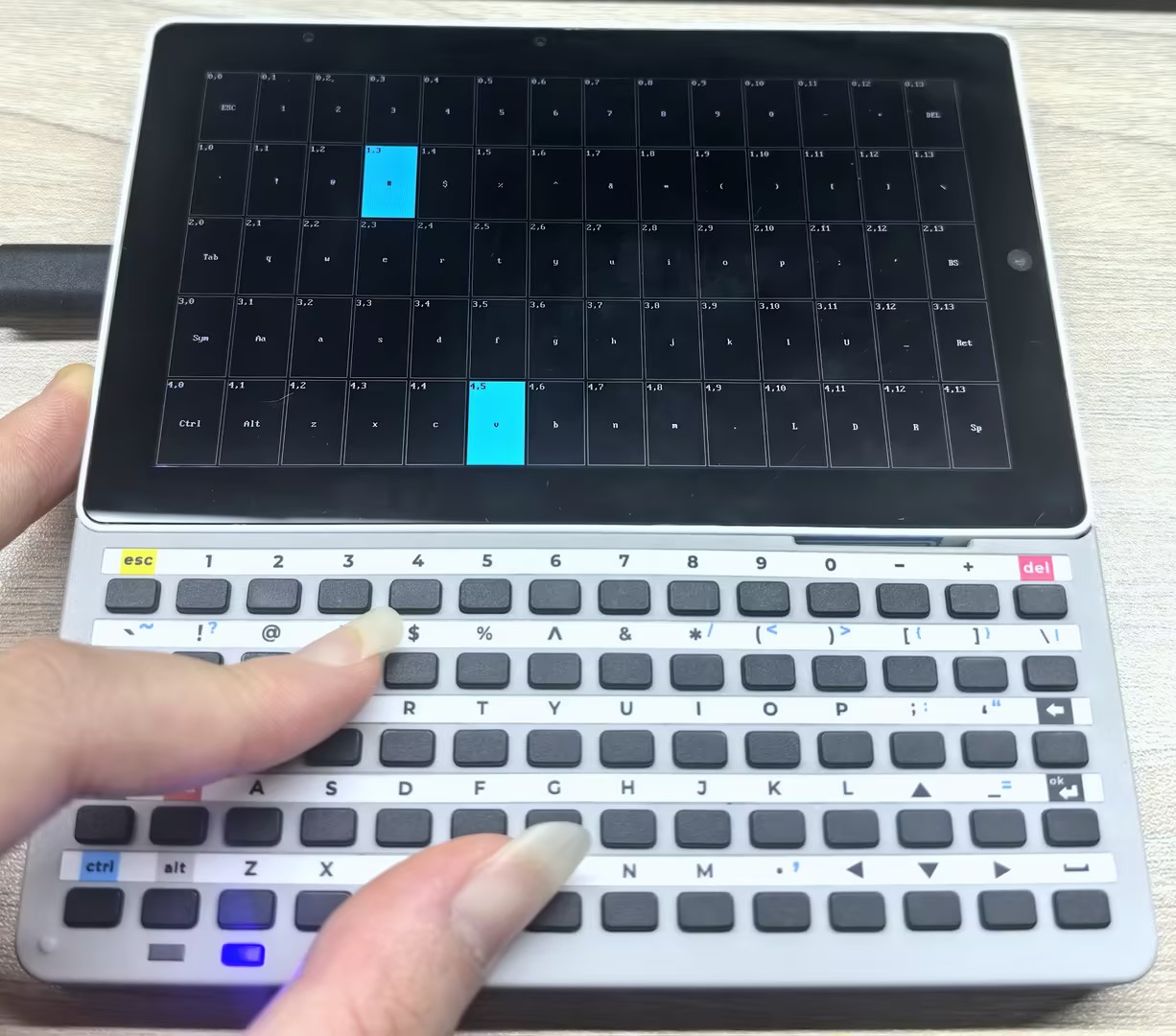
- 普通模式下,Tab5 Keyboard 会上报物理按键的行列位置以及显示当前的修饰键状态,下方程序示例了如何读取这些信息并在 Tab5 的 LCD 上进行可视化展示。按键状态分为以下几种,优先级从高到低:
- Repeating(绿)— 软件自动重复触发的按键事件,持续按住某键超过
repeat_initial_ms后会进入此状态,并以repeat_rate_ms的频率持续触发,直到松开按键。 - WasHold(蓝)— 刚好在本帧触发了 hold 事件的按键,持续按住某键超过
holding_threshold_ms后会进入此状态,并在下一帧切换到 Holding 状态。 - Holding(青)— 已经超过 hold 阈值且仍然按住的按键。
- Pressed(白)— 已经按下但尚未超过 hold 阈值的按键。
- Released(黑)— 已经松开的按键(仅绘制边框,无填充)。
- Repeating(绿)— 软件自动重复触发的按键事件,持续按住某键超过
/*
Key matrix visualizer example using M5UnitUnified for UnitTab5Keyboard.
Renders the 5 x 14 Tab5 keyboard matrix on the Tab5 LCD with per-key
color-coded state:
Green — software repeat firing (isRepeating)
Blue — hold threshold just crossed this frame (wasHold)
Cyan — key held past threshold and still down (isHolding)
White — key pressed but not yet at hold threshold (isPressed)
Black — key released (outline only)
The screen is redrawn every loop iteration so that transient one-frame
states (isRepeating, wasHold) are always visible. Tab5 has sufficient
CPU headroom to absorb the cost.
*/
#include <M5Unified.h>
#include <M5UnitUnified.h>
#include <M5UnitUnifiedKEYBOARD.h>
#include <M5HAL.hpp>
#include <M5Utility.h>
namespace {
auto& lcd = M5.Display;
m5::unit::UnitUnified Units;
m5::unit::UnitTab5Keyboard unit;
// Tab5 Keyboard connects via ExtPort1 (10-pin internal connector) on M5Stack Tab5.
// Pin assignment matches the SimpleDisplay example.
// INT = GPIO50 -- handled by config_t default (irq_pin = 50)
// SDA = GPIO0
// SCL = GPIO1
constexpr int8_t TAB5_KEYBOARD_SDA = 0;
constexpr int8_t TAB5_KEYBOARD_SCL = 1;
// Matrix geometry (5 rows x 14 cols) -- pulled from the unit's namespace constants
// so the code automatically tracks any future change in KEY_COL_COUNT / KEY_COUNT.
constexpr uint8_t MATRIX_ROWS = m5::unit::tab5_keyboard::KEY_COUNT / m5::unit::tab5_keyboard::KEY_COL_COUNT;
constexpr uint8_t MATRIX_COLS = m5::unit::tab5_keyboard::KEY_COL_COUNT;
// Visual style — cell fill colors ordered by priority (highest first).
constexpr uint16_t COLOR_BG = TFT_BLACK;
constexpr uint16_t COLOR_CELL_BORDER = TFT_DARKGRAY;
constexpr uint16_t COLOR_CELL_LABEL = TFT_LIGHTGRAY; // label on released cell
constexpr uint16_t COLOR_FILL_REPEAT = TFT_GREEN; // isRepeating (one-shot)
constexpr uint16_t COLOR_FILL_WAS_HOLD = TFT_BLUE; // wasHold (one-shot)
constexpr uint16_t COLOR_FILL_HOLDING = TFT_CYAN; // isHolding (sustained)
constexpr uint16_t COLOR_FILL_PRESSED = TFT_WHITE; // isPressed (normal)
// Key state enum — used by draw_cell() to select fill / label colors.
enum class CellState : uint8_t {
Released = 0,
Pressed = 1,
Holding = 2,
WasHold = 3,
Repeating = 4,
};
// Minimum gap between adjacent cells; keeps a visible grid even on small displays.
constexpr int CELL_PADDING = 2;
bool setup_tab5_keyboard()
{
// Normal mode is required: this example reads bitwise per-key state, which is
// only populated in Normal mode. INT pin defaults to GPIO50 (Tab5 ExtPort1).
{
auto cfg = unit.config();
cfg.mode = m5::unit::tab5_keyboard::Mode::Normal;
// Enable software auto-repeat so isRepeating() / wasHold() states are
// exercised and rendered with distinct colors.
cfg.software_repeat = true;
cfg.repeat_initial_ms = 1000;
cfg.repeat_rate_ms = 1000;
cfg.holding_threshold_ms = 500;
unit.config(cfg);
}
M5_LOGI("Tab5 ExtPort1 I2C: SDA:%d SCL:%d", TAB5_KEYBOARD_SDA, TAB5_KEYBOARD_SCL);
Wire.end();
Wire.begin(TAB5_KEYBOARD_SDA, TAB5_KEYBOARD_SCL, unit.component_config().clock);
if (!Units.add(unit, Wire) || !Units.begin()) {
return false;
}
// begin() applies cfg.mode and (when start_periodic is true) enables the matching INT
// and starts draining events, so no manual writeInterruptEnable()/startPeriodicMeasurement().
M5.Log.printf("Firmware:%02X\n", unit.firmwareVersion());
return true;
}
// Pre-computed cell rectangles. Filled once by layout_matrix() in setup().
struct CellRect {
int16_t x;
int16_t y;
int16_t w;
int16_t h;
};
CellRect cells[MATRIX_ROWS][MATRIX_COLS];
// Maximum bytes for a single cell label including the null terminator.
constexpr size_t LABEL_BUF_LEN = 6;
const char* modifier_label(const uint8_t row, const uint8_t col)
{
// Tab5 keyboard modifier key positions (see unit_Tab5Keyboard.hpp isModifierKey()).
if (row == 3 && col == 0) return "Sym";
if (row == 3 && col == 1) return "Aa";
if (row == 4 && col == 0) return "Ctrl";
if (row == 4 && col == 1) return "Alt";
return nullptr;
}
const char* control_label(const char c)
{
switch (c) {
case 0x08:
return "BS";
case 0x09:
return "Tab";
case 0x0A:
case 0x0D:
return "Ret";
case 0x1B:
return "ESC";
case 0x20:
return "Sp";
case 0x7F:
return "DEL";
default:
return nullptr;
}
}
// Map USB HID keycodes that hidUsageToChar() does not translate to ASCII
// (Escape, Forward Delete, arrow keys, etc.) to short labels. Detection goes
// through the HID keycode because the ASCII path returns 0 for these keys.
const char* hid_named_label(const uint8_t hid_keycode)
{
switch (hid_keycode) {
case 0x29:
return "ESC"; // Escape
case 0x4C:
return "DEL"; // Forward Delete
case 0x4F:
return "R"; // Right Arrow
case 0x50:
return "L"; // Left Arrow
case 0x51:
return "D"; // Down Arrow
case 0x52:
return "U"; // Up Arrow
default:
return nullptr;
}
}
// Compute the live label for (row, col). Reflects the current Sym/Aa state via
// keyMatrixToChar(), so pressing Sym swaps the rendered glyphs to their symbol
// variants, and Aa adds the shift modifier.
void cell_label(const uint8_t row, const uint8_t col, char* dst, const size_t n)
{
const char* mod = modifier_label(row, col);
if (mod != nullptr) {
snprintf(dst, n, "%s", mod);
return;
}
// Arrow keys are detected via HID keycode (they have no ASCII representation).
// Mirror keyMatrixToChar()'s Sym dispatch so the Sym layer's arrows are picked up too.
const auto mapping = unit.isSym() ? m5::unit::tab5_keyboard::keyMatrixToHidSym(row, col)
: m5::unit::tab5_keyboard::keyMatrixToHidBase(row, col);
const char* named = hid_named_label(mapping.keycode);
if (named != nullptr) {
snprintf(dst, n, "%s", named);
return;
}
const char c = unit.keyMatrixToChar(row, col);
const char* ctrl = control_label(c);
if (ctrl != nullptr) {
snprintf(dst, n, "%s", ctrl);
} else if (c >= 0x21 && c < 0x7F) {
dst[0] = c;
dst[1] = '\0';
} else if (c != 0) {
snprintf(dst, n, "0x%02X", static_cast<uint8_t>(c));
} else {
dst[0] = '\0';
}
}
void layout_matrix()
{
const int cw = lcd.width() / MATRIX_COLS;
const int ch = lcd.height() / MATRIX_ROWS;
const int off_x = (lcd.width() - cw * MATRIX_COLS) / 2;
const int off_y = (lcd.height() - ch * MATRIX_ROWS) / 2;
for (uint8_t row = 0; row < MATRIX_ROWS; ++row) {
for (uint8_t col = 0; col < MATRIX_COLS; ++col) {
cells[row][col] = CellRect{static_cast<int16_t>(off_x + col * cw), static_cast<int16_t>(off_y + row * ch),
static_cast<int16_t>(cw), static_cast<int16_t>(ch)};
}
}
}
// Return the fill color for a given cell state.
uint16_t cell_fill_color(const CellState state)
{
switch (state) {
case CellState::Repeating:
return COLOR_FILL_REPEAT;
case CellState::WasHold:
return COLOR_FILL_WAS_HOLD;
case CellState::Holding:
return COLOR_FILL_HOLDING;
case CellState::Pressed:
return COLOR_FILL_PRESSED;
default:
return COLOR_BG;
}
}
// Choose a legible text color given the cell background.
// Dark backgrounds (black / blue / green) → white text.
// Light backgrounds (white / cyan) → black text.
uint16_t cell_label_color(const CellState state)
{
switch (state) {
case CellState::Holding:
case CellState::Pressed:
return TFT_BLACK;
default:
return COLOR_CELL_LABEL; // white / gray on dark background
}
}
// Render one cell directly to the LCD. Caller is expected to wrap multiple
// draw_cell() calls in lcd.startWrite() / lcd.endWrite() to batch the SPI
// transactions.
void draw_cell(const uint8_t row, const uint8_t col, const CellState state)
{
const CellRect& r = cells[row][col];
const int16_t ix = r.x + CELL_PADDING;
const int16_t iy = r.y + CELL_PADDING;
const int16_t iw = r.w - CELL_PADDING * 2;
const int16_t ih = r.h - CELL_PADDING * 2;
if (iw <= 0 || ih <= 0) {
return;
}
const uint16_t fill = cell_fill_color(state);
lcd.fillRect(ix, iy, iw, ih, fill);
lcd.drawRect(ix, iy, iw, ih, COLOR_CELL_BORDER);
const uint16_t fg = cell_label_color(state);
const uint16_t bg = fill;
// Cell coordinate label "row,col" at top-left for easier debugging.
if (iw >= 24 && ih >= 16) {
lcd.setTextDatum(top_left);
lcd.setTextColor(fg, bg);
lcd.setCursor(ix + 2, iy + 2);
lcd.printf("%u,%u", row, col);
}
// Key imprint centered in the cell. Computed live so Sym/Aa modifier state
// is reflected (e.g. pressing Sym swaps glyphs to their symbol variants).
char label[LABEL_BUF_LEN];
cell_label(row, col, label, sizeof(label));
if (label[0] != '\0' && iw >= 20 && ih >= 24) {
lcd.setTextDatum(middle_center);
lcd.setTextColor(fg, bg);
lcd.drawString(label, ix + iw / 2, iy + ih / 2 + 4);
}
}
// Determine the highest-priority visual state for the key at flat index kidx.
// Priority (highest → lowest): Repeating > WasHold > Holding > Pressed > Released.
CellState key_cell_state(const uint8_t kidx)
{
if (unit.isRepeating(kidx)) {
return CellState::Repeating;
}
if (unit.wasHold(kidx)) {
return CellState::WasHold;
}
if (unit.isHolding(kidx)) {
return CellState::Holding;
}
if (unit.isPressed(kidx)) {
return CellState::Pressed;
}
return CellState::Released;
}
// Per-cell cached state for incremental redraw. Initialized to Released so the
// first frame after setup() repaints every cell.
CellState prev_states[m5::unit::tab5_keyboard::KEY_COUNT]{};
bool prev_sym = false;
bool prev_aa = false;
bool initial_draw_done = false;
// Redraw only the cells whose state changed since the previous frame. Sym/Aa
// changes relabel every cell, so they force a full redraw.
void draw_dirty_cells()
{
const bool sym_changed = (unit.isSym() != prev_sym);
const bool aa_changed = (unit.isAa() != prev_aa);
const bool full_redraw = !initial_draw_done || sym_changed || aa_changed;
lcd.startWrite(); // Batch SPI transactions across all cell draws this frame.
for (uint8_t row = 0; row < MATRIX_ROWS; ++row) {
for (uint8_t col = 0; col < MATRIX_COLS; ++col) {
const uint8_t kidx = static_cast<uint8_t>(row * MATRIX_COLS + col);
const CellState state = key_cell_state(kidx);
if (!full_redraw && state == prev_states[kidx]) {
continue;
}
draw_cell(row, col, state);
prev_states[kidx] = state;
}
}
lcd.endWrite();
prev_sym = unit.isSym();
prev_aa = unit.isAa();
initial_draw_done = true;
}
} // namespace
void setup()
{
M5.begin();
M5.setTouchButtonHeightByRatio(100);
// Keep the LCD in landscape (Tab5: 1280x720 native).
if (lcd.height() > lcd.width()) {
lcd.setRotation(3);
}
lcd.fillScreen(TFT_LIGHTGRAY);
if (!setup_tab5_keyboard()) {
M5_LOGE("Failed to begin UnitTab5Keyboard");
lcd.fillScreen(TFT_RED);
while (true) {
m5::utility::delay(10000);
}
}
M5_LOGI("M5UnitUnified initialized");
M5_LOGI("%s", Units.debugInfo().c_str());
// Direct-to-LCD rendering: paint the matrix background once, then let
// draw_dirty_cells() incrementally refresh only the cells whose state
// changed. This avoids the ~450 KB / frame cost of pushing a full-screen
// sprite over SPI.
lcd.setFont(&fonts::AsciiFont8x16);
lcd.fillScreen(COLOR_BG);
layout_matrix();
draw_dirty_cells(); // initial_draw_done=false → forces a full repaint.
}
void loop()
{
M5.update();
Units.update();
draw_dirty_cells();
m5::utility::delay(1000 / 60);
}烧录程序后,按下 Tab5 Keyboard 上的任意按键,Tab5 LCD 上对应的按键格会亮起并显示该键的行列坐标以及当前修饰键状态(Sym/Aa/Ctrl/Alt)。持续按住某键超过 500ms 后会进入 Holding 状态,格子颜色变为青色;持续按住超过 1000ms 后会进入 Repeating 状态,格子颜色变为绿色,并以 1000ms 的频率持续触发直到松开按键。
2.3 HID 模式
- HID 模式下,Tab5 Keyboard 会将按键事件转换为标准 HID 键码上报,可通过 Tab5 的 USB Type-A 接口模拟一个 USB 键盘设备发送 HID 报告给主机电脑。
USB HID 键盘
#include <M5Unified.h>
#include <M5UnitUnified.h>
#include <M5UnitUnifiedKEYBOARD.h>
#include <M5HAL.hpp>
#include <M5Utility.h>
#include "USB.h"
#include "USBHIDKeyboard.h"
#include <algorithm>
#include <cctype>
#include <string>

namespace {
auto& lcd = M5.Display;

m5::unit::UnitUnified Units;
m5::unit::UnitTab5Keyboard unit;
USBHIDKeyboard Keyboard;

// Tab5 Keyboard uses ExtPort1 on Tab5.
constexpr int8_t TAB5_KEYBOARD_SDA = 0;
constexpr int8_t TAB5_KEYBOARD_SCL = 1;
constexpr size_t MAX_LOG_LINES     = 7;

constexpr uint8_t HID_BACKSPACE = 0x2A;
constexpr uint8_t HID_DELETE    = 0x4C;
constexpr uint8_t HID_LEFT      = 0x50;
constexpr uint8_t HID_DOWN      = 0x51;
constexpr uint8_t HID_UP        = 0x52;
constexpr uint8_t HID_RIGHT     = 0x4F;
constexpr uint8_t HID_ENTER     = 0x28;
constexpr uint8_t HID_TAB       = 0x2B;
constexpr uint8_t HID_ESCAPE    = 0x29;
constexpr uint8_t HID_SPACE     = 0x2C;

constexpr uint8_t HID_MOD_CTRL  = 0x01;
constexpr uint8_t HID_MOD_SHIFT = 0x02;
constexpr uint8_t HID_MOD_ALT   = 0x04;

constexpr uint32_t USB_KEY_RELEASE_DELAY_MS = 5;

constexpr uint16_t COLOR_BG         = TFT_BLACK;
constexpr uint16_t COLOR_PANEL      = 0x2104;
constexpr uint16_t COLOR_BORDER     = 0x5AEB;
constexpr uint16_t COLOR_TEXT       = TFT_WHITE;
constexpr uint16_t COLOR_MUTED      = 0xAD55;
constexpr uint16_t COLOR_ACCENT     = TFT_CYAN;
constexpr uint16_t COLOR_MOD_ACTIVE = TFT_GREEN;
constexpr uint16_t COLOR_WARN       = TFT_ORANGE;

struct EventLogLine {
    std::string line1;
    std::string line2;
};

EventLogLine log_lines[MAX_LOG_LINES];
size_t log_head{};
size_t log_count{};
uint8_t last_modifier{};
uint8_t last_keycode{};
uint32_t sent_count{};

// Dirty flags keep the screen refresh incremental instead of redrawing all UI.
bool header_dirty{true};
bool log_dirty{true};
bool status_dirty{true};

struct Rect {
    int16_t x;
    int16_t y;
    int16_t w;
    int16_t h;
};

Rect header_rect;
Rect info_rect;
Rect status_rect;
Rect log_rect;

bool needs_redraw()
{
    return header_dirty || log_dirty || status_dirty;
}

void mark_event_dirty()
{
    log_dirty    = true;
    status_dirty = true;
}

void push_log(const std::string& line1, const std::string& line2)
{
    // Store event messages in a small ring buffer for the on-screen log panel.
    log_lines[log_head] = EventLogLine{line1, line2};
    log_head            = (log_head + 1U) % MAX_LOG_LINES;
    if (log_count < MAX_LOG_LINES) {
        ++log_count;
    }
}

std::string key_name(const uint8_t keycode, const char c)
{
    switch (keycode) {
        case HID_BACKSPACE:
            return "Backspace";
        case HID_DELETE:
            return "Delete";
        case HID_LEFT:
            return "Left";
        case HID_RIGHT:
            return "Right";
        case HID_UP:
            return "Up";
        case HID_DOWN:
            return "Down";
        case HID_ENTER:
            return "Enter";
        case HID_TAB:
            return "Tab";
        case HID_ESCAPE:
            return "Esc";
        case HID_SPACE:
            return "Space";
        default:
            break;
    }
    if (c != 0 && std::isprint(static_cast<unsigned char>(c))) {
        return std::string(1, c);
    }
    return m5::utility::formatString("kc=0x%02X", keycode);
}

void send_usb_hid_report(const uint8_t modifier, const uint8_t keycode)
{
    if (keycode == 0U) {
        return;
    }

    // Send one press report followed by an empty report to release the key.
    KeyReport report{};
    report.modifiers = modifier;
    report.keys[0]   = keycode;
    Keyboard.sendReport(&report);

    m5::utility::delay(USB_KEY_RELEASE_DELAY_MS);
    KeyReport release{};
    Keyboard.sendReport(&release);
}

void forward_hid_event(const m5::unit::tab5_keyboard::Event& evt)
{
    // Forward the HID code from the Tab5 keyboard unit to the host computer.
    last_modifier = evt.modifier;
    last_keycode  = evt.hid.keycode;
    ++sent_count;

    const char c  = m5::unit::tab5_keyboard::hidUsageToChar(evt.hid.keycode, evt.modifier);
    const auto name = key_name(evt.hid.keycode, c);

    send_usb_hid_report(evt.modifier, evt.hid.keycode);

    Serial.printf("USB HID mod=0x%02X key=0x%02X name=%s\n", evt.modifier, evt.hid.keycode, name.c_str());
    push_log(m5::utility::formatString("Mod:0x%02X Key:0x%02X", evt.modifier, evt.hid.keycode),
             m5::utility::formatString("USB:%s", name.c_str()));
    M5_LOGI("[Forward] modifier=0x%02X keycode=0x%02X name=%s", evt.modifier, evt.hid.keycode, name.c_str());
}

void drain_keyboard_events()
{
    // The unit stores events internally; drain all pending HID events each loop.
    while (!unit.empty()) {
        const auto evt = unit.oldest();
        if (evt.type == m5::unit::tab5_keyboard::EventType::Hid) {
            forward_hid_event(evt);
            mark_event_dirty();
        }
        unit.discard();
    }
}

void layout_screen()
{
    const int16_t w = lcd.width();
    const int16_t h = lcd.height();
    header_rect     = Rect{0, 0, w, 104};
    status_rect     = Rect{0, static_cast<int16_t>(h - 82), w, 82};
    log_rect        = Rect{static_cast<int16_t>(w * 2 / 3), 104, static_cast<int16_t>(w - w * 2 / 3),
                           static_cast<int16_t>(h - 104 - 82)};
    info_rect       = Rect{0, 104, static_cast<int16_t>(w * 2 / 3), static_cast<int16_t>(h - 104 - 82)};
}

void draw_panel(const Rect& r, const uint16_t color)
{
    lcd.fillRect(r.x, r.y, r.w, r.h, color);
    lcd.drawRect(r.x, r.y, r.w, r.h, COLOR_BORDER);
}

void draw_header()
{
    lcd.fillRect(header_rect.x, header_rect.y, header_rect.w, header_rect.h, COLOR_BG);
    lcd.setTextDatum(top_left);
    lcd.setTextColor(COLOR_ACCENT, COLOR_BG);
    lcd.setFont(&fonts::FreeMonoBold18pt7b);
    lcd.drawString("Tab5 USB HID Keyboard", 16, 8);

    lcd.setTextColor(COLOR_MUTED, COLOR_BG);
    lcd.drawString("HID mode  Tab5 acts as PC keyboard", 18, 58);
}

void draw_info()
{
    draw_panel(info_rect, COLOR_PANEL);
    lcd.setTextDatum(top_left);
    lcd.setFont(&fonts::FreeMonoBold18pt7b);
    lcd.setTextColor(COLOR_MUTED, COLOR_PANEL);
    lcd.drawString("How to use", info_rect.x + 14, info_rect.y + 10);

    lcd.setTextColor(COLOR_TEXT, COLOR_PANEL);
    lcd.drawString("1. Connect Tab5 to the computer", info_rect.x + 14, info_rect.y + 58);
    lcd.drawString("2. PC recognizes a USB keyboard", info_rect.x + 14, info_rect.y + 100);
    lcd.drawString("3. Focus any text box on PC", info_rect.x + 14, info_rect.y + 142);
    lcd.drawString("4. Type on the Tab5 keyboard", info_rect.x + 14, info_rect.y + 184);
}

void draw_modifier_badge(const char* label, const bool active, const int16_t x, const int16_t y)
{
    const int16_t w = 126;
    const int16_t h = 42;
    const uint16_t fill = active ? COLOR_MOD_ACTIVE : COLOR_BG;
    const uint16_t fg   = active ? TFT_BLACK : COLOR_MUTED;
    lcd.fillRoundRect(x, y, w, h, 7, fill);
    lcd.drawRoundRect(x, y, w, h, 7, COLOR_BORDER);
    lcd.setTextDatum(middle_center);
    lcd.setFont(&fonts::FreeMonoBold18pt7b);
    lcd.setTextColor(fg, fill);
    lcd.drawString(label, x + w / 2, y + h / 2);
}

void draw_status()
{
    draw_panel(status_rect, COLOR_BG);
    lcd.setTextDatum(top_left);
    lcd.setFont(&fonts::FreeMonoBold18pt7b);
    lcd.setTextColor(COLOR_ACCENT, COLOR_BG);
    lcd.drawString("Last Modifier", 16, status_rect.y + 8);

    draw_modifier_badge("Ctrl", (last_modifier & HID_MOD_CTRL) != 0U, 300, status_rect.y + 18);
    draw_modifier_badge("Aa", (last_modifier & HID_MOD_SHIFT) != 0U, 436, status_rect.y + 18);
    draw_modifier_badge("Sym", false, 572, status_rect.y + 18);
    draw_modifier_badge("Alt", (last_modifier & HID_MOD_ALT) != 0U, 708, status_rect.y + 18);

    lcd.setTextColor(COLOR_MUTED, COLOR_BG);
    lcd.setTextDatum(top_right);
    lcd.drawString(m5::utility::formatString("sent:%u key:0x%02X", static_cast<unsigned>(sent_count), last_keycode)
                       .c_str(),
                   status_rect.w - 16, status_rect.y + 20);
}

void draw_log()
{
    draw_panel(log_rect, COLOR_BG);
    lcd.setTextDatum(top_left);
    lcd.setFont(&fonts::FreeMonoBold18pt7b);
    lcd.setTextColor(COLOR_WARN, COLOR_BG);
    lcd.drawString("Events", log_rect.x + 12, log_rect.y + 10);

    int16_t y            = log_rect.y + 52;
    const int16_t line_h = lcd.fontHeight();
    for (size_t i = 0; i < log_count; ++i) {
        const size_t idx = (log_head + MAX_LOG_LINES - log_count + i) % MAX_LOG_LINES;
        lcd.setTextColor(COLOR_ACCENT, COLOR_BG);
        lcd.drawString(log_lines[idx].line1.c_str(), log_rect.x + 12, y);
        y += line_h;
        lcd.setTextColor(COLOR_MUTED, COLOR_BG);
        lcd.drawString(log_lines[idx].line2.c_str(), log_rect.x + 12, y);
        y += line_h + 4;
    }
}

void draw_screen()
{
    lcd.startWrite();
    if (header_dirty) {
        draw_header();
        draw_info();
        header_dirty = false;
    }
    if (log_dirty) {
        draw_log();
        log_dirty = false;
    }
    if (status_dirty) {
        draw_status();
        status_dirty = false;
    }
    lcd.endWrite();
}

bool setup_tab5_keyboard()
{
    auto cfg            = unit.config();
    // HID mode gives USB HID modifier/keycode pairs from the keyboard unit.
    cfg.mode            = m5::unit::tab5_keyboard::Mode::HID;
    cfg.start_periodic = true;
    cfg.irq_pin         = 50;
    unit.config(cfg);

    M5_LOGI("Tab5 ExtPort1 I2C: SDA:%d SCL:%d", TAB5_KEYBOARD_SDA, TAB5_KEYBOARD_SCL);
    // Reconfigure Wire for Tab5 ExtPort1 before attaching the keyboard unit.
    Wire.end();
    Wire.begin(TAB5_KEYBOARD_SDA, TAB5_KEYBOARD_SCL, unit.component_config().clock);
    if (!Units.add(unit, Wire) || !Units.begin()) {
        return false;
    }

    M5.Log.printf("Firmware:%02X\n", unit.firmwareVersion());
    return true;
}

}  // namespace

void setup()
{
    M5.begin();
    Serial.begin(115200);
    // Start the USB HID device stack so the PC enumerates Tab5 as a keyboard.
    Keyboard.begin();
    USB.begin();
    Serial.println("# Tab5 USB HID keyboard ready");
    M5.setTouchButtonHeightByRatio(100);

    if (lcd.height() > lcd.width()) {
        lcd.setRotation(3);
    }
    layout_screen();
    lcd.fillScreen(COLOR_BG);

    if (!setup_tab5_keyboard()) {
        M5_LOGE("Failed to begin UnitTab5Keyboard");
        lcd.fillScreen(TFT_RED);
        lcd.setTextColor(TFT_WHITE, TFT_RED);
        lcd.setTextDatum(middle_center);
        lcd.drawString("UnitTab5Keyboard begin failed", lcd.width() / 2, lcd.height() / 2);
        while (true) {
            m5::utility::delay(10000);
        }
    }

    push_log("Forwarder ready", "Mode:HID");
    draw_screen();
}

void loop()
{
    M5.update();
    Units.update();
    drain_keyboard_events();

    if (needs_redraw()) {
        draw_screen();
    }
    m5::utility::delay(1000 / 60);
}烧录程序后,连接 Tab5 的 USB Type-A 接口到电脑,电脑会识别到一个新的 USB 键盘设备。此时按下任意按键,都会将对应的 HID 键码通过 USB 发送给电脑,并在 LCD 上显示最近一次发送的 HID 事件信息(修饰键状态、键码、以及按键名称),在电脑上文本输入光标处就会看到输入的内容。
Mod:0x00 Key:0x00 USB:kc=0x00 。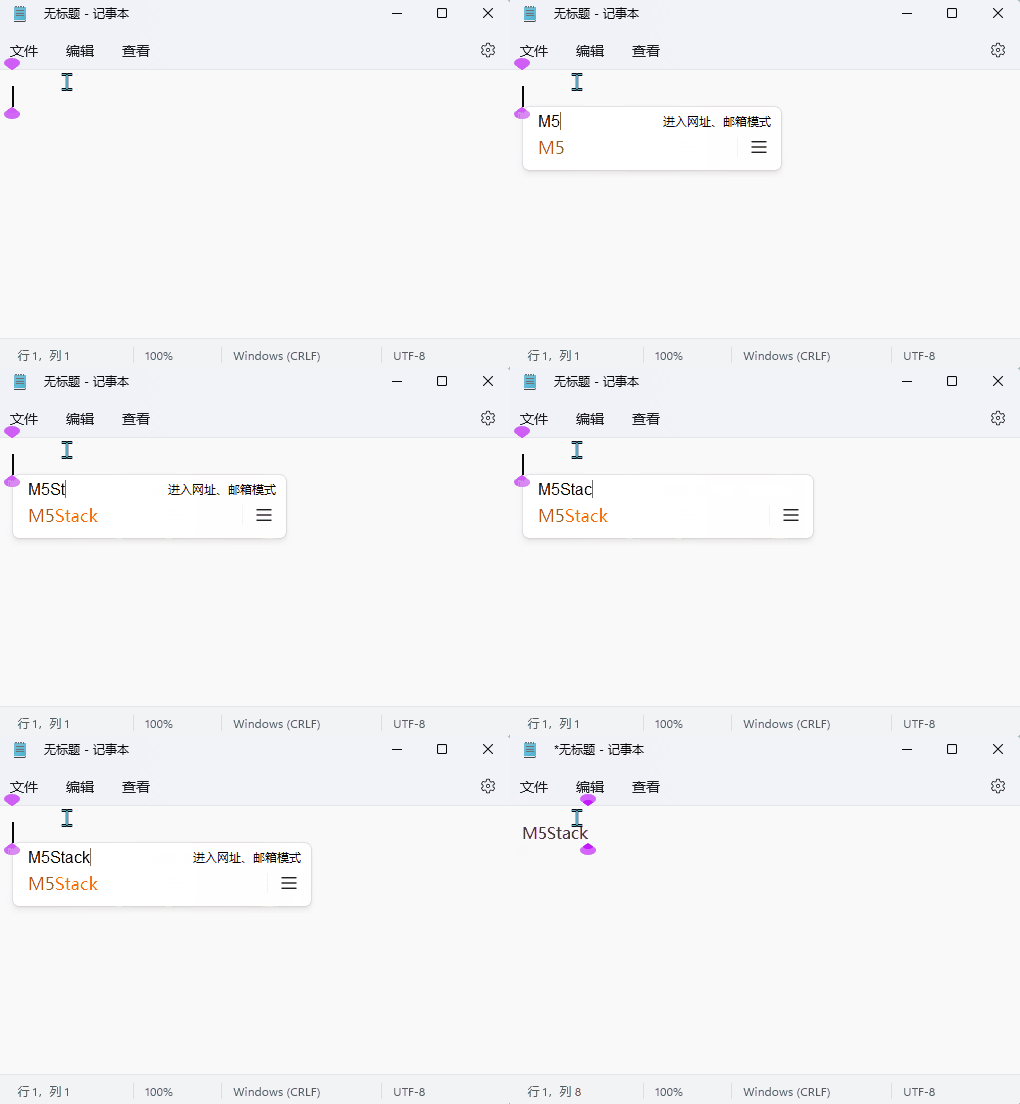
BLE HID 键盘
/*
  Tab5 Keyboard BLE HID keyboard example using M5UnitUnified.

  The Tab5 reads UnitTab5Keyboard in HID mode and sends each HID event as a
  Bluetooth LE HID keyboard report. Pair the host with "Tab5 BLE Keyboard".
*/
#include <M5Unified.h>
#include <M5UnitUnified.h>
#include <M5UnitUnifiedKEYBOARD.h>
#include <M5HAL.hpp>
#include <M5Utility.h>
#include <BLE2902.h>
#include <BLEAdvertising.h>
#include <BLEDevice.h>
#include <BLEHIDDevice.h>
#include <BLESecurity.h>
#include <BLEServer.h>
#include <algorithm>
#include <cctype>
#include <string>

namespace {
auto& lcd = M5.Display;

m5::unit::UnitUnified Units;
m5::unit::UnitTab5Keyboard unit;

BLEHIDDevice* hid_device{};
BLECharacteristic* input_report{};
BLEServer* ble_server{};

// Tab5 Keyboard uses ExtPort1 on Tab5.
constexpr int8_t TAB5_KEYBOARD_SDA = 0;
constexpr int8_t TAB5_KEYBOARD_SCL = 1;
constexpr size_t MAX_LOG_LINES     = 7;

constexpr uint8_t REPORT_ID_KEYBOARD = 1;

constexpr uint8_t HID_BACKSPACE = 0x2A;
constexpr uint8_t HID_DELETE    = 0x4C;
constexpr uint8_t HID_LEFT      = 0x50;
constexpr uint8_t HID_DOWN      = 0x51;
constexpr uint8_t HID_UP        = 0x52;
constexpr uint8_t HID_RIGHT     = 0x4F;
constexpr uint8_t HID_ENTER     = 0x28;
constexpr uint8_t HID_TAB       = 0x2B;
constexpr uint8_t HID_ESCAPE    = 0x29;
constexpr uint8_t HID_SPACE     = 0x2C;

constexpr uint8_t HID_MOD_CTRL  = 0x01;
constexpr uint8_t HID_MOD_SHIFT = 0x02;
constexpr uint8_t HID_MOD_ALT   = 0x04;

constexpr uint32_t BLE_KEY_RELEASE_DELAY_MS = 8;

constexpr uint16_t COLOR_BG         = TFT_BLACK;
constexpr uint16_t COLOR_PANEL      = 0x2104;
constexpr uint16_t COLOR_BORDER     = 0x5AEB;
constexpr uint16_t COLOR_TEXT       = TFT_WHITE;
constexpr uint16_t COLOR_MUTED      = 0xAD55;
constexpr uint16_t COLOR_ACCENT     = TFT_CYAN;
constexpr uint16_t COLOR_MOD_ACTIVE = TFT_GREEN;
constexpr uint16_t COLOR_WARN       = TFT_ORANGE;

// Standard boot keyboard report map: modifier, reserved, six key slots.
const uint8_t keyboard_report_map[] = {
    0x05, 0x01,        // Usage Page (Generic Desktop)
    0x09, 0x06,        // Usage (Keyboard)
    0xA1, 0x01,        // Collection (Application)
    0x85, REPORT_ID_KEYBOARD,  // Report ID
    0x05, 0x07,        // Usage Page (Keyboard/Keypad)
    0x19, 0xE0,        // Usage Minimum (Keyboard LeftControl)
    0x29, 0xE7,        // Usage Maximum (Keyboard Right GUI)
    0x15, 0x00,        // Logical Minimum (0)
    0x25, 0x01,        // Logical Maximum (1)
    0x75, 0x01,        // Report Size (1)
    0x95, 0x08,        // Report Count (8)
    0x81, 0x02,        // Input (Data, Variable, Absolute)
    0x95, 0x01,        // Report Count (1)
    0x75, 0x08,        // Report Size (8)
    0x81, 0x01,        // Input (Constant)
    0x95, 0x06,        // Report Count (6)
    0x75, 0x08,        // Report Size (8)
    0x15, 0x00,        // Logical Minimum (0)
    0x25, 0x65,        // Logical Maximum (101)
    0x05, 0x07,        // Usage Page (Keyboard/Keypad)
    0x19, 0x00,        // Usage Minimum (Reserved)
    0x29, 0x65,        // Usage Maximum (Keyboard Application)
    0x81, 0x00,        // Input (Data, Array)
    0xC0               // End Collection
};

struct EventLogLine {
    std::string line1;
    std::string line2;
};

EventLogLine log_lines[MAX_LOG_LINES];
size_t log_head{};
size_t log_count{};
uint8_t last_modifier{};
uint8_t last_keycode{};
uint32_t sent_count{};
bool ble_connected{};
bool ble_authenticated{};

// Dirty flags keep the screen refresh incremental instead of redrawing all UI.
bool header_dirty{true};
bool log_dirty{true};
bool status_dirty{true};

struct Rect {
    int16_t x;
    int16_t y;
    int16_t w;
    int16_t h;
};

Rect header_rect;
Rect info_rect;
Rect status_rect;
Rect log_rect;

class ServerCallbacks : public BLEServerCallbacks {
    void onConnect(BLEServer*) override
    {
        ble_connected = true;
        ble_authenticated = false;
        status_dirty  = true;
    }

    void onDisconnect(BLEServer* server) override
    {
        ble_connected = false;
        ble_authenticated = false;
        status_dirty  = true;
        BLESecurity::resetSecurity();
    }
};

class SecurityCallbacks : public BLESecurityCallbacks {
    bool onSecurityRequest() override
    {
        return true;
    }

#if defined(CONFIG_BLUEDROID_ENABLED)
    void onAuthenticationComplete(esp_ble_auth_cmpl_t desc) override
    {
        ble_authenticated = desc.success;
        status_dirty      = true;
        Serial.printf("BLE authentication %s\n", desc.success ? "ok" : "failed");
    }
#endif

#if defined(CONFIG_NIMBLE_ENABLED)
    void onAuthenticationComplete(ble_gap_conn_desc* desc) override
    {
        ble_authenticated = desc != nullptr;
        status_dirty      = true;
        Serial.printf("BLE authentication %s\n", ble_authenticated ? "ok" : "failed");
    }
#endif
};

bool needs_redraw()
{
    return header_dirty || log_dirty || status_dirty;
}

void mark_event_dirty()
{
    log_dirty    = true;
    status_dirty = true;
}

void push_log(const std::string& line1, const std::string& line2)
{
    // Store event messages in a small ring buffer for the on-screen log panel.
    log_lines[log_head] = EventLogLine{line1, line2};
    log_head            = (log_head + 1U) % MAX_LOG_LINES;
    if (log_count < MAX_LOG_LINES) {
        ++log_count;
    }
}

std::string key_name(const uint8_t keycode, const char c)
{
    switch (keycode) {
        case HID_BACKSPACE:
            return "Backspace";
        case HID_DELETE:
            return "Delete";
        case HID_LEFT:
            return "Left";
        case HID_RIGHT:
            return "Right";
        case HID_UP:
            return "Up";
        case HID_DOWN:
            return "Down";
        case HID_ENTER:
            return "Enter";
        case HID_TAB:
            return "Tab";
        case HID_ESCAPE:
            return "Esc";
        case HID_SPACE:
            return "Space";
        default:
            break;
    }
    if (c != 0 && std::isprint(static_cast<unsigned char>(c))) {
        return std::string(1, c);
    }
    return m5::utility::formatString("kc=0x%02X", keycode);
}

void send_ble_hid_report(const uint8_t modifier, const uint8_t keycode)
{
    if (!ble_connected || !ble_authenticated || input_report == nullptr || keycode == 0U) {
        return;
    }

    // Report format: modifier, reserved, key[0..5]. Send press, then release.
    uint8_t report[8]{};
    report[0] = modifier;
    report[2] = keycode;
    input_report->setValue(report, sizeof(report));
    input_report->notify();

    m5::utility::delay(BLE_KEY_RELEASE_DELAY_MS);
    uint8_t release[8]{};
    input_report->setValue(release, sizeof(release));
    input_report->notify();
}

void forward_hid_event(const m5::unit::tab5_keyboard::Event& evt)
{
    // Forward the HID code from the Tab5 keyboard unit to the paired BLE host.
    last_modifier = evt.modifier;
    last_keycode  = evt.hid.keycode;
    ++sent_count;

    const char c    = m5::unit::tab5_keyboard::hidUsageToChar(evt.hid.keycode, evt.modifier);
    const auto name = key_name(evt.hid.keycode, c);

    send_ble_hid_report(evt.modifier, evt.hid.keycode);

    Serial.printf("BLE HID mod=0x%02X key=0x%02X name=%s connected=%u\n", evt.modifier, evt.hid.keycode,
                  name.c_str(), ble_connected);
    push_log(m5::utility::formatString("Mod:0x%02X Key:0x%02X", evt.modifier, evt.hid.keycode),
             m5::utility::formatString("BLE:%s", name.c_str()));
    M5_LOGI("[BLE] modifier=0x%02X keycode=0x%02X name=%s", evt.modifier, evt.hid.keycode, name.c_str());
}

void drain_keyboard_events()
{
    // The unit stores events internally; drain all pending HID events each loop.
    while (!unit.empty()) {
        const auto evt = unit.oldest();
        if (evt.type == m5::unit::tab5_keyboard::EventType::Hid) {
            forward_hid_event(evt);
            mark_event_dirty();
        }
        unit.discard();
    }
}

void layout_screen()
{
    const int16_t w = lcd.width();
    const int16_t h = lcd.height();
    header_rect     = Rect{0, 0, w, 104};
    status_rect     = Rect{0, static_cast<int16_t>(h - 82), w, 82};
    log_rect        = Rect{static_cast<int16_t>(w * 2 / 3), 104, static_cast<int16_t>(w - w * 2 / 3),
                           static_cast<int16_t>(h - 104 - 82)};
    info_rect       = Rect{0, 104, static_cast<int16_t>(w * 2 / 3), static_cast<int16_t>(h - 104 - 82)};
}

void draw_panel(const Rect& r, const uint16_t color)
{
    lcd.fillRect(r.x, r.y, r.w, r.h, color);
    lcd.drawRect(r.x, r.y, r.w, r.h, COLOR_BORDER);
}

void draw_header()
{
    lcd.fillRect(header_rect.x, header_rect.y, header_rect.w, header_rect.h, COLOR_BG);
    lcd.setTextDatum(top_left);
    lcd.setTextColor(COLOR_ACCENT, COLOR_BG);
    lcd.setFont(&fonts::FreeMonoBold18pt7b);
    lcd.drawString("Tab5 BLE HID Keyboard", 16, 8);

    lcd.setTextColor(COLOR_MUTED, COLOR_BG);
    lcd.drawString("HID mode  Tab5 acts as BLE keyboard", 18, 58);
}

void draw_info()
{
    draw_panel(info_rect, COLOR_PANEL);
    lcd.setTextDatum(top_left);
    lcd.setFont(&fonts::FreeMonoBold18pt7b);
    lcd.setTextColor(COLOR_MUTED, COLOR_PANEL);
    lcd.drawString("How to use", info_rect.x + 14, info_rect.y + 10);

    lcd.setTextColor(COLOR_TEXT, COLOR_PANEL);
    lcd.drawString("1. Pair host with Tab5 BLE Keyboard", info_rect.x + 14, info_rect.y + 58);
    lcd.drawString("2. Host recognizes a BLE keyboard", info_rect.x + 14, info_rect.y + 100);
    lcd.drawString("3. Focus any text box on host", info_rect.x + 14, info_rect.y + 142);
    lcd.drawString("4. Type on the Tab5 keyboard", info_rect.x + 14, info_rect.y + 184);
}

void draw_modifier_badge(const char* label, const bool active, const int16_t x, const int16_t y)
{
    const int16_t w = 126;
    const int16_t h = 42;
    const uint16_t fill = active ? COLOR_MOD_ACTIVE : COLOR_BG;
    const uint16_t fg   = active ? TFT_BLACK : COLOR_MUTED;
    lcd.fillRoundRect(x, y, w, h, 7, fill);
    lcd.drawRoundRect(x, y, w, h, 7, COLOR_BORDER);
    lcd.setTextDatum(middle_center);
    lcd.setFont(&fonts::FreeMonoBold18pt7b);
    lcd.setTextColor(fg, fill);
    lcd.drawString(label, x + w / 2, y + h / 2);
}

void draw_status()
{
    draw_panel(status_rect, COLOR_BG);
    lcd.setTextDatum(top_left);
    lcd.setFont(&fonts::FreeMonoBold18pt7b);
    lcd.setTextColor(COLOR_ACCENT, COLOR_BG);
    lcd.drawString("Last Modifier", 16, status_rect.y + 8);

    draw_modifier_badge("Ctrl", (last_modifier & HID_MOD_CTRL) != 0U, 300, status_rect.y + 18);
    draw_modifier_badge("Aa", (last_modifier & HID_MOD_SHIFT) != 0U, 436, status_rect.y + 18);
    draw_modifier_badge("Sym", false, 572, status_rect.y + 18);
    draw_modifier_badge("Alt", (last_modifier & HID_MOD_ALT) != 0U, 708, status_rect.y + 18);

    lcd.setTextColor(ble_connected ? COLOR_MOD_ACTIVE : COLOR_WARN, COLOR_BG);
    lcd.setTextDatum(top_right);
    lcd.drawString(ble_connected ? (ble_authenticated ? "BLE bonded" : "BLE connected") : "BLE pairing",
                   status_rect.w - 16, status_rect.y + 8);

    lcd.setTextColor(COLOR_MUTED, COLOR_BG);
    lcd.drawString(m5::utility::formatString("sent:%u key:0x%02X", static_cast<unsigned>(sent_count), last_keycode)
                       .c_str(),
                   status_rect.w - 16, status_rect.y + 42);
}

void draw_log()
{
    draw_panel(log_rect, COLOR_BG);
    lcd.setTextDatum(top_left);
    lcd.setFont(&fonts::FreeMonoBold18pt7b);
    lcd.setTextColor(COLOR_WARN, COLOR_BG);
    lcd.drawString("Events", log_rect.x + 12, log_rect.y + 10);

    int16_t y            = log_rect.y + 52;
    const int16_t line_h = lcd.fontHeight();
    for (size_t i = 0; i < log_count; ++i) {
        const size_t idx = (log_head + MAX_LOG_LINES - log_count + i) % MAX_LOG_LINES;
        lcd.setTextColor(COLOR_ACCENT, COLOR_BG);
        lcd.drawString(log_lines[idx].line1.c_str(), log_rect.x + 12, y);
        y += line_h;
        lcd.setTextColor(COLOR_MUTED, COLOR_BG);
        lcd.drawString(log_lines[idx].line2.c_str(), log_rect.x + 12, y);
        y += line_h + 4;
    }
}

void draw_screen()
{
    lcd.startWrite();
    if (header_dirty) {
        draw_header();
        draw_info();
        header_dirty = false;
    }
    if (log_dirty) {
        draw_log();
        log_dirty = false;
    }
    if (status_dirty) {
        draw_status();
        status_dirty = false;
    }
    lcd.endWrite();
}

bool setup_ble_hid_keyboard()
{
    BLEDevice::init("Tab5 BLE Keyboard");

    // HID hosts expect bonding/encryption. Without it, reconnect after reset can
    // look connected briefly and then disconnect, or force pairing again.
    BLESecurity::setCapability(ESP_IO_CAP_NONE);
    BLESecurity::setAuthenticationMode(true, false, true);
    BLESecurity::setInitEncryptionKey(ESP_BLE_ENC_KEY_MASK | ESP_BLE_ID_KEY_MASK);
    BLESecurity::setRespEncryptionKey(ESP_BLE_ENC_KEY_MASK | ESP_BLE_ID_KEY_MASK);
    BLESecurity::setKeySize(16);
    BLEDevice::setSecurityCallbacks(new SecurityCallbacks());

    ble_server = BLEDevice::createServer();
    if (ble_server == nullptr) {
        return false;
    }
    ble_server->setCallbacks(new ServerCallbacks());
#if !defined(CONFIG_BT_NIMBLE_EXT_ADV) || defined(CONFIG_BLUEDROID_ENABLED)
    ble_server->advertiseOnDisconnect(true);
#endif

    hid_device  = new BLEHIDDevice(ble_server);
    input_report = hid_device->inputReport(REPORT_ID_KEYBOARD);
    hid_device->manufacturer()->setValue("M5Stack");
    hid_device->pnp(0x02, 0x303A, 0x4001, 0x0100);
    hid_device->hidInfo(0x00, 0x01);
    hid_device->reportMap((uint8_t*)keyboard_report_map, sizeof(keyboard_report_map));
    hid_device->setBatteryLevel(100);
    hid_device->startServices();

    BLEAdvertising* advertising = BLEDevice::getAdvertising();
    advertising->setAppearance(HID_KEYBOARD);
    advertising->addServiceUUID(hid_device->hidService()->getUUID());
    advertising->setScanResponse(true);
    advertising->start();
    return true;
}

bool setup_tab5_keyboard()
{
    auto cfg            = unit.config();
    // HID mode gives BLE HID modifier/keycode pairs from the keyboard unit.
    cfg.mode            = m5::unit::tab5_keyboard::Mode::HID;
    cfg.start_periodic = true;
    cfg.irq_pin         = 50;
    unit.config(cfg);

    M5_LOGI("Tab5 ExtPort1 I2C: SDA:%d SCL:%d", TAB5_KEYBOARD_SDA, TAB5_KEYBOARD_SCL);
    // Reconfigure Wire for Tab5 ExtPort1 before attaching the keyboard unit.
    Wire.end();
    Wire.begin(TAB5_KEYBOARD_SDA, TAB5_KEYBOARD_SCL, unit.component_config().clock);
    if (!Units.add(unit, Wire) || !Units.begin()) {
        return false;
    }

    M5.Log.printf("Firmware:%02X\n", unit.firmwareVersion());
    return true;
}

}  // namespace

void setup()
{
    M5.begin();
    Serial.begin(115200);
    M5.setTouchButtonHeightByRatio(100);

    if (lcd.height() > lcd.width()) {
        lcd.setRotation(3);
    }
    layout_screen();
    lcd.fillScreen(COLOR_BG);

    if (!setup_ble_hid_keyboard()) {
        M5_LOGE("Failed to start BLE HID keyboard");
        lcd.fillScreen(TFT_RED);
        lcd.setTextColor(TFT_WHITE, TFT_RED);
        lcd.setTextDatum(middle_center);
        lcd.drawString("BLE HID begin failed", lcd.width() / 2, lcd.height() / 2);
        while (true) {
            m5::utility::delay(10000);
        }
    }

    if (!setup_tab5_keyboard()) {
        M5_LOGE("Failed to begin UnitTab5Keyboard");
        lcd.fillScreen(TFT_RED);
        lcd.setTextColor(TFT_WHITE, TFT_RED);
        lcd.setTextDatum(middle_center);
        lcd.drawString("UnitTab5Keyboard begin failed", lcd.width() / 2, lcd.height() / 2);
        while (true) {
            m5::utility::delay(10000);
        }
    }

    Serial.println("# Tab5 BLE HID keyboard ready");
    push_log("BLE HID ready", "Pair:Tab5 BLE Keyboard");
    draw_screen();
}

void loop()
{
    M5.update();
    Units.update();
    drain_keyboard_events();

    if (needs_redraw()) {
        draw_screen();
    }
    m5::utility::delay(1000 / 60);
}烧录程序后,打开手机或电脑的蓝牙设置,配对名为 Tab5 BLE Keyboard 的设备。屏幕右下角显示 “BLE bonded” 说明配对成功,然后在该设备上任何文本输入框内输入内容,就会看到 Tab5 上显示最近一次发送的 HID 事件信息(修饰键状态、键码、以及按键名称),在手机或电脑的文本输入框内就会看到输入的内容。
Mod:0x00 Key:0x00 BLE:kc=0x00 。2.下方演示中数据线仅为 Tab5 供电使用,BLE HID 键盘功能完全通过无线蓝牙连接实现。
2.4 字符模式
- 字符模式下,Tab5 Keyboard 会直接上报输入的字符以及当前的修饰键状态,适合需要直接获取文本输入内容的应用场景。
/*
  Tab5 Keyboard Character-mode input example using M5UnitUnified.

  Character mode reports ready-to-use character strings from the keyboard
  firmware. It is the simplest mode for text input, but it does not provide
  physical row/column data or full navigation-key editing semantics.
*/
#include <M5Unified.h>
#include <M5UnitUnified.h>
#include <M5UnitUnifiedKEYBOARD.h>
#include <M5HAL.hpp>
#include <M5Utility.h>
#include <algorithm>
#include <cctype>
#include <string>

namespace {
auto& lcd = M5.Display;

m5::unit::UnitUnified Units;
m5::unit::UnitTab5Keyboard unit;

constexpr int8_t TAB5_KEYBOARD_SDA = 0;
constexpr int8_t TAB5_KEYBOARD_SCL = 1;
constexpr size_t TEXT_CONTEXT_CHARS = 15 * 39;
constexpr size_t MAX_TEXT_LENGTH   = TEXT_CONTEXT_CHARS;
constexpr size_t MAX_LOG_LINES     = 7;

constexpr uint16_t COLOR_BG     = TFT_BLACK;
constexpr uint16_t COLOR_PANEL  = 0x2104;
constexpr uint16_t COLOR_BORDER = 0x5AEB;
constexpr uint16_t COLOR_TEXT   = TFT_WHITE;
constexpr uint16_t COLOR_MUTED  = 0xAD55;
constexpr uint16_t COLOR_ACCENT = TFT_CYAN;
constexpr uint16_t COLOR_MOD_ACTIVE = TFT_GREEN;
constexpr uint16_t COLOR_WARN   = TFT_ORANGE;

std::string text_buffer;
struct EventLogLine {
    std::string position;
    std::string key;
};

EventLogLine log_lines[MAX_LOG_LINES];
size_t log_head{};
size_t log_count{};
uint8_t last_modifier{};
bool header_dirty{true};
bool text_dirty{true};
bool log_dirty{true};
bool status_dirty{true};

struct Rect {
    int16_t x;
    int16_t y;
    int16_t w;
    int16_t h;
};

Rect header_rect;
Rect text_rect;
Rect status_rect;
Rect log_rect;

bool needs_redraw()
{
    return header_dirty || text_dirty || log_dirty || status_dirty;
}

void mark_editor_dirty()
{
    text_dirty   = true;
    log_dirty    = true;
    status_dirty = true;
}

void push_log(const std::string& position, const std::string& key)
{
    log_lines[log_head] = EventLogLine{position, key};
    log_head            = (log_head + 1U) % MAX_LOG_LINES;
    if (log_count < MAX_LOG_LINES) {
        ++log_count;
    }
}

void push_log(const std::string& line)
{
    push_log(line, "");
}

void print_serial_header(const char* mode)
{
    Serial.printf("\n[Tab5Keyboard] %s mode key monitor ready\n", mode);
    Serial.println("Open this serial monitor to see every key event.");
}

void append_char(const char c)
{
    switch (c) {
        case '\b':
        case 0x7F:
            if (!text_buffer.empty()) {
                text_buffer.pop_back();
            }
            break;
        case '\r':
        case '\n':
            text_buffer += '\n';
            break;
        case '\t':
            text_buffer += "    ";
            break;
        default:
            if (std::isprint(static_cast<unsigned char>(c))) {
                text_buffer += c;
            }
            break;
    }

    if (text_buffer.size() > MAX_TEXT_LENGTH) {
        text_buffer.erase(0, text_buffer.size() - MAX_TEXT_LENGTH);
    }
}

void process_character_event(const m5::unit::tab5_keyboard::Event& evt)
{
    last_modifier = evt.modifier;
    for (uint8_t i = 0; i < evt.chr.length && evt.chr.chars[i] != '\0'; ++i) {
        append_char(evt.chr.chars[i]);
    }
    push_log(m5::utility::formatString("CHAR mod=0x%02X", evt.modifier),
             m5::utility::formatString("Key: \"%s\"", evt.chr.chars));
    Serial.printf("[Character] modifier=0x%02X length=%u chars=\"%s\"\n", evt.modifier, evt.chr.length,
                  evt.chr.chars);
    M5_LOGI("[Char] modifier=0x%02X length=%u chars=\"%s\"", evt.modifier, evt.chr.length, evt.chr.chars);
}

void drain_keyboard_events()
{
    while (!unit.empty()) {
        const auto evt = unit.oldest();
        if (evt.type == m5::unit::tab5_keyboard::EventType::Character) {
            process_character_event(evt);
            mark_editor_dirty();
        }
        unit.discard();
    }
}

void layout_screen()
{
    const int16_t w = lcd.width();
    const int16_t h = lcd.height();
    header_rect     = Rect{0, 0, w, 104};
    status_rect     = Rect{0, static_cast<int16_t>(h - 82), w, 82};
    log_rect        = Rect{static_cast<int16_t>(w * 2 / 3), 104, static_cast<int16_t>(w - w * 2 / 3),
                           static_cast<int16_t>(h - 104 - 82)};
    text_rect       = Rect{0, 104, static_cast<int16_t>(w * 2 / 3), static_cast<int16_t>(h - 104 - 82)};
}

void draw_panel(const Rect& r, const uint16_t color)
{
    lcd.fillRect(r.x, r.y, r.w, r.h, color);
    lcd.drawRect(r.x, r.y, r.w, r.h, COLOR_BORDER);
}

void draw_header()
{
    lcd.fillRect(header_rect.x, header_rect.y, header_rect.w, header_rect.h, COLOR_BG);
    lcd.setTextDatum(top_left);
    lcd.setFont(&fonts::FreeMonoBold18pt7b);
    lcd.setTextColor(COLOR_ACCENT, COLOR_BG);
    lcd.drawString("Tab5 Character Input", 16, 8);

    lcd.setTextColor(COLOR_MUTED, COLOR_BG);
    lcd.drawString("Character mode  Text input  Touch=Clear", 18, 58);
}

void draw_text_area()
{
    draw_panel(text_rect, COLOR_PANEL);
    lcd.setTextDatum(top_left);
    lcd.setFont(&fonts::FreeMonoBold18pt7b);
    lcd.setTextColor(COLOR_MUTED, COLOR_PANEL);
    lcd.drawString("Text", text_rect.x + 14, text_rect.y + 10);

    lcd.setTextColor(COLOR_TEXT, COLOR_PANEL);
    const int16_t text_left   = text_rect.x + 14;
    const int16_t text_top    = text_rect.y + 58;
    const int16_t text_right  = text_rect.x + text_rect.w - 14;
    const int16_t text_bottom = text_rect.y + text_rect.h - 10;
    int16_t x                 = text_left;
    int16_t y                 = text_top;

    const int16_t char_h    = lcd.fontHeight();
    const int16_t max_lines = std::max<int16_t>(1, (text_bottom - text_top) / char_h);
    const size_t start      = text_buffer.size() > TEXT_CONTEXT_CHARS ? text_buffer.size() - TEXT_CONTEXT_CHARS : 0;
    int16_t lines{};

    for (size_t i = start; i < text_buffer.size() && lines < max_lines; ++i) {
        const char c = text_buffer[i];
        if (c == '\n') {
            x = text_left;
            y = static_cast<int16_t>(y + char_h);
            ++lines;
        } else {
            char s[2] = {c, '\0'};
            const int16_t char_w = std::max<int16_t>(1, lcd.textWidth(s));
            if (x + char_w > text_right) {
                x = text_left;
                y = static_cast<int16_t>(y + char_h);
                ++lines;
                if (lines >= max_lines) break;
            }
            if (y + char_h <= text_bottom) {
                lcd.drawString(s, x, y);
                x = static_cast<int16_t>(x + char_w);
            }
        }
    }

    if (text_buffer.empty()) {
        lcd.setTextColor(COLOR_MUTED, COLOR_PANEL);
        lcd.drawString("Start typing...", text_left, text_top);
    }
}

void draw_modifier_badge(const char* label, const bool active, const int16_t x, const int16_t y)
{
    const int16_t w = 126;
    const int16_t h = 42;
    const uint16_t fill = active ? COLOR_MOD_ACTIVE : COLOR_BG;
    const uint16_t fg   = active ? TFT_BLACK : COLOR_MUTED;
    lcd.fillRoundRect(x, y, w, h, 7, fill);
    lcd.drawRoundRect(x, y, w, h, 7, COLOR_BORDER);
    lcd.setTextDatum(middle_center);
    lcd.setFont(&fonts::FreeMonoBold18pt7b);
    lcd.setTextColor(fg, fill);
    lcd.drawString(label, x + w / 2, y + h / 2);
}

void draw_status()
{
    draw_panel(status_rect, COLOR_BG);
    lcd.setTextDatum(top_left);
    lcd.setFont(&fonts::FreeMonoBold18pt7b);
    lcd.setTextColor(COLOR_ACCENT, COLOR_BG);
    lcd.drawString("Last Modifier", 16, status_rect.y + 8);

    draw_modifier_badge("Ctrl", (last_modifier & 0x11U) != 0U, 300, status_rect.y + 18);
    draw_modifier_badge("Aa", (last_modifier & 0x22U) != 0U, 436, status_rect.y + 18);
    draw_modifier_badge("Sym", false, 572, status_rect.y + 18);
    draw_modifier_badge("Alt", (last_modifier & 0x44U) != 0U, 708, status_rect.y + 18);

    lcd.setTextColor(COLOR_MUTED, COLOR_BG);
    lcd.setTextDatum(top_right);
    lcd.drawString(m5::utility::formatString("chars: %u", static_cast<unsigned>(text_buffer.size())).c_str(),
                   status_rect.w - 16, status_rect.y + 20);
}

void draw_log()
{
    draw_panel(log_rect, COLOR_BG);
    lcd.setTextDatum(top_left);
    lcd.setFont(&fonts::FreeMonoBold18pt7b);
    lcd.setTextColor(COLOR_WARN, COLOR_BG);
    lcd.drawString("Events", log_rect.x + 12, log_rect.y + 10);

    int16_t y            = log_rect.y + 52;
    const int16_t line_h = lcd.fontHeight();
    for (size_t i = 0; i < log_count; ++i) {
        const size_t idx = (log_head + MAX_LOG_LINES - log_count + i) % MAX_LOG_LINES;
        lcd.setTextColor(COLOR_ACCENT, COLOR_BG);
        lcd.drawString(log_lines[idx].position.c_str(), log_rect.x + 12, y);
        y += line_h;
        if (!log_lines[idx].key.empty()) {
            lcd.setTextColor(COLOR_MUTED, COLOR_BG);
            lcd.drawString(log_lines[idx].key.c_str(), log_rect.x + 12, y);
            y += line_h;
        }
        y += 4;
    }
}

void draw_screen()
{
    lcd.startWrite();
    if (header_dirty) {
        draw_header();
        header_dirty = false;
    }
    if (text_dirty) {
        draw_text_area();
        text_dirty = false;
    }
    if (log_dirty) {
        draw_log();
        log_dirty = false;
    }
    if (status_dirty) {
        draw_status();
        status_dirty = false;
    }
    lcd.endWrite();
}

bool setup_tab5_keyboard()
{
    auto cfg            = unit.config();
    cfg.mode            = m5::unit::tab5_keyboard::Mode::Character;
    cfg.start_periodic = true;
    cfg.irq_pin         = 50;
    unit.config(cfg);

    M5_LOGI("Tab5 ExtPort1 I2C: SDA:%d SCL:%d", TAB5_KEYBOARD_SDA, TAB5_KEYBOARD_SCL);
    Wire.end();
    Wire.begin(TAB5_KEYBOARD_SDA, TAB5_KEYBOARD_SCL, unit.component_config().clock);
    if (!Units.add(unit, Wire) || !Units.begin()) {
        return false;
    }

    M5.Log.printf("Firmware:%02X\n", unit.firmwareVersion());
    return true;
}

}  // namespace

void setup()
{
    M5.begin();
    Serial.begin(115200);
    print_serial_header("Character");
    M5.setTouchButtonHeightByRatio(100);

    if (lcd.height() > lcd.width()) {
        lcd.setRotation(3);
    }
    layout_screen();
    lcd.fillScreen(COLOR_BG);

    if (!setup_tab5_keyboard()) {
        M5_LOGE("Failed to begin UnitTab5Keyboard");
        lcd.fillScreen(TFT_RED);
        lcd.setTextColor(TFT_WHITE, TFT_RED);
        lcd.setTextDatum(middle_center);
        lcd.drawString("UnitTab5Keyboard begin failed", lcd.width() / 2, lcd.height() / 2);
        while (true) {
            m5::utility::delay(10000);
        }
    }

    push_log("Keyboard ready");
    draw_screen();
}

void loop()
{
    M5.update();
    Units.update();
    drain_keyboard_events();

    if (M5.Touch.getDetail().wasClicked()) {
        text_buffer.clear();
        push_log("Clear text");
        mark_editor_dirty();
    }

    if (needs_redraw()) {
        draw_screen();
    }
    m5::utility::delay(1000 / 30);
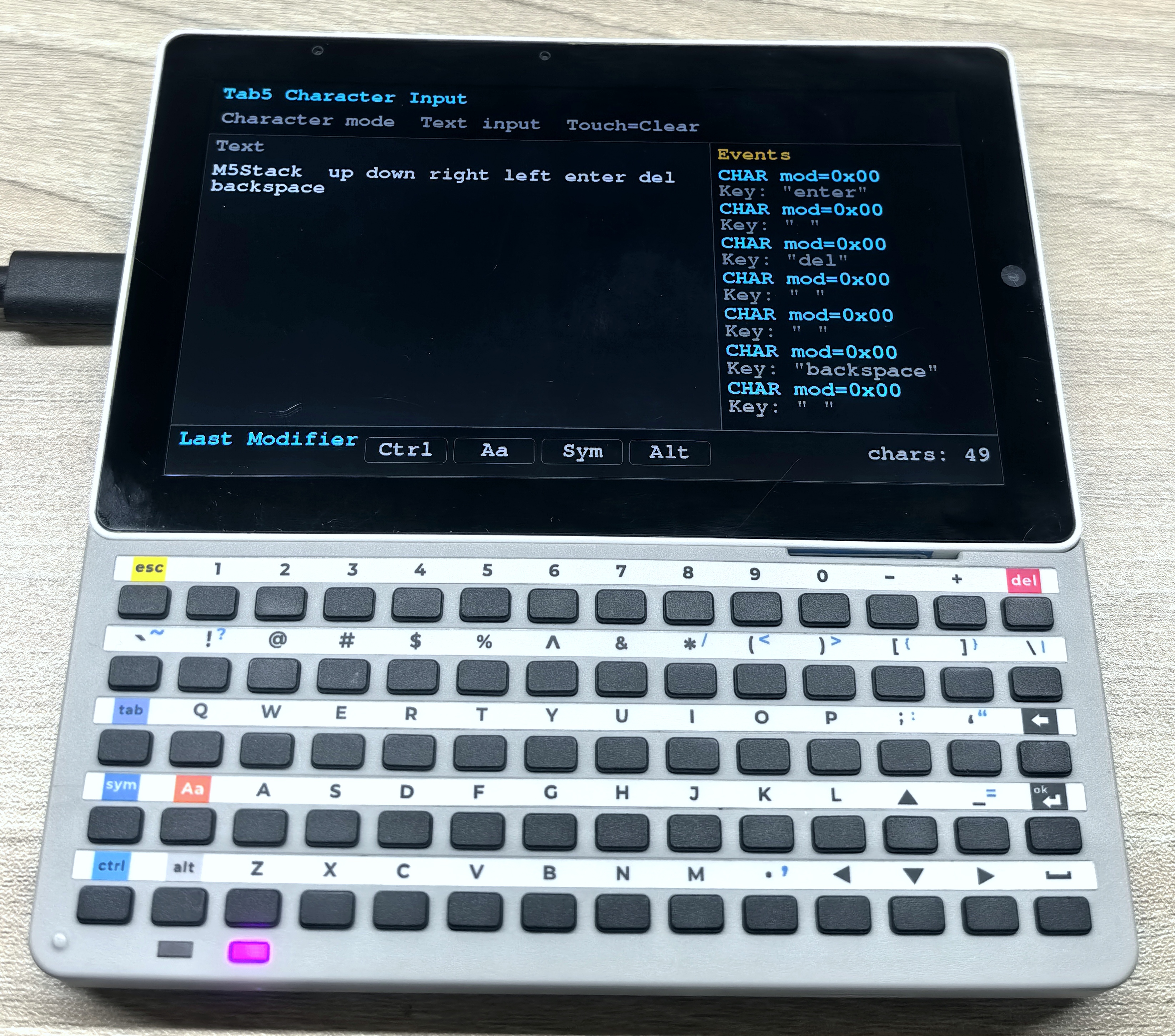
}烧录程序后,在串口监视器及 LCD 上的文本区域中可以看到每次按键输入的字符内容和修饰键状态,触摸屏幕可以清空文本内容。
2.5 键盘综合示例
- 下面的示例程序使用普通模式实现了一个简单的文本编辑器,展示了如何使用 Tab5 控制 Tab5 Keyboard 的各种功能来处理文本输入、光标移动、事件日志等。程序在屏幕上显示了当前的文本内容、光标位置,以及最近的按键事件。
/*
  Tab5 Keyboard input example using M5UnitUnified for UnitTab5Keyboard.

    This example uses Normal mode so the Tab5 keyboard behaves like a small text
    editor: printable keys insert text, Backspace/Delete remove text, and the
    arrow keys move the cursor. The current editing state is shown on screen.
*/
#include <M5Unified.h>
#include <M5UnitUnified.h>
#include <M5UnitUnifiedKEYBOARD.h>
#include <M5HAL.hpp>
#include <M5Utility.h>
#include <algorithm>
#include <cctype>
#include <limits>
#include <string>

namespace {
auto& lcd = M5.Display;

m5::unit::UnitUnified Units;
m5::unit::UnitTab5Keyboard unit;

constexpr int8_t TAB5_KEYBOARD_SDA = 0;
constexpr int8_t TAB5_KEYBOARD_SCL = 1;
constexpr size_t TEXT_CONTEXT_CHARS = 15 * 39;
constexpr size_t MAX_TEXT_LENGTH   = TEXT_CONTEXT_CHARS;
constexpr size_t MAX_LOG_LINES     = 7;

constexpr uint8_t HID_BACKSPACE = 0x2A;
constexpr uint8_t HID_DELETE    = 0x4C;
constexpr uint8_t HID_LEFT      = 0x50;
constexpr uint8_t HID_DOWN      = 0x51;
constexpr uint8_t HID_UP        = 0x52;
constexpr uint8_t HID_RIGHT     = 0x4F;

constexpr uint16_t COLOR_BG         = TFT_BLACK;
constexpr uint16_t COLOR_PANEL      = 0x2104;  // dark gray
constexpr uint16_t COLOR_BORDER     = 0x5AEB;
constexpr uint16_t COLOR_TEXT       = TFT_WHITE;
constexpr uint16_t COLOR_CURSOR     = TFT_GREEN;
constexpr uint16_t COLOR_MUTED      = 0xAD55;
constexpr uint16_t COLOR_ACCENT     = TFT_CYAN;
constexpr uint16_t COLOR_MOD_ACTIVE = TFT_GREEN;
constexpr uint16_t COLOR_WARN       = TFT_ORANGE;

std::string text_buffer;
size_t cursor_pos{};
struct EventLogLine {
    std::string position;
    std::string key;
};

EventLogLine log_lines[MAX_LOG_LINES];
size_t log_head{};
size_t log_count{};
bool header_dirty{true};
bool text_dirty{true};
bool log_dirty{true};
bool status_dirty{true};

struct Rect {
    int16_t x;
    int16_t y;
    int16_t w;
    int16_t h;
};

Rect header_rect;
Rect text_rect;
Rect status_rect;
Rect log_rect;

bool needs_redraw()
{
    return header_dirty || text_dirty || log_dirty || status_dirty;
}

void mark_editor_dirty()
{
    text_dirty   = true;
    log_dirty    = true;
    status_dirty = true;
}

void push_log(const std::string& position, const std::string& key)
{
    // Keep a small ring buffer so the screen always shows the latest key events.
    log_lines[log_head] = EventLogLine{position, key};
    log_head            = (log_head + 1U) % MAX_LOG_LINES;
    if (log_count < MAX_LOG_LINES) {
        ++log_count;
    }
}

void push_log(const std::string& line)
{
    push_log(line, "");
}

void print_serial_header(const char* mode)
{
    Serial.printf("\n[Tab5Keyboard] %s mode key monitor ready\n", mode);
    Serial.println("Open this serial monitor to see every key event.");
}

size_t line_begin(const size_t pos)
{
    // Cursor movement is based on logical text lines separated by '\n'.
    size_t i = std::min(pos, text_buffer.size());
    while (i > 0 && text_buffer[i - 1] != '\n') {
        --i;
    }
    return i;
}

size_t line_end(const size_t pos)
{
    size_t i = std::min(pos, text_buffer.size());
    while (i < text_buffer.size() && text_buffer[i] != '\n') {
        ++i;
    }
    return i;
}

struct VisualCursorPosition {
    int16_t line{};
    int16_t x{};
};

void prepare_text_font()
{
    lcd.setFont(&fonts::FreeMonoBold18pt7b);
}

int16_t text_left()
{
    return text_rect.x + 14;
}

int16_t text_right()
{
    return text_rect.x + text_rect.w - 14;
}

VisualCursorPosition visual_cursor_position(const size_t pos)
{
    prepare_text_font();
    const int16_t left  = text_left();
    const int16_t right = text_right();
    int16_t x           = left;
    int16_t line{};

    for (size_t i = 0; i < text_buffer.size(); ++i) {
        const char c = text_buffer[i];
        if (c != '\n') {
            char s[2] = {c, '\0'};
            const int16_t char_w = std::max<int16_t>(1, lcd.textWidth(s));
            if (x + char_w > right) {
                x = left;
                ++line;
            }
        }

        if (i == pos) {
            return VisualCursorPosition{line, x};
        }

        if (c == '\n') {
            x = left;
            ++line;
        } else {
            char s[2] = {c, '\0'};
            x = static_cast<int16_t>(x + std::max<int16_t>(1, lcd.textWidth(s)));
        }
    }

    return VisualCursorPosition{line, x};
}

size_t cursor_pos_on_visual_line(const int16_t target_line, const int16_t target_x)
{
    prepare_text_font();
    const int16_t left  = text_left();
    const int16_t right = text_right();
    int16_t x           = left;
    int16_t line{};
    size_t best_pos     = cursor_pos;
    int32_t best_delta  = std::numeric_limits<int32_t>::max();

    auto consider = [&](const size_t pos) {
        if (line != target_line) {
            return;
        }
        const int32_t delta = std::abs(static_cast<int32_t>(x) - static_cast<int32_t>(target_x));
        if (delta < best_delta) {
            best_delta = delta;
            best_pos   = pos;
        }
    };

    for (size_t i = 0; i < text_buffer.size(); ++i) {
        const char c = text_buffer[i];
        if (c != '\n') {
            char s[2] = {c, '\0'};
            const int16_t char_w = std::max<int16_t>(1, lcd.textWidth(s));
            if (x + char_w > right) {
                x = left;
                ++line;
            }
        }

        consider(i);

        if (c == '\n') {
            x = left;
            ++line;
        } else {
            char s[2] = {c, '\0'};
            x = static_cast<int16_t>(x + std::max<int16_t>(1, lcd.textWidth(s)));
        }
    }

    consider(text_buffer.size());
    return best_pos;
}

void move_cursor_left()
{
    if (cursor_pos > 0) {
        --cursor_pos;
    }
}

void move_cursor_right()
{
    if (cursor_pos < text_buffer.size()) {
        ++cursor_pos;
    }
}

void move_cursor_up()
{
    const auto current = visual_cursor_position(cursor_pos);
    if (current.line == 0) {
        return;
    }
    cursor_pos = cursor_pos_on_visual_line(static_cast<int16_t>(current.line - 1), current.x);
}

void move_cursor_down()
{
    const auto current = visual_cursor_position(cursor_pos);
    const size_t next  = cursor_pos_on_visual_line(static_cast<int16_t>(current.line + 1), current.x);
    if (next == cursor_pos) {
        return;
    }
    cursor_pos = next;
}

void insert_char(const char c)
{
    // All text edits happen at cursor_pos so input behaves like a text box.
    switch (c) {
        case '\b':
            if (cursor_pos > 0) {
                text_buffer.erase(cursor_pos - 1, 1);
                --cursor_pos;
            }
            break;
        case 0x7F:
            if (cursor_pos < text_buffer.size()) {
                text_buffer.erase(cursor_pos, 1);
            }
            break;
        case '\r':
        case '\n':
            text_buffer.insert(cursor_pos, 1, '\n');
            ++cursor_pos;
            break;
        case '\t':
            text_buffer.insert(cursor_pos, "    ");
            cursor_pos += 4;
            break;
        default:
            if (std::isprint(static_cast<unsigned char>(c))) {
                text_buffer.insert(cursor_pos, 1, c);
                ++cursor_pos;
            }
            break;
    }

    if (text_buffer.size() > MAX_TEXT_LENGTH) {
        const size_t removed = text_buffer.size() - MAX_TEXT_LENGTH;
        text_buffer.erase(0, removed);
        cursor_pos = cursor_pos > removed ? cursor_pos - removed : 0;
    }
}

void delete_at_cursor()
{
    insert_char(0x7F);
}

void backspace_at_cursor()
{
    insert_char('\b');
}

std::string display_name_for_char(const char c)
{
    switch (c) {
        case '\b':
            return "Backspace";
        case 0x7F:
            return "Delete";
        case '\t':
            return "Tab";
        case '\r':
        case '\n':
            return "Enter";
        case 0x1B:
            return "Esc";
        default:
            break;
    }
    if (std::isprint(static_cast<unsigned char>(c))) {
        return std::string(1, c);
    }
    return m5::utility::formatString("0x%02X", static_cast<uint8_t>(c));
}

void process_character_event(const m5::unit::tab5_keyboard::Event& evt)
{
    for (uint8_t i = 0; i < evt.chr.length && evt.chr.chars[i] != '\0'; ++i) {
        insert_char(evt.chr.chars[i]);
    }

    push_log(m5::utility::formatString("CHAR mod=0x%02X", evt.modifier),
             m5::utility::formatString("Key: \"%s\"", evt.chr.chars));
    M5_LOGI("[Char] modifier=0x%02X length=%u chars=\"%s\"", evt.modifier, evt.chr.length, evt.chr.chars);
}

void process_key_event(const m5::unit::tab5_keyboard::Event& evt)
{
    if (!evt.key.pressed) {
        return;
    }

    // Normal mode gives row/col events; convert them to HID usage codes for editor behavior.
    const auto mapping = unit.isSym() ? m5::unit::tab5_keyboard::keyMatrixToHidSym(evt.key.row, evt.key.col)
                                      : m5::unit::tab5_keyboard::keyMatrixToHidBase(evt.key.row, evt.key.col);
    const uint8_t modifier = static_cast<uint8_t>(mapping.modifier | (unit.isAa() ? 0x02 : 0x00) |
                                                  (unit.isCtrl() ? 0x01 : 0x00) | (unit.isAlt() ? 0x04 : 0x00));
    const char c = m5::unit::tab5_keyboard::hidUsageToChar(mapping.keycode, modifier);

    const char* action = nullptr;
    switch (mapping.keycode) {
        case HID_BACKSPACE:
            backspace_at_cursor();
            action = "Backspace";
            break;
        case HID_DELETE:
            // Delete removes the character after the cursor, unlike Backspace.
            delete_at_cursor();
            action = "Delete";
            break;
        case HID_LEFT:
            move_cursor_left();
            action = "Left";
            break;
        case HID_RIGHT:
            move_cursor_right();
            action = "Right";
            break;
        case HID_UP:
            move_cursor_up();
            action = "Up";
            break;
        case HID_DOWN:
            move_cursor_down();
            action = "Down";
            break;
        default:
            if (c != 0) {
                insert_char(c);
            }
            break;
    }

    const auto name = action ? std::string(action) : (c ? display_name_for_char(c) : std::string("matrix"));
    push_log(m5::utility::formatString("Row:%u  Col:%u", evt.key.row, evt.key.col),
             m5::utility::formatString("Key:%s%s", name.c_str(), evt.repeat ? " repeat" : ""));
    Serial.printf("[Normal] row=%u col=%u pressed=%u repeat=%u sym=%u aa=%u ctrl=%u alt=%u hid=0x%02X mod=0x%02X key=%s\n",
                  evt.key.row, evt.key.col, evt.key.pressed, evt.repeat, unit.isSym(), unit.isAa(), unit.isCtrl(),
                  unit.isAlt(), mapping.keycode, modifier, name.c_str());
    M5_LOGI("[Key] row=%u col=%u pressed=%u repeat=%u char=%s", evt.key.row, evt.key.col, evt.key.pressed,
            evt.repeat, name.c_str());
}

void process_hid_event(const m5::unit::tab5_keyboard::Event& evt)
{
    const char c = m5::unit::tab5_keyboard::hidUsageToChar(evt.hid.keycode, evt.modifier);
    if (c != 0) {
        insert_char(c);
    }

    const auto name = c ? display_name_for_char(c) : m5::utility::formatString("kc=0x%02X", evt.hid.keycode);
    push_log(m5::utility::formatString("HID mod=0x%02X", evt.modifier),
             m5::utility::formatString("Key:%s", name.c_str()));
    Serial.printf("[HID] modifier=0x%02X keycode=0x%02X key=%s\n", evt.modifier, evt.hid.keycode, name.c_str());
    M5_LOGI("[HID] modifier=0x%02X keycode=0x%02X char=%s", evt.modifier, evt.hid.keycode, name.c_str());
}

void drain_keyboard_events()
{
    // Drain all queued keyboard events every frame before redrawing the UI.
    while (!unit.empty()) {
        const auto evt = unit.oldest();
        switch (evt.type) {
            case m5::unit::tab5_keyboard::EventType::Character:
                process_character_event(evt);
                break;
            case m5::unit::tab5_keyboard::EventType::Key:
                process_key_event(evt);
                break;
            case m5::unit::tab5_keyboard::EventType::Hid:
                process_hid_event(evt);
                break;
            case m5::unit::tab5_keyboard::EventType::None:
            default:
                break;
        }
        unit.discard();
        mark_editor_dirty();
    }
}

void layout_screen()
{
    // Split the Tab5 LCD into text input, event log, header, and status regions.
    const int16_t w = lcd.width();
    const int16_t h = lcd.height();
    header_rect     = Rect{0, 0, w, 104};
    status_rect     = Rect{0, static_cast<int16_t>(h - 82), w, 82};
    log_rect        = Rect{static_cast<int16_t>(w * 2 / 3), 104, static_cast<int16_t>(w - w * 2 / 3),
                           static_cast<int16_t>(h - 104 - 82)};
    text_rect       = Rect{0, 104, static_cast<int16_t>(w * 2 / 3), static_cast<int16_t>(h - 104 - 82)};
}

void draw_panel(const Rect& r, const uint16_t color)
{
    lcd.fillRect(r.x, r.y, r.w, r.h, color);
    lcd.drawRect(r.x, r.y, r.w, r.h, COLOR_BORDER);
}

void draw_header()
{
    lcd.fillRect(header_rect.x, header_rect.y, header_rect.w, header_rect.h, COLOR_BG);
    lcd.setTextDatum(top_left);
    lcd.setTextColor(COLOR_ACCENT, COLOR_BG);
    lcd.setFont(&fonts::FreeMonoBold18pt7b);
    lcd.drawString("Tab5 Keyboard Input", 16, 8);

    lcd.setTextColor(COLOR_MUTED, COLOR_BG);
    lcd.drawString("BS=Prev  Del=Next  Arrow=Move Touch=Clear", 18, 58);
}

void draw_text_area()
{
    draw_panel(text_rect, COLOR_PANEL);
    lcd.setTextDatum(top_left);
    lcd.setFont(&fonts::FreeMonoBold18pt7b);
    lcd.setTextColor(COLOR_MUTED, COLOR_PANEL);
    lcd.drawString("Text", text_rect.x + 14, text_rect.y + 10);

    lcd.setTextColor(COLOR_TEXT, COLOR_PANEL);
    const int16_t text_left   = text_rect.x + 14;
    const int16_t text_top    = text_rect.y + 58;
    const int16_t text_right  = text_rect.x + text_rect.w - 14;
    const int16_t text_bottom = text_rect.y + text_rect.h - 10;
    int16_t x                 = text_left;
    int16_t y                 = text_top;

    const int16_t char_h    = lcd.fontHeight();
    const int16_t max_lines = std::max<int16_t>(1, (text_bottom - text_top) / char_h);
    const size_t start      = cursor_pos > TEXT_CONTEXT_CHARS ? cursor_pos - TEXT_CONTEXT_CHARS : 0;
    int16_t lines{};
    int16_t cursor_x{};
    int16_t cursor_y{};
    bool cursor_visible{};

    auto mark_cursor = [&]() {
        // Store the cursor position and draw it after text so it is never covered by glyphs.
        cursor_x       = x;
        cursor_y       = y;
        cursor_visible = x < text_right && y + char_h <= text_bottom;
    };

    auto advance_line = [&]() {
        x = text_left;
        y = static_cast<int16_t>(y + char_h);
        ++lines;
    };

    for (size_t i = start; i < text_buffer.size() && lines < max_lines; ++i) {
        const char c = text_buffer[i];
        if (c == '\n') {
            if (i == cursor_pos) {
                mark_cursor();
            }
            advance_line();
        } else {
            char s[2] = {c, '\0'};
            const int16_t char_w = std::max<int16_t>(1, lcd.textWidth(s));
            // Wrap manually so typed text never spills into the Events panel.
            if (x + char_w > text_right) {
                advance_line();
                if (lines >= max_lines) {
                    break;
                }
            }
            if (i == cursor_pos) {
                mark_cursor();
            }
            if (y + char_h <= text_bottom) {
                lcd.drawString(s, x, y);
                x = static_cast<int16_t>(x + char_w);
            }
        }
    }

    if (cursor_pos == text_buffer.size() && lines < max_lines) {
        mark_cursor();
    }

    if (text_buffer.empty()) {
        lcd.setTextColor(COLOR_MUTED, COLOR_PANEL);
        lcd.drawString("Start typing...", text_left + lcd.textWidth("|") + 8, text_top);
    } else if (cursor_visible) {
        lcd.fillRect(cursor_x, cursor_y, 4, char_h, COLOR_CURSOR);
    }
}

void draw_modifier_badge(const char* label, const bool active, const int16_t x, const int16_t y)
{
    const int16_t w = 126;
    const int16_t h = 42;
    const uint16_t fill = active ? COLOR_MOD_ACTIVE : COLOR_BG;
    const uint16_t fg   = active ? TFT_BLACK : COLOR_MUTED;
    lcd.fillRoundRect(x, y, w, h, 7, fill);
    lcd.drawRoundRect(x, y, w, h, 7, COLOR_BORDER);
    lcd.setTextDatum(middle_center);
    lcd.setFont(&fonts::FreeMonoBold18pt7b);
    lcd.setTextColor(fg, fill);
    lcd.drawString(label, x + w / 2, y + h / 2);
}

void draw_status()
{
    draw_panel(status_rect, COLOR_BG);
    lcd.setTextDatum(top_left);
    lcd.setFont(&fonts::FreeMonoBold18pt7b);
    lcd.setTextColor(COLOR_ACCENT, COLOR_BG);
    lcd.drawString("Modifiers", 16, status_rect.y + 8);

    draw_modifier_badge("Ctrl", unit.isCtrl(), 220, status_rect.y + 18);
    draw_modifier_badge("Aa", unit.isAa(), 356, status_rect.y + 18);
    draw_modifier_badge("Sym", unit.isSym(), 492, status_rect.y + 18);
    draw_modifier_badge("Alt", unit.isAlt(), 628, status_rect.y + 18);

    lcd.setTextColor(COLOR_MUTED, COLOR_BG);
    lcd.setTextDatum(top_right);
    lcd.drawString(m5::utility::formatString("chars: %u  cursor: %u", static_cast<unsigned>(text_buffer.size()),
                                             static_cast<unsigned>(cursor_pos))
                       .c_str(),
                   status_rect.w - 16, status_rect.y + 20);
}

void draw_log()
{
    draw_panel(log_rect, COLOR_BG);
    lcd.setTextDatum(top_left);
    lcd.setFont(&fonts::FreeMonoBold18pt7b);
    lcd.setTextColor(COLOR_WARN, COLOR_BG);
    lcd.drawString("Events", log_rect.x + 12, log_rect.y + 10);

    lcd.setTextColor(COLOR_MUTED, COLOR_BG);
    int16_t y            = log_rect.y + 52;
    const int16_t line_h = lcd.fontHeight();
    for (size_t i = 0; i < log_count; ++i) {
        const size_t idx = (log_head + MAX_LOG_LINES - log_count + i) % MAX_LOG_LINES;
        lcd.setTextColor(COLOR_ACCENT, COLOR_BG);
        lcd.drawString(log_lines[idx].position.c_str(), log_rect.x + 12, y);
        y += line_h;
        if (!log_lines[idx].key.empty()) {
            lcd.setTextColor(COLOR_MUTED, COLOR_BG);
            lcd.drawString(log_lines[idx].key.c_str(), log_rect.x + 12, y);
            y += line_h;
        }
        y += 4;
    }
}

void draw_screen()
{
    // Incremental redraw: each draw_* function clears only its own panel.
    lcd.startWrite();
    if (header_dirty) {
        draw_header();
        header_dirty = false;
    }
    if (text_dirty) {
        draw_text_area();
        text_dirty = false;
    }
    if (log_dirty) {
        draw_log();
        log_dirty = false;
    }
    if (status_dirty) {
        draw_status();
        status_dirty = false;
    }
    lcd.endWrite();
}

bool setup_tab5_keyboard()
{
    // Normal mode is required here because it exposes physical row/col events and modifier state.
    auto cfg            = unit.config();
    cfg.mode            = m5::unit::tab5_keyboard::Mode::Normal;
    cfg.start_periodic = true;
    cfg.irq_pin         = 50;// INT pin defaults to GPIO50 (Tab5 ExtPort1)
    cfg.software_repeat = true;
    unit.config(cfg);

    M5_LOGI("Tab5 ExtPort1 I2C: SDA:%d SCL:%d", TAB5_KEYBOARD_SDA, TAB5_KEYBOARD_SCL);
    Wire.end();
    Wire.begin(TAB5_KEYBOARD_SDA, TAB5_KEYBOARD_SCL, unit.component_config().clock);
    if (!Units.add(unit, Wire) || !Units.begin()) {
        return false;
    }

    M5.Log.printf("Firmware:%02X\n", unit.firmwareVersion());
    return true;
}

}  // namespace

void setup()
{
    M5.begin();
    Serial.begin(115200);
    print_serial_header("Normal");
    M5.setTouchButtonHeightByRatio(100);

    if (lcd.height() > lcd.width()) {
        lcd.setRotation(3);
    }
    layout_screen();
    lcd.fillScreen(COLOR_BG);

    if (!setup_tab5_keyboard()) {
        M5_LOGE("Failed to begin UnitTab5Keyboard");
        lcd.fillScreen(TFT_RED);
        lcd.setTextColor(TFT_WHITE, TFT_RED);
        lcd.setTextDatum(middle_center);
        lcd.drawString("UnitTab5Keyboard begin failed", lcd.width() / 2, lcd.height() / 2);
        while (true) {
            m5::utility::delay(10000);
        }
    }

    push_log("Keyboard ready");
    draw_screen();
}

void loop()
{
    M5.update();
    Units.update();
    drain_keyboard_events();

    // A single touch clears the editor contents without using any keyboard key.
    if (M5.Touch.getDetail().wasClicked()) {
        text_buffer.clear();
        cursor_pos = 0;
        push_log("Clear text");
        mark_editor_dirty();
    }

    if (needs_redraw()) {
        draw_screen();
    }
    m5::utility::delay(1000 / 30);
}烧录程序后,屏幕上会显示一个简单的文本编辑界面,顶部是标题和快捷键提示,左侧是文本输入区域,右侧是事件日志,底部显示当前的修饰键状态以及文本统计信息。按动按键,可观察光标移动、文本编辑、事件日志等功能的表现。