

Arduino 上手教程
2. 设备开发 & 案例程序
3. M5Unified
4. M5GFX
5. 扩展模块
Unit
Module
Atomic
Tab5
IoT
ToughC5 电源管理
ToughC5 电源管理相关 API 与案例程序。
案例程序
编译要求
- M5Stack 板管理版本 >=
3.3.9 - 开发板选项 =
M5ToughC5 - M5Unified 库版本 >=
0.2.22 - M5GFX 库版本 >=
0.2.28
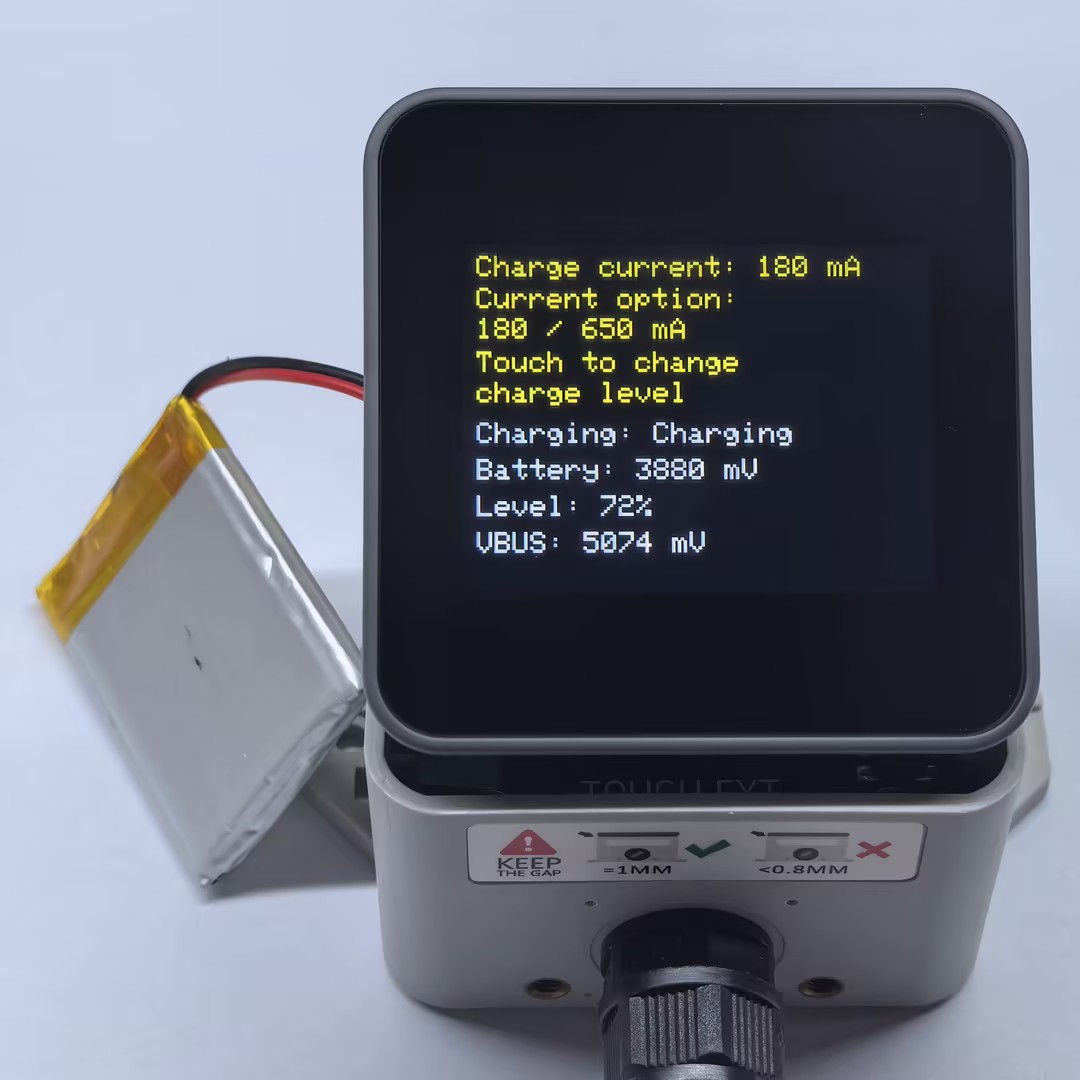
ToughC5 的充电电流由 M5.Power.setChargeCurrent() 设置。本例提供两个充电电流档位:低电流 180 mA 和高电流 650 mA。触摸屏幕后,程序会在两个档位之间切换,并刷新屏幕上的状态信息。
cpp
1 2 3 4 5 6 7 8 9 10 11 12 13 14 15 16 17 18 19 20 21 22 23 24 25 26 27 28 29 30 31 32 33 34 35 36 37 38 39 40 41 42 43 44 45 46 47 48 49 50 51 52 53 54 55 56 57 58 59 60 61 62 63 64 65 66 67 68 69 70 71 72 73 74 75 76 77 78 79 80 81 82 83 84 85 86 87 88 89 90 91 92 93 94 95 96 97 98 99 100 101 102 103 104
#include <M5Unified.h>

constexpr int CHARGE_CURRENT_LOW_MA = 180;
constexpr int CHARGE_CURRENT_HIGH_MA = 650;

int chargeCurrentMa = CHARGE_CURRENT_LOW_MA;
uint32_t lastRefreshMs = 0;

void drawStatus()
{
  const auto chargeState = M5.Power.isCharging();
  const char* chargeText =
      chargeState == m5::Power_Class::is_charging ? "Charging" :
      chargeState == m5::Power_Class::is_discharging ? "Not charging" :
      "Unknown";

  const int batteryVoltage = M5.Power.getBatteryVoltage();
  const int batteryLevel = M5.Power.getBatteryLevel();
  const int vbusVoltage = M5.Power.getVBUSVoltage();

  M5.Display.clear();
  M5.Display.setTextSize(2);

  M5.Display.setTextColor(0xFFE0);

  M5.Display.setCursor(10, 8);
  M5.Display.printf("Charge current: %d mA", chargeCurrentMa);

  M5.Display.setCursor(10, 30);
  M5.Display.printf("Current option:");

  M5.Display.setCursor(10, 51);
  M5.Display.printf("180 / 650 mA");

  M5.Display.setCursor(10, 74);
  M5.Display.printf("Touch to change");

  M5.Display.setCursor(10, 95);
  M5.Display.printf("charge level");

  M5.Display.setTextColor(0xFFFF);

  M5.Display.setCursor(10, 123);
  M5.Display.printf("Charging: %s", chargeText);

  M5.Display.setCursor(10, 148);
  if (batteryVoltage < 0) {
    M5.Display.printf("Battery: Unknown");
  } else if (batteryVoltage == 0) {
    M5.Display.printf("Battery: No battery");
  } else {
    M5.Display.printf("Battery: %d mV", batteryVoltage);
  }

  M5.Display.setCursor(10, 173);
  if (batteryLevel < 0) {
    M5.Display.printf("Level: Unknown");
  } else {
    M5.Display.printf("Level: %d%%", batteryLevel);
  }

  M5.Display.setCursor(10, 198);
  if (vbusVoltage < 0) {
    M5.Display.printf("VBUS: Unsupported");
  } else {
    M5.Display.printf("VBUS: %d mV", vbusVoltage);
  }
}

void setup()
{
  auto cfg = M5.config();

  // If powered from the Grove port or DC input, set this to false as needed.
  // cfg.output_power = false;

  M5.begin(cfg);
  M5.Power.setChargeCurrent(chargeCurrentMa);

  drawStatus();
  lastRefreshMs = millis();
}

void loop()
{
  M5.update();

  bool redraw = false;

  if (M5.Touch.getCount() > 0 && M5.Touch.getDetail(0).wasPressed()) {
    chargeCurrentMa = (chargeCurrentMa == CHARGE_CURRENT_LOW_MA)
        ? CHARGE_CURRENT_HIGH_MA
        : CHARGE_CURRENT_LOW_MA;

    M5.Power.setChargeCurrent(chargeCurrentMa);
    redraw = true;
  }

  const uint32_t now = millis();
  if (redraw || now - lastRefreshMs >= 1000) {
    drawStatus();
    lastRefreshMs = now;
  }
}程序启动后默认设置 180 mA 充电电流,并显示当前充电状态、电池电压、电量和 VBUS 电压。触摸屏幕一次即可切换到另一个充电电流档位,屏幕内容会立即刷新,其他状态信息也会每秒更新一次。
API
ToughC5 电池状态部分使用了 M5Unified 库中的 Power_Class,更多相关的API可以参考下方文档:
Page Tools