

Arduino 上手教程
2. 设备开发 & 案例程序
3. M5Unified
4. M5GFX
5. 扩展模块
Unit
Module
Atomic
Tab5
IoT
PaperMono NFC 近场通信
PaperMono NFC 近场通信相关 API 与案例程序。
案例程序
编译要求
- M5Stack 板管理版本 >= 3.3.9
- 开发板选项 =
M5PaperMono - M5Unified 库版本 >= 0.2.20
- M5GFX 库版本 >= 0.2.27
- M5UnitUnifiedNFC 库版本 >= 0.1.0
PaperMono 的 NFC / RFID 使能与复位信号 PYB_NFC_EN 连接至 M5IOE1 GPIO4 (M5IOE1_PIN_4)。下方案例程序会先将该引脚配置为输出并拉高,以释放复位并使能 NFC 模块;如果未执行该操作,NFC 模块可能无法正常初始化。
快速扫描识别
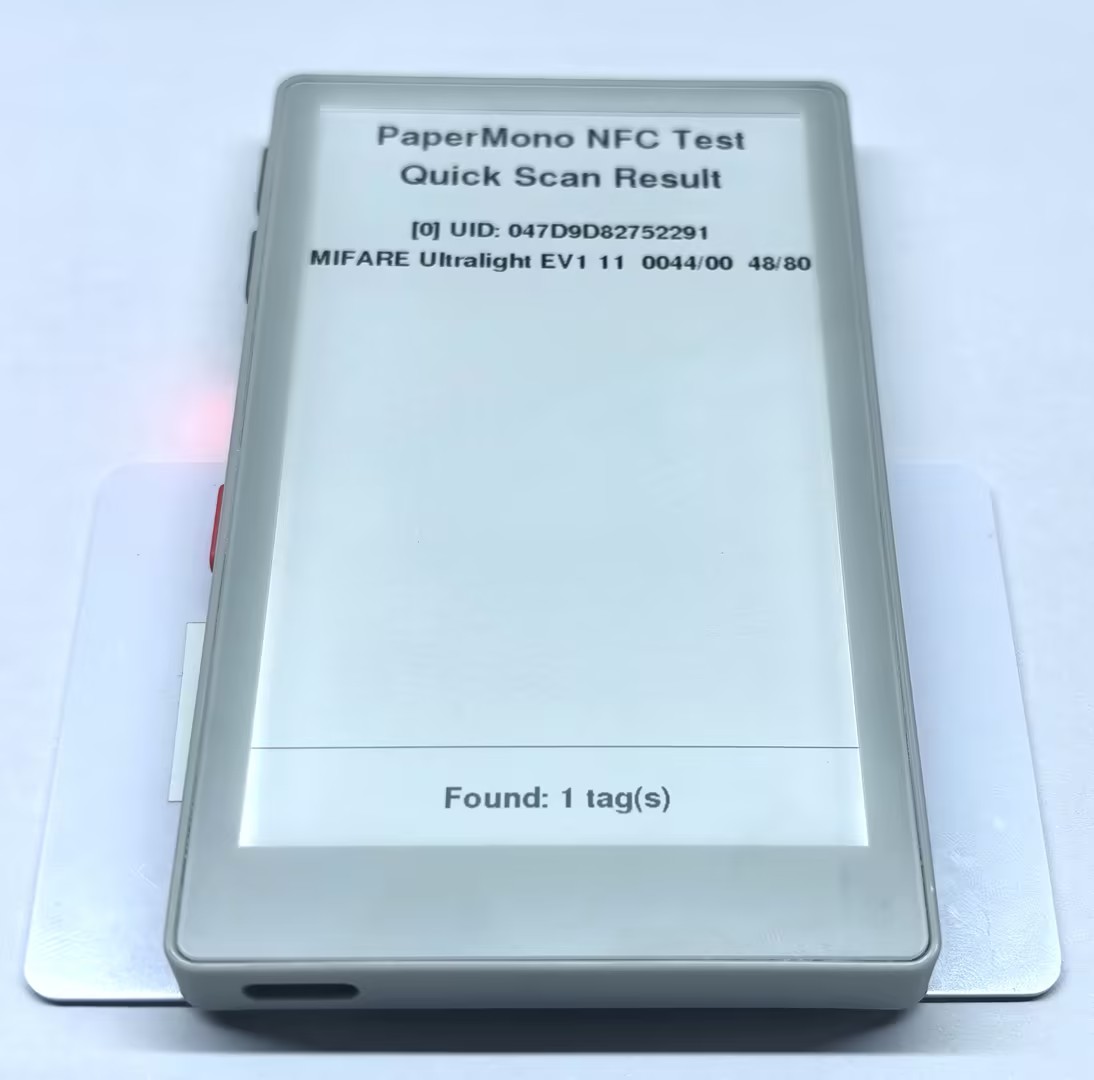
本例持续检测 PaperMono 感应区域内的 NFC-A 标签,输出 UID、类型、ATQA、SAK 以及用户区和总容量信息。
#include <M5Unified.h>
#include <M5UnitUnified.h>
#include <M5UnitUnifiedNFC.h>
#include <utility/M5IOE1_Class.hpp>
#include <vector>

using namespace m5::nfc::a;

namespace {
auto& lcd = M5.Display;
m5::unit::UnitUnified Units;
m5::unit::UnitNFC unit{};
m5::nfc::NFCLayerA nfc_a{unit};

constexpr uint8_t NFC_IRQ_PIN = 6;
constexpr auto NFC_CONTROL_PIN = m5::M5IOE1_Class::gpio4;
constexpr int STATUS_HEIGHT = 92;
}  // namespace

void drawBottomStatus(const char* message)
{
    const int top = lcd.height() - STATUS_HEIGHT;
    lcd.fillRect(0, top, lcd.width(), STATUS_HEIGHT, TFT_WHITE);
    lcd.drawFastHLine(0, top, lcd.width(), TFT_BLACK);
    lcd.setTextColor(TFT_BLACK, TFT_WHITE);
    lcd.setTextDatum(middle_center);
    lcd.setFont(&fonts::FreeSansBold12pt7b);
    lcd.drawString(message, lcd.width() / 2, top + STATUS_HEIGHT / 2);
}

void stopOnError(const char* message)
{
    M5_LOGE("%s", message);
    lcd.fillScreen(TFT_WHITE);
    lcd.setTextColor(TFT_BLACK, TFT_WHITE);
    lcd.setTextDatum(middle_center);
    lcd.setFont(&fonts::FreeSansBold18pt7b);
    lcd.drawString("PaperMono NFC Test", lcd.width() / 2, lcd.height() / 2 - 48);
    lcd.drawString(message, lcd.width() / 2, lcd.height() / 2 + 40);
    lcd.display();
    while (true) {
        delay(1000);
    }
}

void drawReadyScreen()
{
    lcd.fillScreen(TFT_WHITE);
    lcd.setTextColor(TFT_BLACK, TFT_WHITE);
    lcd.setTextDatum(middle_center);
    lcd.setFont(&fonts::FreeSansBold18pt7b);
    lcd.drawString("PaperMono NFC Test", lcd.width() / 2, 90);
    lcd.drawString("Quick Scan", lcd.width() / 2, 170);
    lcd.drawString("Place NFC-A tag", lcd.width() / 2, 300);
    drawBottomStatus("Waiting for NFC-A tag");
    lcd.display();
}

void setup()
{
    Serial.begin(115200);

    auto cfg = M5.config();
    cfg.clear_display = false;
    M5.begin(cfg);
    lcd.setRotation(0);
    lcd.setEpdMode(epd_mode_t::epd_text);

    auto& ioe = M5.getIOExpander(0);
    ioe.setHighImpedance(NFC_CONTROL_PIN, false);
    ioe.setDirection(NFC_CONTROL_PIN, true);
    ioe.digitalWrite(NFC_CONTROL_PIN, true);
    delay(10);

    auto nfc_cfg = unit.config();
    nfc_cfg.using_irq = true;
    nfc_cfg.irq = NFC_IRQ_PIN;
    unit.config(nfc_cfg);

    if (!(Units.add(unit, M5.In_I2C) && Units.begin())) {
        stopOnError("NFC init failed");
    }

    M5_LOGI("M5Unit-NFC initialized");
    M5_LOGI("%s", Units.debugInfo().c_str());
    drawReadyScreen();
}

void loop()
{
    M5.update();
    Units.update();

    static bool tagWasShown = false;
    std::vector<PICC> piccs;
    if (!nfc_a.detect(piccs)) {
        tagWasShown = false;
        delay(20);
        return;
    }
    if (tagWasShown) {
        nfc_a.deactivate();
        delay(100);
        return;
    }
    tagWasShown = true;

    lcd.fillScreen(TFT_WHITE);
    lcd.setTextColor(TFT_BLACK, TFT_WHITE);
    lcd.setTextDatum(top_center);
    lcd.setFont(&fonts::FreeSansBold18pt7b);
    lcd.drawString("PaperMono NFC Test", lcd.width() / 2, 24);
    lcd.drawString("Quick Scan Result", lcd.width() / 2, 76);
    lcd.setFont(&fonts::FreeSansBold12pt7b);

    uint16_t identified = 0;
    int y = 150;
    for (auto& picc : piccs) {
        if (!nfc_a.identify(picc)) {
            M5_LOGW("Failed to identify %s", picc.uidAsString().c_str());
            continue;
        }

        M5.Log.printf("PICC:%s %s %04X/%02X %u/%u\n", picc.uidAsString().c_str(),
                      picc.typeAsString().c_str(), picc.atqa, picc.sak, picc.userAreaSize(),
                      picc.totalSize());

        if (identified < 5) {
            char uidLine[64];
            char infoLine[96];
            snprintf(uidLine, sizeof(uidLine), "[%u] UID: %s", identified, picc.uidAsString().c_str());
            snprintf(infoLine, sizeof(infoLine), "%s  %04X/%02X  %u/%u", picc.typeAsString().c_str(),
                     picc.atqa, picc.sak, picc.userAreaSize(), picc.totalSize());
            lcd.drawString(uidLine, lcd.width() / 2, y);
            lcd.drawString(infoLine, lcd.width() / 2, y + 38);
            y += 92;
        }
        ++identified;
    }

    char countLine[32];
    snprintf(countLine, sizeof(countLine), "Found: %u tag(s)", identified);
    drawBottomStatus(countLine);
    nfc_a.deactivate();
    lcd.display();
    M5.Log.printf("==> %u PICC\n", identified);
    delay(500);
}将一张或多张 NFC-A 标签靠近 PaperMono 的 NFC 感应区域,识别结果会显示在屏幕上,同时输出到串口监视器。
完整数据读取
本例使用 BtnA 触发完整读取。程序会检测、识别并重新激活标签,然后使用 nfc_a.dump() 将标签数据完整输出到串口监视器。屏幕显示标签基本信息和读取状态。
对于 MIFARE Classic 标签,程序使用默认 KeyA FFFFFFFFFFFF 进行认证;如果标签修改过密钥,需要将代码中的 keyA 改为实际密钥。
#include <M5Unified.h>
#include <M5UnitUnified.h>
#include <M5UnitUnifiedNFC.h>
#include <utility/M5IOE1_Class.hpp>

using namespace m5::nfc::a;
using namespace m5::nfc::a::mifare;
using namespace m5::nfc::a::mifare::classic;

namespace {
auto& lcd = M5.Display;
m5::unit::UnitUnified Units;
m5::unit::UnitNFC unit{};
m5::nfc::NFCLayerA nfc_a{unit};

constexpr uint8_t NFC_IRQ_PIN = 6;
constexpr auto NFC_CONTROL_PIN = m5::M5IOE1_Class::gpio4;
constexpr Key keyA = DEFAULT_KEY;
constexpr int STATUS_HEIGHT = 92;
}  // namespace

void drawBottomStatus(const char* message)
{
    const int top = lcd.height() - STATUS_HEIGHT;
    lcd.fillRect(0, top, lcd.width(), STATUS_HEIGHT, TFT_WHITE);
    lcd.drawFastHLine(0, top, lcd.width(), TFT_BLACK);
    lcd.setTextColor(TFT_BLACK, TFT_WHITE);
    lcd.setTextDatum(middle_center);
    lcd.setFont(&fonts::FreeSansBold12pt7b);
    lcd.drawString(message, lcd.width() / 2, top + STATUS_HEIGHT / 2);
}

void stopOnError(const char* message)
{
    M5_LOGE("%s", message);
    lcd.fillScreen(TFT_WHITE);
    lcd.setTextColor(TFT_BLACK, TFT_WHITE);
    lcd.setTextDatum(middle_center);
    lcd.setFont(&fonts::FreeSansBold18pt7b);
    lcd.drawString("PaperMono NFC Test", lcd.width() / 2, lcd.height() / 2 - 48);
    lcd.drawString(message, lcd.width() / 2, lcd.height() / 2 + 40);
    lcd.display();
    while (true) {
        delay(1000);
    }
}

void drawReadyScreen()
{
    lcd.fillScreen(TFT_WHITE);
    lcd.setTextColor(TFT_BLACK, TFT_WHITE);
    lcd.setTextDatum(middle_center);
    lcd.setFont(&fonts::FreeSansBold18pt7b);
    lcd.drawString("PaperMono NFC Test", lcd.width() / 2, 110);
    lcd.drawString("Complete Reading", lcd.width() / 2, 190);
    lcd.drawString("Place tag and press BtnA", lcd.width() / 2, 340);
    drawBottomStatus("BtnA: scan and dump tag");
    lcd.display();
}

void setup()
{
    Serial.begin(115200);

    auto cfg = M5.config();
    cfg.clear_display = false;
    M5.begin(cfg);
    lcd.setRotation(0);
    lcd.setEpdMode(epd_mode_t::epd_text);

    auto& ioe = M5.getIOExpander(0);
    ioe.setHighImpedance(NFC_CONTROL_PIN, false);
    ioe.setDirection(NFC_CONTROL_PIN, true);
    ioe.digitalWrite(NFC_CONTROL_PIN, true);
    delay(10);

    auto nfc_cfg = unit.config();
    nfc_cfg.using_irq = true;
    nfc_cfg.irq = NFC_IRQ_PIN;
    unit.config(nfc_cfg);

    if (!(Units.add(unit, M5.In_I2C) && Units.begin())) {
        stopOnError("NFC init failed");
    }

    M5_LOGI("M5Unit-NFC initialized");
    M5_LOGI("%s", Units.debugInfo().c_str());
    drawReadyScreen();
}

void loop()
{
    M5.update();
    Units.update();

    if (!M5.BtnA.wasClicked()) {
        delay(20);
        return;
    }

    lcd.fillScreen(TFT_WHITE);
    lcd.setTextColor(TFT_BLACK, TFT_WHITE);
    lcd.setTextDatum(middle_center);
    lcd.setFont(&fonts::FreeSansBold18pt7b);
    lcd.drawString("PaperMono NFC Test", lcd.width() / 2, 80);
    lcd.drawString("Reading...", lcd.width() / 2, 180);
    drawBottomStatus("Waiting for tag...");
    lcd.display();

    PICC picc{};
    if (!nfc_a.detect(picc)) {
        drawBottomStatus("PICC not found");
        lcd.display();
        M5.Log.printf("PICC NOT exists\n");
        delay(500);
        drawReadyScreen();
        return;
    }

    if (!nfc_a.identify(picc) || !nfc_a.reactivate(picc)) {
        drawBottomStatus("Identify failed");
        lcd.display();
        M5_LOGE("Failed to identify/activate %s", picc.uidAsString().c_str());
        nfc_a.deactivate();
        delay(500);
        drawReadyScreen();
        return;
    }

    lcd.fillScreen(TFT_WHITE);
    lcd.setTextColor(TFT_BLACK, TFT_WHITE);
    lcd.setTextDatum(top_center);
    lcd.setFont(&fonts::FreeSansBold18pt7b);
    lcd.drawString("PaperMono NFC Test", lcd.width() / 2, 30);
    lcd.drawString("Complete Reading", lcd.width() / 2, 86);
    lcd.setFont(&fonts::FreeSansBold12pt7b);
    lcd.drawString(picc.uidAsString().c_str(), lcd.width() / 2, 190);
    lcd.drawString(picc.typeAsString().c_str(), lcd.width() / 2, 240);
    drawBottomStatus("Dumping data to Serial...");
    lcd.display();

    M5.Log.printf("==== Dump %s %s %u/%u ====\n", picc.uidAsString().c_str(),
                  picc.typeAsString().c_str(), picc.userAreaSize(), picc.totalSize());
    nfc_a.dump(keyA);
    M5.Log.printf("==== Dump complete ====\n");

    drawBottomStatus("Dump complete");
    lcd.display();
    nfc_a.deactivate();
    delay(800);
    drawReadyScreen();
}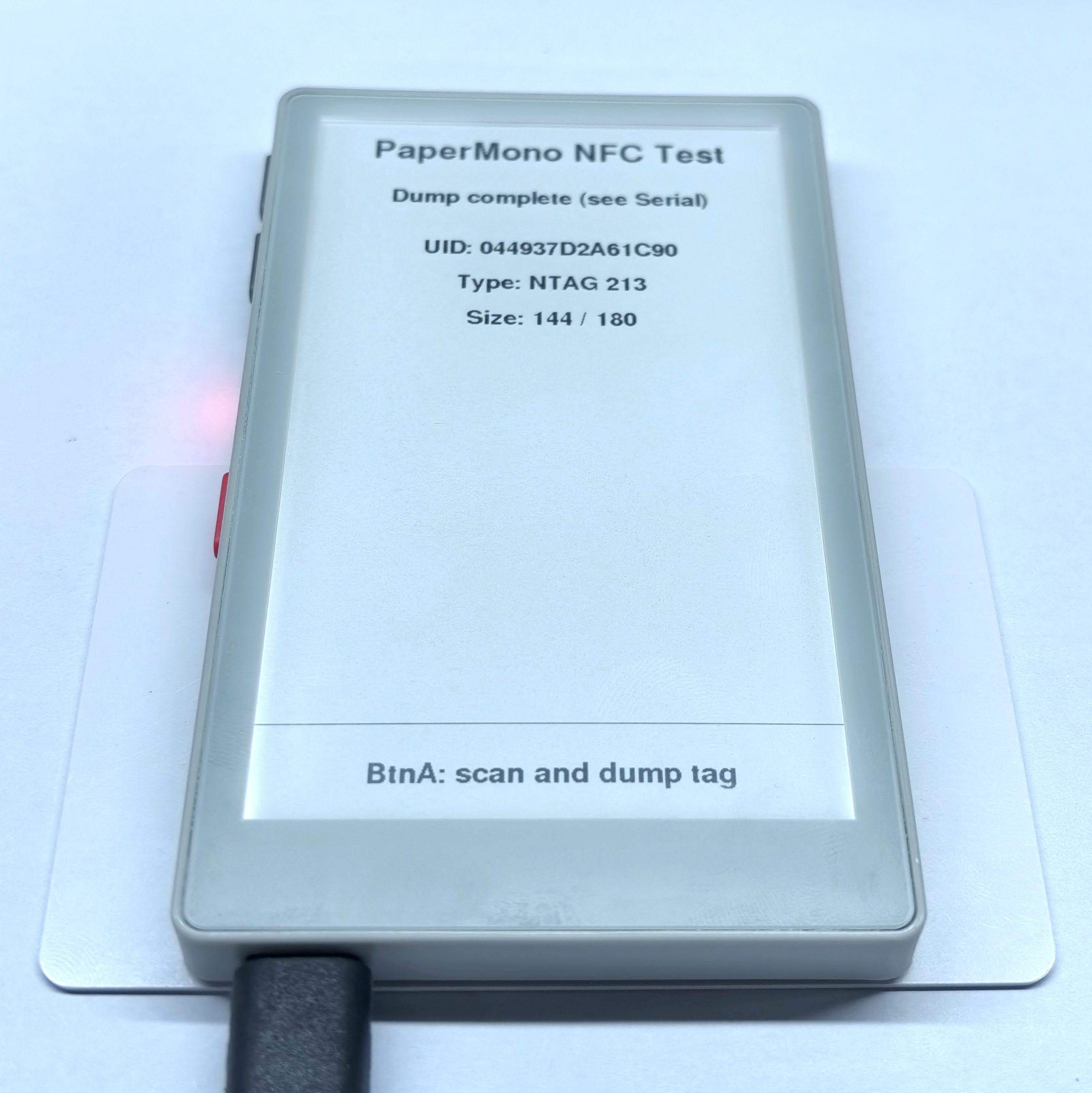
串口监视器输出示例:
[000/00]:04 49 37 F2
[001/01]:D2 A6 1C 90
[002/02]:F8 48 00 00
[003/03]:E1 10 12 00
[004/04]:49 41 4D 4C
[005/05]:49 55 42 4F
[006/06]:20 4D 35 53
[007/07]:54 41 43 4B
[008/08]:20 37 36 39
[009/09]:39 00 00 00
[010/0A]:00 00 00 00
[011/0B]:6C 6C 6F 20
[012/0C]:4D 35 53 74
[013/0D]:61 63 6B 11
[014/0E]:01 1A 54 02
[015/0F]:6A 61 E3 81
[016/10]:93 E3 82 93
[017/11]:E3 81 AB E3
[018/12]:81 A1 E3 81
[019/13]:AF 20 4D 35
[020/14]:53 74 61 63
[021/15]:6B 51 01 11
[022/16]:54 02 7A 68
[023/17]:E4 BD A0 E5
[024/18]:A5 BD 20 4D
[025/19]:35 53 74 61
[026/1A]:63 6B FE 78
[027/1B]:00 00 00 00
[028/1C]:00 00 00 00
[029/1D]:00 00 00 00
[030/1E]:00 00 00 00
[031/1F]:00 00 00 00
[032/20]:00 00 00 00
[033/21]:00 00 00 00
[034/22]:00 00 00 00
[035/23]:00 00 00 00
[036/24]:00 00 00 00
[037/25]:00 00 00 00
[038/26]:00 00 00 00
[039/27]:00 00 00 00
[040/28]:00 00 00 BD
[041/29]:04 00 00 FF
[042/2A]:00 05 00 00
[043/2B]:00 00 00 00
[044/2C]:00 00 00 00
==== Dump complete ====NDEF 格式读写标签
本例使用 BtnA 单击读取 NDEF 消息,使用 BtnB 单击写入 NDEF 消息。程序会检查标签是否支持 NDEF,读取时在屏幕和串口监视器中输出记录内容,写入时保存一个 HTTPS URI 和一个文本记录。
mifareUltralightChangeFormatToNDEF() 会修改标签格式,该操作不可恢复,请确认标签中没有需要保留的数据。#include <M5Unified.h>
#include <M5UnitUnified.h>
#include <M5UnitUnifiedNFC.h>
#include <utility/M5IOE1_Class.hpp>
#include <vector>
using namespace m5::nfc;
using namespace m5::nfc::a;
using namespace m5::nfc::a::mifare;
using namespace m5::nfc::ndef;
namespace {
auto& lcd = M5.Display;
m5::unit::UnitUnified Units; // Unit manager
m5::unit::UnitNFC unit{}; // NFC unit driver
m5::nfc::NFCLayerA nfc_a{unit}; // NFC-A protocol layer
constexpr uint8_t NFC_IRQ_PIN = 6; // NFC interrupt pin
constexpr auto NFC_CONTROL_PIN = m5::M5IOE1_Class::gpio4; // NFC power-enable pin (IO expander)
// Layout constants
constexpr int STATUS_HEIGHT = 92; // Bottom hint bar height
constexpr int TITLE_Y = 30; // Title position
constexpr int STATUS_Y = 100; // Status line below the title
constexpr int CONTENT_TOP = 160; // First data line position
constexpr int LINE_STEP = 44; // Vertical spacing between data lines
constexpr const char* KEY_HINT = "BtnA: Read BtnB: Write"; // Fixed key hint text
} // namespace
// Draw the fixed key-hint bar at the bottom
void drawBottomStatus(const char* message)
{
const int top = lcd.height() - STATUS_HEIGHT;
lcd.fillRect(0, top, lcd.width(), STATUS_HEIGHT, TFT_WHITE);
lcd.drawFastHLine(0, top, lcd.width(), TFT_BLACK); // Separator line
lcd.setTextColor(TFT_BLACK, TFT_WHITE);
lcd.setTextDatum(middle_center);
lcd.setFont(&fonts::FreeSansBold12pt7b);
lcd.drawString(message, lcd.width() / 2, top + STATUS_HEIGHT / 2);
}
// Render one page: title + status + data lines + bottom key hint
void renderPage(const char* status, const std::vector<String>& lines)
{
lcd.fillScreen(TFT_WHITE);
lcd.setTextColor(TFT_BLACK, TFT_WHITE);
// Title
lcd.setTextDatum(top_center);
lcd.setFont(&fonts::FreeSansBold18pt7b);
lcd.drawString("PaperMono NFC Test", lcd.width() / 2, TITLE_Y);
// Status / prompt line
lcd.setFont(&fonts::FreeSansBold12pt7b);
lcd.drawString(status, lcd.width() / 2, STATUS_Y);
// Data lines, stop before the bottom hint bar
int y = CONTENT_TOP;
for (auto&& line : lines) {
if (y + LINE_STEP >= lcd.height() - STATUS_HEIGHT) break;
lcd.drawString(line, lcd.width() / 2, y);
y += LINE_STEP;
}
drawBottomStatus(KEY_HINT);
lcd.display();
}
// Show a fatal error and halt
void stopOnError(const char* message)
{
M5_LOGE("%s", message);
renderPage(message, {});
while (true) {
delay(1000);
}
}
// Initial screen
void drawReadyScreen()
{
renderPage("Click BtnA to Read, BtnB to Write", {});
}
// Read NDEF and show the result under the title
void readNdef()
{
std::vector<String> lines;
// Verify the tag is NDEF formatted
bool valid = false;
if (!nfc_a.ndefIsValidFormat(valid)) {
M5_LOGE("Failed to check NDEF format");
renderPage("NDEF check failed", lines);
return;
}
if (!valid) {
M5.Log.printf("Data format is NOT NDEF\n");
renderPage("Tag is not NDEF formatted", lines);
return;
}
// Read raw NDEF data
TLV message;
if (!nfc_a.ndefRead(message)) {
M5_LOGE("Failed to read NDEF");
renderPage("NDEF read failed", lines);
return;
}
// No message TLV present
if (!message.isMessageTLV()) {
M5.Log.printf("NDEF Message TLV is NOT exists\n");
renderPage("No NDEF message", lines);
return;
}
// Collect each record into display lines
char buf[192];
for (auto&& record : message.records()) {
if (record.tnf() == TNF::Wellknown) {
// Well-known type: show type and decoded payload
const auto payload = record.payloadAsString();
M5.Log.printf("SZ:%3u TNF:%u T:%s [%s]\n", record.payloadSize(), record.tnf(),
record.type(), payload.c_str());
snprintf(buf, sizeof(buf), "Type: %s", record.type());
lines.push_back(String(buf));
snprintf(buf, sizeof(buf), "%s", payload.c_str());
lines.push_back(String(buf));
} else {
// Other types: show type only
M5.Log.printf("SZ:%3u TNF:%u T:%s\n", record.payloadSize(), record.tnf(),
record.type());
snprintf(buf, sizeof(buf), "Type: %s", record.type());
lines.push_back(String(buf));
}
}
renderPage("NDEF Read Result", lines);
}
// Write NDEF, output written data into outLines for display
bool writeNdef(std::vector<String>& outLines)
{
auto& picc = nfc_a.activatedPICC();
// Format MIFARE Ultralight as NDEF if needed
if (picc.isMifareUltralight() && !nfc_a.mifareUltralightChangeFormatToNDEF()) {
M5_LOGE("Failed to format MIFARE Ultralight as NDEF");
return false;
}
// Reserve one byte for the terminator TLV
const uint32_t maxUserSize = picc.userAreaSize() > 1 ? picc.userAreaSize() - 1 : 0;
if (maxUserSize == 0) {
M5_LOGE("Invalid NDEF user area size");
return false;
}
// Build the message with a URI and a text record
TLV message{Tag::Message};
Record uri;
Record text;
uri.setURIPayload("m5stack.com/", URIProtocol::HTTPS);
text.setTextPayload("Hello PaperMono", "en");
// Add URI record if it fits
message.push_back(uri);
if (message.required() > maxUserSize) {
message.pop_back();
return false;
}
outLines.push_back(String("URI: https://m5stack.com/"));
// Add text record if it still fits
message.push_back(text);
if (message.required() > maxUserSize) {
message.pop_back();
} else {
outLines.push_back(String("Text: Hello PaperMono"));
}
// Write to the tag
if (message.records().empty() || !nfc_a.ndefWrite(message)) {
M5_LOGE("Failed to write NDEF");
outLines.clear();
return false;
}
M5.Log.printf("Write NDEF OK!\n");
return true;
}
void setup()
{
Serial.begin(115200);
// Keep current display content on boot
auto cfg = M5.config();
cfg.clear_display = false;
M5.begin(cfg);
lcd.setRotation(0);
lcd.setEpdMode(epd_mode_t::epd_text);
// Enable NFC unit power via IO expander
auto& ioe = M5.getIOExpander(0);
ioe.setHighImpedance(NFC_CONTROL_PIN, false);
ioe.setDirection(NFC_CONTROL_PIN, true);
ioe.digitalWrite(NFC_CONTROL_PIN, true);
delay(10);
// Configure NFC to use the IRQ pin
auto nfc_cfg = unit.config();
nfc_cfg.using_irq = true;
nfc_cfg.irq = NFC_IRQ_PIN;
unit.config(nfc_cfg);
// Register and start the NFC unit
if (!(Units.add(unit, M5.In_I2C) && Units.begin())) {
stopOnError("NFC init failed");
}
M5_LOGI("M5Unit-NFC initialized");
M5_LOGI("%s", Units.debugInfo().c_str());
drawReadyScreen();
}
void loop()
{
M5.update();
Units.update();
// Check button input
const bool readRequested = M5.BtnA.wasClicked(); // BtnA -> Read
const bool writeRequested = M5.BtnB.wasClicked(); // BtnB -> Write
if (!readRequested && !writeRequested) {
delay(20);
return;
}
// Prompt user to place the tag
renderPage(readRequested ? "Place tag for READ..." : "Place tag for WRITE...", {});
// Detect a tag in the field
PICC picc{};
if (!nfc_a.detect(picc)) {
M5.Log.printf("PICC NOT exists\n");
renderPage("PICC not found", {});
return;
}
// Identify and (re)activate the tag
if (!nfc_a.identify(picc) || !nfc_a.reactivate(picc)) {
M5_LOGE("Failed to identify/activate %s", picc.uidAsString().c_str());
renderPage("Identify failed", {});
nfc_a.deactivate();
return;
}
M5.Log.printf("PICC:%s %s %u/%u\n", picc.uidAsString().c_str(), picc.typeAsString().c_str(),
picc.userAreaSize(), picc.totalSize());
// Dispatch based on tag capability and requested action
if (!picc.supportsNDEF()) {
M5.Log.printf("Not support the NDEF\n");
renderPage("Tag does not support NDEF", {});
} else if (readRequested) {
readNdef();
} else {
std::vector<String> lines;
const bool ok = writeNdef(lines);
renderPage(ok ? "NDEF Write Result" : "NDEF write failed", lines);
}
M5.Log.printf("Please remove the PICC from the reader\n");
nfc_a.deactivate();
}- Write
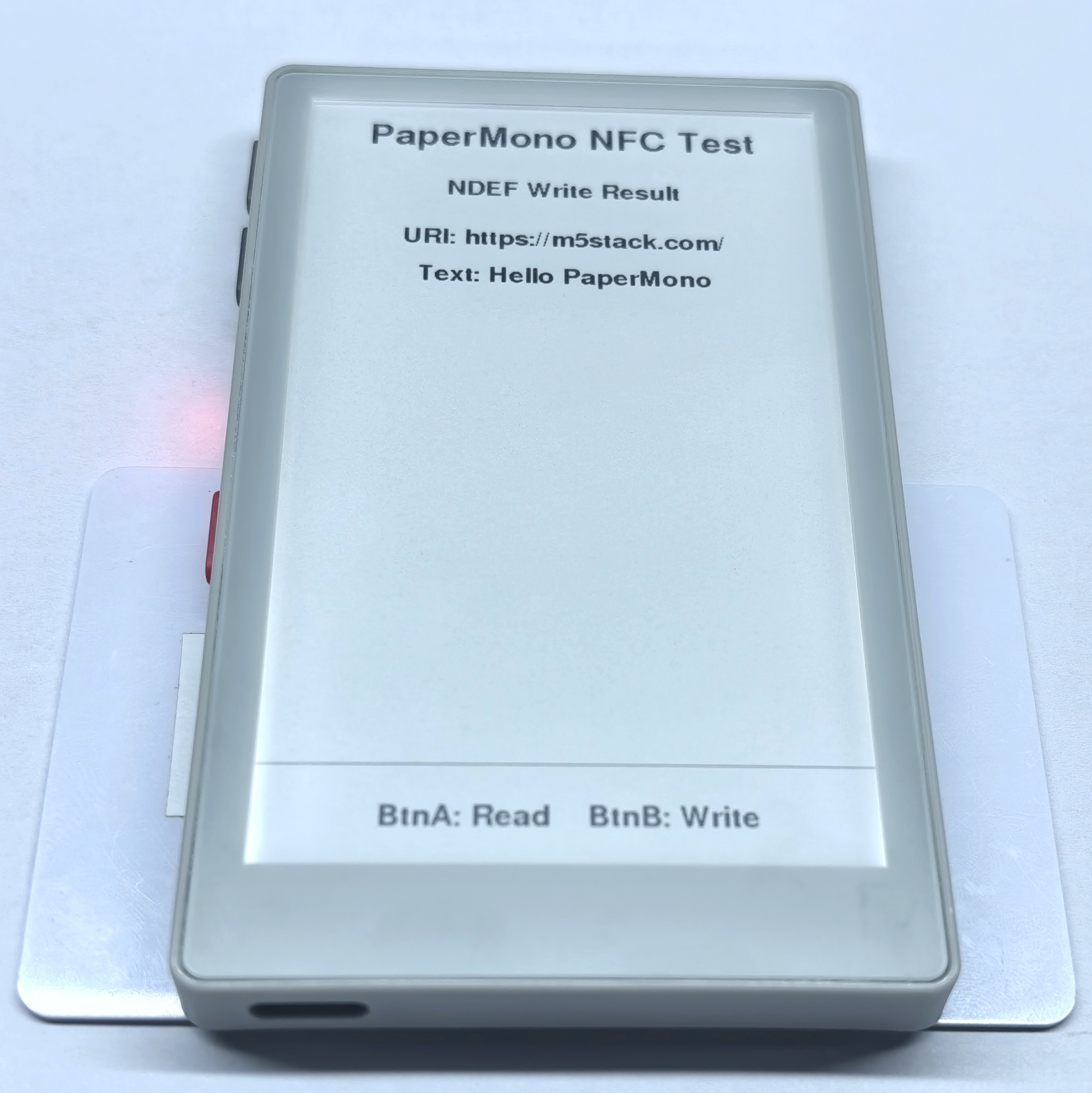
串口监视器输出示例:
PICC:047D9D82752291 MIFARE Ultralight EV1 11 48/80
Write NDEF OK!
Please remove the PICC from the reader- Read
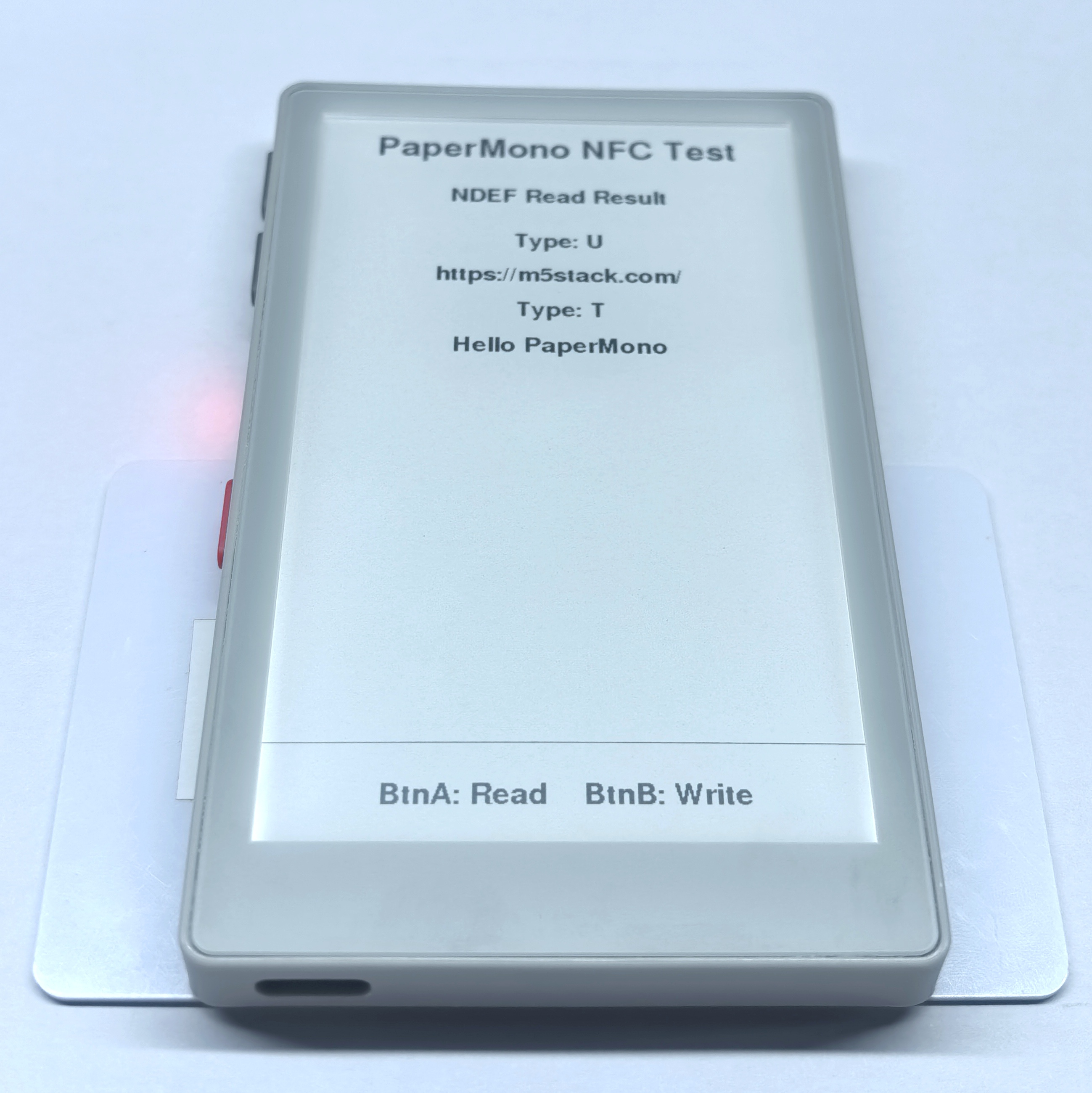
串口监视器输出示例:
PICC:047D9D82752291 MIFARE Ultralight EV1 11 48/80
SZ: 13 TNF:1 T:U [https://m5stack.com/]
SZ: 18 TNF:1 T:T [Hello PaperMono]
Please remove the PICC from the reader标签模拟
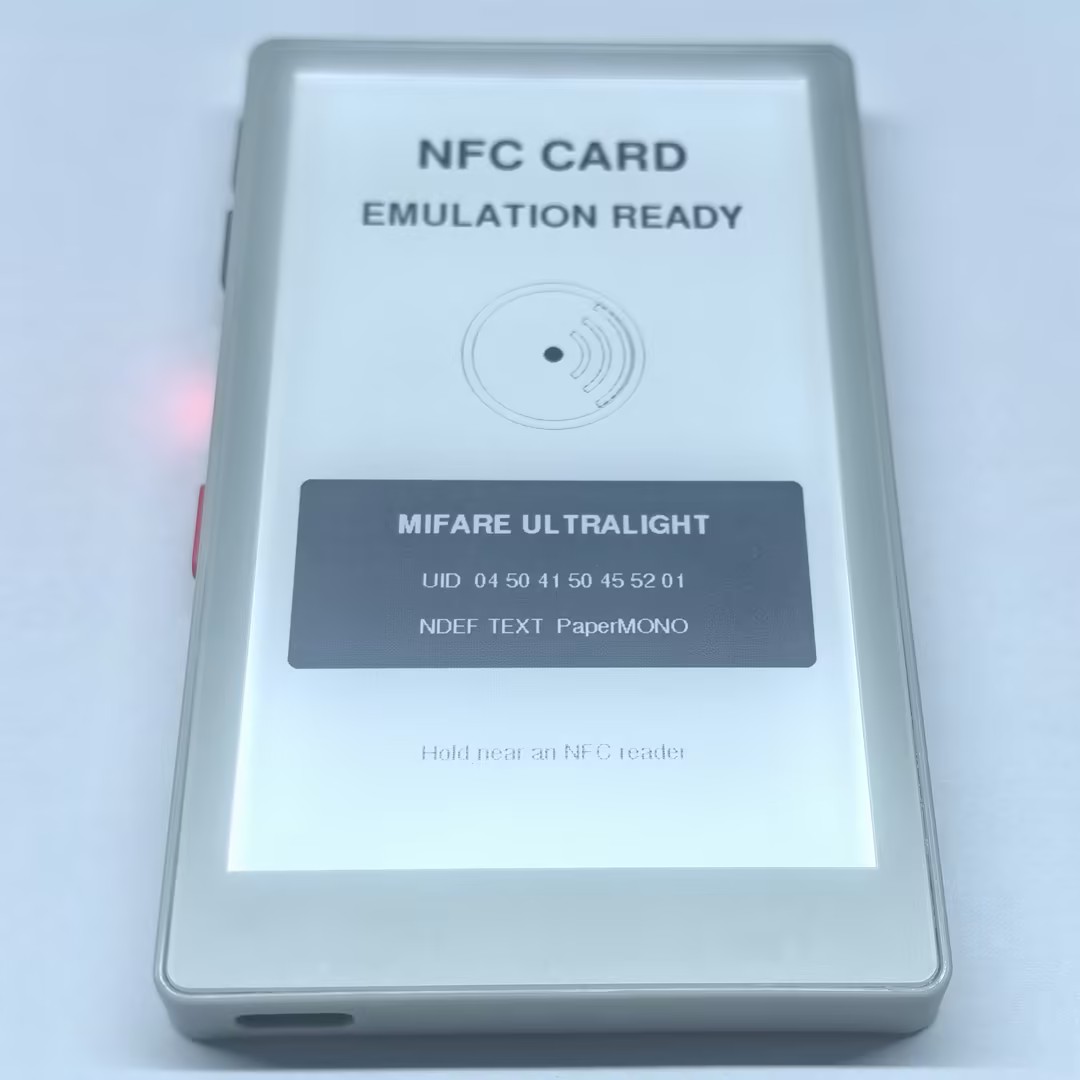
本例将 PaperMono 模拟为一张 MIFARE Ultralight NFC-A 标签,标签使用固定 UID 04504150455201,并保存文本为 PaperMONO 的 NDEF 记录。初始化成功后,屏幕会显示模拟标签信息,程序持续处理读卡器请求,并在串口监视器中输出 NFC-A 状态变化。
#include <Arduino.h>
#include <M5Unified.h>
#include <M5UnitUnified.h>
#include <M5UnitUnifiedNFC.h>
#include <wiring/m5_unit_unified_wiring.hpp>

namespace {

using m5::nfc::NFC;
using m5::nfc::EmulationLayerA;
using m5::nfc::a::PICC;
using m5::nfc::a::Type;

constexpr uint16_t kBlack = 0x0000;
constexpr uint16_t kDark = 0x52AA;
constexpr uint16_t kWhite = 0xFFFF;
constexpr uint8_t kFrontlightBrightness = 160;
constexpr int kNfcIrqPin = 6;

// Seven-byte NFC-A UID used by this demo.
constexpr uint8_t kUid[] = {0x04, 0x50, 0x41, 0x50, 0x45, 0x52, 0x01};

// MIFARE Ultralight memory. Page 4 contains an NDEF Text record whose
// language is "en" and whose text is exactly "PaperMONO".
uint8_t cardMemory[64] = {
    0x00, 0x00, 0x00, 0x00,  // UID0, UID1, UID2, BCC0
    0x00, 0x00, 0x00, 0x00,  // UID3, UID4, UID5, UID6
    0x00, 0xA3, 0x00, 0x00,  // BCC1, internal, lock bytes
    0xE1, 0x10, 0x06, 0x00,  // Capability Container
    0x03, 0x10, 0xD1, 0x01,  // NDEF TLV and record header
    0x0C, 0x54, 0x02, 0x65,  // payload length, Text type, language length, 'e'
    0x6E, 0x50, 0x61, 0x70,  // 'nPaper'
    0x65, 0x72, 0x4D, 0x4F,  // 'erMO'
    0x4E, 0x4F, 0xFE, 0x00,  // 'NO', terminator
};

m5::unit::UnitUnified units;
m5::unit::UnitNFC nfc;
EmulationLayerA emulation(nfc);
PICC card;
M5Canvas canvas(&M5.Display);

uint8_t calculateBcc(const uint8_t* data, size_t length,
                     uint8_t initial = 0)
{
    uint8_t value = initial;
    for (size_t i = 0; i < length; ++i) {
        value ^= data[i];
    }
    return value;
}

void embedUid()
{
    memcpy(cardMemory, kUid, 3);
    cardMemory[3] = calculateBcc(kUid, 3, 0x88);
    memcpy(cardMemory + 4, kUid + 3, 4);
    cardMemory[8] = calculateBcc(kUid + 3, 4);
}

void drawNfcMark(int cx, int cy)
{
    canvas.drawCircle(cx, cy, 78, kBlack);
    canvas.drawCircle(cx, cy, 69, kBlack);
    canvas.fillCircle(cx, cy, 8, kBlack);
    canvas.drawArc(cx, cy, 31, 25, 305, 55, kBlack);
    canvas.drawArc(cx, cy, 49, 43, 305, 55, kBlack);
    canvas.drawArc(cx, cy, 67, 61, 305, 55, kBlack);
}

void drawReadyScreen(bool ready)
{
    M5.Display.setEpdMode(epd_mode_t::epd_fast);
    canvas.fillSprite(kWhite);
    canvas.setTextDatum(middle_center);
    canvas.setTextColor(kBlack, kWhite);

    canvas.setFont(&fonts::FreeSansBold24pt7b);
    canvas.drawString("NFC CARD", 240, 100);
    canvas.setFont(&fonts::FreeSansBold18pt7b);
    canvas.setTextColor(ready ? kBlack : kDark, kWhite);
    canvas.drawString(ready ? "EMULATION READY" : "INITIALIZATION FAILED",
                      240, 170);

    drawNfcMark(240, 320);

    canvas.fillRoundRect(34, 450, 412, 176, 8, kBlack);
    canvas.setTextColor(kWhite, kBlack);
    canvas.setFont(&fonts::FreeSansBold12pt7b);
    canvas.drawString("MIFARE ULTRALIGHT", 240, 495);
    canvas.setFont(&fonts::FreeSans9pt7b);
    canvas.drawString("UID  04 50 41 50 45 52 01", 240, 548);
    canvas.drawString("NDEF TEXT  PaperMONO", 240, 590);

    canvas.setTextColor(kDark, kWhite);
    canvas.drawString(ready ? "Hold near an NFC reader"
                            : "Check serial output",
                      240, 700);
    canvas.pushSprite(0, 0);
}

bool beginCardEmulation()
{
    auto config = nfc.config();
    config.emulation = true;
    config.mode = NFC::A;
    config.using_irq = true;
    config.irq = kNfcIrqPin;
    nfc.config(config);

    if (!m5::unit::wiring::i2cClass(units, nfc, M5.In_I2C) ||
        !units.begin()) {
        return false;
    }

    embedUid();
    return card.emulate(Type::MIFARE_Ultralight, kUid, sizeof(kUid)) &&
           emulation.begin(card, cardMemory, sizeof(cardMemory));
}

const char* stateName(EmulationLayerA::State state)
{
    static constexpr const char* names[] = {
        "None", "Off", "Idle", "Ready", "Active", "Halt"
    };
    return names[static_cast<unsigned>(state)];
}

}  // namespace

void setup()
{
    Serial.begin(115200);
    delay(100);
    Serial.println("PaperMono NFC-A card emulation demo");

    auto config = M5.config();
    config.clear_display = false;
    config.internal_rtc = false;
    config.internal_imu = false;
    config.internal_mic = false;
    M5.begin(config);

    M5.Display.setRotation(0);
    M5.Display.setBrightness(kFrontlightBrightness);
    canvas.setColorDepth(16);
    if (!canvas.createSprite(M5.Display.width(), M5.Display.height())) {
        Serial.println("Display canvas allocation failed");
        return;
    }

    const bool ready = beginCardEmulation();
    drawReadyScreen(ready);
    if (!ready) {
        Serial.println("NFC-A emulation initialization failed");
        return;
    }

    const auto& picc = emulation.emulatePICC();
    Serial.printf("NFC-A emulation ready: %s\n",
                  picc.typeAsString().c_str());
    Serial.printf("UID: %s, ATQA: %04X, SAK: %u\n",
                  picc.uidAsString().c_str(), picc.atqa, picc.sak);
    Serial.println("NDEF text: PaperMONO");
}

void loop()
{
    // Keep the loop short because NFC-A response timing is strict.
    units.update();
    emulation.update();

    static EmulationLayerA::State previous = EmulationLayerA::State::None;
    const auto state = emulation.state();
    if (state != previous) {
        Serial.printf("NFC-A state: %s\n", stateName(state));
        previous = state;
    }
    yield();
}
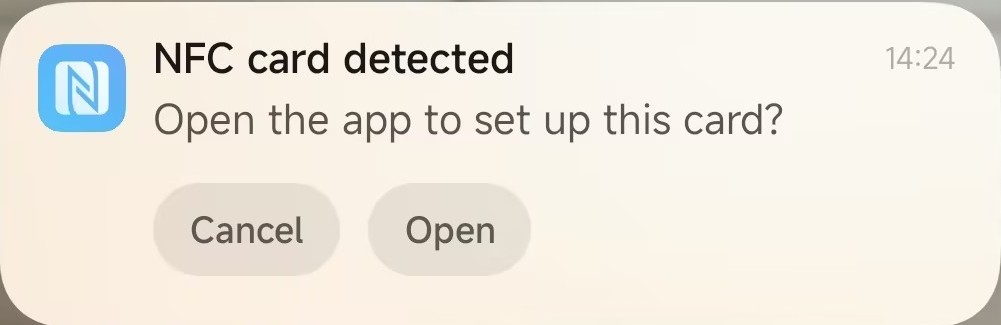
手机读取到的标签信息示例:
串口监视器输出示例:
PaperMono NFC-A card emulation demo
NFC-A emulation ready: MIFARE Ultralight
UID: 04504150455201, ATQA: 0044, SAK: 0
NDEF text: PaperMONO
NFC-A state: Off
NFC-A state: Idle
NFC-A state: Off
NFC-A state: Idle
NFC-A state: Ready
NFC-A state: Active
NFC-A state: Off