

Arduino 上手教程
2. 设备开发 & 案例程序
3. M5Unified
4. M5GFX
5. 扩展模块
Unit
Module
Atomic
Tab5
IoT
PaperMono Touch 触摸屏
PaperMono 触摸屏相关 API 与案例程序。
案例程序
编译要求
- M5Stack 板管理版本 >= 3.3.9
- 开发板选项 =
M5PaperMono - M5Unified 库版本 >= 0.2.20
- M5GFX 库版本 >= 0.2.27
PaperMono 触摸有效区域
触摸 IC 固件层面对触摸边界进行内缩处理,返回的有效触控坐标范围限定为: X轴:5 ~ 475(总宽480px),Y轴:5 ~ 795(总高800px)
cpp
1 2 3 4 5 6 7 8 9 10 11 12 13 14 15 16 17 18 19 20 21 22 23 24 25 26 27 28 29 30 31 32 33 34 35 36 37 38 39 40 41 42 43 44 45 46 47 48 49 50 51 52 53 54 55 56 57 58 59 60 61 62 63 64 65 66 67 68 69 70 71 72 73 74 75 76 77 78 79 80 81 82 83 84 85 86 87 88 89 90 91 92 93 94 95
#include <M5Unified.h>

constexpr uint_fast8_t MAX_TOUCH_POINTS = 2;

M5Canvas canvas(&M5.Display);
m5::touch_point_t touchPoints[MAX_TOUCH_POINTS];
m5::touch_point_t lastPoints[MAX_TOUCH_POINTS];
uint_fast8_t lastCount = 0;
uint32_t lastRefresh = 0;

bool touchChanged(const m5::touch_point_t* points, uint_fast8_t count)
{
    if (count != lastCount) {
        return true;
    }

    for (uint_fast8_t i = 0; i < count; ++i) {
        if (points[i].x != lastPoints[i].x || points[i].y != lastPoints[i].y
            || points[i].id != lastPoints[i].id) {
            return true;
        }
    }
    return false;
}

void saveTouchPoints(const m5::touch_point_t* points, uint_fast8_t count)
{
    lastCount = count;
    for (uint_fast8_t i = 0; i < count; ++i) {
        lastPoints[i] = points[i];
    }
}

void drawTouchPoints(const m5::touch_point_t* points, uint_fast8_t count)
{
    const int w = M5.Display.width();

    canvas.fillSprite(TFT_WHITE);
    canvas.setTextDatum(top_center);
    canvas.setFont(&fonts::FreeSansBold18pt7b);
    canvas.setTextColor(TFT_BLACK);
    canvas.drawString("PaperMono Touch Test", w / 2, 30);

    canvas.setFont(&fonts::FreeSansBold12pt7b);
    char text[40];
    snprintf(text, sizeof(text), "Touch points: %u / %u", static_cast<unsigned>(count),
             static_cast<unsigned>(MAX_TOUCH_POINTS));
    canvas.drawString(text, w / 2, 100);

    const uint16_t pointColors[] = {
        TFT_BLACK, TFT_DARKGREY, TFT_LIGHTGREY, TFT_BLACK, TFT_DARKGREY
    };

    for (uint_fast8_t i = 0; i < count; ++i) {
        char line[48];
        snprintf(line, sizeof(line), "Point %u: X:%d  Y:%d", static_cast<unsigned>(i + 1),
                 points[i].x, points[i].y);
        canvas.drawString(line, w / 2, 155 + i * 55);
        canvas.drawCircle(points[i].x, points[i].y, 24, TFT_BLACK);
        canvas.fillCircle(points[i].x, points[i].y, 8, pointColors[i]);
    }

    canvas.pushSprite(0, 0);
}

void setup()
{
    auto cfg = M5.config();
    cfg.clear_display = false;
    M5.begin(cfg);
    M5.Display.setEpdMode(epd_mode_t::epd_fastest);

    canvas.createSprite(M5.Display.width(), M5.Display.height());
    drawTouchPoints(nullptr, 0);
}

void loop()
{
    M5.update();
    const uint_fast8_t count = M5.Display.getTouchRaw(touchPoints, MAX_TOUCH_POINTS);

    if (touchChanged(touchPoints, count)
        && (count == 0 || millis() - lastRefresh >= 150)) {
        Serial.printf("Touch points: %u\r\n", static_cast<unsigned>(count));
        for (uint_fast8_t i = 0; i < count; ++i) {
            Serial.printf("Point %u: x:%d, y:%d\r\n", static_cast<unsigned>(i + 1),
                          touchPoints[i].x, touchPoints[i].y);
        }

        drawTouchPoints(touchPoints, count);
        saveTouchPoints(touchPoints, count);
        lastRefresh = millis();
    }
    delay(20);
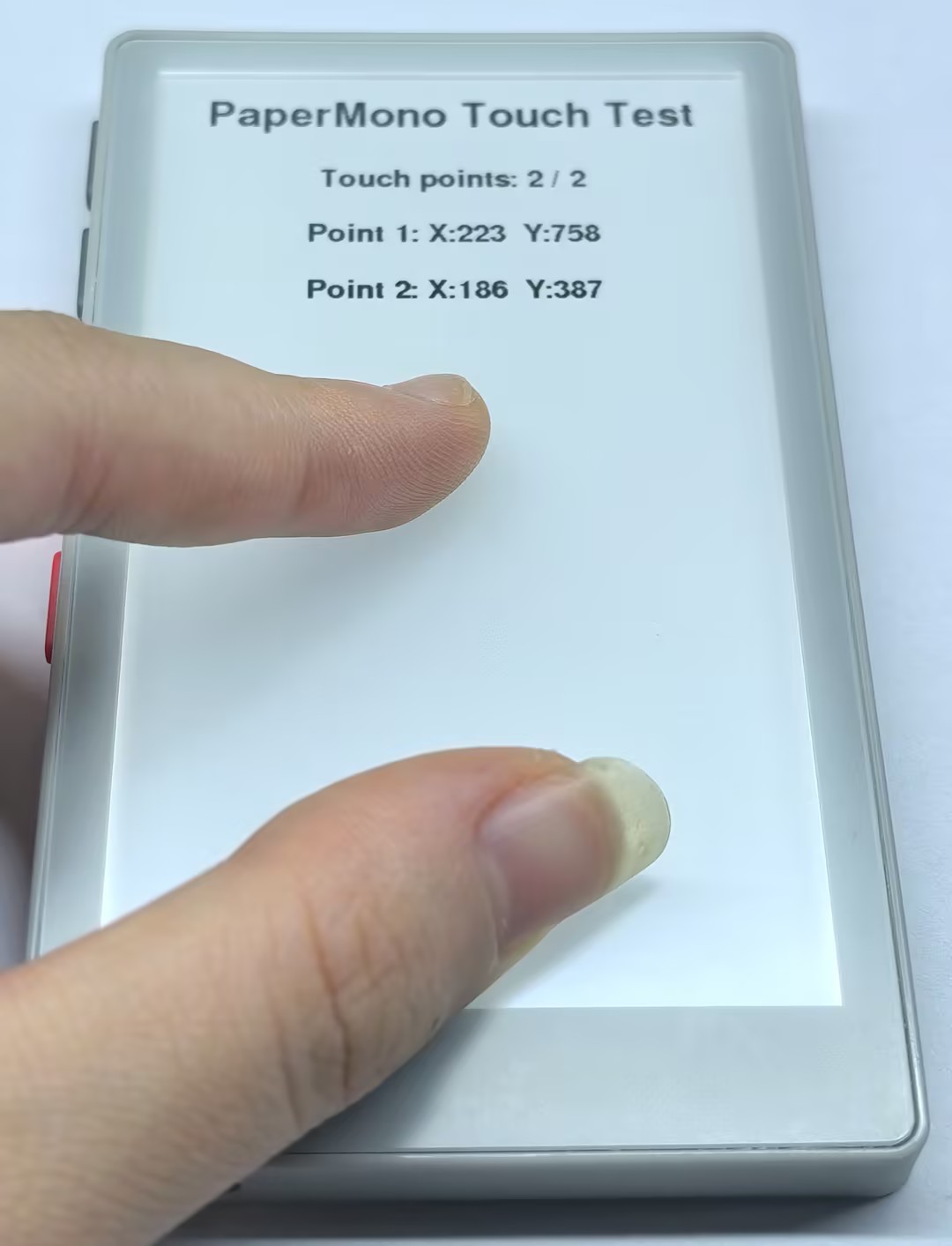
}PaperMono 触摸屏会显示当前触摸点的数量和坐标,最多支持 2 个触摸点。每次触摸点发生变化时,屏幕会刷新显示。
API
PaperMono 触摸屏部分使用了 M5Unified 库中的 Touch_Class,更多相关的API可以参考下方文档:
Page Tools