

Arduino 上手教程
2. 设备开发 & 案例程序
3. M5Unified
4. M5GFX
5. 扩展模块
Unit
Module
Atomic
Tab5
IoT
Unit 4EncoderMotor Driver Arduino 使用教程
1. 准备工作
- 环境配置:参考 Arduino IDE 上手教程 完成 IDE 安装,并根据实际使用的开发板安装对应的板管理与驱动库。
- 使用到的驱动库:
- 使用到的硬件产品:
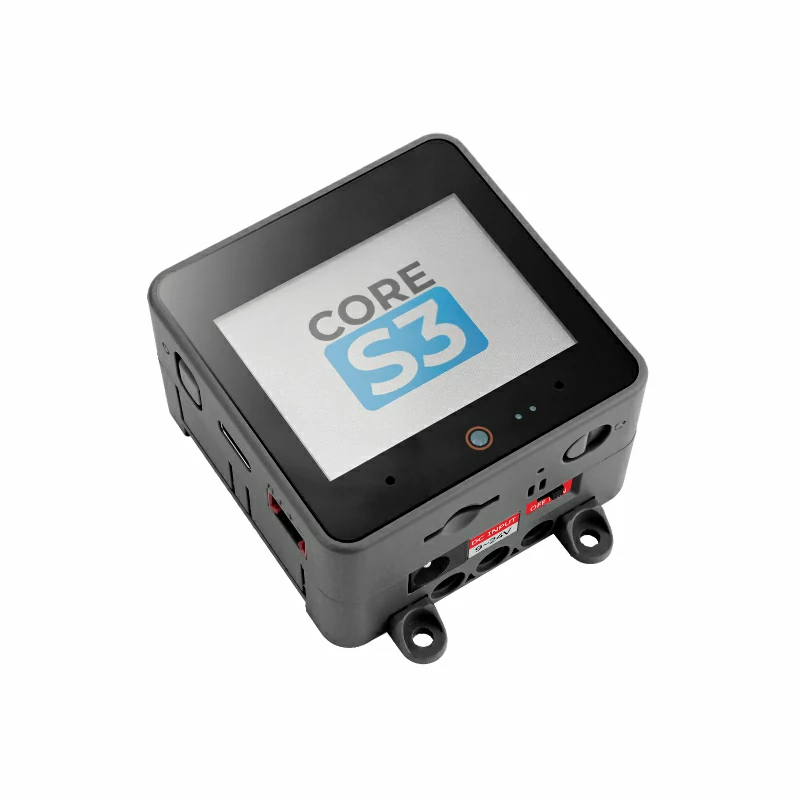
- CoreS3
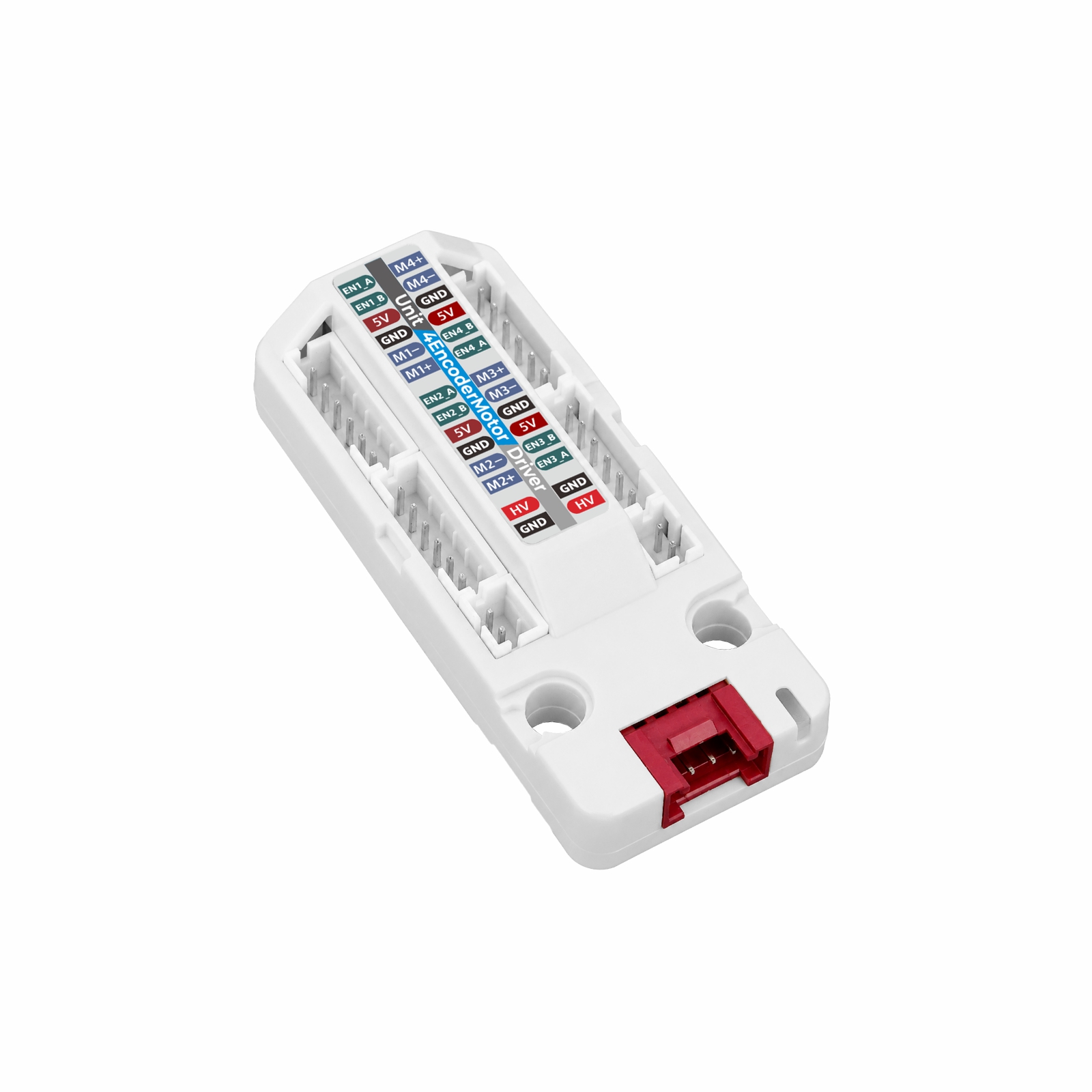
- Unit 4EncoderMotor Driver
- 4 × 6 线编码器减速电机(M+ / M- / GND / 5V / EN_B / EN_A)
- 外部 DC 6 ~ 12V 电源
2. 注意事项
3. 案例程序
- 本教程中使用的主控设备为 CoreS3,搭配 Unit 4EncoderMotor Driver 控制四路编码器电机。Unit 4EncoderMotor Driver 采用 I2C 协议通信,设备连接后对应的引脚为
G2 (SDA)、G1 (SCL)。单元上的两组 HY2.0-4P 接口内部连通,可任选其一连接主控,另一组用于扩展其他 I2C 设备。 - 下方分别提供驱动单元支持的三种控制方式的例程:PWM 模式(开环调速)、速度模式(速度环)、位置模式(位置环),另有软启动 / 软停止、RGB 指示灯两个例程。
- 所有例程都使用驱动库的
M5UnitEncoderMotor类,构造时传入产品选择器M5Unit_4EncoderMotor_Driver(默认地址0x24,四通道);驱动库通过#include <M5Unit-EncoderMotor-Driver.h>引入,显示功能还需使用上述 M5Unified 和 M5GFX 库。
3.1 PWM 模式(四通道开环调速)
#include <M5Unified.h>
#include <M5Unit-EncoderMotor-Driver.h>

// Product selector sets the default address and channel count:
// U232 = 0x2F (1 channel), U233 = 0x24 (4 channels)
M5UnitEncoderMotor motors(M5Unit_4EncoderMotor_Driver);

// Draw into an offscreen canvas so a full screen refresh does not flicker
M5Canvas canvas(&M5.Display);

constexpr int8_t I2C_SDA_PIN     = 2;  // CoreS3 PORT.A
constexpr int8_t I2C_SCL_PIN     = 1;
constexpr uint32_t I2C_FREQUENCY = 400000;
constexpr int8_t PWM_DUTY        = 100;   // -127 ~ 127
constexpr uint32_t RUN_MS        = 3000;
constexpr uint32_t STEP_MS       = 200;

void halt(const char *message)
{
    Serial.println(message);
    while (true) {
        delay(1000);
    }
}

// Center the status screen and mix three font sizes so the key value stands out.
void showScreen(const char *title, const char *value, const char *detail1, const char *detail2)
{
    canvas.fillScreen(TFT_BLACK);
    canvas.setTextDatum(middle_center);

    canvas.setFont(&fonts::DejaVu18);
    canvas.setTextColor(TFT_LIGHTGREY);
    canvas.drawString(title, canvas.width() / 2, 32);

    canvas.setFont(&fonts::DejaVu40);
    canvas.setTextColor(TFT_WHITE);
    canvas.drawString(value, canvas.width() / 2, 112);

    canvas.setFont(&fonts::DejaVu12);
    canvas.setTextColor(TFT_LIGHTGREY);
    if (detail1 && detail1[0]) {
        canvas.drawString(detail1, canvas.width() / 2, 176);
    }
    if (detail2 && detail2[0]) {
        canvas.drawString(detail2, canvas.width() / 2, 204);
    }

    canvas.pushSprite(0, 0);
}

void drawStatus(const char *state, int8_t duty)
{
    int8_t speed[4] = {0, 0, 0, 0};
    for (uint8_t channel = 0; channel < motors.motorCount() && channel < 4; ++channel) {
        motors.getSpeed(speed[channel], channel);
    }

    char value[16];
    char detail1[48];
    char detail2[48];
    snprintf(value, sizeof(value), "%+d", speed[0]);
    snprintf(detail1, sizeof(detail1), "%s   duty %+d", state, duty);
    snprintf(detail2, sizeof(detail2), "M2 %+d   M3 %+d   M4 %+d", speed[1], speed[2], speed[3]);
    showScreen("PWM", value, detail1, detail2);
}

// Apply the duty cycle to every channel and keep reporting back
void holdDuty(const char *state, int8_t duty, uint32_t duration_ms)
{
    for (uint8_t channel = 0; channel < motors.motorCount(); ++channel) {
        if (!motors.setPWMDuty(duty, channel)) {
            halt("Failed to set PWM duty.");
        }
    }
    for (uint32_t elapsed = 0; elapsed < duration_ms; elapsed += STEP_MS) {
        drawStatus(state, duty);
        Serial.printf("%s duty=%+d", state, duty);
        for (uint8_t channel = 0; channel < motors.motorCount(); ++channel) {
            int8_t speed = 0;
            int32_t encoder = 0;
            motors.getSpeed(speed, channel);
            motors.getEncoder(encoder, channel);
            Serial.printf(" M%u[speed=%+d encoder=%ld]", channel + 1, speed, static_cast<long>(encoder));
        }
        Serial.println();
        delay(STEP_MS);
    }
}

void setup()
{
    auto cfg = M5.config();
    cfg.output_power = true;
    M5.begin(cfg);
    canvas.createSprite(M5.Display.width(), M5.Display.height());
    Serial.begin(115200);

    while (!motors.begin(&Wire, 0, I2C_SDA_PIN, I2C_SCL_PIN, I2C_FREQUENCY)) {
        Serial.println("Unit 4EncoderMotor Driver not found");
        delay(1000);
    }
    delay(100);  // give the unit time to finish the previous write
    for (uint8_t channel = 0; channel < motors.motorCount(); ++channel) {
        // Soft start is saved in the unit flash; turn it off so this demo runs without a ramp
        if (!motors.setSoftStartStop(false, channel)) {
            halt("Failed to disable soft start / stop.");
        }
        if (!motors.setMotorMode(M5_UNIT_ENCODER_MOTOR_MODE_NORMAL, channel) || !motors.setPWMDuty(0, channel)) {
            halt("Failed to initialise PWM mode.");
        }
    }
    Serial.println("Unit 4EncoderMotor Driver ready");
}

void loop()
{
    holdDuty("forward", PWM_DUTY, RUN_MS);
    holdDuty("coast", 0, 1000);
    holdDuty("reverse", -PWM_DUTY, RUN_MS);
    holdDuty("coast", 0, 1000);
}程序用产品选择器 M5Unit_4EncoderMotor_Driver 构造 M5UnitEncoderMotor 对象,begin() 时地址传 0 表示使用默认地址 0x24,通过 motorCount() 可以得到 4 个通道。所有带通道参数的接口(setPWMDuty()、getSpeed()、getEncoder() 等)都以 0 ~ 3 指定通道,省略时默认通道 0。循环中四路同时以占空比 100 正转 3 秒、归零滑行 1 秒、-100 反转 3 秒。
串口返回信息示例如下:
Unit 4EncoderMotor Driver ready
forward duty=+100 M1[speed=+16 encoder=804] M2[speed=+16 encoder=806] M3[speed=+16 encoder=801] M4[speed=+16 encoder=803]
coast duty=+0 M1[speed=+6 encoder=1512] M2[speed=+6 encoder=1515] M3[speed=+6 encoder=1509] M4[speed=+6 encoder=1511]
reverse duty=-100 M1[speed=-15 encoder=1180] M2[speed=-15 encoder=1177] M3[speed=-15 encoder=1182] M4[speed=-15 encoder=1179]3.2 速度模式(四通道同步)
#include <M5Unified.h>
#include <M5Unit-EncoderMotor-Driver.h>

// Product selector sets the default address and channel count:
// U232 = 0x2F (1 channel), U233 = 0x24 (4 channels)
M5UnitEncoderMotor motors(M5Unit_4EncoderMotor_Driver);

// Draw into an offscreen canvas so a full screen refresh does not flicker
M5Canvas canvas(&M5.Display);

constexpr int8_t I2C_SDA_PIN     = 2;  // CoreS3 PORT.A
constexpr int8_t I2C_SCL_PIN     = 1;
constexpr uint32_t I2C_FREQUENCY = 400000;
constexpr int8_t TARGET_SPEED    = 15;
constexpr M5UnitEncoderMotorPID SPEED_PID = {10, 1, 15};  // Default speed loop P / I / D
constexpr uint32_t RUN_MS        = 5000;
constexpr uint32_t STEP_MS       = 200;

void halt(const char *message)
{
    Serial.println(message);
    while (true) {
        delay(1000);
    }
}

// Center the status screen and mix three font sizes so the key value stands out.
void showScreen(const char *title, const char *value, const char *detail1, const char *detail2)
{
    canvas.fillScreen(TFT_BLACK);
    canvas.setTextDatum(middle_center);

    canvas.setFont(&fonts::DejaVu18);
    canvas.setTextColor(TFT_LIGHTGREY);
    canvas.drawString(title, canvas.width() / 2, 32);

    canvas.setFont(&fonts::DejaVu40);
    canvas.setTextColor(TFT_WHITE);
    canvas.drawString(value, canvas.width() / 2, 112);

    canvas.setFont(&fonts::DejaVu12);
    canvas.setTextColor(TFT_LIGHTGREY);
    if (detail1 && detail1[0]) {
        canvas.drawString(detail1, canvas.width() / 2, 176);
    }
    if (detail2 && detail2[0]) {
        canvas.drawString(detail2, canvas.width() / 2, 204);
    }

    canvas.pushSprite(0, 0);
}

void drawStatus(const char *state, int8_t target)
{
    int8_t speed[4] = {0, 0, 0, 0};
    for (uint8_t channel = 0; channel < motors.motorCount() && channel < 4; ++channel) {
        motors.getSpeed(speed[channel], channel);
    }

    char value[16];
    char detail1[48];
    char detail2[48];
    snprintf(value, sizeof(value), "%+d", speed[0]);
    snprintf(detail1, sizeof(detail1), "%s   target %+d", state, target);
    snprintf(detail2, sizeof(detail2), "M2 %+d   M3 %+d   M4 %+d", speed[1], speed[2], speed[3]);
    showScreen("SPEED", value, detail1, detail2);
}

// Hold the same target speed on all channels and print the closed loop response
void holdSpeed(const char *state, int8_t target, uint32_t duration_ms)
{
    for (uint8_t channel = 0; channel < motors.motorCount(); ++channel) {
        if (!motors.runSpeed(target, SPEED_PID, channel)) {
            halt("Failed to run in Speed mode.");
        }
    }
    for (uint32_t elapsed = 0; elapsed < duration_ms; elapsed += STEP_MS) {
        drawStatus(state, target);
        Serial.printf("%s target=%+d", state, target);
        for (uint8_t channel = 0; channel < motors.motorCount(); ++channel) {
            int8_t speed = 0;
            int8_t duty = 0;
            motors.getSpeed(speed, channel);
            motors.getPWMDuty(duty, channel);
            Serial.printf(" M%u[measured=%+d duty=%+d]", channel + 1, speed, duty);
        }
        Serial.println();
        delay(STEP_MS);
    }
}

void setup()
{
    auto cfg = M5.config();
    cfg.output_power = true;
    M5.begin(cfg);
    canvas.createSprite(M5.Display.width(), M5.Display.height());
    Serial.begin(115200);

    while (!motors.begin(&Wire, 0, I2C_SDA_PIN, I2C_SCL_PIN, I2C_FREQUENCY)) {
        Serial.println("Unit 4EncoderMotor Driver not found");
        delay(1000);
    }
    delay(100);  // give the unit time to finish the previous write
    for (uint8_t channel = 0; channel < motors.motorCount(); ++channel) {
        // Soft start is saved in the unit flash; turn it off so this demo runs without a ramp
        if (!motors.setSoftStartStop(false, channel)) {
            halt("Failed to disable soft start / stop.");
        }
        if (!motors.setMotorMode(M5_UNIT_ENCODER_MOTOR_MODE_NORMAL, channel) || !motors.setPWMDuty(0, channel)) {
            halt("Failed to initialise Speed mode.");
        }
    }
    Serial.println("Unit 4EncoderMotor Driver ready");
}

void loop()
{
    holdSpeed("run", TARGET_SPEED, RUN_MS);
    holdSpeed("stop", 0, 2000);
}四路分别调用 runSpeed(15, SPEED_PID, channel),SPEED_PID = {10, 1, 15} 为固件默认速度环参数,目标值 15 的单位是 20 ms 内的编码器计数增量。循环中每 200 ms 遍历 4 个通道打印目标、实测与占空比。
串口返回信息示例如下:
Unit 4EncoderMotor Driver ready
run target=+15 M1[measured=+15 duty=+54] M2[measured=+15 duty=+55] M3[measured=+14 duty=+56] M4[measured=+15 duty=+54]
stop target=+0 M1[measured=+0 duty=+0] M2[measured=+0 duty=+0] M3[measured=+0 duty=+0] M4[measured=+0 duty=+0]3.3 位置模式(四通道同步)
#include <M5Unified.h>
#include <M5Unit-EncoderMotor-Driver.h>

// Product selector sets the default address and channel count:
// U232 = 0x2F (1 channel), U233 = 0x24 (4 channels)
M5UnitEncoderMotor motors(M5Unit_4EncoderMotor_Driver);

// Draw into an offscreen canvas so a full screen refresh does not flicker
M5Canvas canvas(&M5.Display);

constexpr int8_t I2C_SDA_PIN     = 2;  // CoreS3 PORT.A
constexpr int8_t I2C_SCL_PIN     = 1;
constexpr uint32_t I2C_FREQUENCY = 400000;
constexpr int32_t TARGET_POSITION = 1320;  // One output revolution
constexpr int8_t MAX_SPEED        = 100;    // Position loop output limit
constexpr M5UnitEncoderMotorPID POSITION_PID = {1, 1, 17};  // Default position loop P / I / D
constexpr uint32_t TIMEOUT_MS     = 8000;
constexpr uint32_t STEP_MS        = 200;

void halt(const char *message)
{
    Serial.println(message);
    while (true) {
        delay(1000);
    }
}

// Center the status screen and mix three font sizes so the key value stands out.
void showScreen(const char *title, const char *value, const char *detail1, const char *detail2)
{
    canvas.fillScreen(TFT_BLACK);
    canvas.setTextDatum(middle_center);

    canvas.setFont(&fonts::DejaVu18);
    canvas.setTextColor(TFT_LIGHTGREY);
    canvas.drawString(title, canvas.width() / 2, 32);

    canvas.setFont(&fonts::DejaVu40);
    canvas.setTextColor(TFT_WHITE);
    canvas.drawString(value, canvas.width() / 2, 112);

    canvas.setFont(&fonts::DejaVu12);
    canvas.setTextColor(TFT_LIGHTGREY);
    if (detail1 && detail1[0]) {
        canvas.drawString(detail1, canvas.width() / 2, 176);
    }
    if (detail2 && detail2[0]) {
        canvas.drawString(detail2, canvas.width() / 2, 204);
    }

    canvas.pushSprite(0, 0);
}

void drawStatus(int32_t target)
{
    int32_t encoder[4] = {0, 0, 0, 0};
    for (uint8_t channel = 0; channel < motors.motorCount() && channel < 4; ++channel) {
        motors.getEncoder(encoder[channel], channel);
    }

    char value[16];
    char detail1[48];
    char detail2[48];
    snprintf(value, sizeof(value), "%ld", static_cast<long>(encoder[0]));
    snprintf(detail1, sizeof(detail1), "target %ld", static_cast<long>(target));
    snprintf(detail2, sizeof(detail2), "M2 %ld   M3 %ld   M4 %ld", static_cast<long>(encoder[1]),
             static_cast<long>(encoder[2]), static_cast<long>(encoder[3]));
    showScreen("POSITION", value, detail1, detail2);
}

// Move all channels to the target position and wait until they arrive
void moveTo(int32_t target, uint32_t timeout_ms)
{
    for (uint8_t channel = 0; channel < motors.motorCount(); ++channel) {
        if (!motors.runPosition(target, MAX_SPEED, POSITION_PID, channel)) {
            halt("Failed to run in Position mode.");
        }
    }
    for (uint32_t elapsed = 0; elapsed < timeout_ms; elapsed += STEP_MS) {
        drawStatus(target);
        bool reached = true;
        Serial.printf("target=%ld", static_cast<long>(target));
        for (uint8_t channel = 0; channel < motors.motorCount(); ++channel) {
            int32_t encoder = 0;
            motors.getEncoder(encoder, channel);
            if (abs(target - encoder) > 10) {
                reached = false;
            }
            Serial.printf(" M%u[encoder=%ld]", channel + 1, static_cast<long>(encoder));
        }
        Serial.println();
        if (reached) {
            Serial.println("position reached");
            return;
        }
        delay(STEP_MS);
    }
    Serial.println("position timeout");
}

void setup()
{
    auto cfg = M5.config();
    cfg.output_power = true;
    M5.begin(cfg);
    canvas.createSprite(M5.Display.width(), M5.Display.height());
    Serial.begin(115200);

    while (!motors.begin(&Wire, 0, I2C_SDA_PIN, I2C_SCL_PIN, I2C_FREQUENCY)) {
        Serial.println("Unit 4EncoderMotor Driver not found");
        delay(1000);
    }
    delay(100);  // give the unit time to finish the previous write
    for (uint8_t channel = 0; channel < motors.motorCount(); ++channel) {
        // Soft start is saved in the unit flash; turn it off so this demo runs without a ramp
        if (!motors.setSoftStartStop(false, channel)) {
            halt("Failed to disable soft start / stop.");
        }
        if (!motors.setMotorMode(M5_UNIT_ENCODER_MOTOR_MODE_NORMAL, channel) || !motors.setPWMDuty(0, channel) ||
            !motors.clearEncoder(channel)) {
            halt("Failed to initialise Position mode.");
        }
    }
    Serial.println("Unit 4EncoderMotor Driver ready");
}

void loop()
{
    moveTo(TARGET_POSITION, TIMEOUT_MS);
    delay(1000);
    moveTo(0, TIMEOUT_MS);
    delay(1000);
}先对 4 个通道分别 clearEncoder(channel) 清零,再调用 runPosition(1320, 100, POSITION_PID, channel) 让四路同时走到 1320 计数(输出轴一圈),100 为位置环输出限幅,POSITION_PID = {1, 1, 17} 为固件默认参数。四路全部到位后打印 position reached。
串口返回信息示例如下:
Unit 4EncoderMotor Driver ready
target=1320 M1[encoder=1318] M2[encoder=1319] M3[encoder=1316] M4[encoder=1317]
position reached3.4 软启动与软停止(四通道同步)
#include <M5Unified.h>
#include <M5Unit-EncoderMotor-Driver.h>

// Product selector sets the default address and channel count:
// U232 = 0x2F (1 channel), U233 = 0x24 (4 channels)
M5UnitEncoderMotor motors(M5Unit_4EncoderMotor_Driver);

// Draw into an offscreen canvas so a full screen refresh does not flicker
M5Canvas canvas(&M5.Display);

constexpr int8_t I2C_SDA_PIN     = 2;  // CoreS3 PORT.A
constexpr int8_t I2C_SCL_PIN     = 1;
constexpr uint32_t I2C_FREQUENCY = 400000;
constexpr int8_t TARGET_SPEED    = 20;  // Encoder counts per 20 ms
constexpr M5UnitEncoderMotorPID SPEED_PID = {10, 1, 15};  // Default speed loop P / I / D
constexpr uint32_t RUN_MS        = 4000;
constexpr uint32_t STEP_MS       = 50;

void halt(const char *message)
{
    Serial.println(message);
    while (true) {
        delay(1000);
    }
}

// Center the status screen and mix three font sizes so the key value stands out.
void showScreen(const char *title, const char *value, const char *detail1, const char *detail2)
{
    canvas.fillScreen(TFT_BLACK);
    canvas.setTextDatum(middle_center);

    canvas.setFont(&fonts::DejaVu18);
    canvas.setTextColor(TFT_LIGHTGREY);
    canvas.drawString(title, canvas.width() / 2, 32);

    canvas.setFont(&fonts::DejaVu40);
    canvas.setTextColor(TFT_WHITE);
    canvas.drawString(value, canvas.width() / 2, 112);

    canvas.setFont(&fonts::DejaVu12);
    canvas.setTextColor(TFT_LIGHTGREY);
    if (detail1 && detail1[0]) {
        canvas.drawString(detail1, canvas.width() / 2, 176);
    }
    if (detail2 && detail2[0]) {
        canvas.drawString(detail2, canvas.width() / 2, 204);
    }

    canvas.pushSprite(0, 0);
}

void drawStatus(const char *state, int8_t target)
{
    int8_t speed[4] = {0, 0, 0, 0};
    for (uint8_t channel = 0; channel < motors.motorCount() && channel < 4; ++channel) {
        motors.getSpeed(speed[channel], channel);
    }

    char value[16];
    char detail1[48];
    char detail2[48];
    snprintf(value, sizeof(value), "%+d", speed[0]);
    snprintf(detail1, sizeof(detail1), "%s   target %+d", state, target);
    snprintf(detail2, sizeof(detail2), "M2 %+d   M3 %+d   M4 %+d", speed[1], speed[2], speed[3]);
    showScreen("SOFT START", value, detail1, detail2);
}

// Drive all channels and sample the measured speed to show the ramp.
void holdSpeed(const char *state, int8_t target, uint32_t duration_ms)
{
    for (uint8_t channel = 0; channel < motors.motorCount(); ++channel) {
        motors.runSpeed(target, SPEED_PID, channel);
    }
    for (uint32_t elapsed = 0; elapsed < duration_ms; elapsed += STEP_MS) {
        drawStatus(state, target);
        Serial.printf("%s t=%4lums target=%+d", state, static_cast<long>(elapsed), target);
        for (uint8_t channel = 0; channel < motors.motorCount(); ++channel) {
            int8_t speed = 0;
            motors.getSpeed(speed, channel);
            Serial.printf(" M%u[measured=%+d]", channel + 1, speed);
        }
        Serial.println();
        delay(STEP_MS);
    }
}

void setup()
{
    auto cfg = M5.config();
    cfg.output_power = true;
    M5.begin(cfg);
    canvas.createSprite(M5.Display.width(), M5.Display.height());
    Serial.begin(115200);

    while (!motors.begin(&Wire, 0, I2C_SDA_PIN, I2C_SCL_PIN, I2C_FREQUENCY)) {
        Serial.println("Unit 4EncoderMotor Driver not found");
        delay(1000);
    }
    delay(100);  // give the unit time to finish the previous write
    for (uint8_t channel = 0; channel < motors.motorCount(); ++channel) {
        if (!motors.setMotorMode(M5_UNIT_ENCODER_MOTOR_MODE_SPEED, channel) || !motors.setPWMDuty(0, channel)) {
            halt("Failed to initialise speed mode.");
        }
        // The soft start / stop bit is saved in the unit flash, so set it once per channel in setup()
        if (!motors.setSoftStartStop(true, channel)) {
            halt("Failed to enable soft start / stop.");
        }
    }
    Serial.println("Soft start / stop enabled");
    Serial.println("Unit 4EncoderMotor Driver ready");
}

void loop()
{
    holdSpeed("run", TARGET_SPEED, RUN_MS);
    holdSpeed("stop", 0, RUN_MS);
}软启动 / 软停止由单元固件实现(寄存器 0xD1),setSoftStartStop(true) 打开后,速度给定的变化会按固件内部的斜坡渐变,而不是直接阶跃。该位写入后保存在单元 Flash,掉电不丢,因此在 setup() 里设置一次即可。
例程用速度模式演示:runSpeed(20, SPEED_PID) 起转,4 秒后 runSpeed(0, SPEED_PID) 停止,每 50 ms 采样一次实测转速。速度环会自己把占空比尽快拉满,所以转速爬升比 PWM 模式快;想看到更明显的占空比斜坡,可以改用 PWM 模式(见 3.1)。
5V Grove 供电时从静止直接给速度环阶跃,瞬时电流较大,建议外接 DC 供电。
串口返回信息示例如下:
Soft start / stop enabled
Unit 4EncoderMotor Driver ready
run t=   0ms target=+20 M1[measured=+0] M2[measured=+0] M3[measured=+0] M4[measured=+0]
run t= 100ms target=+20 M1[measured=+12] M2[measured=+12] M3[measured=+11] M4[measured=+12]
run t= 200ms target=+20 M1[measured=+20] M2[measured=+20] M3[measured=+19] M4[measured=+20]
stop t=   0ms target=+0 M1[measured=+20] M2[measured=+20] M3[measured=+19] M4[measured=+20]
stop t= 100ms target=+0 M1[measured=+0] M2[measured=+0] M3[measured=+0] M4[measured=+0]3.5 RGB 指示灯
#include <M5Unified.h>
#include <M5Unit-EncoderMotor-Driver.h>

// Product selector sets the default address and channel count:
// U232 = 0x2F (1 channel), U233 = 0x24 (4 channels)
M5UnitEncoderMotor motors(M5Unit_4EncoderMotor_Driver);

// Draw into an offscreen canvas so a full screen refresh does not flicker
M5Canvas canvas(&M5.Display);

constexpr int8_t I2C_SDA_PIN     = 2;  // CoreS3 PORT.A
constexpr int8_t I2C_SCL_PIN     = 1;
constexpr uint32_t I2C_FREQUENCY = 400000;

struct ColorStep {
    const char *name;
    uint8_t red;
    uint8_t green;
    uint8_t blue;
};

constexpr ColorStep STEPS[] = {
    {"red", 255, 0, 0},    {"green", 0, 255, 0},    {"blue", 0, 0, 255},
    {"yellow", 255, 255, 0}, {"cyan", 0, 255, 255}, {"magenta", 255, 0, 255},
    {"off", 0, 0, 0},
};
constexpr uint8_t BRIGHTNESS = 80;  // 0 ~ 255
constexpr uint32_t STEP_MS   = 800;

void halt(const char *message)
{
    Serial.println(message);
    while (true) {
        delay(1000);
    }
}

// Center the status screen and mix three font sizes so the key value stands out.
void showScreen(const char *title, const char *value, const char *detail1, const char *detail2)
{
    canvas.fillScreen(TFT_BLACK);
    canvas.setTextDatum(middle_center);

    canvas.setFont(&fonts::DejaVu18);
    canvas.setTextColor(TFT_LIGHTGREY);
    canvas.drawString(title, canvas.width() / 2, 32);

    canvas.setFont(&fonts::DejaVu40);
    canvas.setTextColor(TFT_WHITE);
    canvas.drawString(value, canvas.width() / 2, 112);

    canvas.setFont(&fonts::DejaVu12);
    canvas.setTextColor(TFT_LIGHTGREY);
    if (detail1 && detail1[0]) {
        canvas.drawString(detail1, canvas.width() / 2, 176);
    }
    if (detail2 && detail2[0]) {
        canvas.drawString(detail2, canvas.width() / 2, 204);
    }

    canvas.pushSprite(0, 0);
}

void setup()
{
    auto cfg = M5.config();
    cfg.output_power = true;
    M5.begin(cfg);
    canvas.createSprite(M5.Display.width(), M5.Display.height());
    Serial.begin(115200);

    while (!motors.begin(&Wire, 0, I2C_SDA_PIN, I2C_SCL_PIN, I2C_FREQUENCY)) {
        Serial.println("Unit 4EncoderMotor Driver not found");
        delay(1000);
    }
    if (!motors.setRGBBrightness(BRIGHTNESS)) {
        halt("Failed to set RGB brightness.");
    }
    Serial.println("RGB demo ready");
}

void loop()
{
    for (const auto &step : STEPS) {
        const bool ok = motors.setRGBColor(step.red, step.green, step.blue);
        delay(100);

        uint8_t red = 0;
        uint8_t green = 0;
        uint8_t blue = 0;
        uint8_t brightness = 0;
        const bool read_ok = motors.getRGBColor(red, green, blue) && motors.getRGBBrightness(brightness);

        char value[16];
        char detail1[48];
        char detail2[48];
        snprintf(value, sizeof(value), "%s", step.name);
        snprintf(detail1, sizeof(detail1), "R%3u G%3u B%3u", red, green, blue);
        snprintf(detail2, sizeof(detail2), "brightness %u", brightness);
        showScreen("RGB", value, detail1, detail2);

        Serial.printf("set=%s rgb=(%u,%u,%u) brightness=%u result=%s read=(%u,%u,%u)/%u read_result=%s\n",
                      step.name, step.red, step.green, step.blue, BRIGHTNESS, ok ? "OK" : "FAIL", red, green,
                      blue, brightness, read_ok ? "OK" : "FAIL");
        delay(STEP_MS);
    }
}四通道单元共用一颗 RGB 指示灯,setRGBBrightness(80) 设置亮度后依次下发七种颜色,每次都用 getRGBColor() 与 getRGBBrightness() 回读颜色和亮度,串口同时打印下发值与回读值。
串口返回信息示例如下:
RGB demo ready
set=red rgb=(255,0,0) brightness=80 result=OK read=(255,0,0)/80 read_result=OK
set=green rgb=(0,255,0) brightness=80 result=OK read=(0,255,0)/80 read_result=OK
set=blue rgb=(0,0,255) brightness=80 result=OK read=(0,0,255)/80 read_result=OK
set=yellow rgb=(255,255,0) brightness=80 result=OK read=(255,255,0)/80 read_result=OK
set=cyan rgb=(0,255,255) brightness=80 result=OK read=(0,255,255)/80 read_result=OK
set=magenta rgb=(255,0,255) brightness=80 result=OK read=(255,0,255)/80 read_result=OK
set=off rgb=(0,0,0) brightness=80 result=OK read=(0,0,0)/80 read_result=OK4. 编译上传
将上述任一例程的代码复制粘贴到 Arduino IDE 的代码编辑区,选中设备端口(详情请参考 程序编译与烧录),点击 Arduino IDE 左上角编译上传按钮,等待程序完成编译并上传至设备。