

Arduino入門
2. デバイス&サンプル
3. M5Unified
4. M5GFX
5. 拡張モジュール&サンプル
Unit
Module
Atomic
Tab5
IoT
アクセサリー
StickC-Plus SE IR 赤外線送信
StickC-Plus SE の赤外線送信に関するライブラリとサンプルプログラムです。
サンプルプログラム
コンパイル要件
- M5Stack ボードマネージャーバージョン >= 3.3.8
- ボードオプション = M5StickCPlus
- M5Unified ライブラリバージョン >= 0.2.18
- IRremote ライブラリバージョン >= 4.7.1
cpp
1 2 3 4 5 6 7 8 9 10 11 12 13 14 15 16 17 18 19 20 21 22 23 24 25 26 27 28 29 30 31 32 33 34 35 36 37 38 39 40 41 42 43 44 45 46 47 48 49 50 51 52 53 54 55 56 57 58 59 60 61 62 63 64 65 66 67 68 69 70 71 72 73 74 75 76 77 78 79
#include "M5Unified.h"

#define IR_SEND_PIN 9   // Onboard IR transmitter pin. The IR driver circuit is active-low.
#define TX_LED_PIN  10  // Onboard normal LED pin used as the transmission indicator. It is also active-low.

// Invert the IRremote output polarity for active-low IR hardware.
#define USE_ACTIVE_LOW_OUTPUT_FOR_SEND_PIN
// Disable IRremote's built-in feedback LED code because IO10 is controlled manually below.
#define NO_LED_SEND_FEEDBACK_CODE
#include <IRremote.hpp>

constexpr uint8_t LED_ON  = LOW;
constexpr uint8_t LED_OFF = HIGH;
constexpr uint8_t IR_OFF  = HIGH;

uint16_t address = 0x0000;
uint8_t command = 0x55;
uint8_t repeats = 0;

void setup() {
    M5.begin();
    M5.Lcd.setRotation(1);
    M5.Lcd.setFont(&fonts::FreeMonoBold12pt7b);

    Serial.begin(115200);
    delay(200);

    // Set idle levels before switching the pins to OUTPUT to avoid unwanted flashes.
    digitalWrite(IR_SEND_PIN, IR_OFF);
    pinMode(IR_SEND_PIN, OUTPUT);

    digitalWrite(TX_LED_PIN, LED_OFF);
    pinMode(TX_LED_PIN, OUTPUT);

    // IR_SEND_PIN is fixed by the macro above, so IRremote 4.x must use begin() without parameters.
    IrSender.begin();

    Serial.println("StickC-Plus SE IRremote active-low example");
    Serial.printf("IR Send Pin: %d\n", IR_SEND_PIN);
    Serial.printf("TX LED Pin : %d\n", TX_LED_PIN);

    M5.Lcd.clear();
    M5.Lcd.setCursor(0, 0);
    M5.Lcd.println("IR Ready");
    M5.Lcd.printf("IR : GPIO%d\n", IR_SEND_PIN);
    M5.Lcd.printf("LED: GPIO%d\n", TX_LED_PIN);

    delay(500);
}

void loop() {
    M5.update();

    M5.Lcd.clear();
    M5.Lcd.setCursor(0, 0);
    M5.Lcd.printf("Send NEC:\n addr=0x%04x\n cmd=0x%02x\n", address, command);

    Serial.printf("Send NEC: addr=0x%04X, cmd=0x%02X, repeats=%u\n",
                  address, command, repeats);

    // Turn on the normal LED only while a transmission is in progress.
    digitalWrite(TX_LED_PIN, LED_ON);

    // Send one NEC frame using the current address and command values.
    IrSender.sendNEC(address, command, repeats);

    // Keep the indicator visible briefly after the short IR frame, then turn it off.
    delay(80);
    digitalWrite(TX_LED_PIN, LED_OFF);

    // Force the active-low IR output back to the inactive level after sending.
    digitalWrite(IR_SEND_PIN, IR_OFF);

    address += 0x0001;
    command += 0x01;
    repeats = 0;

    delay(2000);
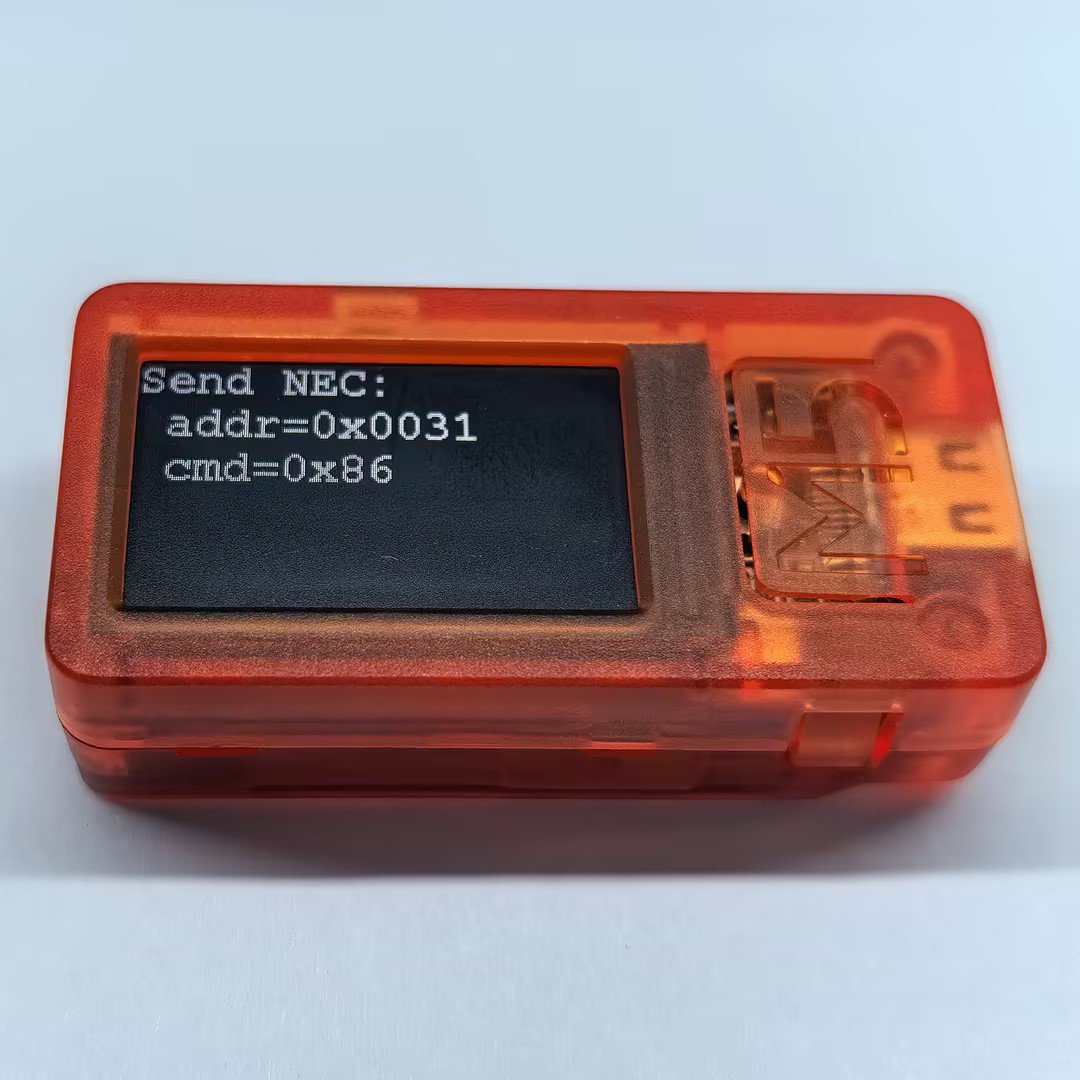
}StickC-Plus SE は 2 秒ごとに NEC 赤外線信号を送信します。アドレス(Address)とコマンド(Command)は、それぞれ 0x0000 と 0x55 から増加します。NEC プロトコルに対応した赤外線受信機器で受信を確認できます。
Page Tools