

Arduino Quick Start
2. Devices & Examples
Demo Board-SHT30
3. M5Unified
4. M5GFX
5. Extensions
Unit
Module
Atomic
Tab5
IoT
Accessories
Chain Captain RTC
Chain Captain RTC clock related APIs and sample programs.
Example
Compilation Requirements
- M5Stack Board Manager Version >=
3.3.10-a - Board Option =
M5ChainCaptain - M5Unified Library Version >=
0.3.0 - M5GFX Library Version >=
0.3.0
Note
The RX8130CE is powered by the always-on
3V3_L0 rail. As long as the battery is not depleted, the RTC keeps counting even when the controller is powered off.Note
M5PM1 and M5IOE1 support I2C idle sleep and may still be asleep when the device is restarted after a battery-powered shutdown, so they need some time to respond. Calling
M5.begin() immediately may cause initialization to fail; wait 500 ms before initialization.RTC Time Setting
cpp
1 2 3 4 5 6 7 8 9 10 11 12 13 14 15 16 17 18 19 20 21 22 23 24 25 26 27 28 29 30 31 32 33 34 35 36 37 38 39 40 41 42 43 44 45 46 47 48 49 50 51 52 53 54 55 56 57 58 59 60 61 62 63 64 65 66 67 68 69 70 71 72 73 74 75 76 77 78 79 80 81 82 83 84 85 86 87 88 89 90 91 92 93 94 95
#include <M5Unified.h>

M5Canvas canvas(&M5.Display);

static const char* WEEK_DAYS[] = {
  "Sun", "Mon", "Tue", "Wed", "Thu", "Fri", "Sat",
};

static void drawTime()
{
  if (!M5.Rtc.isEnabled()) return;

  auto dt = M5.Rtc.getDateTime();

  canvas.fillSprite(TFT_BLACK);
  canvas.setTextDatum(middle_center);
  canvas.setFont(&fonts::FreeSansBold12pt7b);
  canvas.setTextColor(TFT_WHITE, TFT_BLACK);
  canvas.drawString("RX8130CE RTC", 120, 30);

  char dateLine[32];
  char timeLine[24];
  snprintf(dateLine, sizeof(dateLine), "%04d/%02d/%02d  %s",
           dt.date.year, dt.date.month, dt.date.date,
           WEEK_DAYS[(dt.date.weekDay + 7) % 7]);
  snprintf(timeLine, sizeof(timeLine), "%02d:%02d:%02d",
           dt.time.hours, dt.time.minutes, dt.time.seconds);

  canvas.setFont(&fonts::FreeSansBold12pt7b);
  canvas.drawString(dateLine, 120, 100);
  canvas.setFont(&fonts::FreeSansBold18pt7b);
  canvas.drawString(timeLine, 120, 145);

  canvas.setFont(&fonts::FreeSans9pt7b);
  canvas.drawString("A: set demo time", 120, 210);
  canvas.pushSprite(0, 0);
}

static void setDemoTime()
{
  M5.Rtc.setDateTime({{2026, 11, 4}, {12, 34, 56}});
  Serial.println("RTC time set to 2026/11/04 12:34:56");
}

void setup()
{
  // Wait for M5PM1/M5IOE1 to exit I2C idle sleep after a battery-powered restart.
  delay(500);

  auto cfg = M5.config();
  cfg.serial_baudrate = 115200;
  M5.begin(cfg);

  M5.Display.setRotation(0);

  // Retry RTC init if it is not ready.
  for (int i = 0; i < 5 && !M5.Rtc.isEnabled(); ++i) {
    delay(200);
    M5.Rtc.begin(&M5.In_I2C, M5.getBoard());
  }

  // Set backlight after M5IOE1 is ready.
  M5.Display.setBrightness(128);

  canvas.createSprite(M5.Display.width(), M5.Display.height());

  if (!M5.Rtc.isEnabled()) {
    canvas.fillSprite(TFT_BLACK);
    canvas.setTextDatum(middle_center);
    canvas.setTextColor(TFT_RED, TFT_BLACK);
    canvas.drawString("RTC not found", 120, 120);
    canvas.pushSprite(0, 0);
    Serial.println("RTC not found");
    return;
  }

  if (M5.Rtc.getDateTime().date.year < 2025) setDemoTime();
  drawTime();
}

void loop()
{
  M5.update();

  if (M5.BtnA.wasClicked()) setDemoTime();

  static uint32_t lastRefresh = 0;
  const uint32_t now = millis();
  if (now - lastRefresh >= 500) {
    lastRefresh = now;
    drawTime();
  }

  delay(20);
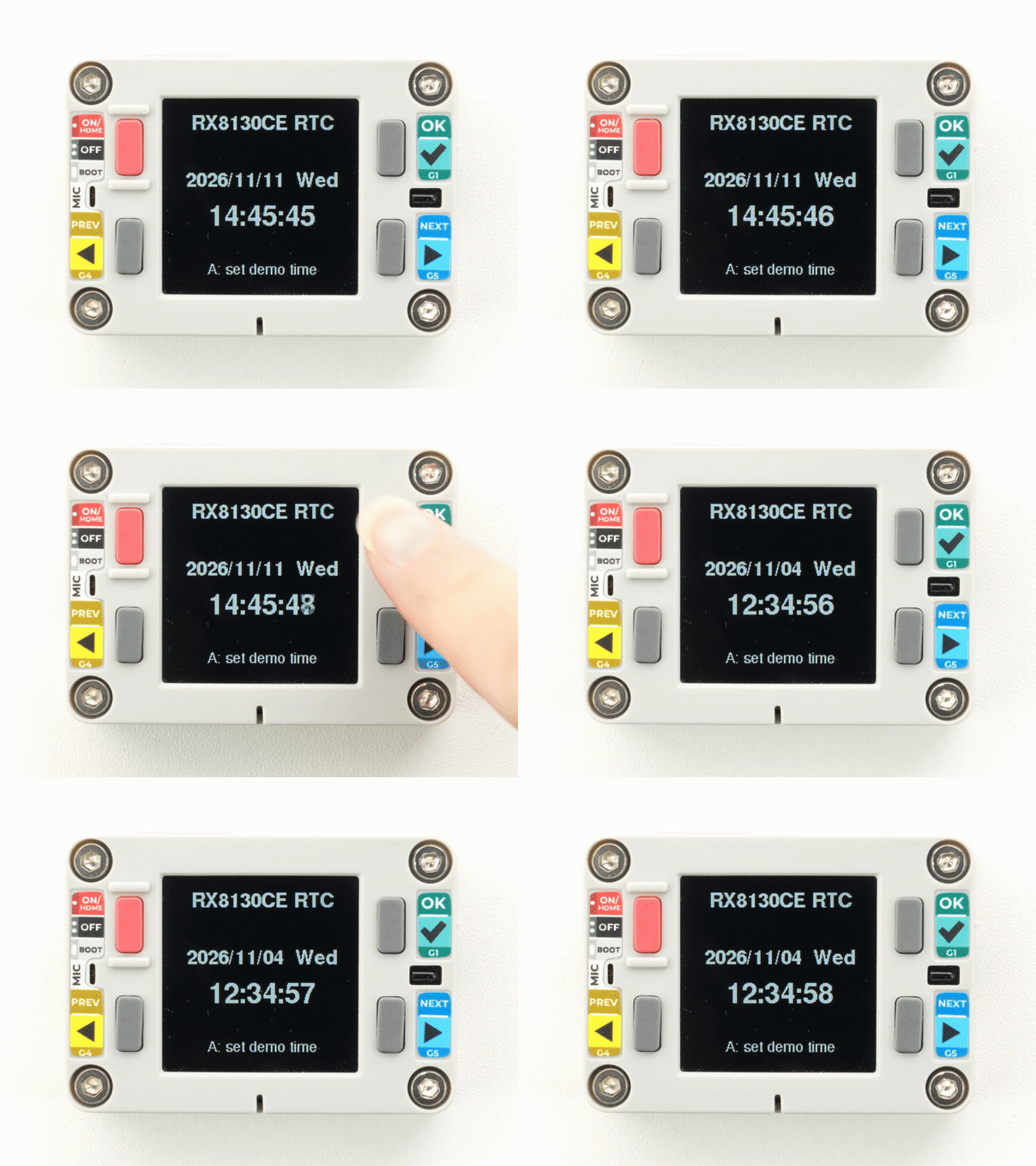
}After uploading, the screen shows the RTC date, weekday, and time. Press KEYA to set the time to the example time 2026/11/04 12:34:56.
Network Time Synchronization
After connecting to Wi-Fi, you can obtain network time via SNTP and write it to the RX8130CE. The example below performs one synchronization in setup() and then reads the RTC time in loop().
Note
Replace
WIFI_SSID and WIFI_PASSWORD with the actual Wi-Fi name and password.cpp
1 2 3 4 5 6 7 8 9 10 11 12 13 14 15 16 17 18 19 20 21 22 23 24 25 26 27 28 29 30 31 32 33 34 35 36 37 38 39 40 41 42 43 44 45 46 47 48 49 50 51 52 53 54 55 56 57 58 59 60 61 62 63 64 65 66 67 68 69 70 71 72 73 74 75 76 77 78 79 80 81 82 83 84 85 86 87 88 89 90 91 92 93 94 95 96 97 98 99 100 101 102 103 104 105 106 107 108 109 110 111 112 113 114 115 116 117 118 119 120 121 122 123 124
#define WIFI_SSID     "your-ssid"
#define WIFI_PASSWORD "your-password"
#define NTP_TIMEZONE  "CST-8" // POSIX Timezone format, UTC+8
#define NTP_SERVER1   "0.pool.ntp.org"
#define NTP_SERVER2   "1.pool.ntp.org"
#define NTP_SERVER3   "2.pool.ntp.org"

#include <WiFi.h>
#include <M5Unified.h>

#if __has_include(<esp_sntp.h>)
#include <esp_sntp.h>
#define SNTP_ENABLED 1
#elif __has_include(<sntp.h>)
#include <sntp.h>
#define SNTP_ENABLED 1
#endif

#ifndef SNTP_ENABLED
#define SNTP_ENABLED 0
#endif

M5Canvas canvas(&M5.Display);

static const char* WEEK_DAYS[] = {
  "Sun", "Mon", "Tue", "Wed", "Thu", "Fri", "Sat",
};

void setup()
{
  // Wait for M5PM1/M5IOE1 to exit I2C idle sleep after a battery-powered restart.
  delay(500);

  auto cfg = M5.config();
  cfg.serial_baudrate = 115200;
  M5.begin(cfg);

  M5.Display.setRotation(0);

  // Retry RTC init if it is not ready.
  for (int i = 0; i < 5 && !M5.Rtc.isEnabled(); ++i) {
    delay(200);
    M5.Rtc.begin(&M5.In_I2C, M5.getBoard());
  }

  // Set backlight after M5IOE1 is ready.
  M5.Display.setBrightness(128);

  canvas.createSprite(M5.Display.width(), M5.Display.height());
  canvas.setTextDatum(middle_center);
  canvas.setFont(&fonts::FreeSansBold12pt7b);
  canvas.setTextColor(TFT_WHITE, TFT_BLACK);

  if (!M5.Rtc.isEnabled()) {
    canvas.fillSprite(TFT_BLACK);
    canvas.drawString("RTC not found", 120, 120);
    canvas.pushSprite(0, 0);
    return;
  }

  canvas.fillSprite(TFT_BLACK);
  canvas.drawString("WiFi connecting...", 120, 80);
  canvas.pushSprite(0, 0);

  WiFi.mode(WIFI_STA);
  WiFi.begin(WIFI_SSID, WIFI_PASSWORD);
  while (WiFi.status() != WL_CONNECTED) {
    delay(500);
    Serial.print('.');
  }

  canvas.fillSprite(TFT_BLACK);
  canvas.drawString("NTP syncing...", 120, 120);
  canvas.pushSprite(0, 0);

  configTzTime(NTP_TIMEZONE, NTP_SERVER1, NTP_SERVER2, NTP_SERVER3);
#if SNTP_ENABLED
  while (sntp_get_sync_status() != SNTP_SYNC_STATUS_COMPLETED) {
    delay(500);
  }
#else
  struct tm timeInfo;
  while (!getLocalTime(&timeInfo, 1000)) {
    delay(500);
  }
#endif

  time_t t = time(nullptr) + 1;
  while (t > time(nullptr)) {
    delay(10);
  }
  M5.Rtc.setDateTime(localtime(&t));
  Serial.println("\nRTC synchronized");
}

void loop()
{
  M5.update();

  if (!M5.Rtc.isEnabled()) {
    delay(1000);
    return;
  }

  auto dt = M5.Rtc.getDateTime();
  char dateLine[32];
  char timeLine[24];
  snprintf(dateLine, sizeof(dateLine), "%04d/%02d/%02d  %s",
           dt.date.year, dt.date.month, dt.date.date,
           WEEK_DAYS[(dt.date.weekDay + 7) % 7]);
  snprintf(timeLine, sizeof(timeLine), "%02d:%02d:%02d",
           dt.time.hours, dt.time.minutes, dt.time.seconds);

  canvas.fillSprite(TFT_BLACK);
  canvas.setTextDatum(middle_center);
  canvas.setTextColor(TFT_WHITE, TFT_BLACK);
  canvas.setFont(&fonts::FreeSansBold12pt7b);
  canvas.drawString(dateLine, 120, 100);
  canvas.setFont(&fonts::FreeSansBold18pt7b);
  canvas.drawString(timeLine, 120, 145);
  canvas.pushSprite(0, 0);

  delay(500);
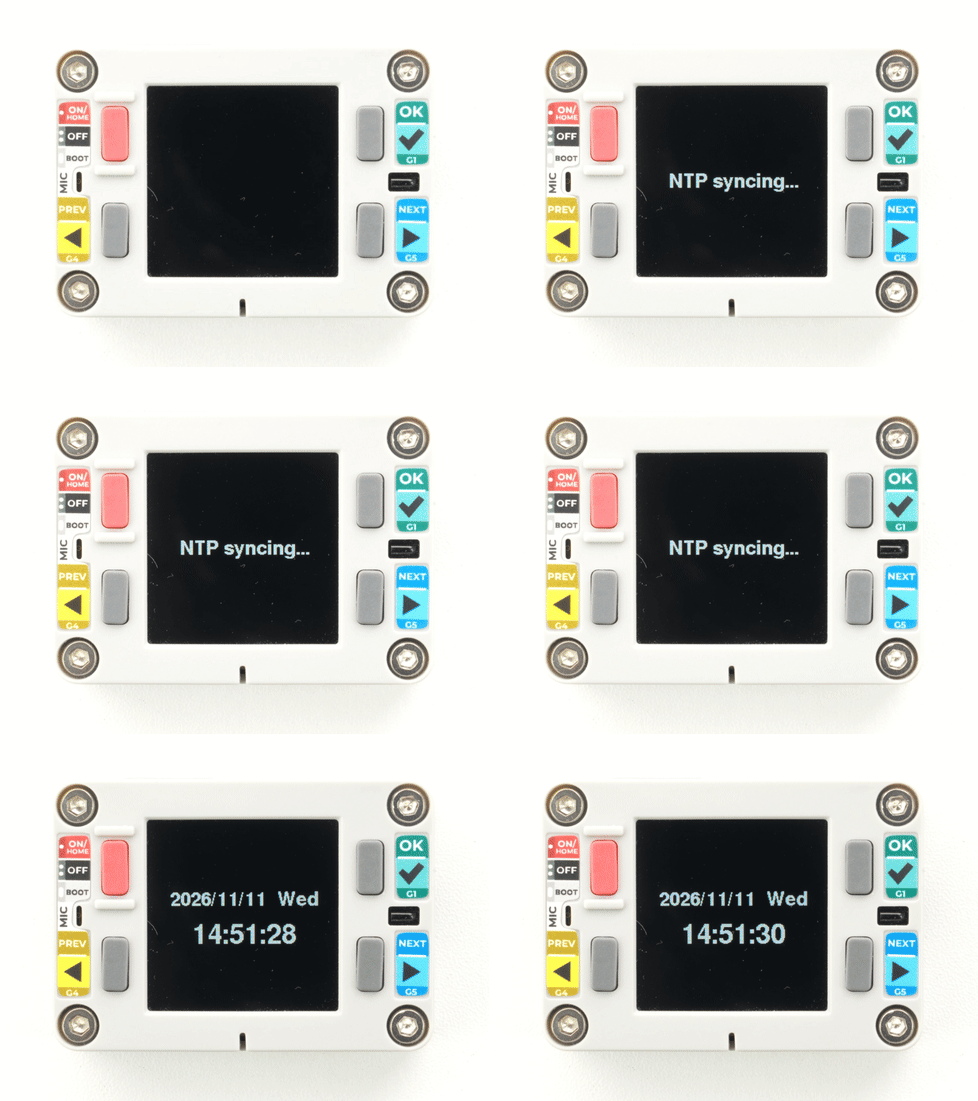
}After uploading, the screen shows the calibrated RTC date, weekday, and time.
API
The Chain Captain RTC section uses the RTC_Class from the M5Unified library. For more related APIs, refer to the following document:
Page Tools