

Arduino Quick Start
2. Devices & Examples
Demo Board-SHT30
3. M5Unified
4. M5GFX
5. Extensions
Unit
Module
Atomic
Tab5
IoT
Accessories
Chain Captain RGB LED
Chain Captain RGB LED related APIs and sample programs.
Example
Compilation Requirements
- M5Stack Board Manager Version >=
3.3.10-a - Board Option =
M5ChainCaptain - M5Unified Library Version >=
0.3.0 - M5GFX Library Version >=
0.3.0 - M5IOE1 Library Version >=
1.0.9
The Chain Captain RGB LED is controlled by three PWM outputs from M5IOE1:
| RGB LED | M5IOE1 Pin | PWM Channel |
|---|---|---|
| R | IO10 | PWM4 |
| G | IO8 | PWM2 |
| B | IO9 | PWM1 |
Note
The GPIO and PWM outputs of M5IOE1 are open-drain by default. The RGB LED has no external pull-up, so if only
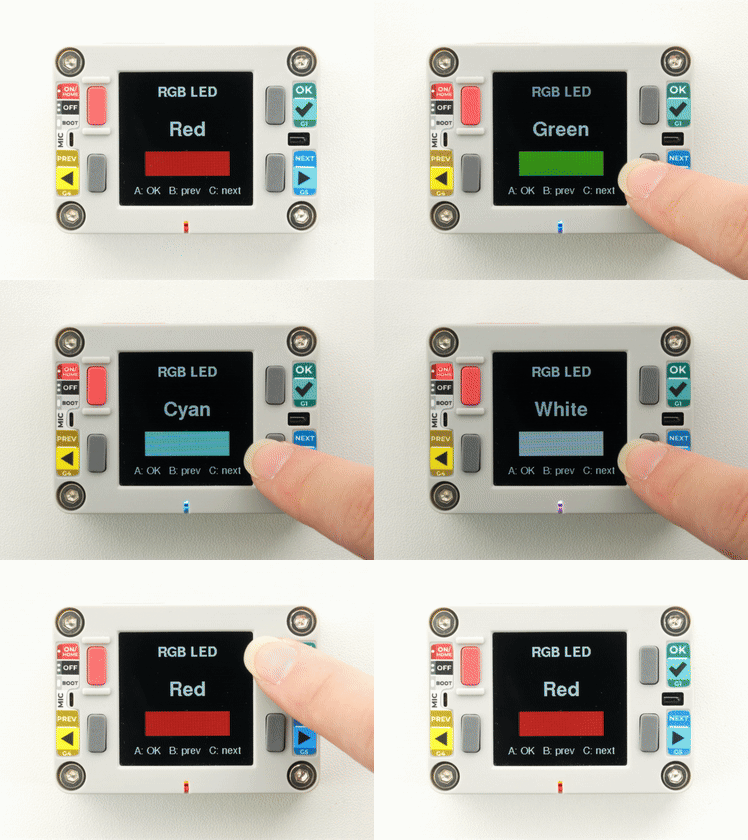
analogWrite() is called without configuring the drive mode, the PWM pins cannot output a high level and the LED will not light. Configure IO8, IO9, and IO10 as push-pull outputs with setDriveMode() first.Press KEYB / KEYC to select the previous / next color, and KEYA to confirm (turn the LED off or restore it).
cpp
1 2 3 4 5 6 7 8 9 10 11 12 13 14 15 16 17 18 19 20 21 22 23 24 25 26 27 28 29 30 31 32 33 34 35 36 37 38 39 40 41 42 43 44 45 46 47 48 49 50 51 52 53 54 55 56 57 58 59 60 61 62 63 64 65 66 67 68 69 70 71 72 73 74 75 76 77 78 79 80 81 82 83 84 85 86 87 88 89 90 91 92 93 94 95 96 97 98 99 100 101 102 103 104 105 106 107 108 109 110 111 112 113 114 115 116
#include <M5Unified.h>
#include <M5IOE1.h>

M5IOE1 ioExpander;

static const uint8_t COLORS[][3] = {
  {255, 0, 0},
  {0, 255, 0},
  {0, 0, 255},
  {255, 255, 0},
  {0, 255, 255},
  {255, 0, 255},
  {255, 255, 255},
};

static const char* COLOR_NAMES[] = {
  "Red", "Green", "Blue", "Yellow", "Cyan", "Magenta", "White",
};

static const size_t COLOR_COUNT = sizeof(COLORS) / sizeof(COLORS[0]);

static size_t colorIndex = 0;
static bool ledEnabled = true;

static void setRgb(uint8_t r, uint8_t g, uint8_t b)
{
  // R=IO10/PWM4, G=IO8/PWM2, B=IO9/PWM1
  ioExpander.analogWrite(M5IOE1_PWM_CH4, r);
  ioExpander.analogWrite(M5IOE1_PWM_CH2, g);
  ioExpander.analogWrite(M5IOE1_PWM_CH1, b);
}

static void drawStatus()
{
  M5.Display.startWrite();
  M5.Display.fillScreen(TFT_BLACK);
  M5.Display.setTextDatum(middle_center);
  M5.Display.setFont(&fonts::FreeSansBold12pt7b);
  M5.Display.setTextColor(TFT_WHITE, TFT_BLACK);
  M5.Display.drawString("RGB LED", 120, 36);
  M5.Display.setTextColor(TFT_WHITE, TFT_BLACK);
  M5.Display.setFont(&fonts::FreeSansBold18pt7b);
  M5.Display.drawString(ledEnabled ? COLOR_NAMES[colorIndex] : "Off", 120, 104);

  if (ledEnabled) {
    const auto& color = COLORS[colorIndex];
    M5.Display.fillRect(44, 142, 152, 44,
                        M5.Display.color565(color[0], color[1], color[2]));
  } else {
    M5.Display.drawRect(44, 142, 152, 44, TFT_WHITE);
  }

  M5.Display.setFont(&fonts::FreeSans9pt7b);
  M5.Display.setTextColor(TFT_WHITE, TFT_BLACK);
  M5.Display.drawString("A: OK   B: prev   C: next", 120, 214);
  M5.Display.endWrite();
}

void setup()
{
  delay(500);
  auto cfg = M5.config();
  cfg.serial_baudrate = 115200;
  M5.begin(cfg);

  M5.Display.setRotation(0);
  M5.Display.setBrightness(128);

  if (ioExpander.begin(&M5.In_I2C, 0x4F, 100000,
                       M5IOE1_INT_MODE_DISABLED) != M5IOE1_OK) {
    Serial.println("M5IOE1 init failed");
    M5.Display.setTextDatum(middle_center);
    M5.Display.drawString("M5IOE1 init failed", 120, 120);
    return;
  }

  // PWM outputs are open-drain by default; use push-pull for the RGB LED.
  ioExpander.setDriveMode(M5IOE1_PIN_10, M5IOE1_DRIVE_PUSHPULL); // R: IO10
  ioExpander.setDriveMode(M5IOE1_PIN_8, M5IOE1_DRIVE_PUSHPULL);  // G: IO8
  ioExpander.setDriveMode(M5IOE1_PIN_9, M5IOE1_DRIVE_PUSHPULL);  // B: IO9

  ioExpander.setPwmFrequency(5000);
  setRgb(COLORS[colorIndex][0], COLORS[colorIndex][1], COLORS[colorIndex][2]);
  drawStatus();
}

void loop()
{
  M5.update();

  if (M5.BtnB.wasClicked()) {
    colorIndex = (colorIndex + COLOR_COUNT - 1) % COLOR_COUNT;
    ledEnabled = true;
    setRgb(COLORS[colorIndex][0], COLORS[colorIndex][1], COLORS[colorIndex][2]);
    drawStatus();
  }

  if (M5.BtnC.wasClicked()) {
    colorIndex = (colorIndex + 1) % COLOR_COUNT;
    ledEnabled = true;
    setRgb(COLORS[colorIndex][0], COLORS[colorIndex][1], COLORS[colorIndex][2]);
    drawStatus();
  }

  if (M5.BtnA.wasClicked()) {
    ledEnabled = !ledEnabled;
    if (ledEnabled) {
      setRgb(COLORS[colorIndex][0], COLORS[colorIndex][1], COLORS[colorIndex][2]);
    } else {
      setRgb(0, 0, 0);
    }
    drawStatus();
  }

  delay(20);
}After uploading, the RGB LED shows red by default. Press KEYB / KEYC to switch to the previous / next color, and press KEYA to turn the LED off or restore it. The screen shows the current color in sync.
API
The Chain Captain RGB LED is controlled by the PWM outputs of M5IOE1. For more related APIs and information, refer to the following documents:
Page Tools