

Arduino Quick Start
2. Devices & Examples
Demo Board-SHT30
3. M5Unified
4. M5GFX
5. Extensions
Unit
Module
Atomic
Tab5
IoT
Accessories
Chain Captain IR
Chain Captain infrared transmission and reception related APIs and sample programs.
Example
Compilation Requirements
- M5Stack Board Manager Version >=
3.3.10-a - Board Option =
M5ChainCaptain - M5Unified Library Version >=
0.3.0 - M5GFX Library Version >=
0.3.0 - M5IOE1 Library Version >=
1.0.9 - IRremote Library Version >=
4.7.1
The Chain Captain IR power is controlled by M5IOE1 IO2, which must be set to a high level before use.
cpp
1 2 3 4 5 6 7 8 9 10 11 12 13 14 15 16 17 18 19 20 21 22 23 24 25 26 27 28 29 30 31 32 33 34 35 36 37 38 39 40 41 42 43 44 45 46 47 48 49 50 51 52 53 54 55 56 57 58 59 60 61 62 63 64 65 66 67 68 69 70 71 72 73 74 75 76 77 78 79 80 81 82 83 84 85 86 87 88 89 90 91 92 93 94 95 96 97 98 99 100
#include <IRremote.hpp>
#include <M5Unified.h>
#include <M5IOE1.h>

#define IR_SEND_PIN 48
#define IR_RECEIVE_PIN 47

uint16_t address = 0x0000;
uint8_t command = 0x10;
uint8_t repeats = 0;

M5IOE1 ioExpander;

void setup()
{
  delay(500);
  M5.begin();
  Serial.begin(115200);
  delay(200);

  M5.Display.setTextColor(TFT_BLACK);
  M5.Display.setTextFont(&fonts::FreeMonoBoldOblique9pt7b);
  M5.Display.clear(TFT_WHITE);
  M5.Display.setCursor(0, 0);
  M5.Display.printf("Chain Captain IR");
  Serial.println("Chain Captain IR TX/RX");

  if (ioExpander.begin(&M5.In_I2C, M5IOE1_DEFAULT_ADDR_2,
                       M5IOE1_I2C_FREQ_100K) != M5IOE1_OK) {
    Serial.println("M5IOE1 init failed");
    while (true) {
      delay(1000);
    }
  }
  // IO2 powers the IR transmitter and receiver.
  ioExpander.pinMode(M5IOE1_PIN_2, OUTPUT);
  ioExpander.digitalWrite(M5IOE1_PIN_2, HIGH);

  IrReceiver.begin(IR_RECEIVE_PIN);
  IrSender.begin(DISABLE_LED_FEEDBACK);
  IrSender.setSendPin(IR_SEND_PIN);

  M5.Display.setCursor(0, 20);
  M5.Display.println("A: send & receive");
  Serial.printf("IR Send Pin: %d, IR Recv Pin: %d\n", IR_SEND_PIN, IR_RECEIVE_PIN);
  delay(500);
}

void loop()
{
  M5.update();

  if (!M5.BtnA.wasClicked()) {
    delay(10);
    return;
  }

  // 1. Send one NEC frame
  Serial.printf("Send NEC: addr=0x%04x, cmd=0x%02x\n", address, command);
  IrSender.sendNEC(address, command, repeats);

  M5.Display.fillRect(0, 20, 240, 70, TFT_WHITE);
  M5.Display.setCursor(0, 24);
  M5.Display.printf("Send NEC:\n addr=0x%04x\n cmd=0x%02x\n", address, command);
  M5.Display.drawFastHLine(0, 86, 240, TFT_BLACK);

  IrReceiver.restartAfterSend();

  // 2. Decode the reflected frame.
  delay(20);

  if (IrReceiver.decode()) {
    Serial.printf("Received: protocol=%s, addr=0x%04x, cmd=0x%02x, raw=0x%08lx\n",
                  getProtocolString(IrReceiver.decodedIRData.protocol),
                  IrReceiver.decodedIRData.address,
                  IrReceiver.decodedIRData.command,
                  (unsigned long)IrReceiver.decodedIRData.decodedRawData);

    M5.Display.fillRect(0, 92, 240, 148, TFT_WHITE);
    M5.Display.setCursor(0, 96);
    M5.Display.printf("Received:\n protocol=%s\n addr=0x%04x\n cmd=0x%02x\n raw=0x%08lx\n",
                      getProtocolString(IrReceiver.decodedIRData.protocol),
                      IrReceiver.decodedIRData.address,
                      IrReceiver.decodedIRData.command,
                      (unsigned long)IrReceiver.decodedIRData.decodedRawData);

    IrReceiver.resume();
  } else {
    Serial.println("No IR received.");
    M5.Display.fillRect(0, 92, 240, 148, TFT_WHITE);
    M5.Display.setCursor(0, 96);
    M5.Display.println("No IR received.");
  }

  address += 0x0001;
  command += 0x01;
  repeats = 0;

  delay(200);
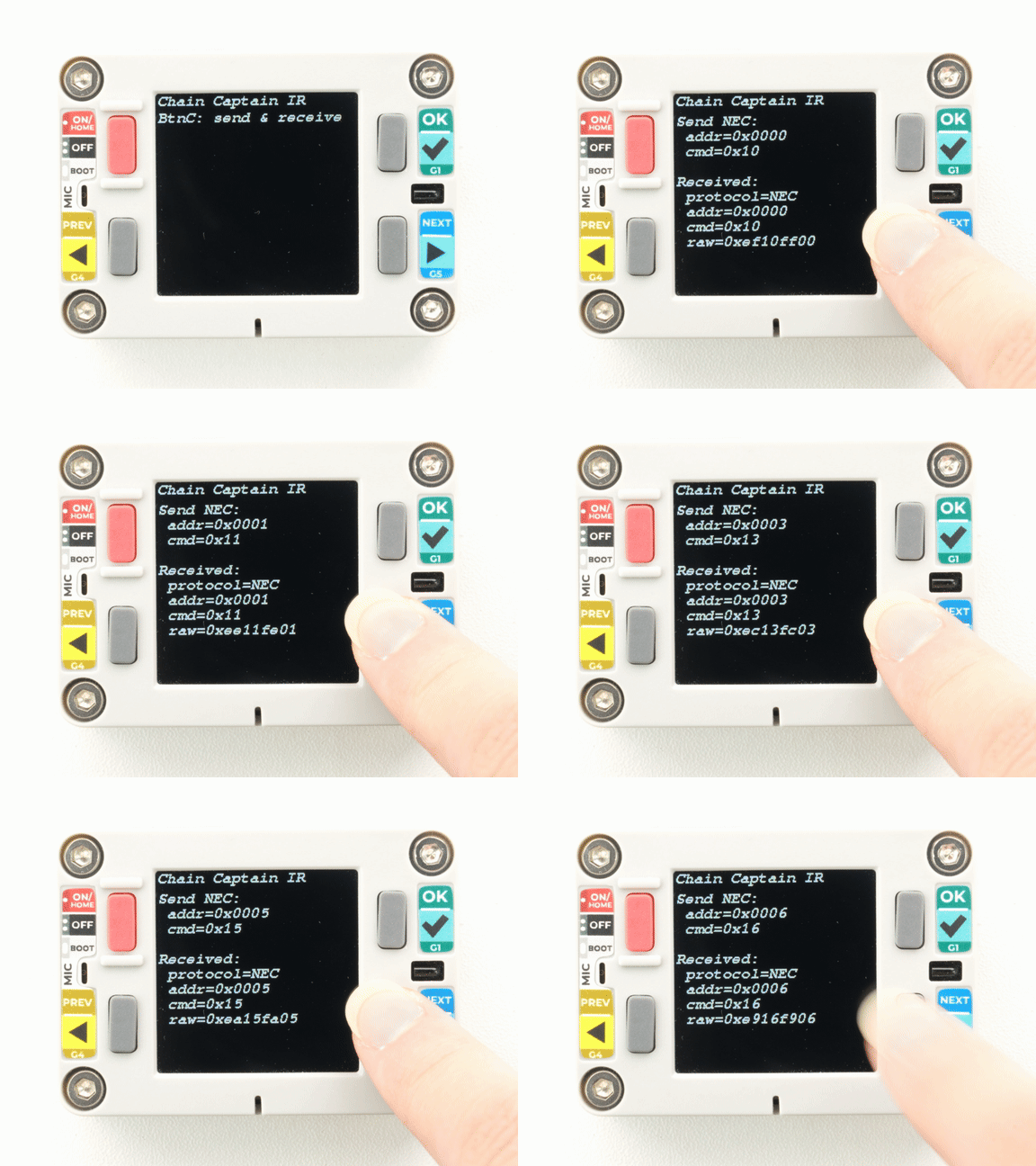
}Press KEYA to send one NEC frame. The receiver is then re-enabled to decode the signal from the transmitter itself (near-field reflection/coupling). The transmission information is shown at the top of the screen, and the decoded result is shown below.
API
Chain Captain IR transmission and reception uses the IRremote library. For more related APIs, refer to the following document:
Page Tools