

Arduino Quick Start
2. Devices & Examples
Demo Board-SHT30
3. M5Unified
4. M5GFX
5. Extensions
Unit
Module
Atomic
Tab5
IoT
Accessories
Chain Captain IMU
Chain Captain onboard BMI270 6-axis IMU related APIs and sample programs.
Example
Compilation Requirements
- M5Stack Board Manager Version >=
3.3.10-a - Board Option =
M5ChainCaptain - M5Unified Library Version >=
0.3.0 - M5GFX Library Version >=
0.3.0
cpp
1 2 3 4 5 6 7 8 9 10 11 12 13 14 15 16 17 18 19 20 21 22 23 24 25 26 27 28 29 30 31 32 33 34 35 36 37 38 39 40 41 42 43 44 45 46 47 48 49 50 51 52 53 54 55 56 57 58 59 60 61 62 63 64 65 66 67 68 69 70 71 72 73 74 75 76 77 78 79 80 81 82 83 84 85 86 87 88 89 90 91 92 93 94 95 96 97 98
#include <M5Unified.h>

M5Canvas canvas(&M5.Display);

static uint32_t lastRefresh = 0;

static bool ensureImuReady()
{
  if (M5.Imu.isEnabled()) return true;

  // Retry the probe while M5PM1 and the shared I2C bus wake up.
  for (int retry = 0; retry < 5; ++retry) {
    if (M5.Imu.begin(&M5.In_I2C, M5.getBoard())) return true;
    delay(200);
  }
  return false;
}

static void drawReading()
{
  // BMI270: read accelerometer and gyroscope data.
  auto data = M5.Imu.getImuData();

  canvas.fillSprite(TFT_BLACK);
  canvas.setTextDatum(middle_center);
  canvas.setFont(&fonts::FreeSansBold12pt7b);
  canvas.setTextColor(TFT_WHITE, TFT_BLACK);
  canvas.drawString("BMI270", 120, 22);

  canvas.drawRect(8, 44, 224, 120, TFT_DARKGREY);
  canvas.fillCircle(120, 104, 5, TFT_DARKGREY);
  // CoreP4X LSM6DS3TR-C and ChainCaptain BMI270 share the same fixed axis remap.
  // M5Unified applies it in getImuData(), so use the corrected axes directly.
  const int x = constrain(static_cast<int>(120 + data.accel.x * 80.0f), 18, 222);
  const int y = constrain(static_cast<int>(104 - data.accel.y * 45.0f), 54, 154);
  canvas.fillCircle(x, y, 8, TFT_GREEN);

  canvas.setFont(&fonts::FreeSans9pt7b);
  canvas.setTextDatum(top_left);
  canvas.setTextColor(TFT_WHITE, TFT_BLACK);
  canvas.setCursor(8, 172);
  canvas.printf("ACC  %+.2f %+.2f %+.2f\n", data.accel.x, data.accel.y, data.accel.z);
  canvas.printf("GYRO %+.2f %+.2f %+.2f", data.gyro.x, data.gyro.y, data.gyro.z);
  canvas.pushSprite(0, 0);
}

void setup()
{
  delay(500);
  auto cfg = M5.config();
  cfg.serial_baudrate = 115200;
  cfg.fallback_board = m5::board_t::board_M5ChainCaptain;
  M5.begin(cfg);

  if (M5.Display.getBoard() != m5::board_t::board_M5ChainCaptain) {
    M5.Display.init();
  }
  if (M5.Display.getBoard() != m5::board_t::board_M5ChainCaptain) {
    Serial.println("Display detection: no");
    return;
  }

  M5.Display.setRotation(0);
  M5.Display.setBrightness(128);

  canvas.createSprite(M5.Display.width(), M5.Display.height());

  const bool imuReady = ensureImuReady();
  Serial.printf("IMU enabled: %s\n", imuReady ? "yes" : "no");
  if (!imuReady) {
    canvas.fillSprite(TFT_BLACK);
    canvas.setTextDatum(middle_center);
    canvas.setTextColor(TFT_RED, TFT_BLACK);
    canvas.drawString("IMU not found", 120, 120);
    canvas.pushSprite(0, 0);
    return;
  }

  drawReading();
}

void loop()
{
  if (!M5.Imu.isEnabled()) {
    delay(1000);
    return;
  }

  const uint32_t now = millis();
  if (now - lastRefresh >= 100) {
    lastRefresh = now;
    if (M5.Imu.update()) {
      drawReading();
    }
  }

  delay(10);
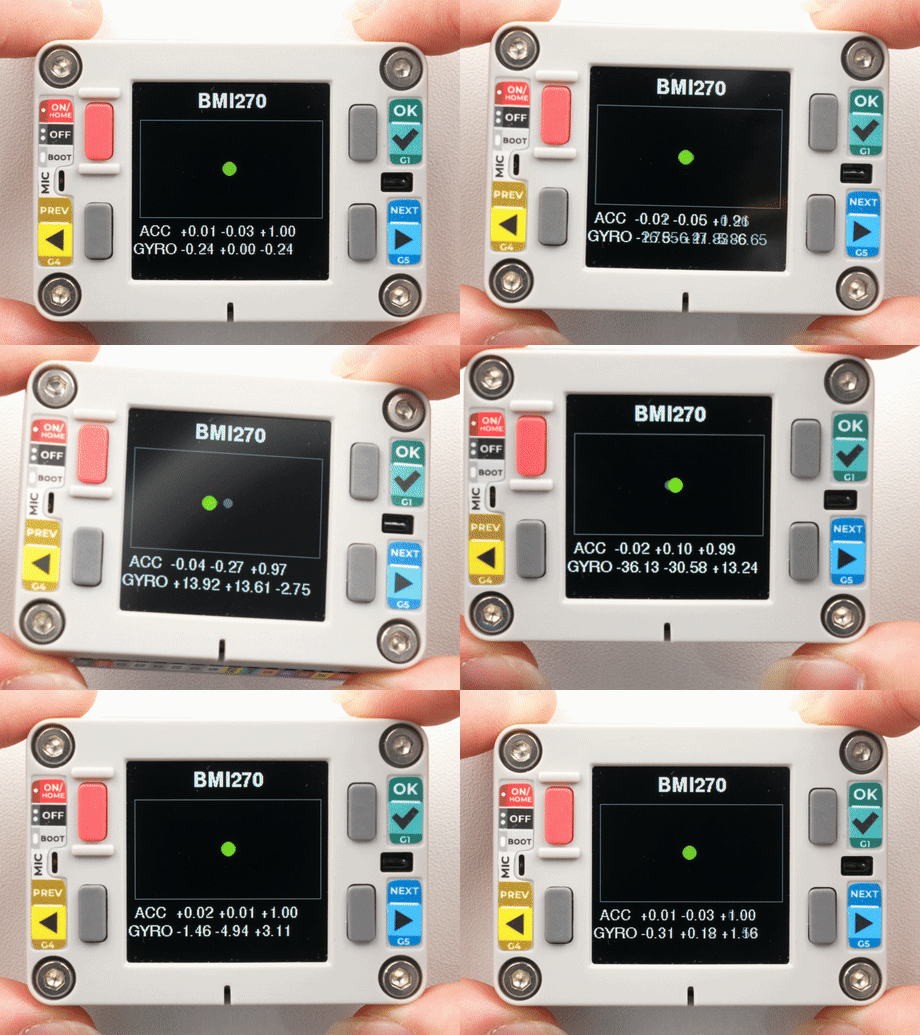
}After uploading, the green dot in the center of the screen moves according to the acceleration direction, and the accelerometer and gyroscope data from the BMI270 are displayed below in real time.
API
The Chain Captain IMU section uses the IMU_Class from the M5Unified library. For more IMU related APIs, refer to the following document:
Page Tools