

Arduino入門
2. デバイス&サンプル
3. M5Unified
4. M5GFX
5. 拡張モジュール&サンプル
Unit
Module
Atomic
Tab5
IoT
アクセサリー
Cap CC1101 Arduino チュートリアル
1. 準備
環境設定: Arduino IDE 入門ガイドを参照して IDE をインストールし、使用する開発ボードに対応するボードパッケージと必要なライブラリをインストールしてください。
使用するライブラリ:
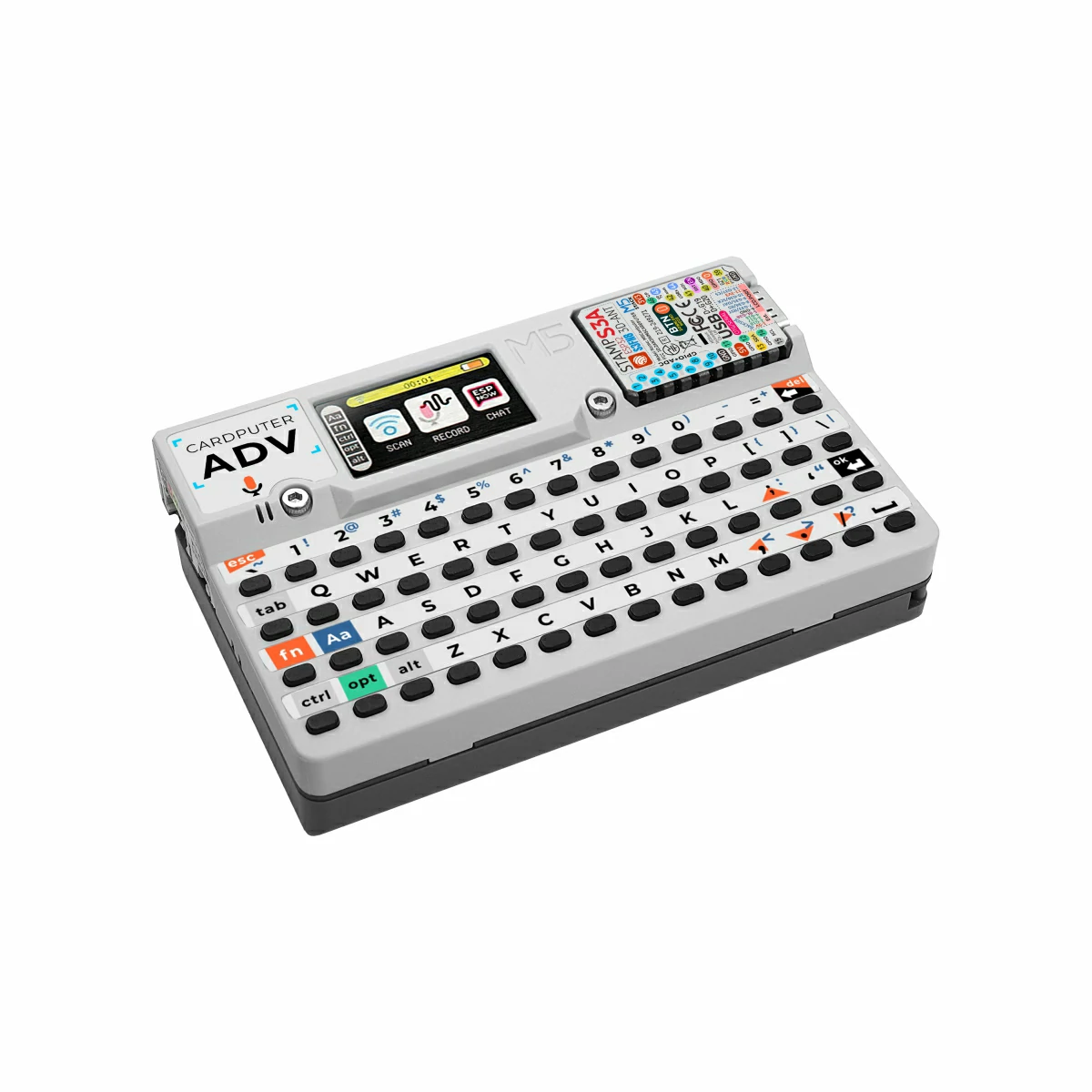
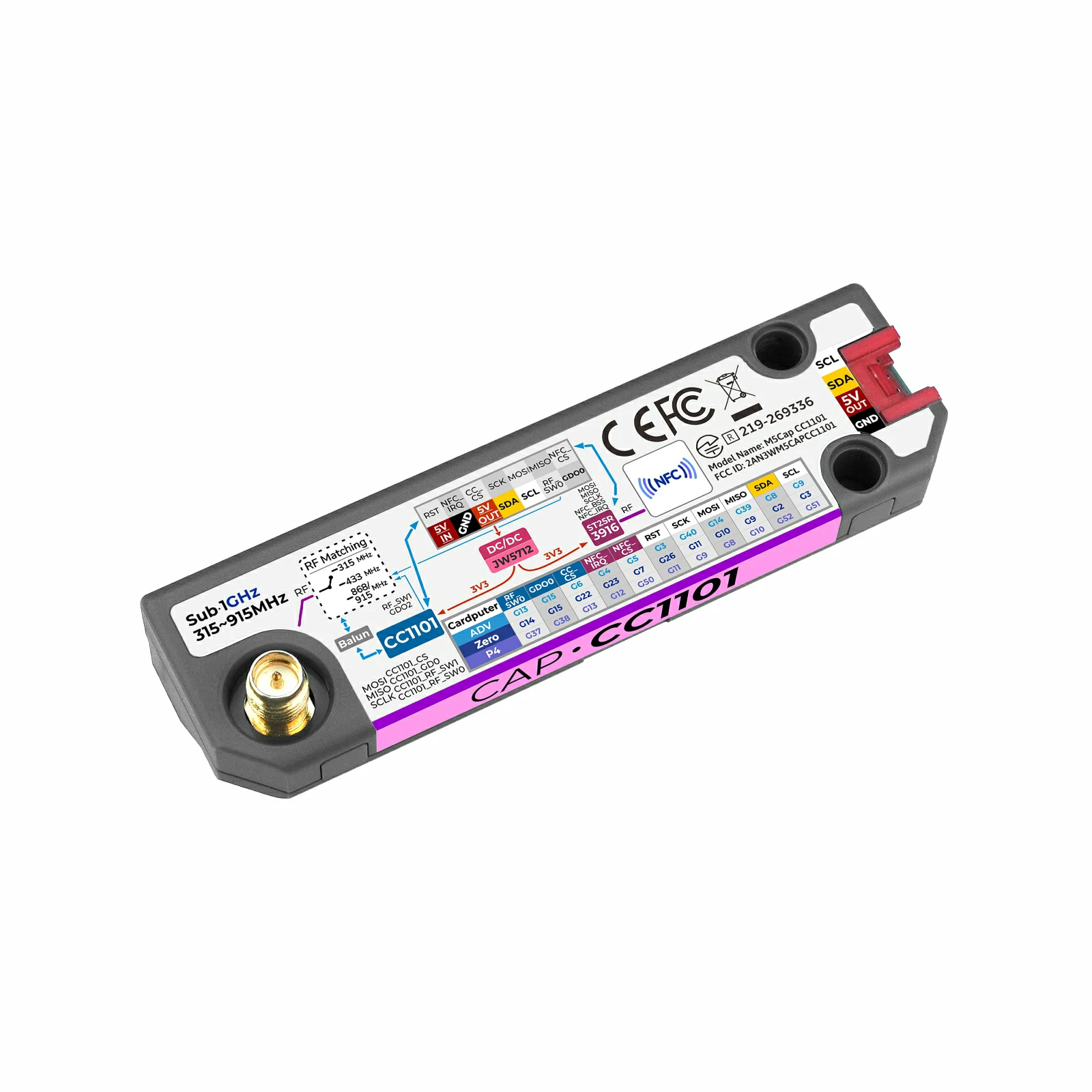
使用するハードウェア:
2. コンパイルと書き込み
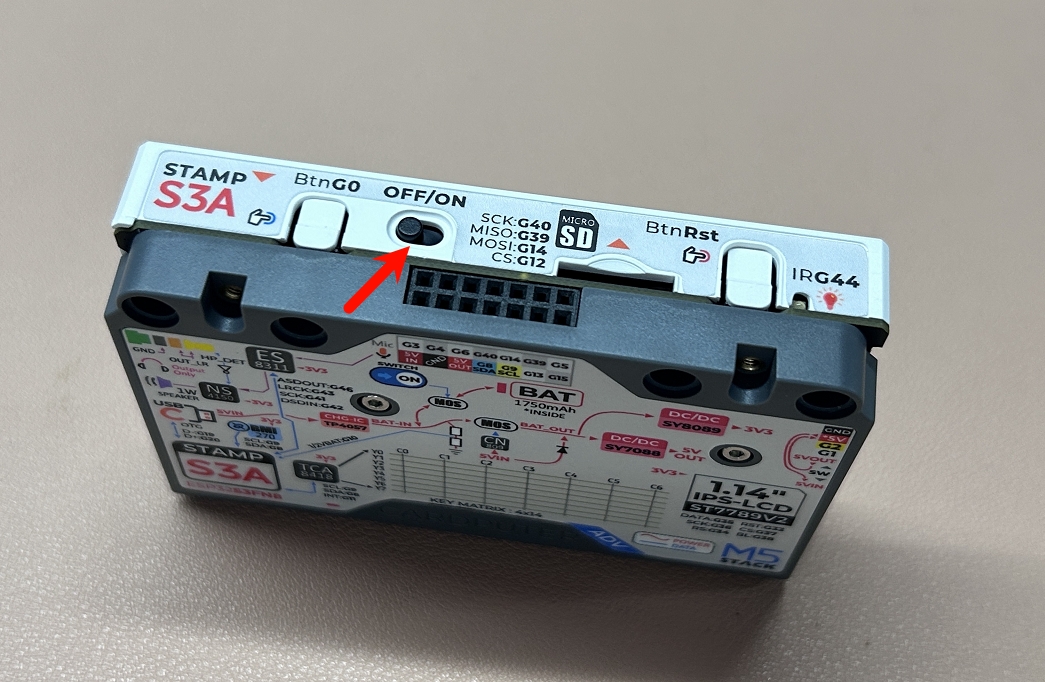
- Cardputer-Adv 側面の電源スイッチを
OFFにします。電源を入れる前にG0ボタンを押し続け、デバイスに電源が入った後に離すと、書き込み用のダウンロードモードに入ります。
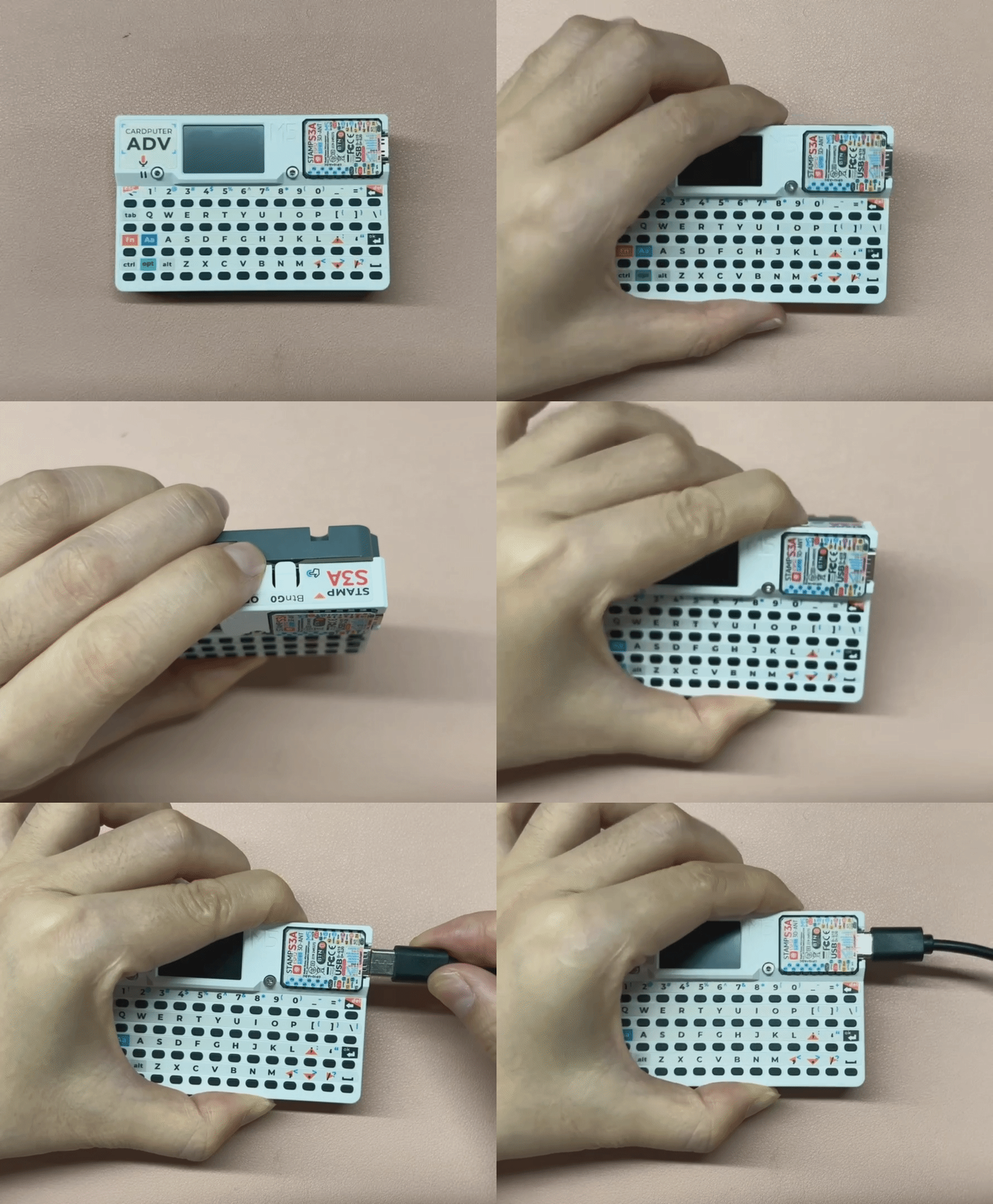
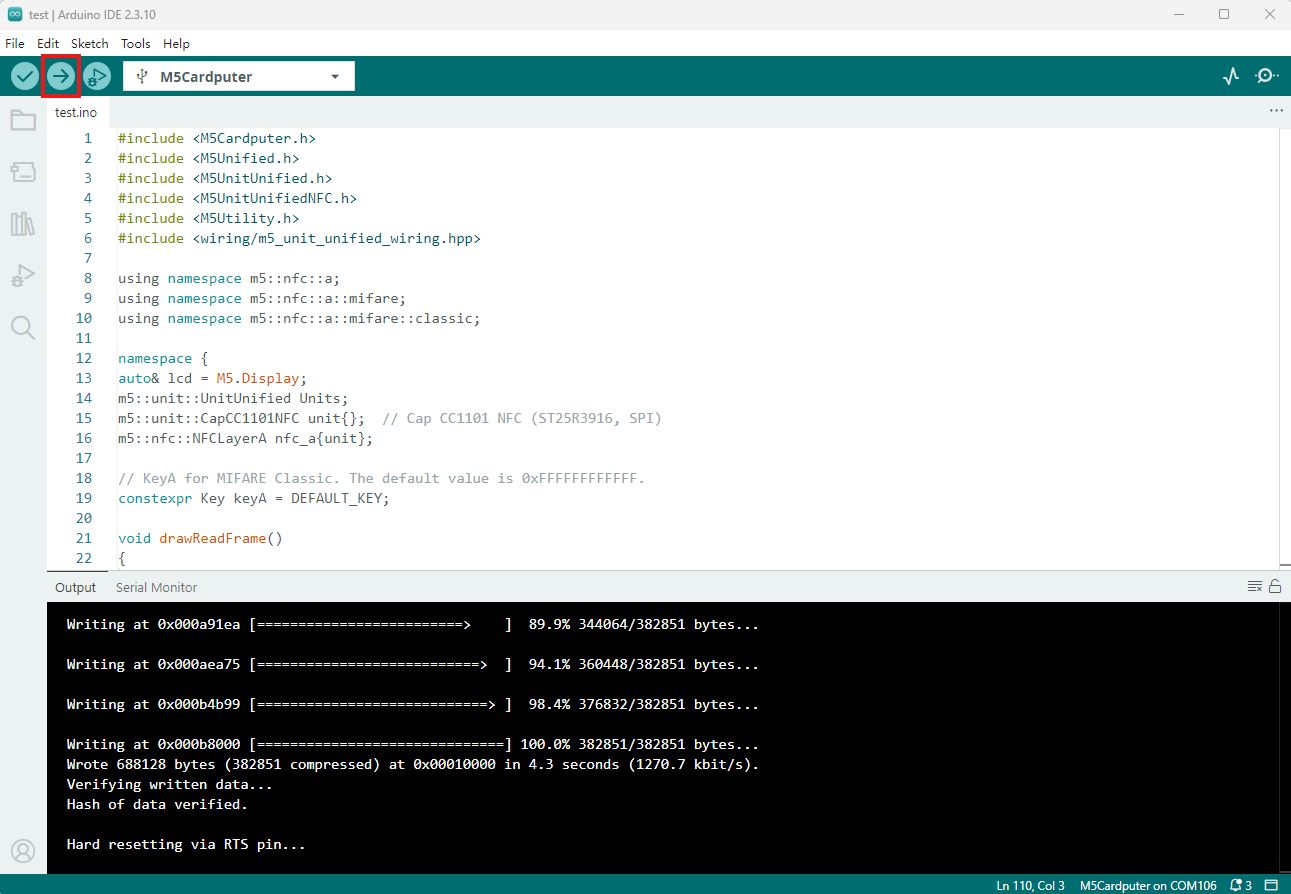
- デバイスのポートを選択し、Arduino IDE 左上のコンパイルと書き込みボタンをクリックして、プログラムのコンパイルとデバイスへの書き込みが完了するまで待ちます。
3. サンプルプログラム
- 本チュートリアルでは Cardputer-Adv をホストデバイスとして Cap CC1101 と組み合わせて使用します。Cap CC1101 の RF 部分と NFC 部分は、いずれも SPI 通信を使用します。CC1101 の SPI ピンは
G5 (CS)、G14 (MOSI)、G39 (MISO)、G40 (SCK)、割り込みピンはG15 (GD0)です。NFC (ST25R3916) の SPI ピンはG5 (CS)、G14 (MOSI)、G39 (MISO)、G40 (SCK)、割り込みピンはG4 (IRQ)です。
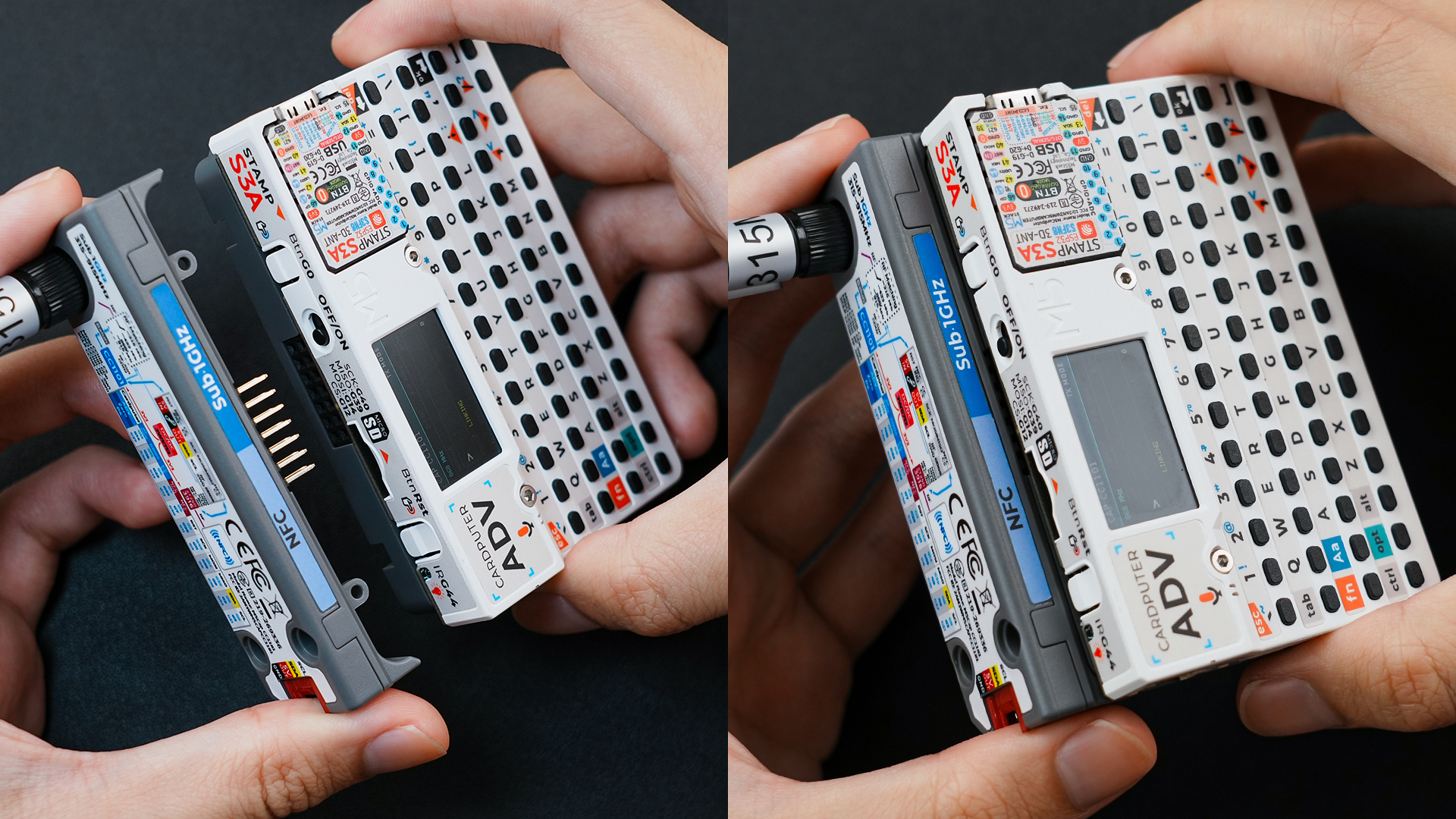
実物の接続・組み立て例を以下に示します。
3.1 RF サンプル
NSS、TRQ、GD02、RST の 4 つのピンのみを設定しています。ただし、RadioLib ライブラリは使用するホストデバイスに応じて、残りの SPI ピン (MOSI、MISO、SCK) を自動的に割り当てます。これらは M5Unified の初期化時にデバイスごとにデフォルト定義されるピンで、Cardputer-Adv ではそれぞれ G14 (MOSI)、G39 (MISO)、G40 (SCK) となるため、手動で指定する必要はありません。RF 帯域は RF_SW0 と RF_SW1 で制御します。RF_SW0 は Cardputer-Adv の G13 に、RF_SW1 は CC1101 の GDO2 に接続されています。プログラムは CC1101_FREQ の値に応じて 2 つのスイッチの論理レベルを設定します。315MHz は RF_SW0=0、RF_SW1=0、433MHz は RF_SW0=0、RF_SW1=1、868MHz/915MHz は RF_SW0=1、RF_SW1=1 です。RF_SW1 はホストから SPI 経由で CC1101 の GDO2 を制御し、出力を High/Low に設定します。
送信側
#include <M5Unified.h>
#include <RadioLib.h>

#define CC1101_FREQ         915.0f  // carrier frequency in MHz (float). Must match receiver
#define CC1101_BIT_RATE     2.4f    // bit rate in kbps (float). Recommend 2.4 = 2400 bits/s
#define CC1101_FREQ_OFFSET  25.4f   // frequency offset in kHz (float). FSK deviation
#define CC1101_BW           58.0    // receiver filter bandwidth in kHz (float). Must be >= signal occupied BW
#define CC1101_TX_POWER     10      // output power in dBm (must be one of allowed values: -30,-20,-15,-10,0,5,7,10)
#define CC1101_PREAMBLE_LEN 16      // preamble length in bits (supported values: 16--2 Bytes, 24--3 Bytes, 32--4 Bytes, 48--6 Bytes, 64--8 Bytes, 96--12 Bytes, 128--16 Bytes, 192--24 Bytes).

constexpr int CC1101_CS = 5;
constexpr int CC1101_GDO0 = 15;
constexpr int RF_SW0 = 13;

//        CC1101 PIN          CSN,       GD00,    RST(unused),   GD02
CC1101 radio = new Module(CC1101_CS, CC1101_GDO0, RADIOLIB_NC, RADIOLIB_NC);

// Tracks the result of the last transmission attempt (error code from RadioLib)
int transmissionState = RADIOLIB_ERR_NONE;

// Special attribute for ESP8266/ESP32 to place ISR in RAM (faster interrupt response)
#if defined(ESP8266) || defined(ESP32)
ICACHE_RAM_ATTR
#endif
// Packet sent flag
volatile bool transmittedFlag = false;

bool transmitPending = false;
uint32_t transmitStartMillis = 0;
constexpr uint32_t TX_WAIT_MS = 100;

// This function is called when a complete packet is transmitted by the module
// IMPORTANT: this function MUST be 'void' type and MUST NOT have any arguments!
void setFlag(void)
{
    // we sent a packet, set the flag
    transmittedFlag = true;
}

void setRfBand()
{
    bool rf_sw0{};
    bool rf_sw1{};

    // Select RF switch states for the configured carrier frequency.
    if (CC1101_FREQ == 315.0f) {
        rf_sw0 = false;
        rf_sw1 = false;
    } else if (CC1101_FREQ == 433.0f) {
        rf_sw0 = false;
        rf_sw1 = true;
    } else if (CC1101_FREQ == 868.0f || CC1101_FREQ == 915.0f) {
        rf_sw0 = true;
        rf_sw1 = true;
    } else {
        return;
    }

    // RF_SW0 is controlled directly by the host GPIO.
    pinMode(RF_SW0, OUTPUT);
    digitalWrite(RF_SW0, rf_sw0 ? HIGH : LOW);

    // Drive RF_SW1 from CC1101 GDO2 through SPI.
    const uint8_t gdo2_config = RADIOLIB_CC1101_GDOX_HW_TO_0 |
                                (rf_sw1 ? RADIOLIB_CC1101_GDO2_INV : RADIOLIB_CC1101_GDO2_NORM);
    if (radio.setDIOMapping(2, gdo2_config) != RADIOLIB_ERR_NONE) {
        Serial.println(F("RF switch setup failed"));
        while (true) { delay(10); }
    }
}

void setup()
{
    M5.begin();
    Serial.begin(115200);
    M5.Display.setFont(&fonts::FreeMonoBold9pt7b);

    // Init CC1101
    Serial.printf("[CC1101] Initializing ...");
    int state = radio.begin(CC1101_FREQ, CC1101_BIT_RATE, CC1101_FREQ_OFFSET, CC1101_BW, CC1101_TX_POWER, CC1101_PREAMBLE_LEN);
    if (state == RADIOLIB_ERR_NONE) {
        Serial.println(F("Init success!"));
    } else {
        Serial.print(F("Init failed, code: "));
        Serial.println(state);
        while (true) { delay(10); }
    }
    setRfBand();

    // Register callback function after sending packet successfully
    radio.setPacketSentAction(setFlag);

    // Send first packet to enable flag
    Serial.printf("[CC1101] Sending first packet...");
    transmissionState = radio.startTransmit("Hello World!");
    setRfBand();

    transmitPending = transmissionState == RADIOLIB_ERR_NONE;
    transmitStartMillis = millis();

    M5.Display.setCursor(5,0);
    M5.Display.printf("Hello World!\n");
}

// Counter to keep track of transmitted packets
int count = 0;

void loop()
{
    if (transmittedFlag ||
        (transmitPending &&
         millis() - transmitStartMillis >= TX_WAIT_MS)) {
        // reset flag
        transmittedFlag = false;
        transmitPending = false;

        if (transmissionState == RADIOLIB_ERR_NONE) {
            // packet was successfully sent
            Serial.println(F("Transmission finished!"));
            M5.Display.println("Send sucessfully!");

            // NOTE: when using interrupt-driven transmit method,
            //       it is not possible to automatically measure
            //       transmission data rate using getDataRate()

        } else {
            Serial.print(F("Send failed, code: "));
            Serial.println(transmissionState);
            M5.Display.print("\nSend failed\ncode:");
            M5.Display.println(transmissionState);
        }

        // Clean up after transmission is finished
        // This will ensure transmitter is disabled,
        // RF switch is powered down etc.
        radio.finishTransmit();
        setRfBand();

        // Wait a second before transmitting again
        delay(1000);

        Serial.printf("[CC1101] Sending #%d packet ... ", count);
        // You can transmit C-string or Arduino string up to 256 characters long
        String str        = "Cap CC1101 #" + String(count++);
        transmissionState = radio.startTransmit(str);
        setRfBand();

        transmitPending = transmissionState == RADIOLIB_ERR_NONE;
        transmitStartMillis = millis();

        M5.Display.clear();
        M5.Display.setCursor(0,5);
        M5.Display.printf("[CC1101]\nSending #%d packet\n......\n", count);

        // You can also transmit byte array up to 256 bytes long
        /*
          byte byteArr[] = {0x01, 0x23, 0x45, 0x67,
                            0x89, 0xAB, 0xCD, 0xEF};
          transmissionState = radio.startTransmit(byteArr, 8);
        */
    }
}受信側
#include <M5Unified.h>
#include <RadioLib.h>

#define CC1101_FREQ         915.0f  // carrier frequency in MHz (float). Must match receiver
#define CC1101_BIT_RATE     2.4f    // bit rate in kbps (float). Recommend 2.4 = 2400 bits/s
#define CC1101_FREQ_OFFSET  25.4f   // frequency offset in kHz (float). FSK deviation
#define CC1101_BW           58.0    // receiver filter bandwidth in kHz (float). Must be >= signal occupied BW
#define CC1101_TX_POWER     10      // output power in dBm (must be one of allowed values: -30,-20,-15,-10,0,5,7,10)
#define CC1101_PREAMBLE_LEN 16      // preamble length in bits (supported values: 16--2 Bytes, 24--3 Bytes, 32--4 Bytes, 48--6 Bytes, 64--8 Bytes, 96--12 Bytes, 128--16 Bytes, 192--24 Bytes).

constexpr int CC1101_CS = 5;
constexpr int CC1101_GDO0 = 15;
constexpr int RF_SW0 = 13;

//        CC1101 PIN          CSN,       GD00,    RST(unused),   GD02
CC1101 radio = new Module(CC1101_CS, CC1101_GDO0, RADIOLIB_NC, RADIOLIB_NC);

#if defined(ESP8266) || defined(ESP32)
ICACHE_RAM_ATTR
#endif
// Packet received flag
volatile bool receivedFlag = false;
// This function is called when a complete packet is received by the module
// IMPORTANT: This function MUST be 'void' type and MUST NOT have any arguments!
void setFlag(void)
{
    receivedFlag = true;
}

void setRfBand()
{
    bool rf_sw0{};
    bool rf_sw1{};

    // Select RF switch states for the configured carrier frequency.
    if (CC1101_FREQ == 315.0f) {
        rf_sw0 = false;
        rf_sw1 = false;
    } else if (CC1101_FREQ == 433.0f) {
        rf_sw0 = false;
        rf_sw1 = true;
    } else if (CC1101_FREQ == 868.0f || CC1101_FREQ == 915.0f) {
        rf_sw0 = true;
        rf_sw1 = true;
    } else {
        return;
    }

    // RF_SW0 is controlled directly by the host GPIO.
    pinMode(RF_SW0, OUTPUT);
    digitalWrite(RF_SW0, rf_sw0 ? HIGH : LOW);

    // Drive RF_SW1 from CC1101 GDO2 through SPI.
    const uint8_t gdo2_config = RADIOLIB_CC1101_GDOX_HW_TO_0 |
                                (rf_sw1 ? RADIOLIB_CC1101_GDO2_INV : RADIOLIB_CC1101_GDO2_NORM);
    if (radio.setDIOMapping(2, gdo2_config) != RADIOLIB_ERR_NONE) {
        Serial.println(F("RF switch setup failed"));
        while (true) { delay(10); }
    }
}

void setup()
{
    M5.begin();
    Serial.begin(115200);
    M5.Display.setFont(&fonts::FreeMonoBold9pt7b);

    // Init CC1101
    Serial.printf("[CC1101] Initializing ... ");
    int state = radio.begin(CC1101_FREQ, CC1101_BIT_RATE, CC1101_FREQ_OFFSET, CC1101_BW, CC1101_TX_POWER, CC1101_PREAMBLE_LEN);
    if (state == RADIOLIB_ERR_NONE) {
        Serial.println(F("Init success!"));
    } else {
        Serial.print(F("Init failed, code: "));
        Serial.println(state);
        while (true) { delay(10); }
    }
    setRfBand();

    // Register callback function after receiving packet successfully
    radio.setPacketReceivedAction(setFlag);

    // Start listening for FSK packets
    Serial.printf("[CC1101] Starting to listen ... ");
    state = radio.startReceive();
    setRfBand();
    if (state == RADIOLIB_ERR_NONE) {
        Serial.println(F("Listen successfully!"));
    } else {
        Serial.print(F("Listen failed, code: "));
        Serial.println(state);
        while (true) { delay(10); }
    }

    // If needed, 'listen' mode can be disabled by calling any of the following methods:
    // radio.standby()
    // radio.sleep()
    // radio.transmit();
    // radio.receive();
    // radio.scanChannel();
}

void loop()
{
    if (receivedFlag) {
        // reset flag
        receivedFlag = false;

        // Read received data as an Arduino String
        String str;
        int state = radio.readData(str);

        // Read received data as byte array
        /*
          byte byteArr[8];
          int numBytes = radio.getPacketLength();
          int state = radio.readData(byteArr, numBytes);
        */

        if (state == RADIOLIB_ERR_NONE) {
            // Packet was successfully received
            Serial.printf("[CC1101] Received packet:\n");
            M5.Display.clear();
            M5.Display.setCursor(0,5);
            M5.Display.printf("[CC1101]\nReceived packet:\n");

            // Data of the packet
            Serial.printf("[CC1101] Data:\t\t");
            Serial.println(str);
            M5.Display.printf("Data: %s\n", str.c_str());

            // RSSI (Received Signal Strength Indicator)
            Serial.printf("[CC1101] RSSI:\t\t");
            Serial.print(radio.getRSSI());
            Serial.println(F(" dBm"));
            M5.Display.printf("RSSI: %0.2f dBm\n", radio.getRSSI());

            // SNR (Signal-to-Noise Ratio)
            Serial.printf("[CC1101] SNR:\t\t");
            Serial.print(radio.getSNR());
            Serial.println(F(" dB"));
            M5.Display.printf("SNR:  %0.2f dB\n", radio.getSNR());

            // LQI (Link Quality Indicator), lower is better
            Serial.print(F("[CC1101] LQI:\t\t"));
            Serial.println(radio.getLQI());
            M5.Display.printf("LQI:  %d\n", radio.getLQI());

        } else if (state == RADIOLIB_ERR_CRC_MISMATCH) {
            // Packet was received, but is malformed
            Serial.println(F("CRC error!"));

        } else {
            Serial.print(F("Receive failed, code: "));
            Serial.println(state);
        }

        radio.startReceive();
        setRfBand();
    }
}この例では送信側がカウンター付きの文字列を送信し、受信側が受信した文字列を出力するとともに、RSSI、SNR、LQI などを表示します。
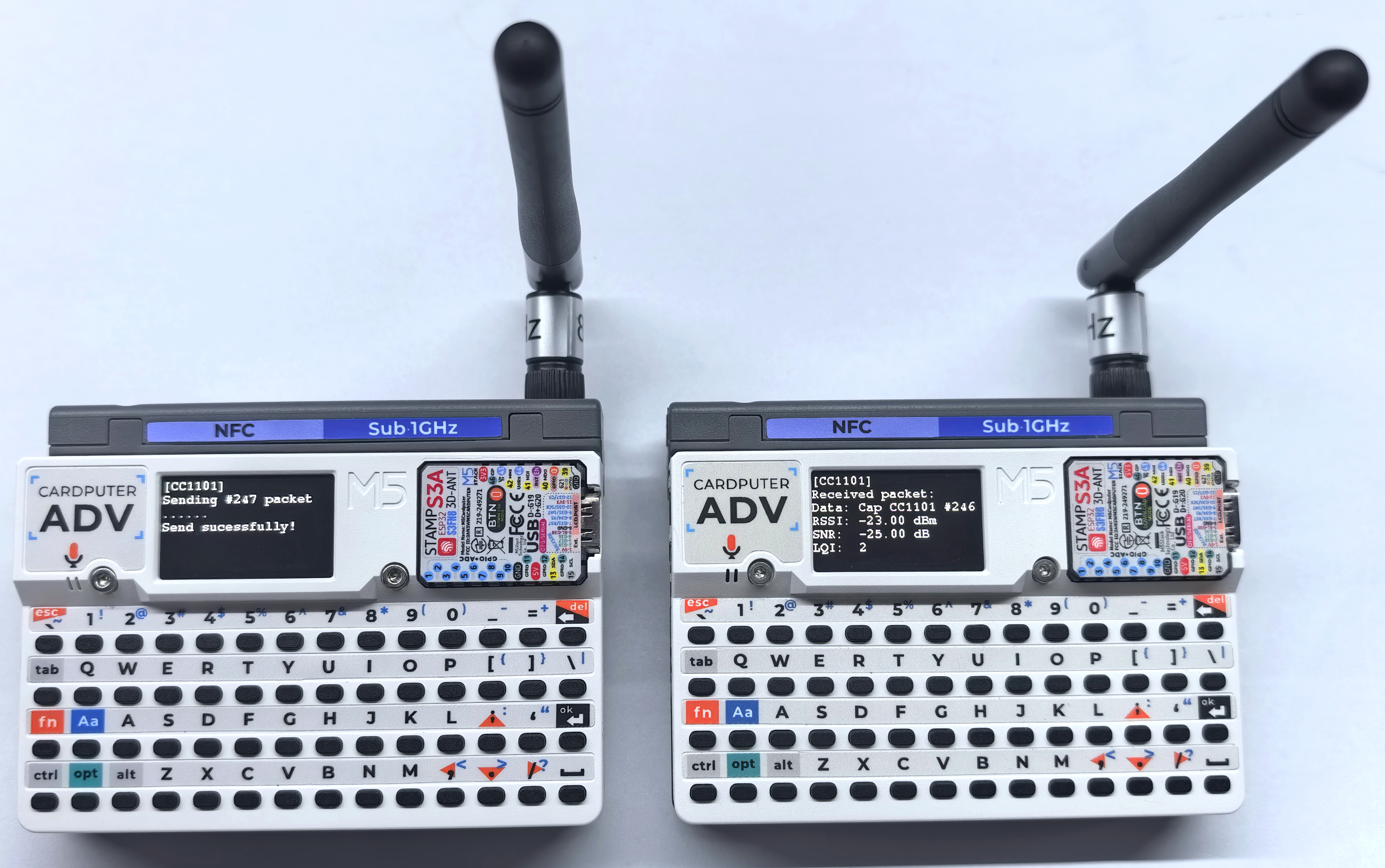
- 送信側のシリアル出力例:
[CC1101] Sending #247 packet ... Transmission finished!- 受信側のシリアル出力例:
[CC1101] Received packet:
[CC1101] Data:            Cap CC1101 #246
[CC1101] RSSI:            -23.00 dBm
[CC1101] SNR:             -25.00 dB
[CC1101] LQI: 23.2 NFC サンプル
MOSI、MISO、SCK) を自動的に割り当てます。Cardputer-Adv ではそれぞれ G14 (MOSI)、G39 (MISO)、G40 (SCK) です。NFC のチップセレクトピンと割り込みピンはそれぞれ G6 (CS)、G4 (IRQ) であるため、手動で指定する必要はありません。完全データ読み取り
本例では、Cardputer-Adv キーボードの Tab キーを押すと完全な読み取りを実行します。プログラムは NFC-A タグを検出、識別、アクティベートし、dump() でカードデータをシリアルモニターに出力します。MIFARE Classic タグはデフォルトキー 0xFFFFFFFFFFFF で認証します。
#include <M5Cardputer.h>
#include <M5Unified.h>
#include <M5UnitUnified.h>
#include <M5UnitUnifiedNFC.h>
#include <M5Utility.h>
#include <wiring/m5_unit_unified_wiring.hpp>

using namespace m5::nfc::a;
using namespace m5::nfc::a::mifare;
using namespace m5::nfc::a::mifare::classic;

namespace {
auto& lcd = M5.Display;
m5::unit::UnitUnified Units;
m5::unit::CapCC1101NFC unit{};  // Cap CC1101 NFC (ST25R3916, SPI)
m5::nfc::NFCLayerA nfc_a{unit};

// KeyA for MIFARE Classic. The default value is 0xFFFFFFFFFFFF.
constexpr Key keyA = DEFAULT_KEY;

void drawReadFrame()
{
    lcd.fillScreen(TFT_BLACK);
    lcd.setTextDatum(textdatum_t::top_left);
    lcd.setFont(&fonts::FreeMonoBold9pt7b);
    lcd.setTextColor(TFT_CYAN);
    lcd.drawString("NFC READ", 4, 0);
}

void drawReadStatus(const char* title, const char* detail, const uint16_t accent)
{
    drawReadFrame();
    lcd.setFont(&fonts::FreeMonoBold9pt7b);
    lcd.setTextColor(accent);
    lcd.drawString(title, 4, 20);
    lcd.setTextColor(TFT_WHITE);
    lcd.drawString(detail, 4, 38);
    lcd.drawString("TAB: SCAN", 4, 108);
}

void drawCardInfo(const PICC& picc)
{
    drawReadFrame();
    lcd.setFont(&fonts::FreeMonoBold9pt7b);
    lcd.setTextColor(TFT_CYAN);
    lcd.drawString("UID:", 4, 20);
    lcd.drawString("TYPE:", 4, 56);
    lcd.setTextColor(TFT_WHITE);
    lcd.drawString(picc.uidAsString().c_str(), 4, 38);
    lcd.drawString(picc.typeAsString().c_str(), 4, 74);
    lcd.drawString("TAB: SCAN", 4, 108);
}
}  // namespace

void setup()
{
    auto cfg = M5.config();
    M5Cardputer.begin(cfg, true);

    if (lcd.height() > lcd.width()) {
        lcd.setRotation(1);
    }

    // Cap CC1101 uses SPI mode 1. The library maps the Cardputer-Adv pins:
    // SCK=G40, MOSI=G14, MISO=G39, NFC CS=G6, NFC IRQ=G4.
    bool unit_ready = m5::unit::wiring::addSPI(Units, unit, 10000000, 1) && Units.begin();
    if (!unit_ready) {
        M5_LOGE("Failed to begin");
        lcd.fillScreen(TFT_RED);
        m5::unit::wiring::failStop();
    }

    M5_LOGI("M5UnitUnified initialized");
    M5_LOGI("%s", Units.debugInfo().c_str());

        drawReadStatus("READY TO SCAN", "PLACE TAG NEAR", TFT_GREEN);
}

void loop()
{
    M5Cardputer.update();
    Units.update();

    if (!M5Cardputer.Keyboard.isChange() || !M5Cardputer.Keyboard.isPressed() ||
        !M5Cardputer.Keyboard.keysState().tab) {
        return;
    }

    PICC picc{};
    if (!nfc_a.detect(picc)) {
        drawReadStatus("NO TAG FOUND", "MOVE TAG CLOSER", TFT_ORANGE);
        M5.Log.printf("PICC NOT exists\n");
        return;
    }

    if (!nfc_a.identify(picc) || !nfc_a.reactivate(picc)) {
        drawReadStatus("READ ERROR", "COULD NOT IDENTIFY", TFT_RED);
        M5_LOGE("Failed to identify/activate %s", picc.uidAsString().c_str());
        return;
    }

    M5.Speaker.tone(3000, 20);
    drawCardInfo(picc);
    M5.Log.printf("==== Dump %s %s %u/%u ====\n", picc.uidAsString().c_str(), picc.typeAsString().c_str(),
                  picc.userAreaSize(), picc.totalSize());

    // Dump all card data. keyA is ignored for non-MIFARE Classic tags.
    nfc_a.dump(keyA);
    nfc_a.deactivate();
}タグを Cap CC1101 の NFC 検出エリアに近づけ、Cardputer-Adv キーボードの Tab キーを押してください。カードの詳細データがシリアルモニターに出力されます。
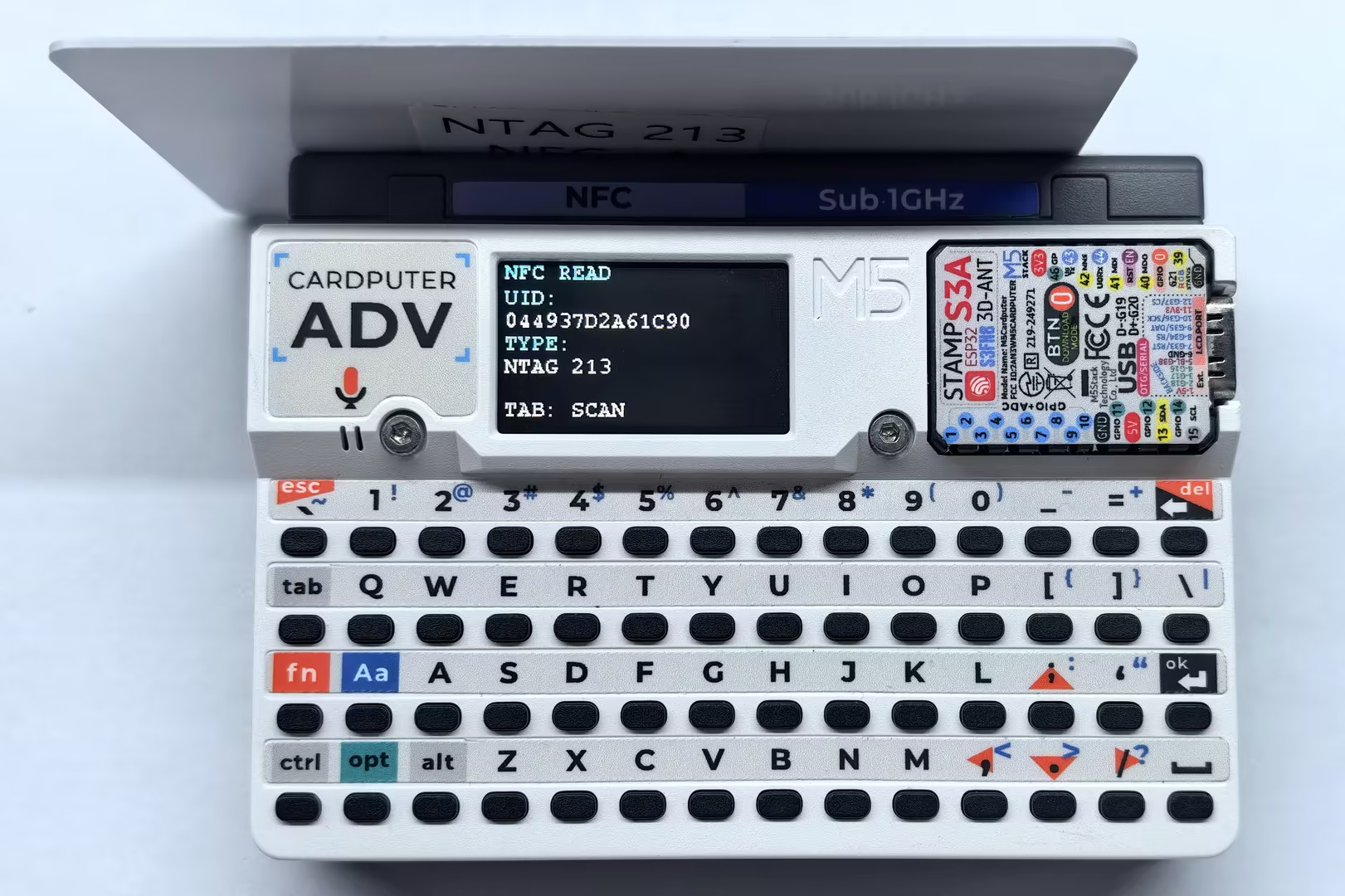
- シリアル出力例:
==== Dump 044937D2A61C90 NTAG 213 144/180 ====
Page    :00 01 02 03
--------------------
[000/00]:04 49 37 F2
[001/01]:D2 A6 1C 90
[002/02]:F8 48 00 00
[003/03]:E1 10 12 00
[004/04]:03 25 91 01
[005/05]:0D 55 04 6D
[006/06]:35 73 74 61
[007/07]:63 6B 2E 63
[008/08]:6F 6D 2F 51
[009/09]:01 10 54 02
[010/0A]:65 6E 48 65
[011/0B]:6C 6C 6F 20
[012/0C]:4D 35 53 74
[013/0D]:61 63 6B FE
[014/0E]:01 1A 54 02
[015/0F]:6A 61 E3 81
[016/10]:93 E3 82 93
[017/11]:E3 81 AB E3
[018/12]:81 A1 E3 81
[019/13]:AF 20 4D 35
[020/14]:53 74 61 63
[021/15]:6B 51 01 11
[022/16]:54 02 7A 68
[023/17]:E4 BD A0 E5
[024/18]:A5 BD 20 4D
[025/19]:35 53 74 61
[026/1A]:63 6B FE 78
[027/1B]:00 00 00 00
[028/1C]:00 00 00 00
[029/1D]:00 00 00 00
[030/1E]:00 00 00 00
[031/1F]:00 00 00 00
[032/20]:00 00 00 00
[033/21]:00 00 00 00
[034/22]:00 00 00 00
[035/23]:00 00 00 00
[036/24]:00 00 00 00
[037/25]:00 00 00 00
[038/26]:00 00 00 00
[039/27]:00 00 00 00
[040/28]:00 00 00 BD
[041/29]:04 00 00 FF
[042/2A]:00 05 00 00
[043/2B]:00 00 00 00
[044/2C]:00 00 00 00NDEF 形式タグの読み書き
本例では、Cardputer-Adv キーボードの Tab キーを短く押すと NDEF メッセージを読み取り、約 600ms 長押しするとサンプル URL とテキストを書き込みます。
mifareUltralightChangeFormatToNDEF() によってタグ形式が変更されます。この操作は元に戻せないため、タグ内に保存しておきたいデータがないことを確認してください。#include <M5Cardputer.h>
#include <M5Unified.h>
#include <M5UnitUnified.h>
#include <M5UnitUnifiedNFC.h>
#include <M5Utility.h>
#include <wiring/m5_unit_unified_wiring.hpp>
#include <string>
using namespace m5::nfc;
using namespace m5::nfc::a;
using namespace m5::nfc::a::mifare;
using namespace m5::nfc::ndef;
namespace {
auto& lcd = M5.Display;
m5::unit::UnitUnified Units;
m5::unit::CapCC1101NFC unit{}; // Cap CC1101 NFC (ST25R3916, SPI)
m5::nfc::NFCLayerA nfc_a{unit};
constexpr uint32_t TAB_HOLD_TIME_MS = 600;
bool tab_was_pressed{};
bool tab_hold_handled{};
uint32_t tab_pressed_at{};
void drawNdefFrame()
{
lcd.fillScreen(TFT_BLACK);
lcd.setTextDatum(textdatum_t::top_left);
lcd.setFont(&fonts::FreeMonoBold9pt7b);
lcd.setTextColor(TFT_CYAN);
lcd.drawString("NFC NDEF", 4, 0);
lcd.setTextColor(TFT_WHITE);
lcd.drawString("TAB:READ HOLD:WRITE", 4, 108);
}
void drawNdefStatus(const char* title, const char* detail, const uint16_t accent)
{
drawNdefFrame();
lcd.setFont(&fonts::FreeMonoBold9pt7b);
lcd.setTextColor(accent);
lcd.drawString(title, 4, 20);
lcd.setTextColor(TFT_WHITE);
lcd.drawString(detail, 4, 38);
}
void drawNdefRecord(const uint8_t index, const char* type, const std::string& payload)
{
if (index > 1) {
return;
}
const int y = 20 + index * 36;
lcd.setFont(&fonts::FreeMonoBold9pt7b);
lcd.setTextColor(TFT_CYAN);
lcd.drawString("TYPE:", 4, y);
lcd.drawString(type, 70, y);
lcd.setTextColor(TFT_WHITE);
lcd.drawString(payload.c_str(), 4, y + 18);
}
}
void readNdef()
{
bool valid{};
if (!nfc_a.ndefIsValidFormat(valid)) {
M5_LOGE("Failed to check NDEF format");
drawNdefStatus("CHECK ERROR", "TRY AGAIN", TFT_RED);
return;
}
if (!valid) {
M5.Log.printf("Data format is NOT NDEF\n");
drawNdefStatus("NOT NDEF", "FORMAT TAG FIRST", TFT_ORANGE);
return;
}
TLV message{};
if (!nfc_a.ndefRead(message)) {
M5_LOGE("Failed to read NDEF");
drawNdefStatus("READ ERROR", "TRY AGAIN", TFT_RED);
return;
}
if (!message.isMessageTLV()) {
M5.Log.printf("NDEF Message TLV is NOT exists\n");
drawNdefStatus("NDEF EMPTY", "NO RECORD", TFT_ORANGE);
return;
}
drawNdefFrame();
uint8_t record_index{};
for (auto&& record : message.records()) {
const auto payload = record.payloadAsString();
M5.Log.printf("TNF:%u Type:%s Payload:%s\n", record.tnf(), record.type(), payload.c_str());
drawNdefRecord(record_index++, record.type(), payload);
}
}
void writeNdef()
{
auto& picc = nfc_a.activatedPICC();
if (picc.isMifareUltralight()) {
// This changes an unformatted Ultralight tag to NDEF format.
if (!nfc_a.mifareUltralightChangeFormatToNDEF()) {
M5_LOGE("Failed to change tag to NDEF format");
drawNdefStatus("FORMAT ERROR", "TRY AGAIN", TFT_RED);
return;
}
}
TLV message{Tag::Message};
Record url{};
url.setURIPayload("m5stack.com/", URIProtocol::HTTPS);
message.push_back(url);
Record text{};
text.setTextPayload("Hello M5Stack", "en");
message.push_back(text);
if (picc.userAreaSize() < 2 || message.required() > picc.userAreaSize() - 1) {
M5.Log.printf("NDEF message is too large\n");
drawNdefStatus("TOO LARGE", "USE MORE MEMORY", TFT_ORANGE);
return;
}
if (!nfc_a.ndefWrite(message)) {
M5_LOGE("Failed to write NDEF");
drawNdefStatus("WRITE ERROR", "TRY AGAIN", TFT_RED);
return;
}
M5.Log.printf("Write NDEF OK\n");
drawNdefStatus("WRITE OK", "REMOVE TAG", TFT_GREEN);
}
void setup()
{
auto cfg = M5.config();
M5Cardputer.begin(cfg, true);
if (lcd.height() > lcd.width()) {
lcd.setRotation(1);
}
// Cap CC1101 uses SPI mode 1. The library maps the Cardputer-Adv pins.
bool unit_ready = m5::unit::wiring::addSPI(Units, unit, 10000000, 1) && Units.begin();
if (!unit_ready) {
M5_LOGE("Failed to begin");
lcd.fillScreen(TFT_RED);
m5::unit::wiring::failStop();
}
M5_LOGI("M5UnitUnified initialized");
M5_LOGI("%s", Units.debugInfo().c_str());
drawNdefStatus("READY", "TAB READ / HOLD WRITE", TFT_GREEN);
}
void loop()
{
M5Cardputer.update();
Units.update();
const bool tab_pressed = M5Cardputer.Keyboard.keysState().tab;
bool read_request{};
bool write_request{};
if (tab_pressed && !tab_was_pressed) {
tab_pressed_at = millis();
tab_hold_handled = false;
}
if (tab_pressed && !tab_hold_handled &&
millis() - tab_pressed_at >= TAB_HOLD_TIME_MS) {
write_request = true;
tab_hold_handled = true;
}
if (!tab_pressed && tab_was_pressed && !tab_hold_handled) {
read_request = true;
}
tab_was_pressed = tab_pressed;
if (!read_request && !write_request) {
return;
}
PICC picc{};
if (!nfc_a.detect(picc)) {
drawNdefStatus("NO TAG FOUND", "MOVE TAG CLOSER", TFT_ORANGE);
M5.Log.printf("PICC NOT exists\n");
return;
}
if (!nfc_a.identify(picc) || !nfc_a.reactivate(picc)) {
drawNdefStatus("READ ERROR", "COULD NOT IDENTIFY", TFT_RED);
M5_LOGE("Failed to identify/activate %s", picc.uidAsString().c_str());
return;
}
M5.Log.printf("PICC:%s %s %u/%u\n", picc.uidAsString().c_str(), picc.typeAsString().c_str(),
picc.userAreaSize(), picc.totalSize());
if (!picc.supportsNDEF()) {
M5.Speaker.tone(1000, 50);
drawNdefStatus("NO NDEF", "TAG NOT SUPPORTED", TFT_ORANGE);
M5.Log.printf("NDEF not supported\n");
} else if (read_request) {
M5.Speaker.tone(2000, 30);
drawNdefStatus("READING", "KEEP TAG CLOSE", TFT_CYAN);
readNdef();
} else {
M5.Speaker.tone(4000, 30);
drawNdefStatus("WRITING", "KEEP TAG CLOSE", TFT_YELLOW);
writeNdef();
}
nfc_a.deactivate();
}読み取り結果は画面とシリアルモニターに表示されます。書き込みに成功したら、タグを取り外してからスマートフォンまたは NFC リーダーで内容を確認してください。
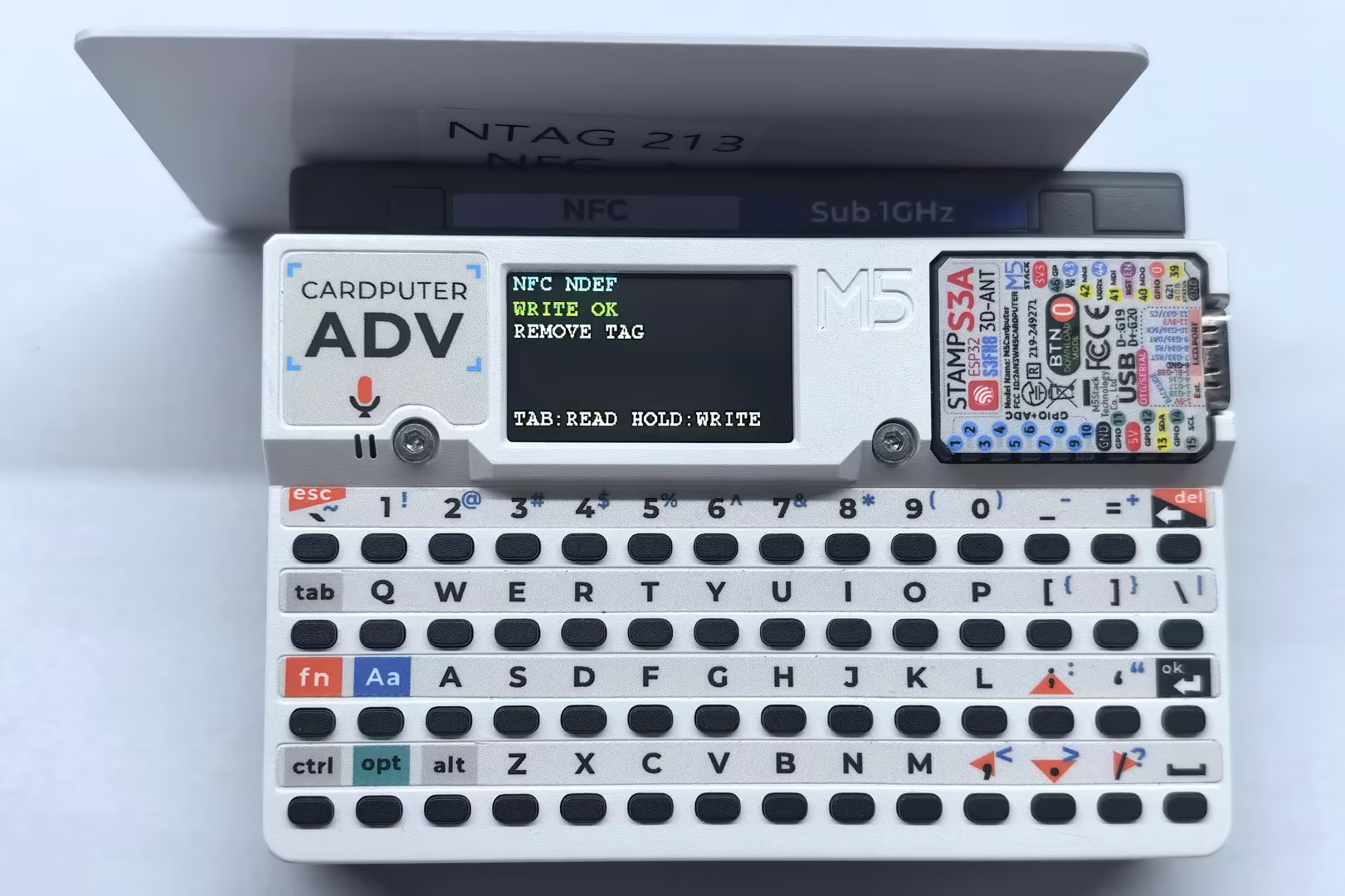
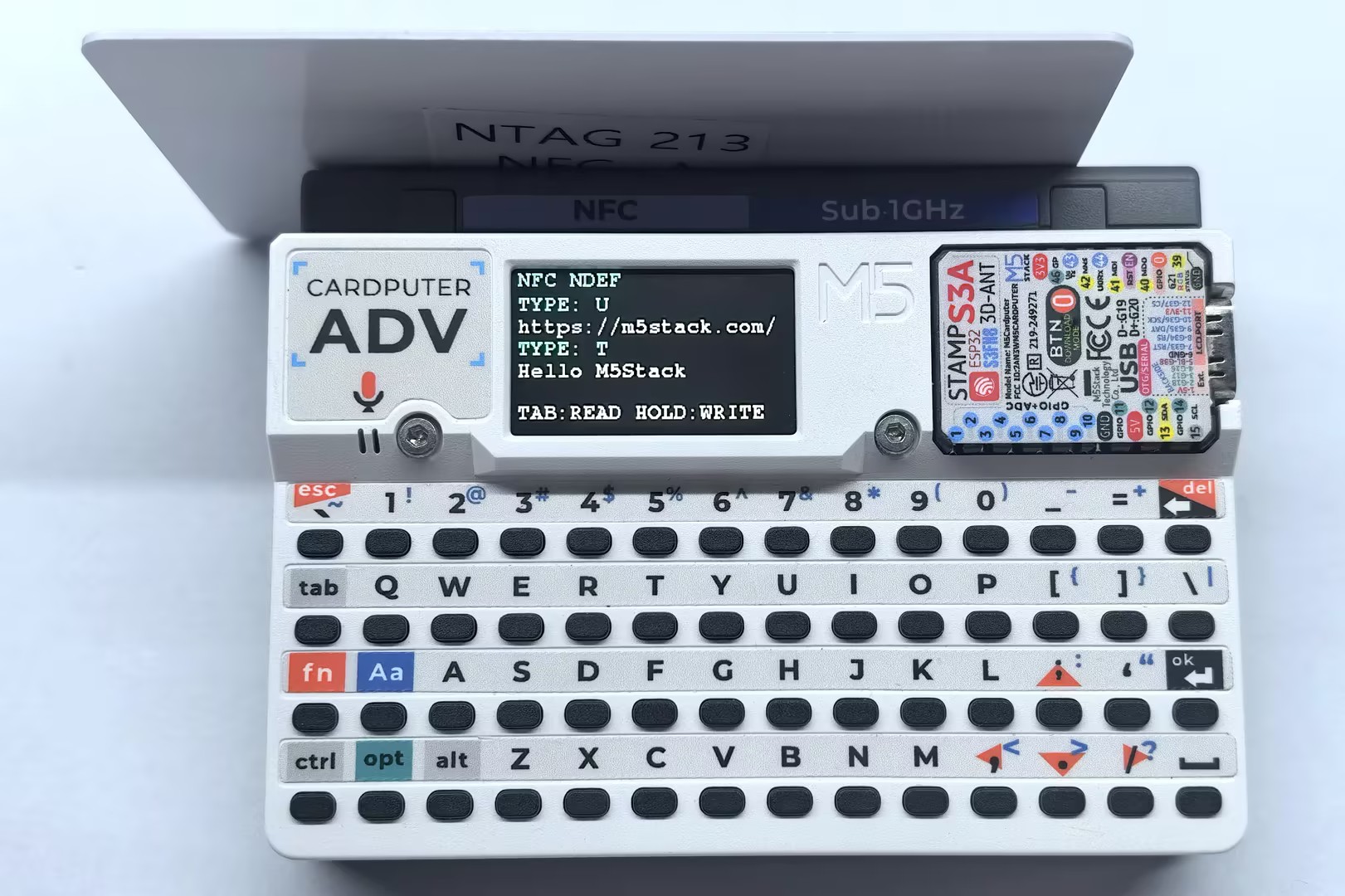
- 書き込み時のシリアル出力例:
PICC:044937D2A61C90 NTAG 213 144/180
Write NDEF OK- 読み取り時のシリアル出力例:
PICC:044937D2A61C90 NTAG 213 144/180
TNF:1 Type:U Payload:https://m5stack.com/
TNF:1 Type:T Payload:Hello M5Stackタグエミュレーション
本例では、Cap CC1101 を NDEF メッセージを含む MIFARE Ultralight タグとしてエミュレートします。プログラムの起動後、スマートフォンまたはその他の NFC リーダーを Cap CC1101 の NFC 検出エリアに近づけると、エミュレートされたタグを読み取れます。
#include <M5Unified.h>
#include <M5UnitUnified.h>
#include <M5UnitUnifiedNFC.h>
#include <M5Utility.h>
#include <wiring/m5_unit_unified_wiring.hpp>
#include <cstring>
#include <cstdio>

using namespace m5::nfc;
using namespace m5::nfc::a;
using namespace m5::nfc::a::mifare;

namespace {
auto& lcd = M5.Display;
m5::unit::UnitUnified Units;
m5::unit::CapCC1101NFC unit{};  // Cap CC1101 NFC (ST25R3916, SPI)
m5::nfc::EmulationLayerA emu_a{unit};

PICC picc{};
constexpr Type type{Type::MIFARE_Ultralight};
constexpr uint8_t uid[] = {0x04, 0x34, 0x56, 0x78, 0x9A, 0xBC, 0xDE};

// MIFARE Ultralight memory containing a URL and a text NDEF record.
uint8_t picc_memory[] = {
    0x00, 0x00, 0x00, 0x00,  // Page 0: UID, filled by embed_uid()
    0x00, 0x00, 0x00, 0x00,  // Page 1: UID, filled by embed_uid()
    0x00, 0xA3, 0x00, 0x00,  // Page 2: internal data and lock bits
    0xE1, 0x10, 0x06, 0x00,  // Page 3: NDEF Capability Container
    0x03, 0x25, 0x91, 0x01,  // Page 4: NDEF TLV and URI record
    0x0D, 0x55, 0x04, 0x6D,  // Page 5: URI payload
    0x35, 0x73, 0x74, 0x61,  // Page 6
    0x63, 0x6B, 0x2E, 0x63,  // Page 7
    0x6F, 0x6D, 0x2F, 0x51,  // Page 8: URL end and text record header
    0x51, 0x01, 0x10, 0x54,  // Page 9: text record header (ME=1)
    0x65, 0x6E, 0x48, 0x65,  // Page 10: "enHe"
    0x6C, 0x6C, 0x6F, 0x20,  // Page 11: "llo "
    0x4D, 0x35, 0x53, 0x74,  // Page 12: "M5St"
    0x61, 0x63, 0x6B, 0xFE,  // Page 13: "ack" and NDEF terminator
    0x44, 0x45, 0x46, 0x00,  // Page 14: padding
    0x44, 0x45, 0x46, 0x00,  // Page 15: padding
};

uint8_t bcc8(const uint8_t* data, const uint8_t length, const uint8_t init = 0)
{
    uint8_t value = init;
    for (uint_fast8_t i = 0; i < length; ++i) {
        value ^= data[i];
    }
    return value;
}

void embed_uid(uint8_t memory[9], const uint8_t tag_uid[7])
{
    memcpy(memory, tag_uid, 3);
    memory[3] = bcc8(tag_uid, 3, 0x88);  // CT ^ UID0 ^ UID1 ^ UID2
    memcpy(memory + 4, tag_uid + 3, 4);
    memory[8] = bcc8(tag_uid + 3, 4);
}

constexpr uint16_t state_colors[] = {
    TFT_DARKGREY, TFT_RED, TFT_YELLOW, TFT_CYAN, TFT_GREEN, TFT_MAGENTA};
constexpr const char* state_names[] = {"NONE", "OFF", "IDLE", "READY", "ACTIVE", "HALT"};

void drawEmulationFrame(const PICC& emulated_picc)
{
    char atqa_text[24]{};

    snprintf(atqa_text, sizeof(atqa_text), "ATQA:%04X SAK:%u", emulated_picc.atqa, emulated_picc.sak);
    lcd.fillScreen(TFT_BLACK);
    lcd.setTextDatum(textdatum_t::top_left);
    lcd.setFont(&fonts::FreeMonoBold9pt7b);
    lcd.setTextColor(TFT_CYAN);
    lcd.drawString("NFC EMULATOR", 4, 0);
    lcd.drawString("TYPE:", 4, 18);
    lcd.drawString("UID:", 4, 54);
    lcd.setTextColor(TFT_WHITE);
    lcd.drawString(emulated_picc.typeAsString().c_str(), 4, 36);
    lcd.drawString(emulated_picc.uidAsString().c_str(), 4, 72);
    lcd.drawString(atqa_text, 4, 90);
}

void drawEmulationState(const EmulationLayerA::State state)
{
    const auto index = m5::stl::to_underlying(state);

    lcd.fillRect(0, 108, lcd.width(), 27, TFT_BLACK);
    lcd.setFont(&fonts::FreeMonoBold9pt7b);
    lcd.setTextColor(TFT_CYAN);
    lcd.drawString("STATE:", 4, 108);
    lcd.setTextColor(state_colors[index]);
    lcd.drawString(state_names[index], 70, 108);
}
}  // namespace

void setup()
{
    M5.begin();

    if (lcd.height() > lcd.width()) {
        lcd.setRotation(1);
    }

    auto cfg = unit.config();
    cfg.emulation = true;
    cfg.mode = NFC::A;
    unit.config(cfg);

    // Cap CC1101 uses SPI mode 1. The library maps the Cardputer-Adv pins.
    bool unit_ready = m5::unit::wiring::addSPI(Units, unit, 10000000, 1) && Units.begin();
    if (!unit_ready) {
        M5_LOGE("Failed to begin");
        lcd.fillScreen(TFT_RED);
        m5::unit::wiring::failStop();
    }

    M5_LOGI("M5UnitUnified initialized");
    M5_LOGI("%s", Units.debugInfo().c_str());

    if (!picc.emulate(type, uid, sizeof(uid))) {
        M5_LOGE("Failed to configure emulated PICC");
        m5::unit::wiring::failStop();
    }
    embed_uid(picc_memory, uid);
    if (!emu_a.begin(picc, picc_memory, sizeof(picc_memory))) {
        M5_LOGE("Failed to begin emulation");
        m5::unit::wiring::failStop();
    }

    const auto& emulated_picc = emu_a.emulatePICC();
    M5.Log.printf("Emulation:%s %s ATQA:%04X SAK:%u\n", emulated_picc.typeAsString().c_str(),
                  emulated_picc.uidAsString().c_str(), emulated_picc.atqa, emulated_picc.sak);
    drawEmulationFrame(emulated_picc);
    drawEmulationState(emu_a.state());
}

void loop()
{
    M5.update();
    Units.update();
    emu_a.update();  // Must be called continuously during emulation.

    static EmulationLayerA::State latest{};
    const auto state = emu_a.state();
    if (latest != state) {
        latest = state;
        const auto index = m5::stl::to_underlying(state);
        drawEmulationState(state);
        M5.Log.printf("Emulation state: %s\n", state_names[index]);
    }
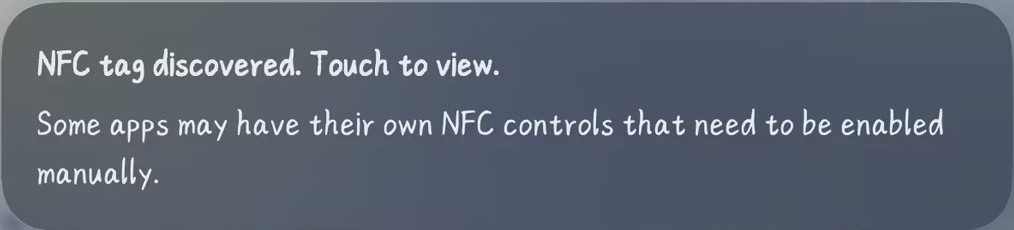
}スマートフォンまたはその他の NFC リーダーを Cap CC1101 の NFC 検出エリアに近づけると、タグ情報と状態ログが画面およびシリアルモニターに出力されます。
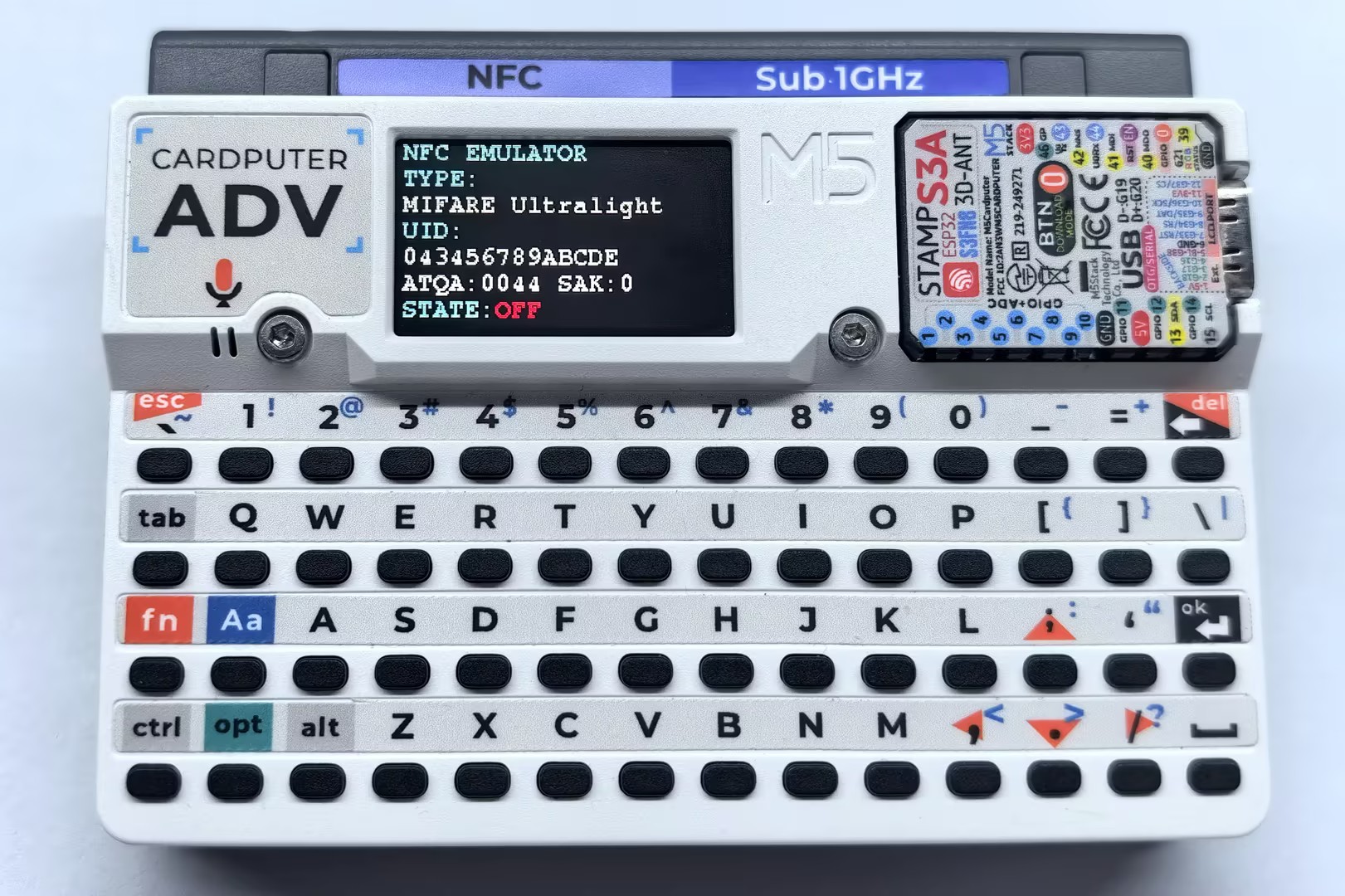
- スマートフォンで読み取ったタグ情報の例:
- シリアル出力例:
Emulation:MIFARE Ultralight 043456789ABCDE ATQA:0044 SAK:0
Emulation state: IDLE
Emulation state: READY
Emulation state: ACTIVE
Emulation state: HALT
Emulation state: READY
Emulation state: OFF
Emulation state: IDLE
Emulation state: READY
Emulation state: ACTIVE
Emulation state: HALT
Emulation state: READY
Emulation state: ACTIVE
Emulation state: OFF